-
-
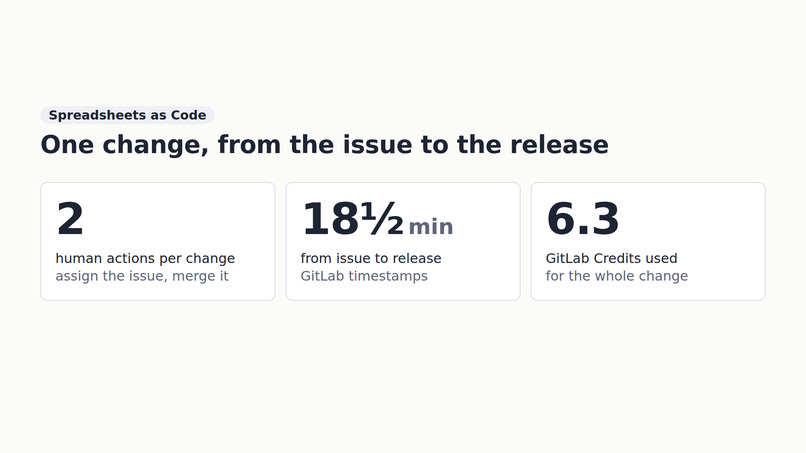
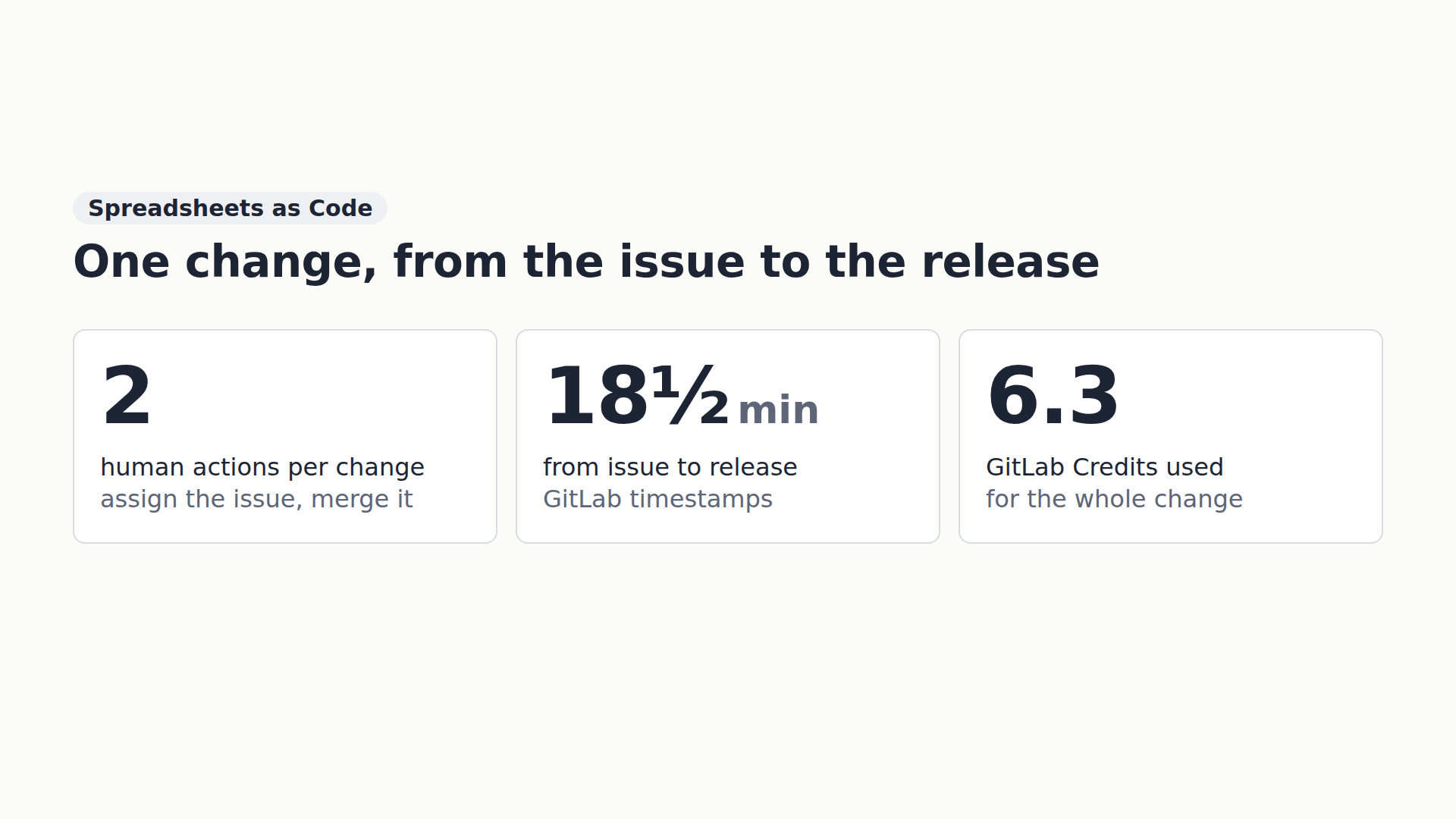
One change from issue to release: two human actions, 18½ minutes, 6.3 GitLab Credits.
-
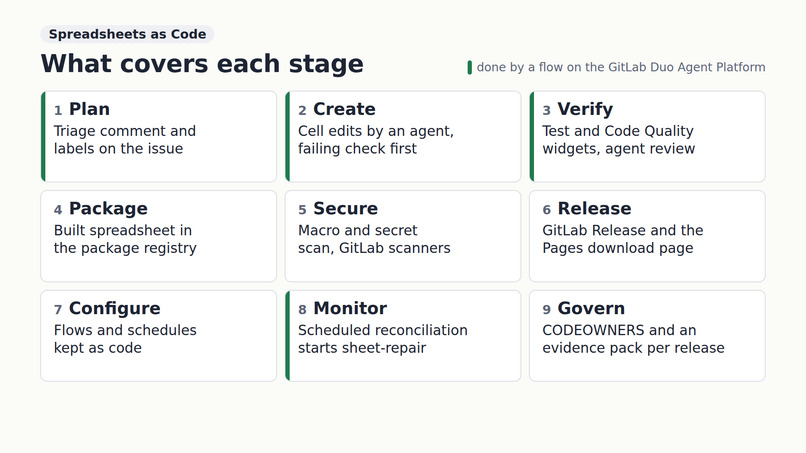
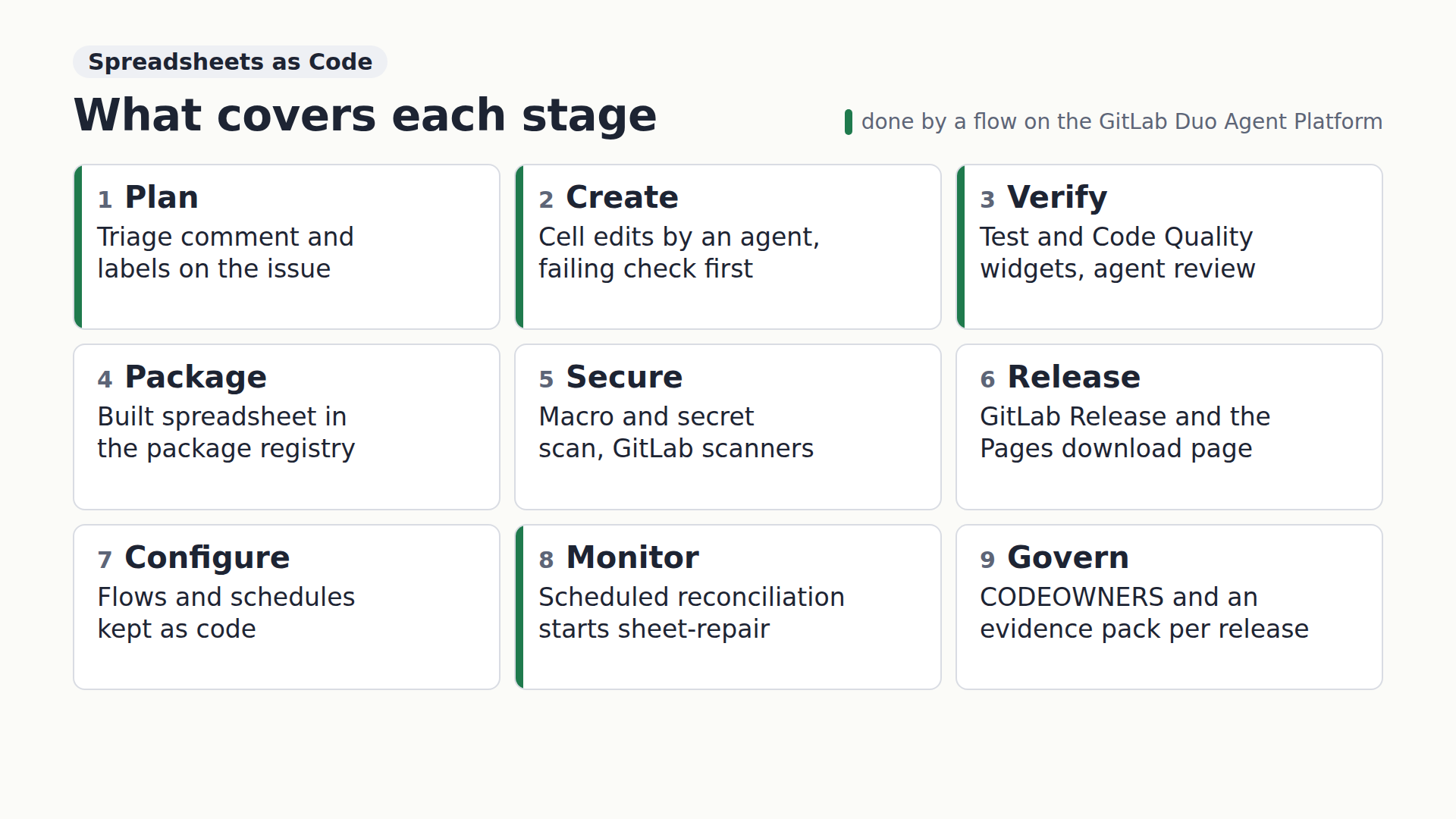
The nine DevSecOps stages the project touches, from plan to govern.
-
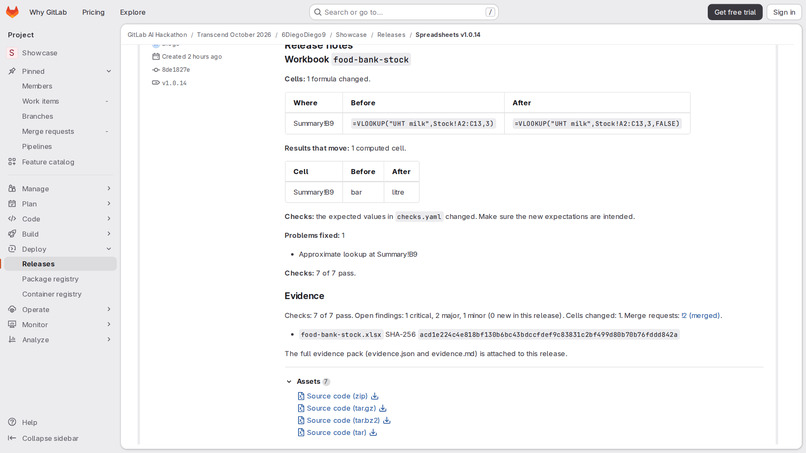
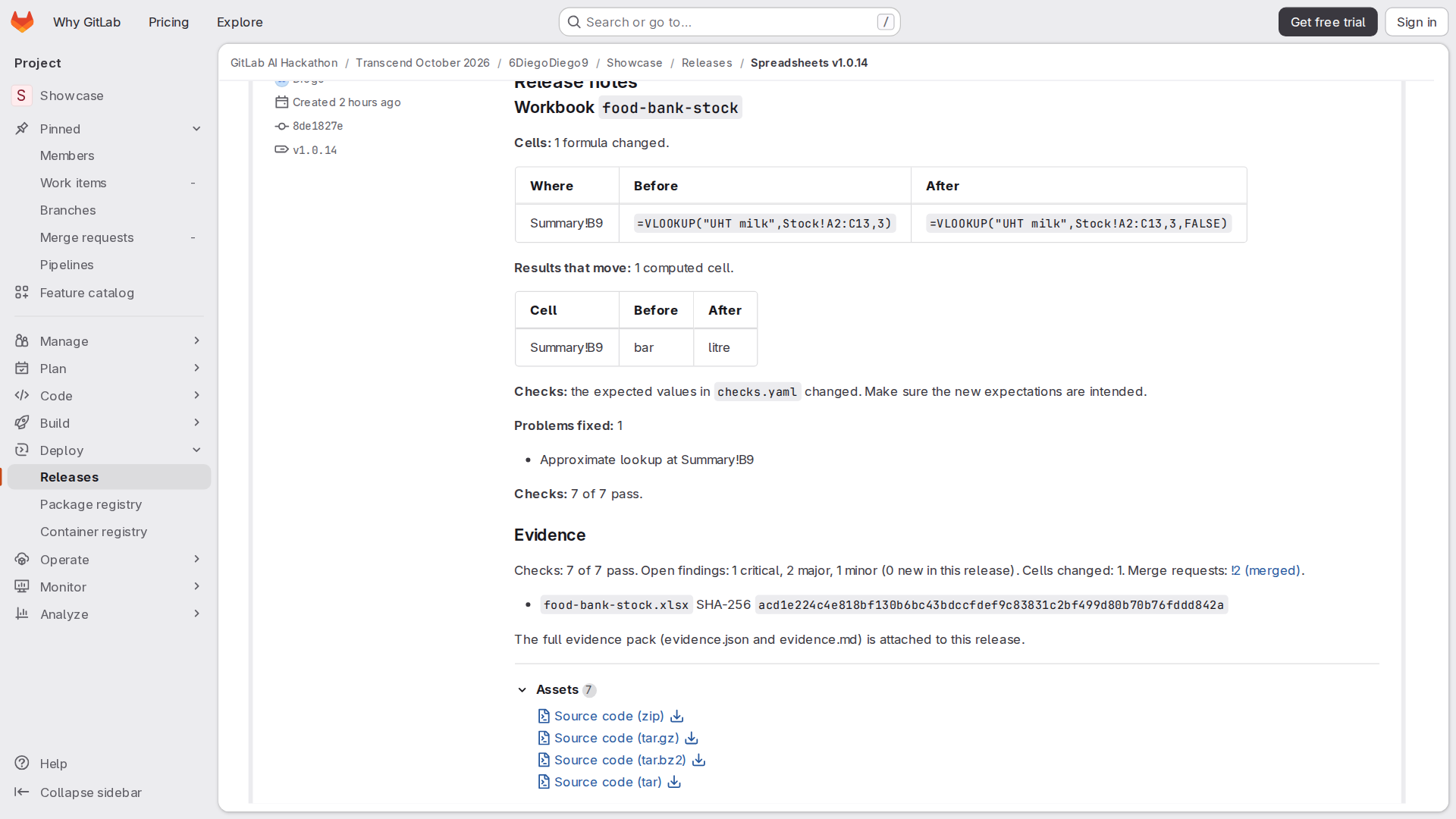
Release v1.0.14: notes written from the cell-by-cell diff, with the evidence pack attached.
-
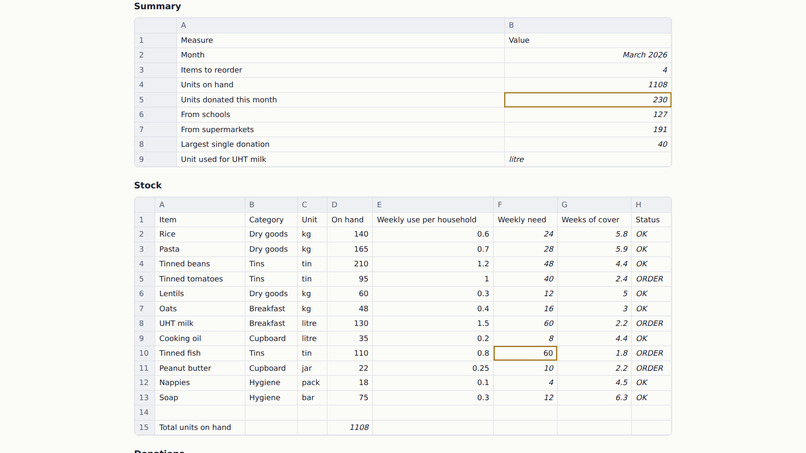
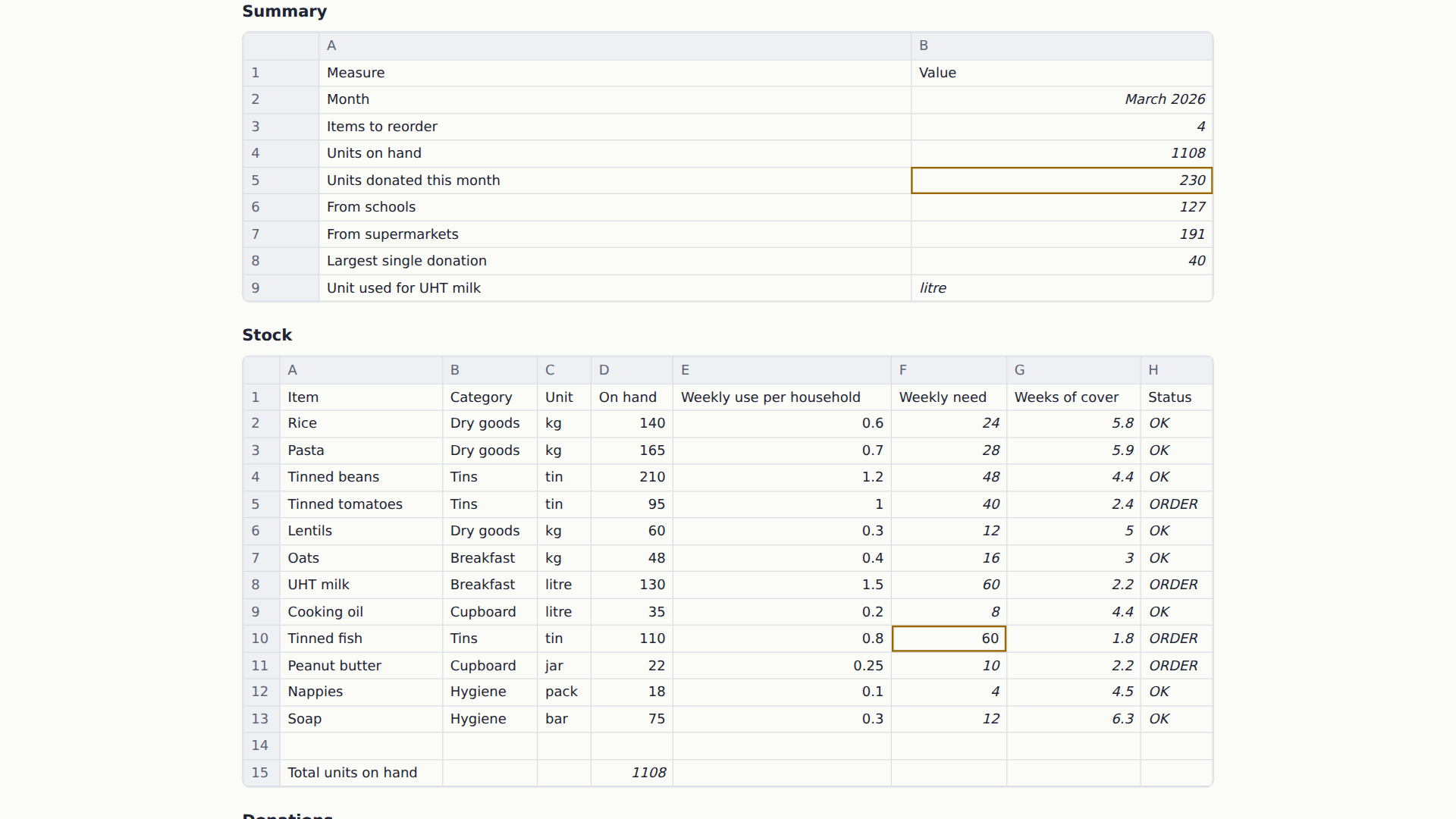
The download page on GitLab Pages: each sheet as a table, cells with open findings highlighted.
-
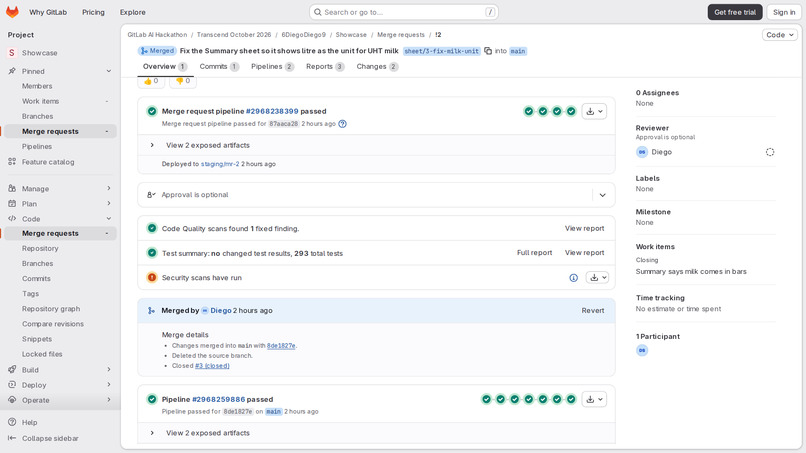
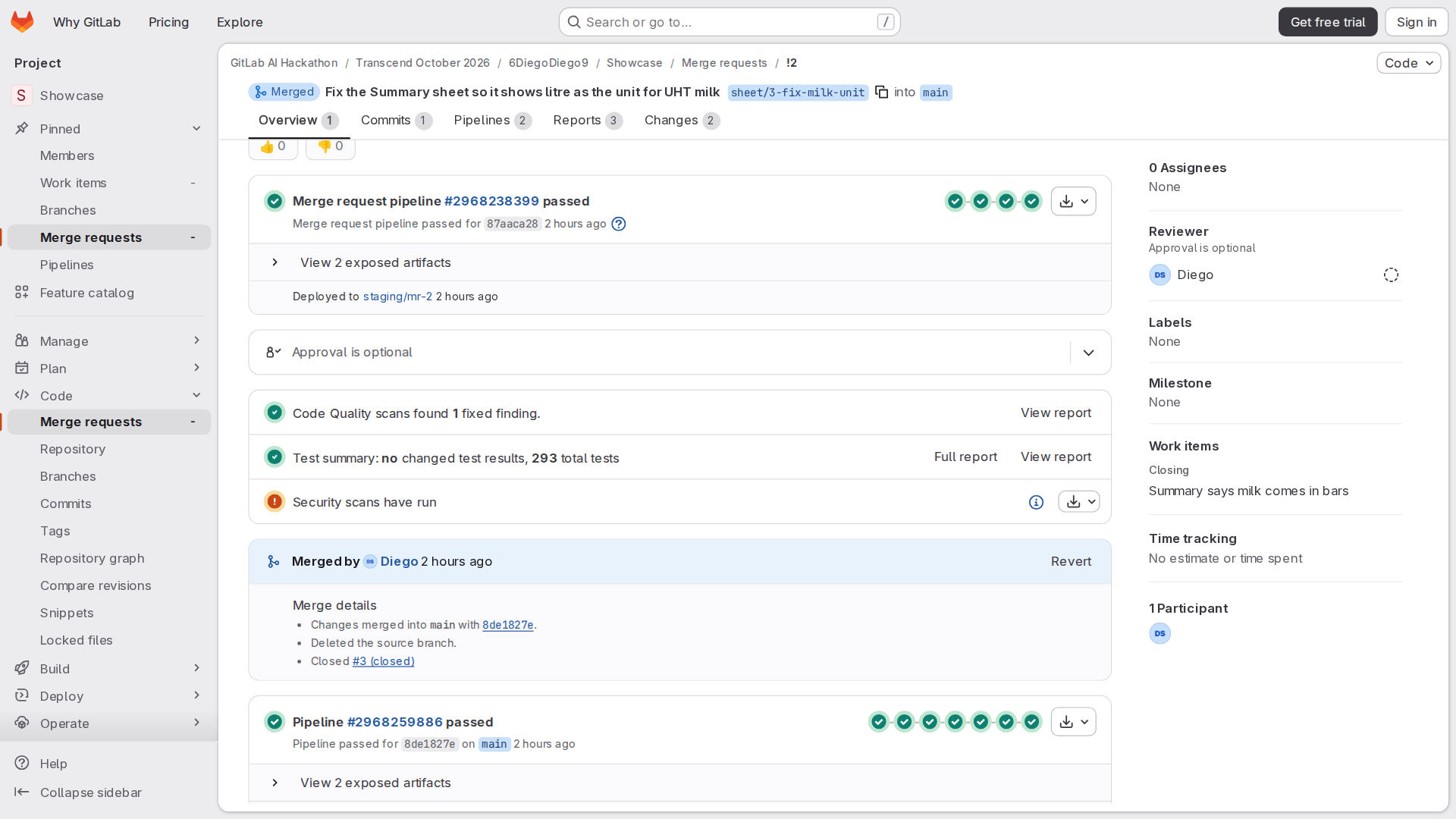
Merge request !2: tests, code quality and security results in GitLab's own widgets.
-
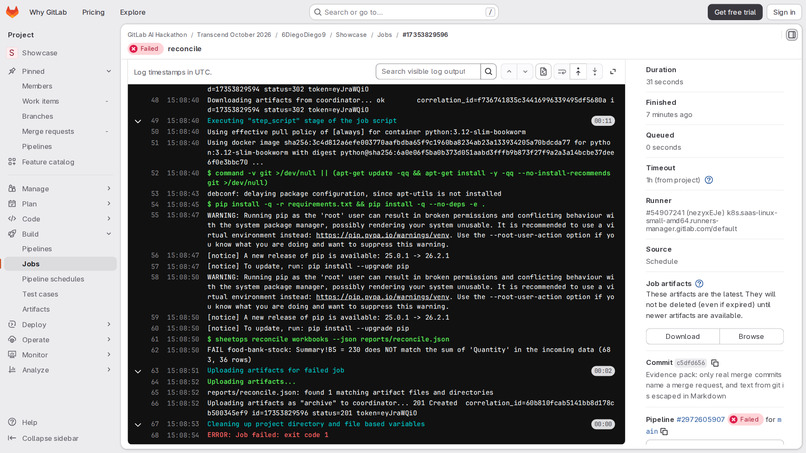
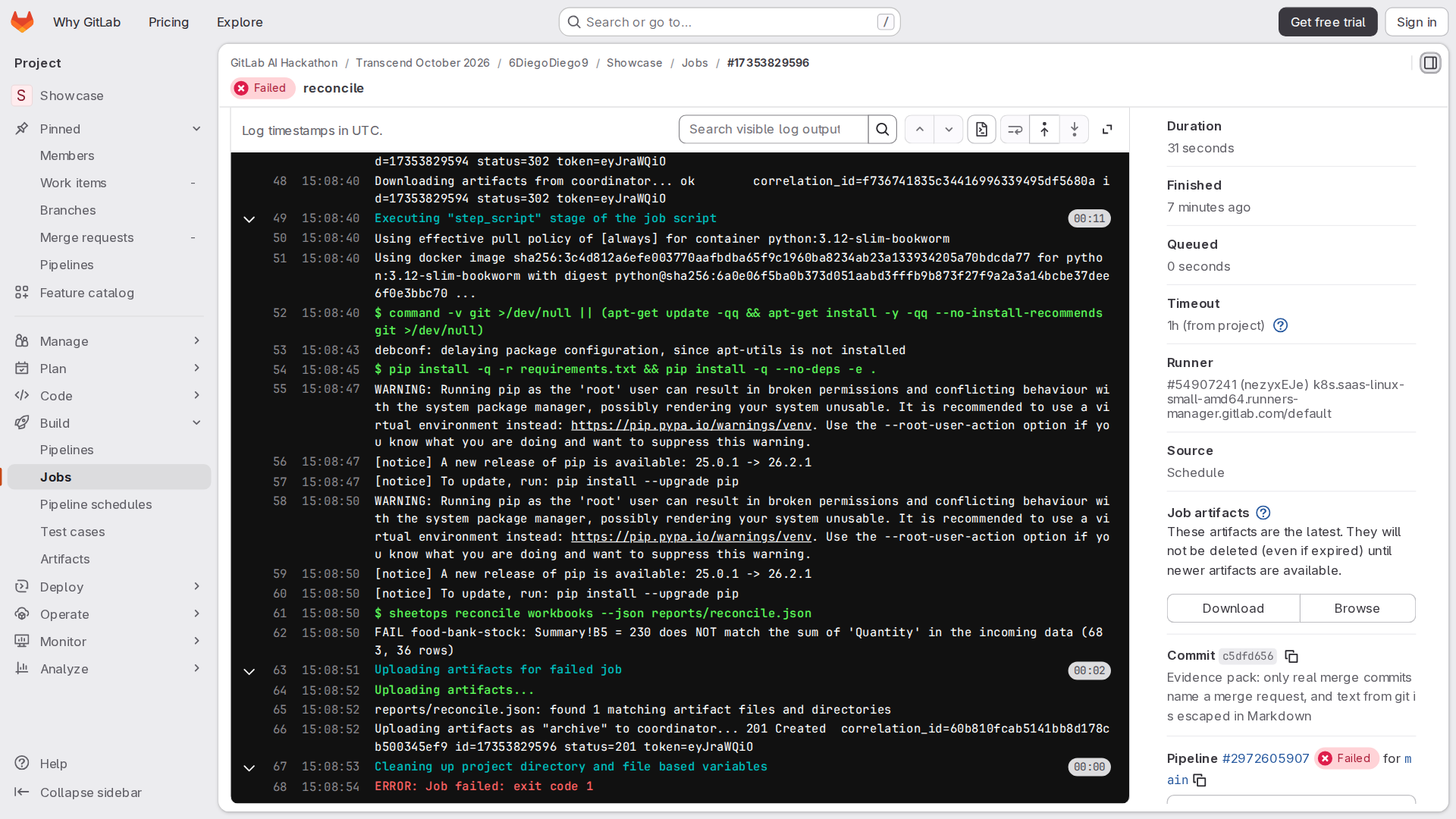
The scheduled reconciliation fails: 230 counted against 683 received. This starts sheet-repair.
Inspiration
For about twenty years a large part of my work has been spreadsheets and the macros behind them, many of them used by people who never see the formulas.
A spreadsheet is often the most important program a small organisation has, and it gets none of the care we give code. Nobody reviews a changed formula and nothing tests the totals. The release process is a file called final_v3 on a shared drive.
When it goes wrong it is usually quiet. In 2013 a much-cited economics paper on public debt and growth turned out to average a range of cells that left out five countries (Herndon, Ash and Pollin). In 2020, 15,841 positive COVID-19 cases were left out of England's daily figures for a week because files of results grew past a size limit (PHE statement); press reports traced it to an old spreadsheet format and its row limit.
Both are mistakes that a test or a second pair of eyes would catch in software. I wanted to see what a spreadsheet gets when it goes through the same lifecycle on GitLab, with agents on the Duo Agent Platform doing the editing.
What it does
The example is the stock plan of a small food bank run by volunteers (all data invented): items on hand, weekly need per
household, a log of donations and a monthly summary. It is the kind of place where one spreadsheet runs everything and
there is no IT team. The workbook ships with the problems you find in real ones: a monthly total that adds up
D2:D14 while the donations log has grown to row 37, a lookup with approximate match on an unsorted list that reports
milk in "bar", a number typed over a formula, and a password and a network path written in a macro.
The workbook lives in the repository as text. Each sheet is a file with one cell per line
(B5 =SUM(Donations!D2:D14)), next to a YAML file with sheets, widths and formats, the VBA modules as .bas files and a
checks.yaml with expected values. The .xlsx is never committed: the pipeline builds it. A merge request diff
therefore shows exactly which cells changed, and GitLab can put a finding next to the line of the cell it is about.
Change requests. A volunteer writes an issue in plain words ("Summary says milk comes in bars") and assigns it to the
sheet-change flow. The flow labels the issue and restates the request, writes a check that fails, edits the cells
until the checks, the formula linter and the macro scanner pass, has a separate reviewer agent read the diff, and opens a
merge request that explains the change cell by cell. Then it asks the author of the issue to merge.
In the first real run the triage comment appeared on issue #3 about a minute after the assignment, and merge request !2,
with the reviewer's APPROVE, two minutes after it. Once merged, the issue closed itself and release v1.0.14 was published
less than 19 minutes after the issue was opened, a detour through one of the toolkit's own tests included (see Challenges).
Every merge request pipeline recalculates the workbook and runs its checks (JUnit, shown in the merge request test widget), the formula linter (Code Quality widget; only findings the change introduces can fail it), the macro and secret scanner (written as a SAST report, so it appears in the security widget) together with GitLab's own Secret Detection, SAST and Dependency Scanning, a recalculation of the same file in LibreOffice Calc to cross-check the toolkit's engine, a Markdown report of what the change means, and a preview of the new version on GitLab Pages.
On the main branch the pipeline builds the .xlsx with an About sheet (version, commit, check results), stores it in
the Generic Package Registry, writes an evidence pack, publishes a GitLab Release with notes written for the people who
use the file, and updates the download page on Pages, which shows every sheet as an HTML table with formulas on hover
and the cells that have open findings highlighted.
Monitoring. Twice a day a scheduled pipeline compares the monthly total in the workbook with the donations exported by
the intake form. When they disagree (today: 230 counted against 683 received) the pipeline fails, and that failure starts
the sheet-repair flow. It reads the failing job, opens an incident issue, fixes the cause (a range that grows with
the data instead of stopping at row 14), adds a check that would have caught it and opens a merge request.
In the first real run, sheet-repair opened incident issue #4 two minutes after the scheduled pipeline failed and
merge request !3 half a minute later; the merge request's pipeline was green just over five minutes after the failure.
On the way it also cleared the three lint and scan findings still open in the workbook, and listed them in the merge
request. The next scheduled reconciliation, that evening, was green: the workbook total and the intake data both came
to 683.
How I built it
- The toolkit (
sheetops, Python 3.12, MIT) converts between the text format and.xlsx/.xlsmfiles, macros included. It has its own recalculation engine with about 70 functions; on 79 hand-computed formulas LibreOffice Calc running headless agrees on 76, and the other 3 are cases where spreadsheet applications disagree with each other. The linter has twelve formula rules (ranges that stop before the data, approximate lookups on unsorted lists, constants typed inside formulas, numbers stored as text and others), and the scanner looks in the macros for programs started from VBA, network calls, code that runs on open, passwords and hard-coded paths. The toolkit has 289 automated tests. - Hostile input. A workbook arrives in a merge request, so the tools treat it as untrusted: limits on formula length
and nesting, range size, zip and VBA decompression, circular references that end in
#CIRC!, and wildcard matching without regular expressions so a pattern cannot keep a job busy for hours. - The pipeline (
.gitlab-ci.yml) has build, verify, test, secure, package, release, deploy and monitor stages. In merge requests the toolkit image with LibreOffice is rebuilt only when the toolkit changes, and the scheduled runs skip the jobs that already ran on the commit being monitored. - The flows are custom flows written in the flow registry YAML (
.gitlab/duo/flows/).sheet-changechains four agent components (triage, editor, reviewer, publisher) andsheet-repairthree (diagnose, fixer, publisher), each with its own prompt and a short list of tools; a router stops the flow early when the request is out of scope, unsafe, or a repair is already waiting for review. They run on the platform's default model, Claude Sonnet 5.5, served by GitLab. The flows readskills/sheet-source/SKILL.mdand use the samesheetopscommands as the pipeline, installed in the flow environment by.gitlab/duo/agent-config.yml.tools/sync_flows.pykeeps the AI Catalog in step with the YAML in the repository.sheet-changestarts when someone assigns an issue to it;sheet-repairhas a trigger on failed pipelines, filtered to the default branch so it never reacts to its own merge requests. - Configuration as code. The two monitoring schedules and their variables are in
.gitlab/schedules.yml, applied withtools/sync_schedules.py. Merge request previews are astaging/mr-Nenvironment and the download page isproduction. - Governance.
.gitlab/CODEOWNERSnames the owner of the workbooks and of the expected values. Every release carries an evidence pack (evidence.jsonandevidence.md): each cell that changed since the previous release with its old and new content, the commit and merge request it came with, the results that moved, every check, the findings that are new or fixed, and the SHA-256 of each file shipped. It depends only on git and the files, so running it again on the same commit gives the same bytes, and the release waits for it.
Challenges I ran into
- A flow can open a merge request but cannot merge it: auto-merge from the flow's token returns
403 insufficient_scope. I designed around it. The flow adds the author of the issue as reviewer, says in a note that auto-merge is off, and a person merges. That one click is also where a human looks at the result before it ships. - A trigger only fires on a human action, and a pipeline started through the API has source
api, so it would not run the monitoring job. The reconciliation runs on schedules owned by a person, and the failed scheduled pipeline is what starts the repair. - The project is public and anyone can comment, so the change flow does not react to mentions. Only a project member can start it, by assigning the issue.
- The first merge request opened by the change flow failed its pipeline, and the flow was not at fault: one of the toolkit's own tests read the live example workbook and expected its seeded defects, which the flow had just fixed. The tests now use a frozen copy of the example, so the workbook can improve without breaking them.
- Checking a recalculation without the desktop application that people actually use. The approximate lookup in the example gives different answers in different spreadsheet apps on the same file, which is exactly why the linter flags it.
Accomplishments that I'm proud of
- A merge request on a spreadsheet that a non-programmer can follow: the diff is in cells, the description says which totals move and why, and the findings sit in GitLab's own widgets.
- The file on the download page, the one in the package registry and the one hashed in the evidence pack are the same bytes.
- The first real run went from an issue written in plain words to a published release with its evidence pack in less than 19 minutes, and the only human steps were assigning the issue and merging.
What I learned
- Flows run as CI jobs in the project's own pipelines, so they leave the same kind of logs as the rest of the automation, and their environment is configured in the repository like everything else.
- Keeping the author and the reviewer as separate agent components, the reviewer with tools to read and run commands but none to edit files, makes the review a real step.
- A merge request opened by a flow is attributed to the person who started it, which makes the trail of who asked for what easy to follow.
- Writing findings in GitLab's report formats was much less work than building a dashboard, and the results ended up where reviewers already look.
What's next for Spreadsheets as Code
- Attach an edited
.xlsxto an issue and have a flow turn it into text and open the merge request (thesheetops explodecommand already does the conversion). - Merge low-risk changes automatically once a flow is allowed to, keeping the human click for changes labelled
risk::high. - Make the code owner's approval mandatory on the protected branch, and record it in the evidence pack.
- More workbooks and more functions in the engine.

Log in or sign up for Devpost to join the conversation.