Inspiration
Almost every modern application implements multiple, redundant layers of security. However, despite these many layers they don't take into account the single greatest point of failure: the end user. All the security measures that an enterprise may implement become useless if an employee unknowingly clicks a suspicious link that steals their data and infiltrates the company’s network. Phishing attacks are a prominent security risk and make up around 50% of entry-point attacks. (See https://www.splunk.com/en_us/blog/security/old-school-vs-new-school.html)
We decided to create this project because we were thinking about how often our friend Josh falls for phishing scams. Many companies will occasionally send out fake phishing emails to test their employees. Josh is tired of falling for these scams because they do sound like they are the real deal. We created this extension to help Josh not fall for phishing scams and help him learn why he probably shouldn't click that link to claim a million free dollars.
What it does
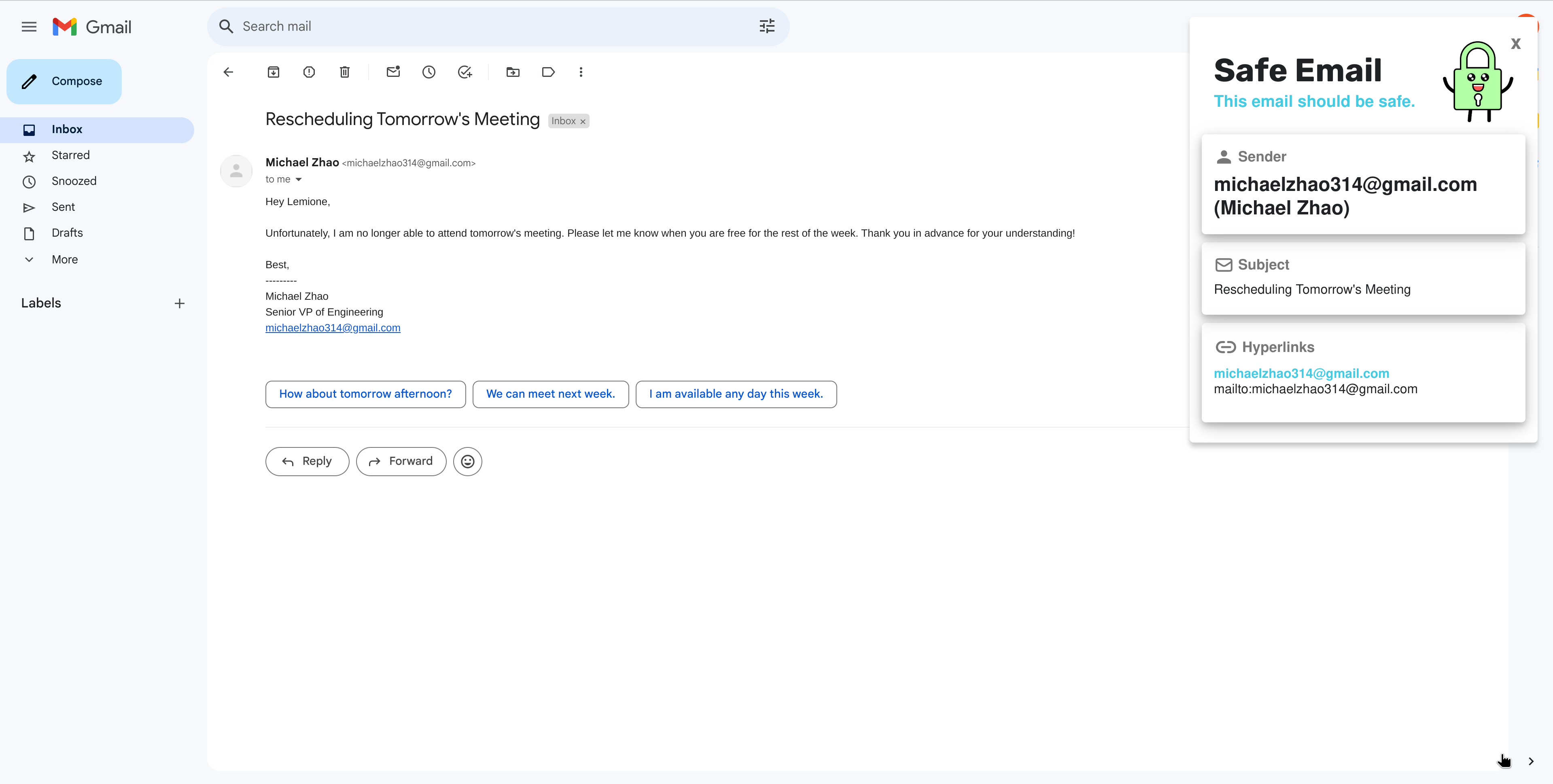
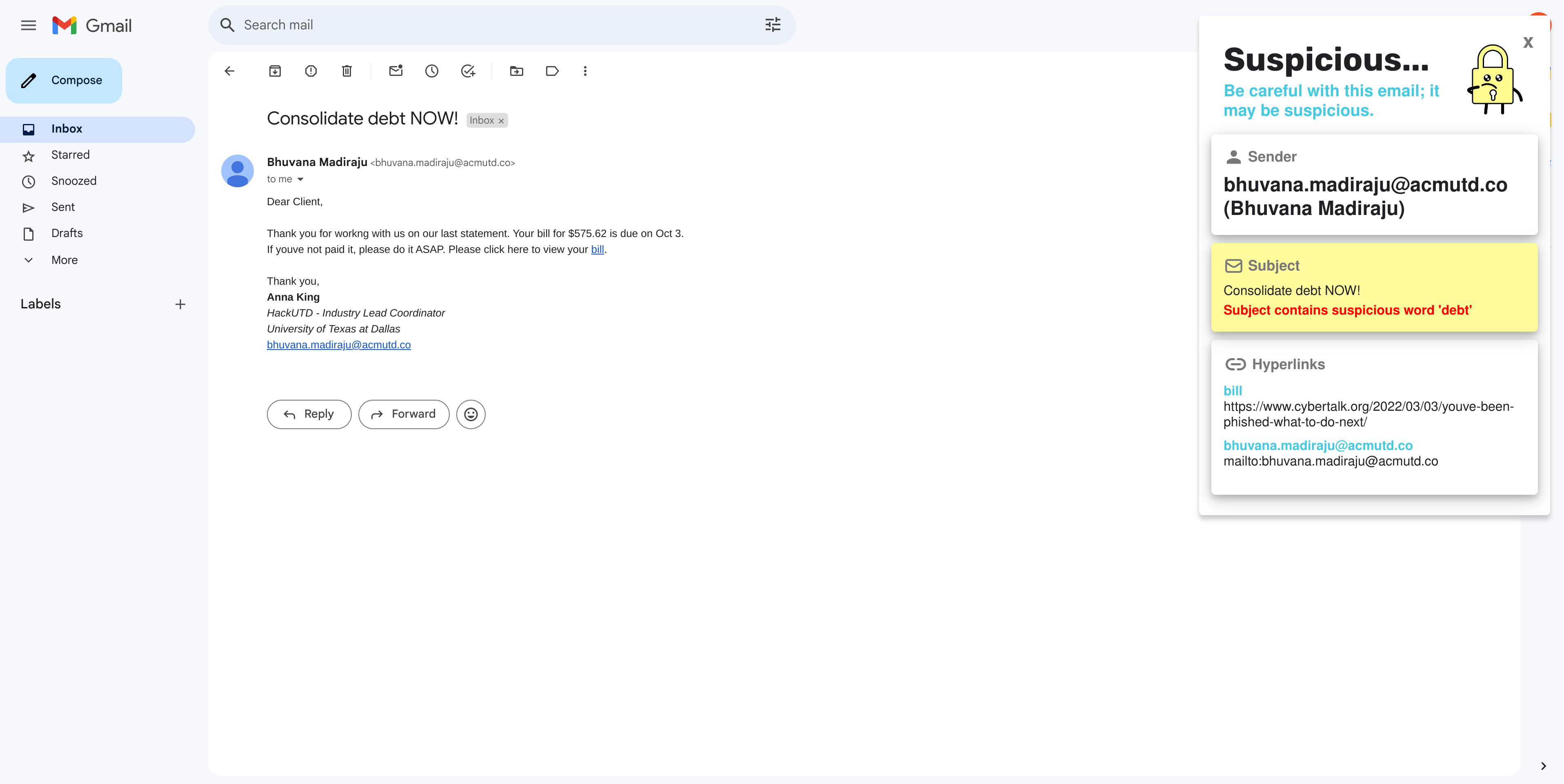
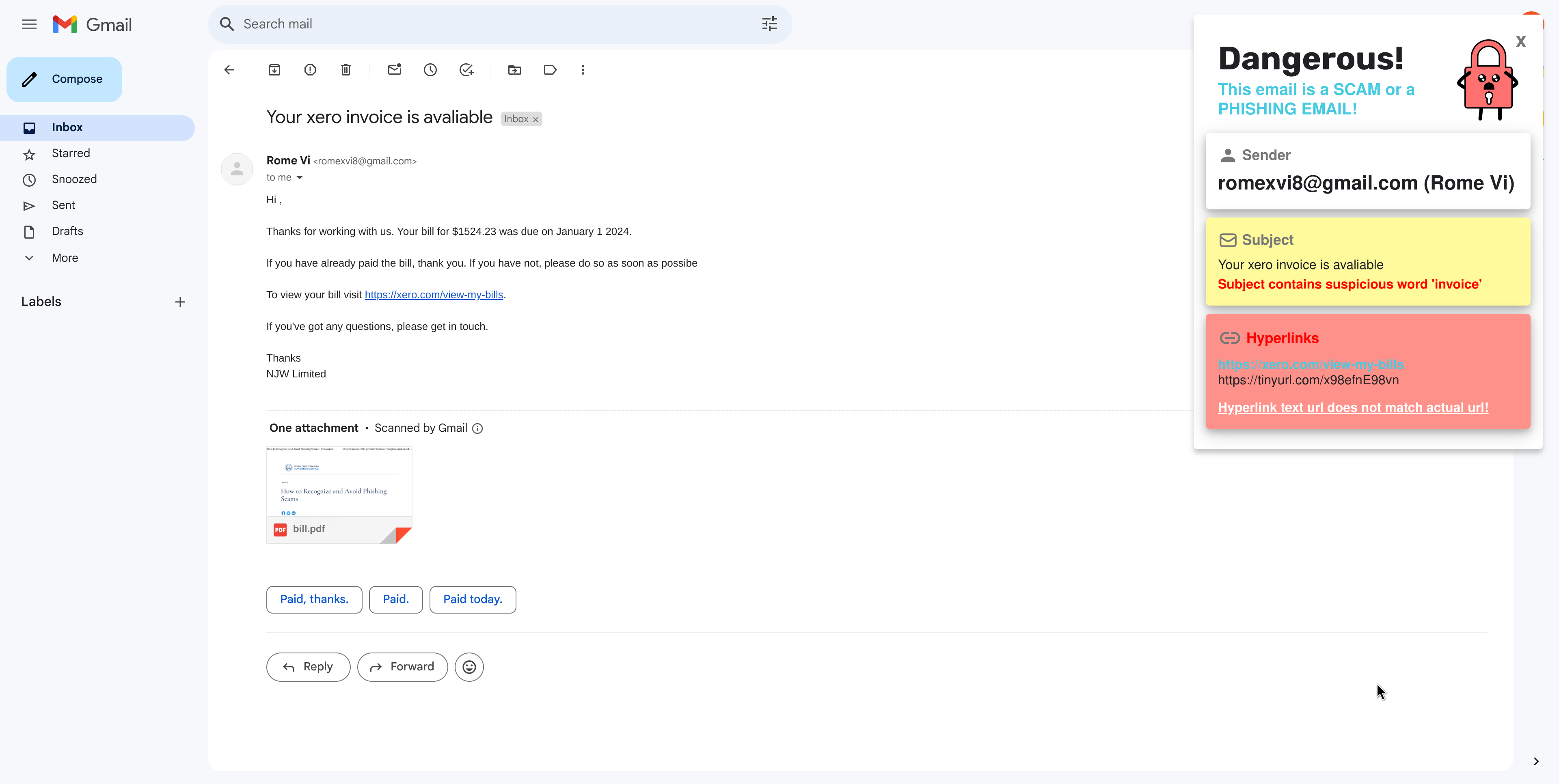
This Chrome extension analyzes emails from different providers and breaks down the sender, title, and content of the emails. The goal of our extension is to scan your emails for unrecognized senders, hidden links, and suspicious content to quickly let the user know if the email is a phishing scam. Utilizing multiple simple heuristics, we were able to detect common signs of phishing attacks and provide a user-friendly interface that explains potential concerns to the user with the content in their emails.
Specifically, Spot Me! looks at the sender and is able to detect suspicious emails that contain altered domains. Additionally, it analyzes the subject of the email, looking for mispelled words that may indicate a fraud email. Finally, it does a quick scan of the content and extracts all hyperlinks. One major violation is when a link displays one URL but leads to a completely different one. It also checks to see if a website is secure with the https protocol and SSL certificates for further validation. Based on the security of these three attributes, it gives the email a rating to determine if it’s safe, suspicious, or potentially suspicious so a user can quickly see why it may be a fraudulent email.
How we built it
Our backend was built using Python and a Flask web server which was deployed with Docker. We hosted this backwend on a Digital Ocean Droplet, reverse proxied with NGINX, and connected to a DNS name through a “.tech” domain. We also created a Chrome BrowserExtension, written in HTML and JavaScript. This frontend was connected to our backend via API fetch calls. The entire extension was packaged with a custom Javascript build system.
Challenges we ran into
When first creating our Chrome extension we weren't able to read the HTML currently in the DOM, and we realized that extensions inject HTML into the page, rather than being on top of the browser. We also had quite a few issues with making POSTS through postman. Additionally, we faced a number of issues, too long to write in paragraph form so here’s a list:
Having the pop up closed when email is closed
Having the pop up update with new info when we opened a new email
Closing the pop up
Finding right setup / balance between popup and extension window
Working with limited access due to Content sec pol (images had to be hosted somewhere)
Sending messages between content scripts and html in the extension window
Getting elements of the DOM to update (no framework 😩)
Dealing with Gmail’s dynamically updating HTML, and needing to wait for the body of the message to fully load before querying the site
Coming up with a simple, unique design, good color scheme
Working with a Python backend and setting up a Flask server (I don’t like Python)
Deploying the script to a Digital Ocean Droplet
Configuring networking with NGINX and certbot
Connecting the DNS using the .tech domain
Putting together everyone’s work using a custom JS build system
Accomplishments that we're proud of
We're proud of the custom icon that we developed and of our backend API to detect the user's email. We are also proud of the amount of features that we were able to fit into the chrome extension. Our extension works for both Gmail and Outlook and is able to successfully identify phishing emails with high accuracy. Not only this, but it was distributed amongst our whole team and worked flawlessly for everyone. We are also very proud of the designs that we were able to come up with in the short amount of time given our previous lack of experience in design and UI/UX. This product could actually be something that could, with minimal cleanup work, go directly into the market!
What we learned
It was our first time making a Chrome extension and we learned a bunch of neat tricks to read from the page and display the information. Although there were lots of challenges that we ran into, with the help of the mentors and online research we were able to devise solutions to many of them. What we originally thought was a very simple cybersecurity task continually unraveled into a larger problem which we could keep developing on. We learned to look at cybersecurity from a new angle, and it worked extremely well for us on this project!
What's next for SpotMe
Next would be more integration to check for attachments and sentiment analysis to further detect malicious content. We would also like to add a system for users to flag emails and links to contribute to a global whitelist in which all users will benefit. We would also like to further develop our hyperlink analysis by adding a NLP component that checks for similarity in the given link and a valid, secure link.
Built With
- .tech
- css3
- digitalocean
- docker
- flask
- html5
- javascript
- nginx
- python
- webextension

Log in or sign up for Devpost to join the conversation.