Inspiration
As developers and lifelong learners, we constantly browse documentation, articles, and tutorials across hundreds of websites. We found ourselves:
- Manually highlighting the same types of information over and over
- Losing track of important snippets across different tabs and sessions
- Struggling to organize highlights from 50+ pages into coherent notes
- Wasting time re-reading entire articles to find that one crucial detail
We realized that highlighting isn't just about marking text—it's about building a personalized knowledge graph. But existing tools treat every page the same, forcing users to manually decide what's important. What if highlighting could be intelligent, contextual, and automated?
What It Does
SpotLightAI is a Chrome extension that combines AI with user intent to create an intelligent highlighting system that learns what matters to you.
Core Features:
🎯 Context-Aware Auto-Highlighting
- Users create a profile (profession, interests, expertise level) during onboarding
- Set up projects with specific learning goals (e.g., "Master React Server Components")
- Define URL patterns for auto-highlighting (e.g.,
react.dev/*,*.github.io/*) - As you browse matching websites, the built-in Chrome AI analyzes page content against your profile
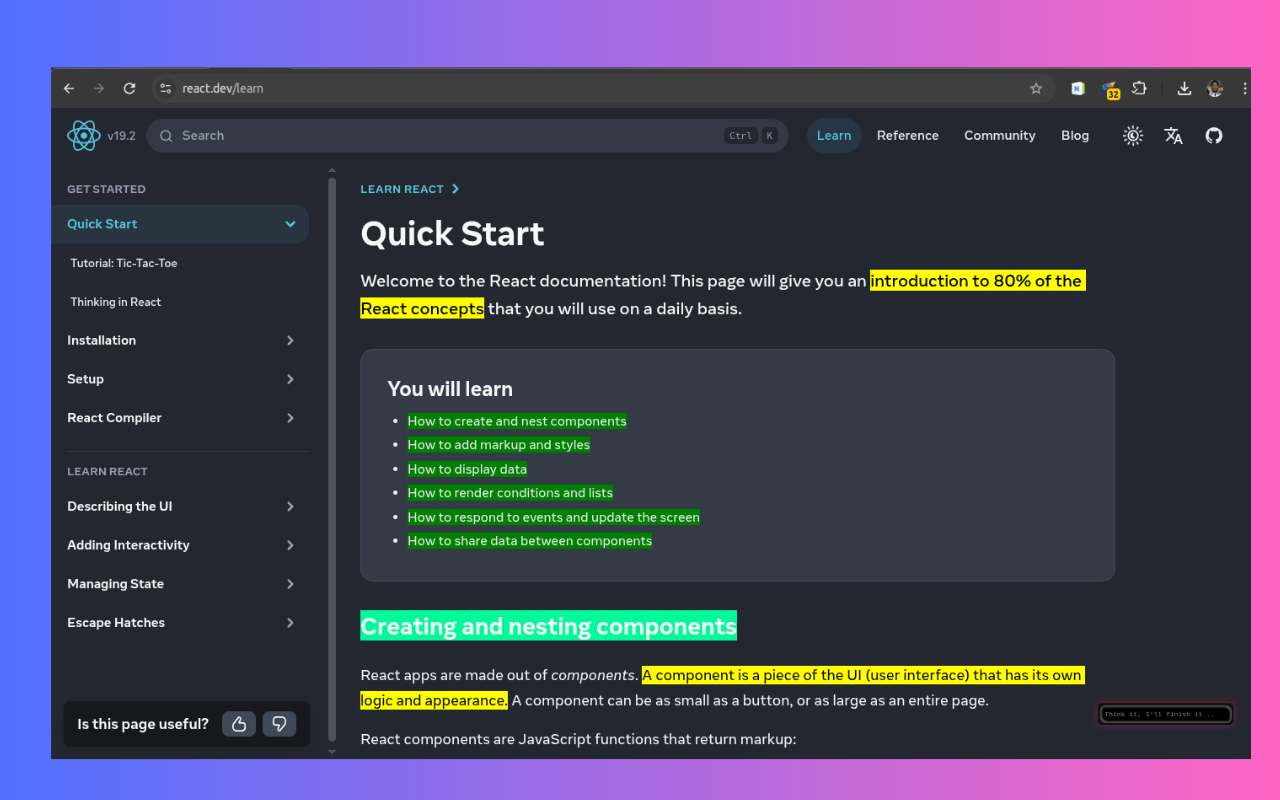
- Automatically highlights relevant snippets in different colors:
- Yellow: Key concepts and definitions
- Green: Actionable tips and how-tos
- Blue: Examples and case studies
- Orange: Important warnings
- Purple: Advanced deep-dive content
📝 Smart Noteboard
- Every webpage with highlights becomes a "note page" in your knowledge base
- Search across all highlights by keyword, date, tag, or domain
- Filter by project, color, or relevance score
- AI-generated tags automatically categorize content
- Export individual notes or entire projects to Markdown, HTML, or PDF
🔍 Side Panel Navigation
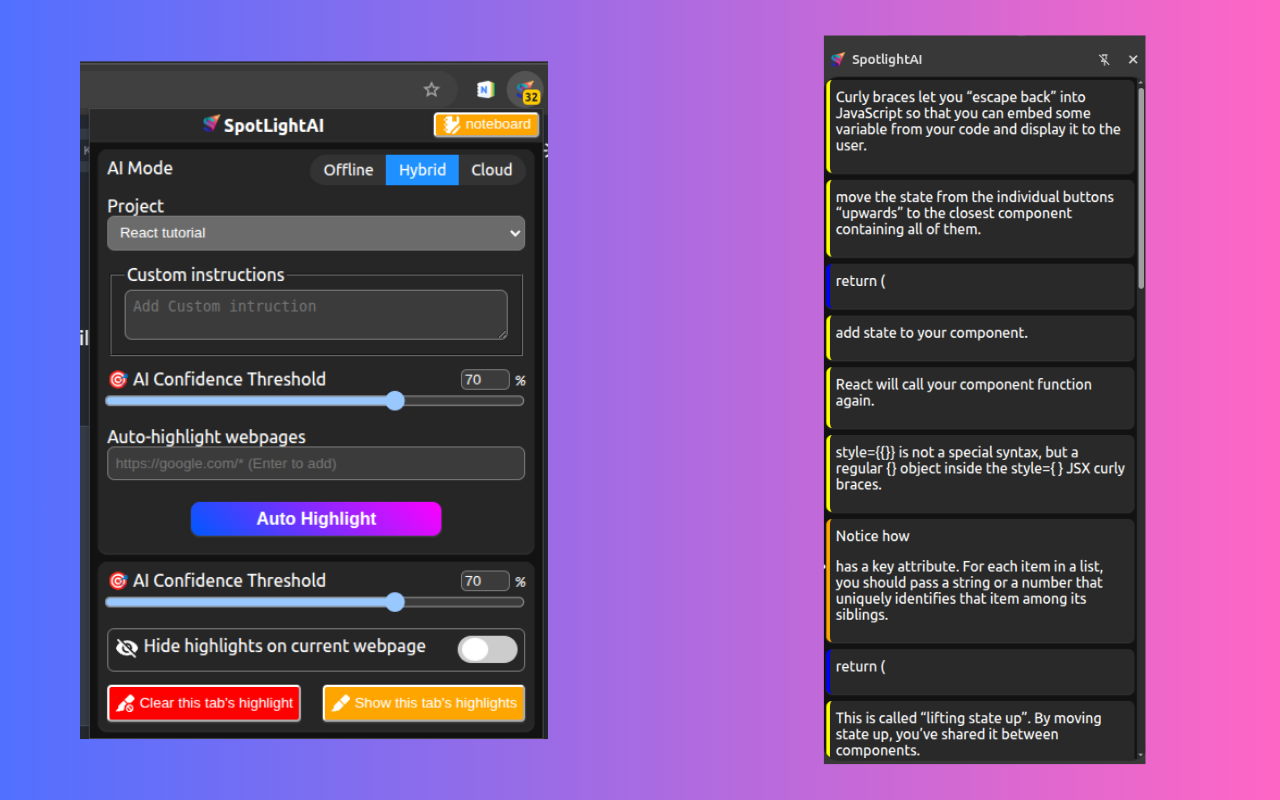
- View all highlights for the current page in a sidebar
- Click any highlight to scroll to its position on the page
- Add comments and notes to any highlight
- Manually create new highlights or delete AI-generated ones
- See AI's reasoning for why each snippet was highlighted
🎨 Manual Highlight Controls
- Select any text and choose from 5 color-coded categories
- Add personal notes and comments to highlights
- Edit or delete highlights with one click
- Override AI suggestions when needed
📊 Highlight Analytics
- Badge counter shows total highlights for current page
- Popup window displays quick stats and recent highlights
- Track your learning progress across projects
- See which domains and topics you engage with most
☁️ Flexible Sync Options
- Toggle between local-only and cloud sync in popup
- IndexedDB storage for blazing-fast local access
- Optional cloud backup for cross-device sync
- Export to local files using File System Access API
🤖 Intelligent Organization
- AI decides which "note page" each highlight belongs to
- Automatically groups related highlights across different websites
- Suggests tags based on content and context
- Learns from your manual edits to improve future suggestions
How We Built It
Frontend Architecture:
- Chrome Extension (Manifest V3)
- Content scripts for DOM manipulation and text highlighting
- React-based side panel and popup UI
- IndexedDB for local storage with optimized schema
- File System Access API for local file export
AI Integration:
- Chrome's Built-in AI (Prompt API)
- Custom prompt engineering for context-aware analysis
- Multi-step AI pipeline:
- Extract block-level text content from webpage
- Send to AI with user profile and project context
- AI returns array of relevant snippets with colors and reasoning
- Match snippets to text nodes and apply highlights
- Confidence scoring to filter low-quality suggestions
- Hybrid mode: AI for discovery + user control for curation
Highlighting Algorithm:
- XPath-based position tracking for reliable reconstruction
- Multi-layer fallback system (XPath → CSS selector → fuzzy text matching)
- Handles dynamic content and DOM changes
- Preserves exact character ranges with context awareness
Data Models:
- Highlights Store: Individual highlight instances with range data
- Webpages Store: Page metadata and statistics (acts as note pages)
- Projects Store: User-defined learning goals
- AutoHighlighters Store: Rules for automatic highlighting
- UserProfile Store: Profession, interests, expertise level
Storage Strategy:
- Separate IndexedDB stores for scalability
- Composite indexes for fast querying (webpageId + createdAt)
- Pagination for pages with 1000+ highlights
- Efficient sync status tracking (local/synced/pending)
Export System:
- JSON: Structured data with full metadata
- Markdown: Human-readable notes with color groupings
- HTML: Styled documents with embedded highlights
- PDF: Print-ready output via browser rendering
Challenges We Ran Into
1. Range Reconstruction After Page Reload The biggest technical challenge was reliably restoring highlights after the user closes and reopens a tab. DOM structures change, elements get reordered, and even identical pages can have different internal structures.
Solution: We implemented a three-tier fallback system:
- Primary: XPath-based positioning and element indexing path (works 90% of the time)
- Secondary: CSS selectors with text offsets
- Tertiary: Fuzzy text matching using surrounding context
2. AI Prompt Engineering Getting consistent, high-quality output from the AI required extensive iteration. Early versions either highlighted too much (entire paragraphs) or missed important content.
Solution: We developed a structured prompt that:
- Clearly defines snippet length requirements (5-100 words)
- Provides concrete examples of good vs. bad highlights
- Includes user context (profession, goals, expertise level)
- Enforces JSON-only output for reliable parsing
- Uses confidence thresholds to filter weak suggestions
3. Performance with Large Pages Technical documentation pages often have 10,000+ text nodes. Analyzing every node would freeze the browser.
Solution:
- Extract block-level content first (paragraphs, headings, lists)
- Send only relevant blocks to AI (max 50 at a time)
- Lazy-load highlights as user scrolls
- Cache AI responses for 24 hours per URL pattern
4. Handling Dynamic Content Many modern websites use client-side rendering, infinite scroll, and dynamic DOM updates—all of which can break existing highlights.
Solution:
- MutationObserver to detect DOM changes
- Re-anchor highlights when content shifts
- Mark orphaned highlights for user review
- Store both absolute and relative positions
5. Color Semantics Users needed a consistent color system that works across all content types without manual configuration.
Solution:
- Five universal categories based on information type (not topic)
- AI assigns colors based on function (definition, action, example, warning, advanced)
- Users can override but system provides smart defaults
Accomplishments That We're Proud Of
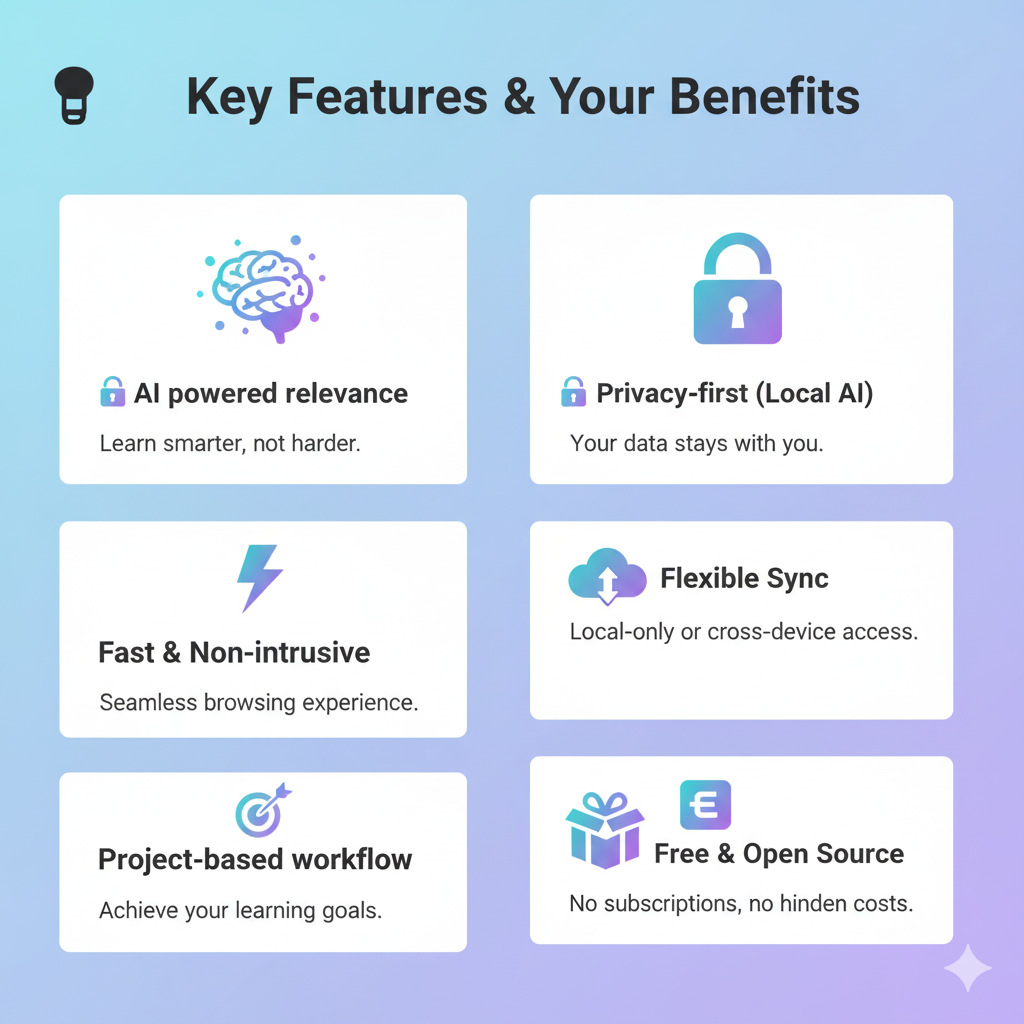
- True AI-Powered Intelligence: Not just keyword matching—the AI understands context, user intent, and information relevance
- Zero Configuration Required: Works out of the box with sensible defaults, yet deeply customizable
- Handles Edge Cases: Robust highlighting that survives page reloads, DOM changes, and dynamic content
- Export-First Design: Your highlights are YOUR data—export to any format without lock-in
- Privacy-Focused: All processing happens locally; cloud sync is optional
- Performance: Handles pages with thousands of highlights without lag
- Learning System: Gets better over time as it learns from your manual edits
What We Learned
Technical Insights:
- Built-in Chrome AI is powerful but requires careful prompt engineering
- IndexedDB composite indexes are critical for query performance
- XPath is more reliable than CSS selectors for DOM positioning
- Fuzzy text matching is essential for handling dynamic content
- Pagination is mandatory for good UX with large datasets
Product Insights:
- Users want automation but need to maintain control
- Color coding must be semantic, not arbitrary
- Export functionality is a core feature, not an afterthought
- The best UI is invisible—highlights should feel native to the page
- Project-based organization resonates more than folder hierarchies
AI Integration Lessons:
- Shorter prompts with clear constraints work better than long instructions
- JSON-only output is essential for reliability
- Confidence scoring lets users control quality thresholds
- Context (user profile + project goal) dramatically improves relevance
- Hybrid AI + manual approach beats pure automation
What's Next for Smart Highlight
Near-Term Features:
- Collaborative Highlighting: Share project highlights with teammates
- Smart Summaries: AI-generated summaries of all highlights per topic
- Spaced Repetition: Surface old highlights for review based on forgetting curve
- Browser Extension: Firefox and Edge support
- Mobile Apps: Sync and review highlights on mobile devices
Advanced Features:
- Cross-Page Connections: AI detects related concepts across different sites
- Knowledge Graph Visualization: See how your highlights connect into a web of knowledge
- Smart Search: Natural language queries like "show me React performance tips from last month"
- Video Transcript Highlighting: Extend to YouTube and video content
- Notion/Obsidian Integration: Sync highlights to your note-taking app
AI Enhancements:
- Multi-Document Analysis: AI compares highlights across multiple pages to find patterns
- Personalized Learning Paths: AI suggests what to read next based on your highlights
- Automatic Flashcard Generation: Turn highlights into spaced-repetition cards
- Citation Management: Auto-generate bibliographies from highlighted sources
Built With
- css3
- gemini-nano
- javascript
- web-components

Log in or sign up for Devpost to join the conversation.