-
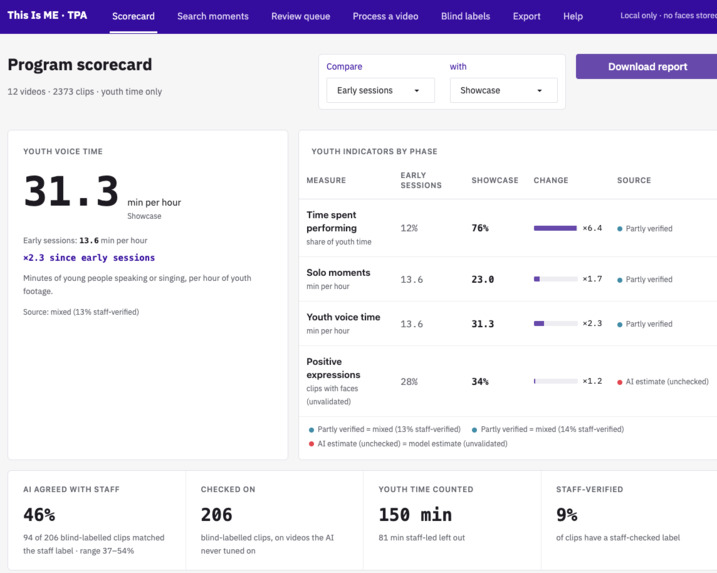
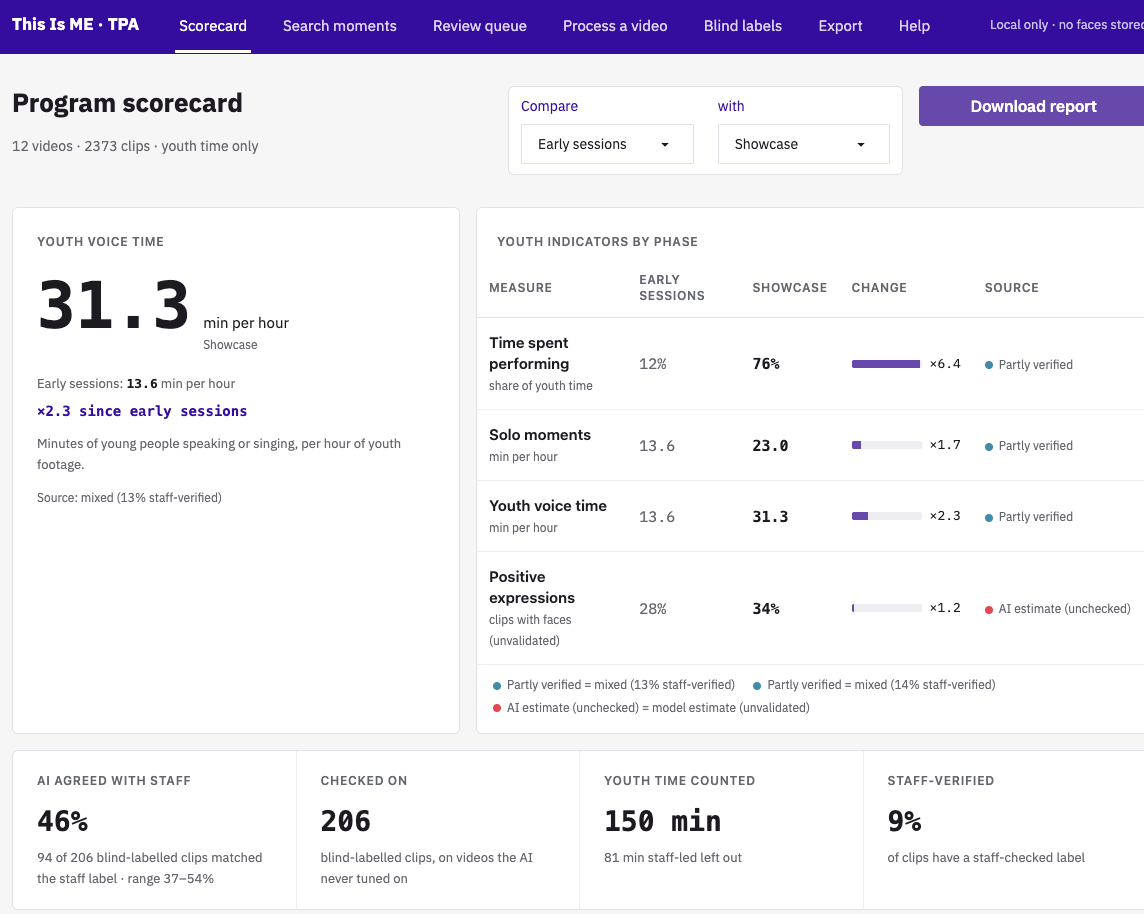
Scorecard: Scorecard: youth indicators from early sessions to the showcase, each tagged by how much staff have verified it
-
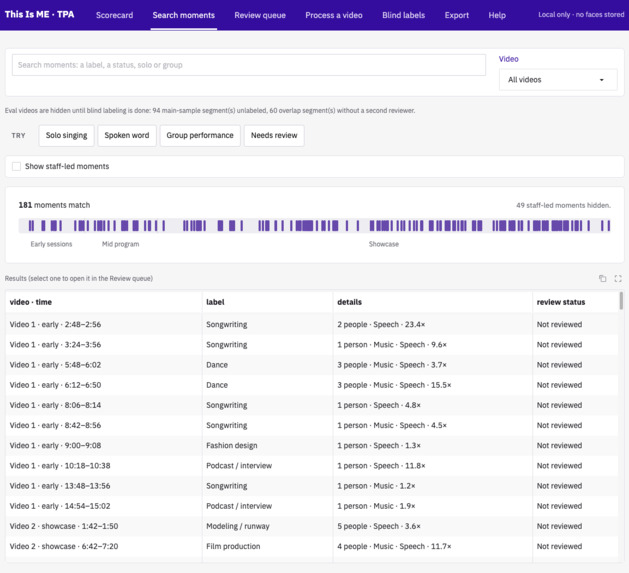
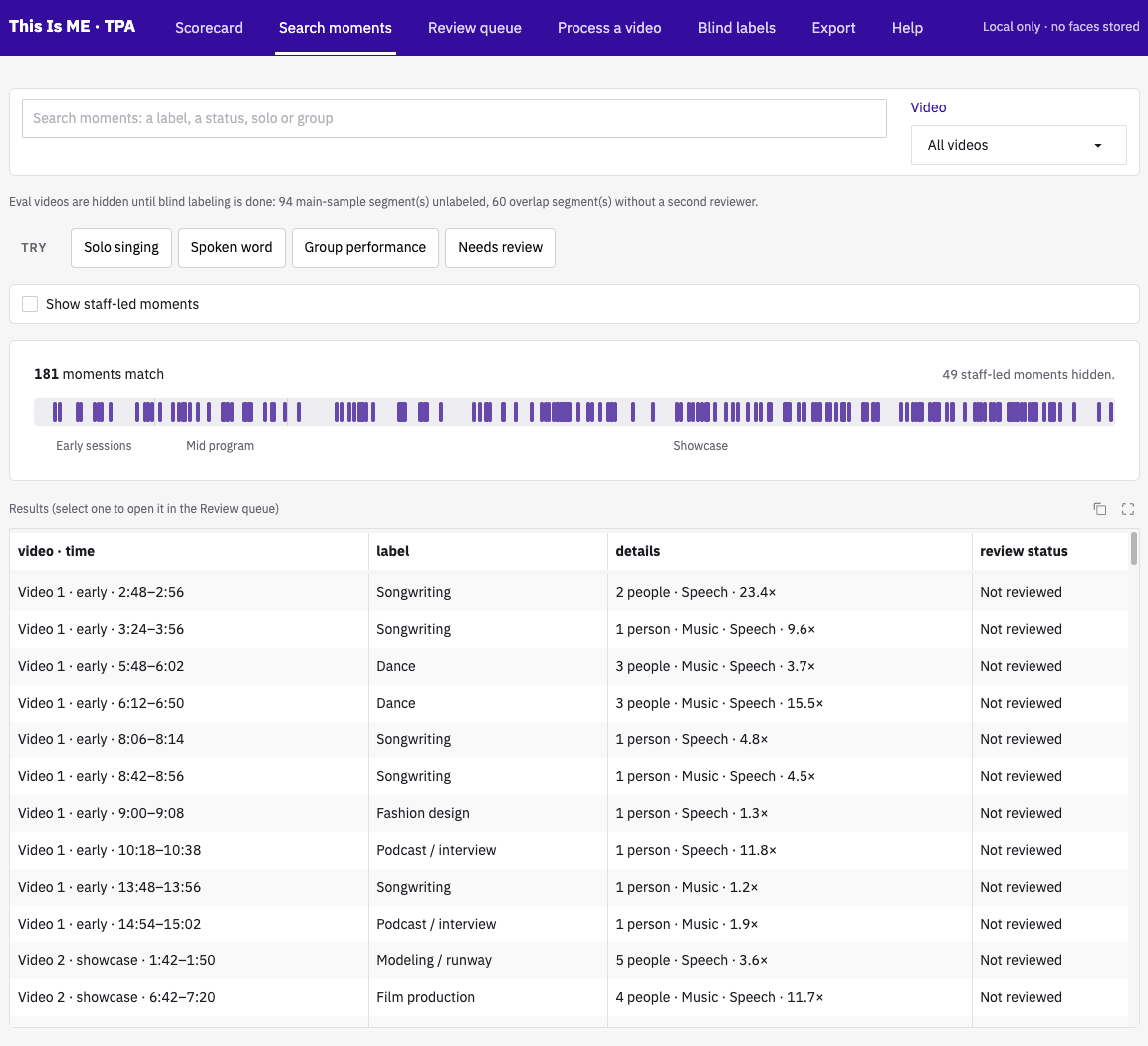
Search moments: Search moments: jump straight to the moments that matter, like solo performances or group singing
-
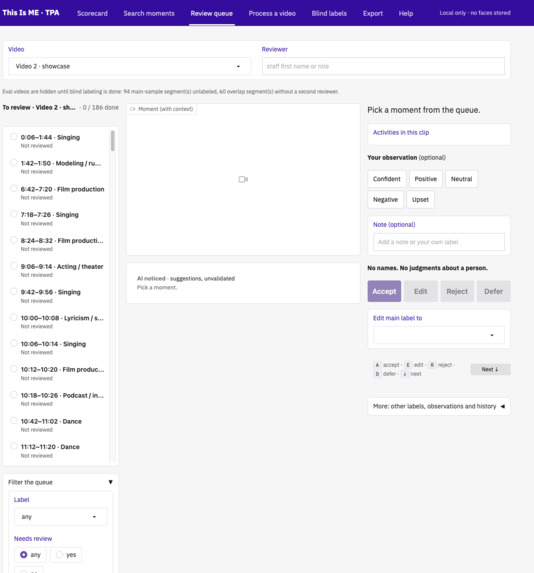
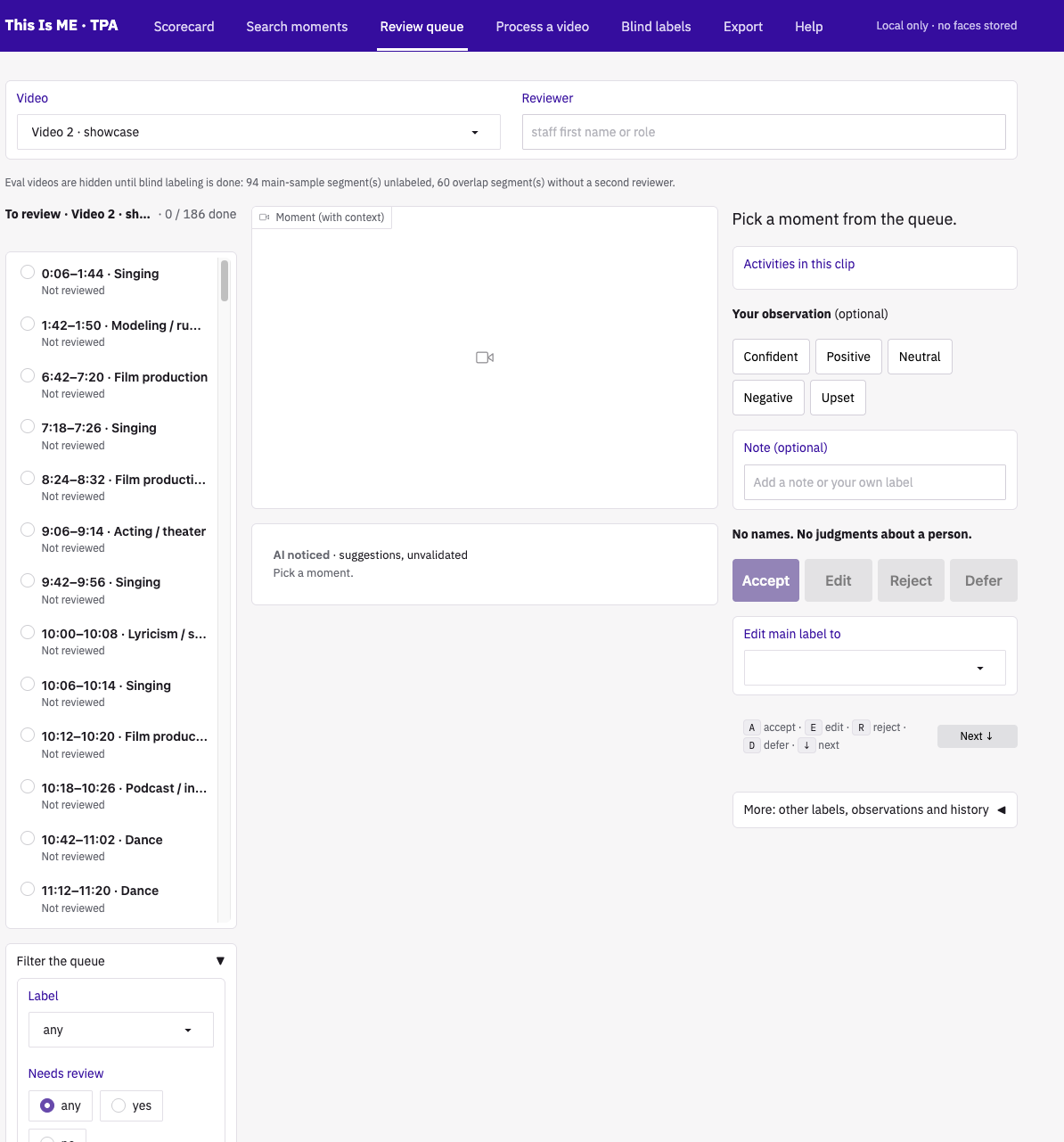
Review queue: Review queue: staff see what the AI noticed, then accept, edit, reject or defer each label
-
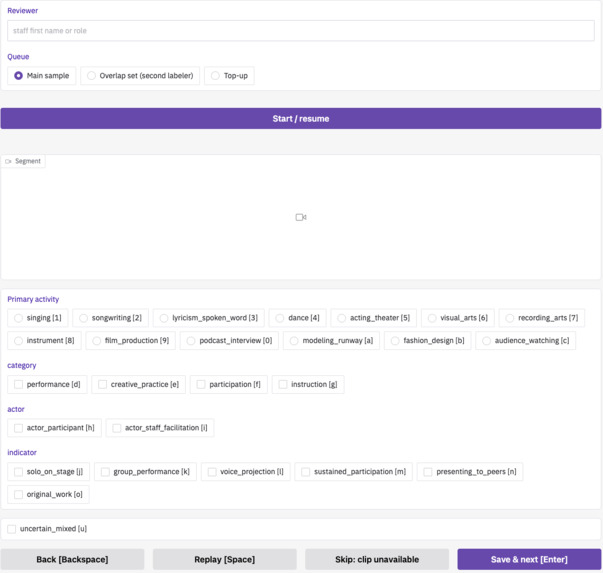
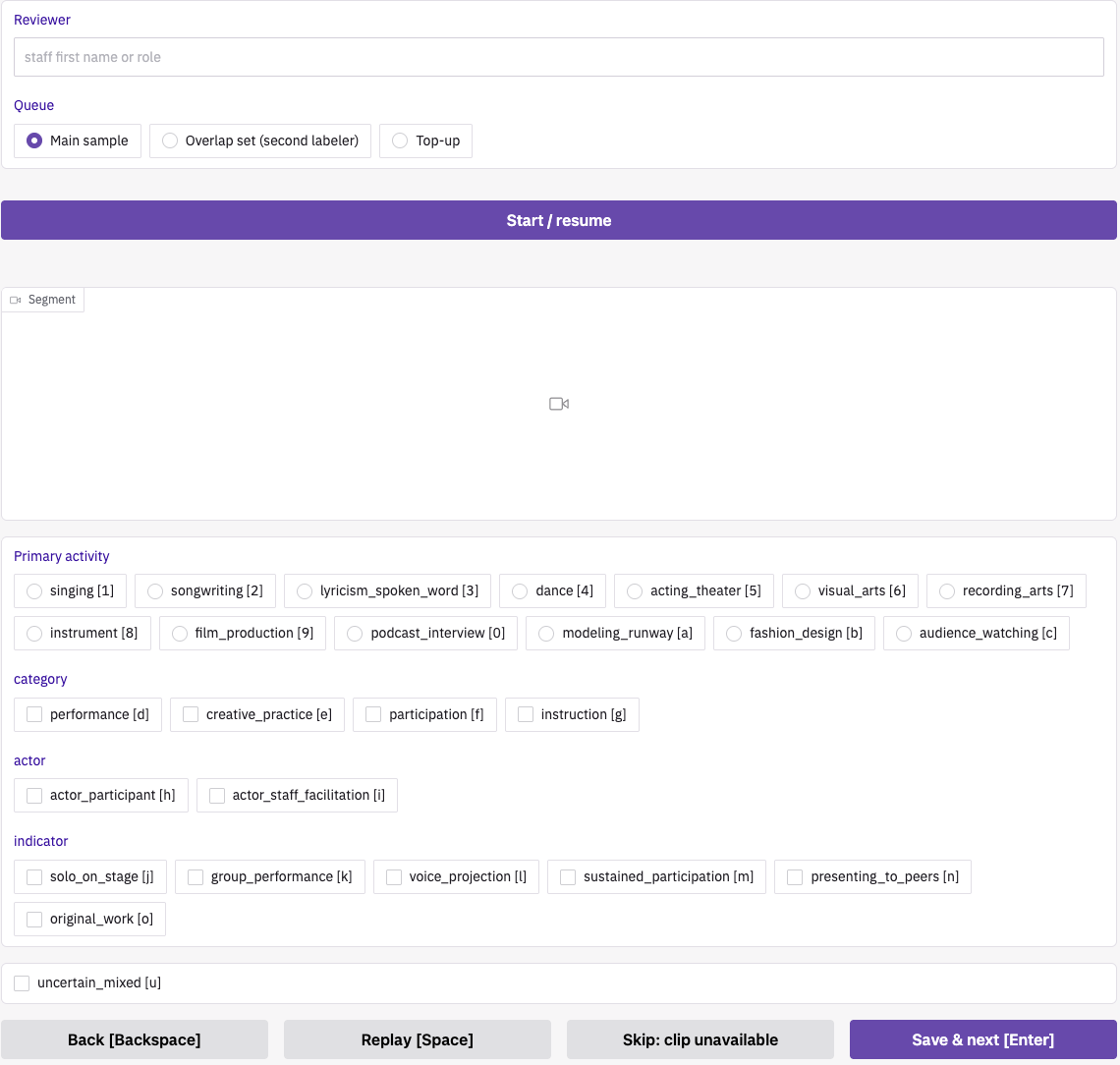
Blind labels: Blind labels: staff label clips without seeing the AI’s answers, a fair answer key to test the AI
-
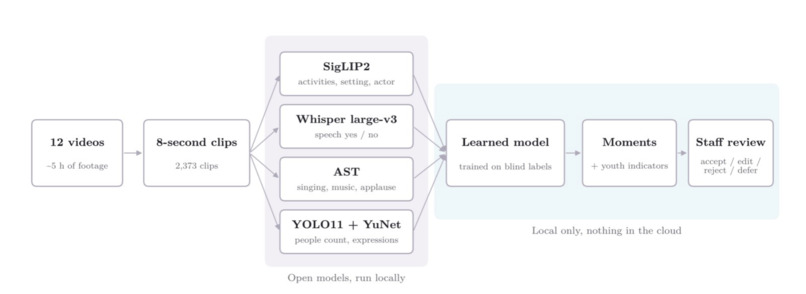
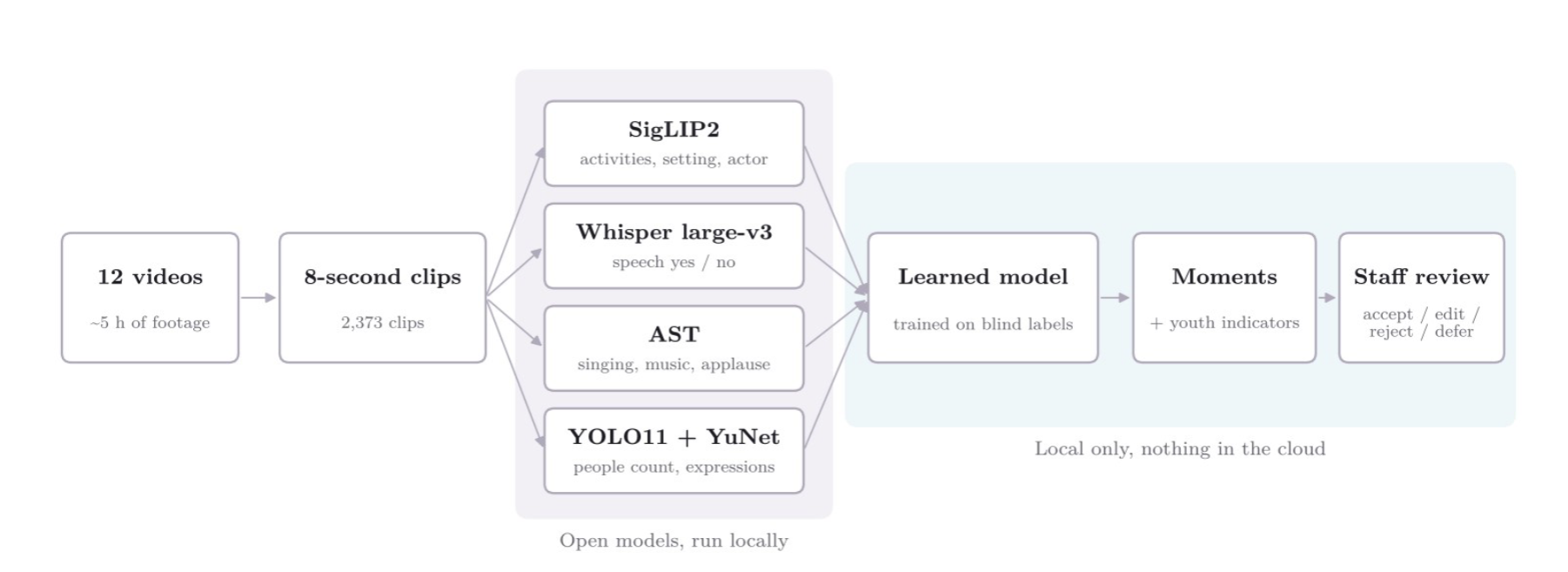
Flowchart: How it works: 8-second clips, local open-source models, a learned layer, then staff review. No cloud AI
-
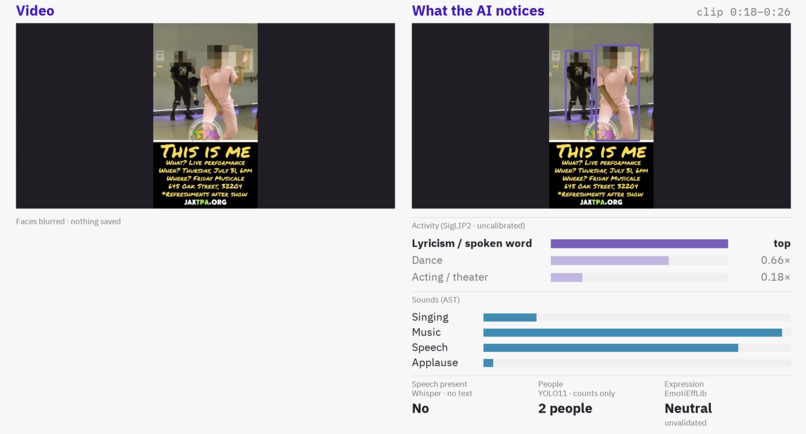
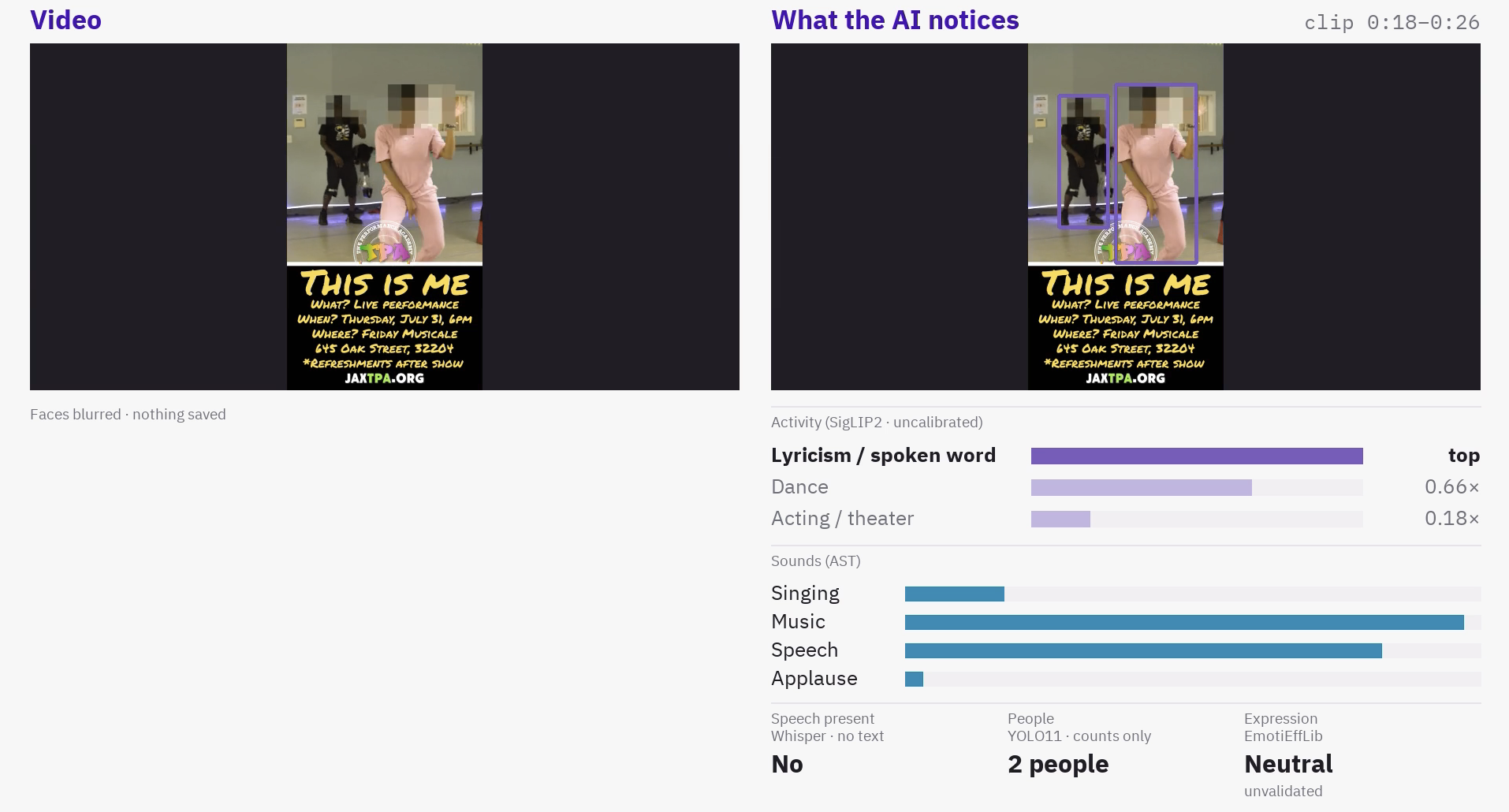
Dance clip: Models at work on a laptop, faces blurred, nothing saved. The model calls this dance spoken word, so staff review it
-
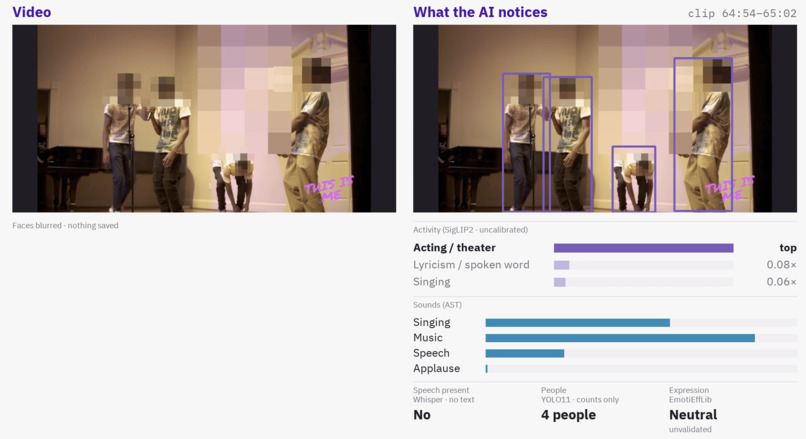
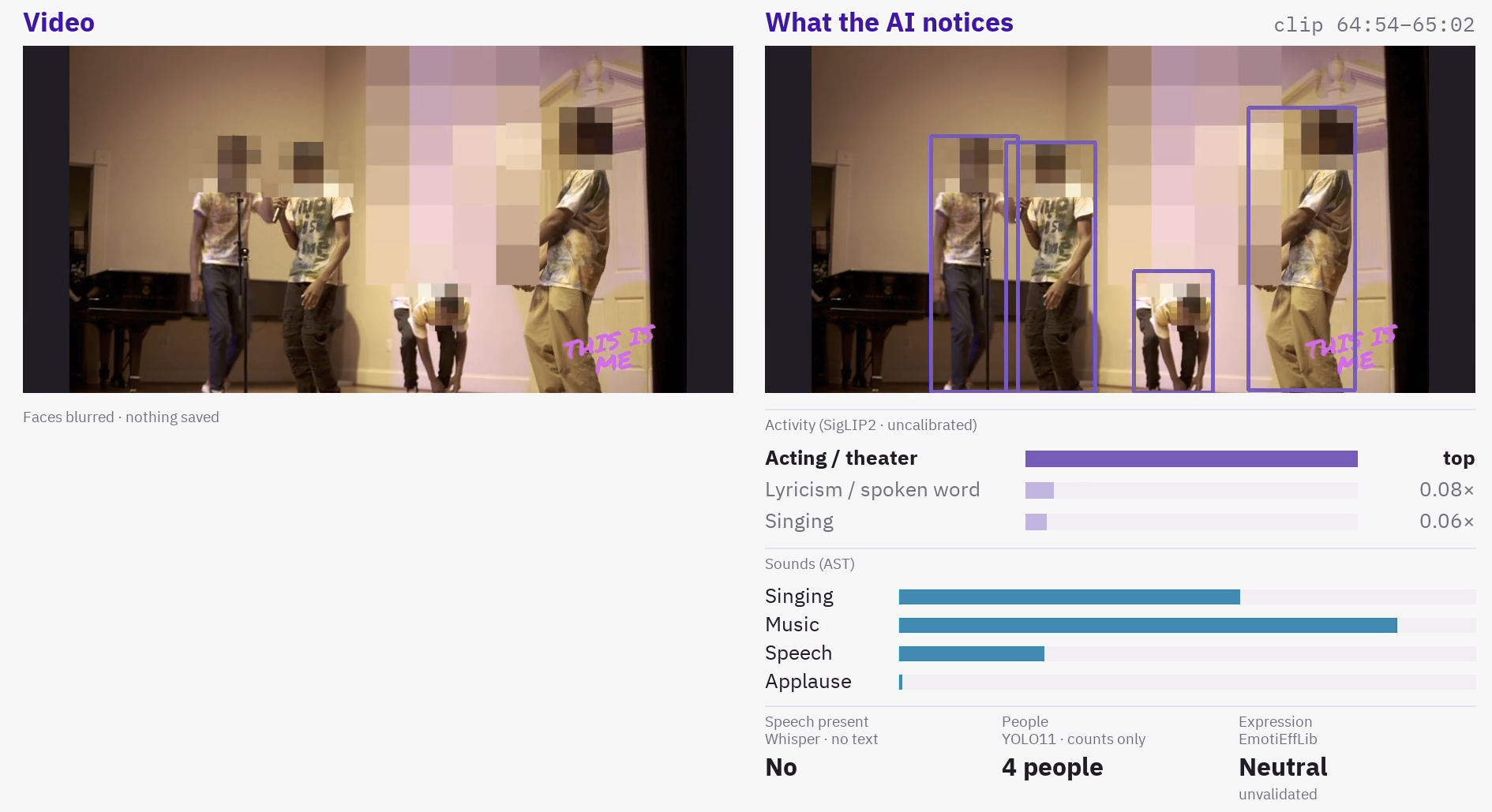
Group performance clip: Group performance: 4 people counted, music heard. The activity model alone says acting, so staff check every label
-
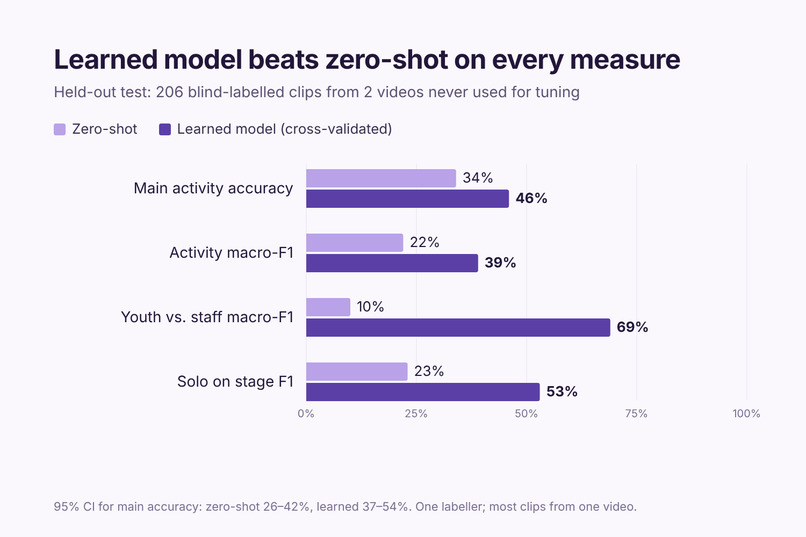
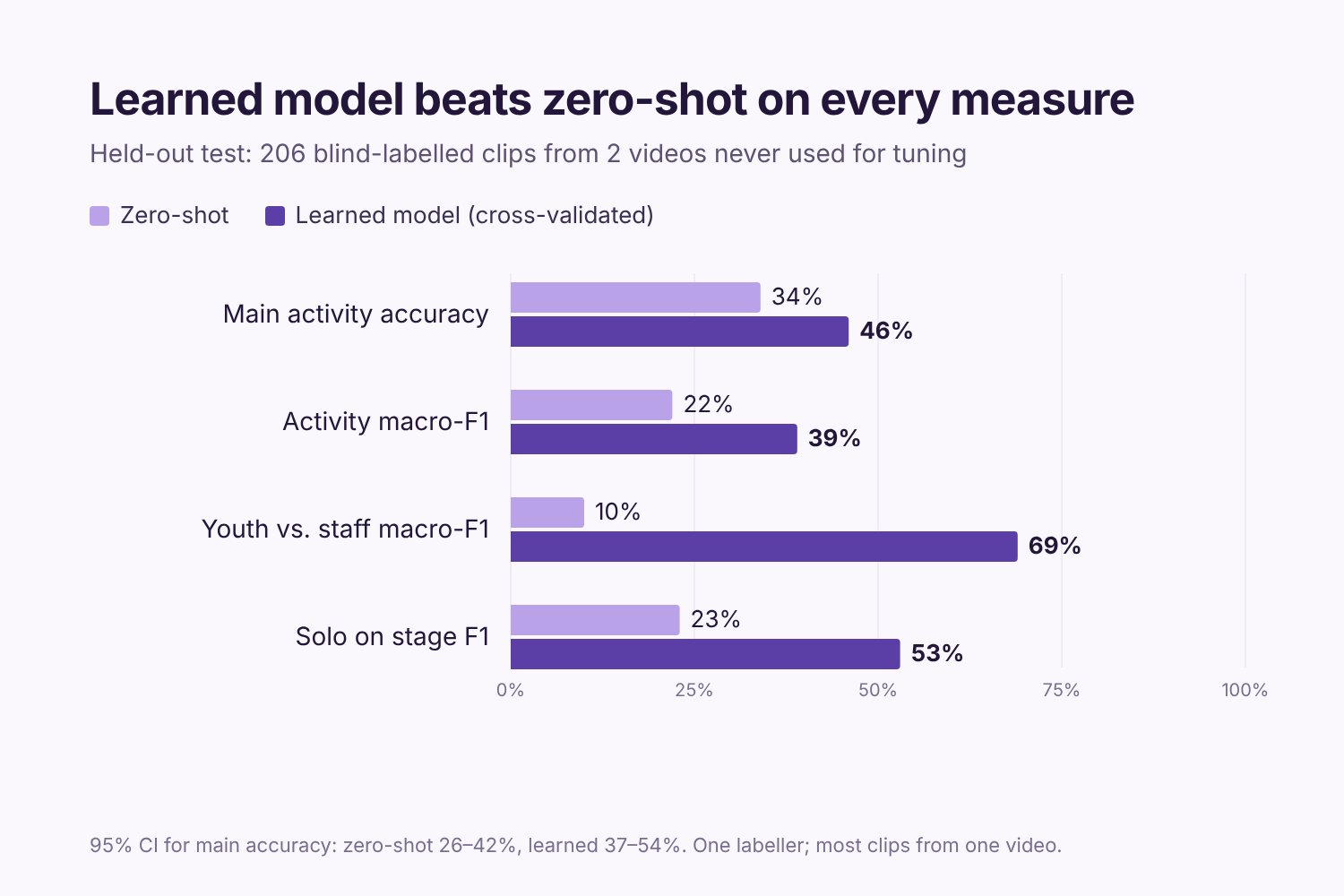
Results chart: Held-out test, 206 blind-labelled clips: the learned model beats zero-shot on every measure
-
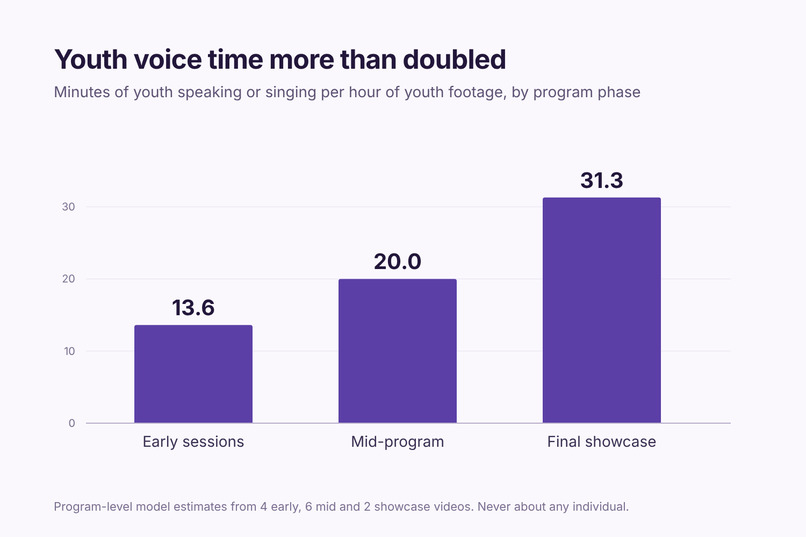
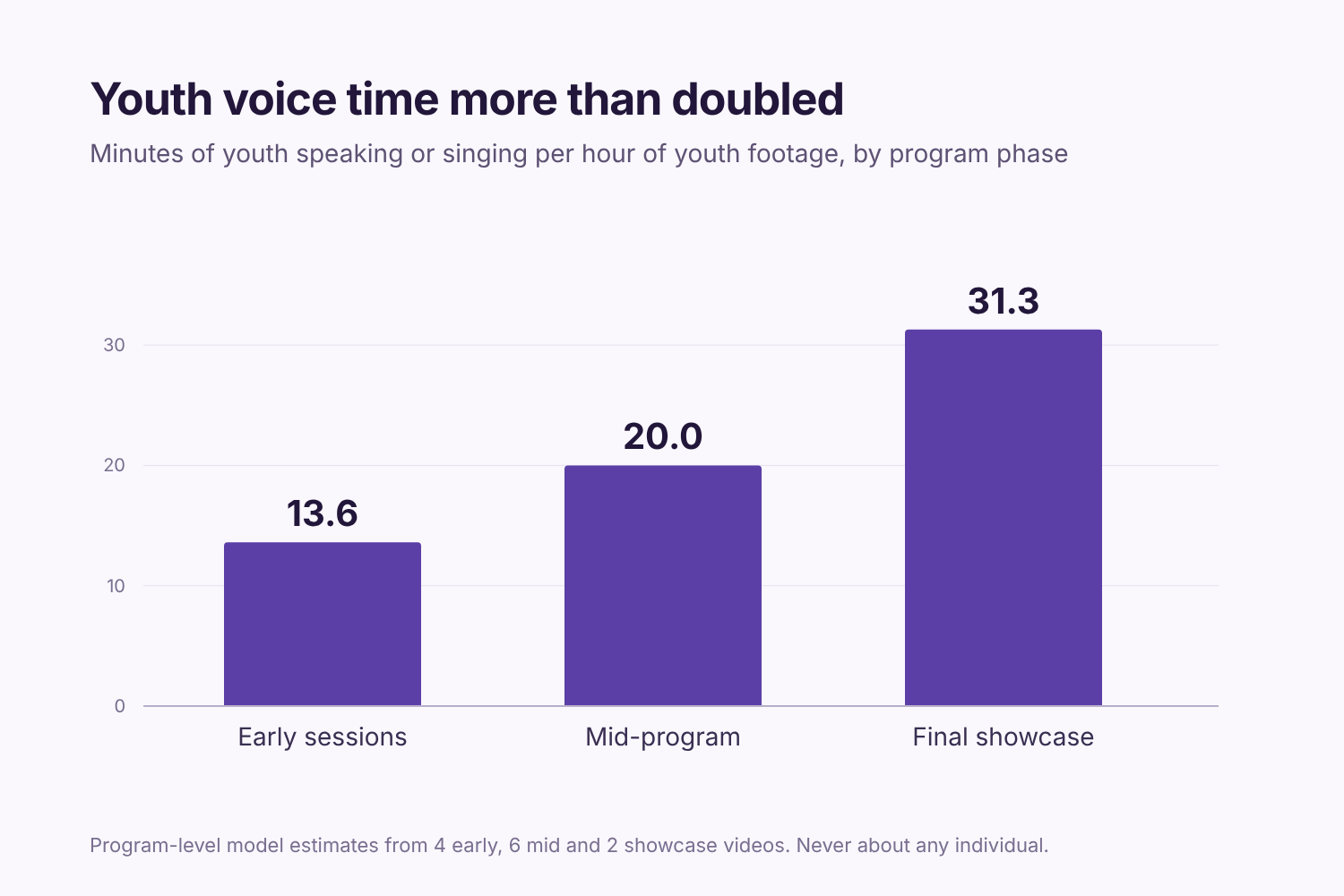
Youth voice chart: Youth voice time per hour of footage: 13.6 early, 20.0 mid-program, 31.3 at the showcase. Never per child
🏆 1st place, 2026 AI4Good Hackathon, Problem Case #1 (The Performance Academy)
Inspiration
At kickoff, The Performance Academy told us something that stuck with us. Their staff watch teens in out-of-home care change over three weeks in the This Is ME program, from barely speaking to getting on stage at the final showcase. They can see it. The problem is that funders need to believe it.
TPA was also clear that they don't care how good the performances are. They care about confidence, self-expression, standing in front of an audience, and sharing something original. All of that is sitting in hours of footage nobody has time to go through. So our goal was simple: turn that footage into evidence funders can trust, without putting any of the kids at risk.
What it does
It's an app TPA staff can run on their own computer. A video goes in, and the app finds the moments that matter: youth singing, performing solo, doing spoken word, working on art. It puts them on a searchable timeline. Staff open a moment, watch the clip in context, see what the AI noticed, and then accept, edit, reject, or defer it. Every decision gets saved as a structured record (JSON/CSV) with timestamps, activity labels, who made the call (AI or staff), the review date, and the guideline version.
The first thing staff see is a Scorecard. It's the page TPA would actually show a funder: youth indicators from early sessions to the showcase, each one marked by how much staff have verified it, plus a button that turns it into a plain-English Word report.
Staff can also process a new video right on the laptop with a live, face-blurred preview, export every annotation, and ask a built-in help assistant that runs locally. A Blind labels tab lets staff label clips without seeing the AI's answers, which gives us a fair answer key to measure the AI against. We entered Track A, plus Track B's human-in-the-loop data foundation.
How we built it
We never feed a whole video to a model. Every video gets cut into 8-second clips (2,373 clips from 12 videos, about 5 hours). Each clip runs through a few small open-source models. SigLIP2 suggests the activity. faster-whisper only tells us whether someone is speaking, and we never use what they say. The Audio Spectrogram Transformer picks up singing, music, and applause. YOLO11 counts people, counts only. YuNet detects faces so EmotiEffLib can make an expression estimate, which we always label as unvalidated. Faces are blurred in previews and thrown away after scoring. Nothing about them is saved.
On top of that we trained a small logistic regression on about 40 numbers per clip that the pipeline already produces. It runs on a laptop in seconds and made the biggest difference of anything we tried. Clips then get merged into 368 moments. The app is Gradio, with DuckDB and Parquet underneath, a local Qwen model through Ollama for the help assistant, and python-docx for the funder report.
Everything runs on open-source AI models running locally on private machines we control. No cloud AI ever touched the footage. The demo runs entirely on our laptop.
How well it works
We blind-labelled 206 clips from two videos we never used for tuning. Every learned-model prediction came from cross-validation, so the model never saw the clip it was scored on. The ranges are 95% confidence intervals.
| Zero-shot | Learned | |
|---|---|---|
| Main activity accuracy | 34% (26–42) | 46% (37–54) |
| Activity macro-F1 | 22% | 39% |
| Youth vs. staff macro-F1 | 10% | 69% |
| Solo on stage F1 | 23% | 53% |
46% isn't "accurate," and we don't claim it is. It's a strong starting point that staff confirm, and that's the whole point of the review queue. The youth-vs-staff jump to 69% matters most to us, because it's what lets us count youth time only.
Here's the finding we're most excited about. Youth voice time, meaning minutes of young people speaking or singing per hour of youth footage, went from 13.6 in early sessions to 20.0 mid-program to 31.3 at the showcase. That's more than double. Performance share also rose, from 12% to 76%, though some of that is just what a showcase is. The positive expression rate moved from 28% to 34%, but it's unvalidated, so we don't lean on it. About 9% of clips are staff-checked so far, and every number in the app says how verified it is.
For speed, the full run on a private GPU machine took about 28 minutes for activities and under 15 for speech and sounds. We made the face step about 11× faster. On the laptop, a 45-second promo goes all the way through in 1 minute 5 seconds.
Challenges we ran into
Our biggest early problem was solos showing up as groups, because instructors standing near a performer got counted. The obvious fix was to guess everyone's age and ignore the adults. We talked it through and said no. Age guesses from faces are off by years right at the 15–17 vs. early-20s line, it's a biometric inference about minors, and it was outside what we were cleared to do. We tried a scene-based filter on performer size instead, and honestly, it did nothing. What actually worked was the learned model, which took solo F1 from 23% to 53% without profiling anyone.
The other big one was thresholds. Our first version assumed every activity shows up in about 10% of footage, but showcase footage is mostly performance. Common labels missed most clips and rare ones fired way too often. That's the moment we realized the vision models were fine and the calibration was the problem.
We also worked mostly blind. The data rules meant no cloud AI could see any footage, so we debugged everything through aggregate numbers.
What we learned
A tiny model plus 206 human labels beat a much bigger zero-shot model. Model governance is mostly about deciding what a model isn't allowed to do. Negative results are worth reporting. And the human in the loop isn't a backup plan. It's what turns AI guesses into evidence.
Limitations
We want to be upfront here. One person labelled everything (our team acting as staff), and most of the 206 clips come from one video, so the ranges are wide. We assigned the program phases ourselves, and early sessions vs. the showcase compares different videos filmed differently, so these numbers describe the footage rather than prove change. Everything is footage-level, never about an individual kid. The laptop demo uses the zero-shot model, not the learned one.
What's next
We're continuing the project with The Performance Academy. The next step is getting TPA staff reviewing clips on their own laptop, since every review adds verified labels we can retrain on. After that: a second labeler so we can measure agreement, staff-defined observation labels so expression estimates either get validated or dropped, the learned model on the laptop, and an Apache-licensed detector to replace YOLO11 (AGPL). The code, architecture diagram, system card, and data-governance note are all in the GitHub repo.


Log in or sign up for Devpost to join the conversation.