-
-
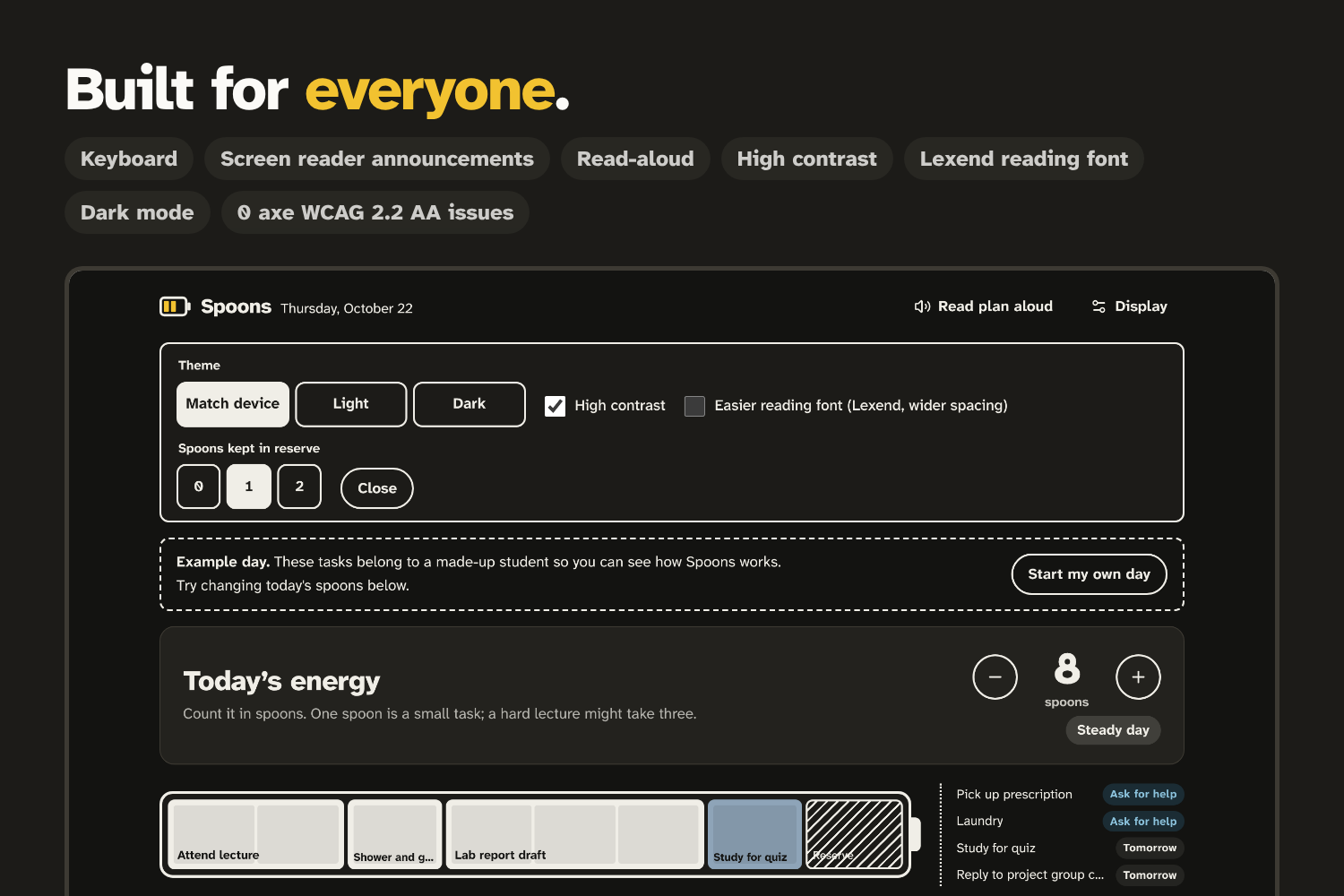
Accessibility features (dark, high contrast)
-
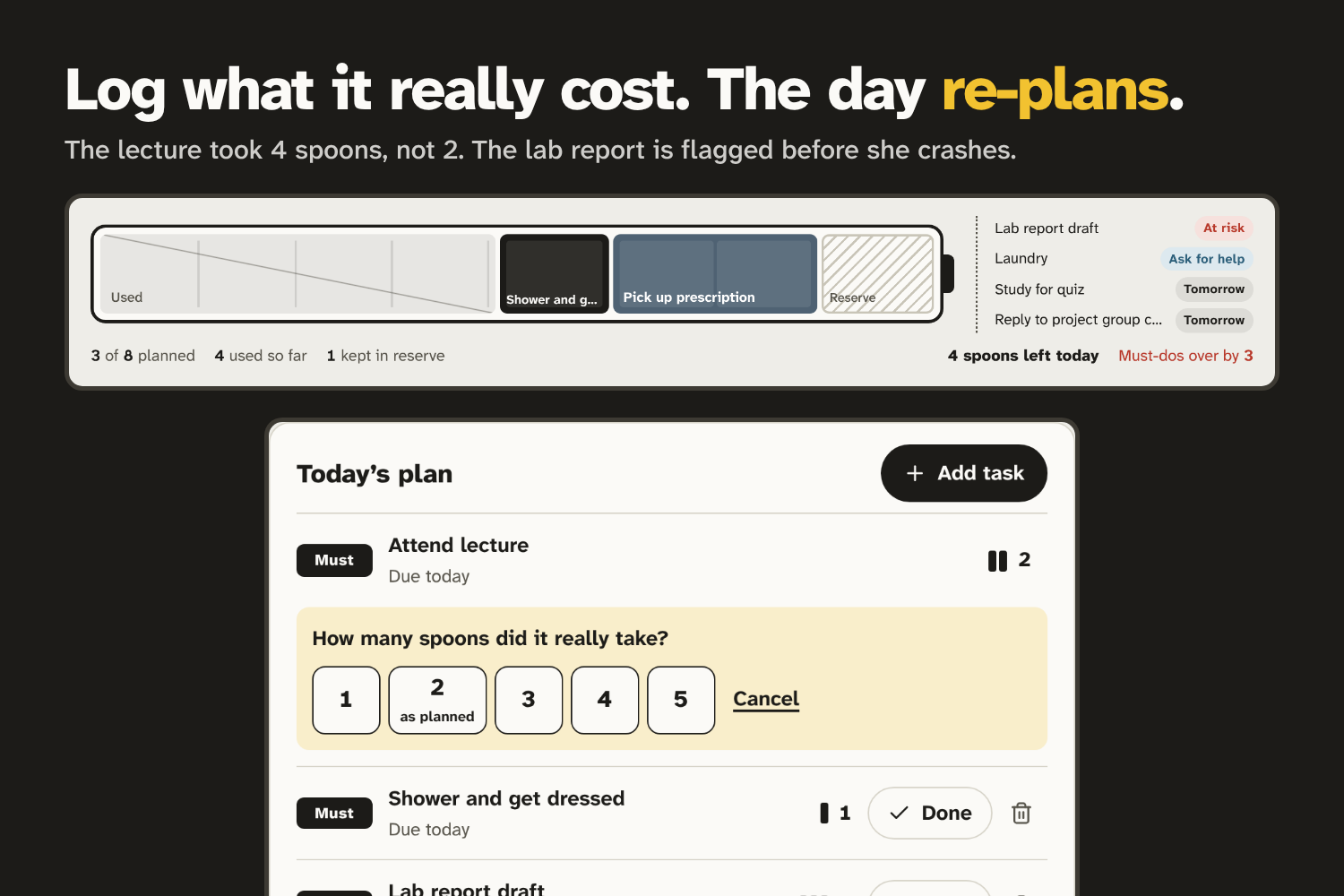
Logging the real cost and re-planning
-
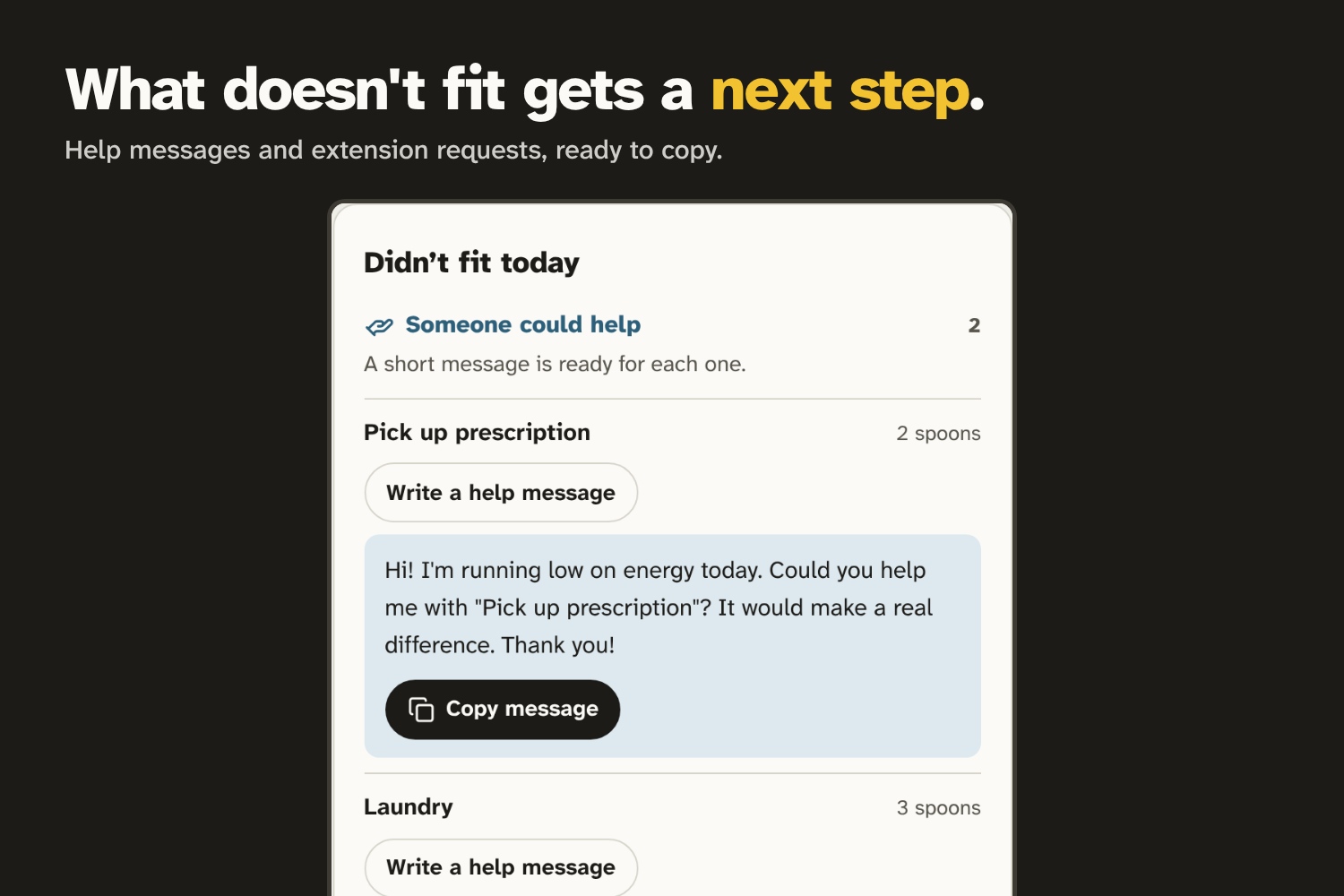
Next steps (the help message)
-
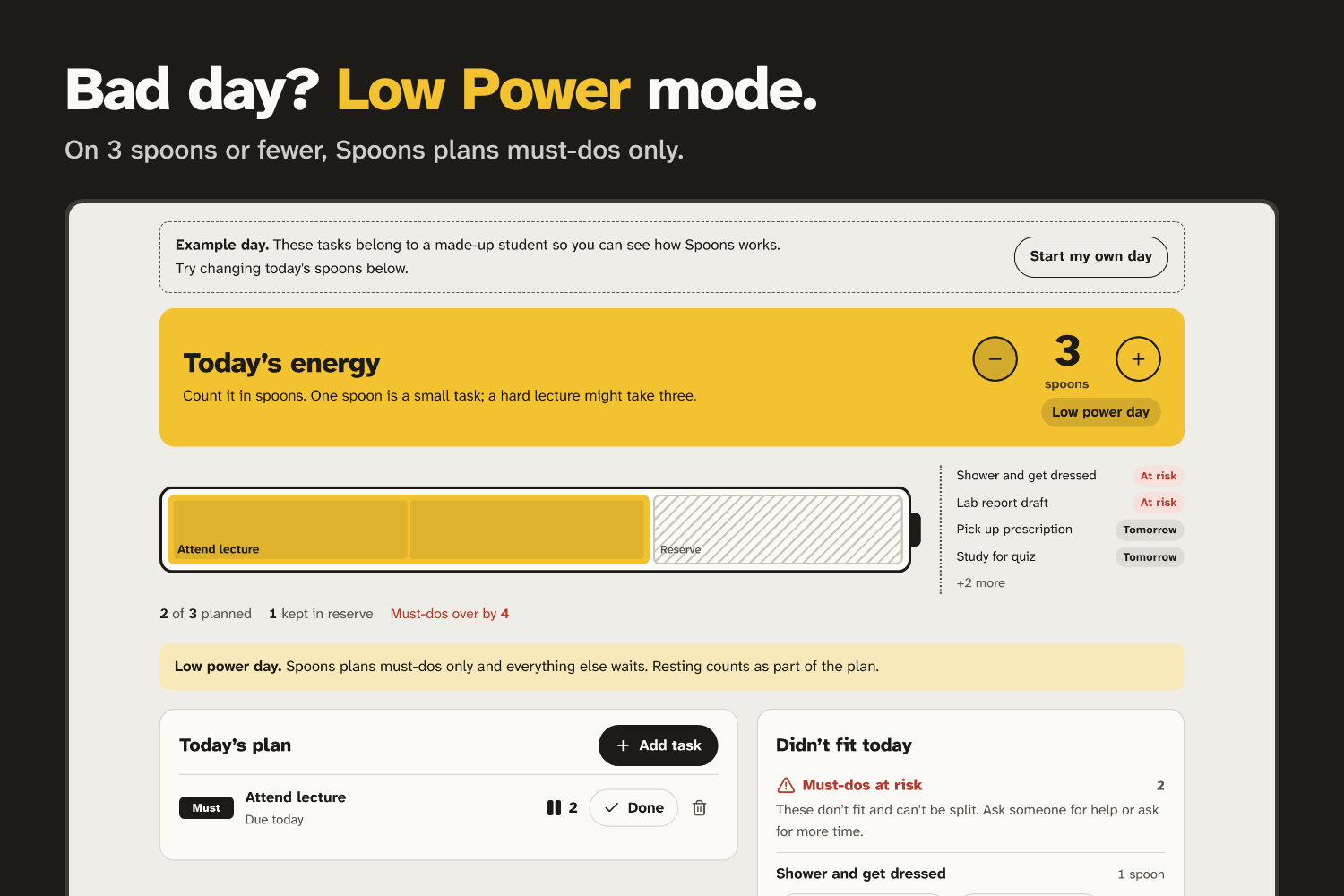
Low Power mode
-
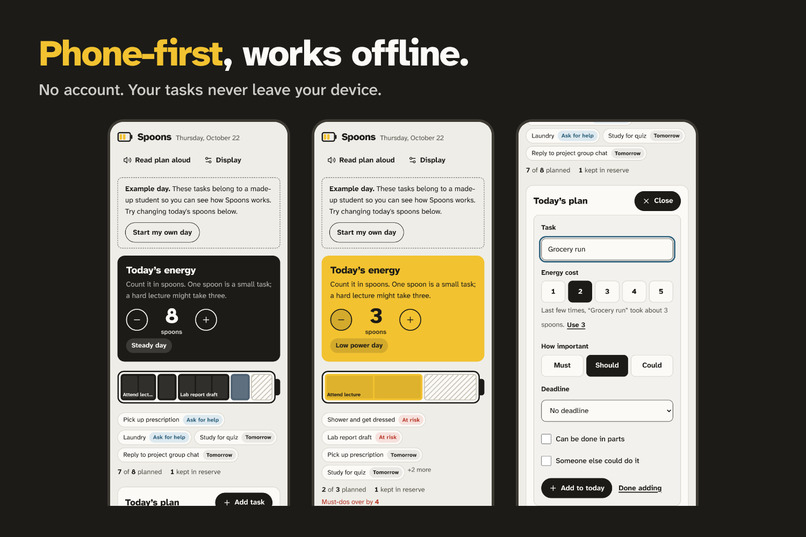
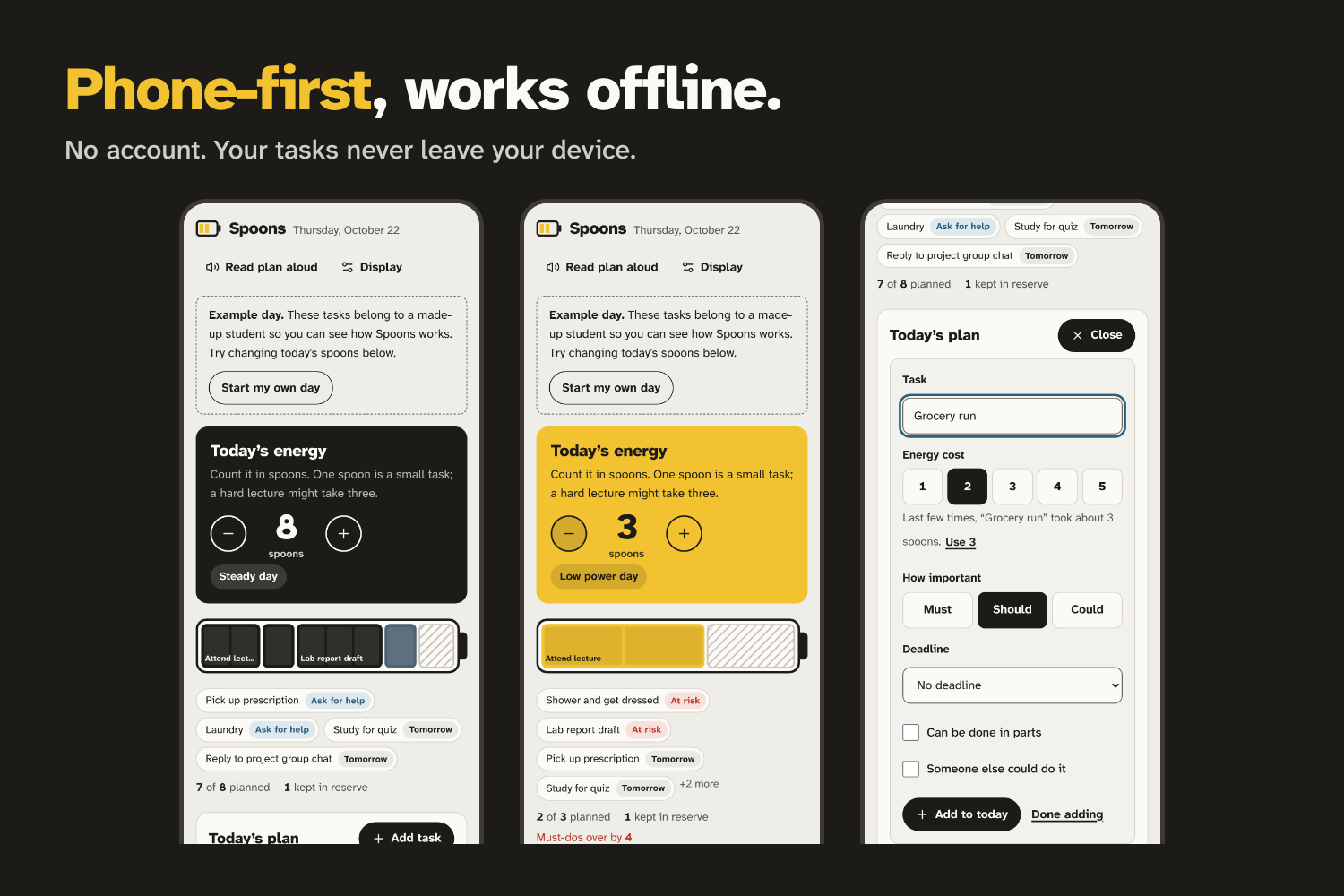
Phone views
-
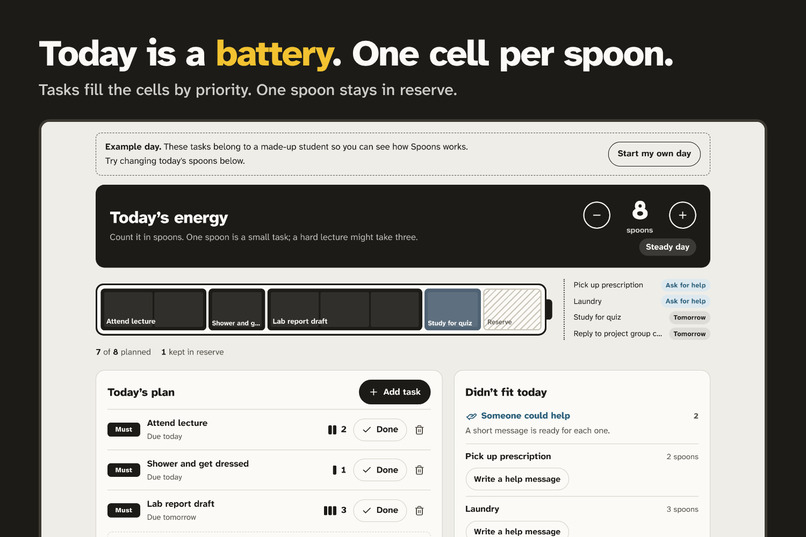
The energy battery
-
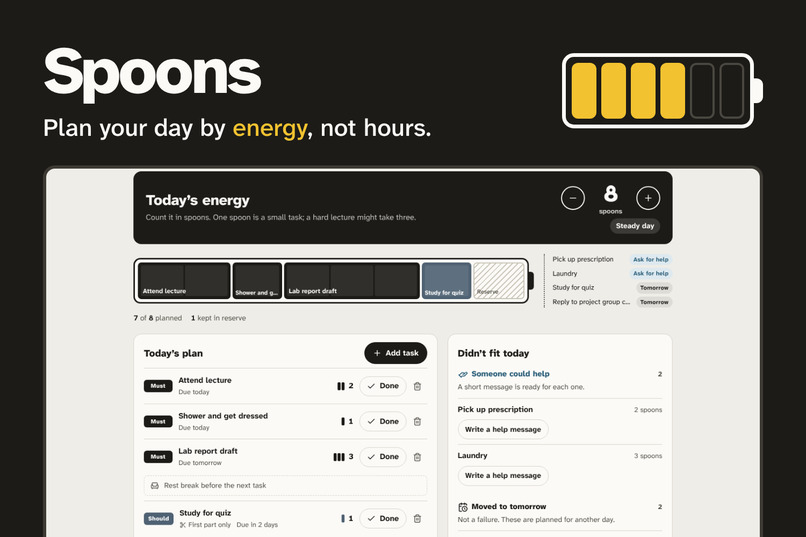
Cover: name, tagline and the app
Inspiration
Your to-do app thinks every day is the same. If you live with a chronic illness such as sickle cell disease, long COVID, lupus or ME/CFS, it isn't. Some mornings you have energy for a full day. Some mornings, getting to one lecture is the whole day.
Ordinary planners don't know the difference. They let you plan a ten-task day on an empty tank, so you push through, crash, and lose tomorrow too.
Many chronically ill people already describe this with spoon theory, written by Christine Miserandino in 2003: you start each day with a limited number of spoons, and every task costs some. We wanted a planner that speaks that language and treats energy, not time, as the limit.
Our user in the demo, Ada, is a composite persona: a student with an energy-limiting illness. Her tasks are made-up examples. No real person's health information is used.
What it does
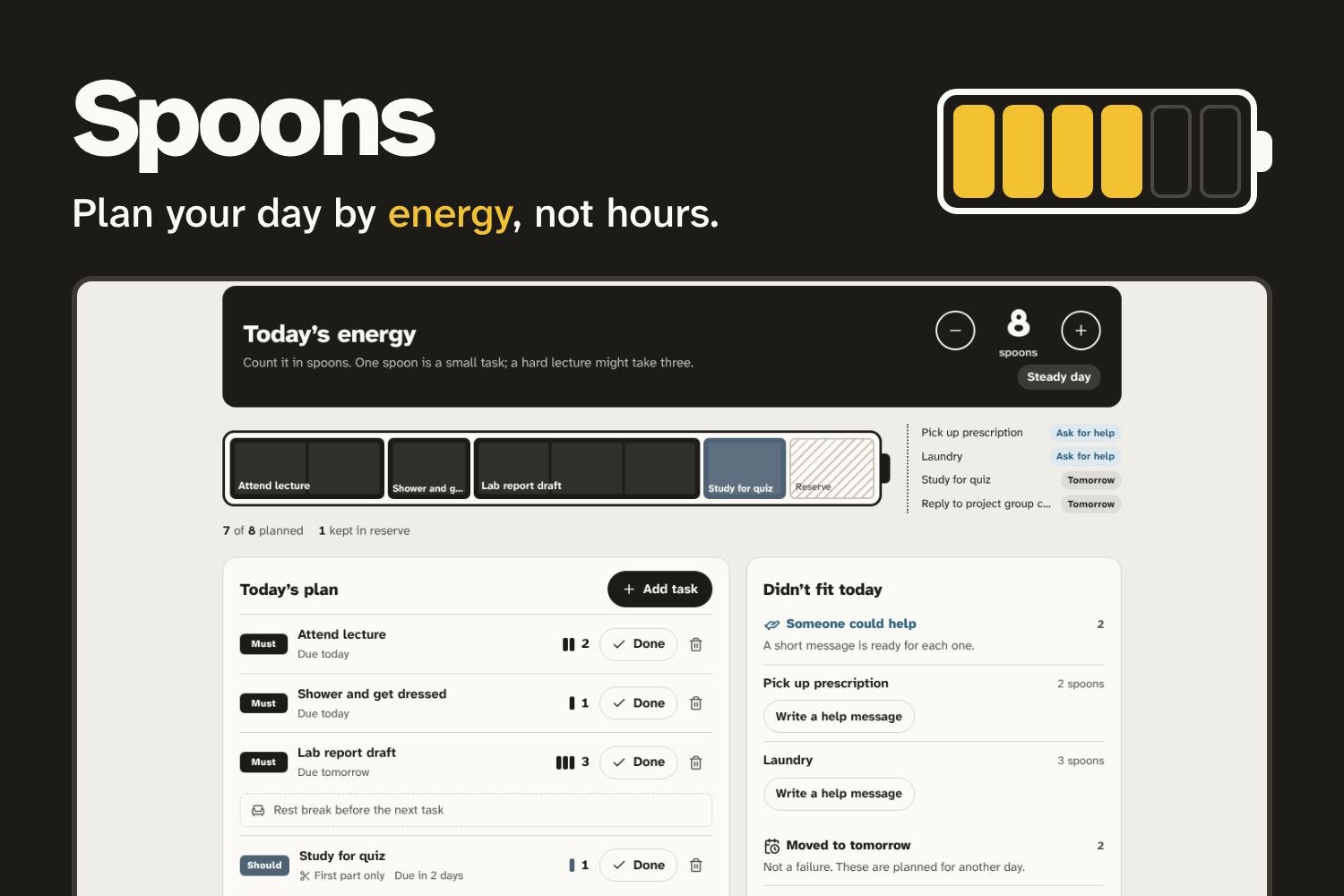
Spoons plans your day by energy, not hours.
- Check in. Each morning, set today's energy from 0 to 12 spoons.
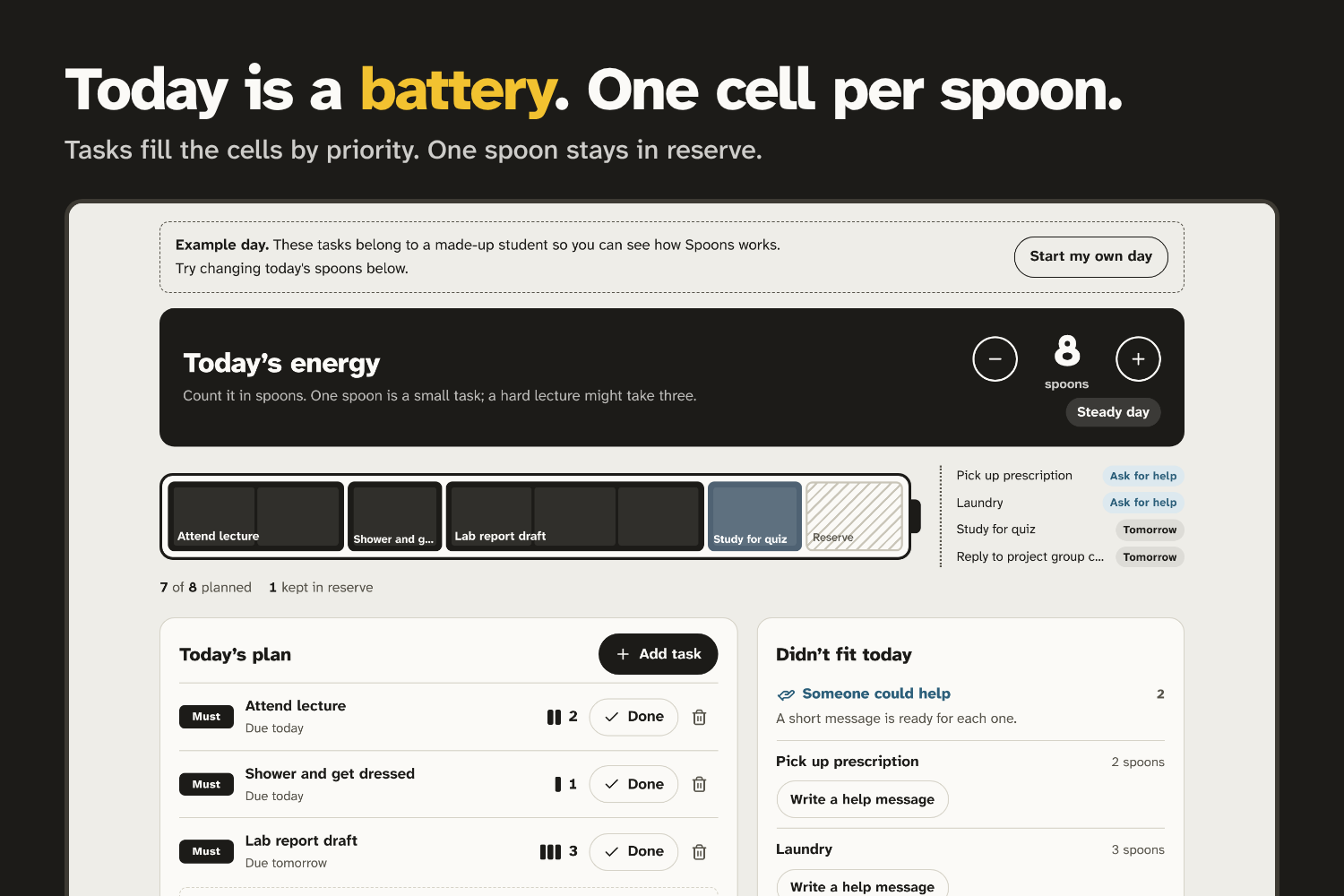
- See it fit. Today becomes a battery, one cell per spoon. Tasks fill the cells by priority (must, should, could), then by deadline. One spoon is kept in reserve so you never run on empty.
- Big tasks get split. If something is too big for what's left, Spoons plans just the first part today.
- Heavy tasks get pacing. A rest break is added after a heavy task, and two heavy tasks are never planned back to back when a lighter one can go between.
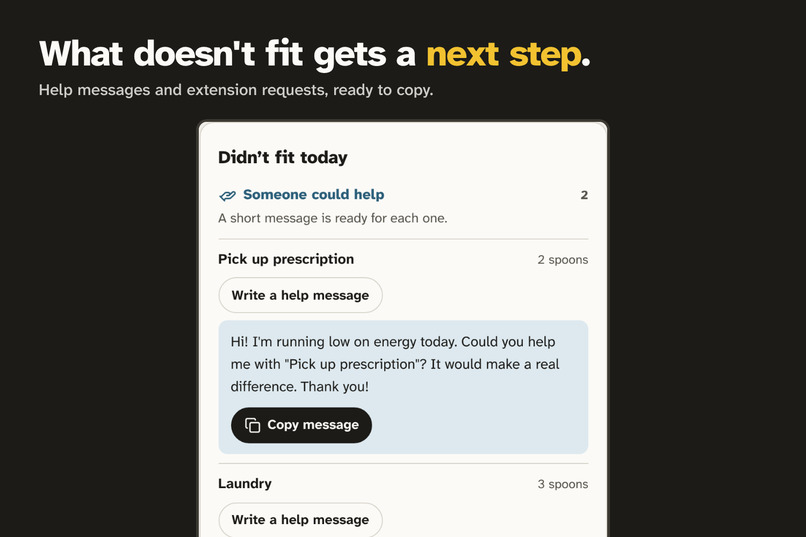
- Everything that doesn't fit gets a next step, not guilt:
- Someone could help: a short, polite help message is ready to copy.
- Must-dos at risk: a request for more time is ready to send.
- Moved to tomorrow: described as planned for another day, not as a failure.
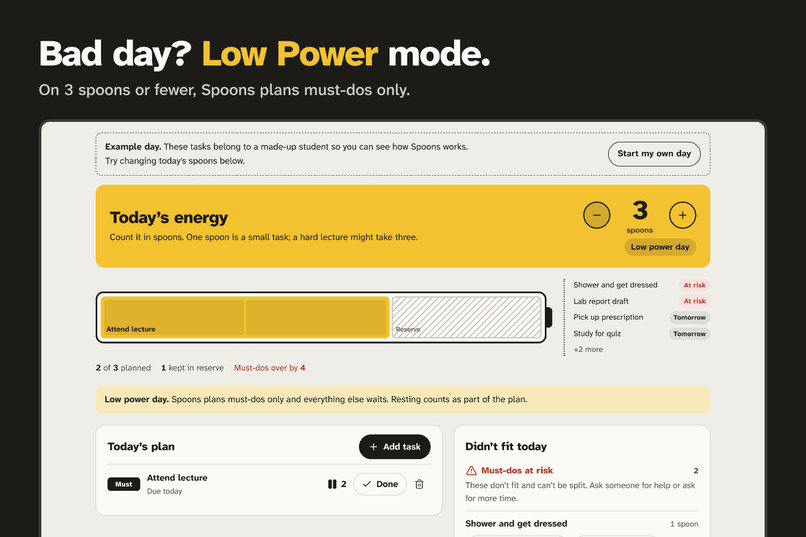
- Low Power mode. On a day of 3 spoons or fewer, the app turns yellow and plans must-dos only.
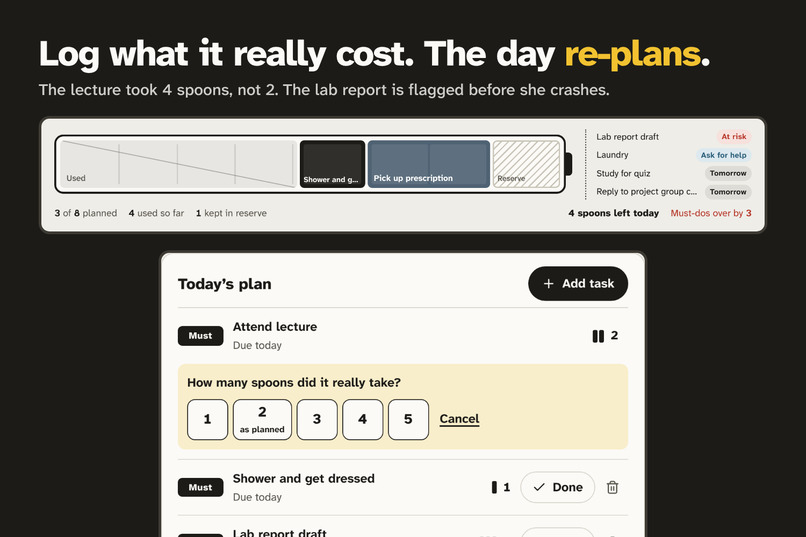
- Re-plans from reality. When you finish a task, you log what it really cost. If the lecture took 4 spoons instead of 2, the rest of the day re-plans instantly and flags what no longer fits.
- Learns your real costs. Add a task you've done before and Spoons suggests what it usually takes you.
Accessibility
For a hackathon about tools that don't leave people behind, accessibility is part of the core, not a final pass:
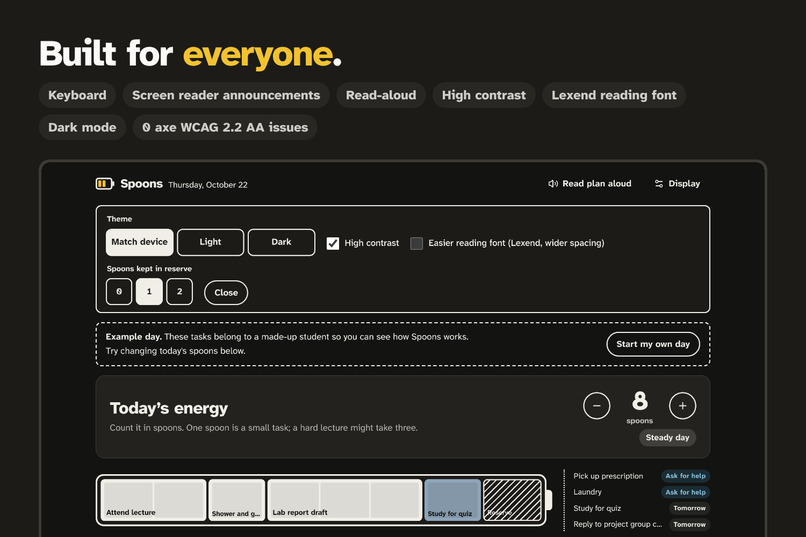
- 0 axe-core WCAG 2.2 AA violations across light, dark, high-contrast, low-power and form states
- Full keyboard use, a skip link, and visible focus everywhere
- Screen-reader announcements whenever the plan changes; the battery has a text description
- Read-aloud of the whole plan (Web Speech API)
- High-contrast mode, dark mode, and an easier-reading font option (Lexend, wider spacing)
- Atkinson Hyperlegible Next, a typeface designed by the Braille Institute for low-vision readers
- 44px touch targets, phone-first layout, reduced-motion support, plain-language copy
- No account, works offline: tasks are stored in the browser and never sent anywhere
How we built it
- React + TypeScript + Vite, deployed on Vercel as a static site, with self-hosted fonts.
- The planning engine is a set of pure TypeScript functions, written test-first with Vitest (26 tests). It is a greedy scheduler:
$$ \text{usable} = \text{today's spoons} - \text{spent} - \text{reserve} $$
Tasks are sorted by priority, then deadline, then your own order. Each one is placed in this order: plan it if it fits; otherwise split it; otherwise route it to help; otherwise flag it if it's a must-do; otherwise move it to tomorrow. A pacing pass then adds rest breaks and keeps heavy tasks apart. Learned costs use the median of past logs, so one bad day doesn't skew the estimate.
- The battery is a flex row where each segment's
flex-growequals its spoon cost, so when the plan changes the segments animate to their new sizes and you can see the day reflow. - Testing: unit tests for every planner rule, including the zero-spoon day, split tasks, re-planning after a costly task, Low Power mode and day rollover. Accessibility was tested with axe-core in a headless browser across every UI state, plus keyboard walkthroughs.
- Design: one visual world, "Low Power", taken from a phone's low-battery mode. Yellow appears only when energy is low, so it always means something.
- Demo video: recorded by a scripted Playwright run, so every frame is the real app working. The voice-over was generated with an open-source TTS model (Kokoro), and the music and sound effects were synthesized in code.
Challenges we ran into
- Making overflow feel helpful, not like failure. An early version left half the example day "unplanned", which read as the app failing. We reworked the language and made sure every leftover task has a concrete next step someone can act on.
- Split tasks across a day. Finishing part one of a split task has to reduce what's left, count the spoons spent, and keep the task open. We modelled that explicitly and covered it with tests.
- Colour that means something. We first painted every planned cell yellow, which made the "low power" warning meaningless. An independent design review caught it, and yellow is now reserved for low-energy days.
- Keeping the demo honest. The recording drifted out of sync with the voice track, so we detected the scene cuts in the footage and re-timed each segment to match.
Accomplishments that we're proud of
- A planner that is honest on a bad day: it says what won't fit, and helps you tell someone.
- A real, tested engine behind the visuals, not a mock-up.
- Zero automated accessibility violations, plus read-aloud, high contrast and a reading-font mode.
- It works for a judge in ten seconds: no sign-up, an example day already loaded.
What we learned
- Using the words a community already uses (spoons) lowers the effort of using the tool.
- Accessibility choices such as plain words, big targets and fewer decisions make the app calmer for everyone on a low-energy day.
- Writing the scheduler test-first surfaced edge cases early, like a zero-spoon day or a task that costs more than the whole remaining budget.
What's next for Spoons
- Test with chronically ill students and university disability-support offices, and tune costs and wording with them
- A "help circle" so requests go straight to trusted friends
- A weekly view to spot patterns: which tasks cost the most, and which days run low
- An installable app (PWA) with a gentle morning check-in
Limitations
- Greedy scheduling: priority wins over packing the most tasks in, by design.
- Energy costs are self-reported, and learning needs at least two logs per task.
- Data lives in one browser, with no sync yet.
- Not medical advice, and not a substitute for care.
- Not yet tested with real users from the target group; that is the next step.
Pre-existing work and AI disclosure
- All code was written during the hackathon (22–24 October 2026), using open-source libraries (React, Vite, Lucide icons, Fontsource fonts) under their licenses.
- AI assistance: we used Claude (Anthropic) as a coding and writing assistant for research, planning, code, tests, the demo recording scripts and documentation drafts. Everything was reviewed, run and tested before submission.
- The demo voice-over is AI-generated (Kokoro, open-source TTS). The music and sound effects were synthesized in code for the video.
- Spoon theory is the work of Christine Miserandino and is credited in the app.
Built With
- axe-core
- css
- ffmpeg
- html5
- javascript
- localstorage
- lucide
- playwright
- python
- react
- typescript
- vercel
- vite
- vitest

Log in or sign up for Devpost to join the conversation.