-
-
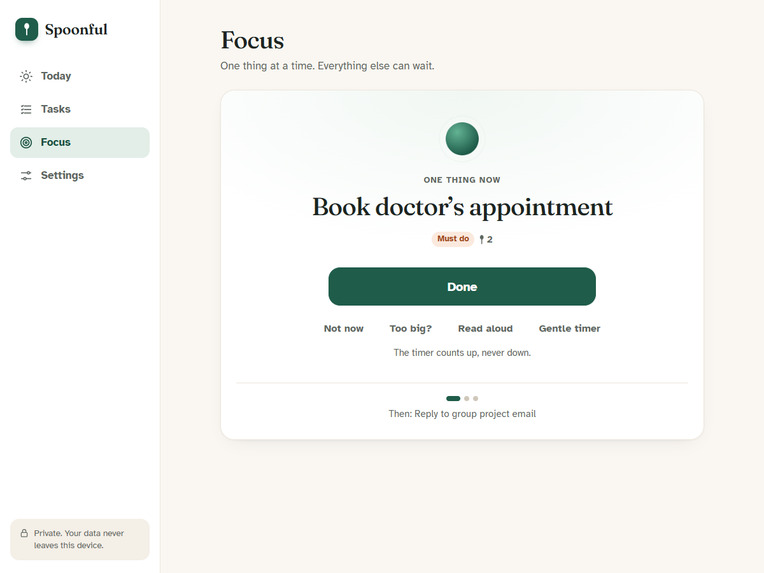
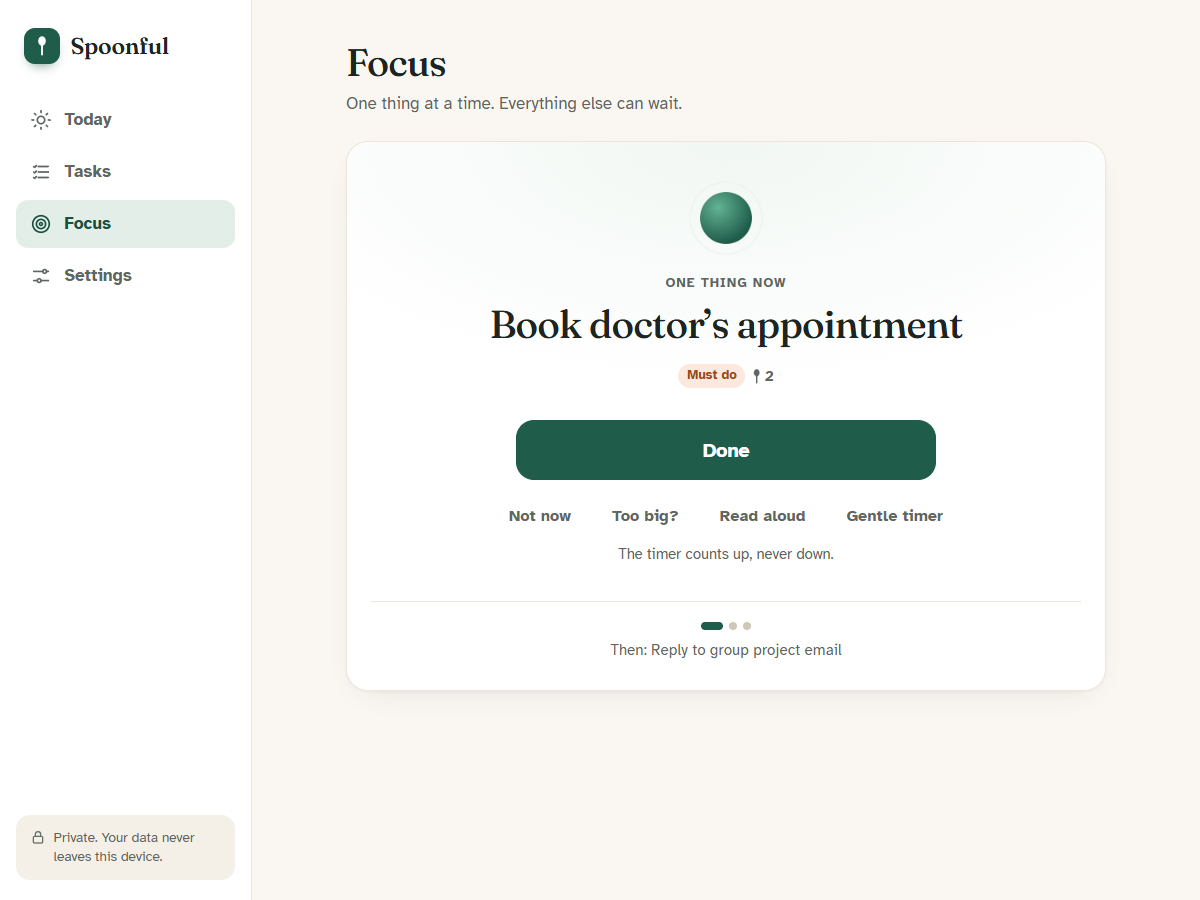
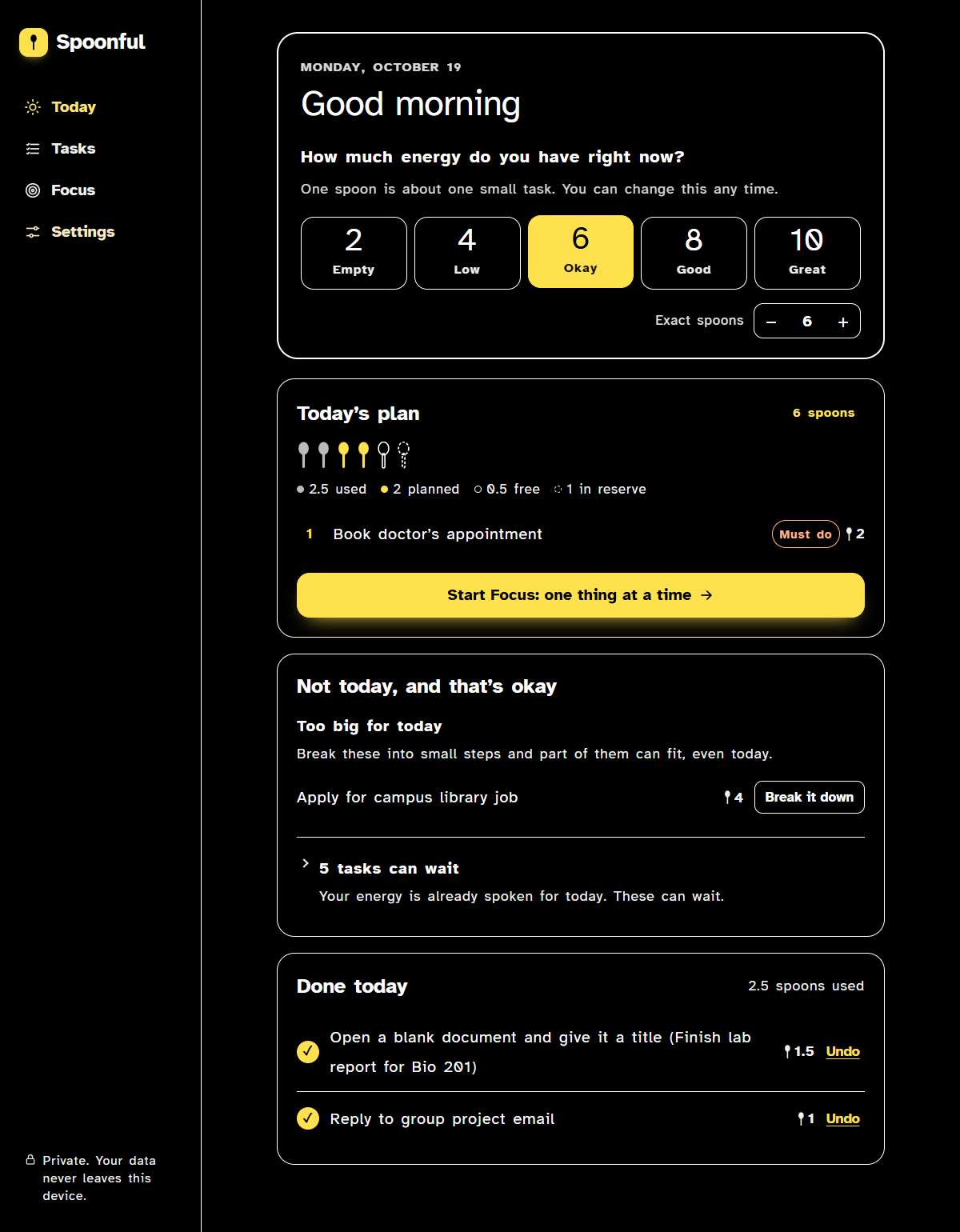
Focus mode: one thing at a time. Done, Not now, Too big? or Read aloud, with a gentle timer that counts up, never down.
-
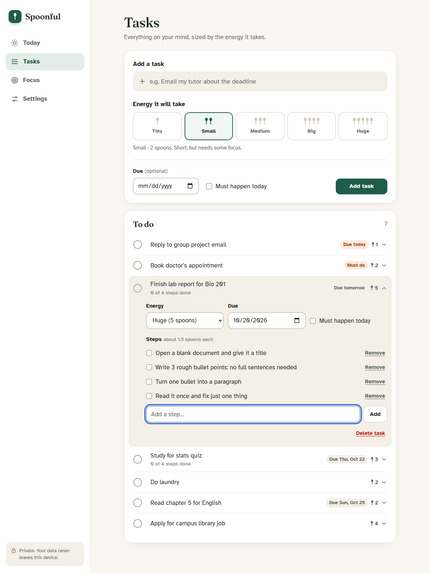
Too big for today? Break it down. Built-in step suggestions (offline, no AI) turn a 5-spoon task into small steps that fit a low day.
-
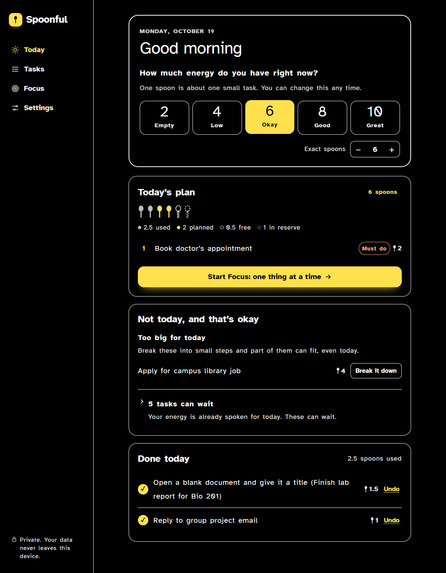
Accessibility built in: high contrast, dark mode, large text and readable spacing. Automated WCAG 2.1 AA check: 0 violations.
-
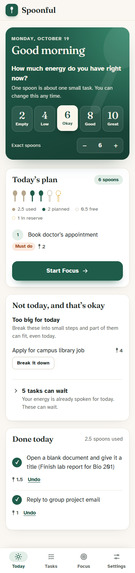
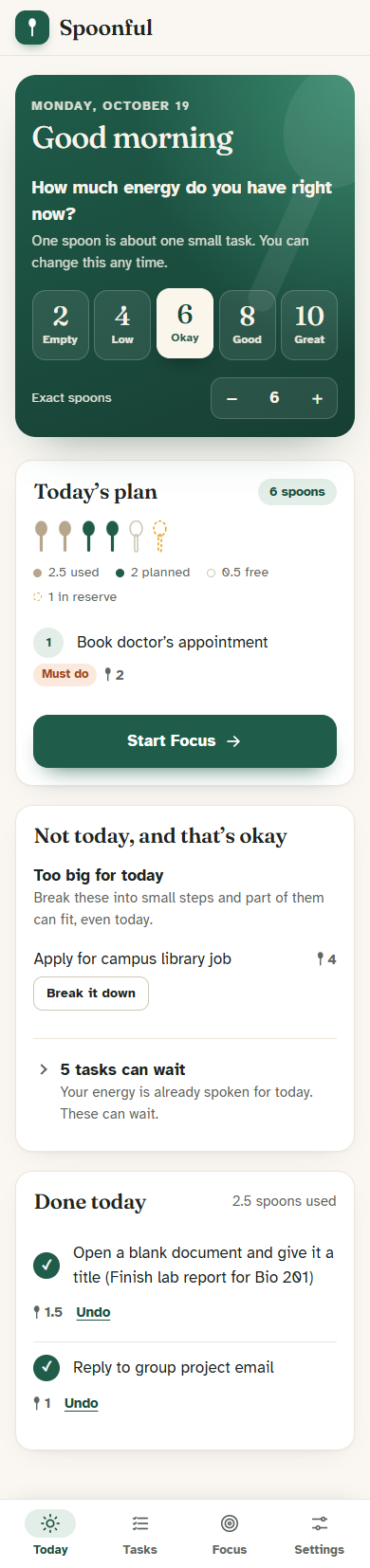
Works on phones and offline as an installable app, with a bottom tab bar. No account, and your data never leaves your device.
-
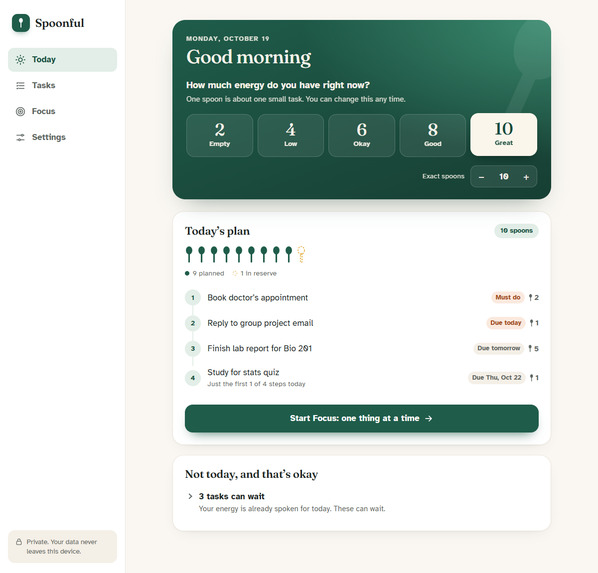
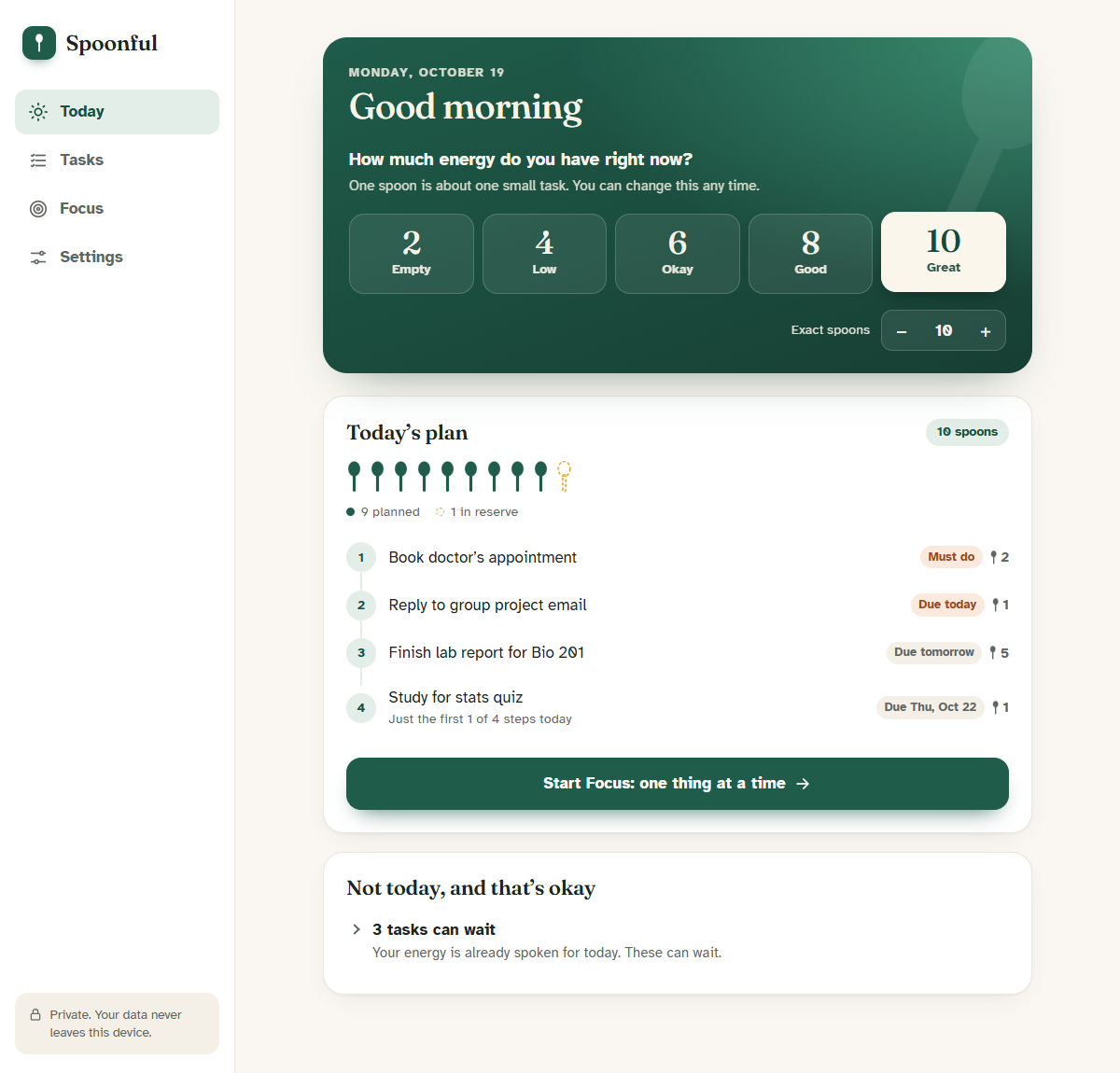
Same task list, great day (10 spoons): Spoonful plans more, including the big lab report and the first step of studying for a quiz.
-
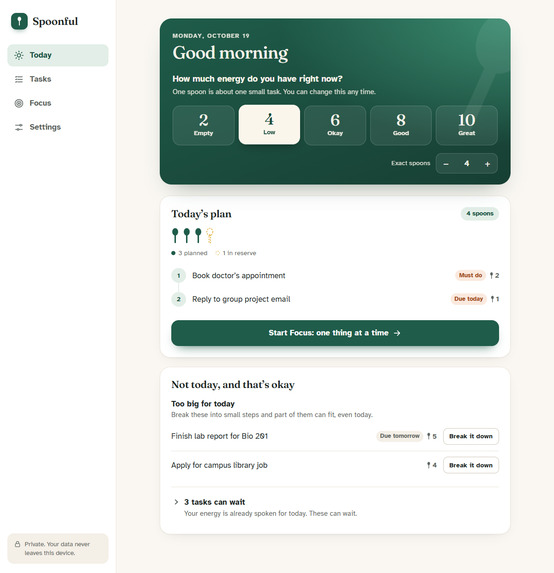
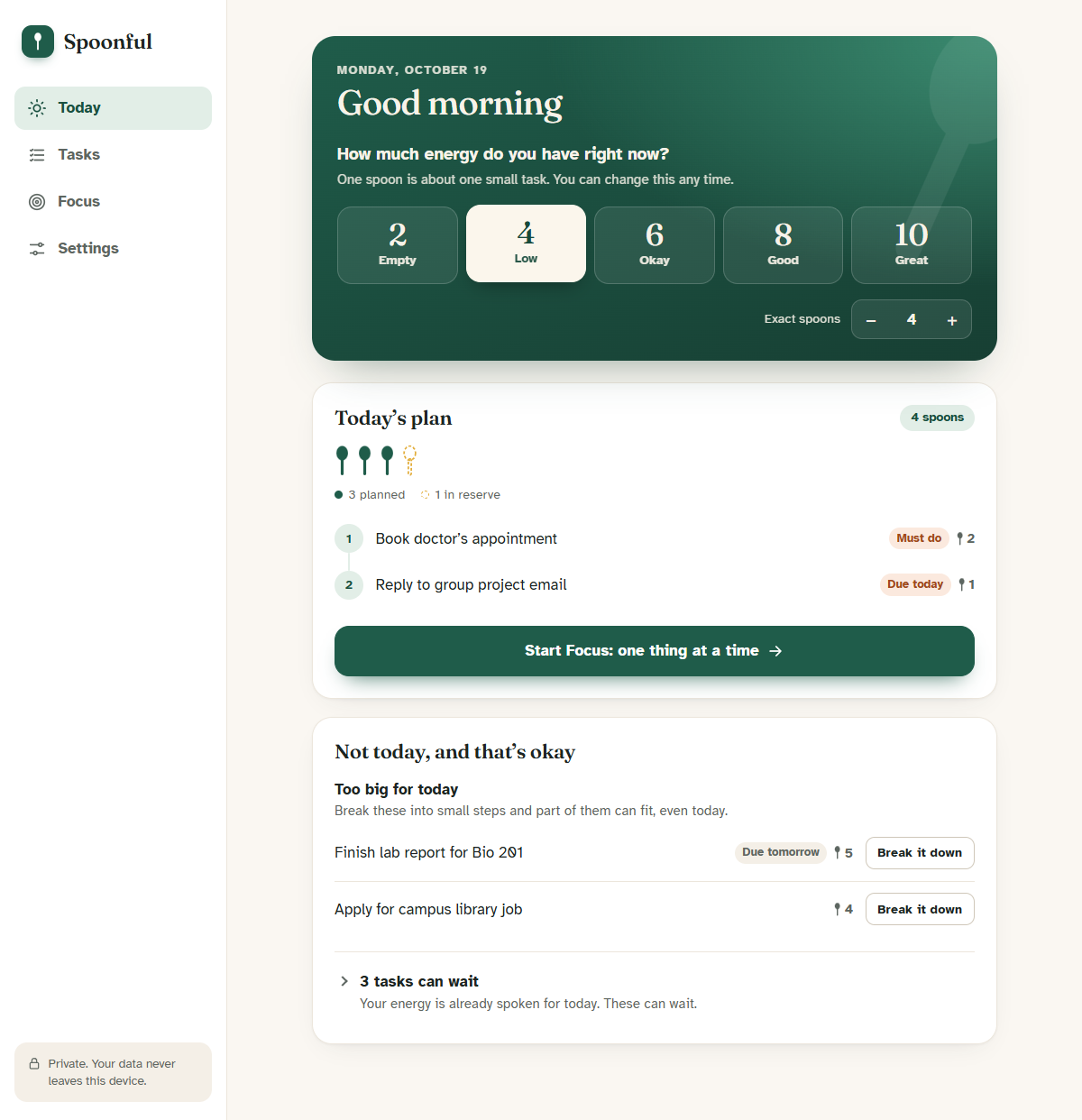
Low-energy day (4 spoons): only the must-dos are planned, one spoon is kept in reserve, and everything else is told kindly that it can wait.
Try it
- Live app: https://waazy-w.github.io/spoonful/ (click "Try it with example tasks")
- Code: https://github.com/waazy-w/spoonful
Inspiration
Picture Maya, a second-year student with long COVID. (Maya is a composite persona; see "Who we built for" below.) On a good day she can manage a lecture, a lab write-up and laundry. On a bad day, replying to one email uses up everything she has. Her to-do app doesn't know the difference. It shows the same 12 items every morning, and every evening it shows her how many she "failed".
Disabled and chronically ill people already have a language for this: spoon theory. You start each day with a limited number of spoons, and every task costs some. Plenty of people talk about spoons. We couldn't find a planner that actually plans with them, so we built one.
Who we built for
User: a student with an energy-limiting condition (chronic illness, ADHD, depression, chronic pain) whose capacity changes from day to day.
Barrier: productivity tools measure time, not energy. They assume every day is the same, which leaves these students with plans they can't keep and a list that feels like a judgement.
Meaningful change: the student goes from an overwhelming list plus guilt to a plan that fits today's real energy, a clear first step, and a written reason that it's okay for the rest to wait.
What it does
- Check in. "How much energy do you have right now?" Pick Empty (2) / Low (4) / Okay (6) / Good (8) / Great (10) spoons, or set an exact number.
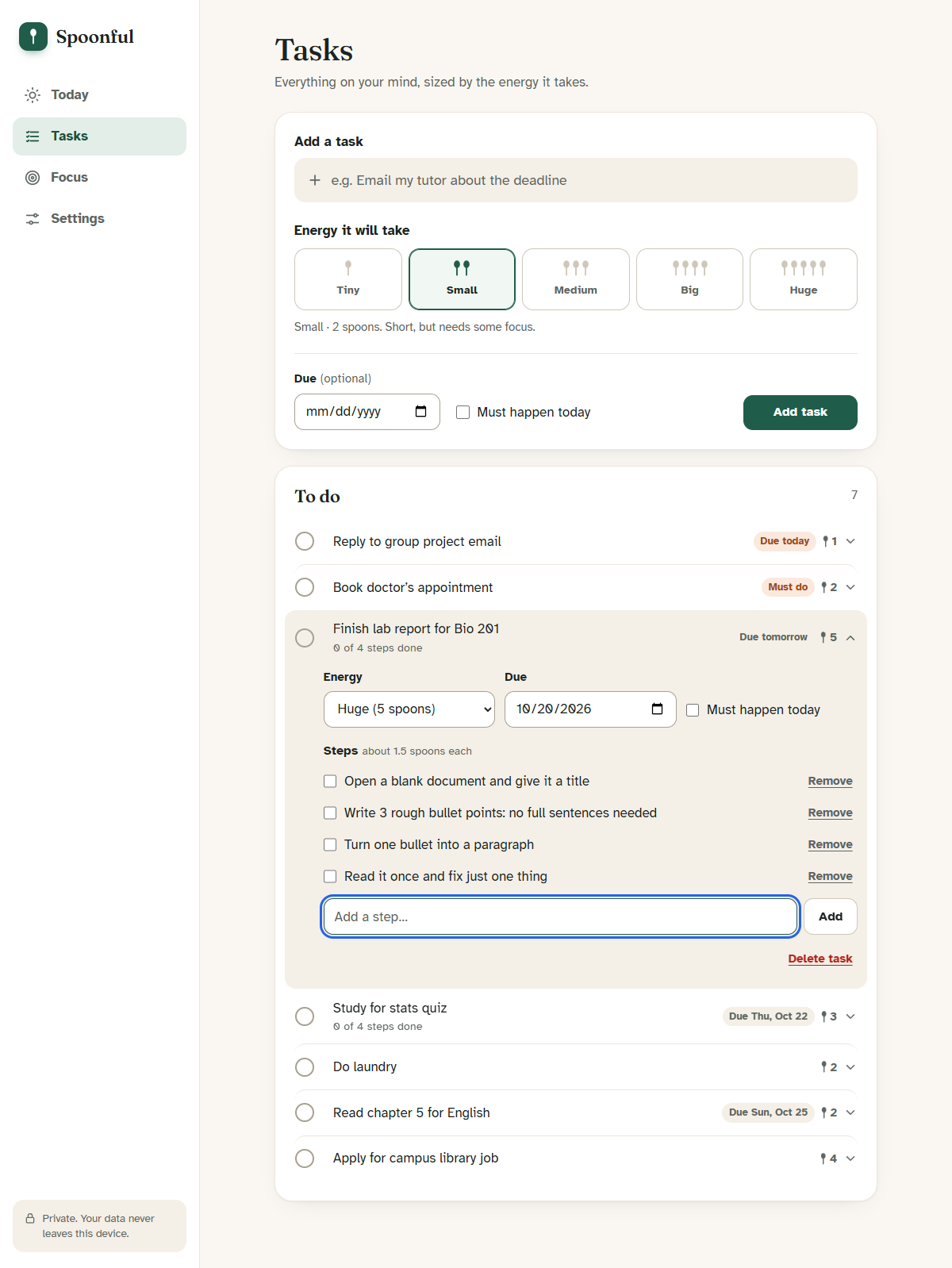
- Add tasks with an energy cost from Tiny (1) to Huge (5), plus an optional due date and a "must happen today" flag.
- Get a plan that fits. Must-dos and near deadlines come first, then the smallest tasks. One spoon is always held in reserve so the plan never spends you to zero.
- "Not today, and that's okay." Every deferred task says why: no room today, rest day, or too big. Too-big tasks get a Break it down button.
- Break it down. Built-in suggestions (offline, no AI) turn "Finish lab report" into "Open a blank document and give it a title → Write 3 rough bullet points → …". Spoonful then plans just the first steps that fit, so big deadlines still move forward on low days.
- Focus mode. One thing on screen at a time, with Done, Not now, Too big? and Read aloud, plus an optional timer that counts up, never down.
- Done today. A record of what you achieved, with Undo.
Accessibility is the feature
- Full keyboard use, a visible focus ring, a skip link, and focus moved deliberately after every action
- Screen-reader announcements through a polite live region ("Done: reply to email. Next: book appointment.")
- Real radio buttons and checkboxes under the card UI, so screen readers announce them correctly. Every icon has a text alternative
- Text size up to 150%, a readable spacing mode (wider letter, word and line spacing), high contrast, dark mode, reduced motion
- Atkinson Hyperlegible font (designed by the Braille Institute for low-vision readers)
- Minimum 44px touch targets, no information shown by colour alone, works at 390px width
- axe-core WCAG 2.1 AA audit: 0 violations in six app states, including dark and high contrast
How we built it
- Vanilla HTML, CSS and JavaScript. No framework, no build step, no backend, no API keys. A judge can open one link and it works, even offline.
- A pure planning engine (
js/planner.js) shared by the browser and the Node tests: greedy, priority-ordered selection with a reserve buffer and partial step planning. - 16 unit tests (
node:test) cover the reserve, budget limits, priority order, partial planning, deferral reasons and date logic. - A headless-Chrome end-to-end test (puppeteer-core) walks the full user journey and runs axe-core in every state.
- A calm, app-style design: sidebar navigation on desktop, a bottom tab bar on phones, and light, dark and high-contrast themes built from shared design tokens.
- A Progressive Web App: a service-worker app-shell cache, an installable manifest, and localStorage persistence that resets the check-in each new day.
- The Web Speech API for read-aloud in Focus mode.
Challenges we ran into
- Making "no" feel kind. The first version just listed unplanned tasks. We rewrote every deferral as a reason ("Your energy is already spoken for today. This can wait.") and labelled very low days as rest, not failure.
- Big tasks never fit. A 5-spoon lab report due tomorrow would never fit a 4-spoon day, so the planner silently ignored it. Our browser test caught this. We added a "never fits" rule that offers a breakdown, and partial planning so the first steps of a big task get scheduled.
- The toast covered the buttons. Our automated test couldn't click "Start Focus" because the notification toast sat on top of it, and real users would have hit the same problem. The fix was
pointer-events: none, plus hiding the toast from screen readers so announcements weren't read twice. - Focus hidden under the sticky header. Our test clicked "Add task" and hit the Settings tab instead: the browser had scrolled the button underneath the sticky header. Keyboard users would have had the same problem, with focus hidden (WCAG 2.2 "Focus Not Obscured"). We fixed it with
scroll-padding. - Keeping keyboard focus through re-renders. Every interactive element has a stable key, so focus returns to the right control after the list redraws.
Accomplishments we're proud of
- 0 automated accessibility violations across light, dark and high-contrast themes
- A planner that explains its decisions instead of hiding them
- Fully private: no account, no server, and the data never leaves the device
What we learned
- Accessibility is easier when it's designed in from the start. Using real form controls under a custom look gave us screen-reader support almost for free.
- Language is part of the interface. The same algorithm feels supportive or judgemental depending on one sentence.
- Writing the core logic as pure, tested functions let us change the planning rules late in the project with confidence.
Limitations (honest list)
- Spoon estimates are subjective and self-reported.
- Step suggestions come from keyword templates, not an understanding of the task.
- One device only (no sync yet); backup/restore is manual.
- Automated accessibility testing isn't the same as testing with disabled users. We haven't yet run sessions with screen-reader users or people with chronic illness.
What's next
- Learn from history: suggest spoon costs based on how a user rated similar past tasks
- Weekly energy patterns ("Mondays are usually low; move heavy tasks to Wednesday")
- Optional encrypted sync, and calendar export for planned items
- Co-design sessions with disability student services
Pre-existing work & AI disclosure
- Concept: "Spoon theory" is Christine Miserandino's (2003). We built on the idea; we did not invent it.
- Fonts: Atkinson Hyperlegible (Braille Institute) and Fraunces (Undercase Type), both under the SIL Open Font License, via Google Fonts.
- Testing libraries (dev only, not shipped): puppeteer-core, axe-core.
- AI assistance: Built with Claude (Anthropic) through Claude Code. The AI helped generate and score the 10 candidate ideas against the rubric, wrote most of the code and tests, ran the automated browser and accessibility tests, drafted this write-up, and produced the demo video. The video's narration is a synthetic text-to-speech voice (Microsoft Zira), and it was recorded automatically from the real app. We chose the idea, reviewed the code and results, and are responsible for the submission. The app itself uses no AI at runtime: step suggestions are hand-written templates.
- All code was written during the hackathon period. No pre-existing project code was used.
Team
- saaz (GitHub: waazy-w)
Built With
- accessibility
- axe-core
- css3
- html5
- javascript
- localstorage
- node.js
- pwa
- service-worker
- web-speech-api

Log in or sign up for Devpost to join the conversation.