-
-
Cover Page
-
How it works
Inspiration
Around 2 billion people work in the informal economy: street vendors, tailors, home cooks, small artisans. Most of them are locked out of online payments, because every tool assumes you can type, read English, and navigate dashboards.
I asked: what if running an online shop was as easy as talking?
What it does
For the seller
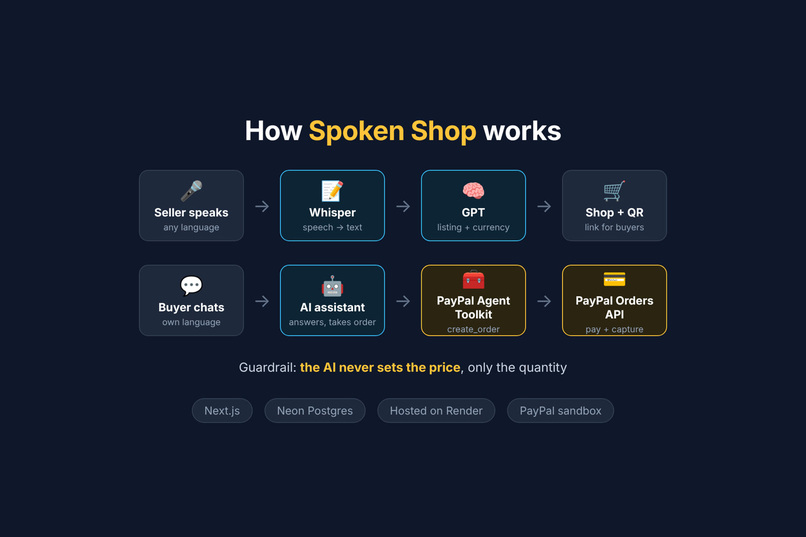
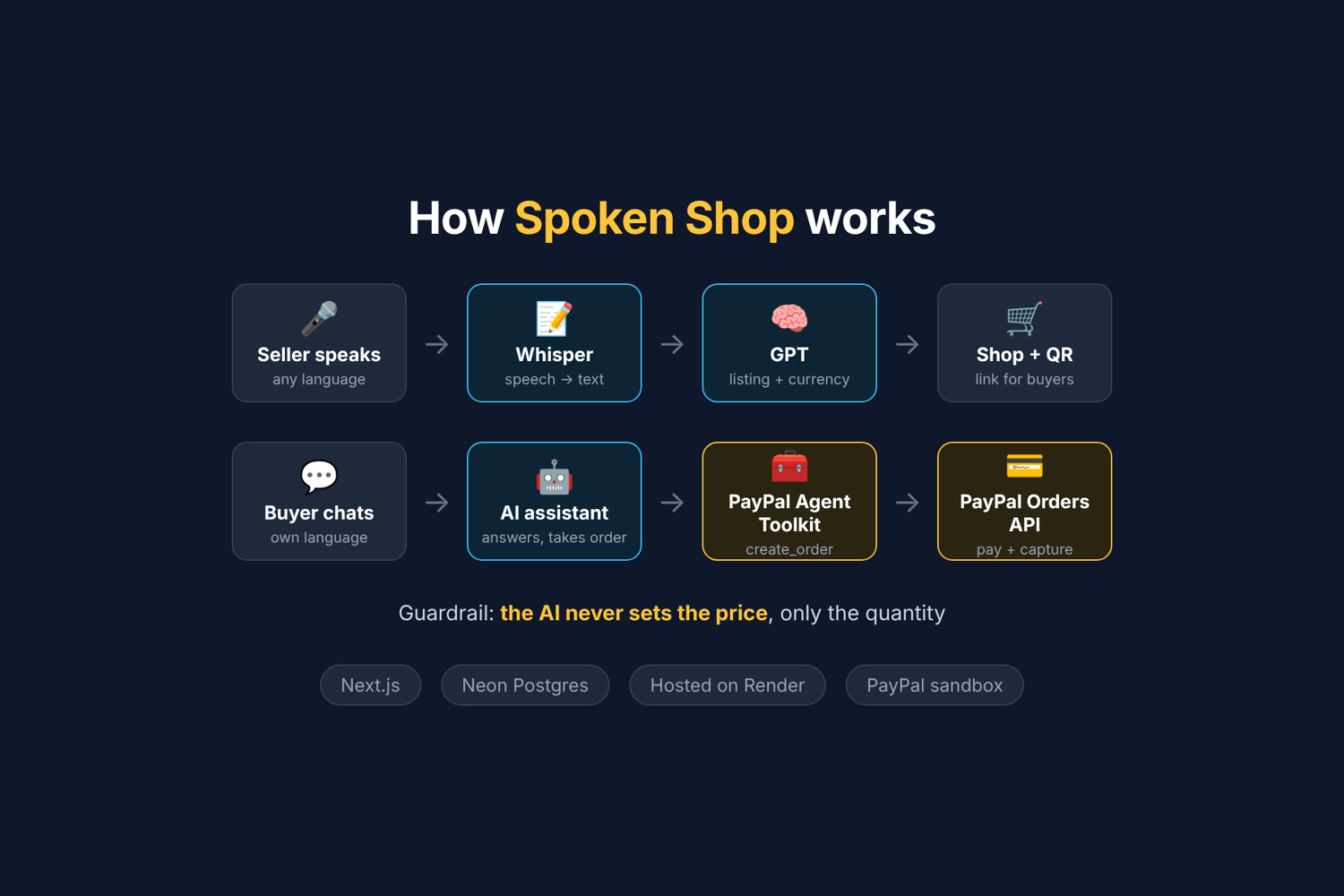
- Taps one button and speaks: what they sell, the price and how much they have, in their own language.
- AI turns it into an English shop listing, keeps local product names, and converts local-currency prices to USD for checkout.
- Gets a shareable shop link and a printable QR code to stick on their stall.
For the buyer
- Scans the QR code. No app to install.
- Chats with an AI shop assistant in their own language, by text or voice.
- Says how many they want. The AI creates a real PayPal order with PayPal's Agent Toolkit and shows a Pay with PayPal button.
- Pays with PayPal, and the seller's stock updates instantly.
In the demo video, Sangeetha, a vegetable seller, lists ridge gourd by speaking local language, and a buyer purchases it through the AI assistant.
How I built it
- Next.js (TypeScript) web app, hosted on Render
- OpenAI Whisper for speech-to-text in 50+ languages
- GPT (gpt-4o-mini) to turn speech into a structured listing, and to power the buyer chat
- PayPal Agent Toolkit (
create_order,get_order) so the AI assistant can create PayPal orders - PayPal JavaScript SDK + Orders API v2 for the checkout button and capturing payments
- Neon Postgres for products and stock
Guardrails for AI near money
- The AI never sets the price. It only chooses the quantity, and the price always comes from the database, so buyers can't talk it into a discount.
- It can't sell more than the stock available.
- Payments are verified on the server before stock changes, and a completed order is never counted twice.
- All PayPal and OpenAI keys stay on the server.
Challenges I ran into
- The AI "made things up." Early on, a spoken Tamil word for a local food came back as "authentic Italian notes." I rewrote the listing prompt to translate faithfully, keep local names and never invent claims, and gave Whisper a hint of common product words.
- Currencies. Sellers speak prices in their own currency, but checkout runs in USD, so I added live conversion and show the seller what their price becomes.
- Data disappearing. Render's free tier wipes files when it sleeps, so I moved from a JSON file to Neon Postgres.
- Safari and the PayPal sandbox popup. Safari's tracking protection blocks the sandbox login popup, so the chat checkout uses a full-page redirect to PayPal instead.
Accomplishments I'm proud of
- A real seller used it in her own language, and it worked end to end.
- The AI assistant is genuinely useful but safe to put near money.
- It's live and works on a phone, from scanning a QR code to a completed PayPal payment.
What I learned
How to design AI features that are helpful but constrained, how PayPal's Agent Toolkit fits into a tool-calling flow, and how much small details (microphone permissions, currencies, browser quirks) matter for real users.
What's next
- One QR code per stall, with a full menu and a single cart
- Restocking by voice, and spoken daily sales summaries in the seller's language
- Each seller connecting their own PayPal account
Built With
- gpt-4o-mini
- neon
- nextjs
- openai
- paypal
- paypal-agent-toolkit
- paypal-orders-api
- postgresql
- react
- render
- tailwindcss
- typescript
- whisper
