-
-

Logo
-
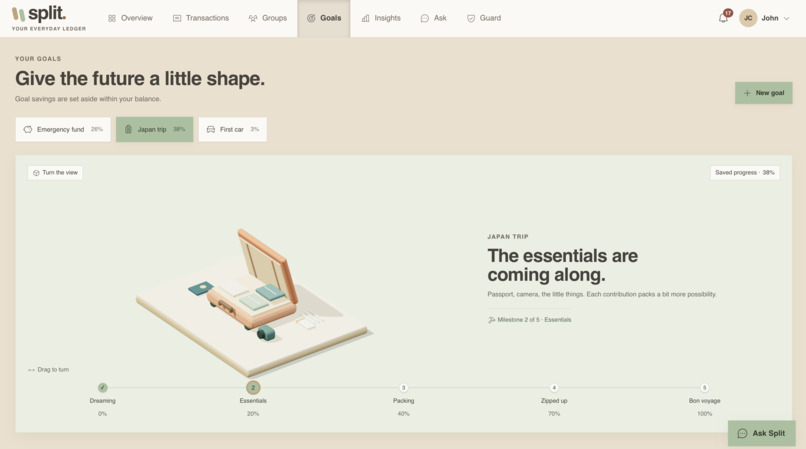
Trips
-
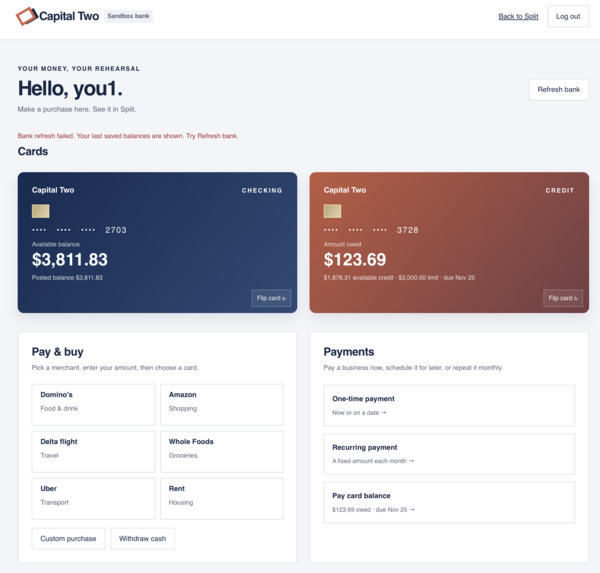
Mock Bank Account
-
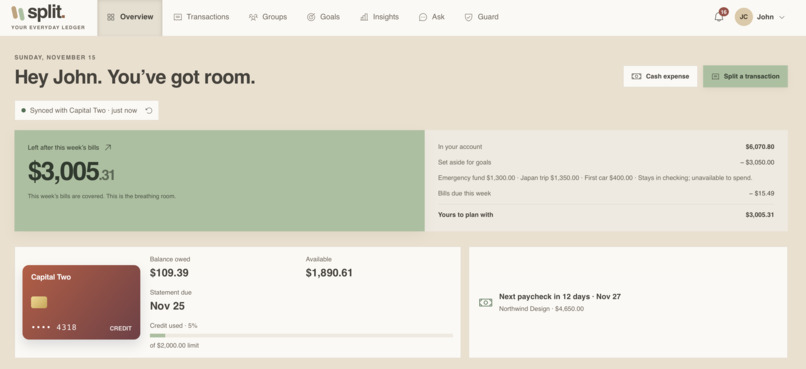
Split
-
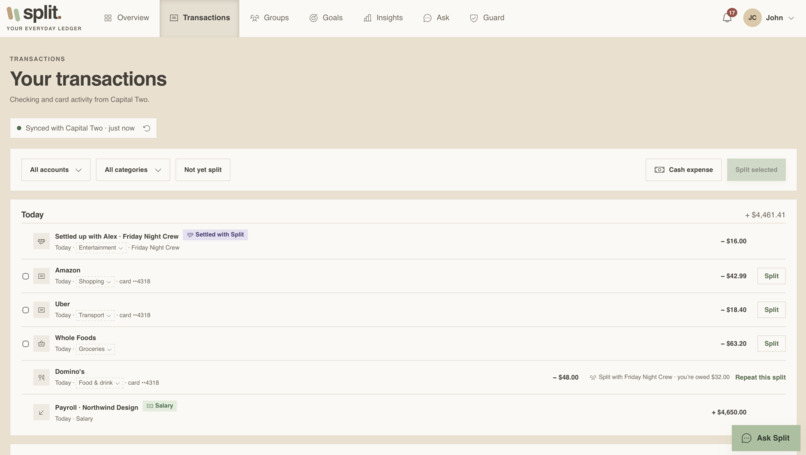
Transactions
-
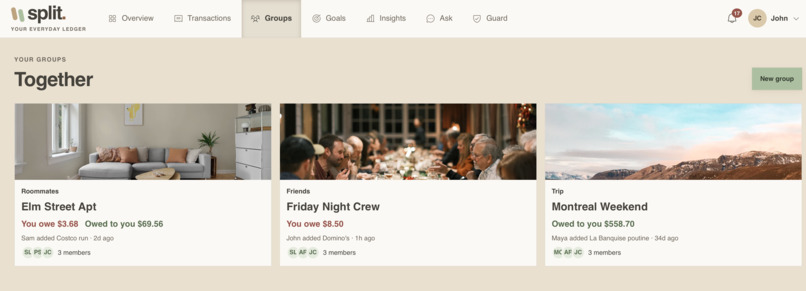
Trips/Groups
-
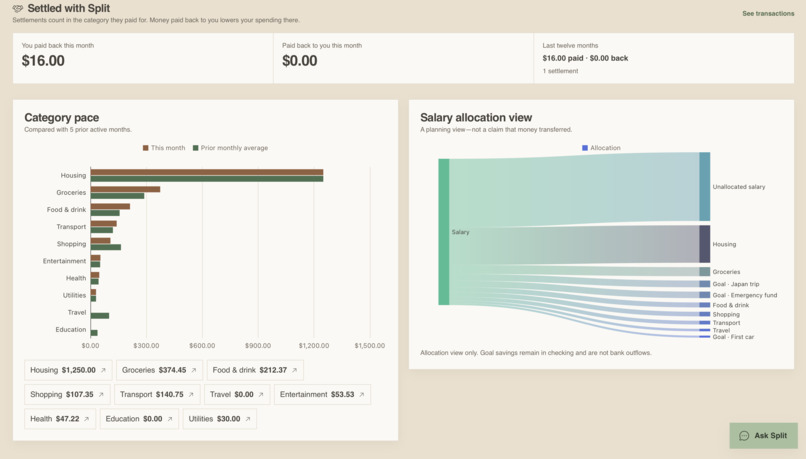
Graphs
-
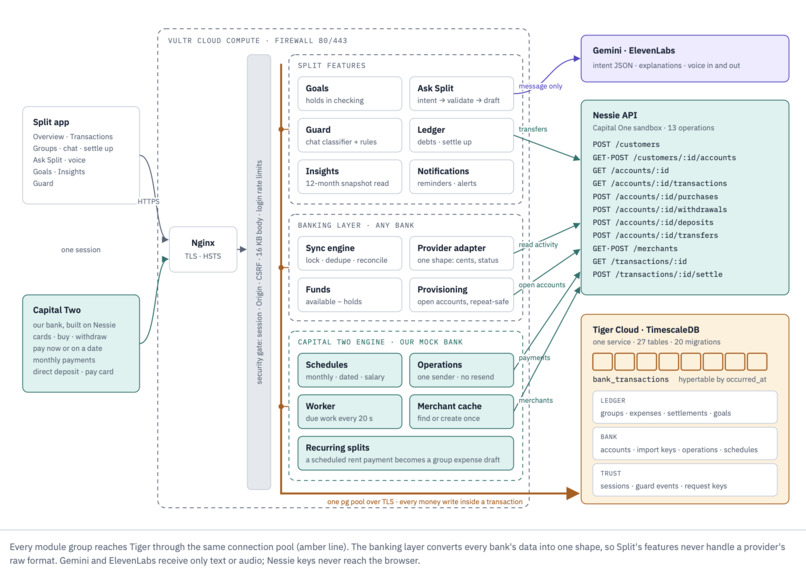
Data Flow Architecture Diagram
-
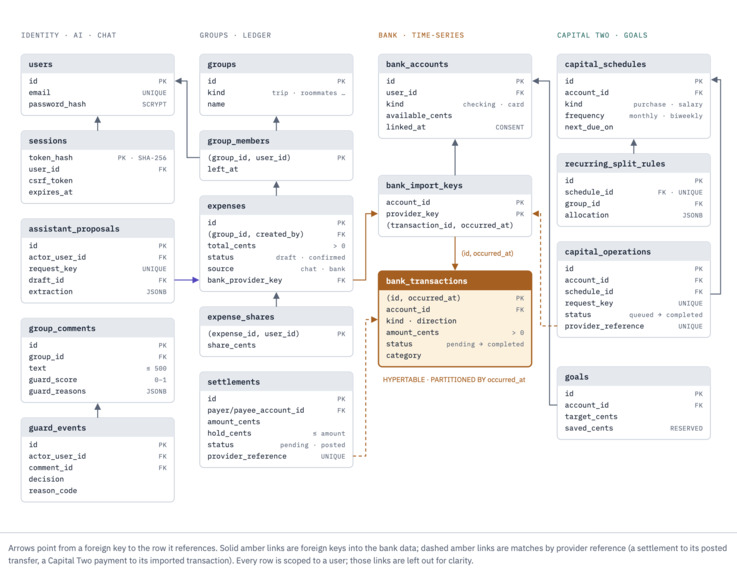
ER Diagram
-
APIs
-
Workflows
-
Functionality
-
Nessie Financial Distributed Systems

Split
Shared money, handled by voice, backed by a real bank, and guarded against the AI itself.
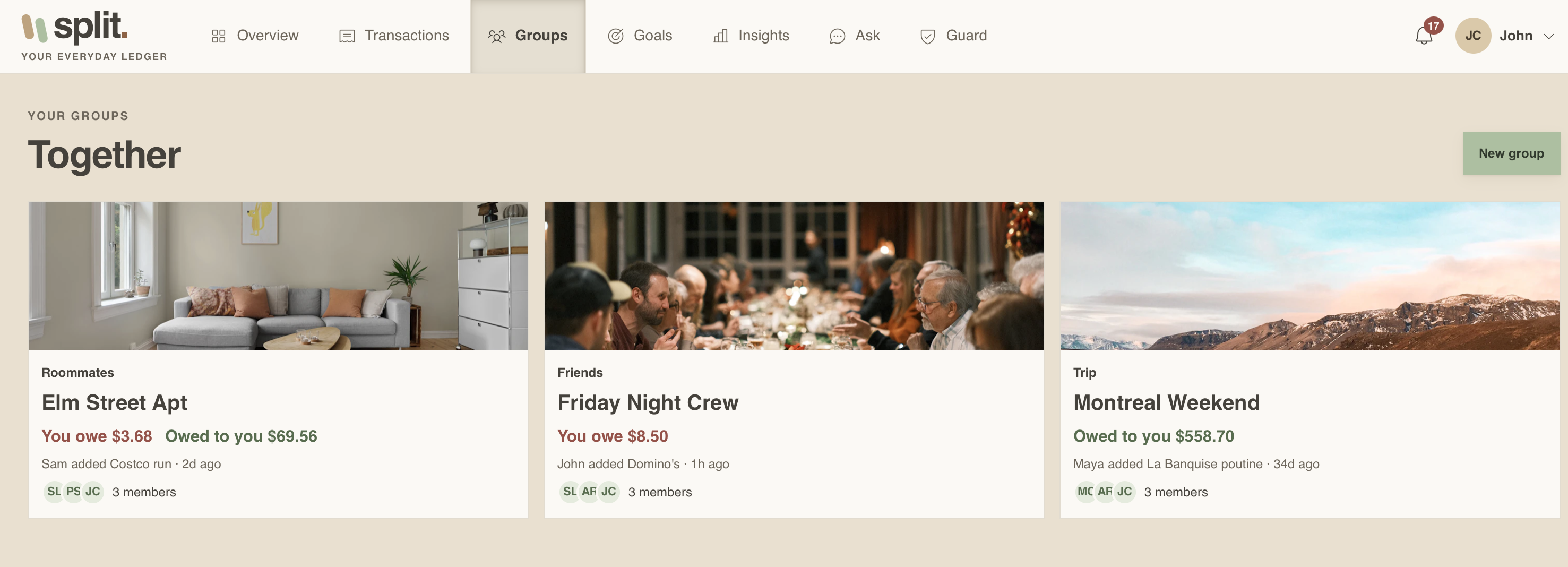
Split is one app for your shared money life: split bills with roommates, plan trips, save toward goals, track recurring payments, and see where your money goes. You can talk to it. Say "Split last night's pizza with Sam and Priya" and Split finds the purchase in your bank, drafts the split, and waits for you to confirm.
The rule the whole system is built around: the AI never moves money, and never invents a number. Only the signed-in user can approve a payment, and every figure the assistant says is computed by application code from the database.
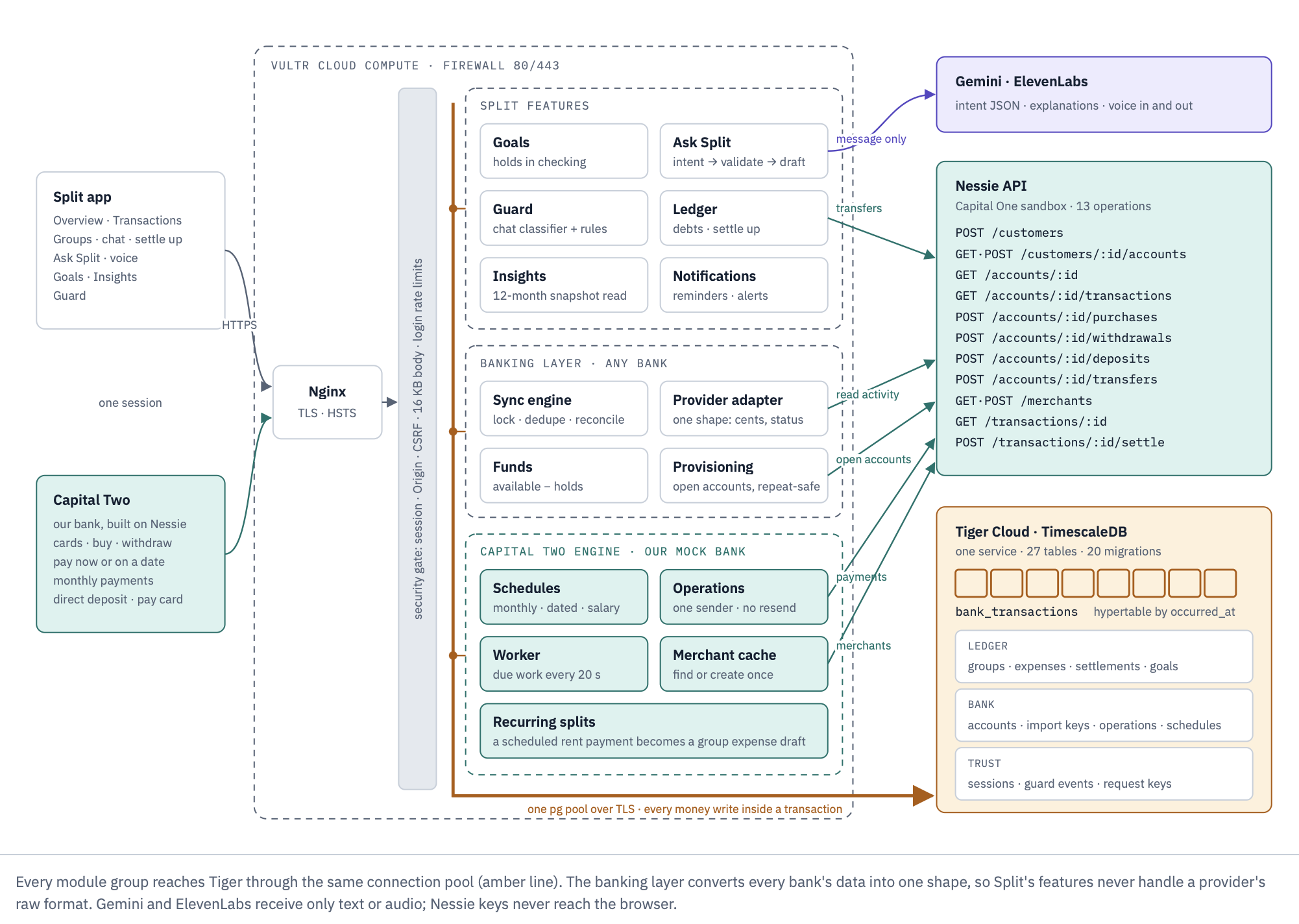
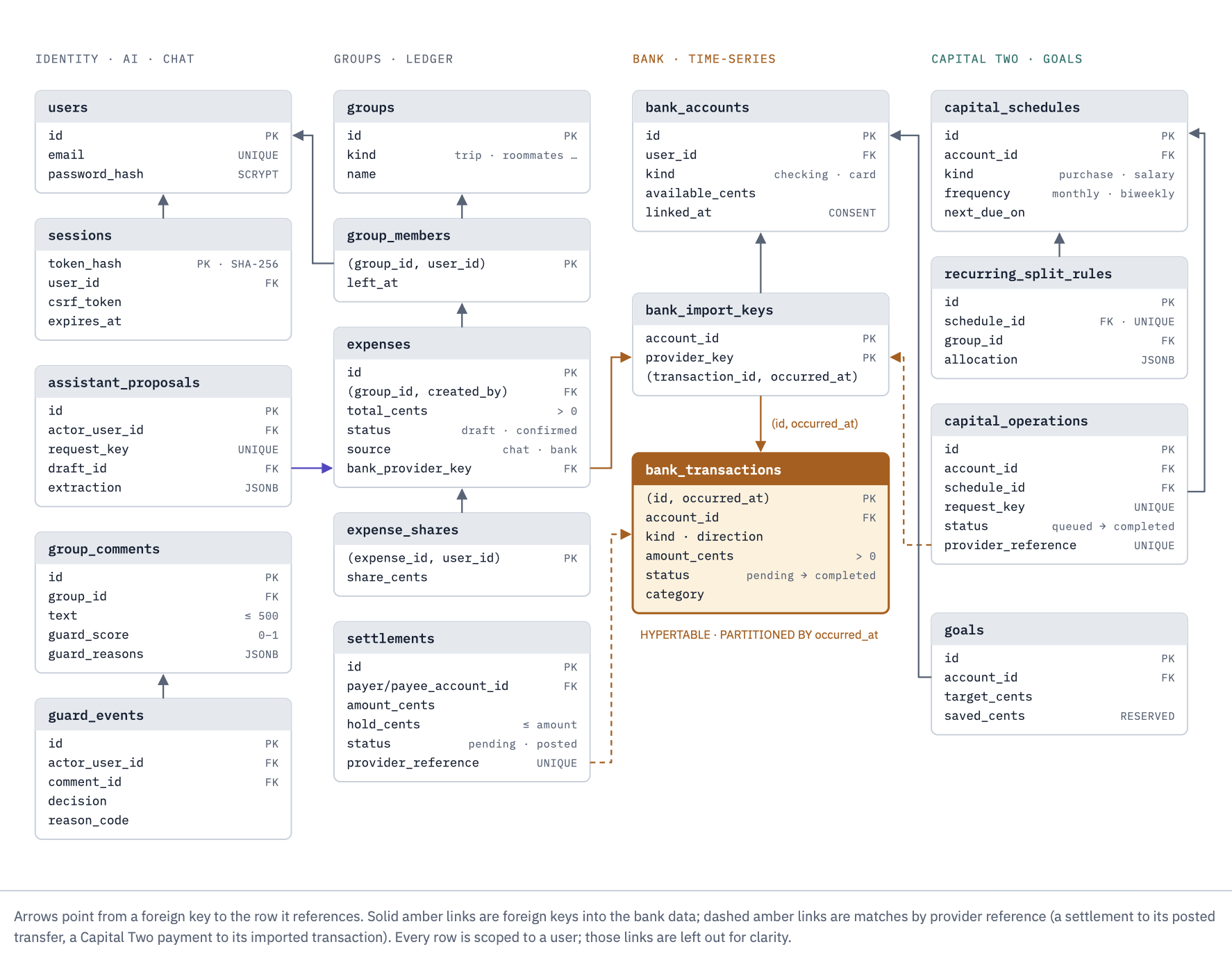
Visual walkthrough of the architecture, data model and money flow:
docs/architecture.html
| Database | Tiger Cloud (TimescaleDB): one service, bank_transactions as a hypertable, 27 tables, 20 versioned migrations |
| AI | Gemini (intent + extraction with JSON Schema output, grounded explanations, speech-to-text, and voice replies) |
| Bank | Capital One Nessie API, through Capital Two, our sandbox bank |
| Hosting | Vultr Cloud Compute, Nginx + Let's Encrypt in front of a single Node origin |
| Quality | ~200 automated tests in 46 files, 49 authenticated API routes, 53 reviewed and merged pull requests |
What you can do
- Ask Split: type or hold to talk. Seven intents: log an expense, check what you can afford, see who owes whom, spending insights, goal progress, reminders, and a safe refusal for everything else. Replies are read aloud.
- Groups: roommates, trips, friends, couples, events, work. Expenses, shares, net balances, a group chat, and settlement threads.
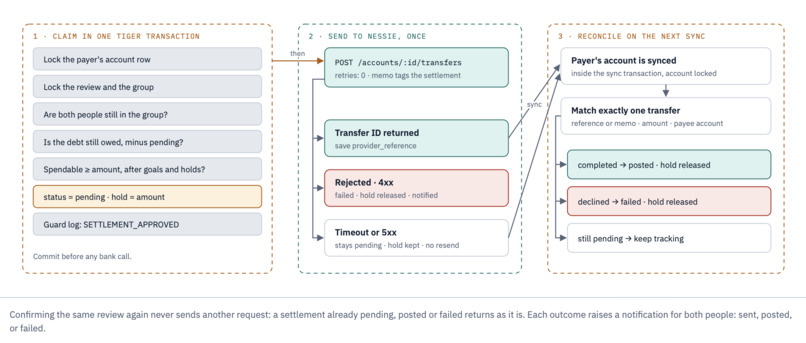
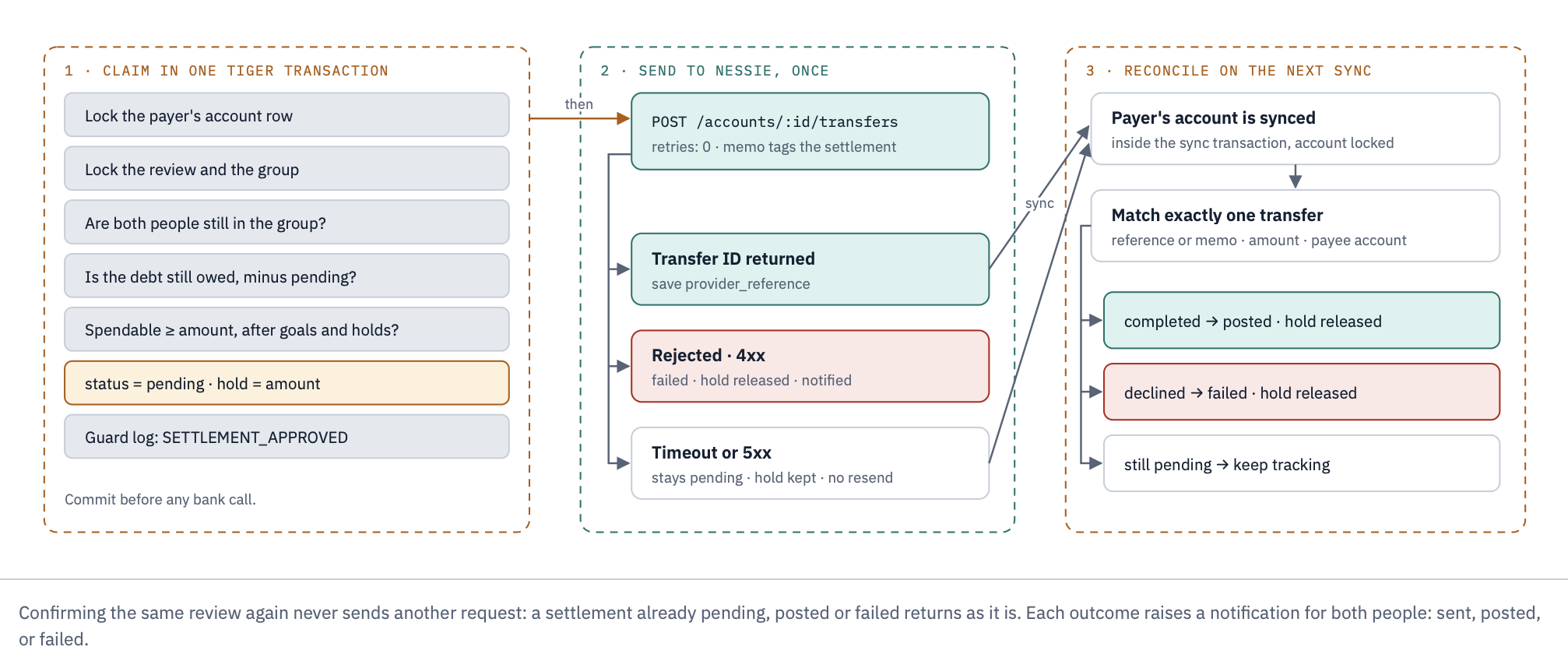
- Settle up: review a payment, confirm it, and Split sends a real Nessie transfer. It shows as paid only when the bank posts it.
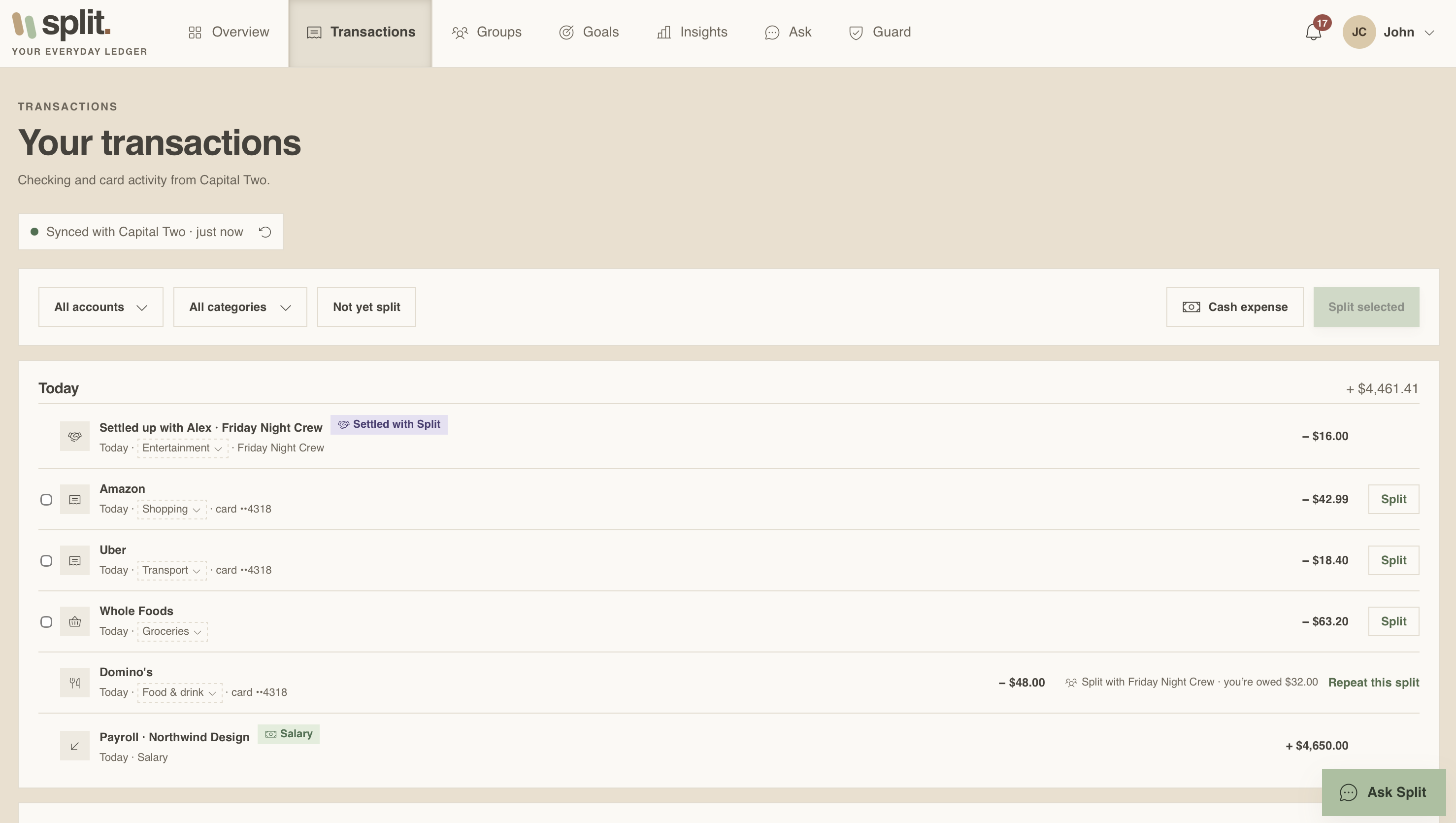
- Bank: connect your accounts (consent first, nothing is read before you press Allow). Transactions sync automatically, categories can be corrected.
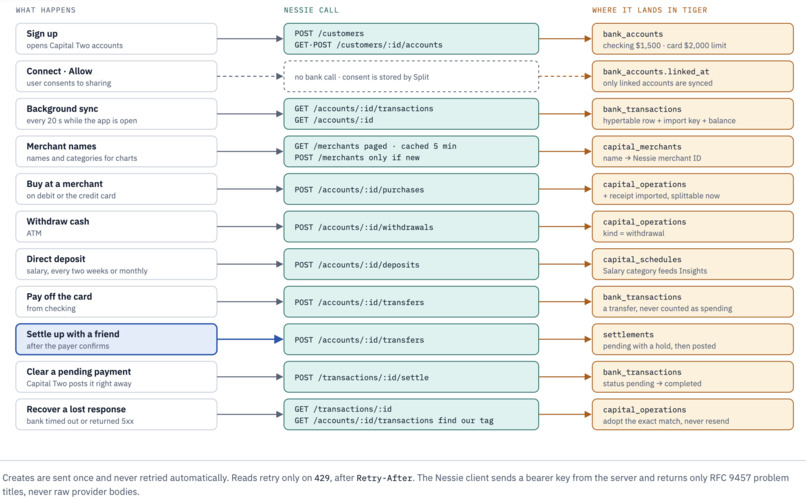
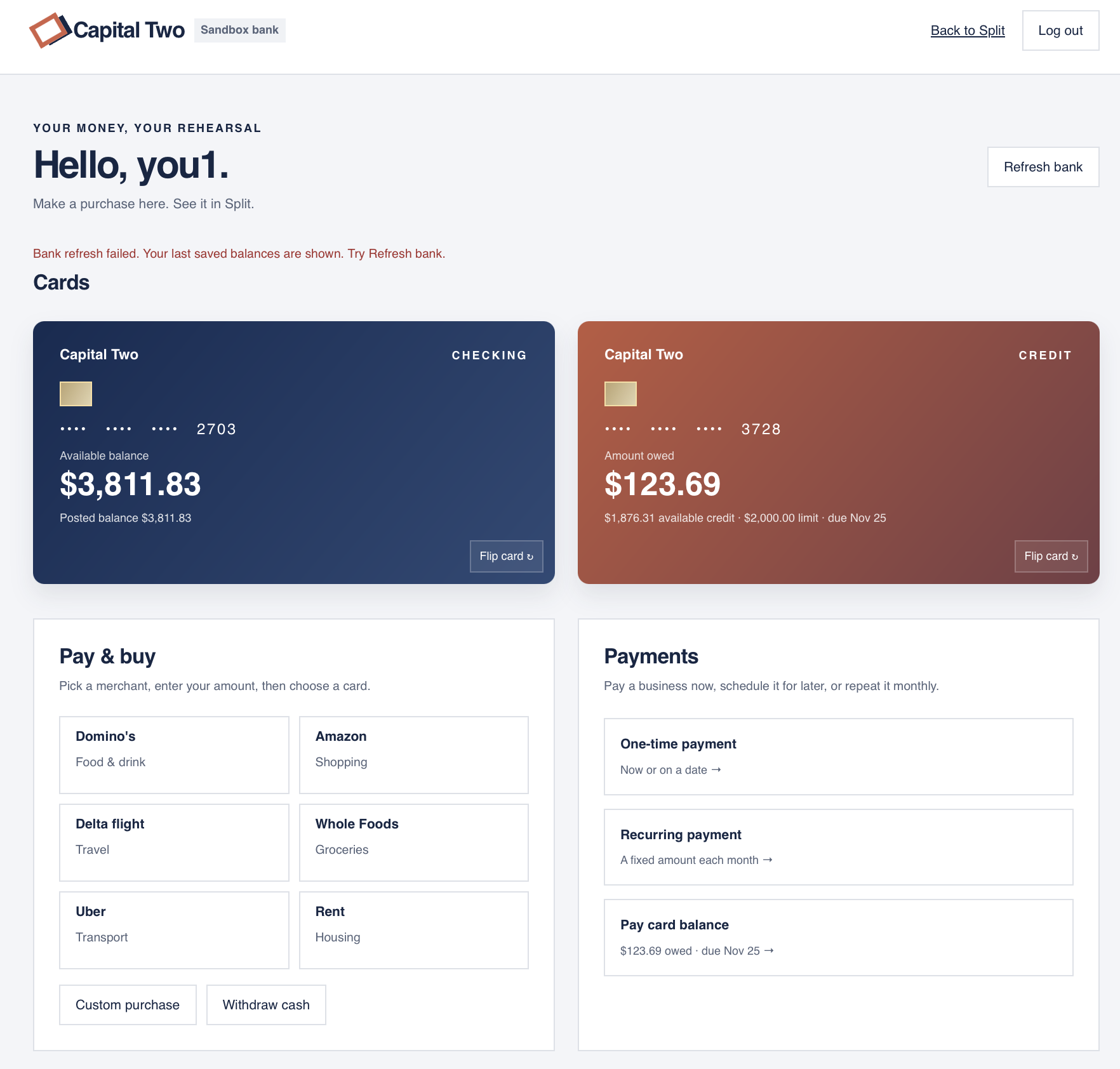
- Capital Two: our Nessie-powered bank. Checking and a credit card, merchant purchases, ATM withdrawals, payments now or on a date, monthly schedules, direct deposit, card repayment, and Split now on any purchase.
- Recurring splits: a monthly rent payment becomes a group expense automatically.
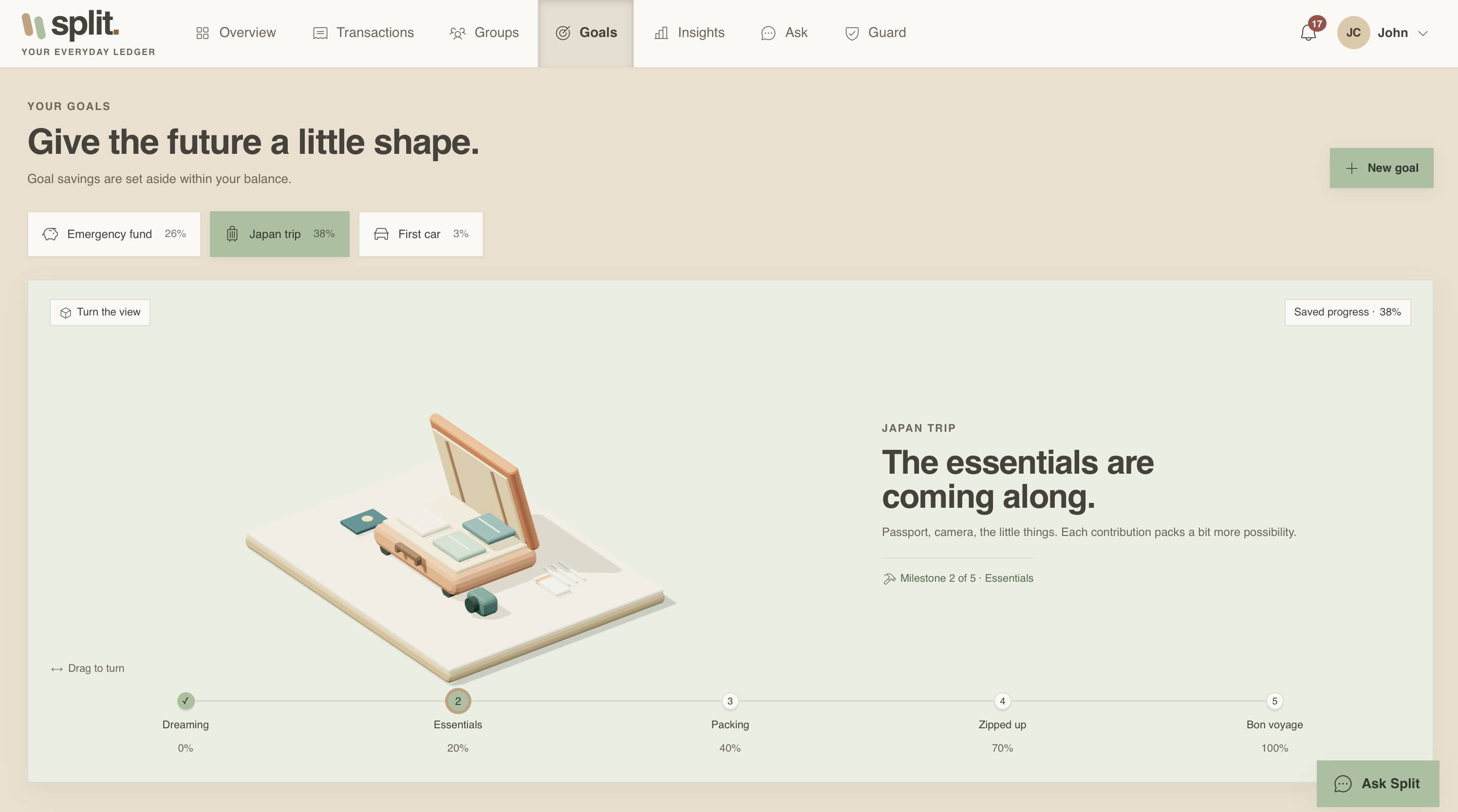
- Goals: set money aside for a house, car, trip or savings. Reserved money is subtracted from what you can spend.
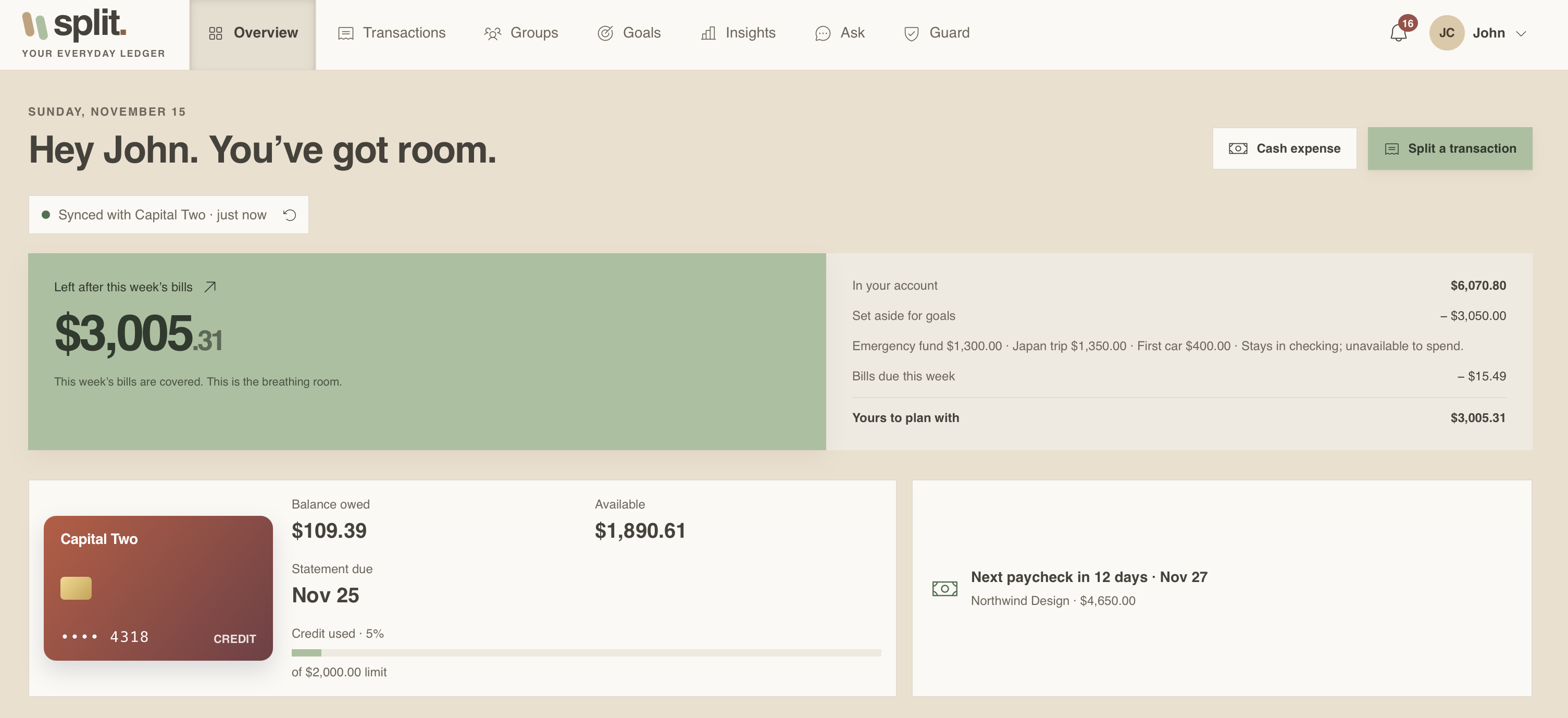
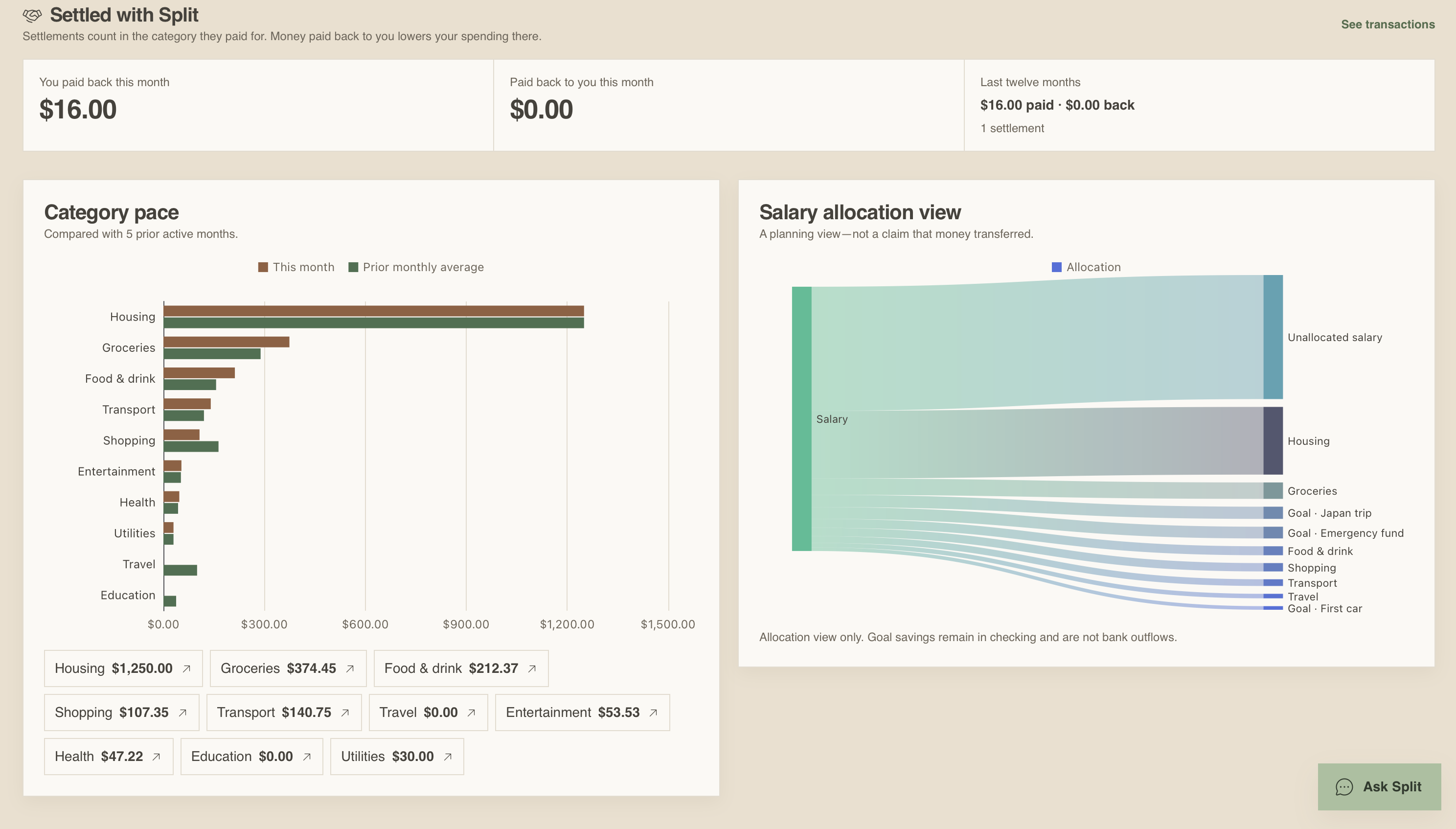
- Insights and Overview: spending and earnings by day, week or month, 12-month trends, categories, salary allocation, and upcoming bills.
- Guard: scores every group chat message for scams, outside-payment requests, credential requests and prompt injection, and keeps an audit log of every blocked AI action.
Architecture
flowchart LR
  subgraph Client["Browser / phone"]
    UI["Split web app<br/>Vite · ECharts"]
  end

  subgraph Vultr["Vultr Cloud Compute"]
    NGINX["Nginx<br/>TLS · HSTS"]
    subgraph API["Node 22 API (single origin)"]
      HTTP["Session · Origin · CSRF<br/>49 routes"]
      ASK["Ask Split<br/>intent → validate → draft"]
      GUARD["Guard<br/>local classifier + rules"]
      LEDGER["Ledger<br/>expenses · settlements"]
      BANK["Banking<br/>sync · funds · overview"]
      WORKER["Capital Two worker<br/>every 20 s"]
    end
  end

  subgraph Tiger["Tiger Cloud (TimescaleDB)"]
    HT[("bank_transactions<br/>hypertable")]
    REL[("users · groups · expenses<br/>settlements · goals · guard")]
  end

  GEM["Gemini<br/>JSON Schema output"]
  VOICE["Gemini<br/>STT · 3.8 Flash TTS"]
  NES["Nessie API<br/>Capital Two"]

  UI -- "HTTPS · HttpOnly cookie + CSRF" --> NGINX
  NGINX -- "proxy to 127.0.0.1" --> HTTP
  HTTP --> ASK & GUARD & LEDGER & BANK
  ASK -- "message only, no tools" --> GEM
  ASK -- "audio / reply text" --> VOICE
  LEDGER -- "transfers" --> NES
  BANK -- "read accounts + activity" --> NES
  WORKER -- "purchases · deposits · schedules" --> NES
  BANK -->|"TLS · SQL"| HT
  LEDGER & GUARD & ASK -->|"TLS · SQL"| REL
One Node process serves the built front end and the API from the same origin, so cookies are SameSite=Strict and there is no CORS surface. The server has a single runtime dependency (pg); HTTP, sessions, rate limits and provider clients are written against Node's standard library.
Data model
Bank activity is time-series data, so it lives in a TimescaleDB hypertable partitioned by occurred_at. Everything around it is relational, and the two are joined in plain SQL: an expense points at the exact bank purchase it came from, a settlement is matched to its Nessie transfer, and a scheduled rent payment becomes a group expense.
erDiagram
  users ||--o{ bank_accounts : owns
  users ||--o{ sessions : "signs in"
  bank_accounts ||--o{ bank_import_keys : "dedupe key"
  bank_import_keys ||--|| bank_transactions : "points to (id, occurred_at)"
  bank_accounts ||--o{ bank_transactions : "activity (hypertable)"

  groups ||--o{ group_members : has
  users ||--o{ group_members : joins
  group_members ||--o{ expenses : pays
  expenses ||--o{ expense_shares : "split into"
  expenses }o--o| bank_import_keys : "linked purchase"
  group_members ||--o{ settlements : "payer / payee"
  settlements }o--|| bank_accounts : "from / to"
  settlements ||--o{ settlement_categories : "pays for"

  groups ||--o{ group_comments : chat
  group_comments ||--o{ guard_events : flags
  guard_events ||--o| guard_feedback : "labeled by"
  users ||--o{ assistant_proposals : asks
  assistant_proposals }o--o| expenses : "drafts"
  users ||--o{ notifications : receives
  users ||--o{ debt_reminders : sends

  bank_accounts ||--o{ capital_operations : "pays from"
  capital_schedules ||--o{ capital_operations : "occurrence"
  capital_schedules ||--o| recurring_split_rules : "auto-split"
  capital_operations ||--o| recurring_split_expenses : creates
  recurring_split_expenses ||--|| expenses : "is"

  bank_accounts ||--o{ goals : "reserves in"
  goals ||--o{ goal_movements : history

  bank_transactions {
    uuid id PK
    timestamptz occurred_at PK "partition column"
    uuid account_id FK
    text provider_transaction_id
    text kind "purchase, deposit, transfer, ..."
    text direction "debit or credit"
    bigint amount_cents "always > 0"
    text status "pending, completed, ..."
    text category
    text source "nessie or demo"
  }
  bank_import_keys {
    uuid account_id PK
    text provider_key PK "bank's transaction ID"
    uuid transaction_id
    timestamptz occurred_at
  }
  bank_accounts {
    uuid id PK
    uuid user_id FK
    text kind "checking or credit_card"
    bigint balance_cents
    bigint available_cents
    bigint credit_limit_cents
    timestamptz linked_at "consent"
  }
  settlements {
    uuid id PK
    uuid payer_account_id FK
    uuid payee_account_id FK
    bigint amount_cents
    bigint hold_cents
    text status "reviewed, pending, posted, failed"
    text provider_reference "Nessie transfer ID"
  }
  expenses {
    uuid id PK
    uuid group_id FK
    uuid created_by FK
    bigint total_cents
    text status "draft, confirmed, expired"
    uuid bank_account_id FK
    text bank_provider_key FK
  }
  capital_operations {
    uuid id PK
    text kind "purchase, withdrawal, card_payment, deposit"
    bigint amount_cents
    uuid request_key "idempotency"
    text status "queued ... completed"
    text provider_reference
  }
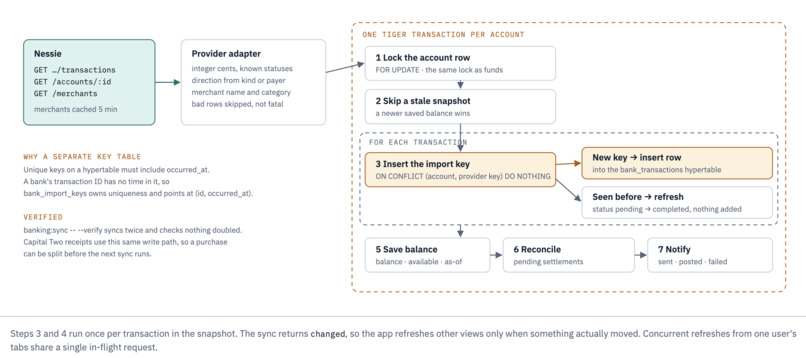
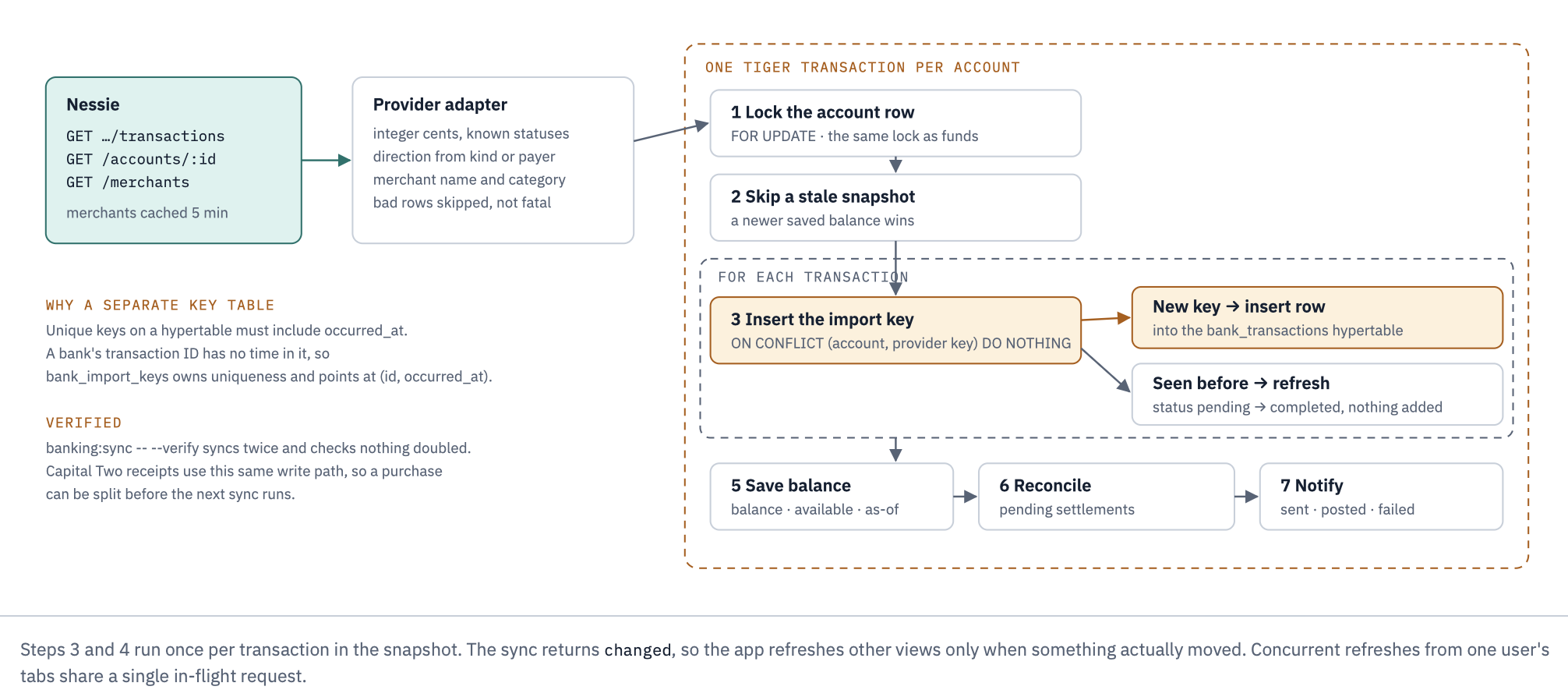
Why bank_import_keys exists. On a hypertable, every unique constraint must include the partition column. A bank's transaction ID has nothing to do with time, so uniqueness on it cannot live on the hypertable. bank_import_keys (account_id, provider_key) is a small relational table that owns that guarantee and points to the hypertable row by (id, occurred_at). The key and the transaction are inserted in the same database transaction, so syncing the same account any number of times never adds a duplicate row or a duplicate dollar.
How each technology is used
Tiger Data
- Hypertable for bank activity.
bank_transactionsis created withcreate_hypertable(... by_range('occurred_at')). Queries for a date range only touch the chunks in that range, so a "this month" chart stays fast as history grows. On a plain local Postgres the same migration keeps a normal table, so development does not require TimescaleDB. time_bucketanalytics. The Overview chart is one query:time_bucketover local-time timestamps (America/New_York), joined to agenerate_seriesof bucket starts so empty days or months come back as zeros instead of gaps.npm run banking:overview-checkrecomputes every bucket from raw rows and compares.- Transactions where money is involved. Spendable funds =
available − goal reservations − settlement holds, computed underSELECT … FOR UPDATEon the account row. Goal deposits, settlement holds and bank syncs take the same lock, so two actions can never spend the same dollar (npm run banking:funds-checkraces them). - Consistent reads. Insights run in a
REPEATABLE READ READ ONLYtransaction, so a sync that lands mid-request cannot change half of the numbers. - One service for everything. Auth, sessions, ledger, Guard, assistant proposals and notifications all live in Tiger. Each developer worked in their own schema inside the same service (
DB_SCHEMA), and migrations are numbered by owner, checksummed, and refused if edited after merge.
Gemini
- Intent and extraction with JSON Schema. Every call sets
responseMimeType: application/jsonand aresponseJsonSchema. The reply is validated again in code (server/assistant/intent.js): unknown fields, fractional or unsafe cents, wrong types, control characters and contradictory intent/expense pairs are rejected. - No tools, minimal input. The model gets only the user's message. No account IDs, balances, credentials or history, and no function calling. Responses that contain function calls or inline data are rejected.
- Grounded explanations. For affordability, debts, spending and "explain this charge", application code computes every figure and writes each factual sentence. Gemini only returns an ordering of the sentence IDs it was given, and the server checks that the ordering contains each ID exactly once.
- Speech-to-text and spoken replies. Recorded WAV audio is sent inline to the configured Gemini model for transcript extraction; spoken replies use Gemini 3.8 Flash TTS. Provider calls stay server-side, audio and text are size-limited, and browser speech synthesis remains the fallback when Gemini voice is unavailable.
- Cost and latency limits. At most 4 concurrent and 30 requests per minute per process, a 25-second timeout, no automatic retries, and
thinkingLevel: minimalfor the extraction model.
Nessie (Capital Two)
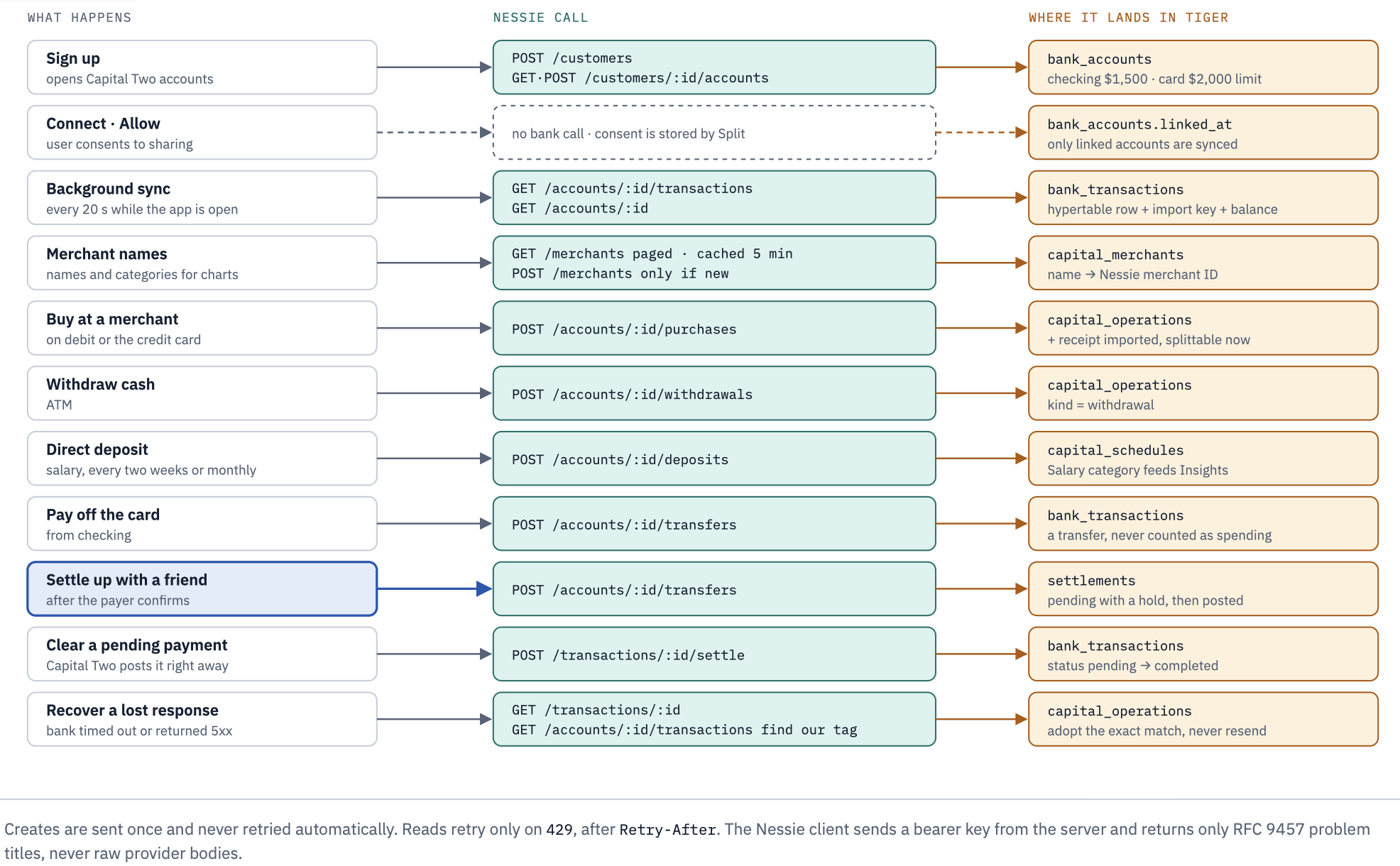
Split is designed to connect to the bank you already have: each provider's data is normalized into one internal shape (integer cents, a fixed set of kinds and statuses), and the rest of the app only reads that shape. For the demo, that bank is Capital Two, built entirely on Nessie.
| Nessie resource | What Split does with it |
|---|---|
customers, customers/:id/accounts |
Opens a checking account and a $2,000-limit credit card per user, repeat-safe |
accounts/:id, accounts/:id/transactions |
Balance snapshots and activity sync into the hypertable |
accounts/:id/purchases |
Merchant purchases on debit or credit |
accounts/:id/withdrawals |
ATM cash withdrawals |
accounts/:id/deposits |
Direct deposit (biweekly or monthly salary) |
accounts/:id/transfers |
Settle-up payments between friends, card repayments |
merchants |
Looks up a merchant, creates it if missing, caches the ID |
transactions/:id, transactions/:id/settle |
Status checks and settlement of pending payments |
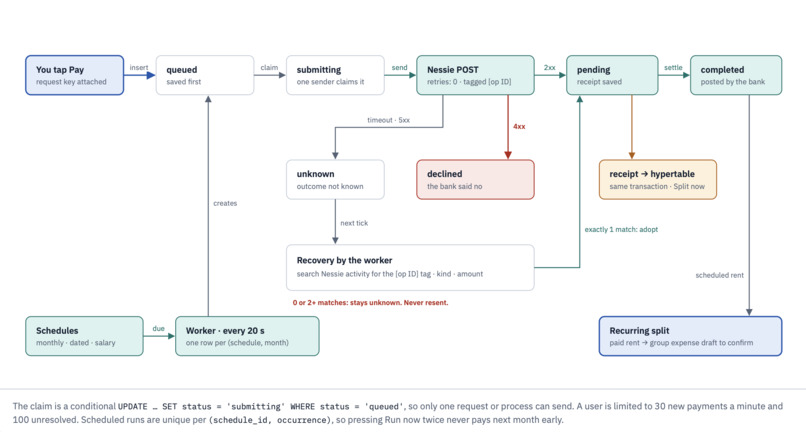
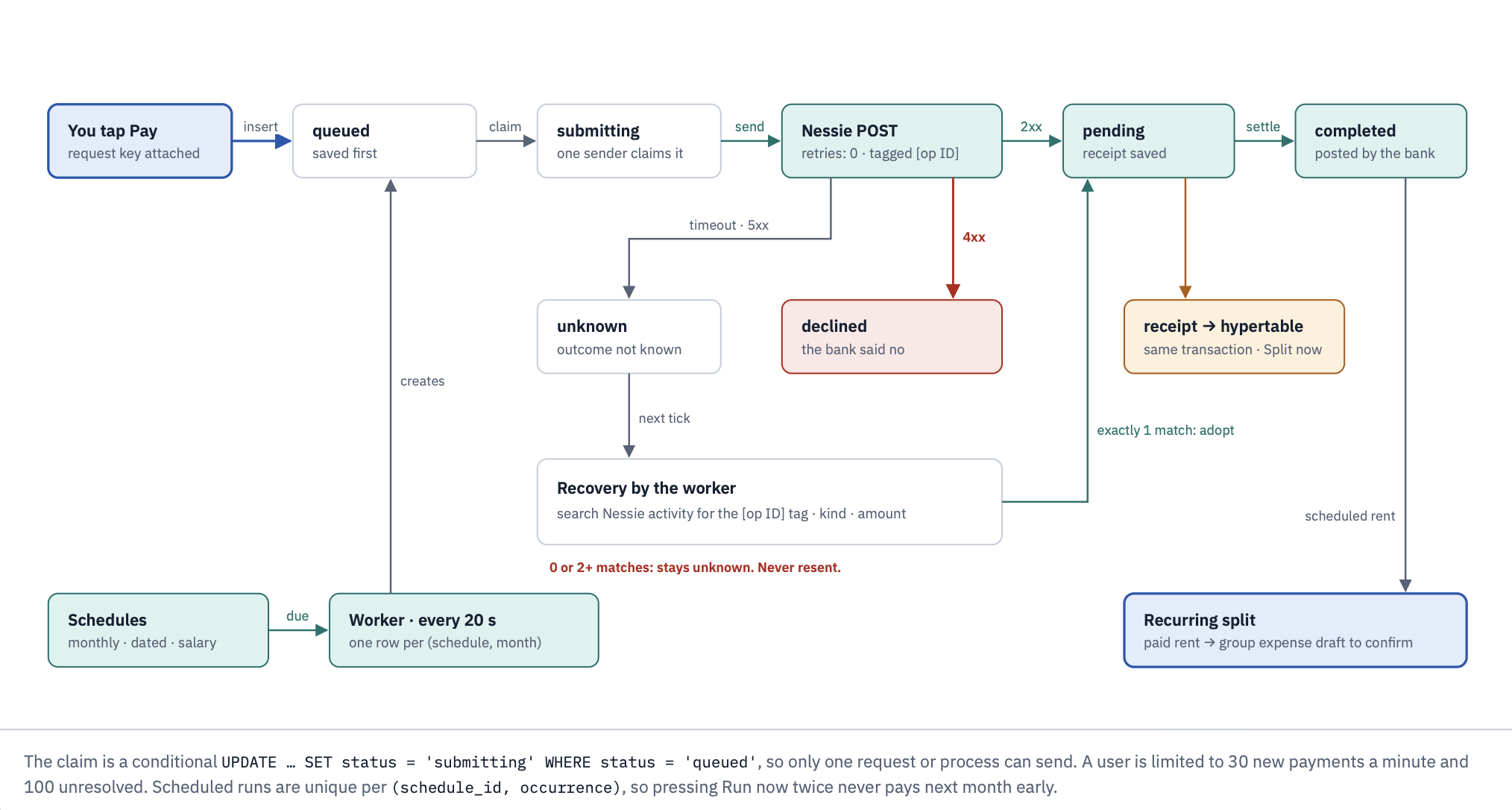
Payments without double-sends. Nessie has no idempotency key for creates. Split saves each operation (with the user's request key) before calling Nessie and embeds an opaque reference in the provider description. A conditional queued → submitting claim picks exactly one sender across requests and processes. If a response is lost, the operation becomes Unknown: Split looks for the exact match by account, kind, amount and reference and adopts it, and never re-sends. Only 429 responses are retried, after Retry-After. New payments are limited to 30 per minute and 100 unresolved per user.
Vultr
Production runs on a Vultr Cloud Compute instance: Node as a non-root systemd service listening on 127.0.0.1, Nginx in front terminating HTTPS with Let's Encrypt, and the instance firewall open only for ports 80 and 443. The app requires an https:// APP_ORIGIN in production, which turns on __Host- cookies, Secure, and HSTS. See Deploying on Vultr.
Security model
AI boundary
- Gemini has no tools and no authority. Its output is a proposal that must pass schema validation, scope checks (every group, member and account is resolved against the session user), and explicit user confirmation.
- Identity always comes from the session, never from the request body or model output. The payer of an AI-drafted expense is always the signed-in user.
- Requests the assistant must not act on (send money, approve payments, change permissions, multiple actions in one message) are refused and written to
guard_eventswith a fixed, redacted reason. - Group notes and chat messages never reach the model or the bank. They have no code path to an action.
Guard (chat)
- Every new comment is scored on the server, never sent to a third party. Explicit rules for instruction override, outside-payment and credential requests add readable reasons.
- The current model (
split-guard-nb-v1) is a bounded Naive Bayes classifier trained on the UCI SMS Spam Collection plus Split-specific examples: 99.1% precision, 83.3% recall on a held-out set of 1,071 messages (server/guard/evaluation.json). - A flagged message shows a warning in the thread; other members get a private alert. Members can label a flag as wrong. Guard is advisory: it never authorizes, blocks or rewrites a payment.
Application
- Passwords: salted scrypt. Sessions: random tokens stored only as SHA-256 hashes, in
HttpOnly,SameSite=Strictcookies (__Host-,Secureand HSTS on HTTPS). Seven-day expiry. - Every mutation requires the exact
Origin, a JSON body, and the session's CSRF token. Bodies are capped at 16 KB; compressed bodies and unexpected content types are rejected. - 10 sign-in attempts per minute per IP (forwarding headers cannot bypass it), and 5 wrong passwords lock an email for 15 minutes.
- Errors return
{code, message, requestId}only. Provider bodies, prompts and credentials are never logged or returned. No provider variables use theVITE_prefix, so none can reach the browser bundle.
Money
- All amounts are integer cents (
bigintin SQL,BigIntfor sums in JS). There is no floating-point money anywhere. - Every money-moving write carries a request key with a unique constraint; a retry returns the original result.
- Reviewed settlement terms are immutable. A settlement is
postedonly after the bank reports the transfer, and its hold is released if it fails.
Engineering practices
- Contracts first. Each feature owner published the endpoints, payload shapes and invariants before building (
C13-CONTRACT.md,C14-CONTRACT.md,fixtures/), so the front end and back end were built in parallel against the same fixtures. - Owned migration ranges.
0001–0099foundation,0100–0199groups and ledger,0200–0299banking,0300–0399assistant and goals. Feature branches never collide on filenames. - Database constraints, not just code.
CHECKconstraints on every amount and status, composite foreign keys that require payers to be group members, partial unique indexes so a bank purchase can be linked to at most one confirmed expense. - Tests that hit real things. Unit tests, real-HTTP tests for session tampering, CSRF and cross-origin requests, and integration tests against a live Tiger schema (provisioning races, concurrent retries, lost provider responses, restart recovery, cross-user access).
- Operational scripts.
db:check,db:verify(fresh-schema acceptance on a throwaway schema),nessie:smoke,banking:read,banking:sync -- --verify,banking:overview-check,banking:funds-check,smoke:gemini,smoke:ask,smoke:insight.
Repository layout
splitAI/
├── index.html, src/            Front end (Vite, vanilla ES modules, ECharts)
│   ├── features/               ask · bank · goals · guard · insights · notifications · overview · recurring · together
│   ├── api/                    session + apiRequest (CSRF header, same-origin)
│   └── lib/, styles/           routing, money formatting, read-aloud, design tokens
├── server/                     Node API (one dependency: pg)
│   ├── app.js, http.js, routes.js, session.js
│   ├── assistant/              Gemini client, intent schema, answers, voice, bank matching, Guard hooks
│   ├── banking/                Nessie provider, sync, funds, overview (time_bucket), bills, provisioning
│   ├── capital-two/            Capital Two operations, schedules, worker
│   ├── ledger/                 debts, settlements, reconciliation, recurring splits, charge explanations
│   ├── goals/, insights/, activity/, guard/, auth/
│   ├── db/                     migrations, migrate, seed, demo history
│   ├── scripts/                checks and smoke tests
│   └── test/                   node:test suites
├── fixtures/                   Contract fixtures shared by front end and back end
└── docs/architecture.html      Diagrams
Running locally
Requires Node 22.15+ (24 recommended) and a Tiger Cloud service (or local Postgres; TimescaleDB is optional locally).
npm install
npm --prefix server install
cp server/.env.example server/.env      # set DATABASE_URL, DB_SCHEMA, DEMO_PASSWORD,
                                        # GEMINI_API_KEY, GEMINI_MODEL, GEMINI_TTS_MODEL, NESSIE_*
npm --prefix server run db:setup        # migrate + seed demo users
npm run build
npm --prefix server start               # http://localhost:3001
Demo users [email protected], [email protected], [email protected] and [email protected] use DEMO_PASSWORD. For hot reload, run APP_ORIGIN=http://localhost:5173 npm --prefix server run dev and npm run dev in two terminals.
npm --prefix server test                # full suite
npm --prefix server run db:check        # TimescaleDB version, hypertable status, migrations, row counts
npm --prefix server run nessie:smoke    # Nessie key and account mapping (read-only)
Deploying on Vultr
- Create a Vultr Cloud Compute instance (Ubuntu LTS) and attach a firewall group that allows only TCP 22 (your IP), 80 and 443.
- Install Node 24 and Nginx. Clone the repo, run
npm ci && npm run buildandnpm --prefix server ci. - Create
server/.envwithNODE_ENV=production,HOST=127.0.0.1,PORT=3001,APP_ORIGIN=https://<your-domain>, the Tiger CloudDATABASE_URL(sslmode=require),DB_SCHEMA=split, and the provider keys. Runnpm --prefix server run db:migrate. - Run the server as a systemd unit under a dedicated non-root user (
ExecStart=/usr/bin/node --env-file=.env index.js,Restart=always). - Point the domain at the instance, then configure Nginx as a reverse proxy to
127.0.0.1:3001and issue a certificate with Certbot (Let's Encrypt).
The app does not trust forwarded headers and enforces the exact APP_ORIGIN, so keep the Node listener private behind Nginx.
Roadmap
- Guard on DeBERTa-v3 (#113): fine-tuned
microsoft/deberta-v3-small, quantized ONNX running in Node, rules-only fallback, under 300 ms per message on CPU. - Continuous aggregates and compression on
bank_transactionsfor long histories. - More bank connectors behind the same normalized provider interface.
Built With
- ai
- gemini
- javascript
- nessie
- sql
- tigerdb
- vite
- vultr


