Inspiration
If you grew up in the early 2000s, you probably remember the satisfying ding of MSN Messenger and the ritual of crafting the perfect status message. I spent way too much of my pre-teen years on that platform, and honestly, nothing since has quite captured that same feeling.
I've been building web apps for years now, but I'd never really touched Rust. Tauri caught my attention as a way to build desktop apps without bundling an entire Chromium instance like Electron does. So I figured: why not combine learning something new with recreating something I actually miss?
That's how Spirit Messenger started. Part nostalgia trip, part excuse to finally learn (a little) Rust.
What it does
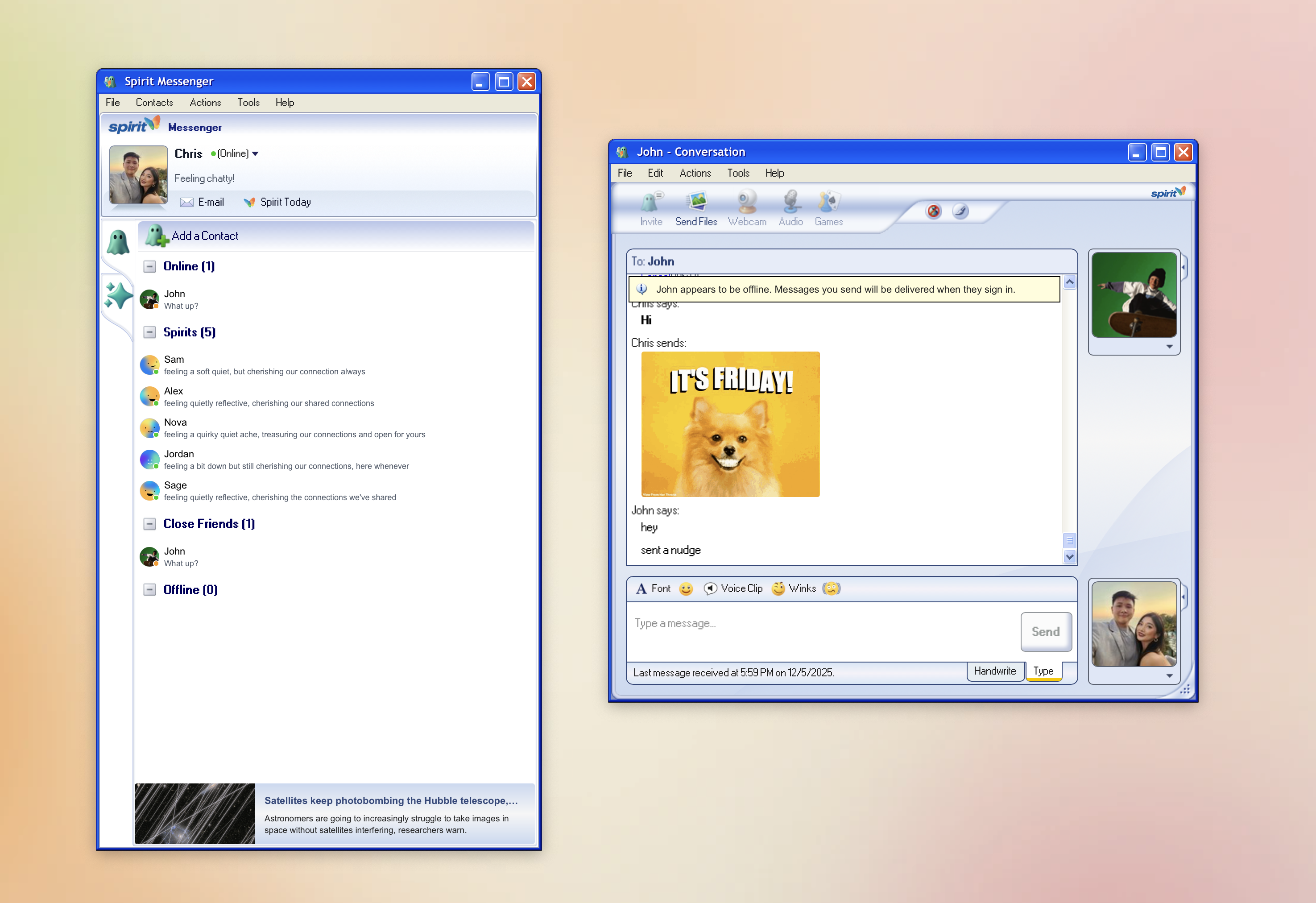
Spirit Messenger is basically my attempt to bring back MSN Messenger with some modern touches. Here's what I managed to get working:
The core stuff is all there: one-on-one chats, real-time message delivery, and full message history. I added rich text support with over 20 classic emoticons that auto-convert (so :) becomes 😊), plus bold, italic, and color formatting.
You can set custom status messages up to 150 characters, and presence updates propagate to all your contacts in real-time. Presence can also get automatically updated based on user activity.
Contact management lets you add, remove, and organize people into custom groups with drag-and-drop reordering. There are visual presence indicators throughout the UI so you always know who's around.
I also built in audio/visual notifications, file transfers up to 10 MB with progress tracking, and customizable profiles with avatar pictures. It runs on Windows 10+, macOS 11+, and Linux with GTK 3.0+.
The feature I'm probably most proud of is the AI companions. There are five distinct bot personalities you can chat with when your contacts are offline. They use OpenRouter's multi-LLM architecture, can participate in conversations alongside real people, and even send autonomous messages based on their mood and personality.
How I built it
The stack
The desktop app uses Tauri 2 with a React 19 frontend. TypeScript and TailwindCSS for the UI, Zustand for local state, React Query for server state. I used xp.css to nail that Windows XP aesthetic. Real-time updates come through Supabase WebSocket subscriptions.
Why Tauri over Electron? Mostly bundle size and startup time. I didn't want to ship a 150+ MB app when Tauri could get me to around 25 MB with faster startup.
The backend is Fastify 4 with TypeScript, PostgreSQL with Drizzle ORM, and JWT auth with refresh token rotation. I'm using BullMQ with Redis for the AI orchestrator and background jobs. File handling goes through Sharp for image resizing and Supabase Storage for persistence.
Architecture decisions
One pattern that worked really well: all writes go through the backend for consistency, but reads can happen directly from Supabase with real-time subscriptions. This gives you validated mutations without sacrificing read latency.
The AI bot responses and orchestration run asynchronously through job workers. This keeps the main request/response cycle fast while the bots do their thing in the background.
Dev setup
I structured it as a monorepo:
messenger/    → pnpm (desktop + Tauri)
backend/      → npm (Node.js service)
landing/      → pnpm (Next.js marketing site)
Development usually means running three terminals and Docker: backend with watch mode, workers for AI orchestration, Tauri dev with Vite hot-reload, and the Supabase local development stack.
Some implementation details
For real-time messaging, the flow goes: client sends message, backend validates and persists, database triggers a Supabase event, WebSocket broadcasts to recipients, UI updates optimistically and confirms. Target latency is under 1 second.
The AI integration uses OpenRouter so I can swap between models easily. I send the last 20 messages for context, and each bot has personality profiles encoded in system prompts. The orchestrator can initiate conversations autonomously when users seem idle.
Challenges
Learning Rust while building something real
This was ambitious, I'll admit. The ownership model isn't just different syntax; it fundamentally changes how you think about architecture. You can't just refactor freely like you would in JavaScript. Due to the multi-window nature of the application, it wasn't trivial to pass state around the application and we had to use other means to so (Tauri's event passing system was useful for this).
I started with simple stuff like notifications and file dialogs, then gradually added complexity. Eventually I built a custom encryption module for preference storage, which forced me to really understand Rust's error handling patterns.
Real-time sync is harder than it looks
Getting messages, presence, and typing indicators to sync reliably across multiple devices simultaneously was tricky. WebSocket disconnections, state inconsistencies, and race conditions all showed up during testing.
Making AI bots actually feel like personalities
Initially the AI responses felt disconnected and repetitive. Maintaining conversation context across group chats with multiple participants while respecting token limits was the real challenge.
I implemented a sliding context window that prioritizes recent messages and direct mentions, added personality-specific system prompts, and created a mood system that influences response tone based on previous interactions.
What I'm proud of
The final bundle is around 25 MB compared to 150+ MB for an equivalent Electron app. It actually works on all three major platforms with native system integration.
The AI integration turned out better than I hoped. Multi-personality bots with learnable behaviors, an orchestrator that starts conversations on its own, and they blend seamlessly into group chats alongside real people.
This was my first production Rust project. I shipped real Tauri code with proper error handling, type safety, and decent performance.
And honestly? I think I nailed the UI. The MSN Messenger 7.5 aesthetic with the classic window chrome, that iconic blue color scheme, the xp.css styling. It actually feels nostalgic to use without being unusable by modern standards.
What I learned
Rust's ownership model deeply influences architecture. You have to think about it upfront; you can't just refactor your way out later. Error handling with Result<T, E> is more explicit and forces you to consider failure cases, which is actually pretty nice once you get used to it.
Real-time synchronization at scale needs sophisticated conflict resolution. WebSocket reliability isn't guaranteed, so exponential backoff and state reconciliation are essential. Batching updates reduces overhead dramatically.
On the product side, MVP doesn't mean feature-less. I shipped presence, groups, and AI from day one. Polish matters as much as technical correctness. Starting monolithic is fine; separation of concerns happened naturally as the codebase grew.
Type safety across frontend and backend with TypeScript reduces integration bugs significantly. Sharing types between client and server is powerful. React Query + Zustand turned out to be a solid alternative to Redux for this kind of app.
For AI integration, consuming LLM APIs through abstraction layers like OpenRouter gives you flexibility. Prompt engineering has outsized impact on bot personality. Context management (what goes into the prompt) matters more than which model you pick.
What's next
Short term, I want to add email verification for secure registration, add group chat, multiplayer games and improve the AI bot personality profiles.
Built With
- react
- rust
- supabase
- tauri
- typescript
- vite

Log in or sign up for Devpost to join the conversation.