-
-
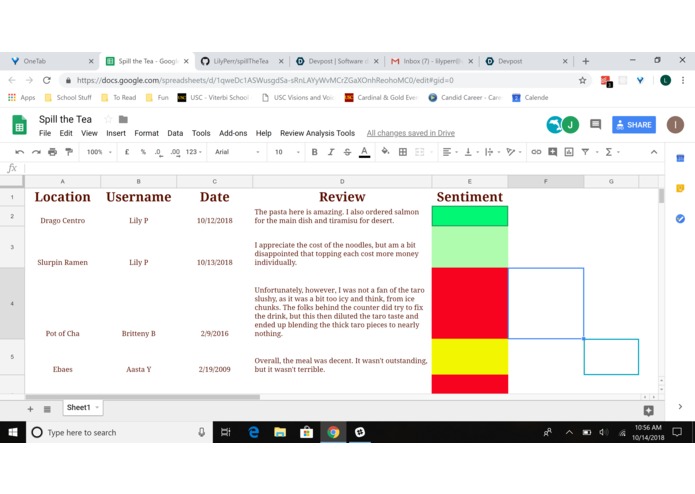
showing real sentiments of reviews (part 1 of 2)
-
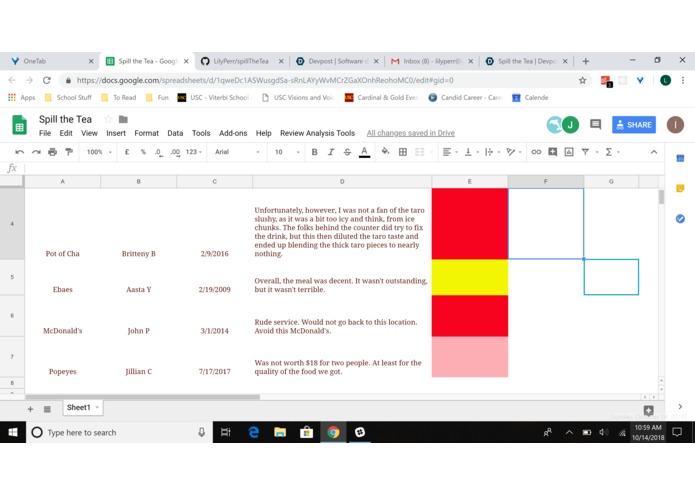
showing real sentiments of reviews (part 2 of 2)


Inspiration
Often times, I read a Yelp or Amazon review and compare it to its rating. When the two are mismatched, I wish that I could have known the real sentiment behind the review without having to read it. The co-creators of this project wanted to know the real sentiment of Yelp reviews.
What it does
Copy and paste a Yelp review into the spreadsheet and ask our tool to analyze the sentiment of the review by pressing "Review Analysis Tools," then "Analyze Sentiment." The result will be a color, which is correlated to one of the following review stars:
Green = positive, 5 stars
Light green = mildly positive, 4 stars
Yellow = ok, 3 stars
Light red = mildly negative, 2 stars
Red = negative, 1 star
How I built it
We used Google Spreadsheets and the Google Cloud API to create this product. Using the link to our project, you can copy and paste a Yelp review into the spreadsheet and ask our tool to analyze the sentiment of the review by pressing "Review Analysis Tools," then "Analyze Sentiment."
Challenges I ran into
Our team did not know how to use the Google Cloud APIs or code in Javascript before this project. We learned a lot about how the Google Cloud API works and how to use it through this project.
Accomplishments that I'm proud of
We are proud of learning how to use the sentiment detector feature in the Google Cloud APIs and how to code some Javascript.
What I learned
We learned how to use the sentiment detector feature in the Google Cloud APIs and how to code some Javascript.
What's next for Spill the Tea
We plan to continue working on this project to improve upon it and eventually turn it into a Chrome extension for your browser.
Log in or sign up for Devpost to join the conversation.