-
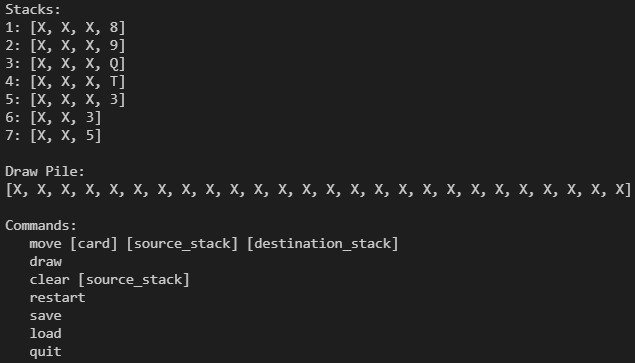
Game Preview
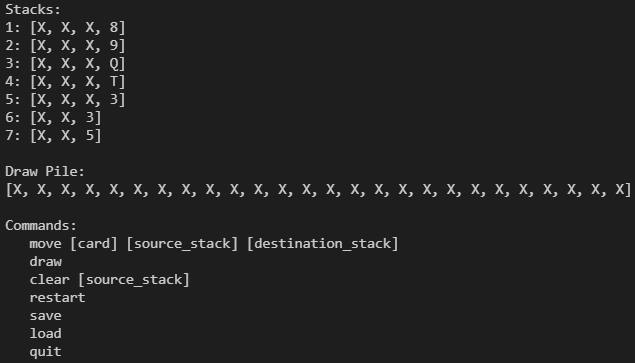
Inspiration
I wanted to build a game because I was bored and I also wanted to build something that I could actually use and play when I am bored and also learn something as I am making the game.
What it does
It is very much like playing Spider Solitaire but you have to play it from the console. First, run the Driver File which will run the game on the console window. Then, the different types of moves and commands are listed below. The commands also have a specific format that you will have to type in order to activate that command. The goal of the game is to clear all the cards (there is no completed stack pile shown). Also, in order to save the game, you need to save it somewhere in your file explorer (The JFileChooser window will pop up) and the file will be a text file with the cards, stacks, etc. If you want to load a previously saved game, you need to find that file (JFileChooser window will open) and load it.
How we built it
I used Java programming language.
Challenges we ran into
The save and Load feature was not working and the JFileChooser was not working. I fixed this by making my board class extend the JFrame container. Additionally, I had problems with implementing the Comparable interface and clearing a completed stack. I researched these errors and issues online and I was able to fix my problem.
Accomplishments that we're proud of
The game is working. I can correctly save/load games.
What we learned
I learned a lot about classes, implementing interfaces, inheritance, and got a lot more experience with Java.
What's next for Spider Solitaire
Currently, this game can only be played on the console or terminal window. Next, I plan on making a web-application based game with images of the cards and also sound effects to make it more robust.
Built With
- comparable
- java
- jfilechooser

Log in or sign up for Devpost to join the conversation.