Inspiration
AI Lodge Hackathon 2026 was my first-ever hackathon, and I wanted to take the opportunity to build something practical that I could actually use in my daily life.
I decided to create SpendWise AI, an AI-powered personal expense tracker. Although there are already many finance trackers available, I wanted to build one with my own personal touch while exploring how AI could make expense tracking easier.
Since I had never built a full-stack application like this before, I also saw it as a great opportunity to challenge myself and learn new technologies.
What it does
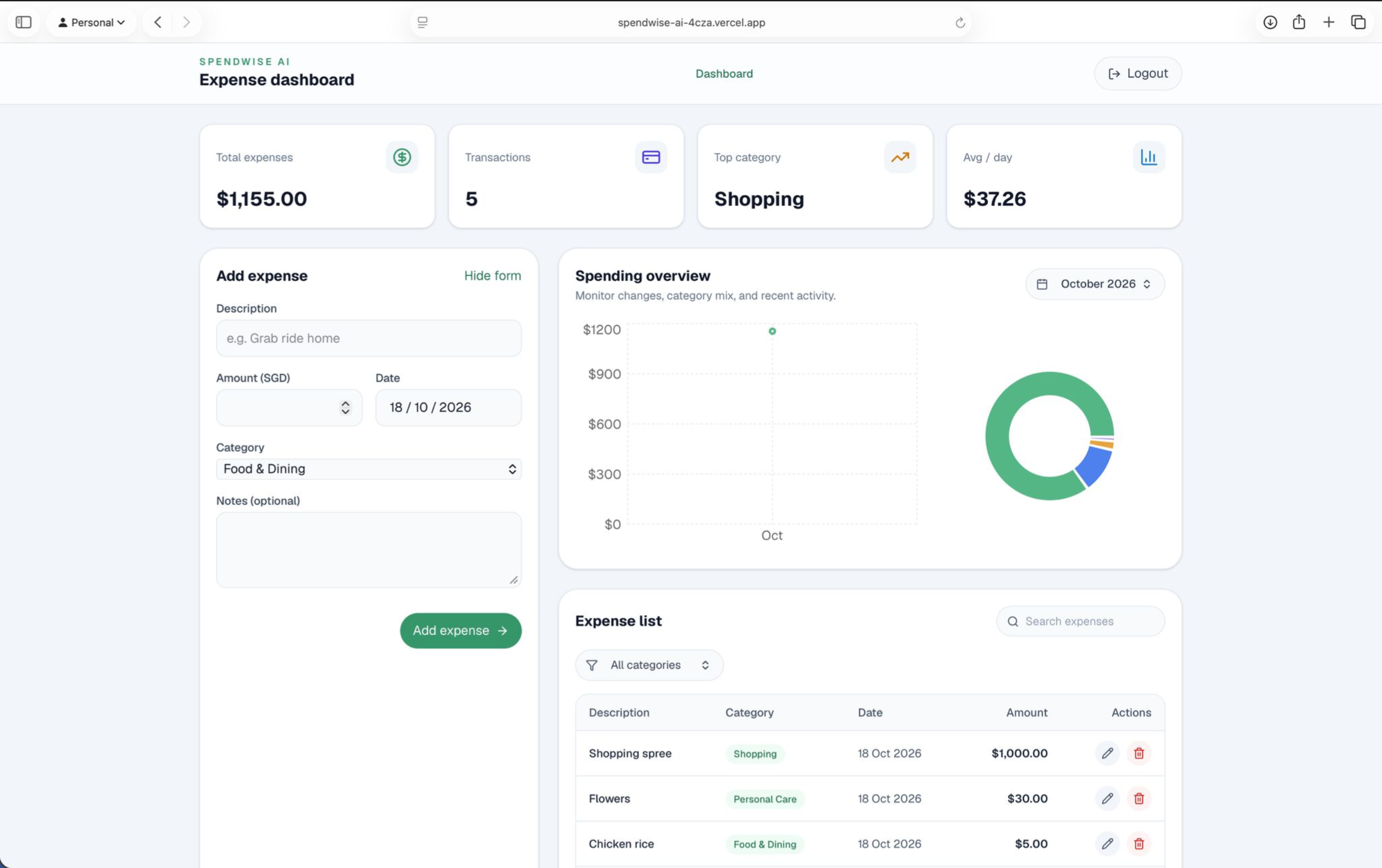
SpendWise AI allows users to record, organise, and manage their daily expenses through a simple interface.
Users can:
- Add, edit, and delete expenses.
- Categorise transactions into different spending categories.
- View their monthly spending through a dashboard with charts and category breakdowns.
- Search and filter their expenses.
- Receive AI-powered category suggestions based on their transaction descriptions.
The goal is to reduce the effort required to track expenses while helping users better understand their spending habits.
How I built it
I built SpendWise AI using Next.js, TypeScript, React, and Tailwind CSS for the website and user interface.
For the backend, I used Supabase for user authentication and PostgreSQL database storage. Row Level Security helps ensure that users can only access their own expense records.
For AI integration, I used the AI Lodge API (apiyi) to generate expense category suggestions based on users' descriptions.
Finally, I used GitHub for version control and Vercel to deploy the application online.
Challenges I ran into
One of my biggest challenges was getting the different services to communicate with one another.
I encountered issues setting up Supabase authentication, configuring API keys, handling password recovery, and connecting the AI provider.
I also experienced API rate limits and timeout errors when developing a more advanced AI spending insights feature. Although I managed to implement parts of it, I decided to keep that feature paused until it could work reliably.
These challenges taught me the importance of troubleshooting, testing, and understanding how different parts of a full-stack application interact.
Accomplishments I'm proud of
As this was my first hackathon and my first time building an application like this, I'm proud that I managed to turn an idea into a working website.
Seeing users able to log in, record expenses, view spending breakdowns, and receive real AI-generated category suggestions was especially satisfying.
I'm also glad I managed to deploy the application publicly rather than leaving it as a local project.
What I learned
This project helped me gain practical experience with Next.js, TypeScript, Supabase, APIs, GitHub, and Vercel.
More importantly, I learned that developing an application involves much more than writing code. It requires planning, integrating services, resolving unexpected issues, and making decisions about which features to prioritise.
I also gained a better understanding of responsible AI integration, particularly the importance of validating AI outputs and handling situations where an AI service is unavailable.
What's next for SpendWise AI
Given more time, I would like to develop the AI spending insights feature further so users can receive personalised recommendations based on their expenses.
I would also like to explore features such as recurring expense tracking, budget goals, and improved spending visualisations.
Overall, this hackathon has been a valuable introduction to full-stack development, and I look forward to applying what I've learned to future projects.
Built With
- apiyi
- github
- next.js
- openai-compatible
- postgresql
- react
- supabase
- tailwindcss
- typescript
- vercel

Log in or sign up for Devpost to join the conversation.