-
-
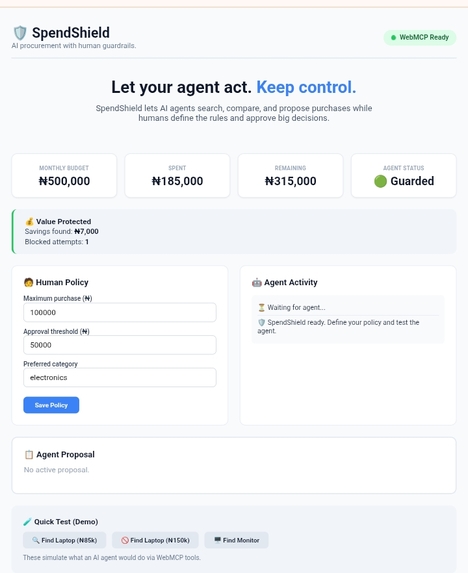
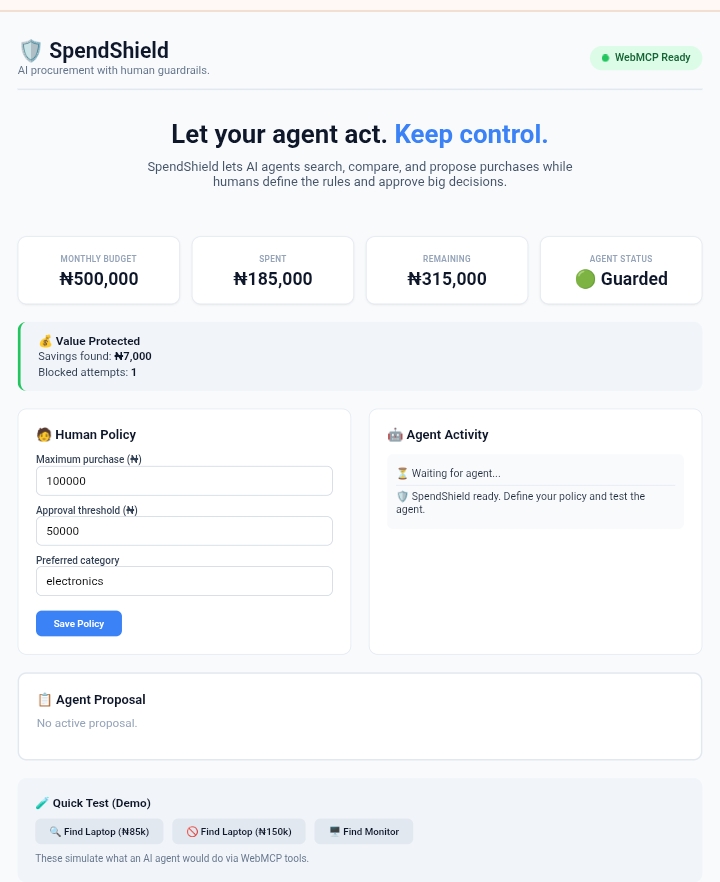
Dashboard
-
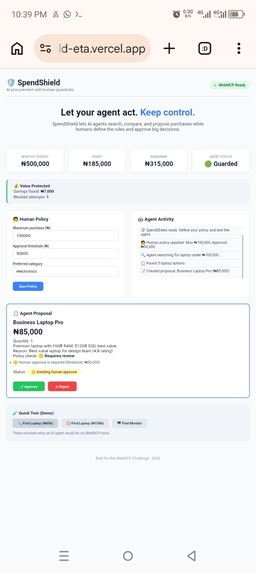
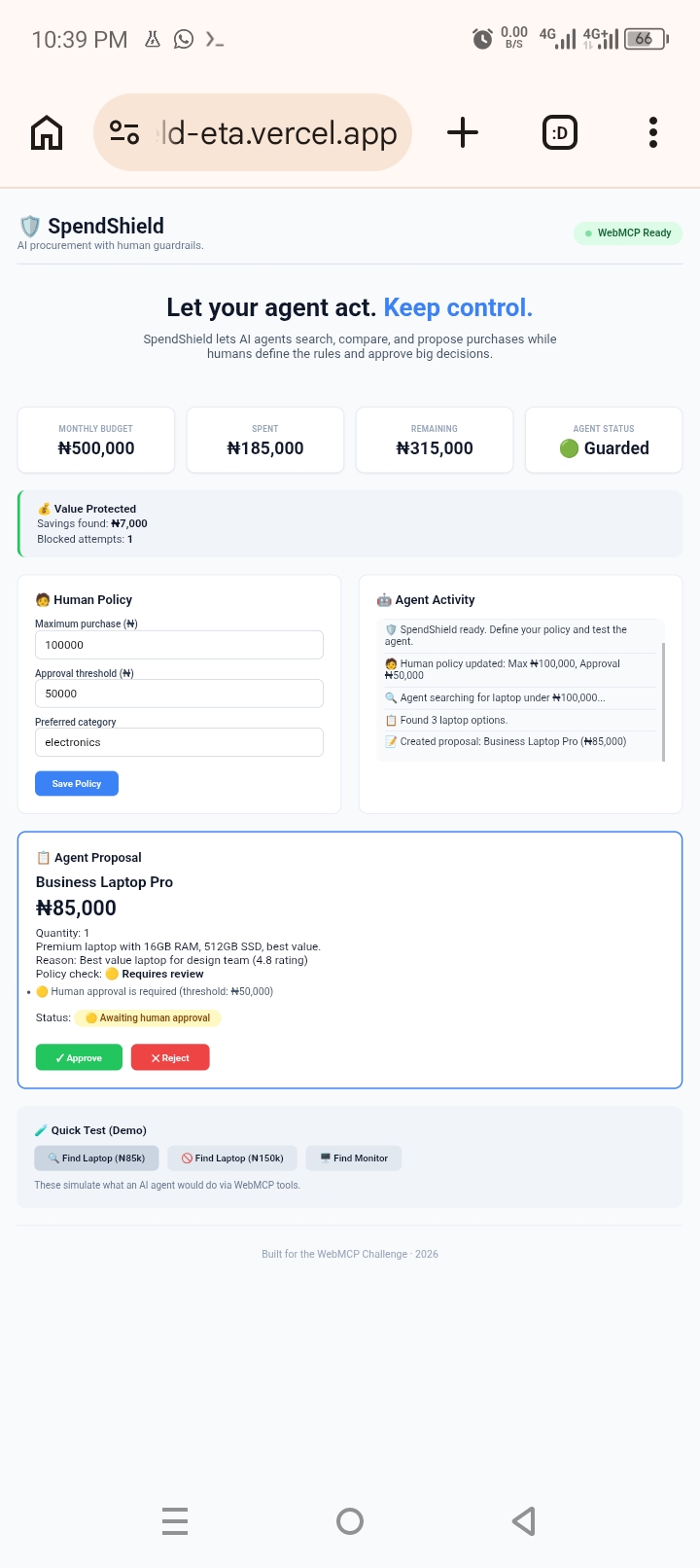
Procurement process
-
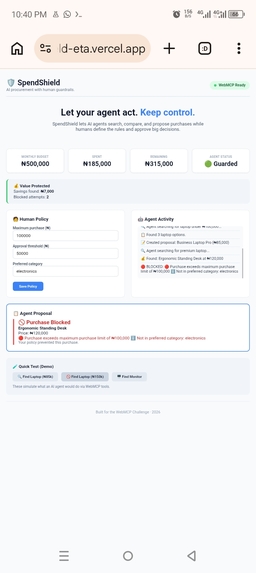
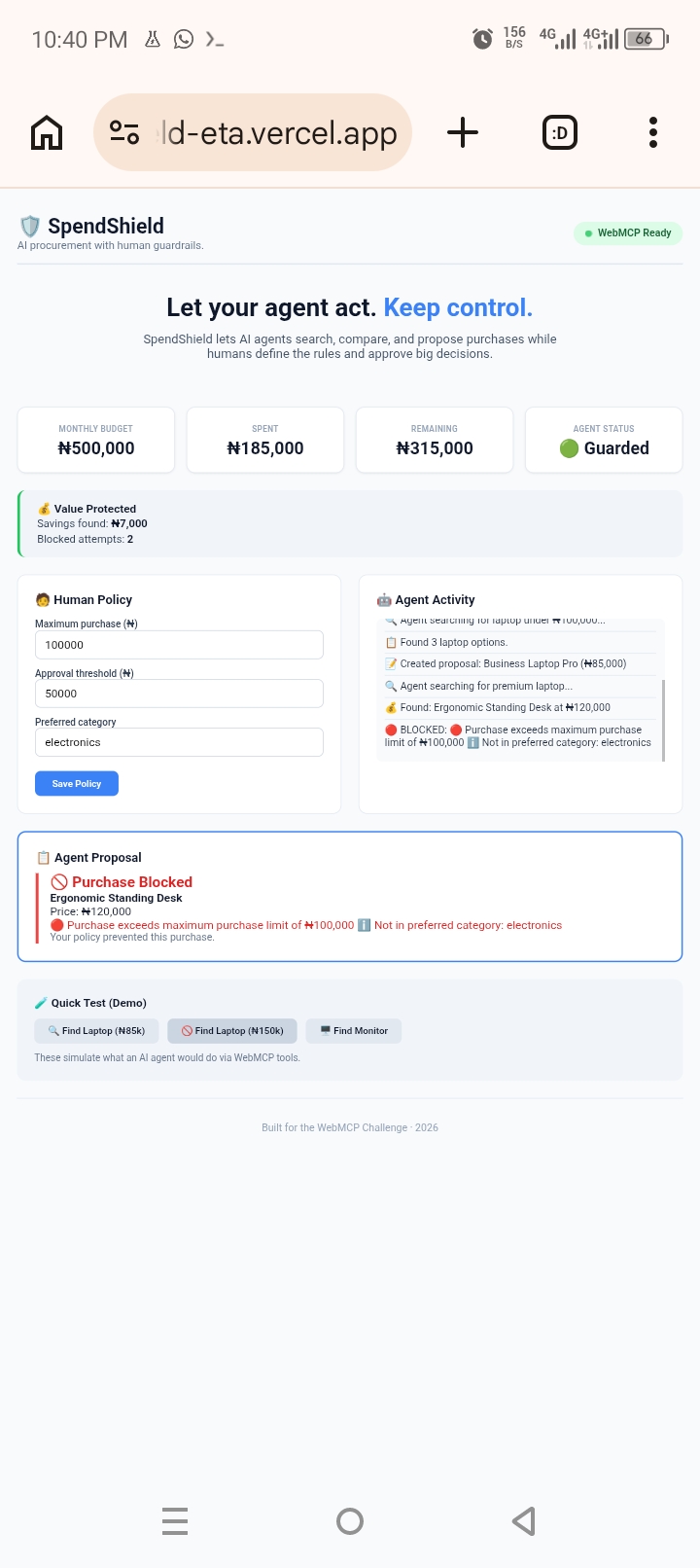
Blocked
-
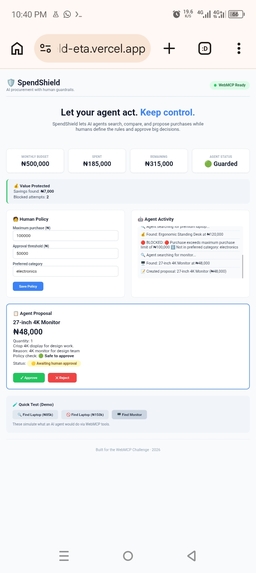
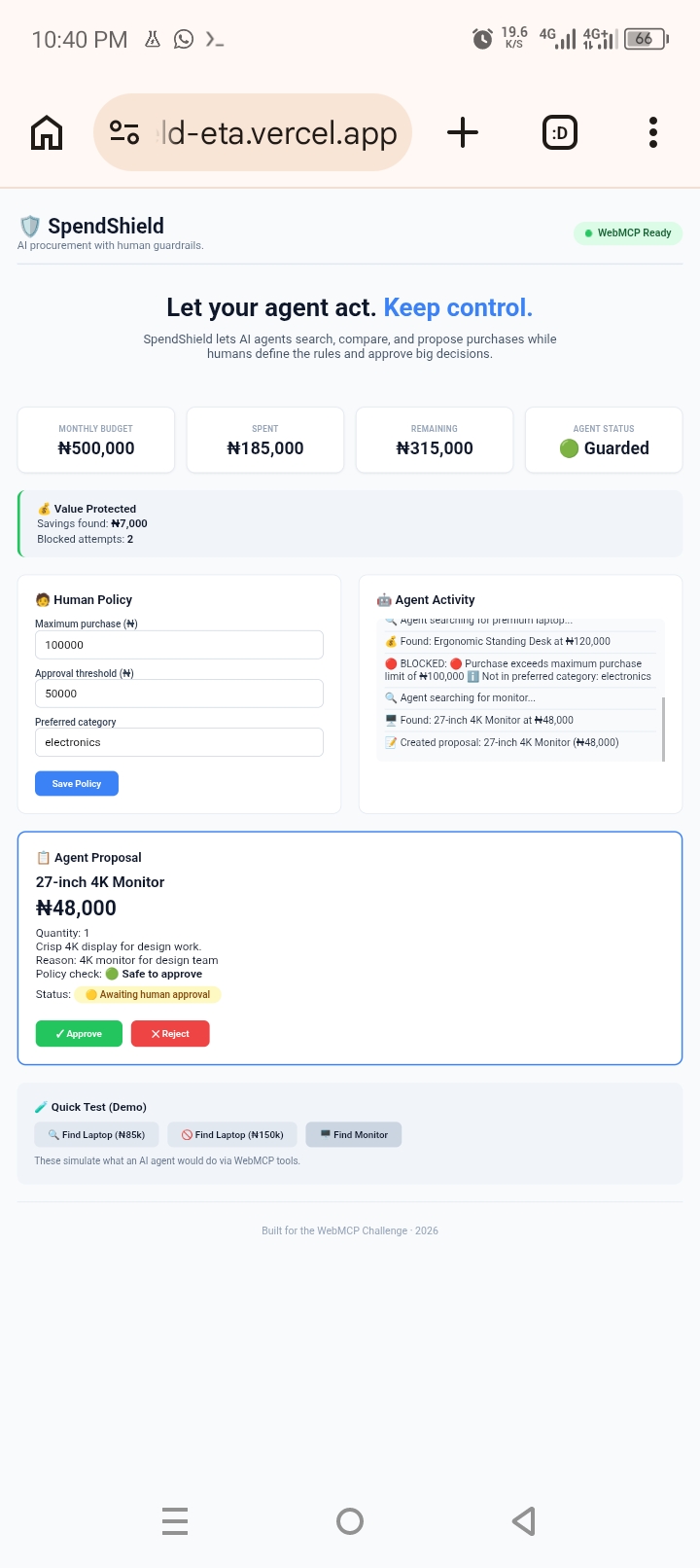
Procurement Process 2
Inspiration
AI agents are becoming capable of taking actions on websites - shopping, booking travel, managing accounts. But this creates a new problem: who controls the agent's decisions? I realized that while we're building AI agents that can "do things," we haven't built proper guardrails for them. An agent with unlimited purchasing power is a financial risk waiting to happen. The WebMCP Challenge was the perfect opportunity to solve this. WebMCP lets websites expose structured tools to agents instead of forcing them to guess their way through a UI. I built SpendShield to show what agent-native web apps should look like: agents that act within clear boundaries, with humans in control.
What it does
SpendShield is an AI procurement guardrail that lets agents search, compare, and propose purchases while humans define financial boundaries and approve consequential actions. Three-tier guardrail system: | Level | Condition | Action | |-------|-----------|--------| | 🟢 SAFE | ≤ ₦50,000 | Agent can act automatically | | 🟡 REVIEW | ₦50,001 - ₦100,000 | Agent proposes, human approves | | 🔴 BLOCKED | > ₦100,000 | Agent cannot proceed | Humans define:
- Monthly budget (e.g., ₦500,000)
- Maximum single purchase (e.g., ₦100,000)
- Approval threshold (e.g., ₦50,000)
- Preferred category (e.g., electronics) Agents can:
- Search product catalogs
- Compare options
- Check policy compliance
- Create human-readable proposals Humans control:
- Review proposals
- Approve or reject
- Track spending in real-time
How we built it
Tech Stack:
- Vanilla HTML + CSS + JavaScript (no frameworks needed)
- WebMCP API for agent tools
- Vercel for hosting
- MIT License
- Built entirely on Android using Termux WebMCP Implementation:
I registered 6 WebMCP tools using the imperative API:
document.modelContext.registerTool({
    name: "get_budget",
    description: "Return budget and limits",
    execute: async () => { /* ... */ }
});

document.modelContext.registerTool({
    name: "search_catalog",
    description: "Search products",
    inputSchema: { /* ... */ },
    execute: async (input) => { /* ... */ }
});

document.modelContext.registerTool({
    name: "compare_options",
    description: "Compare products",
    execute: async (input) => { /* ... */ }
});

document.modelContext.registerTool({
    name: "check_policy",
    description: "Check if purchase is allowed",
    execute: async (input) => { /* ... */ }
});

document.modelContext.registerTool({
    name: "create_proposal",
    description: "Create human-readable proposal",
    execute: async (input) => { /* ... */ }
});

document.modelContext.registerTool({
    name: "approve_proposal",
    description: "Human approval for purchases",
    execute: async (input) => { /* ... */ }
});
The key insight was making the agent propose, not purchase. The agent cannot buy anything directly - it must create a proposal and wait for human approval for any purchase above the threshold.
Challenges we ran into
- WebMCP Testing in Chrome
Testing WebMCP requires enabling
chrome://flags/#enable-webmcp-testing. Without this, the tools register but can't be called. I documented this clearly for judges. - Building Without a Laptop This entire project was built on an Android phone using Termux. I used:
- Termux for the terminal environment
- Nano for editing files
- Git for version control
- Vercel CLI for deployment
- Keeping It Simple With only 4 days, I had to resist adding unnecessary features. No authentication, no database, no complex backend. The judges care about WebMCP leverage, not how many features you can cram in.
- Deployment on Mobile Deploying to Vercel from Termux required careful steps, but the Vercel CLI worked perfectly once I was logged in.
Accomplishments that we're proud of
✅ Complete WebMCP Implementation- 6 real tools registered and working ✅ Three-Tier Guardrail System** - Clear visual status (Safe/Review/Blocked) ✅ Human-Agent Collaboration- Agents propose, humans approve ✅ Real-Time Budget Tracking- Updates immediately on approval ✅ Live Demo - Deployed to Vercel and working: https://spendshield-eta.vercel.app ✅ Open Source - MIT License, public on GitHub ✅ Built on Android- Entire project from a phone in 4 days
What we learned
- WebMCP Changes How We Think About Web Apps Instead of building for humans OR agents, we should build for both. WebMCP gives us a standard way to expose capabilities.
- Guardrails > Automation An agent that can do everything is dangerous. An agent that works within clear boundaries is powerful. The human should always control consequential decisions.
- Keep It Focused You don't need 50 features. You need one feature that works perfectly and demonstrates the technology clearly. SpendShield does one thing: procurement with guardrails.
- Mobile Development Is Viable Building a complete web app on Android is possible with the right tools. Termux, Git, and Vercel made it happen.
What's next for SpendShield
- Real Product Integration Connect to real e-commerce APIs (Shopify, WooCommerce) so the agent can search real products.
- Multi-Agent Support Multiple agents with different roles and permissions.
- Analytics Dashboard Track spending patterns, savings, and policy violations over time.
- More Guardrails
- Department-level budgets
- Project-based spending limits
- Approval workflows (manager → finance → VP)
- Vendor whitelists/blacklists
- Natural Language Policy "Don't spend more than 10% on office supplies" - the agent understands and enforces.
- WebMCP 2.0 Features As the WebMCP standard evolves, SpendShield will evolve with it. Built for the WebMCP Challenge - Shaping the agent-native web.
Built With
- ai
- chrome
- css
- git
- html
- javascript
- license
- mit
- open
- procurement
- source
- termux
- vercel
- webmcp

Log in or sign up for Devpost to join the conversation.