
Inspiration
A bank balance tells you how much money you have. It does not tell you how much of that money is safe to spend.
That gap becomes clear when you are about to buy something. You might have enough money for a pair of headphones today, but part of that balance is already needed for rent, transportation, a loan payment, or another upcoming expense. The purchase can go through successfully and still leave you short several days later.
We built Spendly to make those future consequences visible before checkout.
We wanted to answer three connected questions:
- Can I buy this now without putting my upcoming obligations at risk?
- What changes if I buy today instead of waiting?
- If today is not a good time, when does the purchase become safe within my financial plan?
The idea was to connect the moment someone sees a product with the financial information they need to make a thoughtful decision. Photographing an item should lead to more than a product description—it should help someone understand how that purchase fits into their life.
Spendly — Know when, before you spend.
## What it does
Spendly is a purchase-planning app that connects product recognition, banking data, spending history, and a deterministic financial forecast.
The main experience is:
Scan a product → Confirm the item and price → See the financial impact → Compare buying now versus waiting → Find a Safe Date.
### Recognize a product from a photo
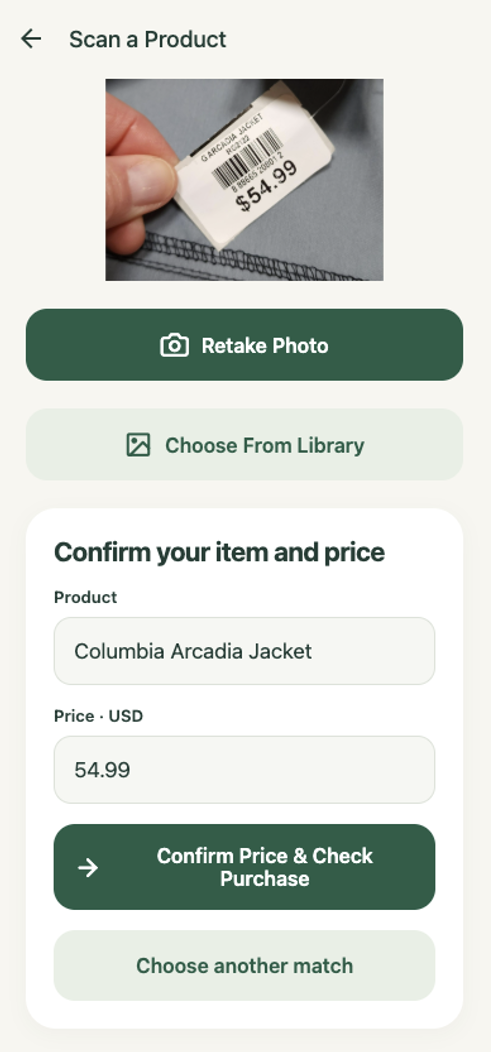
Users can photograph a physical product, packaging, or a price tag. Spendly analyzes visual features, logos, visible text, model information, and readable barcodes to identify the item and extract a visible price.
Recognition supports incomplete information. If the product is identifiable but the price is missing, the user can enter the price. If the exact model is uncertain, the app can present possible matches instead of inventing a precise answer.
Users confirm the details before financial analysis begins. Manual entry is also available.
### Understand what happens to your balance
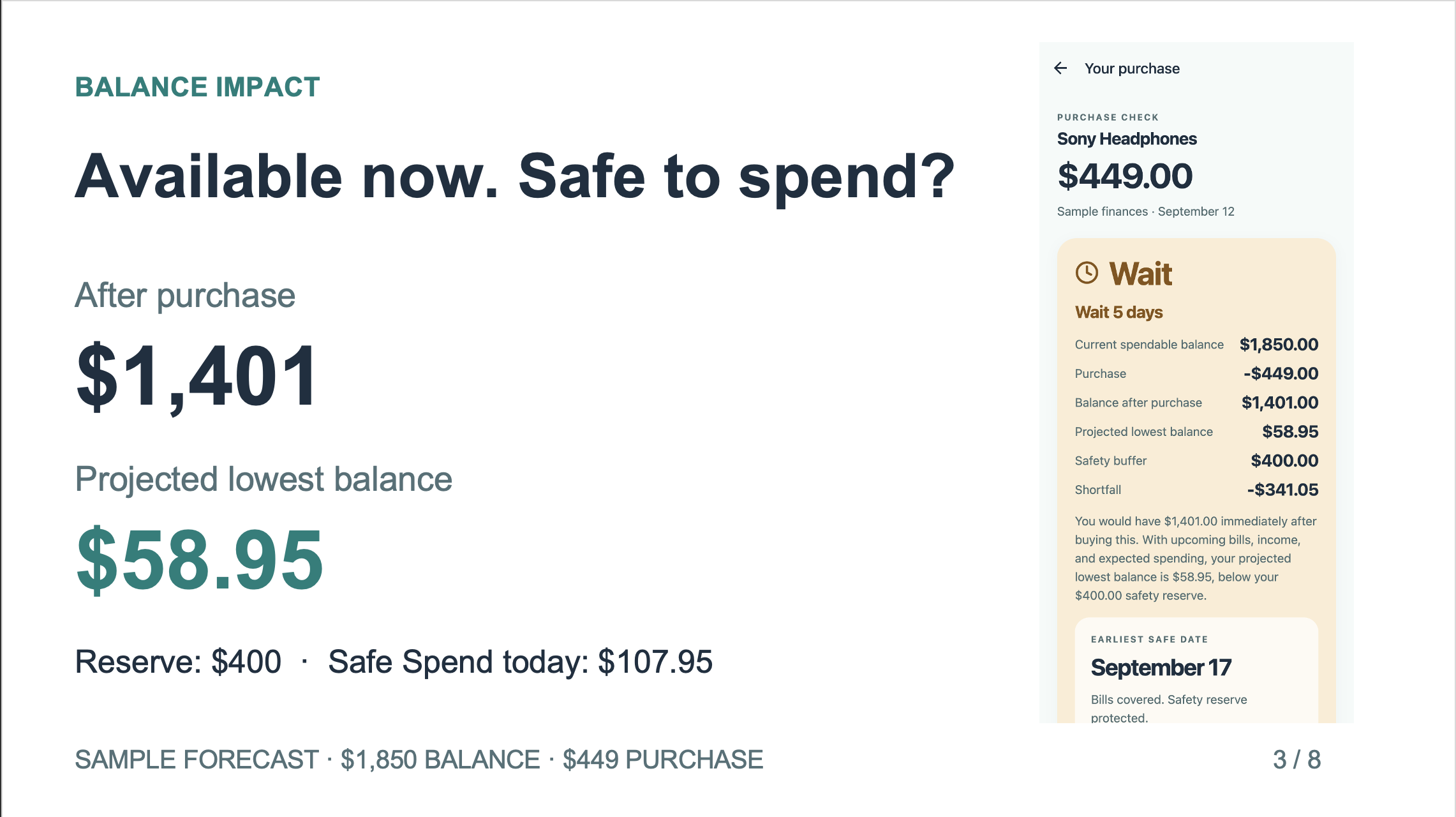
Spendly separates two numbers that are easy to confuse:
- Balance immediately after purchase: the money remaining after subtracting the purchase price.
- Projected lowest future balance: the lowest forecast balance after accounting for upcoming payments, expected income, and estimated spending.
For an illustrative example, imagine a user has $1,850 and wants to buy something for $249. The immediate balance would be $1,601. But future obligations could bring the projected low to $211. If the user’s safety buffer is $400, the forecast would fall $189 below that reserve.
The user has enough money to complete the purchase today. The concern is what happens afterward.
Spendly makes that distinction visible by showing the current balance, purchase price, immediate remaining balance, projected low, safety buffer, and difference from the buffer.
### Find a Safe Date
Spendly evaluates possible purchase dates within the forecast to find the earliest date that meets the configured financial constraints.
A paycheck may create room for the purchase. An upcoming payment may remove that room again. The engine considers the projected obligations rather than assuming that the next payday automatically makes a purchase safe.
If no qualifying date exists within the forecast, Spendly reports that outcome instead of inventing a date.
The app also calculates a safe maximum purchase amount, giving users another way to understand their current spending flexibility.
### Compare two futures with FutureMe
FutureMe compares buying today with waiting until the recommended date.
Users can see how the scenarios differ in purchase timing, projected balances, reserve protection, and savings- goal impact. This makes the recommendation easier to understand: waiting has a visible financial effect rather than being an unexplained instruction.
### Customize upcoming payments and goals
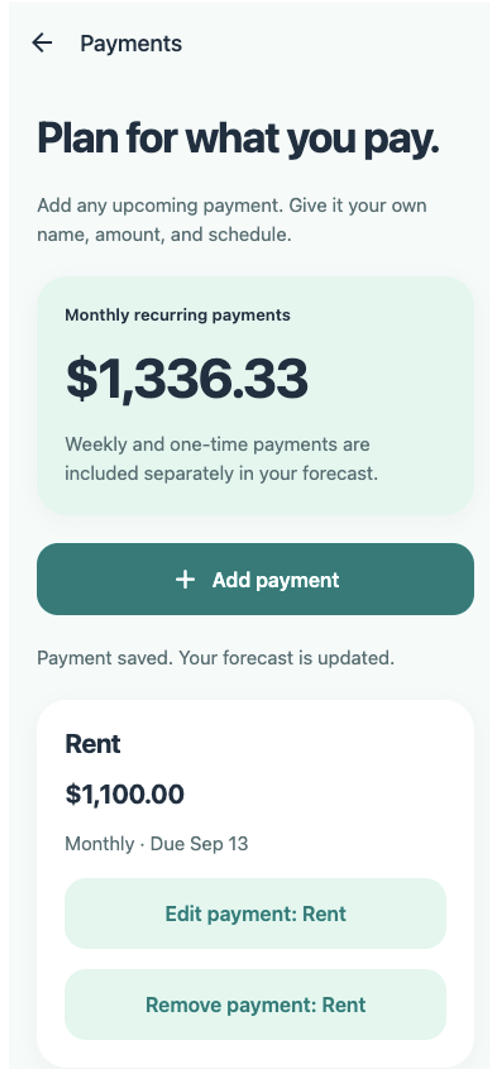
Users can add any expected payment with their own name, amount, due date, and recurrence.
Supported schedules include:
- One-time payments.
- Weekly payments.
- Every-two-weeks payments.
- Monthly payments.
Rent and subscriptions are just examples. A payment could also be tuition, equipment rental, insurance, a family contribution, or another personal expense.
Financial setup also supports expected income, selected spending accounts, a safety buffer, and savings goals. Editing or removing a payment updates the active forecast, including the purchase result and Safe Date.
### Explore changes and save decisions
An unexpected-expense scenario lets users see how an additional cost affects their plan. A previously reasonable purchase may become less comfortable, and the Safe Date may move later.
Users can save purchase decisions and revisit their history. Saved results preserve their original financial context, while checking again creates an updated analysis.
## How we built it
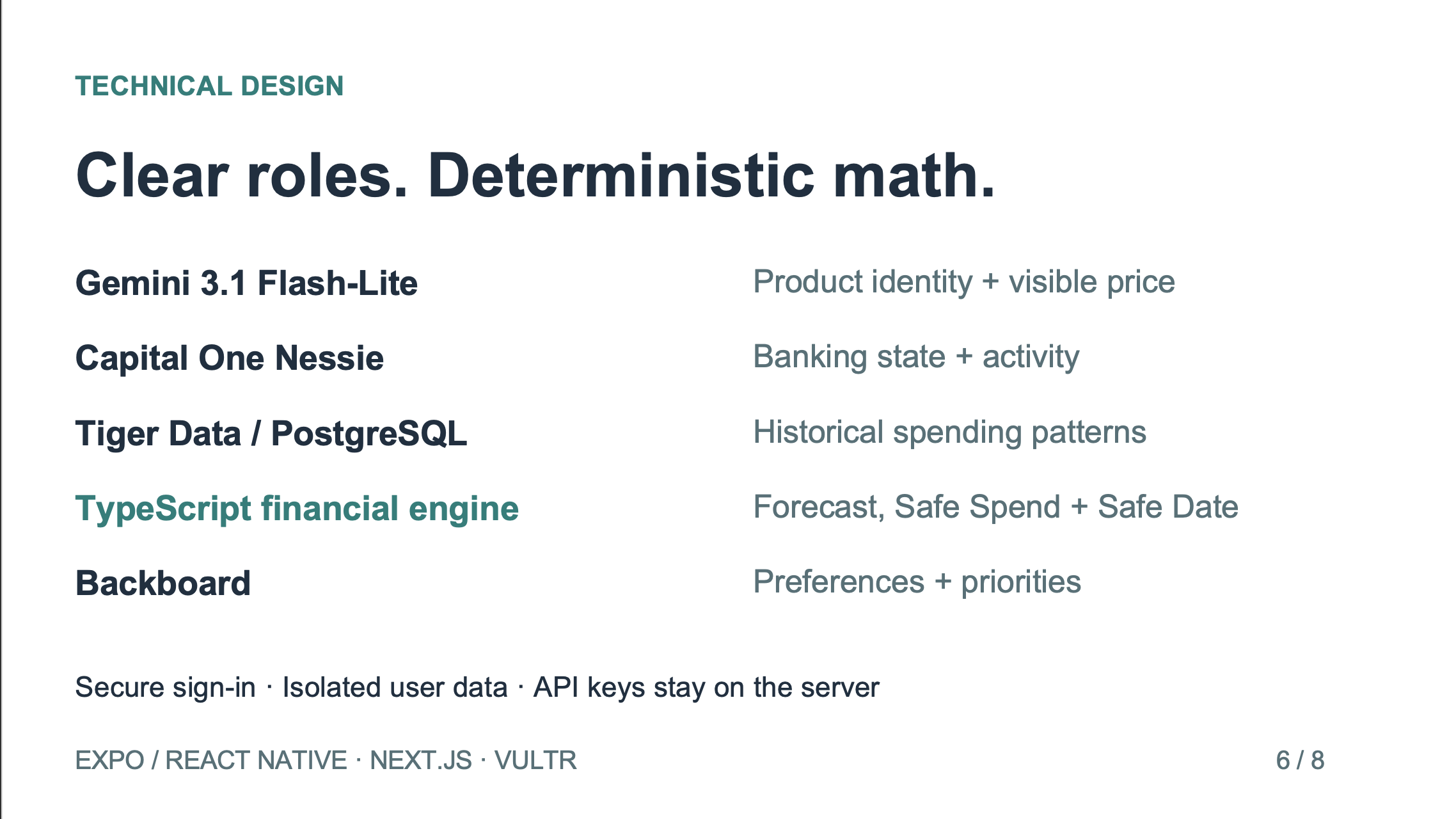
We built Spendly as a set of connected components with clear responsibilities. Product recognition, banking data, historical analytics, preference memory, and financial calculations each have their own boundary.
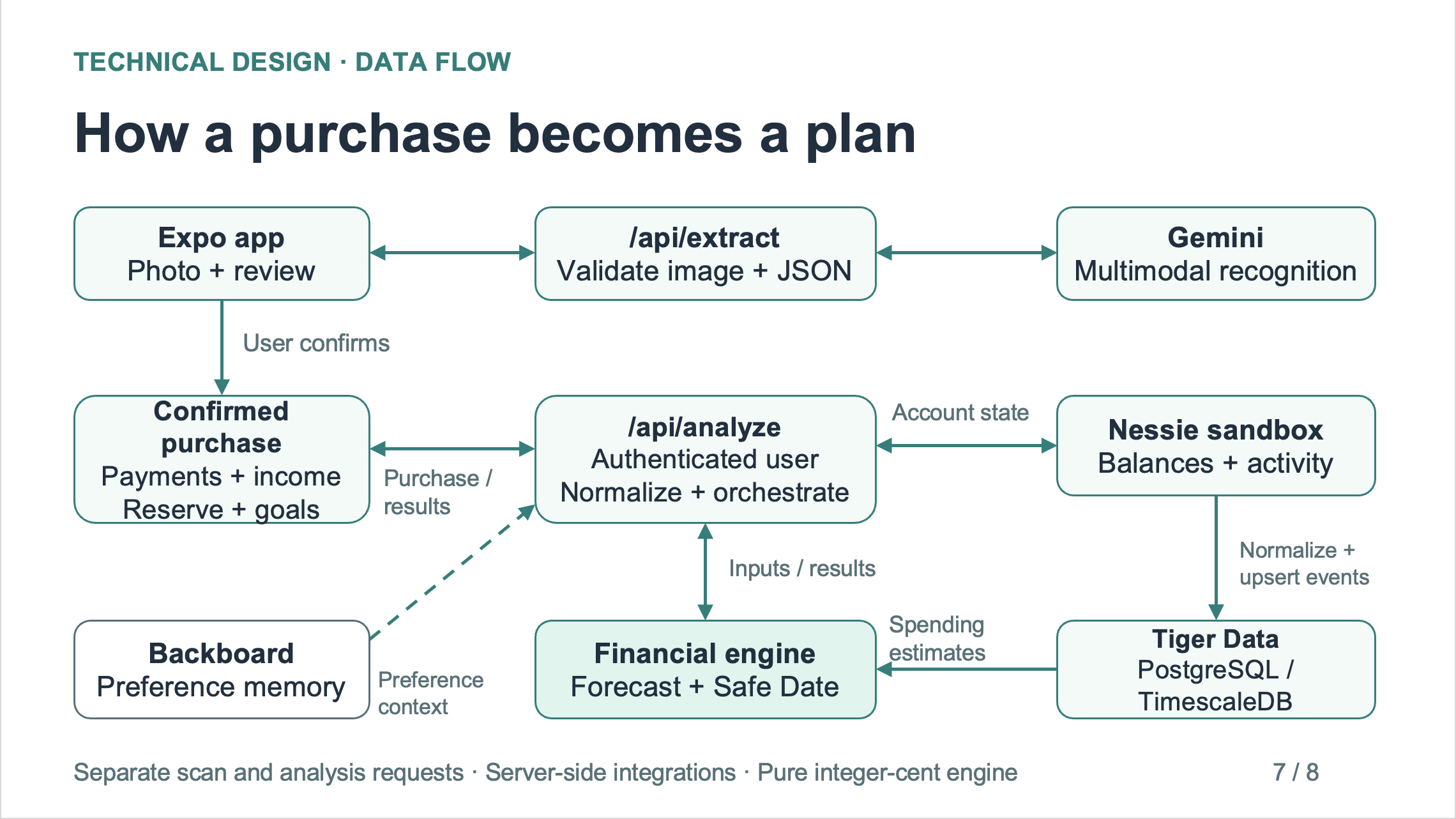
The architecture follows this flow:
Expo frontend → authenticated backend → financial-data provider and analytics → deterministic engine → purchase result and FutureMe.
Product recognition runs separately:
Photo → image preprocessing → backend → Gemini → user confirmation.
### Frontend: Expo, React Native, React, and TypeScript
The mobile interface uses Expo, React Native, React, Expo Router, and TypeScript. Expo also provides the web version served by our deployment.
We organized the app into public authentication routes and protected application routes. The interface includes Home, Scan, Purchase Result, FutureMe, Payments, Financial Setup, Goals, History, and Profile.
Shared components provide consistent buttons, form fields, cards, currency displays, loading states, and error messages. We used Expo Image Picker for camera and photo-library access and Expo Image Manipulator for image preparation.
Payment settings and saved history use AsyncStorage, scoped to the application user and financial-data source. Those planning settings accompany subsequent analysis requests. Native authentication tokens use Expo SecureStore.
### Backend: Next.js, Node.js, TypeScript, and Zod
The backend uses Next.js API routes running on Node.js, written in TypeScript.
The frontend submits recognition requests to /api/extract and confirmed purchase requests to /api/analyze. Separate endpoints handle authentication, profile management, preferences, and saved decisions.
We use Zod to validate incoming requests and external response structures. This keeps malformed image requests, invalid money values, unsupported inputs, and unexpected provider responses from silently entering the financial engine.
Provider credentials remain on the backend. The Expo application receives the public API URL, not the Nessie, Gemini, Backboard, database, or JWT secrets.
### Product recognition: Google Gemini
We use Google Gemini’s multimodal API, configured with gemini-3.1-flash-lite, to identify products from images.
Before upload, large images are resized and compressed. The backend validates the image and passes image content to Gemini—not a phone-local file path. Sharp supports backend image validation and processing.
The recognition prompt asks Gemini to combine visual appearance with packaging, logos, text, model numbers, readable barcodes, and retail context. Structured results support missing fields and uncertain matches.
We also added timing instrumentation to distinguish preprocessing, upload, model-request, and parsing delays.
Crucially, Gemini does not calculate affordability or Safe Date. It helps establish what the user wants to buy.
### Banking data: Capital One Nessie
We integrated the Capital One Nessie banking sandbox for account balances and supported banking activity, including purchases, deposits, withdrawals, transfers, merchants, and bills.
A FinancialDataProvider abstraction separates provider-specific responses from the rest of the application. The Nessie adapter maps external objects into internal financial types with integer-cent amounts.
Authenticated app users are mapped to their banking integration. The frontend does not select an arbitrary user’s banking identity.
We retained a labeled sample-data provider for situations where a banking connection is unavailable. A working fallback does not get presented as connected account data.
### Historical analytics: Tiger Data, TimescaleDB, and PostgreSQL
Tiger Data, using PostgreSQL and TimescaleDB, provides the financial-event and time-series analytics layer.
Normalized transactions are ingested with stable event identifiers and conflict handling. This prevents the same banking activity from being duplicated every time the user refreshes.
Historical queries and aggregates derive information such as daily spending, category patterns, weekday behavior, and spending variability. Those results provide inputs to the forecast.
We keep historical activity separate from future scheduled obligations. A past transaction is not automatically treated as a bill that will happen again.
### Financial calculations: our deterministic TypeScript engine
The financial engine combines current spendable balances, expected income, scheduled payments, estimated ordinary spending, safety reserves, goals, and the proposed purchase.
At a high level, cash flow follows:
# [ \text{Balance}_{t+1}
## \text{Balance}{t} + \text{Income}{t}
## \text{Payments}_{t}
## \text{Expected Spending}_{t}
\text{Purchase}_{t} ]
The implementation also handles event timing, recurrence, account selection, and financial constraints.
All internal monetary values use integer cents. We preserve monthly recurrence anchors so a payment scheduled on the 31st can use February’s last day without incorrectly becoming a payment on the 28th in every later month.
The engine produces the baseline forecast, buy-today scenario, waiting scenario, projected minimum balances, safety-buffer checks, goal impacts, Safe Date, and safe maximum purchase amount.
### Preference memory: Backboard
We use Backboard for persistent user-preference context, including spending priorities, risk tolerance, and preferred explanation style.
This memory is separate from banking truth. Preferences can provide context for the experience, while balances, transactions, obligations, and calculated outcomes remain in the financial system.
Each connected user has a dedicated integration mapping so preference memory is not accidentally shared across accounts.
### Authentication and user isolation
We implemented authentication without an external auth provider.
The system uses Argon2id for password hashing, short-lived JWT access tokens, and rotating refresh sessions whose token hashes are stored in PostgreSQL. The jose library handles JWT operations.
Native tokens are stored using SecureStore. Browser refresh sessions use Secure, HttpOnly cookies.
Protected backend requests derive identity from the validated session rather than trusting a submitted userId. Financial queries and owned records are scoped to that authenticated identity.
We also implemented validation, rate limiting, session revocation, profile editing, password-change and reset- token logic, and account deletion. Production password-reset email delivery remains a follow-up setup task.
### Deployment: Vultr, Nginx, systemd, and Let’s Encrypt
We deployed Spendly on Vultr, using an Ubuntu server with Node.js.
Nginx serves the Expo web interface and forwards API requests to the Next.js backend. The backend runs as an unprivileged user through systemd, with automatic restart and startup on boot.
Let’s Encrypt supplies the publicly trusted HTTPS certificate, and scheduled renewal reloads Nginx after certificate updates. Runtime credentials are stored outside the public web files and application release directories.
### Testing
We used Node’s test runner with tsx for automated TypeScript tests and Python with Playwright for browser workflows.
Testing covered financial boundary cases, recurring payments, duplicate ingestion, schema validation, authentication, user isolation, saved settings, navigation, scan fallback behavior, and responsive layouts.
We also tested real public-URL authentication and a real Gemini image request through the deployed Vultr backend.
## Challenges we ran into
One challenge was getting useful product recognition without overstating certainty. A photo might clearly show a product family but provide no evidence for its exact generation or model. We needed partial results, candidate selection, and confirmation to be normal parts of the workflow.
Another challenge was understanding scan latency. We traced the image from capture through preprocessing, upload, backend validation, Gemini, and response parsing. That helped us improve the image pipeline and distinguish application delays from external-service response time.
Financial correctness required particular care. Duplicate transactions, incorrect units, recurring-date errors, or replaying activity already reflected in a bank balance can all produce misleading results. We addressed these with explicit normalization rules and regression tests.
Connecting services also revealed an important distinction: configured API keys do not automatically mean an authenticated user is connected. We had to verify the user-to-integration mappings and then test the resulting financial path.
Finally, moving from local development to a hosted application exposed issues around network addresses, browser cookies, HTTPS, and reverse-proxy behavior. We verified the public experience rather than relying only on successful builds.
## Accomplishments that we're proud of
We are proud of building a working path from a product photo to an understandable financial decision.
Spendly brings together visual recognition, banking data, historical analytics, custom future obligations, and a shared financial engine. The result explains both immediate purchase impact and the pressure that can appear later.
We verified live Nessie, Tiger Data, and Backboard operation for the connected account. A real product-tag request through the deployed backend identified a Columbia Arcadia Jacket and its visible $54.99 price in approximately 3.8 seconds.
The deployed web app also passed registration, login, persistent-session, profile, password-change, logout, and account-deletion checks. We verified HTTPS certificate renewal rather than only issuing the initial certificate.
Most importantly, the app makes its central idea visible: having enough money to buy something today does not tell the whole story about whether it fits your financial plan.
## What we learned
We learned that explainability starts with the data model and calculations. A polished sentence cannot compensate for an incorrect balance or a missing obligation.
We also learned to give AI a clearly defined role. Visual recognition is valuable because it reduces the work required to describe a purchase. Financial calculations benefit from deterministic logic that can be inspected, tested, and reproduced.
Building the complete experience taught us how much the boundaries matter: image bytes, validated responses, integer cents, recurring dates, authenticated ownership, and deployment configuration all affect what the user ultimately sees.
Finally, we learned that different tests prove different things. Unit tests establish calculation behavior, integration tests establish service behavior, and browser tests establish whether a person can complete the workflow. A reliable product needs evidence at each level.
## What's next for Spendly
Our immediate next steps are to complete physical-device testing and configure production password-reset email delivery.
We also want to:
- Make banking connection and initial financial setup easier.
- Synchronize payment plans, goals, and saved settings across devices.
- Improve recognition latency consistency across different image conditions.
- Expand supported payment schedules and account connections.
- Make changes between forecasts easier to understand.
- Test with users to refine the explanations and reduce setup effort.
Our goal is to help people make spending decisions with a clearer view of what comes next.
Spendly — Know when, before you spend.
› write in markdown style please
• ## Inspiration
A bank balance tells you how much money you have. It does not tell you how much of that money is safe to spend.
That gap becomes clear when you are about to buy something. You might have enough money for a pair of headphones today, but part of that balance is already needed for rent, transportation, a loan payment, or another upcoming expense. The purchase can go through successfully and still leave you short several days later.
We built Spendly to make those future consequences visible before checkout.
We wanted to answer three connected questions:
- Can I buy this now without putting my upcoming obligations at risk?
- What changes if I buy today instead of waiting?
- If today is not a good time, when does the purchase become safe within my financial plan?
Our idea was to connect the moment someone sees a product with the financial information they need to make a thoughtful decision. Photographing an item should lead to more than a product description—it should help someone understand how that purchase fits into their life.
Spendly — Know when, before you spend.
## What it does
Spendly is a purchase-planning app that connects product recognition, banking data, spending history, and a deterministic financial forecast.
The main experience is:
Scan a product → Confirm the item and price → See the financial impact → Compare buying now versus waiting → Find a Safe Date.
### Recognize a product from a photo
Users can photograph a physical product, packaging, or a price tag. Spendly analyzes visual features, logos, visible text, model information, and readable barcodes to identify the item and extract a visible price.
Recognition supports incomplete information. If the product is identifiable but its price is missing, the user can enter the price. If the exact model is uncertain, the app can present possible matches instead of inventing a precise answer.
Users confirm the details before financial analysis begins. Manual entry is also available.
### Understand the purchase’s financial impact
Spendly separates two numbers that are easy to confuse:
- Balance immediately after purchase: the money remaining after subtracting the purchase price.
- Projected lowest future balance: the lowest forecast balance after accounting for upcoming payments, expected income, and estimated spending.
For an illustrative example, imagine a user has $1,850 and wants to buy something for $249. Their immediate balance would be $1,601. However, future obligations could bring the projected low to $211. If their safety buffer is $400, the forecast would fall $189 below that reserve.
The user has enough money to complete the purchase today. The concern is what happens afterward.
Spendly makes that distinction visible by showing:
- Current spendable balance.
- Purchase price.
- Immediate balance after purchase.
- Projected lowest balance.
- Safety buffer.
- Difference from the safety buffer.
- Purchase verdict and Safe Date.
- Savings-goal impact.
### Find a Safe Date
Spendly evaluates possible purchase dates within the forecast to find the earliest date that meets the configured financial constraints.
A paycheck may create room for the purchase. An upcoming payment may remove that room again. The engine considers projected obligations rather than assuming that the next payday automatically makes a purchase safe.
If no qualifying date exists within the forecast, Spendly reports that outcome instead of inventing a date.
The app also calculates a safe maximum purchase amount, helping users understand their current spending flexibility.
### Compare two futures with FutureMe
FutureMe compares buying today with waiting until the recommended date.
Users can see how the scenarios differ in purchase timing, projected balances, reserve protection, and savings- goal impact. This makes the recommendation easier to understand: waiting has a visible financial effect rather than being an unexplained instruction.
### Customize upcoming payments and goals
Users can add any expected payment with their own name, amount, due date, and recurrence.
Supported schedules include:
- One-time payments.
- Weekly payments.
- Every-two-weeks payments.
- Monthly payments.
Rent and subscriptions are just examples. A payment could also be tuition, equipment rental, insurance, a family contribution, or another personal expense.
Financial setup also supports expected income, selected spending accounts, a safety buffer, and savings goals. Editing or removing a payment updates the active forecast, including the purchase result and Safe Date.
### Explore changes and save decisions
An unexpected-expense scenario lets users see how an additional cost affects their plan. A previously reasonable purchase may become less comfortable, and the Safe Date may move later.
Users can save purchase decisions and revisit their history. Saved results preserve their original financial context, while checking again creates an updated analysis.
## How we built it
We built Spendly as connected components with clear responsibilities. Product recognition, banking data, historical analytics, preference memory, and financial calculations each have their own boundary.
The financial-analysis architecture is:
Expo frontend → authenticated backend → financial-data provider and analytics → deterministic engine → purchase result and FutureMe.
Product recognition runs separately:
Photo → image preprocessing → backend → Gemini → user confirmation.
This separation allows users to see the recognized product without waiting for the banking and forecasting pipeline.
### Frontend: Expo, React Native, React, and TypeScript
The interface uses Expo, React Native, React, Expo Router, and TypeScript. Expo also provides the web version served by our deployment.
We organized the app into public authentication routes and protected application routes. The interface includes Home, Scan, Purchase Result, FutureMe, Payments, Financial Setup, Goals, History, and Profile.
Shared components provide consistent buttons, form fields, cards, currency displays, loading states, and error messages. Spendly’s mint, teal, and navy design emphasizes readable financial information and clear actions.
We use:
- Expo Image Picker for camera and photo-library access.
- Expo Image Manipulator for image resizing and compression.
- Expo SecureStore for native authentication-token storage.
- AsyncStorage for device-local payment settings and saved history, scoped by user and financial-data source.
Planning settings accompany subsequent financial-analysis requests, so the engine can account for the user’s custom obligations.
### Backend: Next.js, Node.js, TypeScript, and Zod
The backend uses Next.js API routes running on Node.js, written in TypeScript.
The frontend submits recognition requests to /api/extract and confirmed purchase requests to /api/analyze.
Separate endpoints handle authentication, profile management, preferences, and saved decisions.
We use Zod to validate incoming requests and external response structures. This prevents malformed image requests, invalid money values, unsupported inputs, and unexpected provider responses from silently entering the financial engine.
Provider credentials remain on the backend. The Expo application receives the public API URL, not the Nessie, Gemini, Backboard, database, or JWT secrets.
### Product recognition: Google Gemini
We use Google Gemini’s multimodal API, configured with gemini-3.1-flash-lite, to identify products from
images.
Before upload, large images are resized and compressed. The backend validates the image and passes actual image content to Gemini—not a phone-local file path. Sharp supports backend image validation and processing.
The recognition prompt asks Gemini to combine:
- Product shape and appearance.
- Packaging and logos.
- Visible brand and model text.
- Readable barcode digits.
- Price tags.
- Relevant retail context.
Structured results support missing fields and uncertain matches. We added timing instrumentation to distinguish preprocessing, upload, model-request, and parsing delays.
Gemini does not calculate affordability or Safe Date. It helps establish what the user wants to buy.
### Banking data: Capital One Nessie
We integrated the Capital One Nessie banking sandbox for account balances and supported banking activity, including purchases, deposits, withdrawals, transfers, merchants, and bills.
A FinancialDataProvider abstraction separates provider-specific responses from the rest of the application. The
Nessie adapter maps external objects into internal financial types with integer-cent amounts.
Authenticated app users are mapped to their banking integration. The frontend cannot select an arbitrary user’s banking identity.
We retained a labeled sample-data provider for situations where a banking connection is unavailable. A working fallback is not presented as connected account data.
### Historical analytics: Tiger Data, TimescaleDB, and PostgreSQL
Tiger Data, using PostgreSQL and TimescaleDB, provides the financial-event and time-series analytics layer.
Normalized transactions are ingested with stable event identifiers and conflict handling. This prevents banking activity from being duplicated every time the user refreshes.
Historical queries and aggregates derive information such as daily spending, category patterns, weekday behavior, and spending variability. Those results provide inputs to the forecast.
We keep historical activity separate from future scheduled obligations. A past transaction is not automatically treated as a bill that will happen again.
### Financial calculations: our deterministic TypeScript engine
The financial engine combines:
- Current spendable balances.
- Expected income.
- Scheduled payments.
- Estimated ordinary spending.
- Safety reserves.
- Savings goals.
- The proposed purchase and its timing.
At a high level, cash flow follows:
$$ \text{Balance}{t+1} = \text{Balance}{t} + \text{Income}{t} - \text{Payments}{t} - \text{Expected Spending}{t} - \text{Purchase}{t} $$
The implementation also handles event timing, recurrence, account selection, and financial constraints.
All internal monetary values use integer cents. We preserve monthly recurrence anchors so a payment scheduled on the 31st can use February’s last day without incorrectly becoming a payment on the 28th in every later month.
The engine produces the baseline forecast, buy-today scenario, waiting scenario, projected minimum balances, safety-buffer checks, goal impacts, Safe Date, and safe maximum purchase amount.
### Preference memory: Backboard
We use Backboard for persistent user-preference context, including spending priorities, risk tolerance, and preferred explanation style.
This memory is separate from banking truth. Preferences provide context for the experience, while balances, transactions, obligations, and calculated outcomes remain in the financial system.
Each connected user has a dedicated integration mapping so preference memory is not accidentally shared across accounts.
### Authentication and user isolation
We implemented authentication without an external auth provider.
The system uses:
- Argon2id for password hashing.
- Short-lived JWT access tokens.
- jose for JWT operations.
- Rotating refresh sessions whose token hashes are stored in PostgreSQL.
- SecureStore for native tokens.
- Secure, HttpOnly cookies for browser refresh sessions.
Protected backend requests derive identity from the validated session rather than trusting a submitted userId.
Financial queries and owned records are scoped to that authenticated identity.
We also implemented validation, rate limiting, session revocation, profile editing, password-change and reset- token logic, and account deletion. Production password-reset email delivery remains a follow-up setup task.
### Deployment: Vultr, Nginx, systemd, and Let’s Encrypt
We deployed Spendly on Vultr, using an Ubuntu server with Node.js.
Nginx serves the Expo web interface and forwards API requests to the Next.js backend. The backend runs as an unprivileged user through systemd, with automatic restart and startup on boot.
Let’s Encrypt supplies the publicly trusted HTTPS certificate, and scheduled renewal reloads Nginx after certificate updates. Runtime credentials are stored outside the public web files and application release directories.
### Testing and verification
We used Node’s test runner with tsx for automated TypeScript tests and Python with Playwright for browser workflows.
Testing covered financial boundary cases, recurring payments, duplicate ingestion, schema validation, authentication, user isolation, saved settings, navigation, scan fallback behavior, and responsive layouts.
We also tested real public-URL authentication and a real Gemini image request through the deployed Vultr backend.
## Challenges we ran into
### Useful recognition without false certainty
A photo might clearly show a product family but provide no evidence for its exact generation or model. We needed partial results, candidate selection, and confirmation to be normal parts of the workflow.
### Understanding scan latency
We traced the image from capture through preprocessing, upload, backend validation, Gemini, and response parsing. This helped us improve the image pipeline and distinguish application delays from external-service response time.
### Maintaining financial correctness
Duplicate transactions, incorrect units, recurring-date errors, or replaying activity already reflected in a bank balance can all produce misleading results.
We addressed these with explicit normalization rules, integer-cent calculations, and regression tests.
### Connecting services to the correct user
Configured API keys do not automatically mean an authenticated user is connected. We had to verify user-to- integration mappings and then test the resulting financial path.
### Moving beyond local development
Hosting exposed issues around network addresses, browser cookies, HTTPS, and reverse-proxy behavior.
We verified the actual public experience rather than relying only on successful builds. The deployed web app and API share the same HTTPS origin so browser sessions can operate correctly.
## Accomplishments that we're proud of
We are proud of building a working path from a product photo to an understandable financial decision.
Spendly brings together visual recognition, banking data, historical analytics, custom future obligations, and a shared financial engine. The result explains both immediate purchase impact and the pressure that can appear later.
We verified live Nessie, Tiger Data, and Backboard operation for the connected account. A real product-tag request through the deployed backend identified a Columbia Arcadia Jacket and its visible $54.99 price in approximately 3.8 seconds.
The deployed web app also passed registration, login, persistent-session, profile, password-change, logout, and account-deletion checks. We verified HTTPS certificate renewal rather than only issuing the initial certificate.
Most importantly, the app makes its central idea visible:
Having enough money to buy something today does not tell the whole story about whether it fits your financial plan.
## What we learned
We learned that explainability starts with the data model and calculations. A polished sentence cannot compensate for an incorrect balance or a missing obligation.
We also learned to give AI a clearly defined role. Visual recognition reduces the work required to describe a purchase. Financial calculations benefit from deterministic logic that can be inspected, tested, and reproduced.
Building the complete experience taught us how much the boundaries matter: image bytes, validated responses, integer cents, recurring dates, authenticated ownership, and deployment configuration all affect what the user ultimately sees.
Finally, we learned that different tests prove different things:
- Unit tests establish calculation behavior.
- Integration tests establish service behavior.
- Browser tests establish whether a person can complete the workflow.
- Physical-device tests establish native behavior that a browser cannot prove.
A reliable product needs evidence at each level.
## What's next for Spendly
Our immediate next steps are to complete physical-device testing and configure production password-reset email delivery.
We also want to:
- Make banking connection and initial financial setup easier.
- Synchronize payment plans, goals, and saved settings across devices.
- Improve recognition latency consistency across different image conditions.
- Expand supported payment schedules and account connections.
- Make changes between forecasts easier to understand.
- Test with users to refine the explanations and reduce setup effort.
Our goal is to help people make spending decisions with a clearer view of what comes next.
Spend Smarter, Live Brighter
Built With
- argon2
- backboard
- capital-one-nessie
- expo-router
- expo-securestore
- expo.io
- google-gemini
- jwt
- next.js
- nginx
- node.js
- postgresql
- react
- react-native
- tiger-data
- timescaledb
- typescript
- vultr
- zod

Log in or sign up for Devpost to join the conversation.