-
-
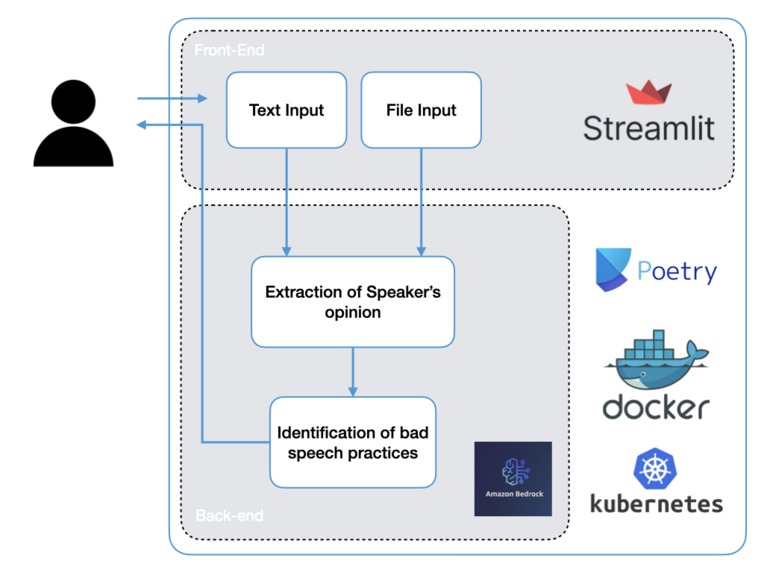
Technical schema of the solution
-
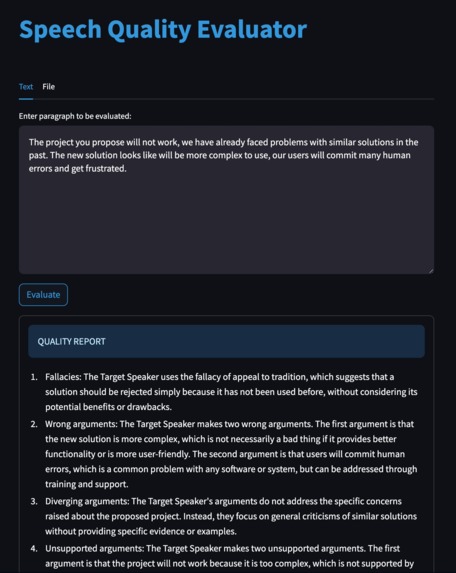
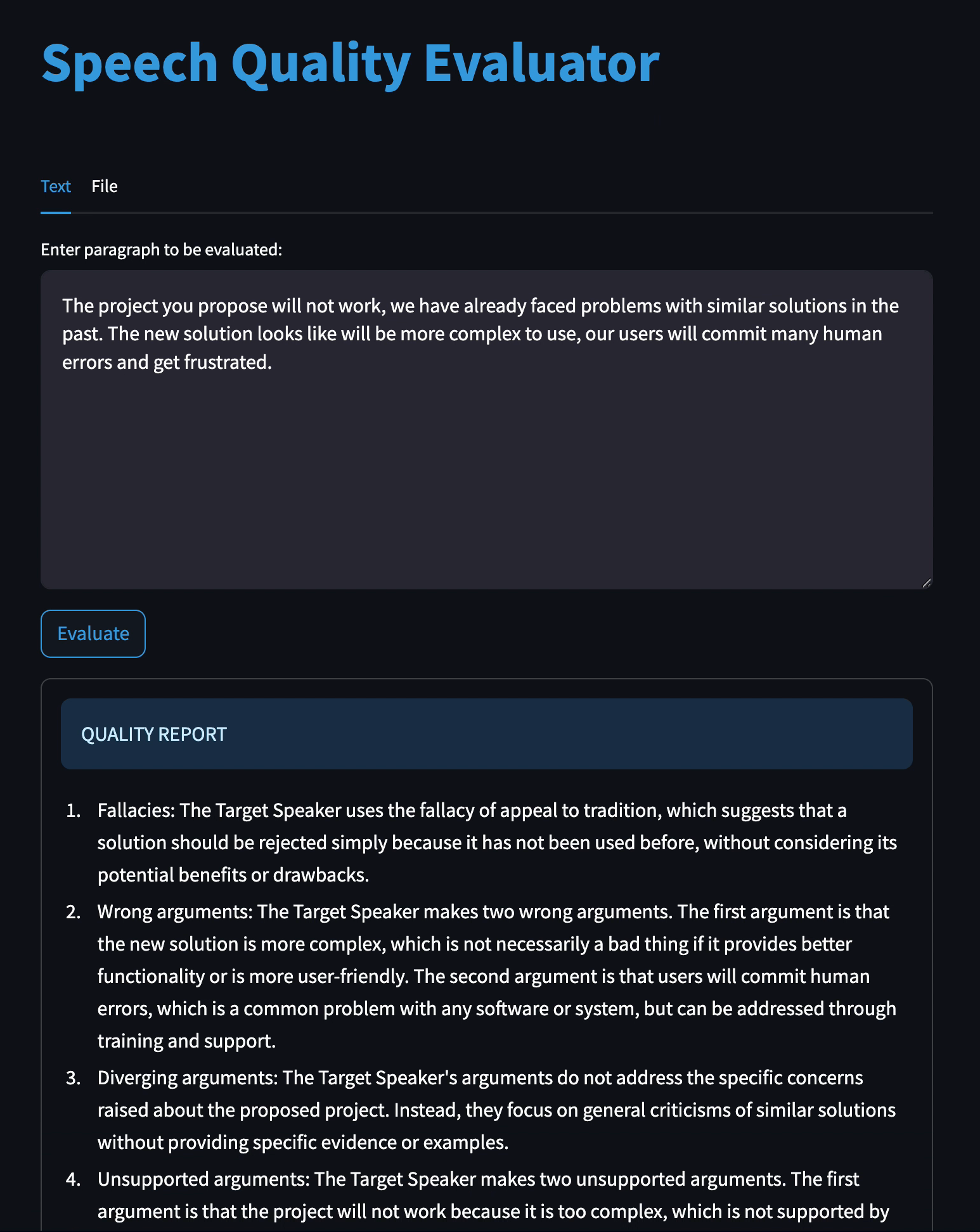
Example of input and answer (partial)

Inspiration
Tired of sifting through half-baked arguments, fallacies, and deviating responses on TV and social media? Astonished to see politics address each other on live TV as if they were high school bullies during the recess? This is how I feel frequently when I listen to politics, celebrities and other people with their own platform. The era of social media has made it too easy for anybody to create a channel and share their opinions and experiences, no matter how many misinformation and absurdities they spread. This is why some years ago I thought about creating this tool --the Speech Quality Evaluator--, a solution aimed at identifying fallacies, speech pitfalls and more in interviews, speeches and political debates. No more of navigating through irrelevant information or being misled by weak or partial arguments. Our platform holds all inputs to high standards, fostering better communication and helping us become better speakers and better listeners.
What it does
The Speech Quality Evaluator is very easy to use, you only need to share the text or the file that you wish to analyze, and the SQE will identify a thorough list of semantic irregularities that will help you become a better conversationalist, and make your discussions richer and more insightful.
How I built it
The core of the solution is built using Amazon's Bedrock, more specifically the Titan foundational model. An initial Prompt is used to identify the opinion of the speaker at hand, to understand which are the arguments of the text that need to be considered (given that the text might be a transcription with 1, 2 or more speakers). Then, a second, more powerful prompt, receives both the original text and the inferred opinion of the speaker (from the first prompt), and focuses on identifying conversational irregularities, such as fallacies, arguments that deviate from the topic at hand, arguments that are not backed up by evidence or data, or simply personal opinions.
This engine is exposed through Streamlit, an open-source Python framework for easily sharing Machine Learning and Data Science applications. The whole application (back-end & front-end) is containerized using a Docker image, that is then deployed in a Kubernetes cluster from where it can be accessed and used.
Challenges I ran into
My objective for this project was to introduce myself to Prompt Engineering, which became the clear bottleneck of the solution. Defining a prompt is a very sensitive task, and any small change, even in the order of the instructions, would turn into completely different (and often opposite) results. It has been very, very difficult to get the prompt to fully understand which is the opinion of the target speaker, especially if there is another speaker with a different opinion in the same text (such as in an interview). I had to try out many different prompts, with more or less information, such as: examples of questions and answers, roles to assume, steps to split the task into and a variety of ways to encode the user's input. The most shocking part has been the impact that new lines and spaces have in the results. I developed the prompts using VSCode Notebooks, where I decided to define the input text as a Python multi-line string for an easier development. The biggest surprise came when I implemented the Streamlit application and prompted the same string (with the same spaces and new lines) directly into Streamlit's UI, obtaining completely different results from the ones obtained in the development stage. This is why I have added two different ways of interacting with Streamlit, either inputting the text in a text box of the UI, or passing a path to a Python file containing the text variable (to be able to replicate the development results, which guided the fine-tunning of the prompts). I also tried passing to the UI a plain txt file path with the same text inside, which yielded yet another different result.
Accomplishments that I'm proud of
I'm very happy to have found a good prompt, able to understand the opinion of the target speaker and answer accordingly in almost all cases. In the more complex input test, the model has confused the opinion of the target speaker only in a couple of bullet points (out of >20). At the same time, I'm very happy with the content of the model's answers, it has managed to give concise and insightful answers that cite the text and the formal irregularities found in them (such as fallacies, which the model gives by name and example in the text).
What I learned
My main focus for this project was getting introduced to Prompt Engineering. I have put the majority of hours on this task, and I feel it has been very valuable. I have debugged a lot of prompts, and learned many tips from other professionals (and some from my own trials and errors). I have also had to be very perseverant when dealing with Amazon Web Services, which was another area I wanted to dive deeper into. After this hack, I feel more comfortable navigating the Amazon management console, and especially using IAM roles and service accounts, which was one of my professional improvement areas.
Finally, it was my first time playing with Streamline too, and I have to say it has been a pleasure. It is very easy to use and lets you create very professional UIs, definitely a tool that I will continue exploring and exploiting from now on.
What's next for Speech Quality Evaluator
I designed the project in a very modular approach, to develop it iteratively both in the hack and afterwards. I tried to transcribe audio and video to text, to allow other ways of passing input to the application. Unfortunately, I could not manage to make it work within the scope of the hackathon, so I will continue working on this. I also want to keep exploring Prompt Engineering, I followed a divide & conquer strategy in which the responsibilities where split amongst various prompts, so I will continue doing this (for tasks such as Markdown transcription of the outputted Speech Quality Report).
Built With
- amazon-bedrock
- amazon-titan
- amazon-web-services
- docker
- kubernetes
- notebooks
- poetry
- python
- streamlit
- vscode

Log in or sign up for Devpost to join the conversation.