-
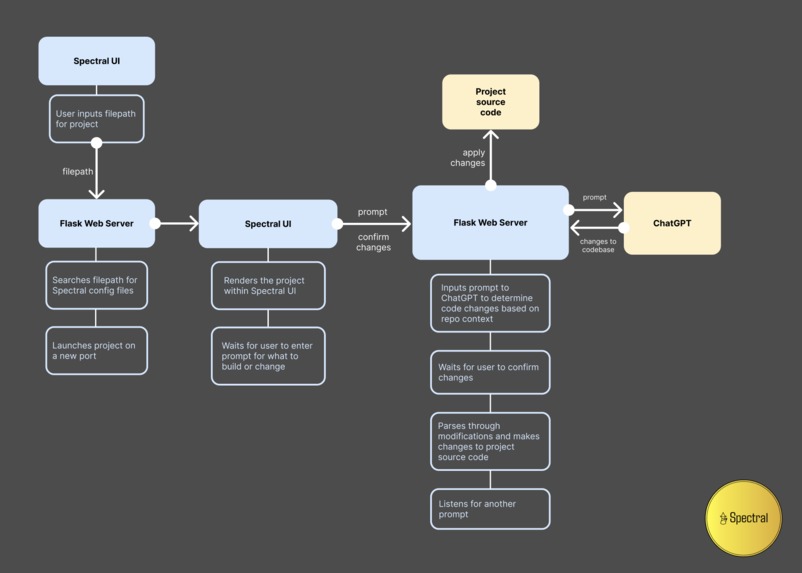
flow

Inspiration
Our team came into the hackathon excited to build a cool full-stack app. However, we quickly realized that most of our time would be eaten up building the frontend, rather than implementing interesting features and functionality. We started working on a command line tool that would help us build frontend components.
We quickly realized that this project was incredibly powerful.
As we continued building and improving the functionality, our command line tool went from a simple helper for components to a powerful engine that could create and import files, import dependencies on its own, handle component creation/URL routing, find and fix its own syntax/compiler errors, and add styling, all with minimal input from the developer.
With Spectral, developers can instantly build an MVP for their ideas, and even fully develop their final React apps. Those with less experience can use Spectral to bring their ideas to life, while having access and control over the bug-free React codebase, unlike most no-code solutions.
What it does
Spectral takes your plain English prompts, generates React code, and compiles it. It can install dependencies, create components & files, add styling, and catch its own syntax/compilation errors, all without explicit user intervention.
-Take plain English prompts, and parse through codebase for context to generate an action plan -Once user confirms action plan, our custom-built Python engine applies changes to the React codebase -Our engine is capable of creating components & files, importing files and dependencies, refactoring code into files/components, and styling, all on its own without explicit user instruction -Our error handling is able to parse through Prettier logs to catch syntax/formatting errors, and even read Vite error logs to discover compiler errors, then fix its own bugs -Custom .priyanshu files can add context & provide explicit instructions for the code generation to follow (ex. Do all styling with Tailwind. Do not write css unless explicitly told to do so) -Users can choose to use our web interface for easy access, or command line utility
How we built it
-Code generation using ChatGPT -CLI interface and tools to edit React source code developed using Python and argparse -Custom functions to parse error logs from Vite, and intelligently determine which code to delete/insert from codebase from chatGPT response -Web client developed using Python Flask server -Web UI built with React, JavaScript, and Vite
Challenges we ran into
Source code modification was initially very buggy because deleting and inserting lines of code would change the line numbers of the file, and make subsequent insertions/deletions very difficult. We were able to fix this by tweaking our code editing logic, to edit from the bottom of the file first.
Building an accompying web client after we had developed our CLI was also difficult and required refactoring/rewriting logic. We were eventually able to do this using Flask to maintain as much of the original Python code as possible.
Accomplishments that we're proud of
We are incredibly proud that we were able to build a full code generation system in the span of 24 hours. When we first started, our CLI was very error prone, and although cool, not practical to use. Through extensive error handling and iterative performance improvements, we were able to get it to the point of being able to develop a full frontend mockup without writing any React code ourselves. We are excited that Spectral is now a tool with legitimate utility potential and is something we would even use ourselves to aid project development.
What we learned
-Learned a lot about working with ports in Flask -Resolve CORS issues
What's next for Spectral
-Adding speech-to-text functionality for increased accessibility -Allowing for larger prompts to be submitted at once with multiple features. Implementing some sort prompt parsing to split large prompts into steps that Spectral can follow more easily.


Log in or sign up for Devpost to join the conversation.