-
-
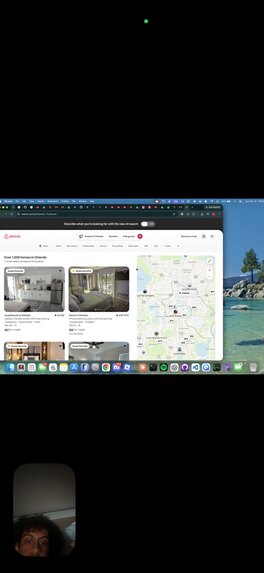
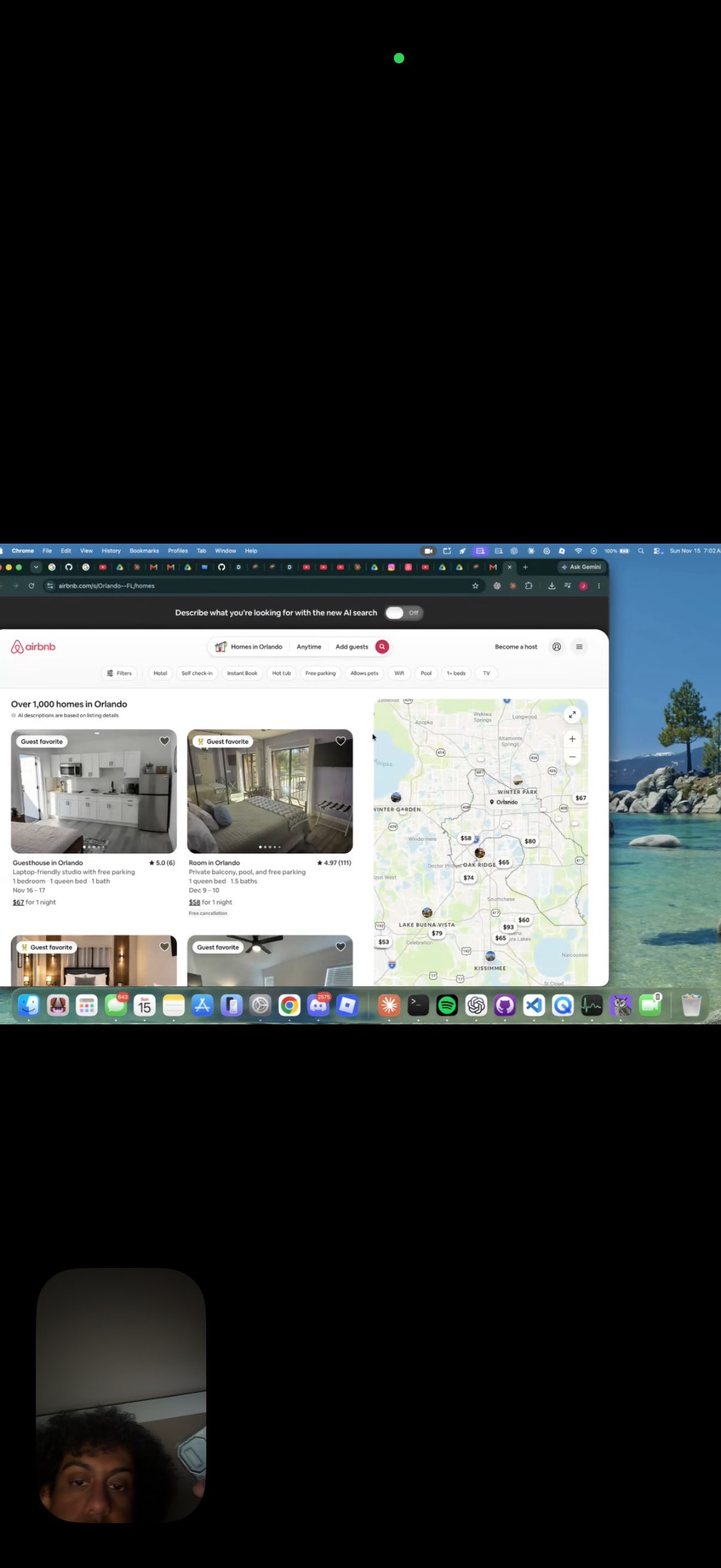
Spectr on FaceTime getting a task done (booking an airbnb)
-
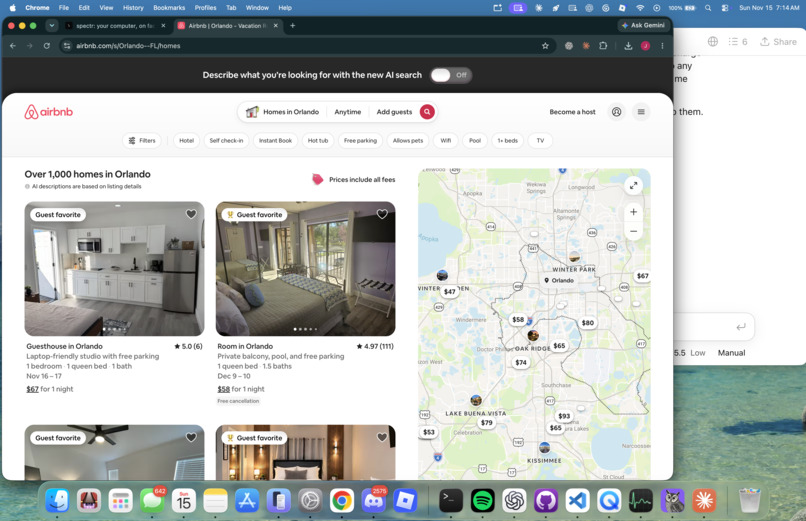
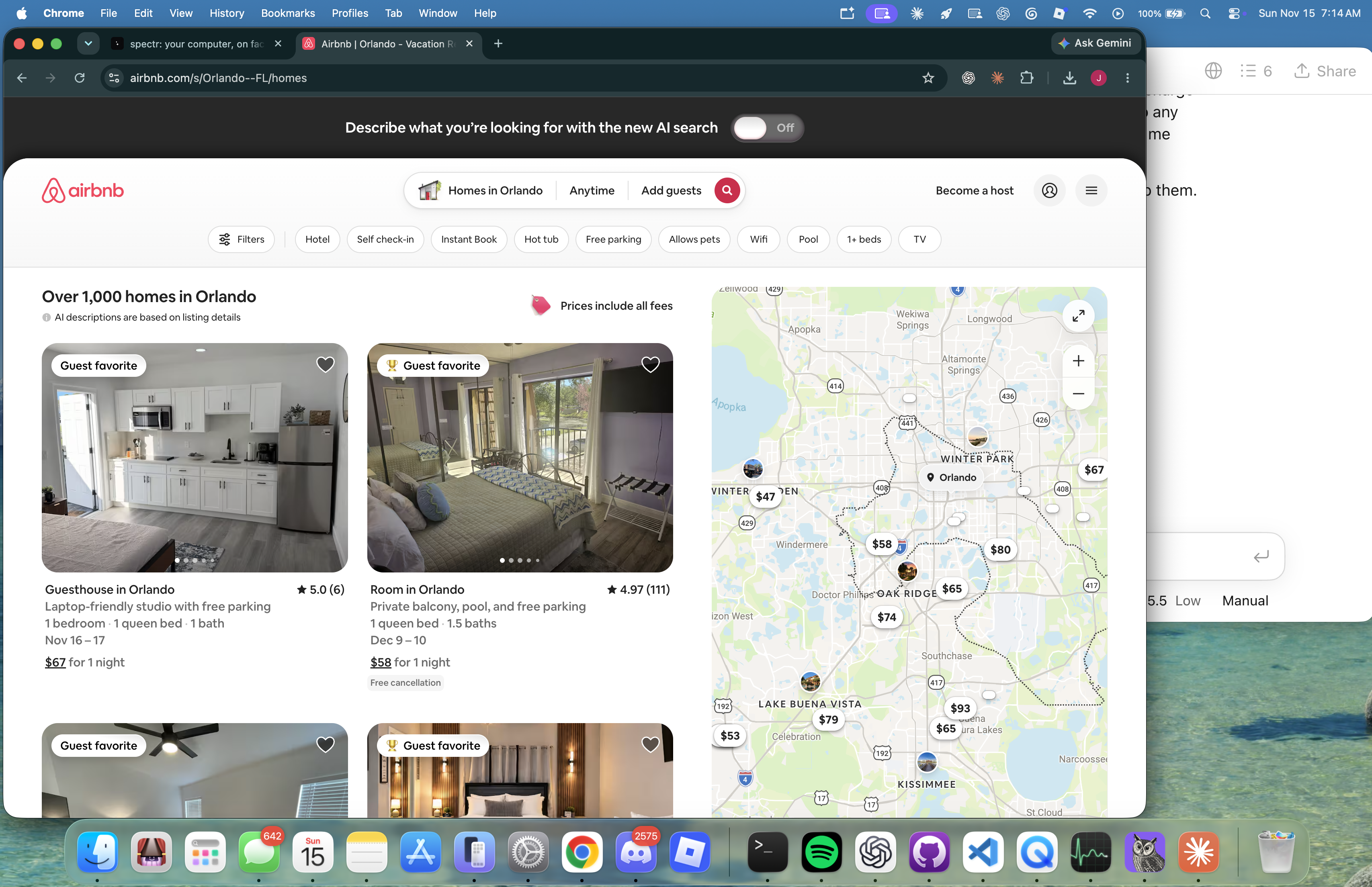
Spectr booking airbnb on browser in local machine
-
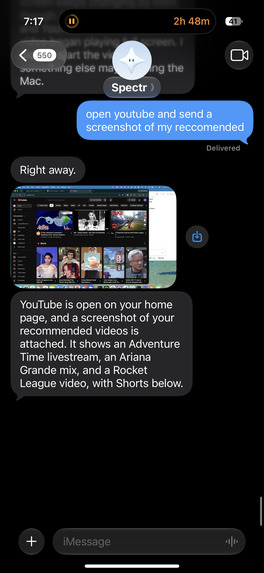
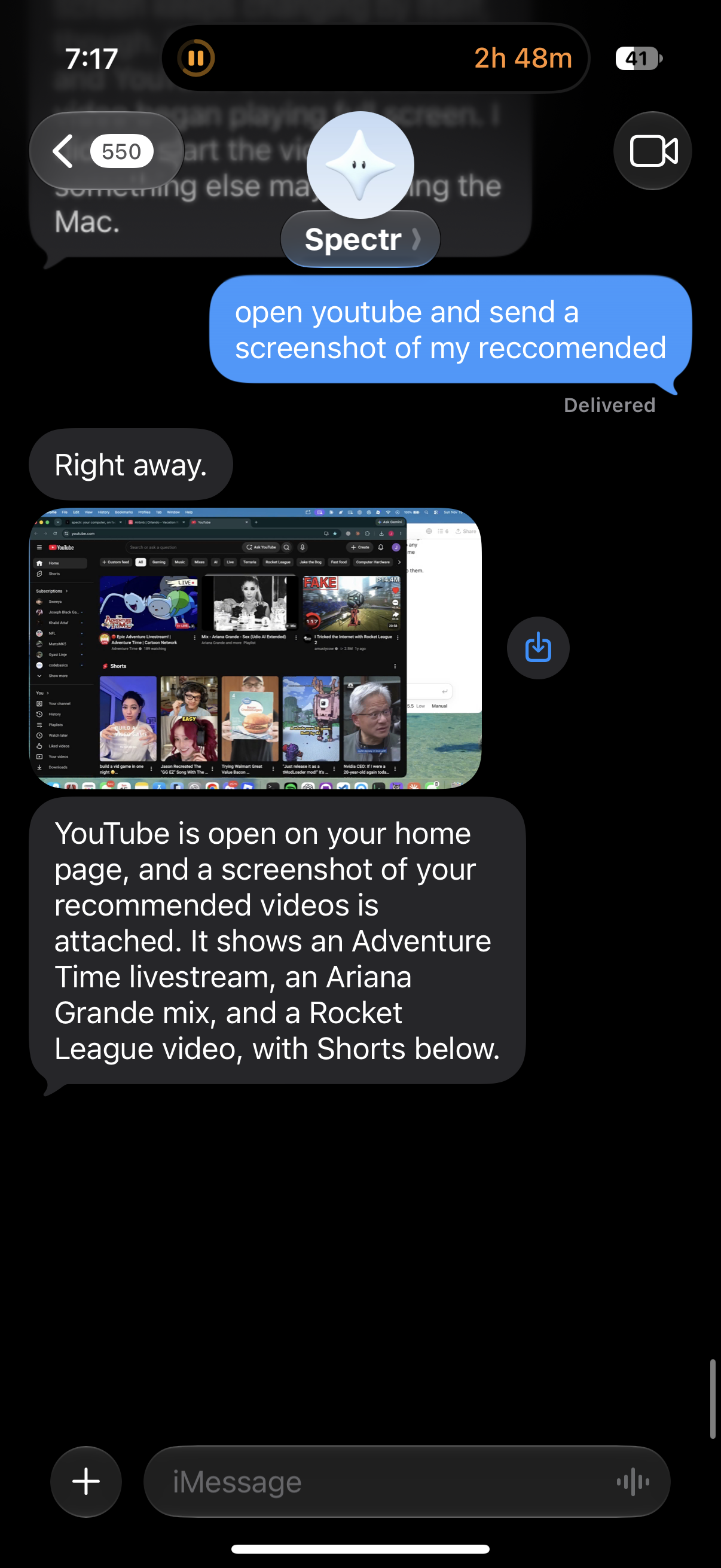
Spectr on text competing a task and sending screenshot for confirmation
-
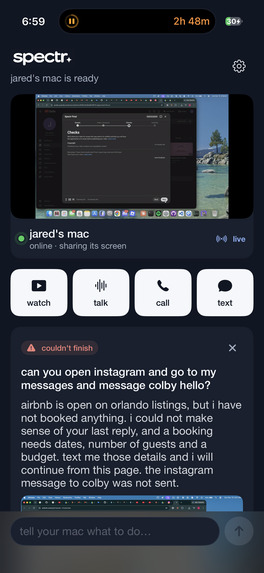
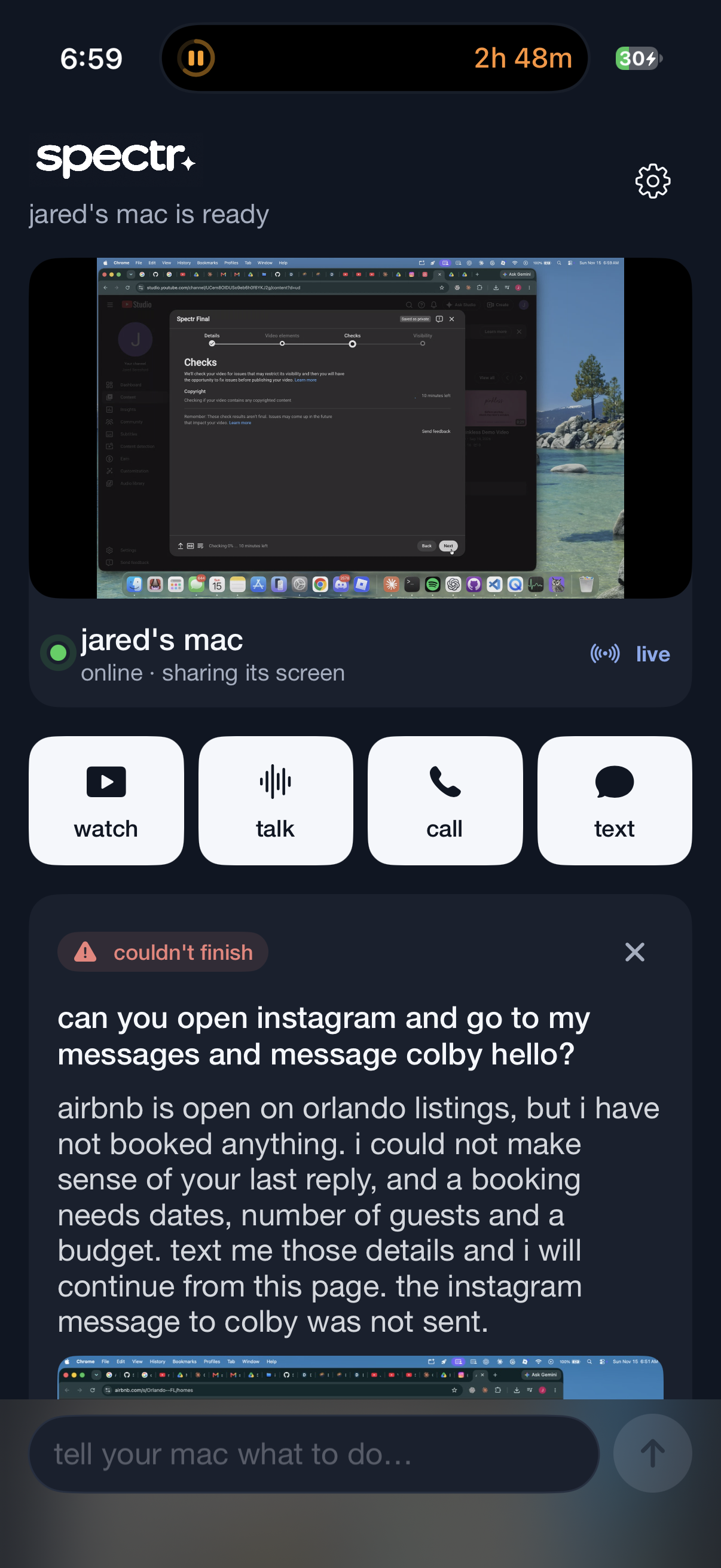
Spectr app for storing history/conversations
-
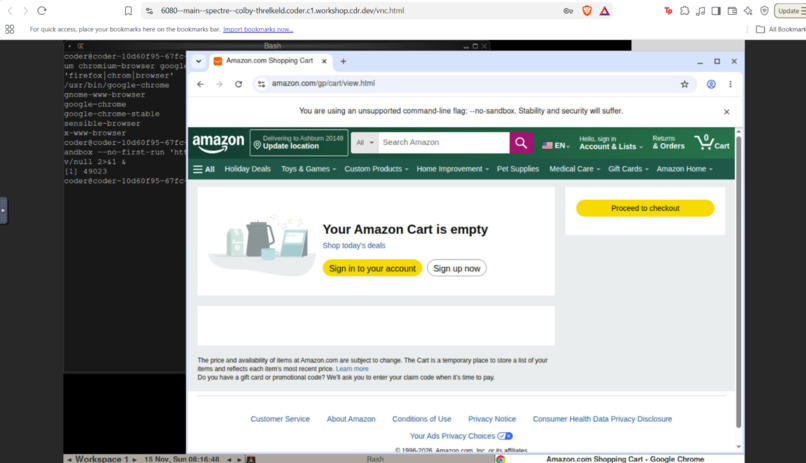
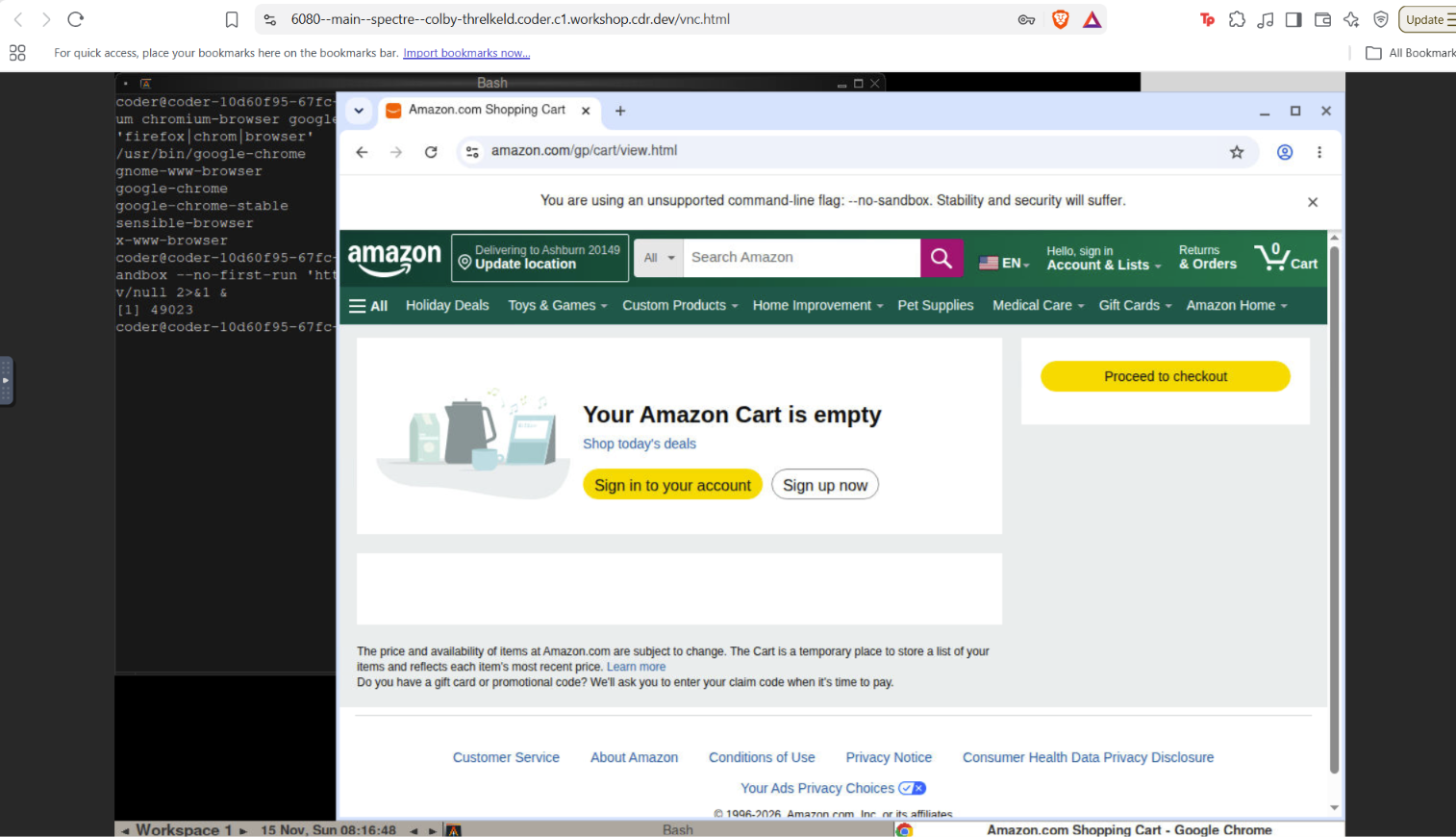
Spectr hosted on coder container when laptop is turned off
-
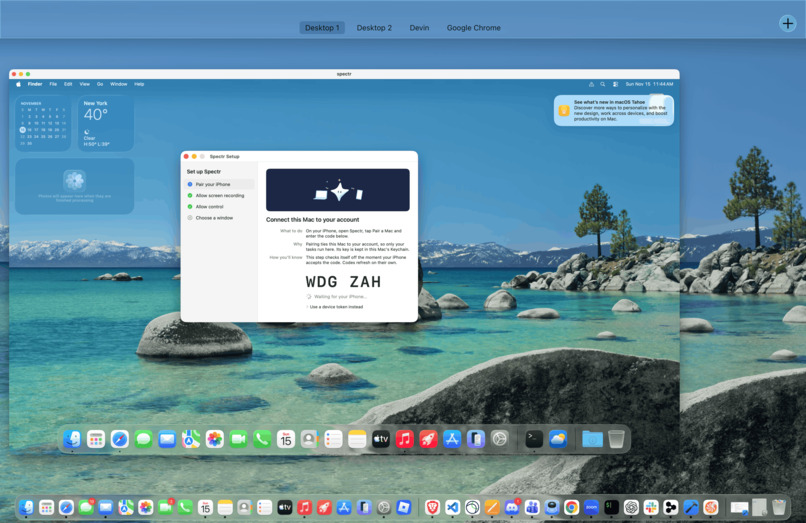
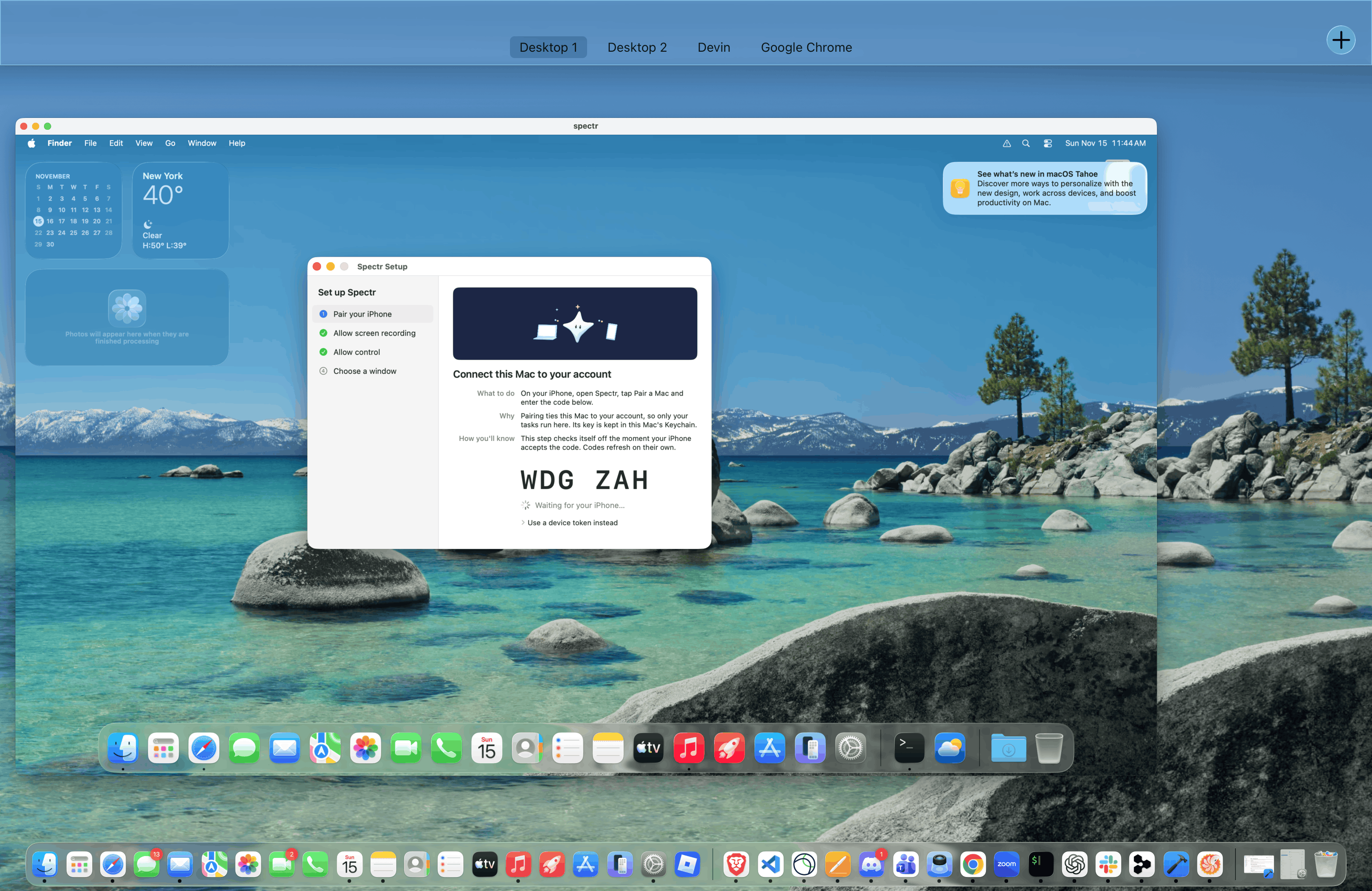
Spectr on a local vm instance for times the laptop lid is not shut
-
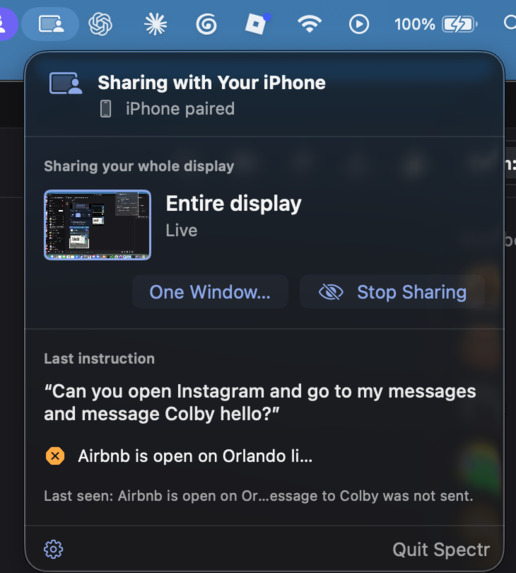
Spectr macOS helper
Inspiration
Computers still ask a lot of people: small buttons, crowded websites, long forms, steps you have to remember. A two-week diary study of 24 people found that over 70% of the phone tasks people put off were ones they expected to finish on a computer. Another study, of 73 people who use AI agents, found that the most severe agent failures were the ones people thought they were least likely to notice.
Those two findings gave us the idea for Spectr. We wanted to let you ask your own computer for help from wherever you are, and to let you watch it work so you can stop it. We built it for a student between classes, a grandparent filling out a form, a developer away from their desk, and a traveler without their laptop.
What it does
Spectr is your computer, on call. You text it, phone it, FaceTime it, or use the iPhone app, and it does the task on your computer. Every channel feeds the same task, so you can start by text, correct it on a call and approve it in the app.
- Text a task. Open airbnb on your browser and be like "look for airbnb in Orlando". Spectr does it and texts the result and a screenshot back in the same thread.
- Call it. Phone Spectr or FaceTime it and just say the task. It answers in its own voice, tells you what it's doing, and reads the result back.
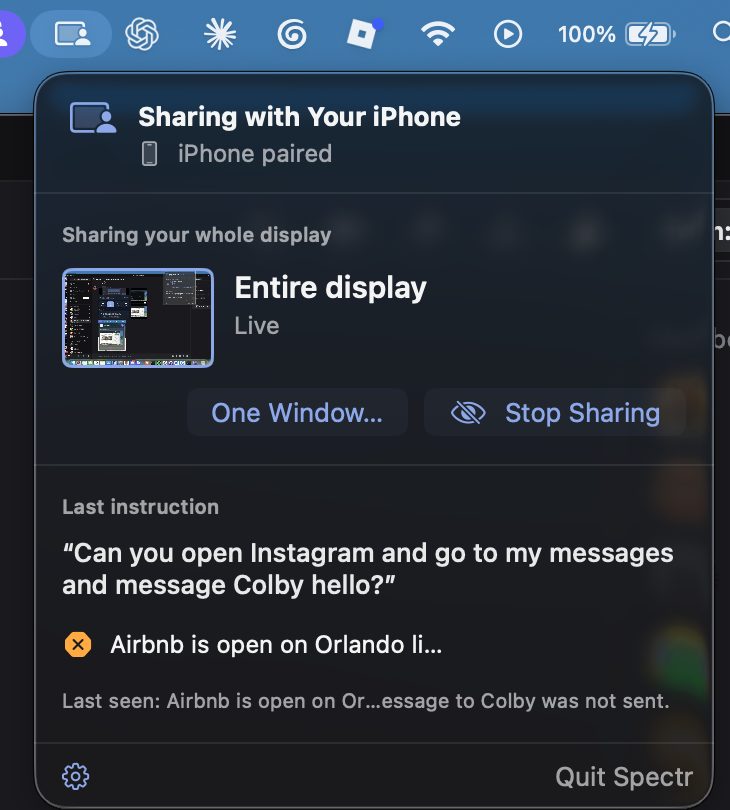
- Watch it work. Your Mac's screen streams live to the iPhone app. On a FaceTime call, the screen is the call's video.
- Stay in control. Say or text "stop" and it stops. Hang up and the task stops too. Say "actually, use the other file" and it changes direction mid-task.
- It asks before risky actions. It checks with you before it sends, buys, posts, submits or deletes. Only a plain "yes" counts as approval. It never types your passwords. It pauses and asks you to log in yourself while you watch.
- It runs where your computer is. On the Mac in front of you, on a macOS virtual machine paired as its own device while you're away from your Mac, or in a cloud workspace with a browser when your laptop is off. Each task goes to the device that checked in most recently.
- Shaped around you. Short onboarding questions set how often you get progress texts and how Spectr talks to you. Replies are short and calm, brief for a student, step by step for someone who needs accessibility support.
Accessibility
Over a billion people live with a disability, and many more find computers hard because of age, eyesight, hand movement or memory. Most tools ask them to learn a new app first. Spectr starts from things people already know how to do: send a text, make a phone call, answer a FaceTime. If you can do one of those, you can use your computer.
- No mouse, no small buttons, no screen required. Someone with low vision, a tremor or limited hand movement can finish a whole task by voice. They call, say what they need, and hear the result read back. Nobody has to find a tiny button or read a crowded page.
- Plain language by default. Every message Spectr sends uses short sentences and simple words, with no slang, jargon or emojis, and questions stay under 300 characters. This follows W3C's guidance for cognitive accessibility: clear words, short text and step by step instructions. Short replies are also easier to listen to on a call.
- It adapts to the person. Onboarding is four short questions you answer with a number or "skip", so there's nothing to type out. You choose how often Spectr updates you (every step, every chunk, or just the result) and how it explains things (short, or plain and simple with each step explained). You can also name your own need, like "larger text". Nothing is saved until you say yes, and preferences only change how Spectr talks, never what you're allowed to ask.
- A safety net for the people scammers target. People 60 and older lost $159 million to tech support scams in 2024 (FTC). Spectr is the opposite of a stranger taking over your computer: it only sees the window you share, never types passwords, and waits for a plain "yes" before it sends, buys, posts, submits or deletes. That lines up with WCAG 3.3.4, which asks for a way to confirm important actions before they happen.
- Watch it, stop it, correct it. People who aren't confident with computers can see every step live, hear what Spectr is doing and why, and say "stop" at any time. Hanging up stops the task too. Nothing happens out of sight.
- An accessible app and site. The iPhone app scales with Dynamic Type and labels its controls for VoiceOver, from the live screen, zoom, mute and end call to "step 1 of 3" during setup. The live view of your Mac zooms with a double-tap or with VoiceOver actions. Our design system requires 44 px touch targets and 4.5 to 1 text contrast, and the landing page respects reduced motion and works with a keyboard.
- Built around real research. 71% of adults 50 and older would rather have a friend or family member teach them new tech, and 3 in 5 say tech is designed without their age in mind (AARP, 2024 and 2026). Spectr acts like that patient helper, available any time, who does the task with you and explains it.
Designing for a grandparent made Spectr better for everyone. The student between classes gets the same short replies, and the developer away from their desk gets the same live view and the same "stop".
How we built it
- The agent loop is a TypeScript backend on Vercel, with Postgres on Supabase. Each task is a series of short HTTP steps. The backend sends Claude (Sonnet 5.5, computer use) a screenshot and asks what to do next. The device clicks, types, scrolls, or opens an app or site, then sends a new screenshot. This repeats up to 60 steps, and at the end Claude checks that the screen actually shows the result before Spectr reports it.
- Actions are validated before the device runs them. The device only runs a short list of actions: screenshot, click, move, drag, scroll, type, key, wait, open an app, open a URL. There are no shell commands and no AppleScript written by the model. Approval is enforced in code, not only in the prompt. The Claude key stays on the server and never reaches a device.
- Shared contracts. JSON contracts, checked with Zod in TypeScript and mirrored in a shared Swift package (SpectrKit), keep the apps, the backend and the call agent in agreement.
- iMessage. Sendblue turns iMessage into webhooks. Webhooks are signature-checked, a message that arrives twice runs once, and stale or replayed steps are rejected.
- Mac helper (Swift). A menu-bar app pairs with a code typed on the iPhone, captures the screen with ScreenCaptureKit, performs actions with CGEvent, and publishes the screen to LiveKit Cloud. It waits until the screen stops changing before it takes the next screenshot, and the backend wakes it over LiveKit the moment a task arrives instead of waiting for its next poll.
- iPhone app (SwiftUI). Supabase sign-in, Messages-style chats, the Mac card, Stop and approvals, a live, zoomable view of the Mac's screen, and in-app calls.
- Voice (ElevenLabs). Spectr has one pinned ElevenLabs voice ("Francesco") on the
eleven_v4_turbomodel, with mood tags like[warmly]and[calmly]on every spoken line. The backend refuses to start if the deployed voice doesn't match the pinned one, so every call, app message and clip sounds the same. A persona prompt keeps Spectr composed and brief, so what gets texted can also be read aloud. - Calls (LiveKit). A call agent built on LiveKit Agents runs on LiveKit Cloud behind a LiveKit phone number. It uses Deepgram Nova-3 for speech-to-text through LiveKit Inference, Silero for voice activity detection, and LiveKit's end-of-turn model to tell when the caller has finished talking. It turns speech into the same tasks a text creates and speaks questions and results back in the ElevenLabs voice. A preloaded greeting and an instant acknowledgement make the call feel live while the Mac wakes up.
- FaceTime (Chert). Chert bridges a real FaceTime call into a LiveKit room. The call agent joins the Mac's room and relays the Mac's screen as its own video, so the caller sees their computer on the call.
- Away from your Mac. The macOS VM runs in the background with the Spectr helper, paired as its own device. The cloud option is a Docker container on a Coder workspace with Chromium on a virtual display (Xvfb, xdotool, noVNC) that runs the same agent loop.
- Landing page. A Next.js site with its own design system, research slides and a mascot.
- Testing and CI. Vitest for the backend, call agent and site, Swift Testing for the apps, and GitHub Actions with a coverage gate and an automatic call-agent deploy on merge.
How we used FaceTime
FaceTime is already on every iPhone, iPad and Mac, and for a lot of older adults it's the one video app they know, because family taught them. So we made FaceTime a full way to use Spectr, not just a demo trick. You FaceTime Spectr, say what you need, and watch your own Mac do it as the call's video.
- Answering the call safely. When someone FaceTimes Spectr, Chert asks our backend whether to answer, with a five-second deadline. In that window we check the webhook signature, confirm with Chert's API that this exact call is real and still ringing on our line, look up the line's owner and their Mac, create a LiveKit room with our voice agent dispatched into it, and return a bridge token that only works for that one room. A forged request never gets a token into a room next to someone's Mac.
- Your screen is the video. Chert only shows video from the participant who is speaking, and that's our voice agent, not the Mac. So the agent joins the Mac's own room as a hidden, watch-only participant and republishes the Mac's screen as its own camera. The caller sees their computer, and the voice they hear comes from the same tile.
- Tuned for reading, not motion. Text on a screen needs sharpness more than smoothness, so the relay sends up to 5 Mbps at 15 fps. At 30 fps, decoding and re-encoding video starved the voice running in the same container and speech detection fell seconds behind.
- No gray screen. Before anyone calls, the agent already holds a recent frame of the owner's Mac, refreshed every 20 seconds, without transcoding the full stream. The moment a caller connects, their screen is there. If the Mac's stream pauses or reconnects, the agent resends the last frame every 600 ms, so FaceTime always has a picture to show.
- Speaking at the right moment. FaceTime drops a call that hears nothing within 10 seconds of the bridge being ready, and anything said before then is lost. The agent waits for Chert's ready signal, uses that wait to pick and synthesize its greeting in the ElevenLabs voice, then greets exactly once, the instant FaceTime can hear it: "Spectr here. You're looking at your Mac, live."
- One task, every channel. What you say on FaceTime becomes the same task a text creates, so corrections, "stop" and approvals all work the same way, and hanging up stops the task. You can start a task by text and FaceTime in to watch it finish.
- FaceTime Audio works too. Without video, Spectr still listens, talks and reads the result back.
- Spectr can FaceTime for you. Because it operates the apps on your Mac, you can ask it to start a FaceTime call, like "FaceTime my daughter", and it places the call from the FaceTime app, signed in as you.
- Why it matters for accessibility. A FaceTime call needs no new app and no typing. For someone with low vision or limited hand movement, it's the easiest way to see and direct their computer from across the room or across the country, with a calm voice explaining every step.
Challenges we ran into
- Making it trustworthy, not just capable. Our first version only asked Claude to ask before risky actions. We moved that rule into code and tightened it so only a plain "yes" counts. "Yes, but send it to Kim" counts as a correction, not an approval.
- Duplicate and stale messages. Texts and webhooks get retried. We built idempotency and revision checks so one message makes one task, and a correction starts from the latest screenshot.
- Speed. Every step is a round trip from the phone to Vercel to Claude to the Mac and back. We moved our Vercel functions to the region next to our Supabase database, timed every step, sent texts after the response instead of before it, and woke the Mac over LiveKit instead of waiting for its next poll.
- Knowing when the screen is ready. Screenshots taken mid-animation or mid-page-load confused the agent. The Mac now measures how much the screen changed between frames and waits for it to settle.
- Video versus voice. A steady 30 fps, 8 Mbps stream looked great but starved the FaceTime audio, so Spectr's voice lagged. We went back to 15 fps for calls, and stopped transcoding video for idle FaceTime rooms. We also had to fix a gray screen when a FaceTime call first connected.
- FaceTime. Chert only shows video from the speaking participant, so our agent relays the Mac's screen as its own video. Our trial FaceTime line was released whenever no agent was connected, so we run the Chert connector as a login service on the Mac. For now the line is bound to one owner's phone number.
- Making a call feel like a conversation. Early calls had long silences while the Mac woke up and Claude thought. We added an instant acknowledgement, a preloaded greeting, varied wording, and a hosted end-of-turn model so Spectr doesn't cut people off or wait too long.
- Finding the voice. We tried several ElevenLabs voices and models before settling on one, and pinned it in code so the phone agent, the backend and the app can't drift apart.
- Speech-to-text mistakes. "Go to slide four" sometimes came through as "slide for". We added checks for common mistakes like that, and the agent only reports success when the Mac shows what was asked for.
- Routing to the right computer. The cloud browser checks in constantly, so tasks started going to it instead of the owner's real Mac. We changed routing so an active Mac wins.
- Real-world setup. A live end-to-end text needs a verified Sendblue contact and a registered, awake Mac. Our first Chert onboarding stalled at phone verification, and our call agent deploy hit a LiveKit authentication error. Our iPhones ran an older iOS than the app targeted, and sign-in emails only reached one teammate's inbox while our email domain was unverified.
- Staying in sync. Four people building across Swift, TypeScript, voice and design needed shared JSON contracts so the apps and backend agreed.
Accomplishments that we're proud of
- A real phone call from a linked number created a task, and the Mac acted on it.
- Running it on a device, a local VM and a coder cloud workspace
- FaceTime calls come in through Chert with the Mac's screen as the call's video.
- The core loop works: text a task, the Mac does it, and the result comes back in the same thread.
- Spectr has one consistent voice across phone calls, FaceTime and the app.
- Stop, corrections, duplicate protection and code-enforced approvals are all tested. The TypeScript side has over 300 passing tests, and the Swift apps have their own test suites in CI.
- The same agent loop runs on a Mac, a macOS VM and a cloud browser.
- A calm, consistent design across the app, the call and the landing page, with a mascot.
What we learned
- Showing the work matters as much as doing the work. Letting people watch and interrupt addresses the risk the failure research points to.
- Safety rules belong in code, not only in the prompt. A model can ask permission and still act.
- Plain language is a feature. Writing for a grandparent made the replies better for everyone, and short replies are also easier to listen to.
- In voice, speed is the experience. A fast acknowledgement matters more than a fast answer.
- Voice and video add many moving parts, such as bridges, rooms, bandwidth and turn-taking. We should test each piece on real hardware early.
What's next for Spectr
- Run the full phone-call test matrix and a real FaceTime call on physical devices, then fix what breaks.
- Hands-free voice with barge-in, so you can interrupt Spectr mid-sentence from the app.
- Spectr calling you back when it needs a decision.
- Code-side detection of risky clicks, such as "send", "buy" and "delete" buttons, as a second safety net.
- Onboarding questions that learn how you like updates, saved only with your permission.
- Homework lookups, job application prep, and a hosted cloud browser.
Built With
- anthropic
- chert
- claude
- elevenlabs
- facetime
- imessage
- livekit
- next.js
- node.js
- postgresql
- react
- screencapturekit
- sendblue
- supabase
- swift
- swiftui
- typescript
- vercel
- zod


