-
-
SpecScribe
-
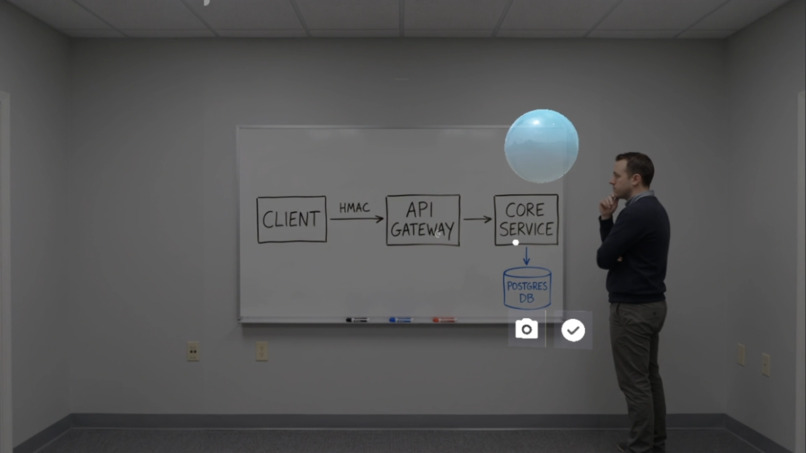
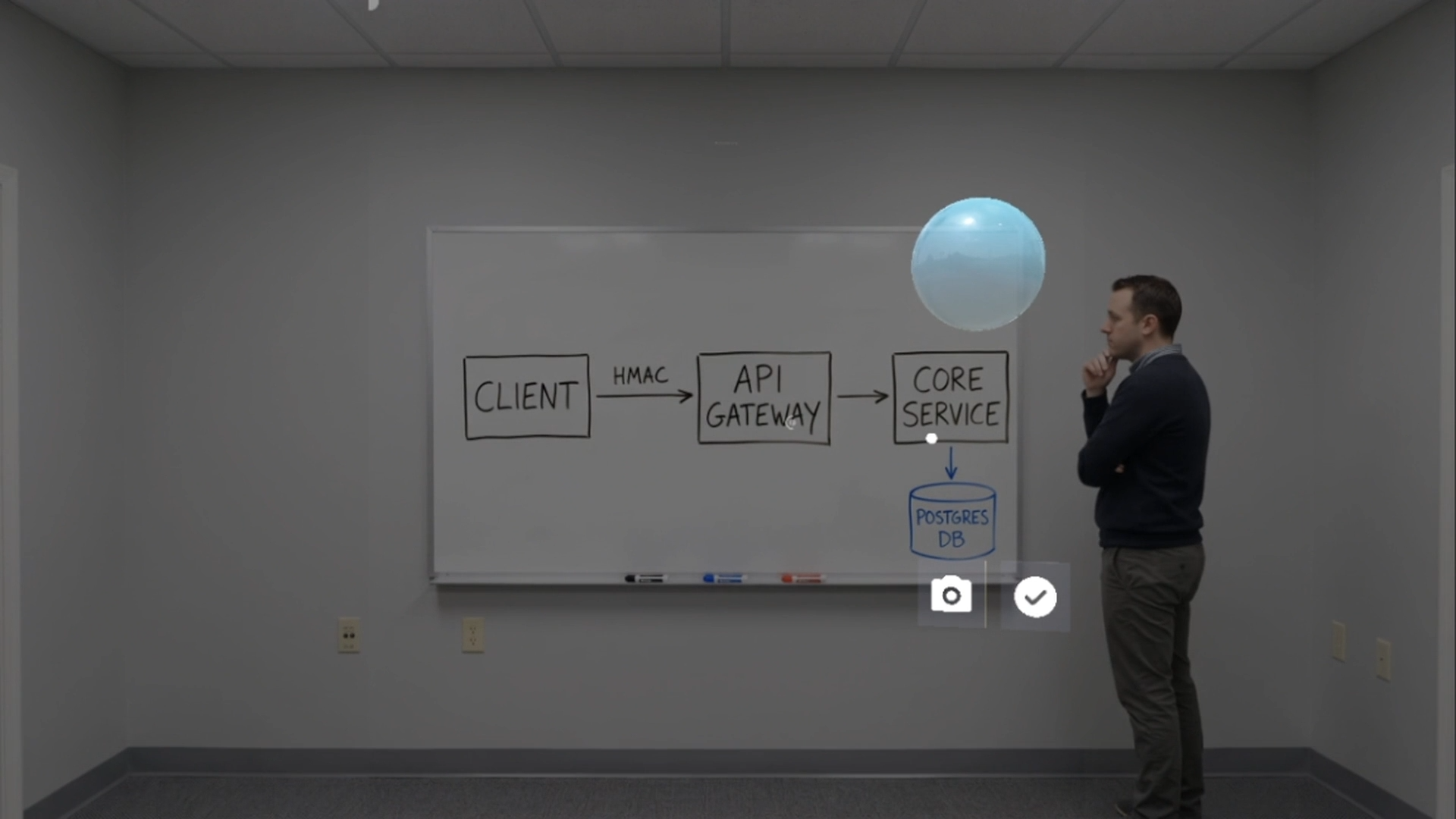
Pinch interact or auto capture in meetings
-
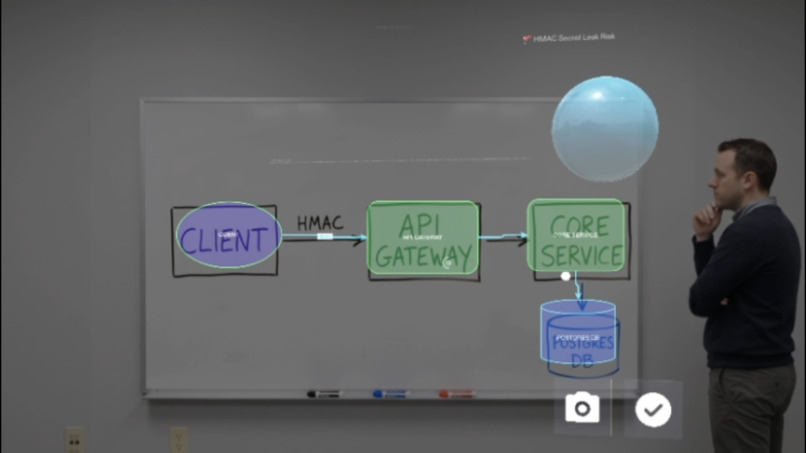
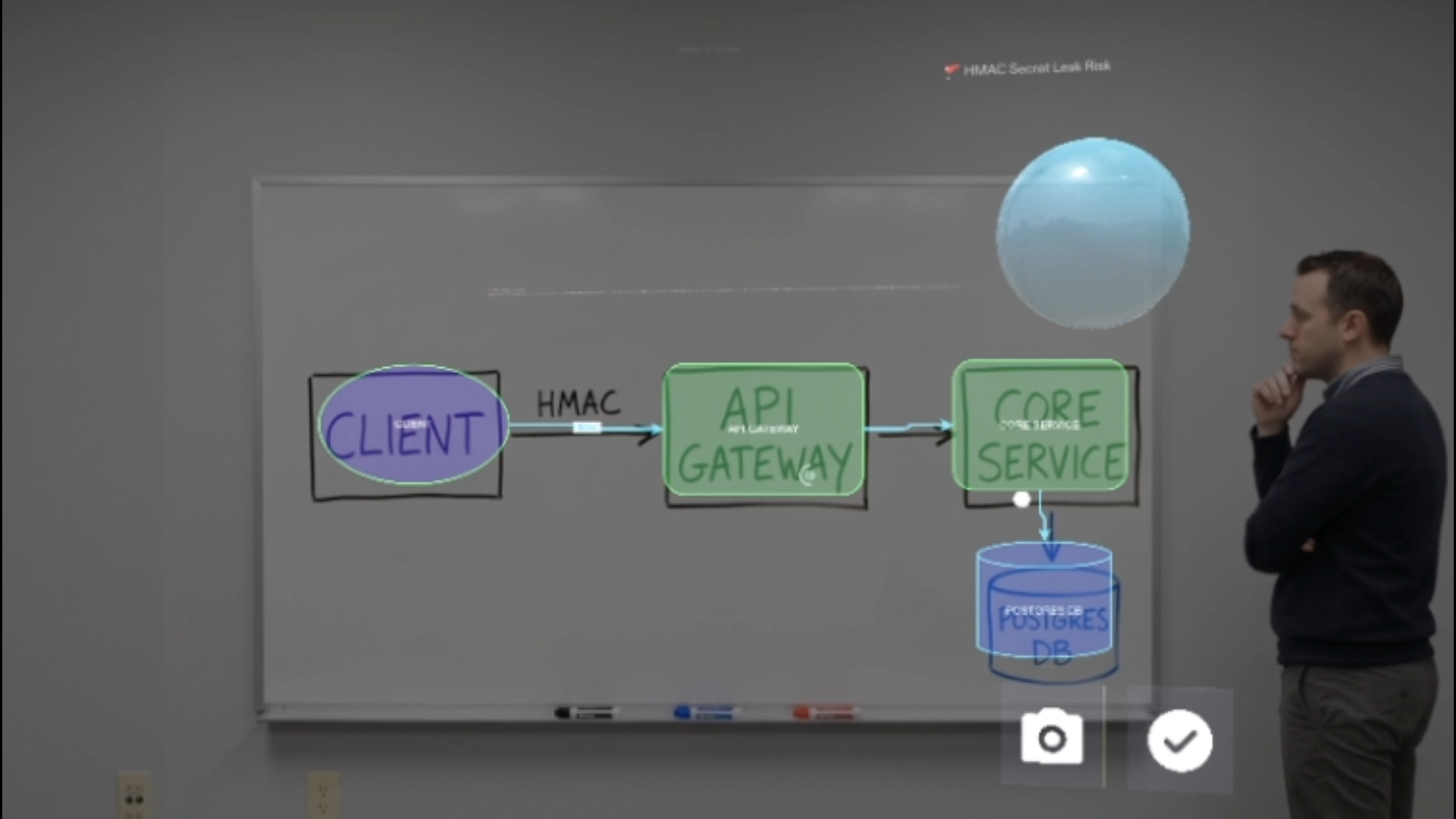
Diagrams overlay onto the whiteboard
-
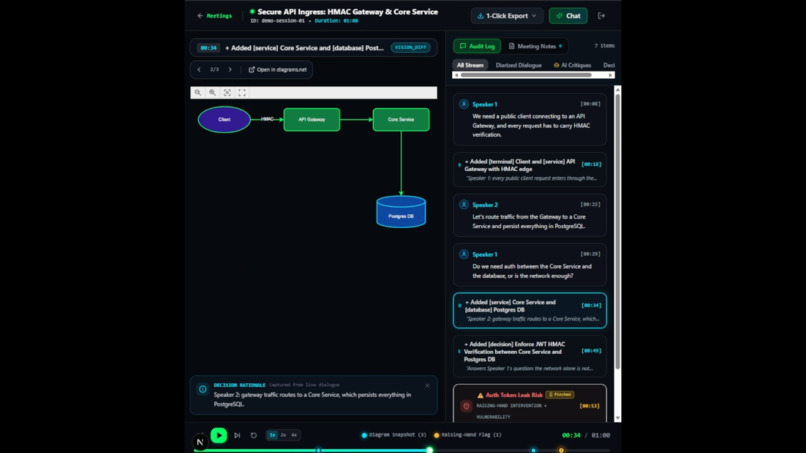
Meeting notes and data points are interactable.
-
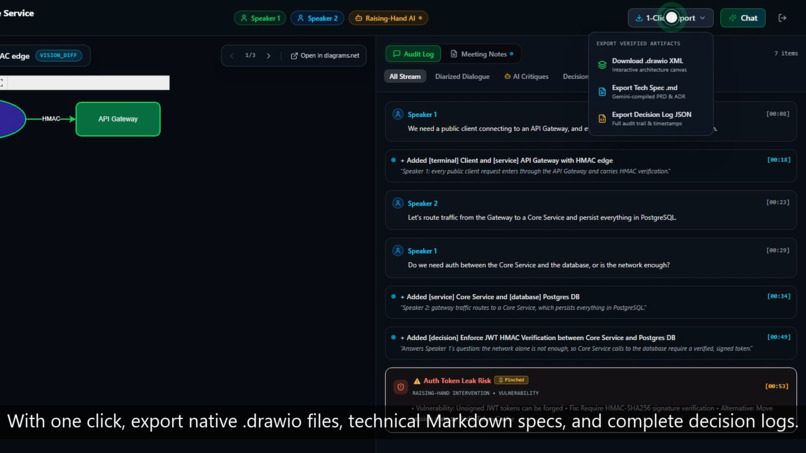
Meeting artifacts can be exported

Inspiration
Technical architecture and system design sessions live and die on physical whiteboards. Engineers debate trade-offs, sketch services and databases, and redraw them many times in an hour. Meeting recorders and AI transcription bots capture only what was spoken, and lose three things that matter most in a design session:
- How the diagram evolved. A photo taken at the end preserves one flattened artifact and discards every iteration before it.
- Why each change was made. The link between a diagram change at time T and the spoken rationale behind it (who proposed the cache, which trade-off was accepted) disappears.
- Flaws caught while they are cheap to fix. Missing authentication boundaries and single points of failure surface days later in code review instead of during the whiteboard session, when changing the design costs nothing.
Why SPECS?
Laptops, tablets and phones are the wrong form factor for whiteboarding. Holding a phone or typing breaks flow, forces engineers to look down, and disconnects them from their teammates. SPECS are hands-free, see-through spatial computing: an engineer keeps the marker in hand and eyes on the board and the room, while a clean digital twin of the diagram and an AI teammate's critiques appear in place, on and beside the board.
What It Does
SpecScribe AR turns a whiteboard design session into a live, structured, reviewable record. It has four parts.
1. Whiteboard-to-Draw.io AR overlay
The engineer draws with a normal marker. A pinch on the camera button captures the board. The backend reads the whole board in one vision pass (every shape, its label, its type and its bounding box, plus every arrow and its label), reconciles that snapshot with the live diagram (adding, renaming and removing nodes and edges), and renders a transparent Draw.io diagram that is projected back onto the board in AR, with each node sitting on the shape it came from. Re-capturing corrects mistakes: a stale or misread node is fixed by the next capture, and an empty answer never wipes the overlay.
2. Pinch controls in the Lens
Two SIK icon buttons sit beside the board: Capture (photograph the board now) and Conclude (end the meeting and generate the spec). Capturing on a pinch means the engineer decides when the diagram is ready, instead of the system guessing mid-stroke. The backend also accepts an ADD_NODE pinch command that injects a typed node (service, database, decision or terminal) named from the latest spoken phrase. The demo scene ships with just Capture and Conclude to keep the view uncluttered.
3. The "Raising-Hand" AI teammate
A glowing orb floats beside the board and listens. Every 20 seconds it cross-checks the conversation against the current diagram. When it finds an architectural risk, the orb raises its hand: it pulses, and a short pill badge appears above it (for example "HMAC Secret Leak Risk"). Pinching the orb opens a critique card with the vulnerability, a fix and an alternative, and plays a spoken summary. Pinching the idle orb asks it to research the last thing that was said.
4. Post-meeting review hub
Conclude generates a Markdown technical specification and embeds the meeting into vector search. Everything lands in a Next.js 15 dashboard backed by Supabase PostgreSQL + pgvector:
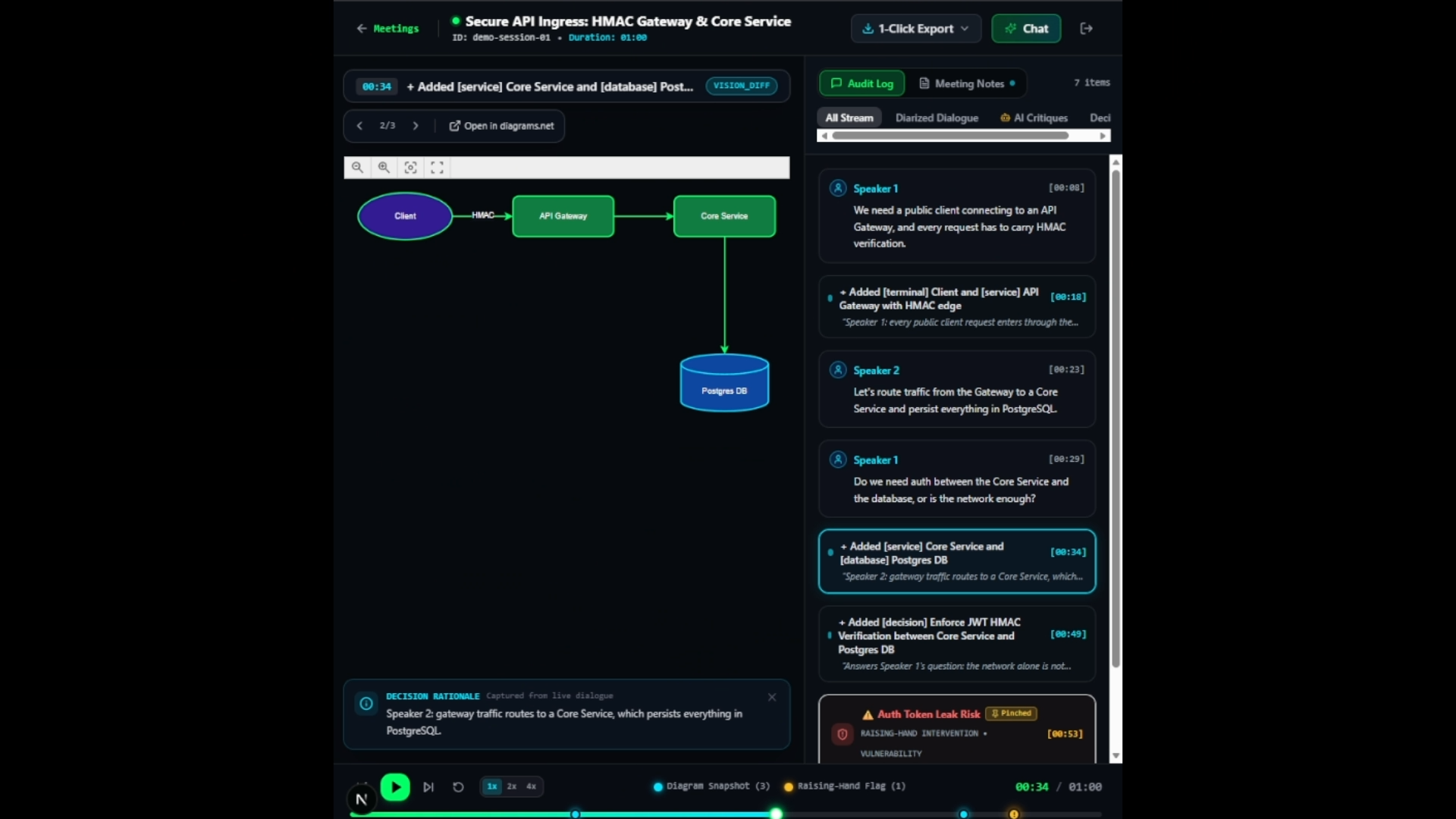
- Temporal scrubber: step back and forward through every diagram iteration, in sync with the speaker-diarized transcript, with markers for diagram snapshots and AI interventions.
- Decision rationale: each diagram change shows the spoken reasoning that produced it.
- "Chat about this meeting": questions are answered from the meeting's transcript, diagram history and agent notes via vector search over 1536-dimensional embeddings, with clickable
[MM:SS]citations that move the timeline. (The bundled offline demo meeting uses a small canned answer set, so the dashboard works without the backend running.) - 1-click export: native
.drawioXML, the Markdown tech spec, and the decision log as JSON.
How We Built It
We worked spec-first (docs/scope.md → docs/prd.md → docs/spec.md), then built four tiers.
1. Lens (Lens Studio 5.23, TypeScript, SPECS)
- Built and demonstrated in the Lens Studio Preview with the SPECS 27 device profile; input through the Spectacles Interaction Kit (SIK 0.18)
Interactablebuttons and the orb. PeriodicCameraCapturerencodes frames off the main thread (Base64.encodeTextureAsync) and sends them only on a pinch. Camera access starts inOnStartEvent.- A persistent WebSocket client (
/ws/meeting/{id}) carries the handshake, camera frames, ASR transcripts and pinch commands up, and diagram updates, hand-raise critiques and the finished spec down. - The board overlay is a child of the whiteboard backplate, so the diagram stays registered to the board.
- 142 TypeScript unit tests (
npm test) and LEAF scenarios for in-preview checks.
2. Orchestrator (FastAPI, Gemini, in-process drawio-mcp)
- Change gate: a perceptual hash (
imagehash.phash) drops unchanged frames before any model call. - Vision:
gemini-3.5-flashreturns a structured full-board snapshot. Shapes come back with Gemini's nativebox_2dboxes plus the board's own box, which we convert to board-relative positions. A strict response schema puts the shape list first and requires it, and an empty read is retried. - Layout: nodes are placed where they were drawn, on a page with the board's aspect ratio, so the overlay maps 1:1 onto the board. Nodes without a drawn position (e.g. pinch-added) fall back to an in-memory Sugiyama hierarchical layout from
drawio-mcp, embedded in the FastAPI process (no CLI or subprocess per change). - Agents: a raising-hand critique agent, a decision linker that ties each diagram change to the dialogue that caused it, and a spec generator that writes the Markdown spec on Conclude. Spoken critiques use Deepgram TTS.
3. Pre-warmed renderer (Playwright Chromium)
A headless Chromium starts once in the FastAPI lifespan and keeps the diagrams.net exporter loaded. Each update renders a transparent (bg: 'none') RGBA PNG for the Lens and stores the .drawio XML for the dashboard.
4. Persistence and dashboard (Supabase pgvector, Next.js 15)
- One Postgres database holds
meetings,transcript_turns,diagram_snapshots,agent_interventionsandknowledge_chunks. gemini-embedding-001embeddings (1536 dimensions), queried through amatch_knowledge_chunksRPC.- Next.js 15 (App Router), React 19 and Tailwind, with password-protected access.
Testing
172 backend pytest tests, plus a live acceptance check that sends real whiteboard frames through Gemini and verifies the overlay end to end: an empty board stays empty, two and then four nodes are read correctly, a recapture changes nothing, stale and partial reads are corrected, and every node lands within 2% of the board width of where it was drawn.
Challenges Encountered
Putting the overlay exactly on the drawing. Our first version asked the model for free-form x/y positions and was off by 8–10% of the board. Switching to Gemini's native
box_2dbounding boxes, measured against the board's own box, brought every node within 2% of where it was drawn.Errors that piled up. Reading the board as a stream of small "deltas" accumulated mistakes: half-read labels such as "S" or "NT" stuck around forever. We switched to reading the full board on every capture and reconciling against the live graph, so each capture is self-correcting.
A model that sometimes answered with nothing. About one call in three returned a summary but no shapes, which once wiped the live overlay. We made the shape list required and first in the response schema, retry empty reads, and only clear the overlay when the model explicitly says the board is empty.
The display has a field of view. SPECS show AR content in a window narrower than what the wearer sees. A whiteboard that fills the room view gets clipped at the edges, so the overlay showed only its middle. We reframed the scene so the board sits inside the display's field of view.
Additive see-through optics. On see-through waveguides black is transparent, and desktop diagram tools default to opaque white canvases. We export with a transparent background and a high-contrast neon palette (phosphor green
#00FF66, cyan#00E5FF) so the lines stay readable against a real whiteboard.Pinches landing on the wrong thing. The whiteboard's own collider sat behind the buttons yet still captured the hand ray, so pinches meant for Capture, Conclude or the orb never reached them. Removing that collider from the board, which does not need to be pinched in the demo flow, fixed it.
Future Potential
- Colocated multi-user sessions (SpectaclesSyncKit): several engineers wearing SPECS share the same overlay and see each other's pinches.
- ADRs into GitHub and Jira: turn the decision lineage into pull requests that add
docs/adr/XXXX-title.mdrecords with the Draw.io diagram embedded. - Whiteboard to infrastructure: translate the validated topology into Terraform or OpenTofu and go from the whiteboard to a staging deployment in one meeting.
- Erase to edit: use world-mesh depth to notice erased strokes and remove them from the digital twin without a recapture.
Built With
- antigravity
- clad
- claudecode
- drawio
- fastapi
- gemini
- imagehash
- leaf
- lens
- next.js
- node.js
- pgvector
- pillow
- postgresql
- pydantic
- pytest
- python
- react
- snap
- specs
- sql
- supabase
- tailwind
- typescript
- websockets
