-
-
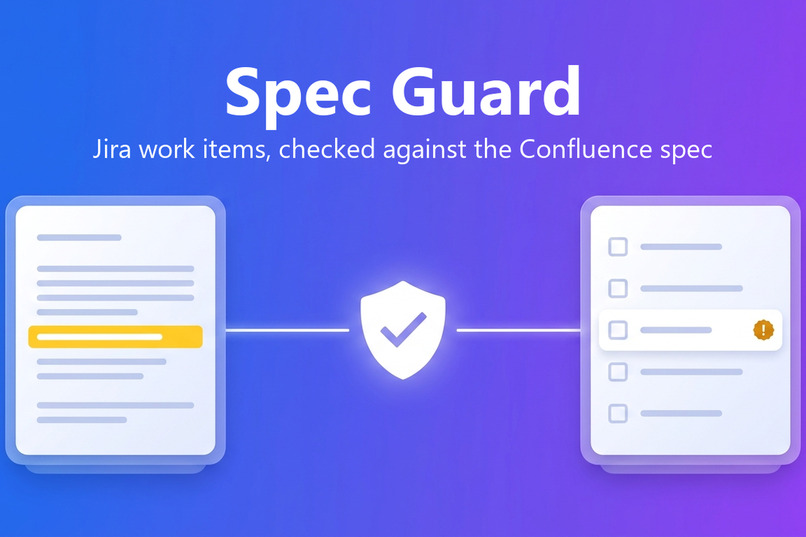
Spec Guard checks Jira work items, and the code agents write for them, against the Confluence spec.
-
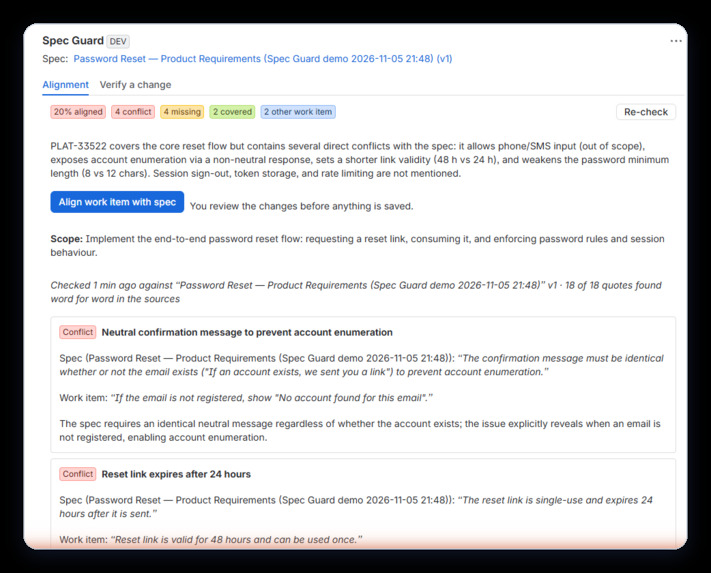
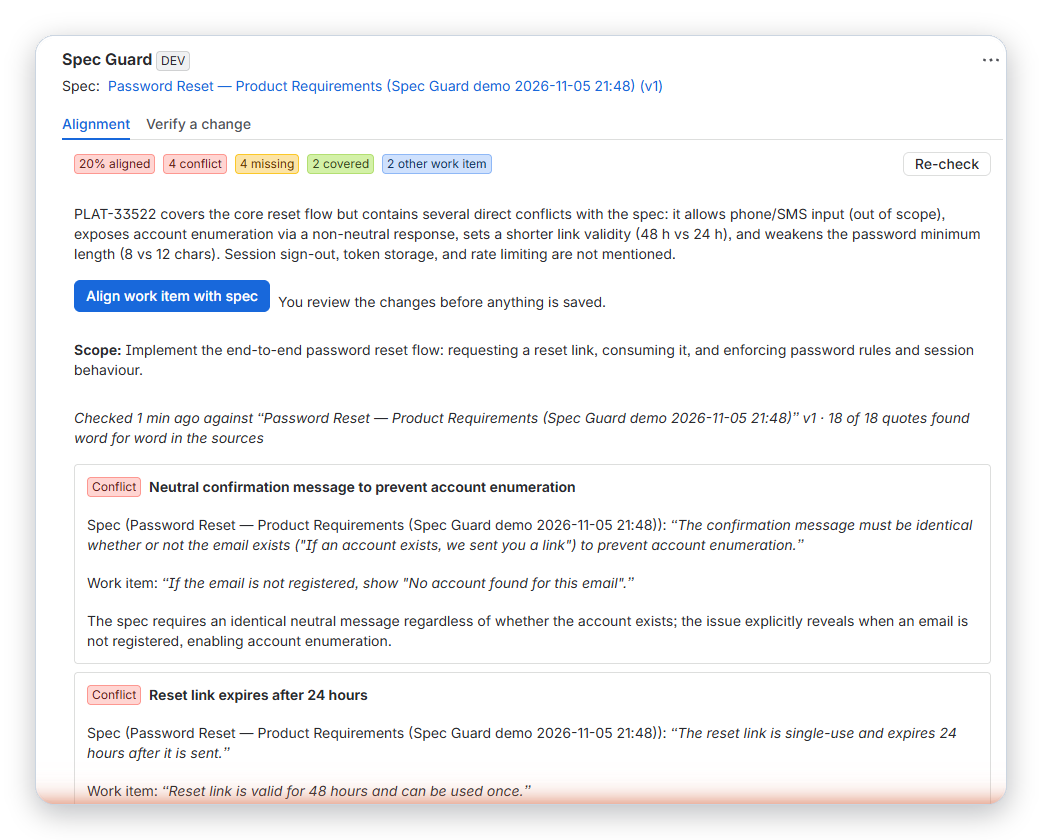
Alignment report: every finding quotes both the spec and the work item, and each quote is checked against its source.
-
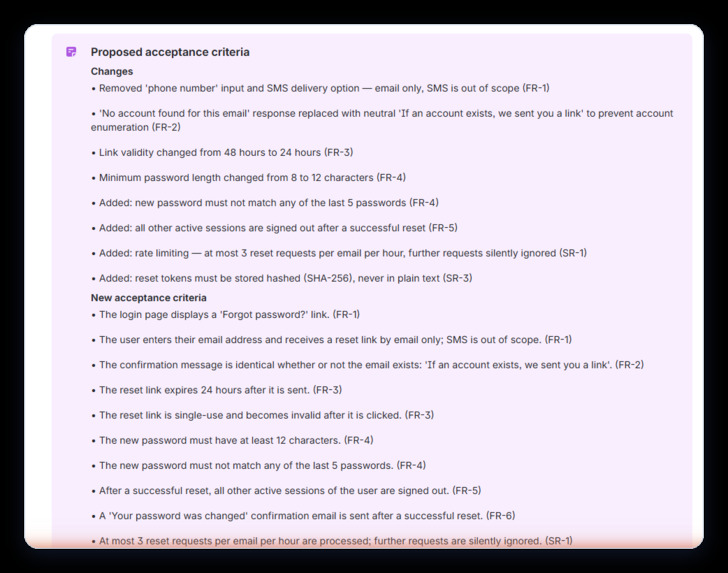
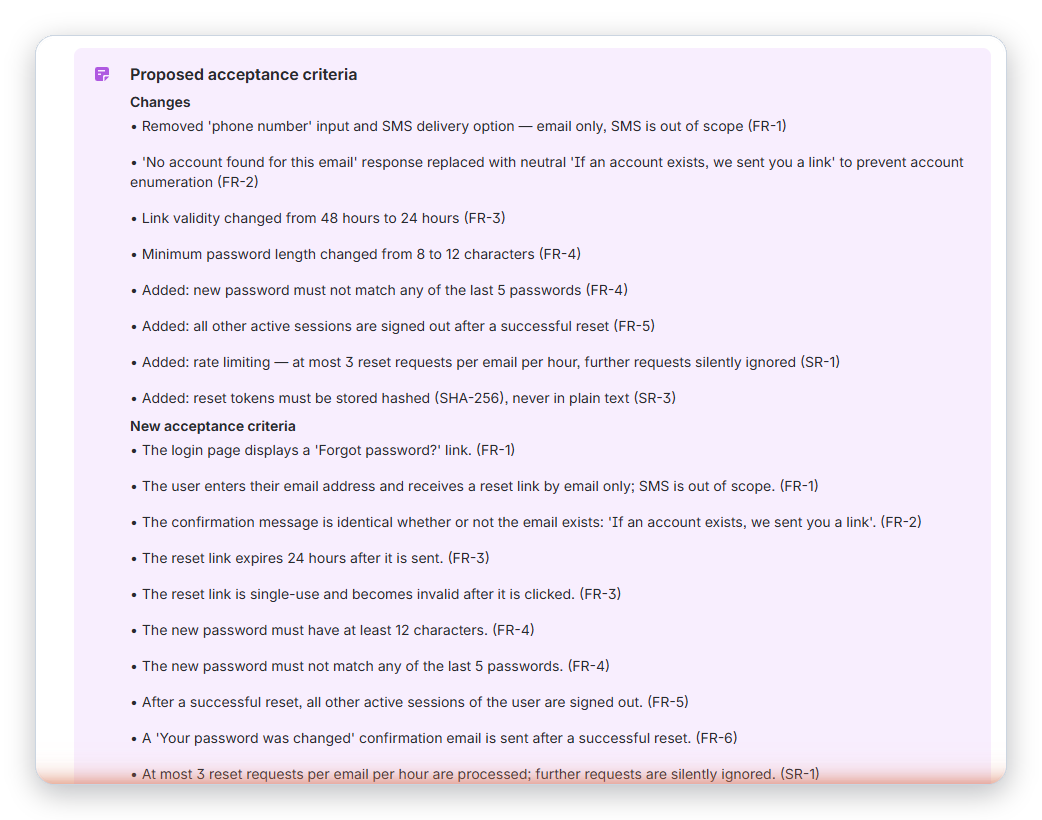
"Align work item with spec" proposes new acceptance criteria and lists every change before anything is applied.
-
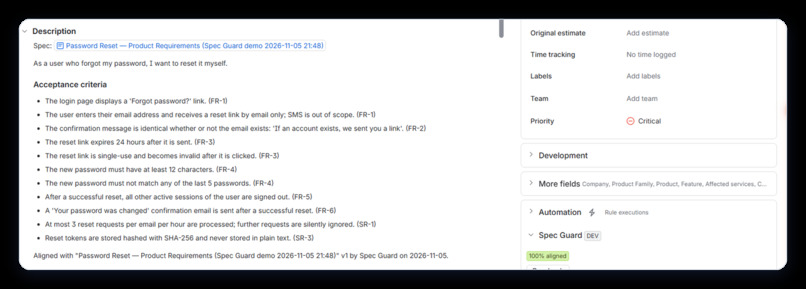
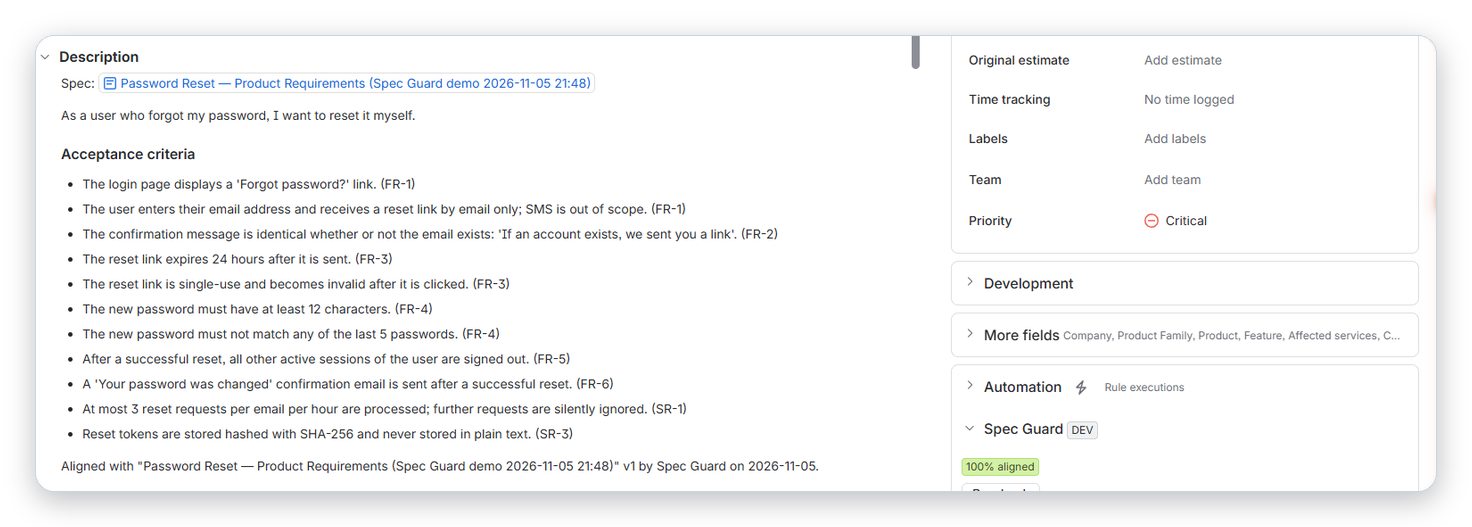
After the user approves the proposal, the work item goes from 20% to 100% aligned and a comment records what changed.
-
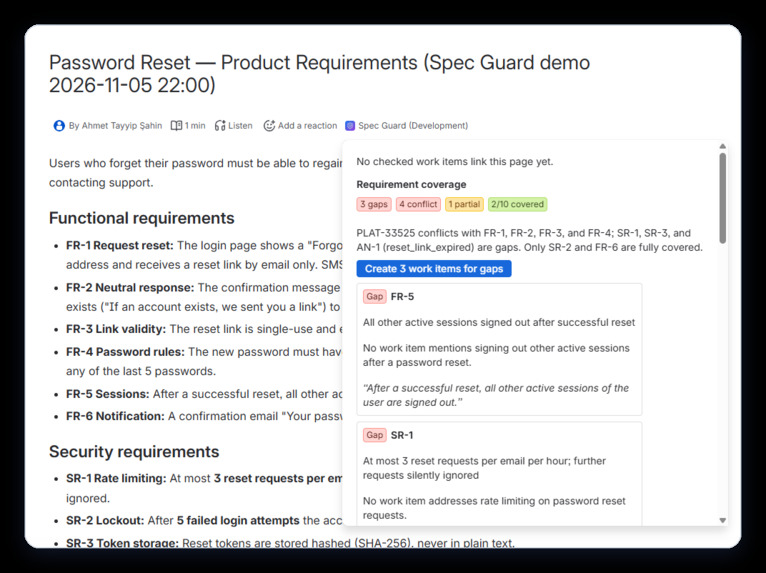
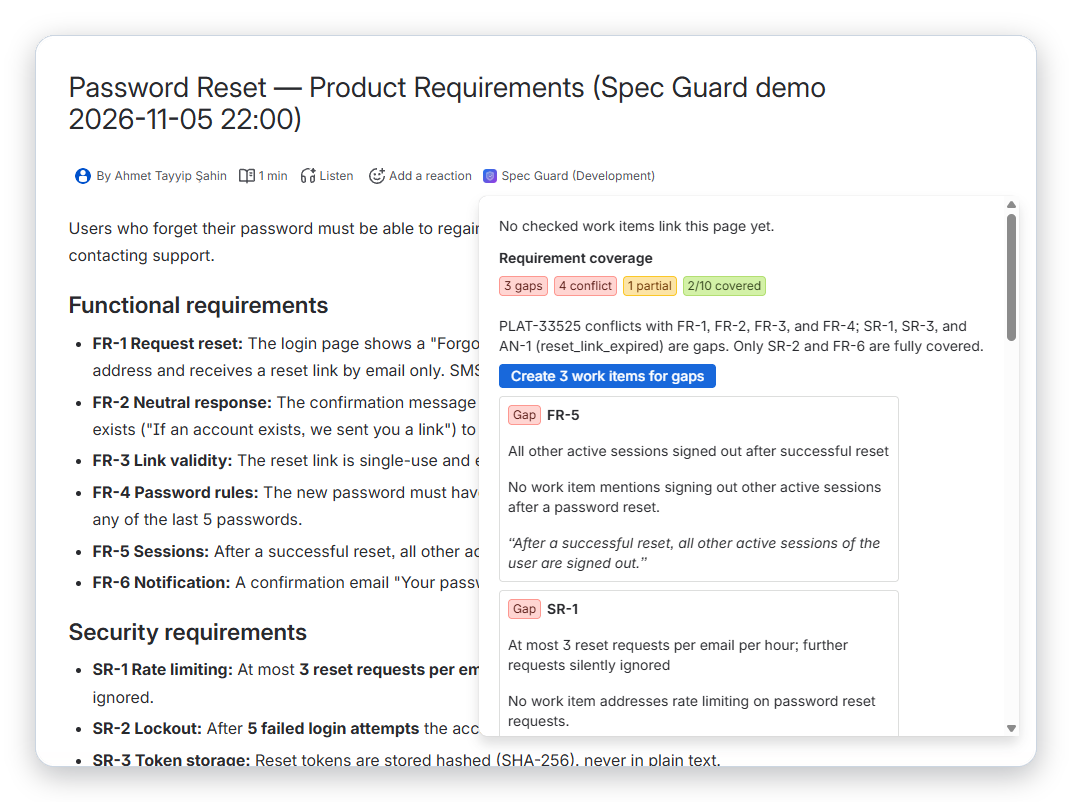
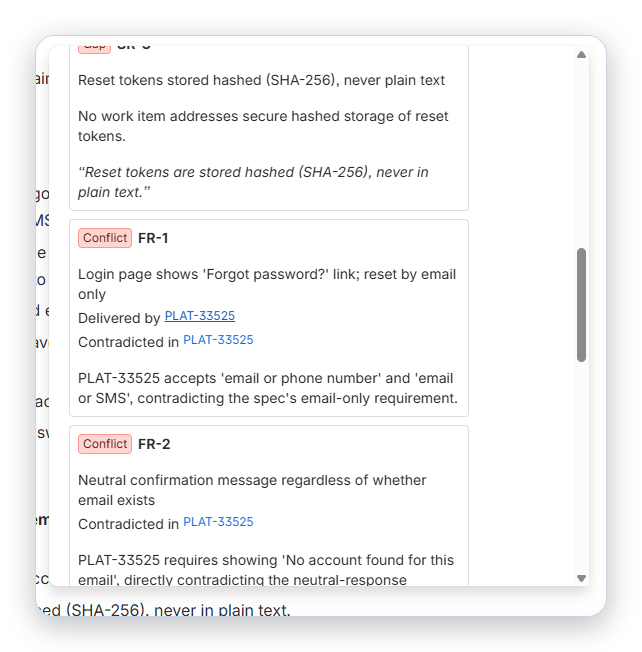
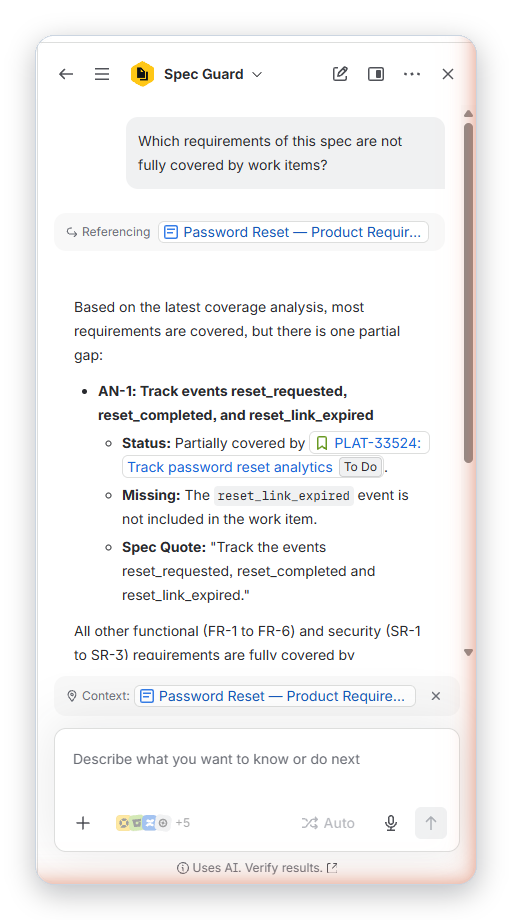
Coverage map on the Confluence spec page: which work items deliver each requirement, and which requirements nobody is building.
-
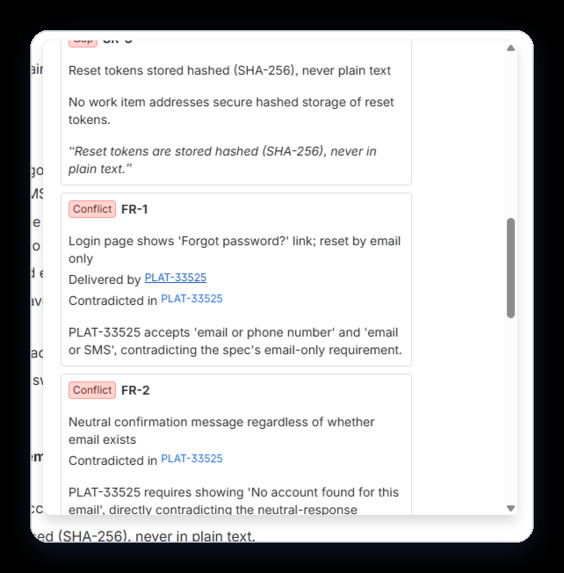
Conflicts between work items that implement the same requirement differently, with quotes from each.
-
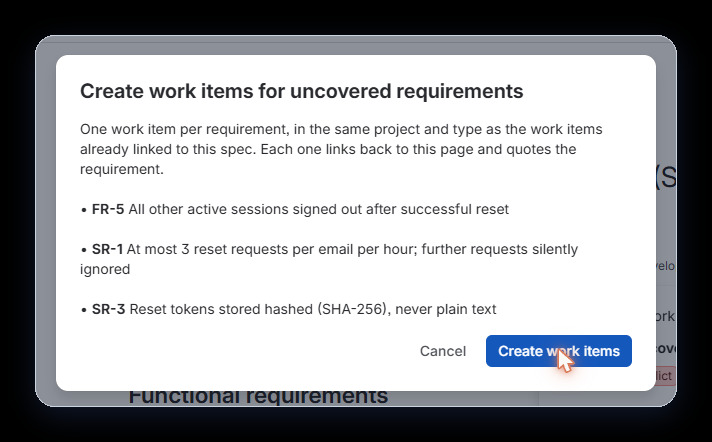
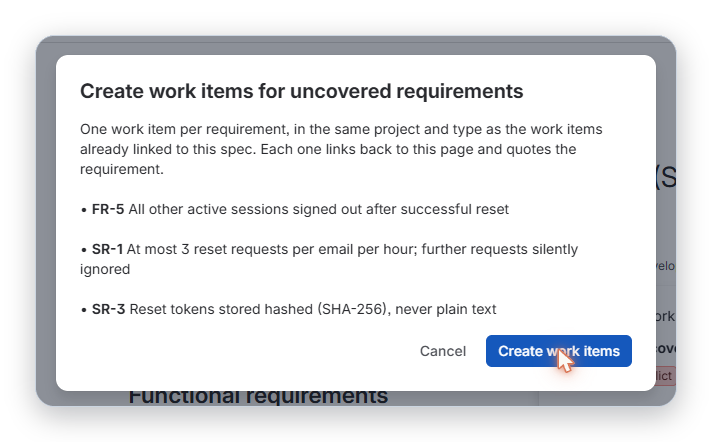
One click creates linked Jira work items for requirements that no work item covers.
-
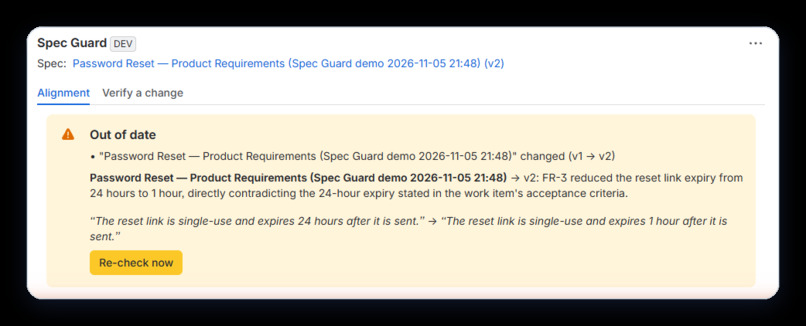
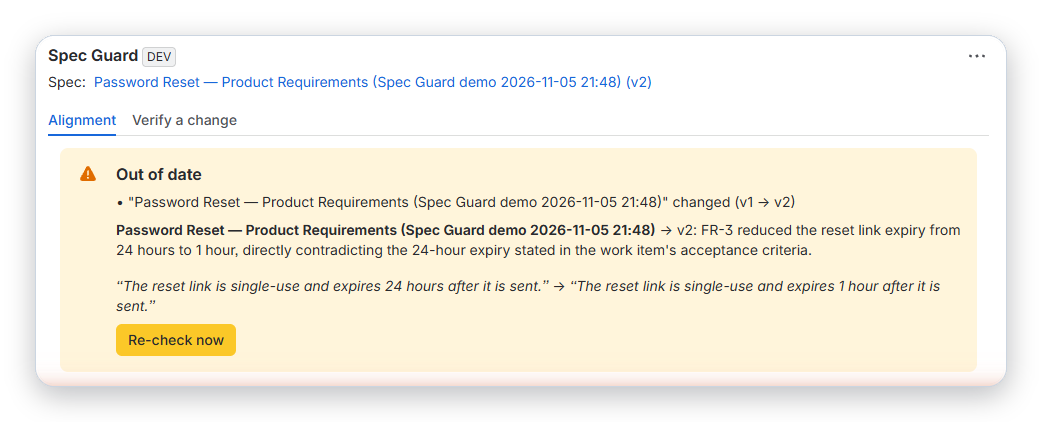
When the spec changes, linked work items are marked out of date and the before/after text is shown to people who can read the spec.
-
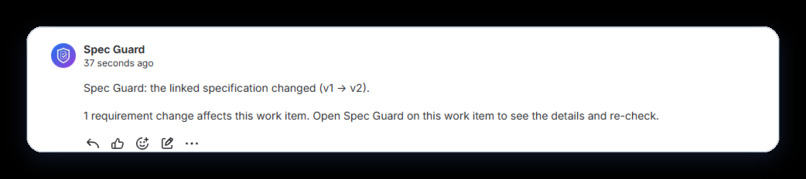
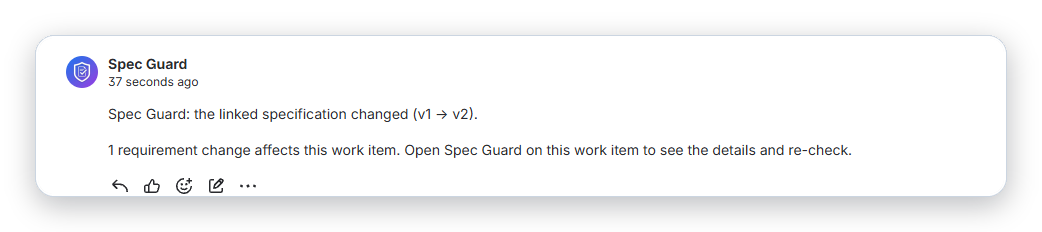
The automatic comment Spec Guard posts on affected work items. It never includes spec text.
-
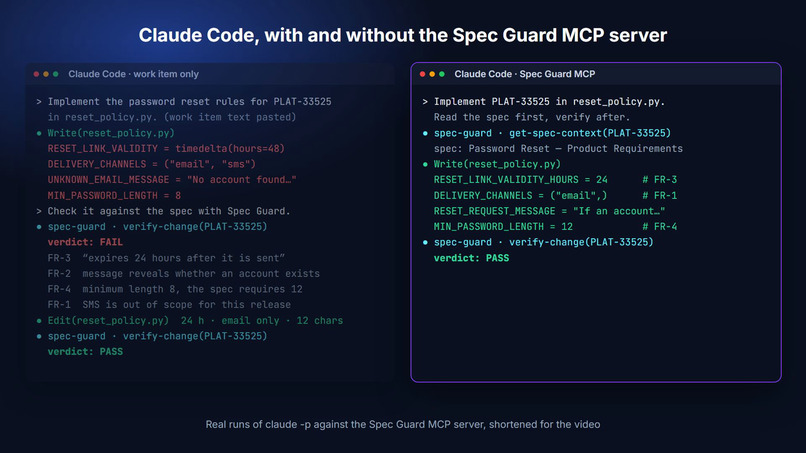
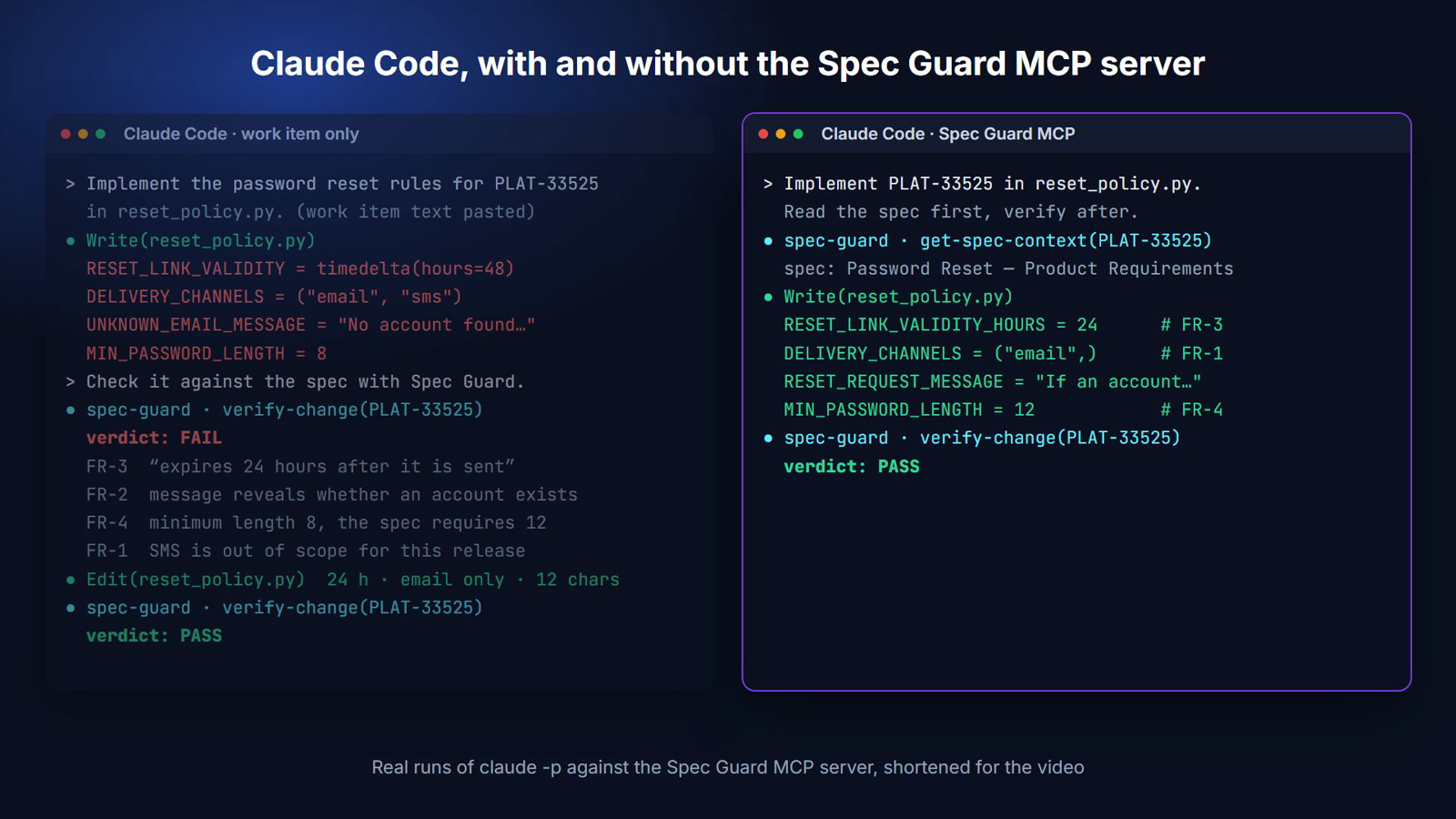
Claude Code without Spec Guard builds the stale ticket. With it, the agent reads the spec first and gets it right.
-
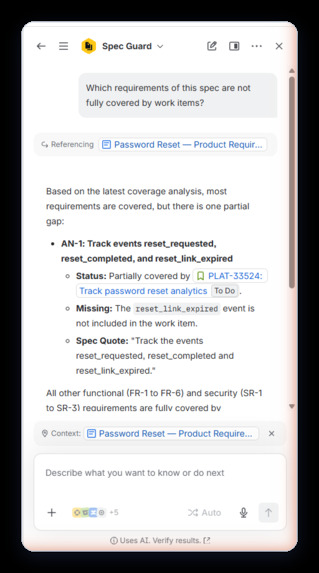
The Spec Guard agent in Rovo, with nine actions that are also exposed as MCP tools.
-
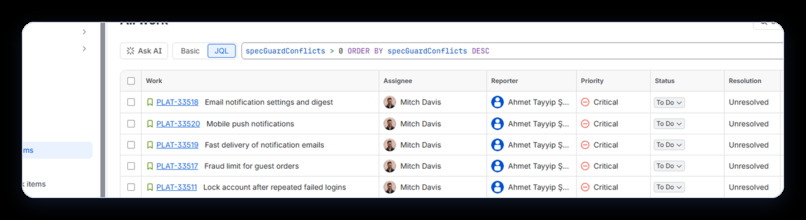
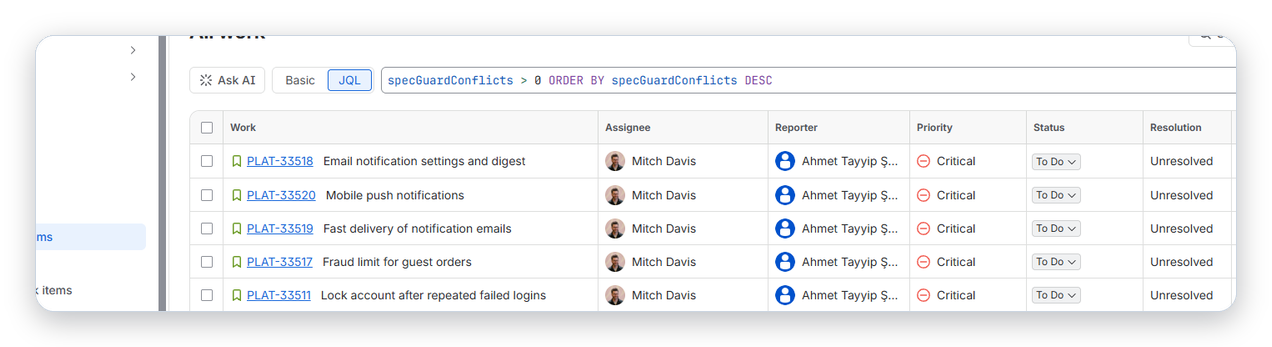
Finding drift across the site with JQL, e.g. specGuardConflicts > 0.
-
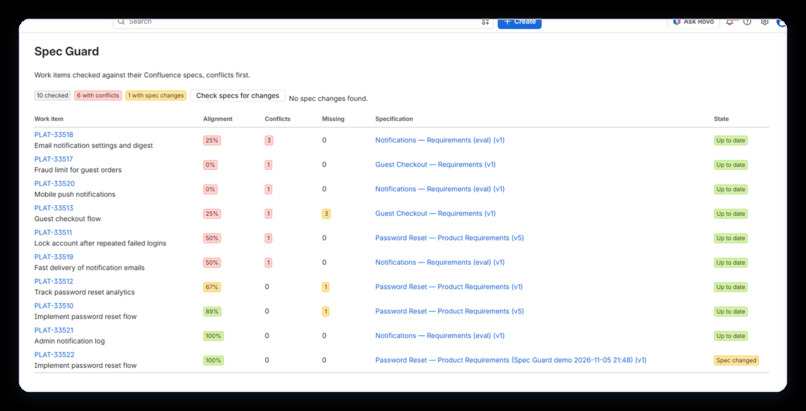
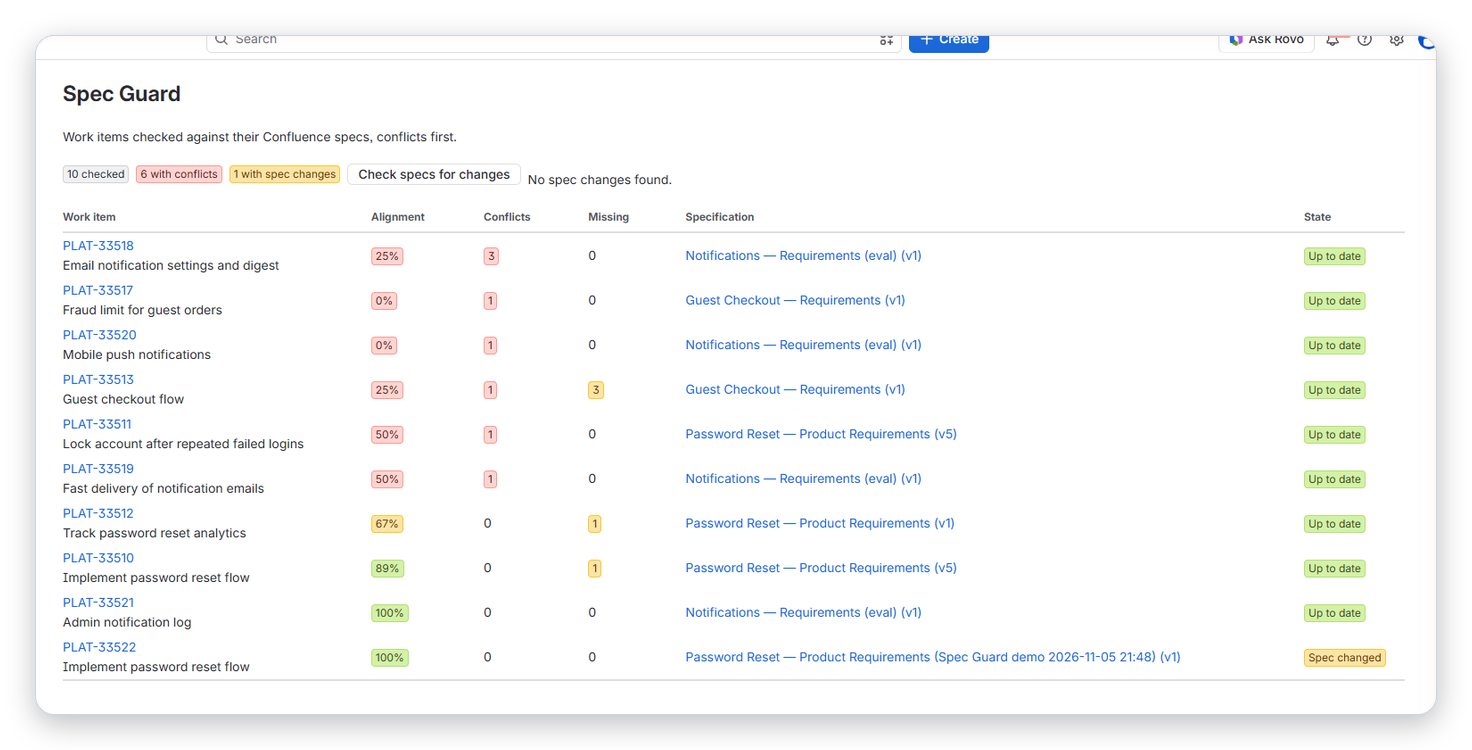
Jira page: every checked work item with its alignment score, conflicts, missing requirements and spec state.
-
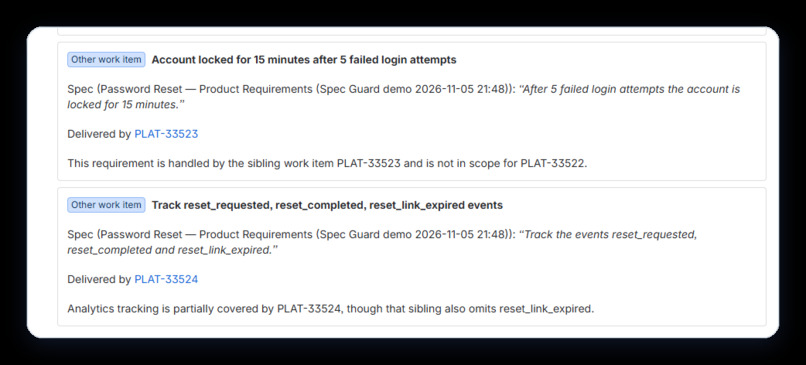
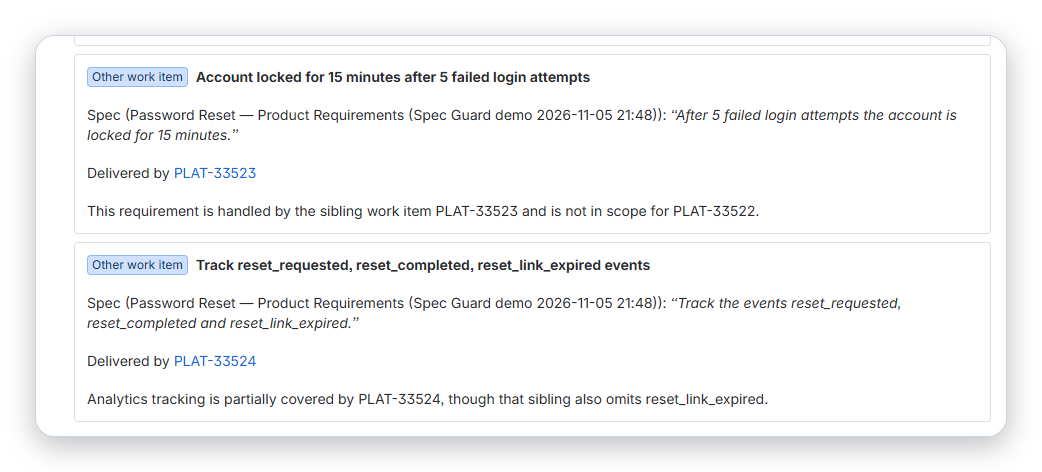
Requirements delivered by sibling work items are recognised, so they are not reported as missing.
-
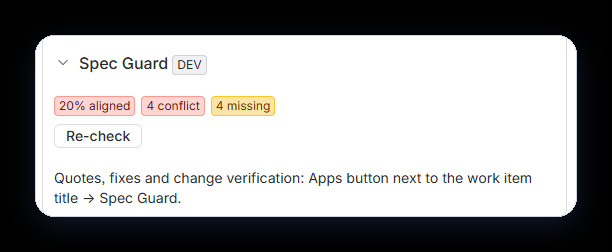
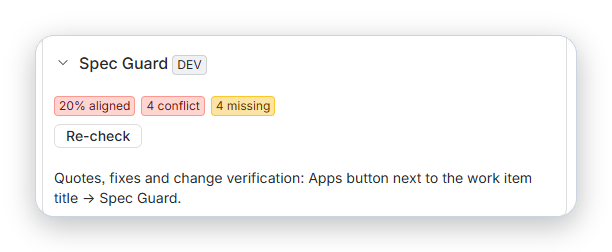
A compact alignment status in the Jira work item sidebar.
Inspiration
A PM changes a requirement in Confluence: the password reset link now expires after 24 hours. The Jira work item still says 48. The developer builds from the work item. Someone notices in QA, or a customer does.
Coding agents make this more likely. An agent reads the work item it is given. If that work item is out of date, the agent builds the out-of-date requirement, quickly and confidently.
What it does
Spec Guard treats the Confluence spec as the source of truth.
- Alignment report on every work item. It works out which requirements of the linked spec the work item is responsible for and marks each one covered, missing, conflicting, unclear, or delivered by another work item. Every finding quotes both the spec and the work item, and every quote is checked against its source.
- Align work item with spec. Proposes acceptance criteria with the spec's values. You review the changes and apply them; a comment records what changed. In the demo video the work item goes from 20% to 100% aligned.
- Coverage map on the spec page. For each requirement: the work items that deliver it, conflicts between them, and gaps nobody is building. One click creates linked work items for the gaps.
- Spec changes reach the work items. Linked work items get a comment and are marked out of date; the details are shown in Spec Guard to people who can read the spec. Work items are re-checked automatically when their description changes.
- Verify a change. Paste a summary or diff and get pass / needs attention / fails spec, with spec quotes and fixes.
- Search drift with JQL, e.g.
specGuardConflicts > 0. - Rovo agent and nine MCP tools. Claude Code calls
get-spec-contextbefore coding andverify-changeafter, so it builds from the spec rather than from a stale ticket. It can also propose a fix to the work item (align-work-item), which is only applied after the user approves (apply-alignment).
Try it in 3 minutes
- Install with the installation link in the README (https://github.com/atss0/spec-guard#install): Jira first, then Confluence.
- Jira → Apps → Spec Guard → Try with demo data → pick a Jira space and a Confluence space → Create demo scenario.
- Open the first demo work item → Check alignment in the Spec Guard sidebar section. The full report is under the Apps button next to the title.
- For MCP (needs a site with Rovo): enable tools for Spec Guard in Atlassian Administration → Connected apps, then run
claude mcp add --transport http spec-guard https://mcp.atlassian.com/forge/00236d0b-a8f0-4b50-82c2-f1d2d34642ccand ask Claude Code to implement the demo work item.
How we built it
- Atlassian Forge with UI Kit: Jira issue panel, issue context, global page and a Confluence byline.
- Forge LLM (Claude hosted by Atlassian). No data leaves Atlassian; the app is eligible for Runs on Atlassian.
- Rovo agent with nine actions, exposed to external agents through
rovo:mcp. - A Forge events queue for all LLM work. Background jobs use offline user impersonation, so they run with the permissions of the user who started them.
- Forge KVS for analyses, spec snapshots and a spec-to-work-item index; an issue property indexed for JQL.
- Triggers for Confluence page updates and Jira work item changes, plus an hourly check as a fallback.
Design choices aimed at trust:
- Quotes are verified against the source text; unverified quotes are labelled.
- Spec and work item text is passed to the model as data, with instructions inside it ignored.
- Analyses and diffs are only shown to users who can read the spec; the automatic spec-change comment never contains spec text.
- Changes to work item content are always proposed first and applied only after the user approves; agents cannot apply a proposal made for someone else, and agent actions refuse to run without a known user.
Challenges we ran into
- Background jobs that read Confluence as the app user failed on restricted spaces. Offline user impersonation fixed that and made the permission model simpler.
- MCP tools of an app connected to both Jira and Confluence are blocked by a Forge issue; we found the workaround and documented it.
- Early versions reported requirements owned by other work items as missing. Giving the model the work item's scope and its sibling work items removed those false findings (0 in the evaluation).
Accomplishments that we're proud of
- The whole loop works end to end: find drift, explain it with verified quotes, fix the work item, find and fill gaps, propagate spec changes, and let coding agents check their own work.
- "Try with demo data" shows the app working on an empty site in about a minute.
- Evaluation. On a seeded spec with 4 planted conflicts across 4 work items, analysed 3 times each, in two runs: 11 and 12 of 12 conflicts found, 0 and 1 false conflicts, no false "missing" findings, every checked quote found word for word in the sources (105 of 105 in the latest run), median 14 seconds per analysis.
- A second set (a 24-requirement PRD with tables and stale values, a Turkish spec, and a spec containing a prompt injection) found 27 of 27 planted conflicts across 15 runs with no false conflicts, and the injected instruction was not followed. It also exposed a bug with HTML entities in non-English specs, which we fixed.
These are smoke tests, not a benchmark. Details and limitations: docs/EVALUATION.md.
What we learned
Spec drift is mostly a context problem. People and agents both need the current requirement at the moment they act, inside the tool they are already using.
What's next for Spec Guard
- Pull request checks when Forge supports Bitbucket in apps that span Jira and Confluence.
- Teamwork Graph to find spec and work item links automatically.
- Larger evaluation sets from real (anonymised) specs.
Built With
- atlassian-forge
- confluence
- confluence-rest-api
- forge-events
- forge-kvs
- forge-llm
- forge-ui-kit
- javascript
- jira
- jira-rest-api
- mcp
- node.js
- react
- rovo
