-
-
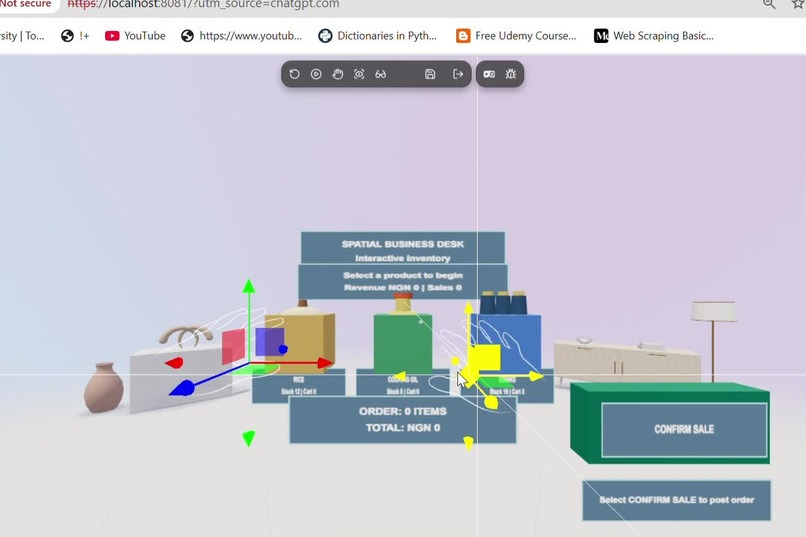
Simulator
-
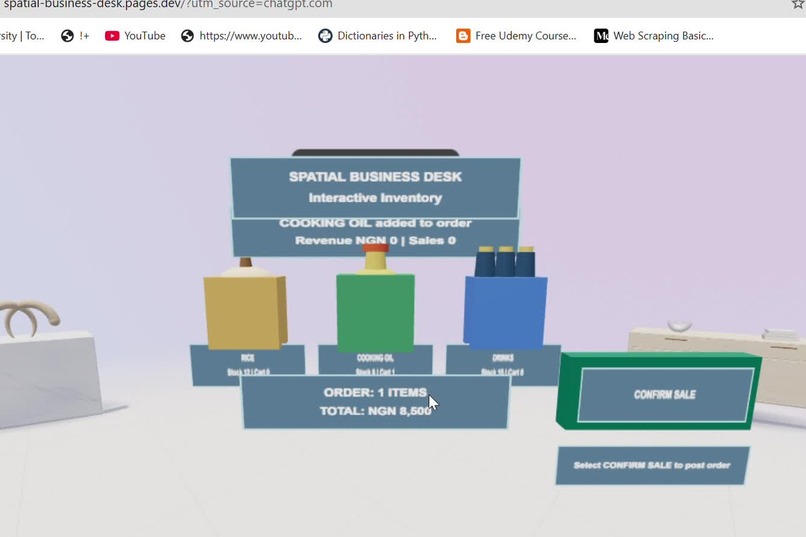
Order_Preparation
-
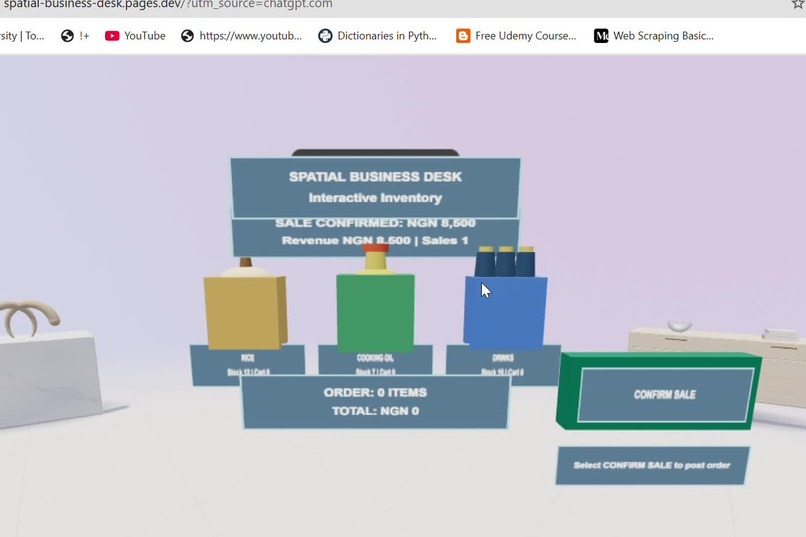
Sale_Confirmed
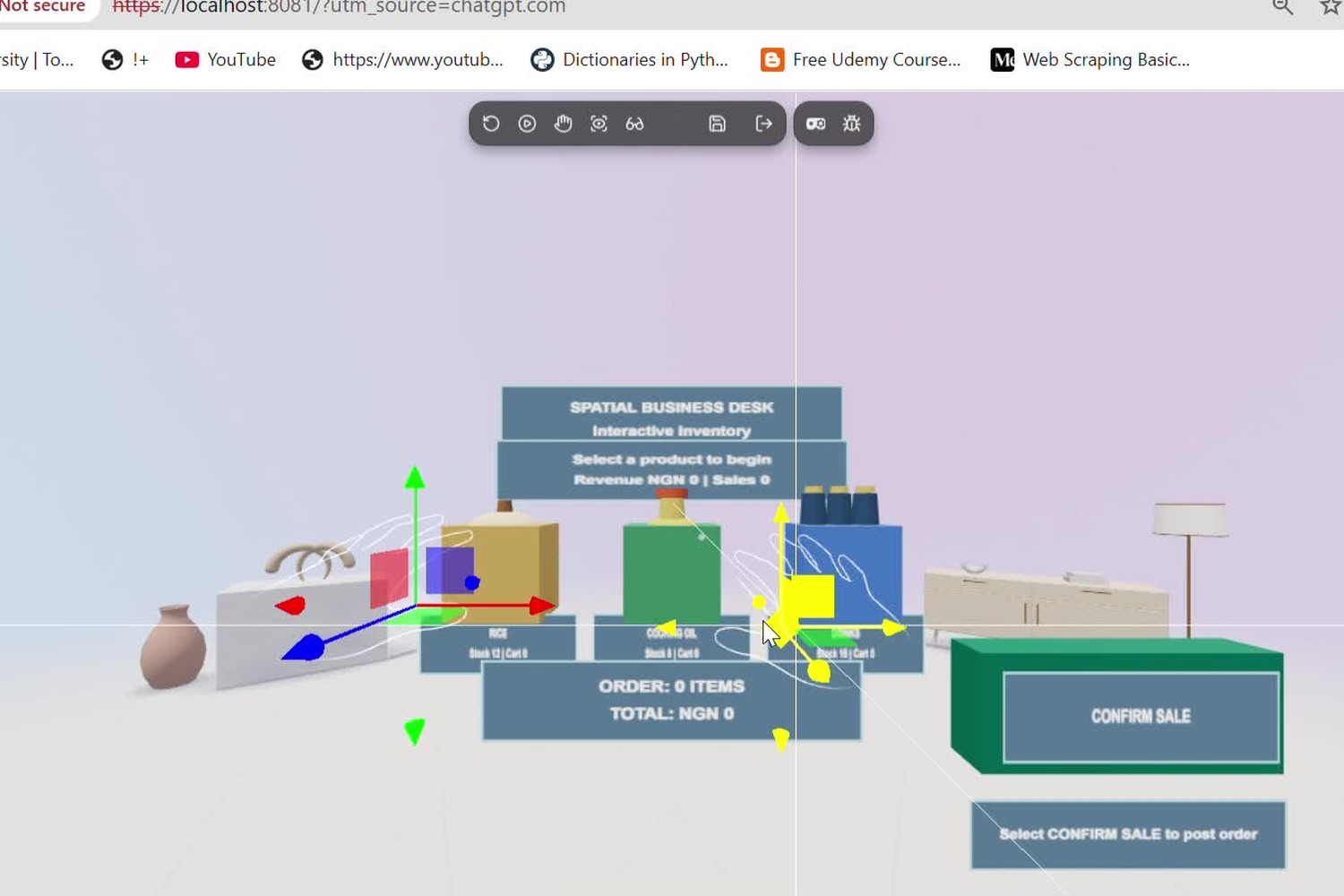
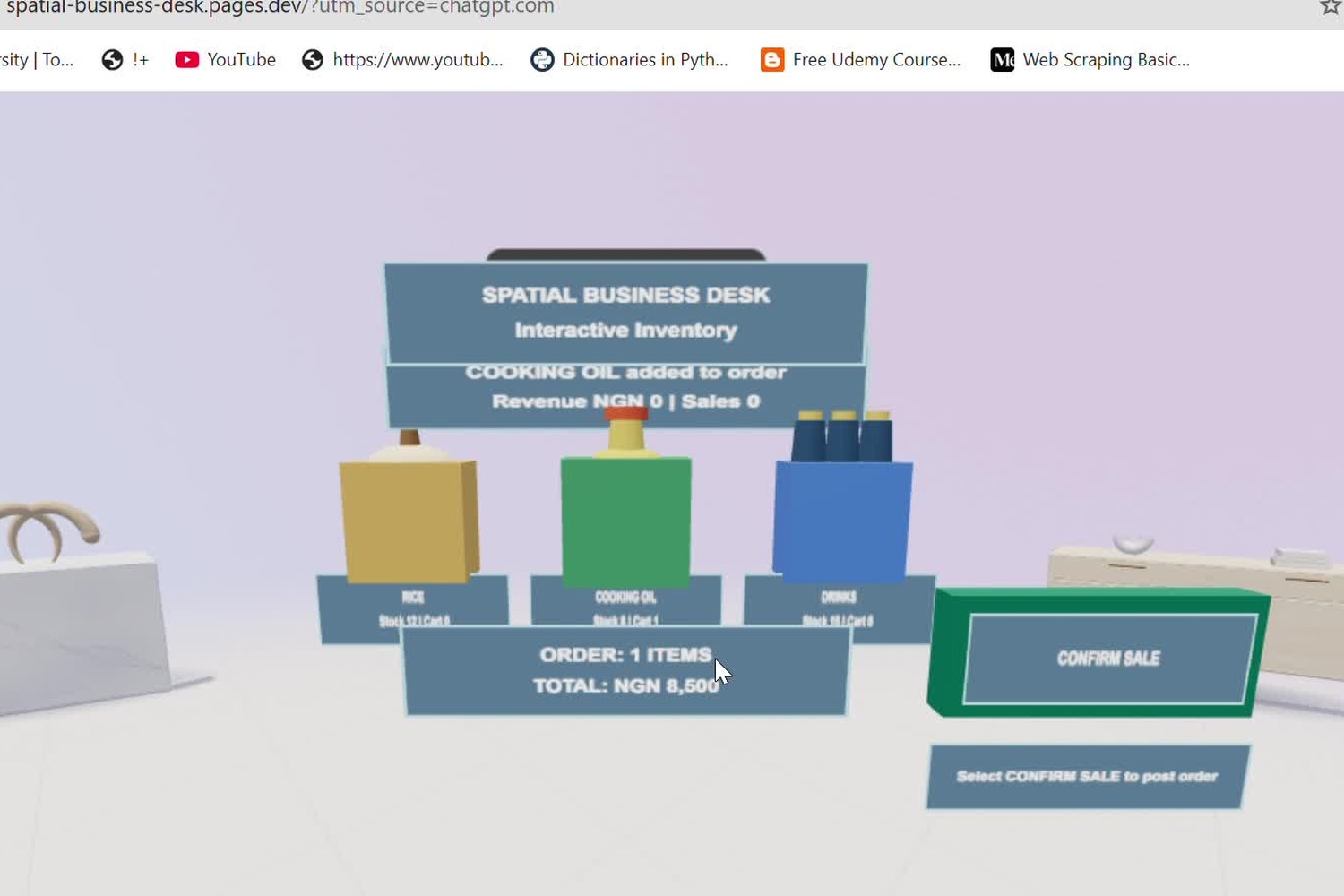
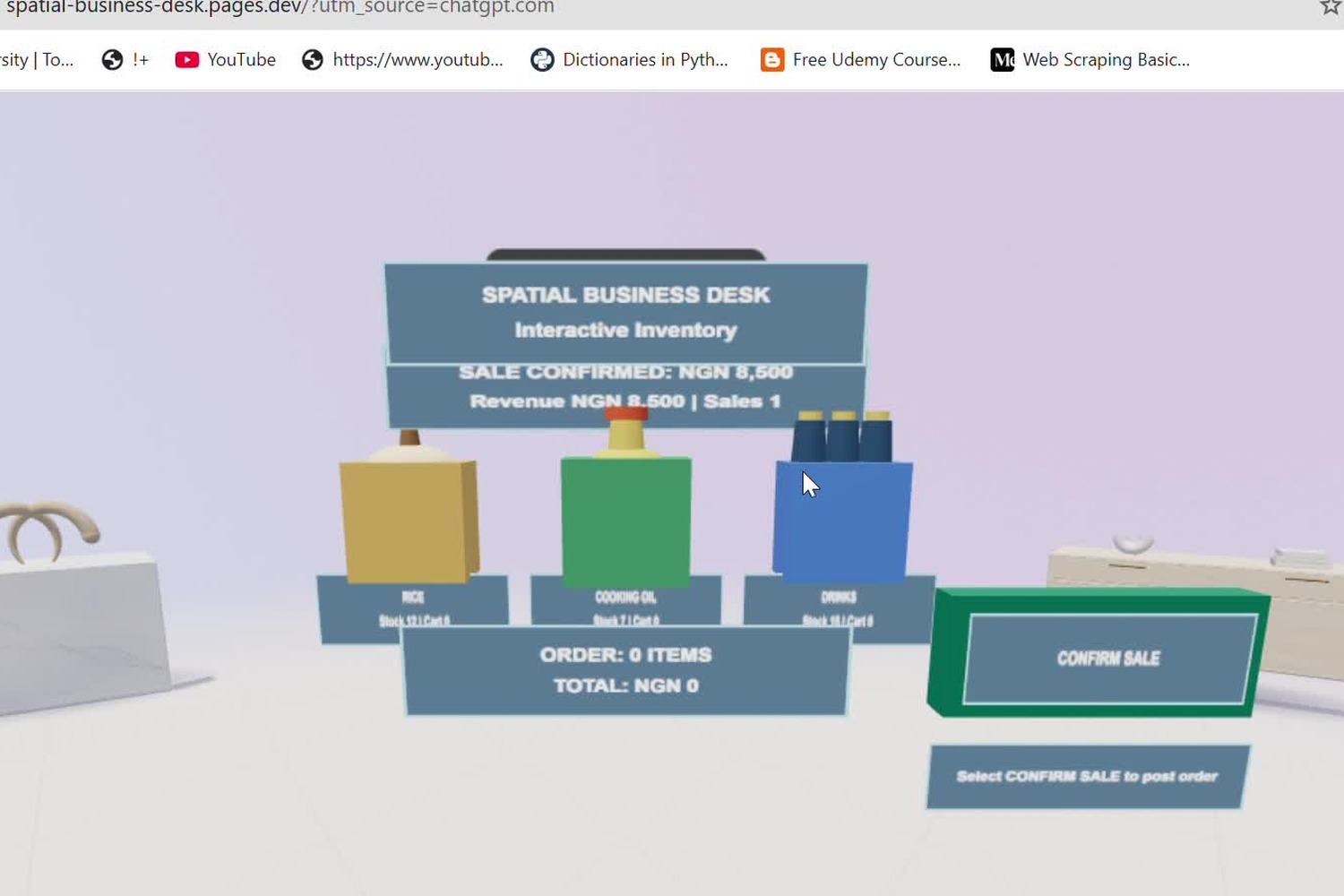
Inspiration
What if running a business could feel as natural as reaching out, picking up a product, and making a decision?
For millions of entrepreneurs, managing a business still means switching between spreadsheets, notebooks, inventory records, and complicated software interfaces.
These tools are useful, but business operations remain largely confined to flat screens, menus, and disconnected information.
We believe spatial computing creates an opportunity to rethink that experience.
Spatial Business Desk was created to explore a new interface for everyday entrepreneurship: an immersive workspace where business owners can see their inventory, interact with products, prepare orders, and confirm sales through hands-first spatial interaction.
Inspired by Meta's immersive computing ecosystem, we set out to demonstrate that virtual and mixed reality technologies can be useful beyond gaming and entertainment.
Our goal is not simply to recreate a conventional dashboard in three dimensions. It is to make business information tangible, interactions intuitive, and operational decisions more deliberate.
Our ambition is simple:
Make spatial computing useful for the everyday entrepreneur.
What it does
Spatial Business Desk is an immersive retail productivity experience that transforms inventory management and sales operations into an interactive three-dimensional workspace.
Instead of navigating conventional forms and tables, users enter a spatial business environment where products become interactive objects, orders are assembled visually, and sales are completed through deliberate confirmation.
The current prototype includes three fictional inventory products:
- Rice: ₦25,000 per unit
- Cooking Oil: ₦8,500 per unit
- Drinks: ₦4,500 per unit
Each product exists as an interactive element within the immersive showroom, with inventory information connected to the application's business state.
1. Hands-first spatial inventory interaction
Users can target and select products through simulated WebXR hand rays and pinch gestures.
The interaction provides visual feedback, allowing users to identify selected products and see how their actions affect the order.
This creates a direct connection between the objects in the immersive environment and the underlying business workflow.
2. Interactive multi-product order management
Spatial Business Desk supports a functional order-management workflow.
Users can:
- Select and add products to an order.
- Add multiple quantities of the same product.
- Prepare orders containing different products.
- Increase or decrease quantities.
- Remove individual items.
- Undo cart edits.
- Clear the entire order.
- Review automatically calculated quantities and monetary totals.
For example, selecting two units of Rice and one unit of Cooking Oil produces an order total of ₦58,500.
The user can then revise the order before committing to a sale.
Importantly, preparing or editing an order does not deduct inventory or increase recorded revenue.
3. Human-controlled sale confirmation
A central design principle is that selecting a product should never automatically become a completed business transaction.
Spatial Business Desk separates reversible order preparation from confirmed sales.
When the user deliberately confirms an order, the prototype updates:
- Remaining inventory quantities.
- Recorded sales revenue.
- Completed sales count.
- The pending order state.
In a verified demonstration, the user confirms one Cooking Oil sale worth ₦8,500.
The application responds by:
- Reducing Cooking Oil stock from 8 to 7 units.
- Increasing recorded revenue from ₦0 to ₦8,500.
- Increasing the completed sales counter from 0 to 1.
- Clearing the completed order from the cart.
Duplicate-action protection helps prevent accidental repeated confirmation.
4. Verified simulated hands-first transaction workflow
The complete workflow has been exercised using simulated WebXR hand interactions through the Immersive Web Emulator (IWER), alongside desktop fallback testing.
Automated validation passed:
- 9 hands-first interaction scenarios
- 4 desktop fallback checks
The demonstrated interactions include product selection, multi-product cart preparation, quantity editing, item removal, undo, clear-cart operations, deliberate sale confirmation, and resulting business-state updates.
These results establish that the prototype supports a functional end-to-end simulated hands-first retail workflow.
Current scope: Spatial Business Desk uses fictional products and in-memory business records. Transactions are simulated business operations, not real payments or bank settlements. Physical Meta Quest headset validation remains outstanding.
Together, these capabilities demonstrate how spatial computing could become a practical interface for everyday business operations.
How we built it
Spatial Business Desk was developed using Meta Immersive Web SDK (IWSDK) and modern immersive web technologies.
Our core technology stack includes:
- Meta Immersive Web SDK: Immersive application development and spatial interaction capabilities.
- WebXR: XR interaction and immersive browser interfaces.
- Three.js: Three-dimensional rendering and scene presentation.
- TypeScript: Typed application logic and interaction management.
- Vite: Frontend development and production builds.
- Immersive Web Emulator (IWER): Simulated XR device and hand-interaction testing.
- GitHub: Source control and version management.
- Cloudflare Pages: Public HTTPS hosting and deployment.
Building the spatial workspace
We created an immersive retail environment containing interactive product representations, inventory information, spatial order controls, and business status indicators.
The workspace connects 3D interactions to application state so that selecting products, editing quantities, and confirming sales produce corresponding changes in order and inventory information.
Designing transaction-safe interactions
We structured the workflow around a deliberate distinction between draft actions and completed sales.
Cart edits remain reversible. Inventory and revenue are only updated following explicit sale confirmation.
We also implemented duplicate-action protection to reduce accidental repeated confirmation.
Implementing hands-first controls
We explored ray-based targeting and simulated hand-pinch interactions using IWSDK and IWER.
Development involved refining spatial interaction targets, product feedback, order controls, and confirmation behavior.
We conducted automated simulator testing to verify that interactions progressed through the expected application states.
Improving usability and presentation
A major part of development involved improving camera framing, product-label readability, spatial panel placement, and cart control visibility.
These refinements made the experience more accessible to users exploring the prototype on desktop while preserving its immersive interaction design.
Public deployment
The working prototype is publicly accessible through Cloudflare Pages.
Live application: https://spatial-business-desk.pages.dev/
Source code: https://github.com/stanley07/spatial-business-desk
Demonstration video: https://youtu.be/thtxHUW_JVw
The repository and demonstration provide supporting evidence of the implementation and tested workflows.
Challenges we ran into
1. Making business workflows genuinely spatial
Traditional business software relies on forms, tables, menus, and flat dashboards.
Our challenge was to determine which operations would benefit from spatial interaction rather than simply transferring a conventional interface into a virtual environment.
We focused on tangible inventory objects, direct selection, spatial order preparation, and deliberate transaction confirmation.
This helped give the immersive workspace a practical purpose.
2. Developing without physical XR hardware
We developed and tested the experience without a physical Meta Quest headset.
Using IWER, we simulated XR interactions, including hand rays and pinch gestures, and examined how these interactions affected the running application.
This provided a reproducible development and testing environment.
However, simulator validation is not equivalent to testing on physical XR hardware, and we do not present it as such.
3. Achieving reliable hands-first transaction workflows
One of our most significant engineering challenges was making hand interactions reliable across multiple kinds of spatial controls.
Selecting a product is relatively straightforward. Building an entire retail transaction workflow requires considerably more coordination between interaction targets and application state.
We had to account for:
- Product selection and visual feedback.
- Multiple quantities and multiple products.
- Quantity increases and decreases.
- Item removal and undo behavior.
- Clearing pending orders.
- Deliberate confirmation.
- Inventory and revenue updates.
- Protection against repeated confirmation actions.
We progressed from individual simulated-hand product interactions to a complete validated workflow.
Our automated checks passed 9 hands-first interaction scenarios, alongside 4 desktop fallback checks.
4. Maintaining transaction safety
An immersive interface should not sacrifice operational reliability for visual novelty.
We therefore separated order preparation from completed transactions.
Users can revise and clear an order without changing stock or revenue. Business-state mutations occur only after explicit confirmation.
This principle became central to the application architecture.
5. Readability and spatial interface design
Presenting products, quantities, monetary figures, and transaction controls in three-dimensional space introduced challenges involving text size, camera framing, panel layout, and interaction accessibility.
We improved the showroom's visual hierarchy, product labels, cart controls, and viewing perspective to make the workflow easier to understand.
6. Windows development and testing compatibility
We encountered operating-system and tooling restrictions affecting some native dependencies and automated XR browser workflows.
We worked through these constraints, maintained controlled source-code checkpoints, and successfully produced and deployed a working public build.
These challenges reinforced a central lesson:
Immersive productivity software must be engineered for dependable interaction, readable information, and deliberate user control—not visual novelty alone.
Accomplishments that we're proud of
We are proud to have transformed a conventional business-management concept into a functioning, publicly accessible immersive productivity experience.
Our most important accomplishment is demonstrating that a meaningful retail transaction can be prepared, revised, and confirmed through simulated hands-first spatial interaction.
1. A functional immersive business environment
We built a three-dimensional retail workspace using Meta Immersive Web SDK, with interactive inventory products, spatial business information, and connected order controls.
2. End-to-end simulated hands-first transactions
We successfully validated a workflow that allows users to select products, prepare multi-product orders, edit quantities, undo mistakes, clear drafts, and deliberately confirm sales using simulated hand interactions.
This goes beyond a static 3D visualization or a single product-selection demonstration.
3. Reversible spatial cart management
Our order-management interface supports multiple products, accurate monetary calculations, and reversible edits.
A merchant can correct mistakes before committing to a sale.
4. Deliberate confirmation and business-state updates
We implemented a confirmation mechanism that separates pending orders from completed transactions.
In our verified demonstration, confirming one Cooking Oil sale:
- Records an ₦8,500 transaction.
- Reduces stock from 8 to 7 units.
- Increases recorded revenue to ₦8,500.
- Updates the completed sales counter to 1.
- Resets the pending cart.
Duplicate-action protection helps prevent accidental repeated confirmation.
5. Successful automated interaction validation
The implementation passed:
- 9 simulated hands-first interaction scenarios
- 4 desktop fallback checks
These tests provide reproducible evidence of the primary workflow.
6. Improved spatial usability
We refined the camera perspective, interface scale, product labels, and cart controls to improve readability without abandoning the immersive design.
7. Public deployment and reproducible source code
We deployed the application through Cloudflare Pages and made the source code available on GitHub.
The experience can be explored publicly, while the repository and demonstration video document the underlying implementation.
8. A practical vision for immersive productivity
Perhaps our greatest accomplishment is demonstrating that immersive computing can support structured, consequential business tasks.
Spatial Business Desk is not yet a production retail-management platform, but it is a working proof of concept for a new way to interact with everyday business operations.
We have moved beyond asking whether business software can appear in VR. We are beginning to demonstrate how business operations can be performed through spatial interaction.
What we learned
The most important lesson from Spatial Business Desk is that the value of immersive computing does not come from simply placing conventional applications in three dimensions.
It comes from designing interactions that make information easier to understand and actions more intuitive.
Five lessons shaped our development.
1. Spatial interactions must have a practical purpose
Every interactive object should represent meaningful information or enable a useful action.
For Spatial Business Desk, products are not merely decorative 3D models. They connect directly to order preparation and inventory management.
2. Hands-first interaction requires an end-to-end design
A successful hand-controlled experience must support more than selecting an object.
Users need a coherent workflow that includes selection, correction, confirmation, and clear feedback.
Testing the complete sequence was essential.
3. Transaction safety matters in immersive environments
Natural interaction should not mean accidental commitment.
We learned to distinguish reversible draft actions from deliberate confirmed transactions.
This principle will remain important as the application evolves.
4. Readability is part of functionality
An immersive application cannot be genuinely useful if important information is difficult to see.
Camera placement, typography, spatial layout, feedback, and control sizing all affect whether users can complete tasks confidently.
5. Simulator validation is valuable but has limits
IWER enabled us to develop, diagnose, and test hands-first interactions without physical XR hardware.
It provided valuable evidence of software behavior, but physical-device testing will be necessary before claiming headset-level usability and performance.
Together, these lessons have strengthened our understanding of how immersive technologies can become practical tools for entrepreneurs.
What's next for Spatial Business Desk
Our vision: A Spatial Operating System for Small Business
Spatial Business Desk is an early proof of concept for a broader vision: a hands-first business operating environment where inventory, sales, customers, analytics, and operational decisions exist within one connected immersive workspace.
Our next stage of development will focus on transforming the current prototype into a more complete, reliable, and connected business platform.
1. Physical headset validation and advanced hand interaction
Our current simulated hands-first transaction workflow has been implemented and validated.
The next priority is testing and refining that workflow on physical Meta Quest hardware.
Future interaction improvements may include more natural gestures, direct object manipulation, enhanced accessibility, and improved spatial navigation.
2. Spatial business intelligence and analytics
We plan to introduce interactive business-performance visualizations, including:
- Sales history.
- Inventory alerts.
- Revenue trends.
- Bestselling products.
- Stock movement summaries.
- Business performance indicators.
These features could allow merchants to understand business conditions through spatial information rather than conventional reporting screens alone.
3. AI-powered spatial business assistance
We envision integrating a conversational AI assistant that can help entrepreneurs ask questions about their business and receive context-aware responses.
For example, a merchant could ask:
"Which products are running low?"
The assistant could identify relevant inventory records and visually highlight the corresponding products inside the spatial workspace.
This is a future capability, not a feature of the current prototype.
4. Connected business data and digital twins
We intend to explore secure integrations with existing inventory, sales, and point-of-sale systems.
With appropriate authentication and permissions, these integrations could support more current digital representations of business operations.
A merchant might eventually inspect stock availability, operational activity, and performance information within a connected spatial environment.
5. Multi-user immersive collaboration
Future versions could enable business owners, employees, accountants, and authorized partners to work together within shared spatial business environments.
Teams could review inventory, discuss operational performance, and coordinate business decisions without needing to be physically present in the same location.
6. Production-ready business operations
Progressing beyond the current prototype will require persistent data storage, secure user authentication, authorization, transaction auditing, tenant isolation, reliability engineering, and integration with established business systems.
Sensitive actions would continue to require appropriate permissions and deliberate confirmation.
The bigger opportunity
We believe immersive computing can do more than entertain.
It can help entrepreneurs see their operations differently, understand business information more naturally, and interact with operational workflows through direct spatial actions.
Our long-term goal is to make Spatial Business Desk a practical spatial business platform for everyday entrepreneurs.
Where inventory becomes visible. Decisions become intuitive. And business operations move beyond the traditional screen.
Spatial Business Desk — Your Business. Beyond the Screen.
Built With
- cloudflare-pages
- github
- iwer
- javascript
- meta-immersive-web
- three.js
- typescript
- vite
- webxr
