SPARK Learn — AI Tutor That Sees, Hears, and Writes Back
The tutor every student wishes they had — patient, brilliant, and always present.
Inspiration
Every student has been there: stuck on a problem at 11 PM, no teacher to call, no one to show their work to. Tutoring is broken — it's expensive, scheduling-dependent, and passive. You watch someone solve a problem for you instead of guiding you to solve it yourself.
We asked: what if an AI could sit next to you like a real tutor? Not a chatbot you type at. Not a video you pause. A living, breathing presence that watches you work, listens to your thinking out loud, and writes back on the same canvas you're drawing on — in real time.
The moment Gemini Live's native audio API dropped — with sub-second latency, real-time vision, and bidirectional audio streaming — we knew it was the missing piece. SPARK was born.
What it does
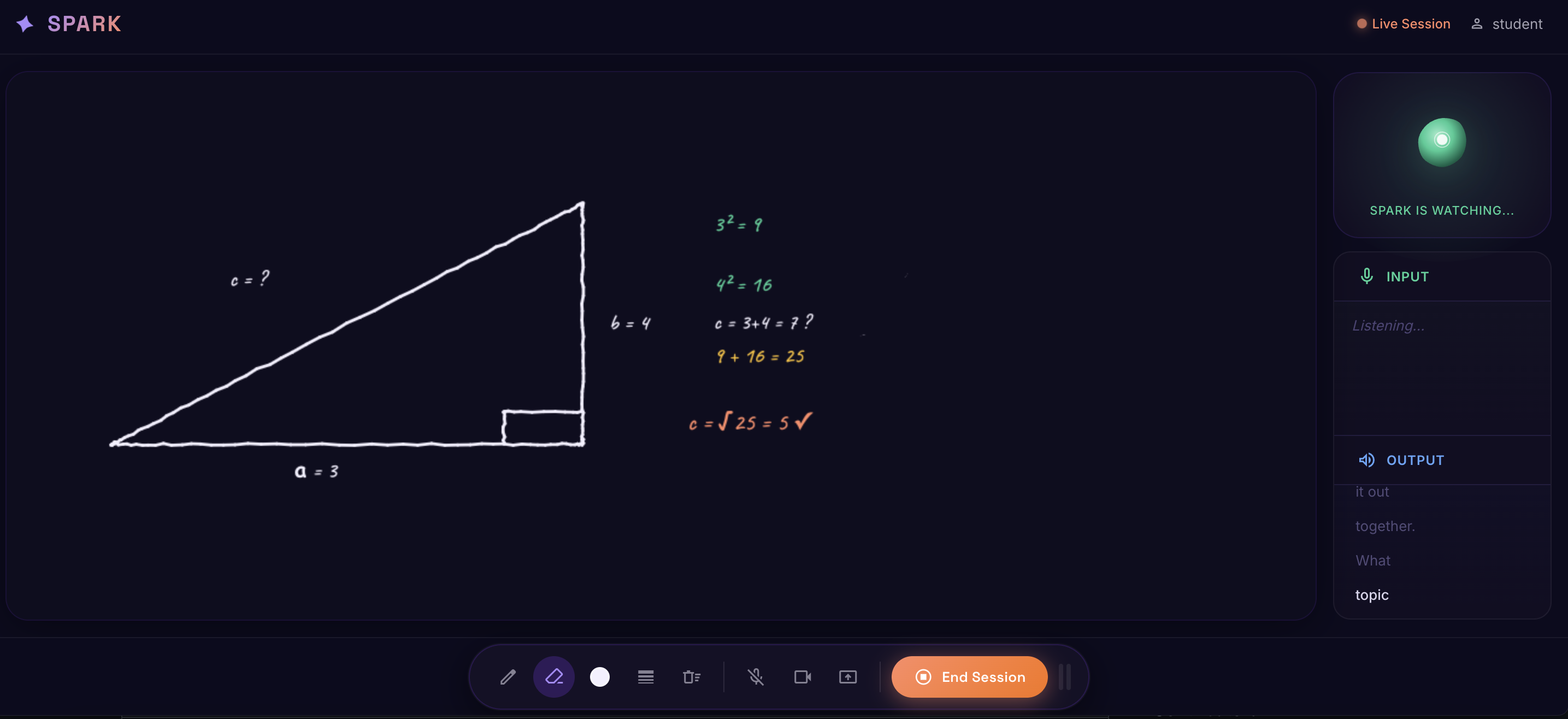
SPARK is a real-time, multimodal AI tutor powered by Gemini Live. It operates across three dimensions simultaneously:
🎙️ It Listens — Continuously
SPARK streams your voice in real time via Gemini's native audio model. No push-to-talk. No turn-taking. Talk through your work like you would with a human tutor, and SPARK responds conversationally — using "hmm", "wait wait wait", "ooh nice!" — because learning feels better when it's human.
👁️ It Sees — Proactively
Every 4 seconds, SPARK captures a composite frame of your drawing canvas and sends it to Gemini's vision model. If you erase the same area 5 times in a row, SPARK notices and asks "I see you keep going back to that part — what's tripping you up?" It doesn't wait to be asked. It initiates.
✍️ It Writes Back — On Your Canvas
SPARK has its own layer on your canvas. It can:
- Write in handwriting style — annotating your work with the Caveat font, letter by letter, like a tutor reaching over to write a note
- Draw formulas — rendering
x = (-b ± √(b²-4ac)) / 2ain large, clear characters using Unicode math symbols - Highlight areas — drawing colored attention boxes around mistakes or key steps
- Show hint cards — floating cards for concepts, examples, warnings, and formulas
- Celebrate wins — confetti explosions when you crack a hard problem
🧠 It Guides — Socratically
SPARK never just gives the answer. It asks the next question. It adjusts difficulty in real time. If you're breezing through, it challenges you. If you're frustrated, it slows down and breaks it apart. It calls set_session_context to display your topic and difficulty level in the UI — making every session feel intentional.
How we built it
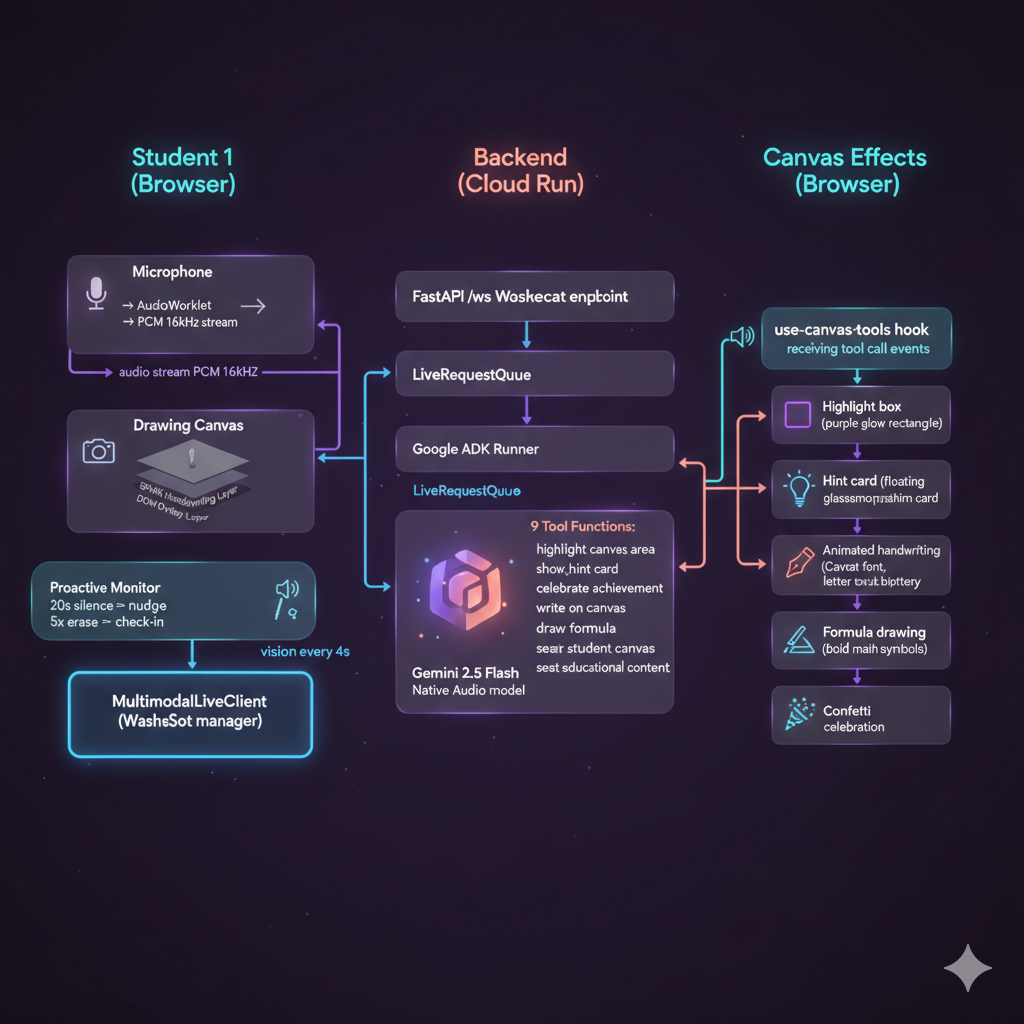
SPARK is a full-stack, real-time AI system built on Google's newest infrastructure:
Backend — Google ADK + Gemini Live
gemini-2.5-flash-native-audio-preview-12-2025
- Google Agent Development Kit (ADK): We use
Agent,App,Runner, andLiveRequestQueueto orchestrate a bidirectional streaming session between the student and the model - FastAPI + WebSocket: A single
/wsendpoint streams ADK events to the frontend in real time, with backoff retry logic and optional GCP Cloud Logging - 9 custom tools:
highlight_canvas_area,show_hint_card,celebrate_achievement,set_session_context,write_on_canvas,draw_formula,clear_spark_canvas,clear_student_canvas,search_educational_content— all returning JSON that the ADK forwards as tool call events to the frontend - python-dotenv: Seamless local/cloud API key management with automatic Vertex AI fallback
Frontend — React + Vite + HTML5 Canvas
- Multimodal Live Client: Custom WebSocket client (
MultimodalLiveClient) extendingEventEmitter3— handles ADK event parsing, audio streaming, and tool call extraction from ADK's event format - 3-Layer Canvas System:
- Layer 1 (student): HTML5 Canvas with pointer events, pen/eraser/highlight tools
- Layer 2 (SPARK): HTML5 Canvas with animated handwriting (2 chars/tick, 35ms interval = ~28 chars/sec) using the Caveat Google Font —
pointer-events: noneso it never blocks the student - Layer 3 (DOM overlay): React components for highlight boxes, hint cards, and celebration particles
- AudioRecorder: AudioWorklet-based PCM capture at 16kHz, streaming base64 chunks directly via
sendRealtimeInput - Proactive Monitor:
useRef-based timers tracking 20s silence and 5-erase stall, sending nudges to the model - Material Design Expressive: Dark purple (
#0D0B1E) + salmon accent (#FF8A65), Spring cubic-bezier animations, animated SVG organic blob presence indicator
The Stack
| Layer | Technology |
|---|---|
| AI Model | Gemini 2.5 Flash Native Audio |
| Agent Orchestration | Google ADK |
| Backend | FastAPI + Python |
| Frontend | React + TypeScript + Vite |
| Realtime | WebSocket (bidirectional streaming) |
| Canvas | HTML5 Canvas API (3 layers) |
| Audio | AudioWorklet (PCM 16kHz) |
| Fonts | Google Fonts (Caveat, Inter, Space Grotesk) |
Challenges we ran into
🔴 The Model That Stopped Listening
The hardest bug: after a few seconds of conversation, SPARK would go silent. The audio was streaming — but the model wasn't responding. The culprit was a subtle throttle we had added to avoid flooding the WebSocket during connection setup: audio chunks were being dropped (300ms gap during ramp-up, 125ms after). The Gemini native audio model uses continuous VAD (voice activity detection) — even a 300ms gap looks like end-of-speech. The model thought the user stopped talking and completed the turn. Fix: removed all throttling. Continuous PCM stream, no gaps.
🔴 ADK Event Format vs. Gemini Live Format
ADK's run_live emits structured ADK events (content, turn_complete, interrupted, tool_call) — not the raw Gemini Live WebSocket protocol. Our frontend was built for raw Gemini messages. We had to reverse-engineer the ADK event schema and write a custom parser in MultimodalLiveClient to translate ADK events into the typed events our UI expected — handling both camelCase and snake_case field variants.
🔴 The Wrong Model ID
gemini-live-2.5-flash-native-audio returned a 404. The correct model ID — gemini-2.5-flash-native-audio-preview-12-2025 — isn't documented prominently. We queried the models list API to find it.
🔴 Three Canvas Layers, Zero Conflicts
Building a 3-layer canvas where Layer 1 (student drawing) accepts pointer events while Layer 2 (SPARK handwriting) is visually on top but fully transparent to input required careful CSS z-index orchestration and pointer-events: none on the SPARK and overlay layers. Getting animated handwriting to work without React re-renders required storing animation state in refs, not state variables.
🔴 GCP Credential Noise
The scaffold assumed Vertex AI credentials were always available. Running locally with a Gemini API key caused crashes in the GCP Cloud Logging import. Wrapped everything in try/except with a stdlib logging fallback to make local development seamless.
Accomplishments that we're proud of
Zero-latency feel: The combination of Gemini's native audio model + continuous PCM streaming creates a conversation that feels genuinely real-time. SPARK interrupts, reacts, and guides without noticeable lag.
The handwriting animation: Watching SPARK write a formula on the canvas letter by letter — in a handwriting font, with a subtle shadow — while simultaneously speaking the explanation out loud is genuinely magical. It's the closest thing to having a tutor reach over and write on your paper.
Proactive intelligence: SPARK doesn't wait to be asked. It watches the canvas every 4 seconds. It notices when you erase repeatedly. It checks in after silence. Most AI tutors are reactive. SPARK is present.
Full multimodal stack: Voice in, voice out, canvas in (vision), canvas out (drawing), tool calls, celebrations — all working together in a single coherent session. Every Gemini modality is in use simultaneously.
9 custom ADK tools working end-to-end: From
highlight_canvas_areatocelebrate_achievement, every tool makes a visible, delightful impact on the student's screen within milliseconds of the model deciding to use it.
What we learned
Continuous audio streams have zero tolerance for gaps. VAD operates on the assumption of a clean signal. Drop even 300ms of audio and the model thinks the user stopped speaking. This fundamentally changes how you architect real-time audio pipelines.
ADK is a powerful abstraction — with a learning curve. The ADK's
LiveRequestQueueandrun_livehandle session management, tool execution, and event routing elegantly. But the event format it emits is different from the raw Gemini Live protocol, and documentation for this is sparse. Investing in understanding the ADK event schema paid off.Pedagogy should drive the prompt. The quality of the tutor is almost entirely determined by the system prompt. We spent significant time on SPARK's personality — the Socratic defaults, the proactive behavior rules, the communication style guidelines. A technically perfect streaming pipeline with a mediocre prompt produces a mediocre tutor.
pointer-events: noneis your best friend when building layered interactive canvases. CSS layering +pointer-eventscontrol is more reliable than trying to manage event delegation in JavaScript.Refs over state for animation loops. Storing animation progress in
useRefinstead ofuseStateprevents React from re-rendering on every character reveal — critical for smooth handwriting at 28 chars/sec.
What's next for SPARK Learn
SPARK is a foundation. Here's where it goes:
📚 Subject-Specific Intelligence
Fine-tuned modes for Math, Physics, Chemistry, and Coding — each with domain-specific tools. A draw_diagram tool that renders circuit diagrams, molecular structures, or coordinate systems. A run_code tool that executes student code and shows output on the canvas.
👤 Student Memory
Persistent session context stored in ADK's memory service — SPARK remembers what topics a student struggled with last week and picks up where you left off. "Last time we worked on integration by parts — want to try a harder one today?"
📊 Teacher Dashboard
A real-time view for teachers showing where students are getting stuck, what topics SPARK is covering most, and which students haven't engaged recently. SPARK becomes an assistant to human teachers, not a replacement.
🌍 Accessibility
SPARK's voice-first interface is naturally accessible. Next: multi-language support (Gemini speaks 40+ languages), adjustable speech pace, and high-contrast canvas modes.
📱 Mobile & Tablet
The canvas + voice interface maps perfectly to a tablet with a stylus. A native iOS/Android app where students draw with an Apple Pencil while talking to SPARK.
🎓 Curriculum Integration
LMS integrations (Google Classroom, Canvas, Schoology) so teachers can assign SPARK sessions tied to specific lessons, with completion and performance data flowing back into their gradebooks.
Built with ❤️ and way too much caffeine for the Gemini Live Hackathon. Powered by Google ADK · Gemini 2.5 Flash Native Audio · Google Cloud
Built With
- audioworklet
- backoff
- eventemitter3
- fastapi
- gcp-cloud-logging
- gemini-2.5-flash-native-audio
- gemini-live-api
- google-adk
- google-cloud-vertex-ai
- google-fonts
- html5-canvas-api
- material-design-expressive
- python
- python-dotenv
- react
- typescript
- uvicorn
- vite
- websocket


Log in or sign up for Devpost to join the conversation.