-
-
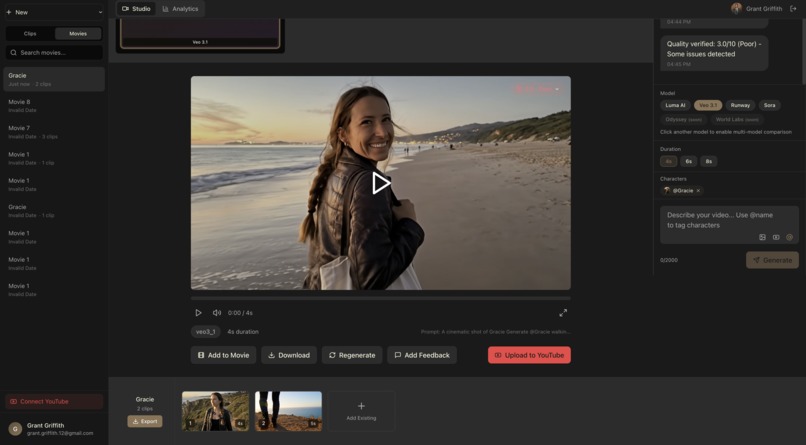
Creating a movie
-
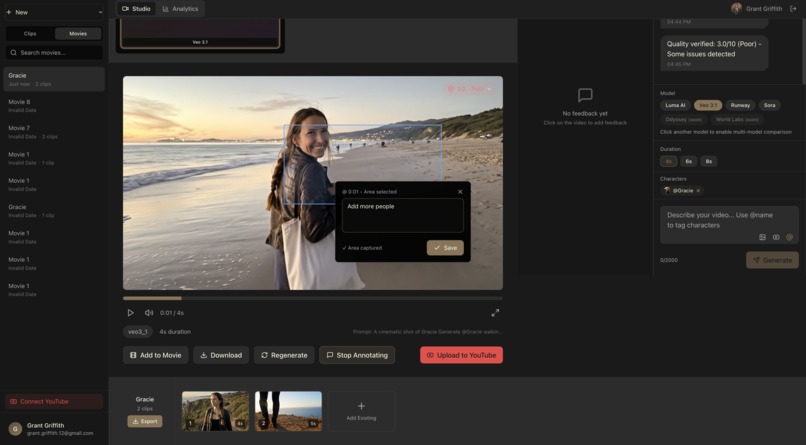
frame by frame edit screens
-
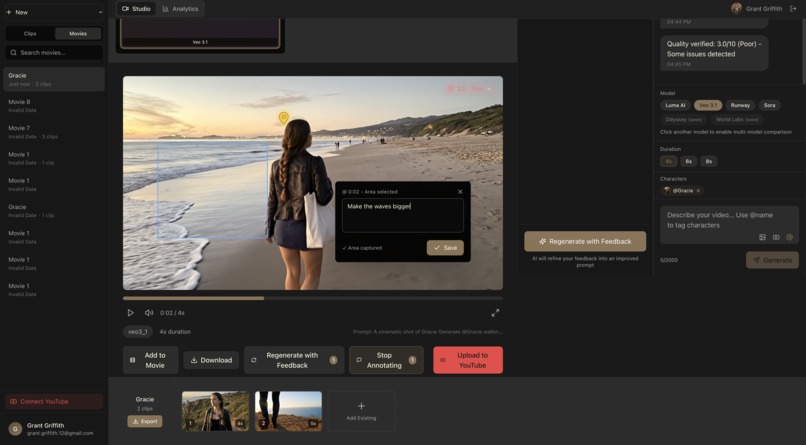
Adding feedback
Inspiration
We kept running into the same problem: AI video generation is incredible now — Veo, Runway, Sora, Luma — but every model lives in its own silo. If you're a small business owner trying to make a product launch video, or a creator who needs a 15-second ad for Instagram, you have to bounce between 5+ platforms, learn 5+ interfaces, manage 5+ subscriptions, and manually compare results. That's not a workflow — that's a chore.
We wanted to build the tool we wished existed: one workspace where you can prompt once, generate across multiple models, compare side-by-side, and edit with natural language. Think of it as the "Kayak for AI video" — model-agnostic, creator-first, and dead simple.
What it does
Premiere 2.0 is a model-agnostic AI video generation and editing platform. Users can:
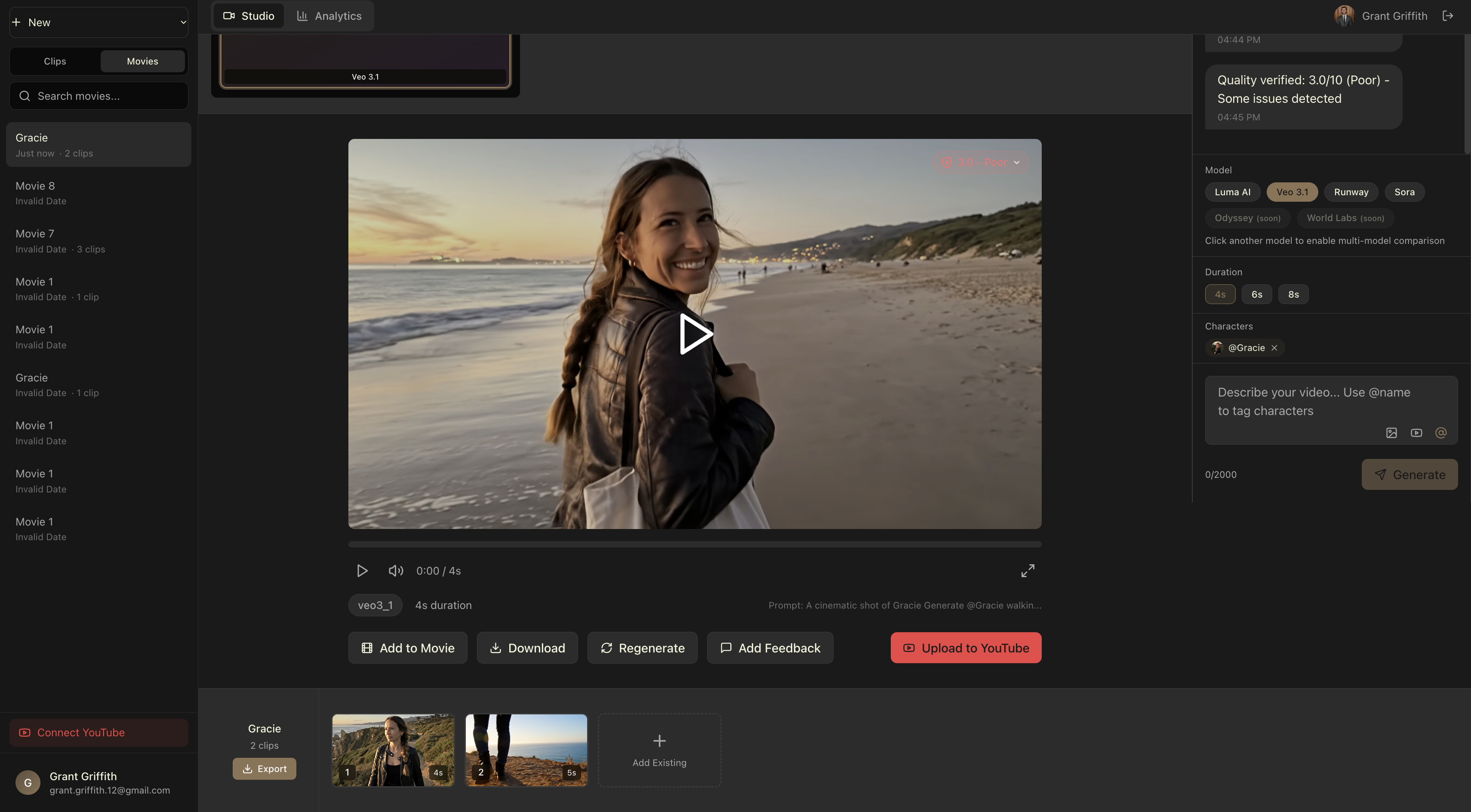
- Generate video from text prompts using multiple AI models (Luma AI, Veo 3.1, Runway Gen-3, Sora) — all from one unified interface
- Compare outputs side-by-side to pick the best result for their use case instead of guessing which model to use
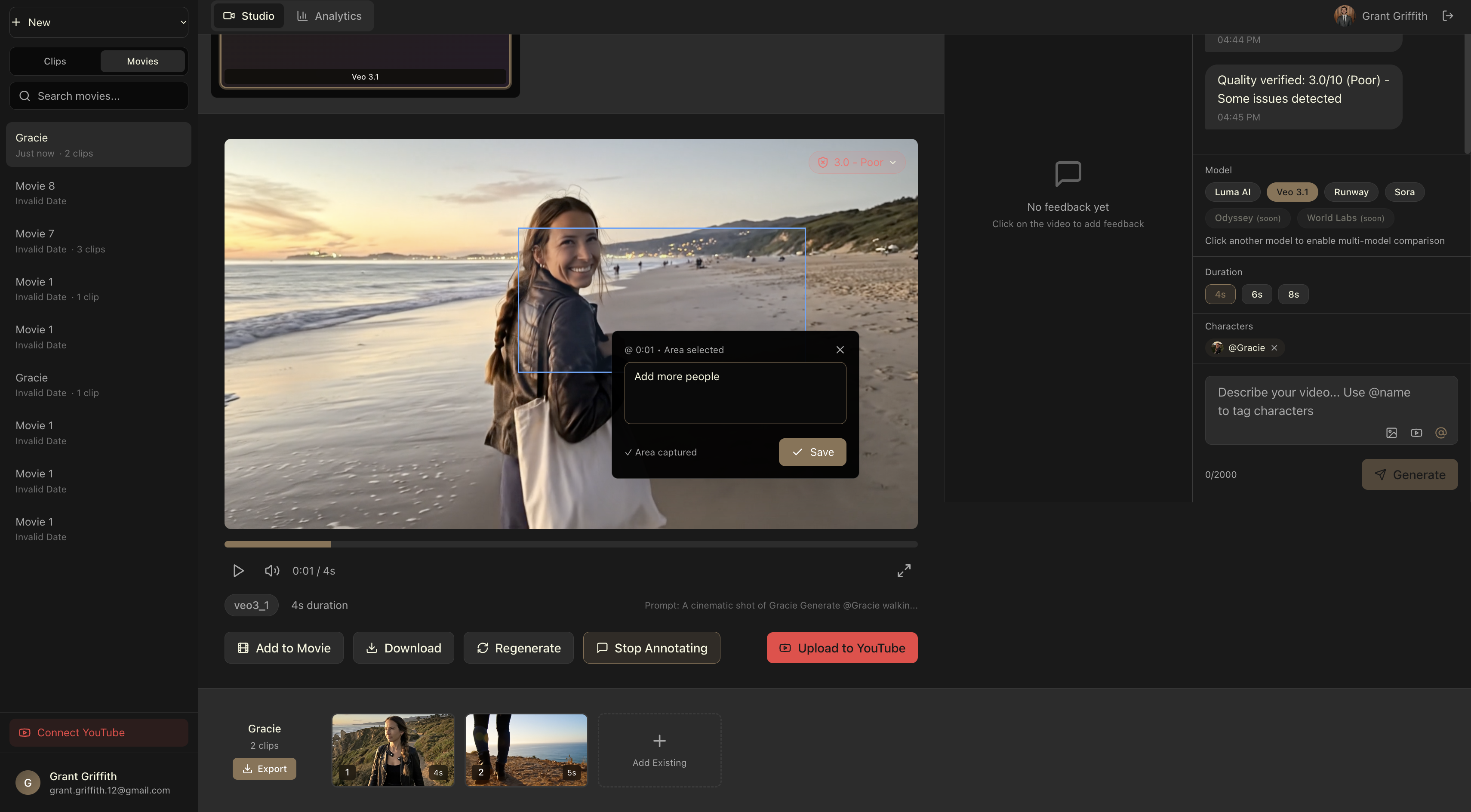
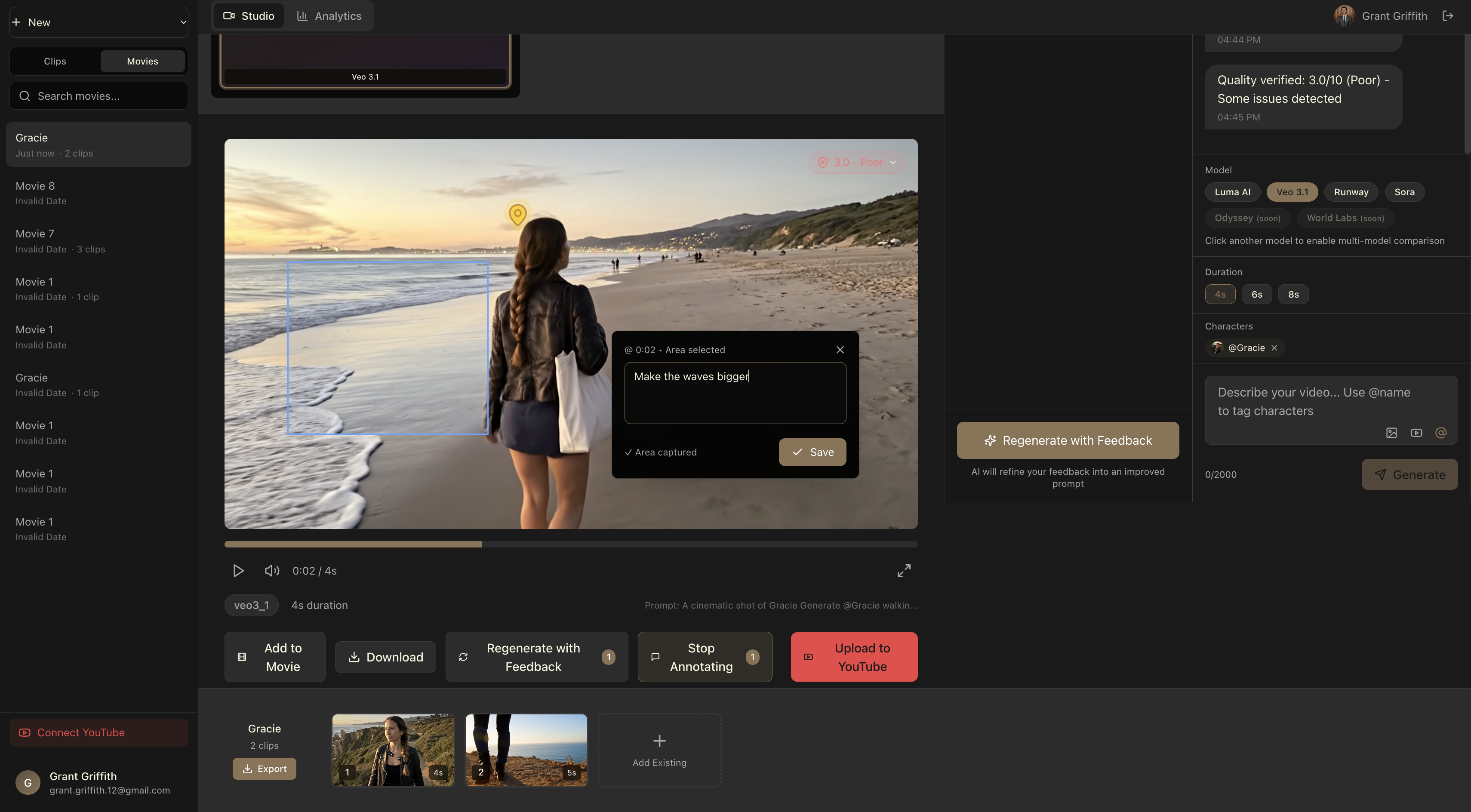
- Edit with natural language — refine clips by chatting ("make the transition faster," "add my logo at the 3-second mark") instead of wrestling with a traditional timeline editor
- Organize projects into Movies and Clips, making it easy to manage multi-clip campaigns like product launches, social ad series, or tutorial content
- Run quality checks with built-in AI scoring that flags low-quality outputs before you waste credits
- Export instantly to TikTok, Reels, YouTube Shorts, or web — auto-sized and ready to post
The target user is a small business owner or solo creator who needs professional-looking video but doesn't have the budget for an agency or the time to learn After Effects.
How we built it
Frontend: Next.js 14 with TypeScript and Tailwind CSS. We used a dark-themed UI inspired by professional creative tools (think the look and feel of tools like Claude or Figma's dark mode) to make the workspace feel premium and focused.
Backend & Database: Supabase for Postgres, authentication (magic link), and file storage for uploaded media and generated clips.
AI Model Integration: We built a unified API abstraction layer that normalizes requests and responses across multiple video generation providers. Each model (Luma, Veo, Runway, Sora) has its own adapter, but the user-facing interface is identical — you just toggle which model(s) you want to use.
Video Processing: FFmpeg for post-processing, resizing, and format conversion. Generated clips are stored in Supabase Storage and served via CDN.
Conversational Editing: We integrated an LLM-powered chat interface (Anthropic's Claude API) that interprets natural language edit instructions and translates them into video manipulation commands.
Deployment: Vercel for the web app, with background job processing for long-running video generation tasks.
Challenges we ran into
Model API inconsistency was the biggest headache. Every video generation API has different input formats, output formats, rate limits, and error handling patterns. Building a clean abstraction layer that handles all of them gracefully took way more iteration than expected.
Async generation workflows were tricky. Video generation takes 30 seconds to several minutes depending on the model. We had to build a robust polling and webhook system so users get real-time progress updates without hammering the APIs.
Cost management was a real concern. AI video generation isn't cheap, and we needed to build in safeguards so users (and we) don't accidentally burn through credits. The quality-check-before-commit feature was born out of this pain.
Scope creep — we originally wanted to build a full nonlinear video editor. We had to ruthlessly scope down to "generate + compare + chat-edit" for the MVP and save the timeline editor for later.
Accomplishments that we're proud of
- The multi-model comparison flow genuinely works and feels magical. Prompting once and seeing 3-4 different AI interpretations side-by-side is a "wow" moment every time.
- Going from zero to a working product as a first-time developer (coming from a product management background) using AI-assisted coding tools. This project forced me to learn real full-stack development — Git workflows, API integration, database design, deployment pipelines — by actually shipping, not just reading docs.
- The design language — we put serious effort into making the UI feel cinematic and premium, not like another generic SaaS dashboard. The dark theme with muted gold accents gives it a distinctive identity.
- The chat-based editing interface — being able to type "make it more dramatic" and have the system actually re-generate or modify the clip is the kind of UX that makes AI feel like a creative partner, not just a tool.
What we learned
- Start with the abstraction layer, not the UI. We initially built model-specific pages and then had to refactor everything when we realized we needed a unified interface. Building the API normalization layer first would have saved days.
- AI-assisted development is a superpower, but you still need to understand what's happening. Tools like Claude Code and Cursor made us 10x faster, but the bugs that stumped us the longest were always architectural — things you can only reason through if you understand the system design.
- Scope ruthlessly. The MVP that ships beats the perfect product that doesn't. We cut the timeline editor, the template marketplace, and multi-user collaboration to get the core generation + comparison loop working.
- Video generation UX is fundamentally different from image generation. Users expect to iterate and refine, not just prompt-and-pray. The conversational editing layer isn't a nice-to-have — it's core to the product.
What's next for Premiere 2.0
- Style Transfer & Brand Training — Upload your brand assets (logos, color palettes, reference videos) and have every generation match your visual identity automatically
- Odyssey and World Labs integration — Both models are coming soon and we're building adapters now
- Timeline Editor — A lightweight, chat-augmented timeline for sequencing multiple clips into longer-form content
- Direct publishing — One-click export to TikTok, YouTube, Instagram with platform-optimized formatting
- Team workspaces — Shared projects, commenting, and approval workflows for small creative teams
- Template marketplace — Community-created prompt templates for common use cases (product demos, testimonials, social ads)
Built With
- claude
- gemini
- luma
- odyssey
- python
- runway
- supabase
- typescript
- veo
- vercel
- world-lab

Log in or sign up for Devpost to join the conversation.