-
-
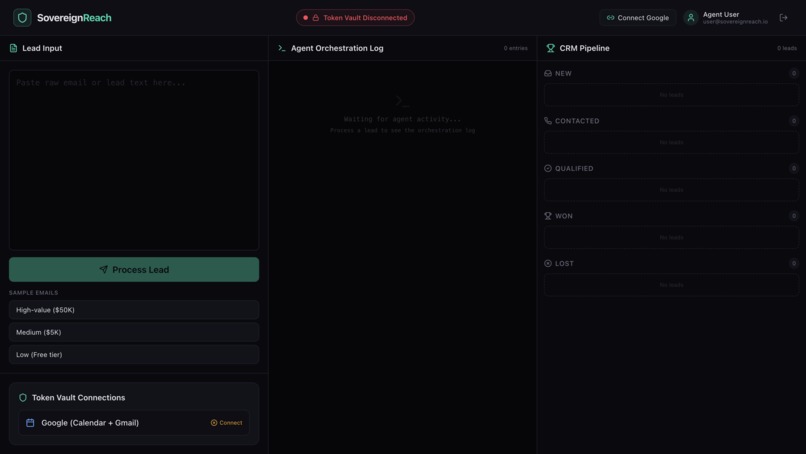
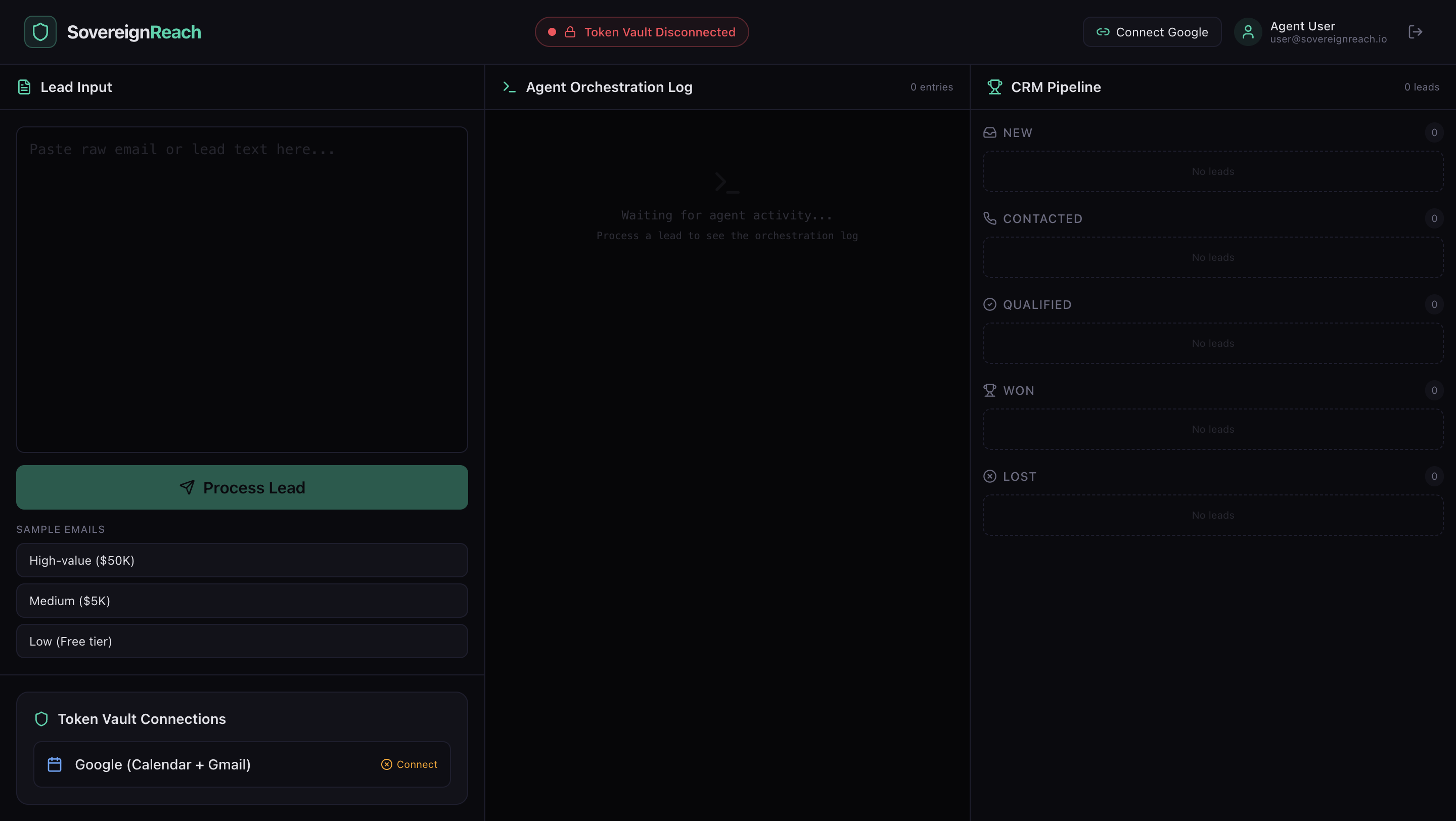
SovereignReach Main Dashboard: A Zero-Trust AI Lead Management System.
-
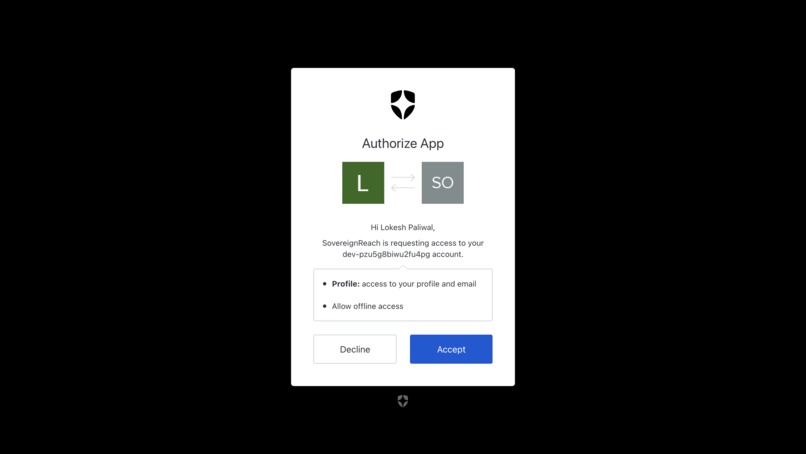
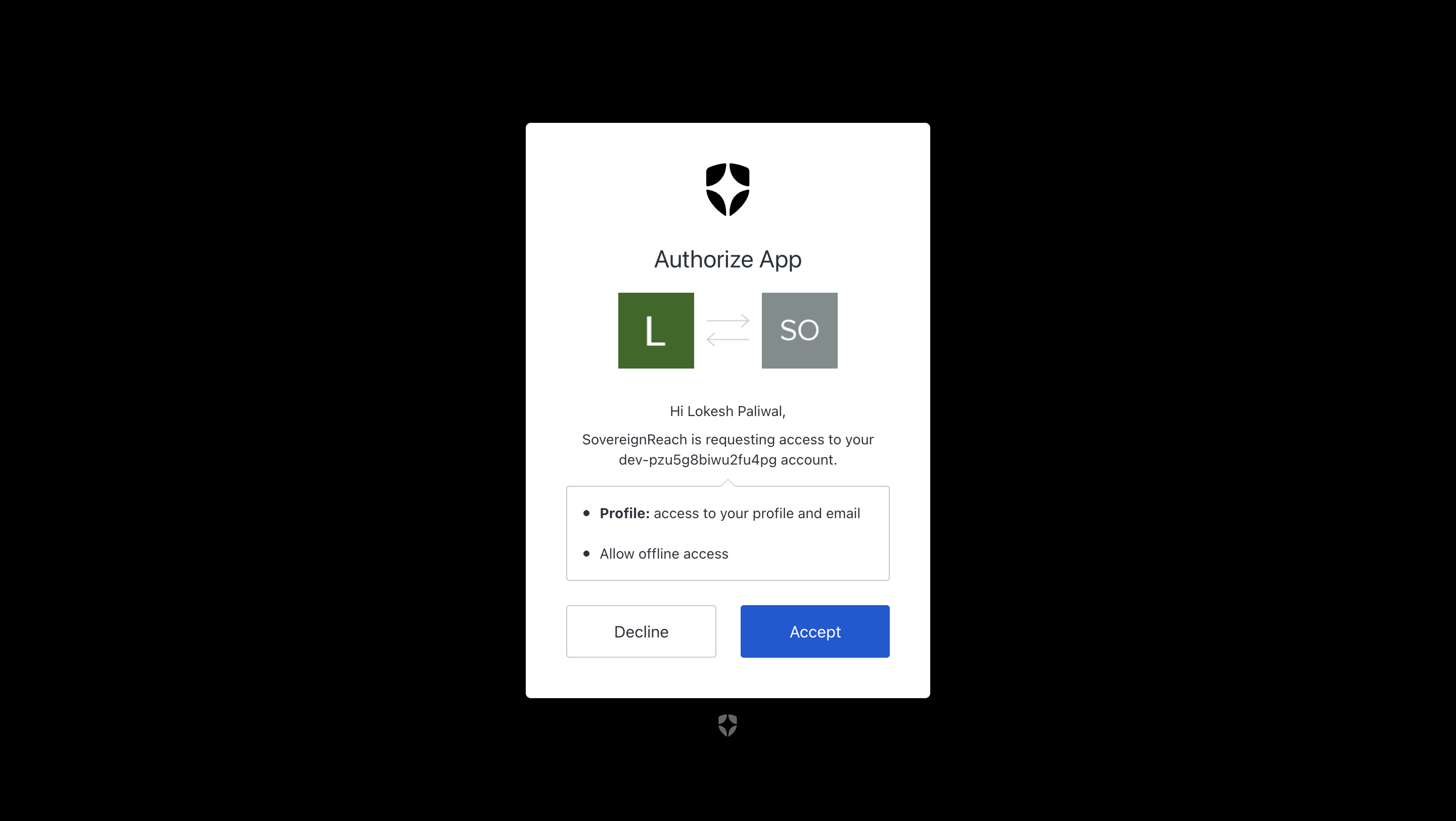
Securing Google Calendar access explicitly via Auth0 Token Vault
-
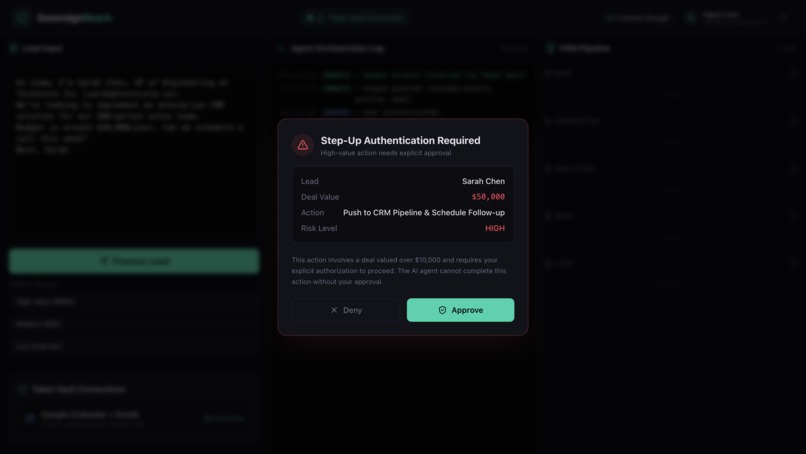
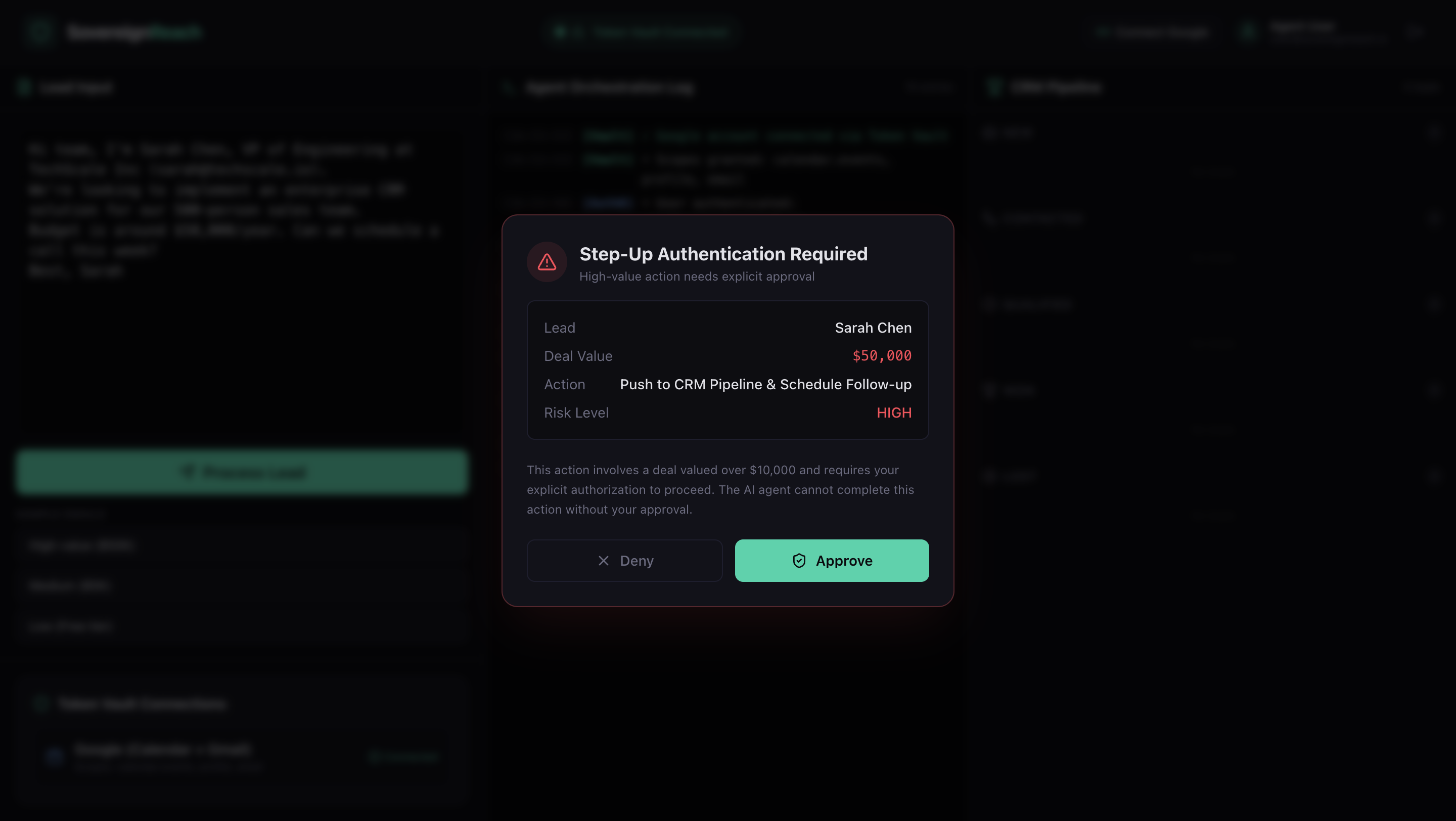
Step-Up Authentication triggered for high-value AI agent actions
-
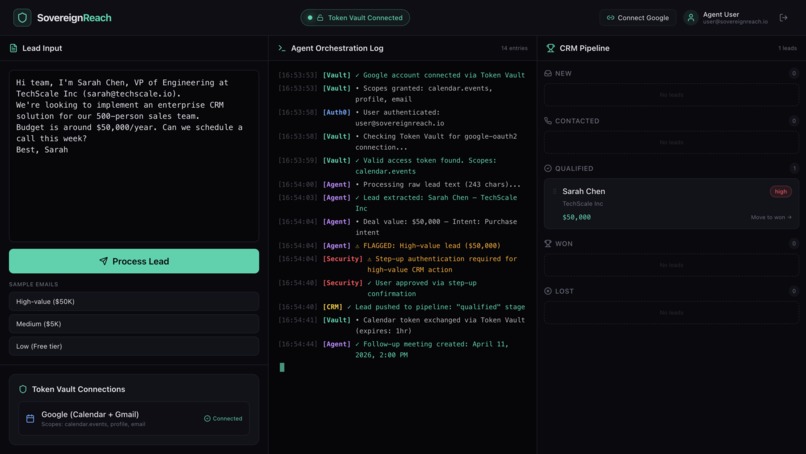
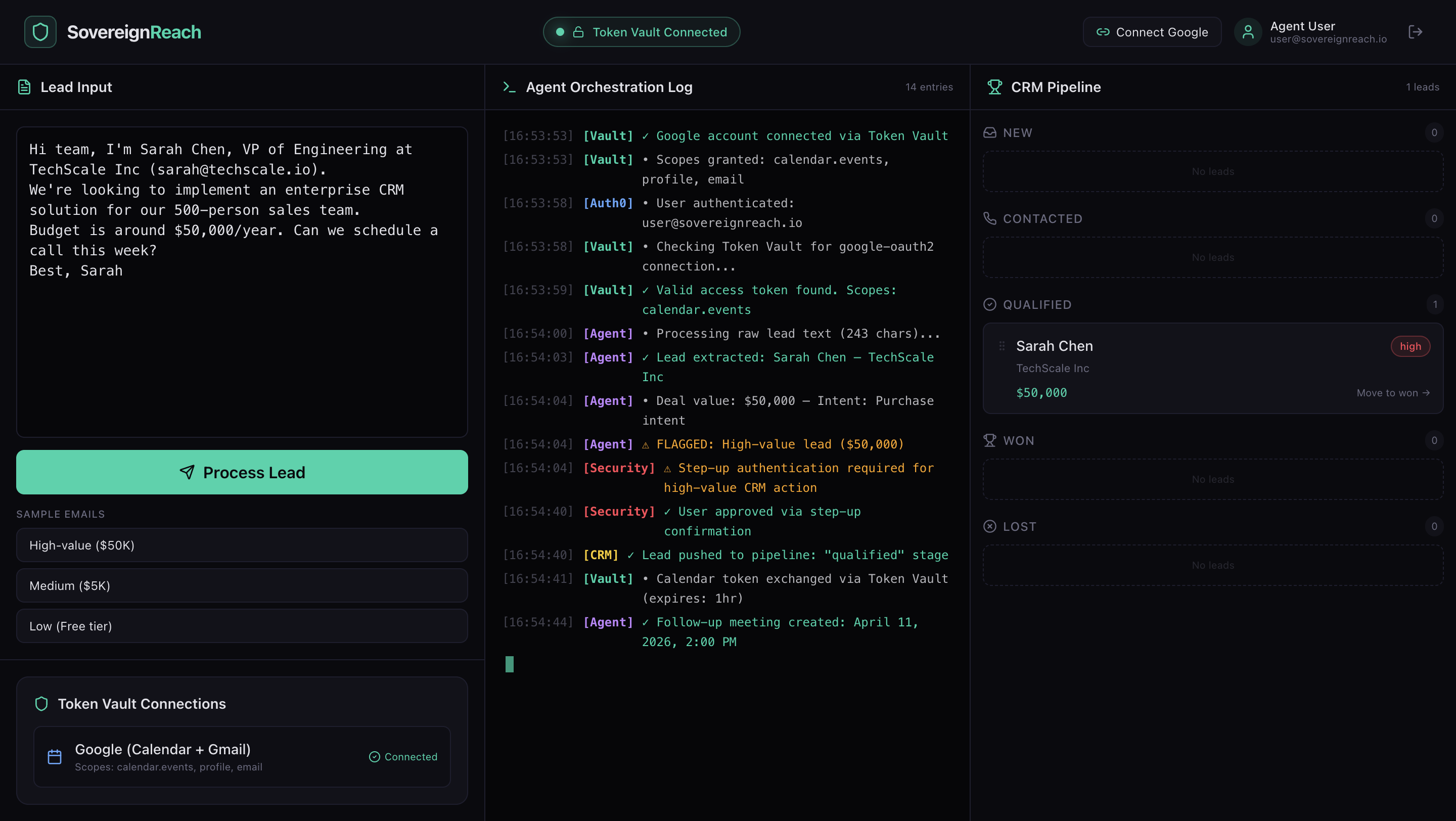
Real-time orchestration logs tracking every agent, vault, and security action
Inspiration
AI agents are getting more powerful every day — they can read emails, schedule meetings, and make decisions autonomously. But most AI agents operate with unlimited access to user credentials. Once you give an AI your Google token, it can do anything — read all your emails, delete your calendar, access your drive.
We asked ourselves: What if an AI agent could only act within explicit permission boundaries? What if every credential was scoped, every action was logged, and every high-stakes decision required human approval?
That's why we built SovereignReach — to prove that AI agents can be powerful AND secure using Auth0 Token Vault.
What it does
SovereignReach is an AI-powered lead management dashboard where an AI agent extracts lead data from raw emails and schedules follow-ups on Google Calendar — but ONLY when the user has explicitly authorized access through Auth0 Token Vault.
The dashboard has three panels:
- Lead Input — Users paste raw email text. Google Gemini AI extracts structured lead data — name, company, email, deal value, and intent.
- Agent Orchestration Log — A real-time terminal showing every agent action with timestamps, color-coded by module — Auth0, Vault, Agent, CRM, and Security.
- CRM Pipeline — A Kanban board (New → Contacted → Qualified → Won → Lost) where leads are automatically placed based on deal value.
The Core Security Flow:
When Token Vault is DISCONNECTED — AI extracts the lead and updates the CRM, but calendar access is blocked with a clear ACCESS DENIED log. The agent cannot touch Google Calendar.
When the user clicks "Connect Google" via Token Vault — the AI can now create follow-up calendar events using scoped, time-limited tokens from the Vault.
When the deal value exceeds $10,000 — a step-up authentication modal appears. The AI agent freezes and cannot proceed without explicit human approval. This implements the CIBA pattern for high-stakes AI actions.
How we built it
- Next.js 14 (App Router) with TypeScript for the full-stack framework
- Auth0 nextjs-auth0 v4 with Token Vault for secure credential management
- Auth0 Connected Accounts to store Google OAuth refresh tokens securely in the Vault
- Auth0 AI SDK (@auth0/ai-vercel) for tool-level token protection
- Google Gemini 2.0 Flash for AI-powered lead extraction from raw text
- Tailwind CSS for the dark-themed dashboard with custom design system
- Vercel for production deployment
Security Layers:
- Token Vault — Google credentials stored in Auth0, never exposed to the app or AI agent
- Scoped Access — Agent only gets calendar.events scope, nothing more
- Step-Up Auth (CIBA pattern) — Deals over $10K need explicit human approval
- Audit Trail — Every action logged with timestamps, modules, and outcomes
- Graceful Denial — No token = ACCESS DENIED logged clearly, never silent failure
Challenges we ran into
Auth0 v4 SDK Migration: The nextjs-auth0 v4 SDK has a completely different API from v3. handleAuth() doesn't exist — routing is middleware-based. This required rethinking our entire auth flow.
Google Refresh Token Dance: Getting Google to return a refresh_token was the hardest challenge. Google only returns it when access_type=offline and prompt=consent are explicitly passed. Auth0's SDK doesn't forward these by default. We solved it by configuring upstream_params directly on the Auth0 Google connection via the Management API.
Token Vault Session Architecture: Auth0 stores two types of tokens — the IDP-level refresh token (Google's) and Auth0's own refresh token. getAccessTokenForConnection() needs both. We had to ensure offline_access scope was requested AND the API had Allow Offline Access enabled.
Vault Status UX: We needed the app to show "Disconnected" before the user explicitly connects Google, and "Connected" after. This required separating the vault status check from the actual calendar API call, using a dedicated status endpoint and localStorage-based connection detection.
Accomplishments that we're proud of
Real Token Vault Integration — Not mocked. Every Google Calendar API call goes through Auth0 Token Vault with actual scoped tokens. The agent literally cannot access Google without explicit user authorization.
The ACCESS DENIED → Connected Flow — When Token Vault is disconnected, the orchestration log shows ACCESS DENIED in red. After connecting, the same flow shows green checkmarks with calendar events created. This before/after is the clearest proof of zero-trust AI.
Step-Up Authentication — Deals over $10,000 trigger a CIBA-style confirmation modal. The AI agent freezes and waits for human approval. Critical decisions always require a human in the loop.
Real-Time Orchestration Log — Every agent action timestamped, color-coded, and categorized by module. Full auditability — judges can see exactly what the AI accessed, when it was blocked, and when it was approved.
Production Google Calendar Integration — Real calendar events created on the user's Google Calendar with attendees and descriptions — all through Token Vault's scoped access tokens.
Graceful Degradation — The app works fully without Google connected. Lead extraction, CRM pipeline, and step-up auth all function. Calendar features show clear ACCESS DENIED logs instead of crashing. Security failures are features, not bugs.
What we learned
- Auth0 Token Vault is production-ready for AI agent credential management — not just a demo feature
- The gap between "AI can do" and "AI is authorized to do" is where enterprise trust lives
- Step-up authentication for AI actions should be standard, not optional
- Zero-trust for AI agents is practical with proper tooling — every action should be scoped, logged, and revocable
- Graceful denial is a feature — when an AI agent is blocked, that's security working correctly
What's next for SovereignReach: Identity-First Sales AI
- Database-backed CRM — Persistent lead storage with PostgreSQL (currently in-memory for MVP)
- Multi-provider Token Vault — Stripe for payments, HubSpot and Salesforce for CRM sync, Gmail for email outreach
- CIBA Push Notifications — Async approval via mobile push for step-up authentication
- Role-based Agent Permissions — Different access levels for sales reps, managers, and admins
- Agent Activity Dashboard — Historical view of all agent actions with filtering, search, and compliance reporting
- Multi-agent Orchestration — Multiple specialized AI agents (lead qualifier, email drafter, meeting scheduler) all governed by Token Vault
Bonus Blog Post: The Refresh Token Rabbit Hole
Building SovereignReach taught us that the hardest part of AI agent security isn't the AI — it's the plumbing.
Our app had a simple goal: let an AI agent create Google Calendar events, but only with explicit user permission via Auth0 Token Vault. Sounds straightforward. It wasn't.
The first surprise was Auth0 v4. We started with code examples using handleAuth() — which doesn't exist in v4. The entire SDK moved to middleware-based routing. Every tutorial online was outdated. We had to read the actual TypeScript declarations in node_modules to understand the new API.
Then came the refresh token rabbit hole. Token Vault needs a Google refresh_token to exchange for scoped access tokens. Google only returns refresh tokens when you pass access_type=offline AND prompt=consent in the authorization request. Auth0's SDK doesn't forward custom parameters by default. We tried adding them in the SDK config — didn't work. We tried adding them in login URLs — didn't work. We tried Auth0 Actions — too complex.
The fix? Two lines of JSON. We used the Auth0 Management API to set upstream_params on the Google social connection, forcing access_type=offline and prompt=consent at the connection level. Suddenly, refresh tokens appeared in user identities.
But then getAccessTokenForConnection still failed with "Federated connection Refresh Token not found." The token was there in the Management API response but invisible to the SDK. We built a Management API fallback that fetches the Google access token directly from user identities — and uses the refresh token to get fresh tokens when they expire.
The lesson? Auth0 Token Vault is powerful, but integrating it requires understanding three separate token flows: Google's OAuth tokens, Auth0's session tokens, and the Token Vault exchange. Once you understand this architecture, building secure AI agents becomes not just possible but practical. The plumbing is hard, but the result — an AI agent that truly cannot act without authorization — is worth every debugging session.
Built With
- auth0
- auth0-ai-sdk
- auth0-connected-accounts
- auth0-token-vault
- google-calendar-api
- google-gemini-ai
- next.js
- node.js
- react
- tailwind-css
- typescript
- vercel

Log in or sign up for Devpost to join the conversation.