Illuminate . Project Story
Inspiration
Opening an unfamiliar codebase is painful. You clone the repo, stare at 200 files, and have no idea where to start. Documentation is either missing or outdated. The real architecture exists only in the heads of senior engineers - and they're always busy.
We wanted to generate that map automatically, straight from the living code.
How we built it
Illuminate is a native IntelliJ plugin written in Kotlin. The pipeline has five layers:
PSI scanner. We use IntelliJ's Program Structure Interface - a native AST - to parse Java, Kotlin, and Python files without any external parsers. Each scanner extracts class names, annotations, method signatures, and dependency relationships (extends / implements / injects / uses). From annotations alone (@Service, @Controller, @Repository...) we classify every class into a role: Controller, Service, Repository, Model, Config, Util, or EntryPoint.
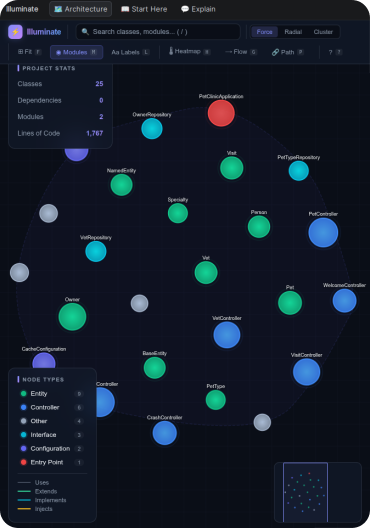
D3.js graph in JCEF. We render a force-directed graph inside IntelliJ's built-in Chromium (JCEF), with nodes colored by role. Clicking a node opens the file in the editor.
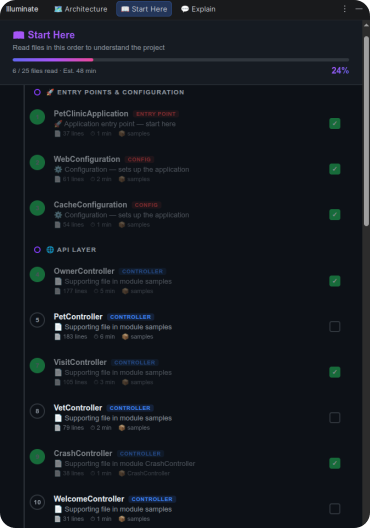
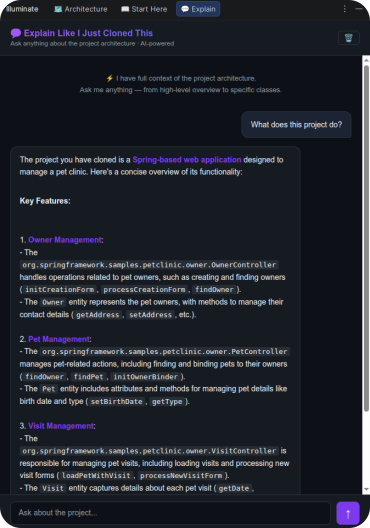
AI layer. We integrated OpenAI to generate one-line class summaries, a "Start Here" reading route, a project-aware chat, and inline HUD explanations above classes and methods. Only metadata is sent to the AI - class names, types, annotations, and dependency lists. Method bodies stay local unless the user explicitly requests a detailed explanation.
Persistence. The scanned structure is cached in .idea/illuminate-cache.json for instant load on next open. Chat history and reading progress persist via IntelliJ's PersistentStateComponent.
Challenges
PSI threading model. PSI cannot be accessed outside a read action. We hit this early and refactored the entire scanner to run inside ReadAction.compute {} blocks.
Java vs Kotlin PSI. The two PSI trees are structured differently. Sharing scanner logic between them caused subtle bugs - we ended up writing fully separate scanners for each language.
JCEF data sync. Injecting the graph data into D3.js via executeJavaScript() is async. The graph rendered before data arrived. We fixed this with a ready-signal handshake between the Kotlin side and the JS side.
AI context limits. Large projects exceed token limits fast. We built a relevance filter that scores each class by proximity to the user's question and includes only the top $k$ nodes in the prompt.
What we learned
The IntelliJ Platform SDK can do almost anything - but the API surface is enormous. Reading existing open-source plugins taught us more than any official documentation.
The hardest part of a developer tool isn't the feature - it's the feel. Scan time, graph render speed, HUD latency: these aren't polish, they're the product. And accuracy matters more than aesthetics. A beautiful graph of wrong data is worse than no graph at all.


Log in or sign up for Devpost to join the conversation.