-
-
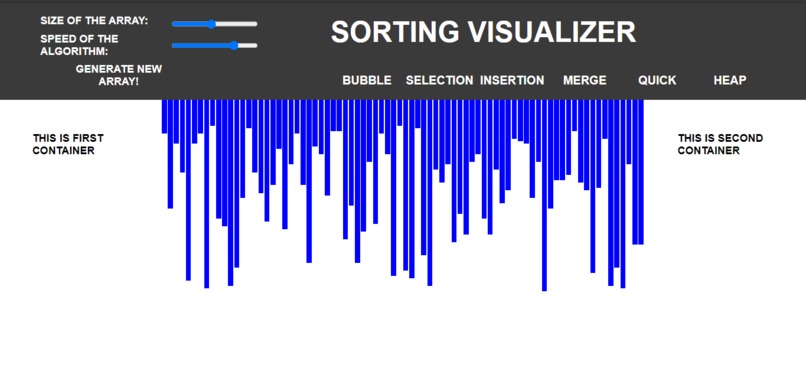
UI of web application
-
Can change the color effects and position of header components


As a student, I was always fascinated by the process of sorting data. I wanted to better understand how different sorting algorithms worked, and I thought that creating a sorting visualizer project would be a great way to do that.
Inspiration
My inspiration for this project came from a few different sources. First, I had taken a course on data structures and algorithms that had covered several different sorting algorithms. While I understood the basic concepts behind each algorithm, I struggled to fully visualize how each one worked in practice. Additionally, I had seen some visualizations of sorting algorithms online that I found really helpful. I thought that creating my own visualization tool would be a great way to solidify my understanding of these concepts.
Learning
Before I could start building my sorting visualizer, I had to do some research to better understand the different sorting algorithms I wanted to include. I reviewed my notes from my data structures and algorithms course and read several articles online to refresh my memory.
I decided to include four different sorting algorithms in my visualizer: bubble sort, insertion sort, selection sort, and quicksort. Each algorithm had its own strengths and weaknesses, and I thought that including a variety of algorithms would make my visualizer more useful.
###Building
To build my sorting visualizer, I used HTML, CSS, and JavaScript. I used HTML and CSS to create the user interface for the tool, and JavaScript to handle the sorting algorithms.
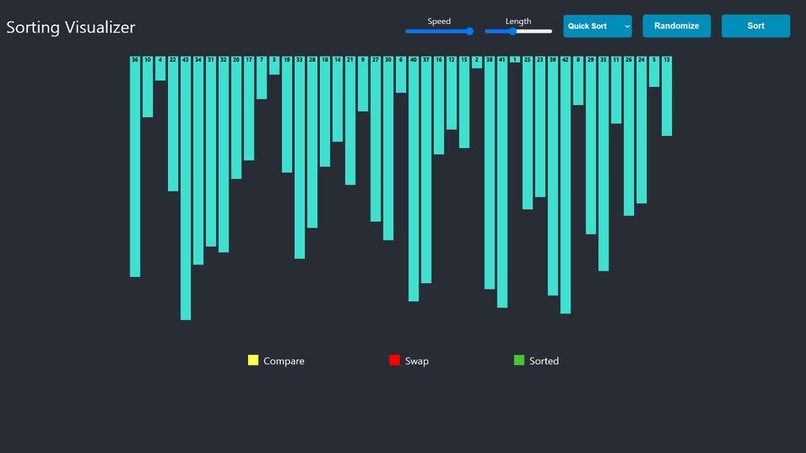
When a user clicks on the "Sort" button in my visualizer, the JavaScript code uses the selected sorting algorithm to sort an array of randomly generated numbers. As the algorithm sorts the array, the visualizer updates in real-time to show the current state of the array.
I also included a feature that allows users to adjust the speed at which the visualization runs. This is useful because some algorithms can be difficult to follow if they run too quickly.
Challenges
One of the biggest challenges I faced when building my sorting visualizer was figuring out how to update the user interface in real-time. I had to learn how to use JavaScript to manipulate the DOM and update the page as the sorting algorithm ran.
Another challenge was making the visualization look appealing and easy to follow. I spent a lot of time tweaking the colors and layout to make sure that users could easily see how the sorting algorithm was progressing.

Log in or sign up for Devpost to join the conversation.