Inspiration
Most people aren't sure which bin their trash goes in, and one wrong item can spoil a whole batch of recycling. We wanted a sorter you can actually watch work: a robot that looks at an item, works out what it's made of, and drops it in the right bin. We also wanted anyone to be able to follow along, and stop it, from their phone.
What it does
Our Robotic Waste Sorter picks up one item at a time and sorts it by material into two bins: Plastic and Metal.
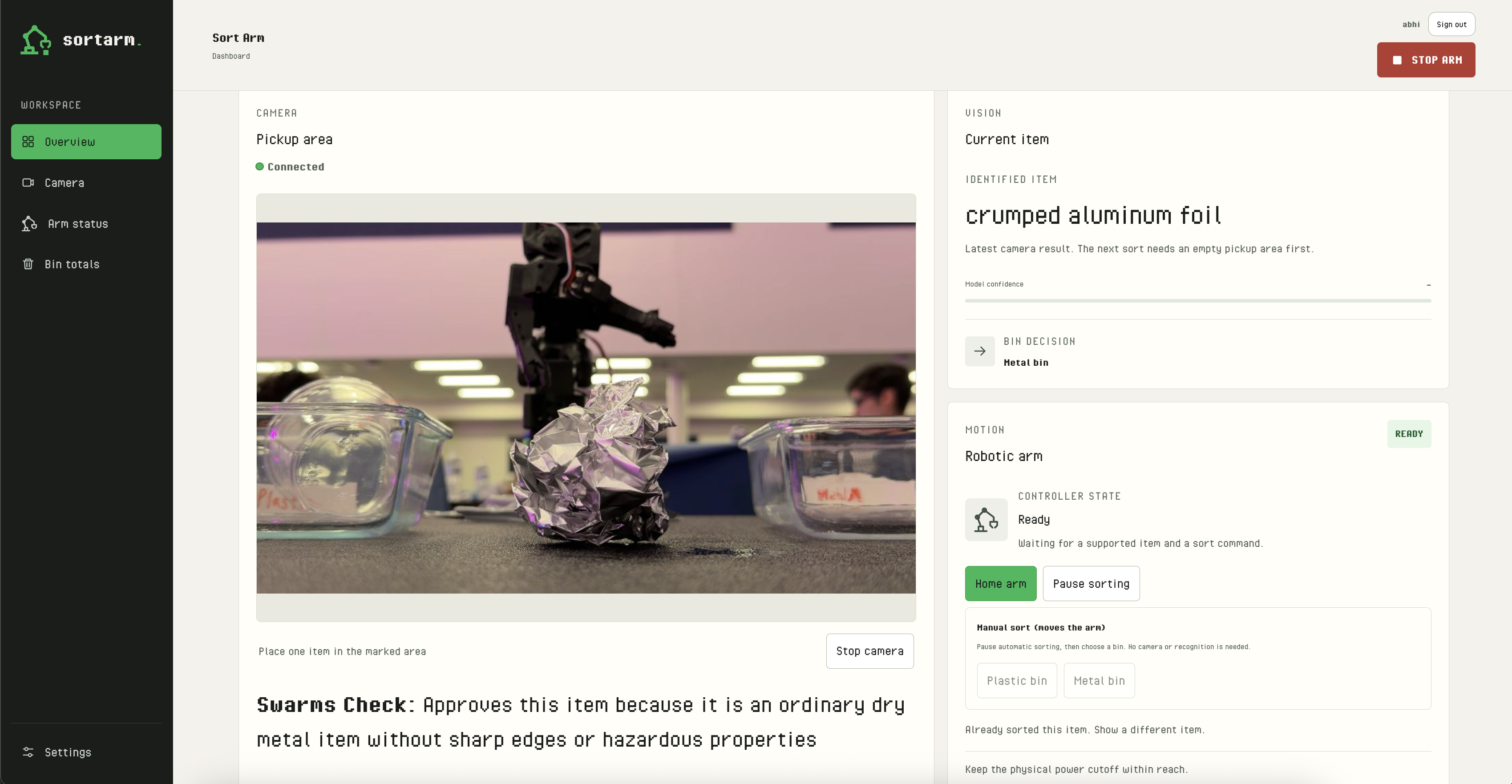
- A phone camera on a tripod watches a marked 15×15 cm pickup area. When an item appears, Google Gemini names it, brand included (like "plastic water bottle" or "aluminum soda can"), and decides: bottles, cups, bags and wrappers go to Plastic; cans, trays, foil and metal utensils go to Metal.
- A Swarms multi-agent check then decides whether the gripper should actually pick the item up. Something like a battery is held back even if Gemini knows what it is.
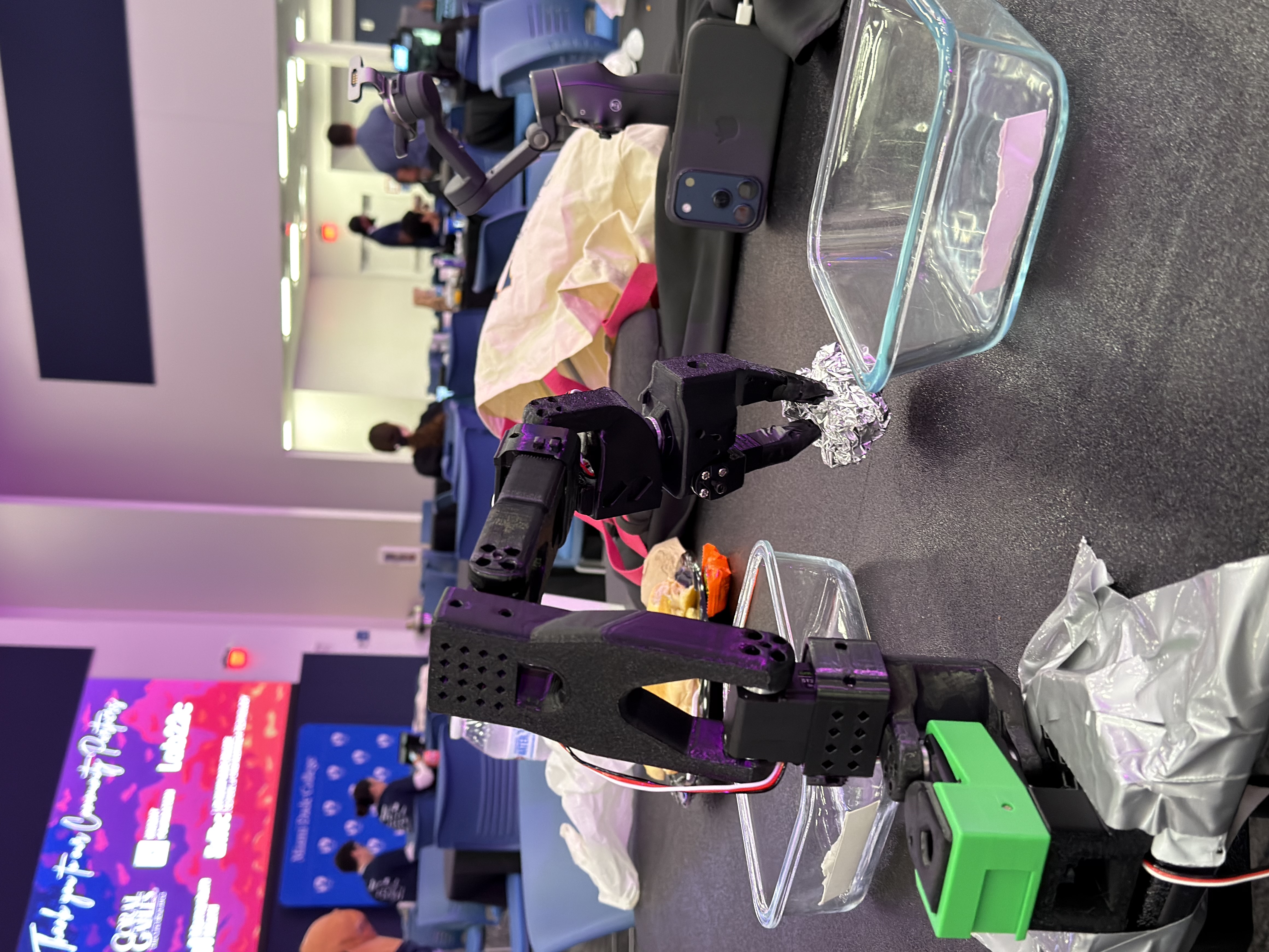
- A 3D-printed SO-101 robotic arm picks the item up and drops it into the right bin.
- If an item is paper, food, glass or a mix of materials, if there's more than one, or if the view is unclear, the arm doesn't guess. The item goes to manual review instead.
- Each object is sorted exactly once, even when the AI describes it in slightly different words from one frame to the next.
- A live web dashboard shows the camera feed with "item was sorted to bin" on screen, what the AI saw, the arm's state, bin totals and recent sorts.
- The dashboard is online through a stable link. Operators sign in with Auth0 before they can home the arm, start sorting or send an item to a bin by hand. STOP works for everyone, with no login.
- Every sort is logged to Tiger Data: completed, stopped or faulted, with its cycle time. The dashboard turns that log into per-minute charts and per-bin stats.
How we built it
- Arm: an SO-101 arm we 3D printed, driven by ST3215 servos through a USB servo adapter and controlled with LeRobot. Our Python controller has three commands,
HOME,SORT <BIN>andSTOP, and replays positions we teach by hand once: home, above the pickup, pick, above Plastic, above Metal. Clamped at the end of the table, the arm works the half-circle in front of it, with both bins about 25 cm from its base. - Vision: camera frames go to Gemini, which returns a structured answer: the item's name, whether something is present, whether it needs review, and the bin. The bridge checks every answer before the arm is allowed to move.
- Safety check: an optional Swarms agent review runs on Gemini's answer (the image is never sent) and can hold an item the gripper shouldn't touch. If Swarms is slow or unavailable, Gemini's decision stands, so an outage can't stop the demo.
- Laptop bridge: a Python server on the laptop runs camera capture, classification and arm control on separate threads, so a slow cloud request can never block STOP.
- Dashboard: plain HTML, CSS and JavaScript served by the bridge, with live state polling and a hardware-inspired pixel style.
- Online access: Tailscale Funnel gives the laptop a stable HTTPS address, so the arm never leaves the table and nothing is deployed to a cloud server. The public link runs on its own port with stricter rules than the laptop's local dashboard.
- Login: Auth0 Universal Login. The bridge verifies every control request's token and requires the
sorter:operatepermission. - Data: Tiger Data (Postgres) stores every sort. Simulated and physical runs are kept separate, so demo numbers never mix with real ones.
- Teamwork through GitHub Issues: four people, each running several AI coding agents (Claude, Codex, Cursor, Grok), all in one repo. To keep everyone in sync in real time, we pinned a GitHub issue as a Message Board and wrote a small
tools/boardscript on top of the GitHub CLI. Every person and agent posts there, signed like[Paul's Claude], and@mentionsa teammate when they need a decision. Each agent keepstools/board waitrunning in the background, so a new post wakes it up to read and reply. Every task got its own issue, branch (<issue#>-name) and PR. Over the weekend the board carried 160+ posts: handoffs, interface changes, review findings, merge order and test results. It became a shared, searchable log of every decision. Agents also handed each other coding tasks through an agent mail server, and we wrote a skill so any teammate's agent can host the dashboard from their own laptop.
Challenges we ran into
- The 3D printer gave out at the finish line. After 9 hours printing the arm's parts, with only 10 minutes left, the printer stopped working. The print was lost, and we had to start again from scratch. Meanwhile we kept building and testing everything else against a simulated arm, so the software was ready when the parts finally came off the printer.
- Safety came first. STOP had to work even when the network, the AI or the dashboard was slow, so it runs on its own path and is never behind a login.
- Putting a robot on the internet safely. Funnel traffic looks local to the laptop, so we split the bridge into a local port and a public port. We added protection against requests forged from other sites, one access rule for Auth0 tokens and operator sessions, and a working log-out on both.
- Counting correctly. A free-text AI can call the same can "Celsius can" in one frame and "Celsius energy drink can" in the next. We made sure each object is sorted and counted once, and that a new sort can't start before the last one has finished.
- Narrowing the bins. We started with four material bins (paper, plastic, metal, organic), tried Recycle and Trash, and settled on Plastic and Metal: the two materials the gripper handles reliably and the AI tells apart most clearly.
- Many agents, one codebase. Merging Auth0, the sort log, Swarms, the restyle and online access in parallel took careful merge ordering, shared specs and constant coordination.
Accomplishments that we're proud of
- A complete loop: camera, then AI decision and safety check, then a physical drop into the right bin, then a live dashboard and a permanent log.
- Recovering from losing a 9-hour print without losing the weekend.
- A public link where anyone can watch and anyone can stop the arm, but only signed-in operators can move it.
- The system never guesses: unclear or unsafe items go to review instead of the wrong bin.
- More than 300 automated tests across the bridge, the arm controller and the dashboard.
- A team workflow where humans and AI agents coordinated in real time through GitHub Issues, so four people and all their agents could change the same codebase without stepping on each other.
What we learned
- Hardware fails at the worst moment. Having a simulated arm let the software keep moving while the printer started over.
- Robots need a safety design that doesn't depend on the network or the AI.
- Structured AI output plus strict checks beats trusting a free-form answer, and a second opinion (Swarms) catches what one model misses.
- Tailscale Funnel and Auth0 together make a laptop-hosted robot safely shareable in an afternoon.
- A pinned GitHub issue works as a real-time chat for humans and AI agents: everything is written down, mentions route work to the right person, and nobody has to remember what was decided.
What's next
- Let the camera find items anywhere on the table, instead of one fixed pickup spot.
- More bins (paper, compost, glass, e-waste) once the gripper is tested on more objects.
- Track sorting accuracy over time in Tiger Data.
- A "classify once" button to save AI requests.
Built with
python · javascript · html · css · lerobot · so-101 · feetech-st3215 · 3d-printing · google-gemini · swarms · auth0 · tailscale · tiger-data · postgresql · github
Built With
- 3d-printing
- auth0
- gemini
- html
- javascript
- lerobot
- python
- swarms
- tailscale
- tiger-data
