Inspiration
Communication is something many of us take for granted. Whether ordering food, asking for directions, attending an appointment, or having a conversation with a stranger, we rarely think about the barriers that can make these everyday interactions difficult.
For millions of Deaf and hard-of-hearing individuals, communicating with someone who doesn't understand sign language can be frustrating and isolating.
We asked ourselves a simple question: What if technology could make communication more accessible without requiring either person to learn an entirely new language?
Existing accessibility solutions often focus on one direction of communication, such as converting speech into text. We wanted to explore something more interactive: a platform that helps both people participate in the same conversation.
That idea became Sora, an AI-powered communication platform designed to bridge the gap between Deaf, hard-of-hearing, and hearing communities.
Our goal wasn't simply to build another AI translator. We wanted to create technology that makes everyday human connections easier, more natural, and more inclusive.
What it does
Sora breaks down communication barriers through AI-powered, two-way communication tools.**
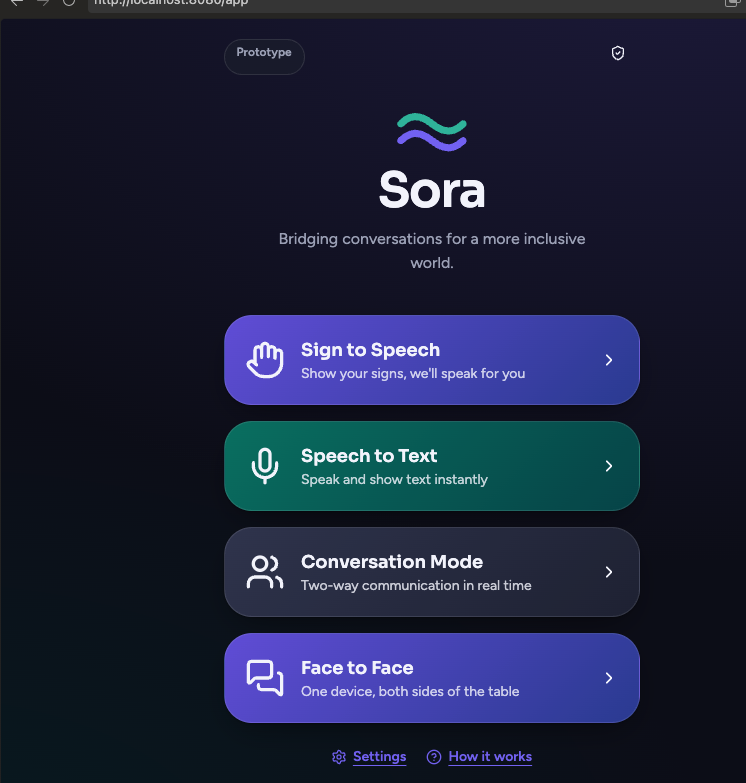
Instead of requiring users to switch between multiple applications, Sora brings accessibility features together in one intuitive interface.
Core features
- Sign Language Recognition: Uses computer vision and AI to interpret supported sign language gestures and convert them into readable text, with an option to generate spoken audio.
- Real-Time Speech-to-Text: Converts spoken language into readable text so Deaf and hard-of-hearing users can follow conversations.
- Face-to-Face Conversation Mode: Provides a dual-sided interface that allows two people sitting across from each other to communicate using the same device. One side rotates 180 degrees for easier viewing.
- AI-Powered Smart Replies: Suggests contextually relevant responses to help users communicate more efficiently, with local suggestions and Gemini-powered assistance.
- Text-to-Speech: Converts written messages into natural-sounding audio, allowing users to communicate verbally without speaking.
- Translation Support: Uses AI-powered language processing to support communication across language barriers.
Sora is designed for everyday interactions, whether someone is speaking with a cashier, communicating with a classmate, attending an appointment, or meeting someone new.
Our vision is simple: communication should be accessible to everyone.
How we built it
We developed Sora as a full-stack web application, combining modern frontend technologies, backend APIs, computer vision, and generative AI.
Frontend
We built the user interface using React and TypeScript, focusing on accessibility, responsiveness, and ease of use.
We designed Sora around a simple principle: users should be able to start communicating with as little friction as possible.
The interface includes conversation panels, transcription displays, accessible controls, and a dedicated Face-to-Face Mode.
For Face-to-Face Mode, we implemented a CSS-based 180-degree rotation that allows two people to view their respective sides of the conversation while sharing one screen.
Backend and AI integration
Our backend uses Node.js and TypeScript to coordinate AI services and handle communication between the frontend and external APIs.
We integrated Google Gemini to support AI-powered translation and contextual smart replies.
We also built a dedicated smart-reply endpoint that handles request validation, API failures, and rate-limit responses.
To improve reliability, we developed a hybrid smart-reply system that combines locally generated responses with AI-generated suggestions. This allows basic suggestions to remain available without depending entirely on an external model.
Speech processing
We integrated speech recognition and text-to-speech functionality to support communication between people who speak and those who prefer to read or type.
We also implemented audio caching to reduce repeated speech-generation requests and improve responsiveness.
Computer vision
For the sign language component, we explored using computer vision and machine learning to recognize hand gestures and interpret supported signs.
The intended processing pipeline is:
Camera Input → Gesture Recognition → Text Translation → Speech Output**
This component represents an important part of Sora's long-term direction, while also highlighting the complexity of translating full sign languages accurately.
Testing
We created automated tests for backend endpoints and frontend smart-reply functionality.
We also focused on error handling and fallback behavior to make the application more resilient when external AI services experience failures.
Challenges we ran into
- Sign language is more complex than gesture recognition
One of our biggest challenges was understanding the complexity of sign language translation.
Sign languages are complete natural languages with their own grammar, facial expressions, body movements, and contextual meaning.
Recognizing individual hand gestures is significantly easier than interpreting continuous signed conversations.
We learned that building a reliable sign language translator requires more than identifying hand positions. It requires understanding movement, context, and nonmanual expressions.
This influenced how we approached the feature and its future development.
- Real-time AI performance
For Sora to feel like a natural conversation, responses need to arrive quickly.
However, AI services introduce network latency, processing delays, and occasional rate limits.
We addressed these challenges by implementing caching, local smart-reply generation, request deduplication, and structured API error handling.
- Designing for two users on one device
Traditional chat applications are generally designed for one person looking at a screen.
Sora needed to support two people facing each other.
We had to rethink the conversation interface so both participants could comfortably read and respond without constantly rotating the device.
Our solution was a dual-panel interface with a 180-degree viewing orientation.
- External API reliability
Integrating generative AI introduced challenges involving API quotas, request validation, and unexpected upstream failures.
We implemented distinct error responses and fallback behavior to prevent a single AI service failure from disrupting the entire experience.
- Building accessibility-first
We wanted Sora to be more than a technically impressive demo.
That meant prioritizing readable text, intuitive controls, straightforward navigation, and minimizing the number of steps needed to communicate.
Balancing advanced AI functionality with a simple user experience was one of our most important design challenges.
Accomplishments that we're proud of
1. Building around a meaningful accessibility problem
We're proud that Sora addresses a real communication barrier rather than using AI simply for novelty.
2. Creating a two-way conversation experience
We built an interface that considers both participants in a conversation, rather than focusing exclusively on speech transcription.
3. Developing Face-to-Face Mode
Our dual-sided interface makes shared-device conversations more practical and gives Sora a distinctive interaction model.
4. Implementing intelligent smart replies
We combined local response generation with Gemini-powered suggestions, creating a more resilient experience than relying solely on cloud AI.
5. Improving reliability through engineering
We implemented audio caching, request deduplication, API validation, automated tests, and structured error handling.
6. Building a foundation for expansion
Sora's modular architecture allows us to continue improving recognition, translation, and accessibility features without rebuilding the entire platform.
Most importantly, we're proud that we created something intended to make human communication more inclusive.
What we learned
Building Sora taught us that the most meaningful AI applications are not always the ones with the most complex models, but the ones that make technology useful to people.
We gained experience in several areas:
- AI integration: Connecting generative AI services to real-time user experiences while handling latency and reliability.
- Computer vision: Understanding the technical challenges involved in recognizing gestures and interpreting sign language.
- Accessibility engineering: Designing interfaces around different communication needs and interaction patterns.
- Full-stack development: Connecting React, TypeScript, backend APIs, and AI-powered services.
- Performance optimization: Using caching, fallback mechanisms, and request deduplication to improve responsiveness.
- Product design: Learning that accessibility must influence the product from the beginning, rather than being added at the end.
We also learned an important distinction: sign language translation is not simply converting gestures into English words.
Accurate interpretation requires understanding the linguistic and cultural context of signed communication.
This reinforced the importance of involving Deaf and hard-of-hearing users in future testing and development.
What's next for Sora
We see Sora as more than a hackathon project. Our long-term vision is to develop it into a practical accessibility platform that people can use in everyday situations.
- Advanced sign language translation
Expand beyond isolated gestures toward continuous sign language recognition, including facial expressions, movement, and linguistic context.
- Sound Awareness
Develop an optional feature that identifies important environmental sounds, such as alarms, doorbells, and emergency signals, and communicates them through visual notifications.
We want to explore privacy-conscious, on-device processing and user-controlled activation rather than requiring continuous cloud audio recording.
- Offline accessibility
Enable core communication features to work without an internet connection, making Sora useful in areas with limited connectivity.
- Mobile applications
Bring Sora to iOS and Android with a mobile-first experience optimized for everyday face-to-face interactions.
- Personalized communication
Allow users to customize text size, speech output, communication preferences, and frequently used responses.
- More languages and sign languages
Explore support for additional spoken and signed languages while respecting the grammatical differences between individual sign languages.
- Real-world accessibility testing
Collaborate with Deaf and hard-of-hearing individuals, educators, and accessibility organizations to evaluate usability, accuracy, and practical value.
- Wearable integration
Explore smart glasses and wearable devices that could display speech transcriptions and accessibility notifications without requiring users to hold a phone.
Our mission with Sora is to make communication feel less like a barrier and more like what it should be: a natural human connection.**
Sora - Because everyone deserves to be part of the conversation.**
Built With
- accessibility
- assistive-technology
- computer-vision
- gemini-api
- generative-ai
- google-gemini
- javascript
- machine-learning
- natural-language-processing
- node.js
- react
- real-time-translation
- rest-api
- sign-language-recognition
- speech-to-text
- tailwindcss
- text-to-speech
- typescript
- vite


