-
-
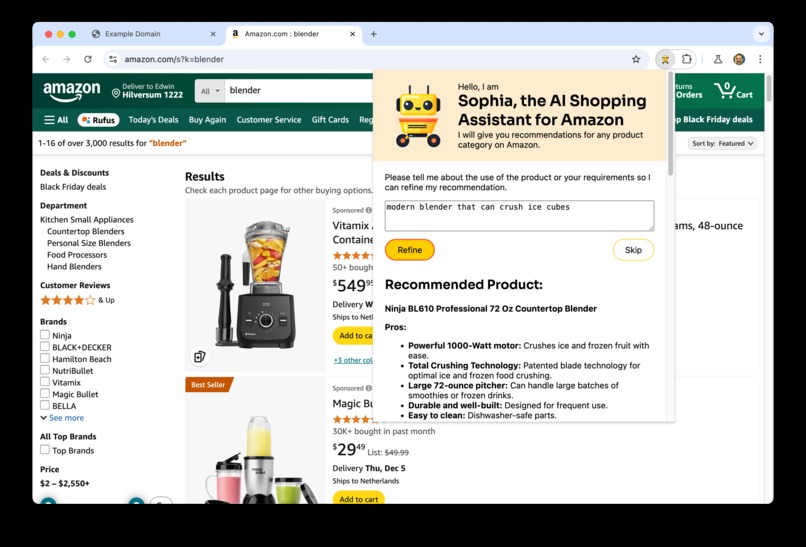
Output of Sophia, the AI shopping assistant

Inspiration
This year my daughter went to college and it took me many hours to choose a laptop. I'm sure AI can do a better job.
What it does
It is a Chrome extension. On an Amazon search results page, it will find the best product for you. It also gives alternative options. It also shows pros and cons of the products. Optionally, you can type how you want to use the product or other requirements and it will take that into account. When you're not on an Amazon search results page it will ask for a product to search for and open the search results page.
How we built it
It's build with the TypeScript compiler. With the --watch option, it's rebuild with every file change. As an IDE, I used WebStorm. I used the marked library to convert Markdown to HTML.
Challenges we ran into
Sometimes, the output data started with the input data and often an error was thrown. I tried changing the prompt, but that didn't help much. Fortunately, on November 23rd I tried again and most problems were solved. I guess the model or engine got an update.
Accomplishments that we're proud of
I wanted to write an practical AI application. I've always wanted to write a chrome extension too. I'm proud I created something useful using both.
What we learned
I learned how easy it is to write an AI application, certainly by using the Chrome Prompt API. I learned how to create a Chrome extension. And I learned how powerful Gemini Nano is.
What's next for Sophia, the AI Shopping Assistant
Support more shops. I chose Amazon because it's well known and available in most countries. I'm not affiliated and this Chrome extension is not meant to promote Amazon.
Instructions on how to use
- Download or fetch the repository at https://github.com/edwinm/ai-assistant
- Use Chrome Dev with AI enabled.
- Go to the extension manager and enable dev mode.
- Load the code from the downloaded repository.
- The extension is now visible as Sophia, the AI Shopping Assistant
Built With
- gemini
- gemini-nano
- typescript
- webstorm
