Inspiration
Huawei's "Beyond Euclid" challenge asked for experiences where you feel the geometry. We wanted to go one step further: take the one space everyone knows by heart, their own room, and turn it into another universe. Then let people walk through that universe on their own feet, because your legs and your sense of direction notice curvature long before your eyes do.
We also wanted it to be a hardware hack, not an app on a dev kit. There is no VR headset here: ATLAS is an iPhone dropped into a lens goggle, with every sensor on the phone put to work.
The question we set out to answer: can a person learn the shape of a non-Euclidean space by walking it, in a room they already know, on hardware they already own? Pictures of hyperbolic space have existed for over a century and most people still cannot say what it would be like to stand in it. Our bet is that the body gets there first: walk a square, fail to come home, and the idea lands.
What it does
ATLAS turns an iPhone in a lens goggle into a walk-through lab for impossible geometry, and into a way to see how people find their way in it.
1. Scan your room
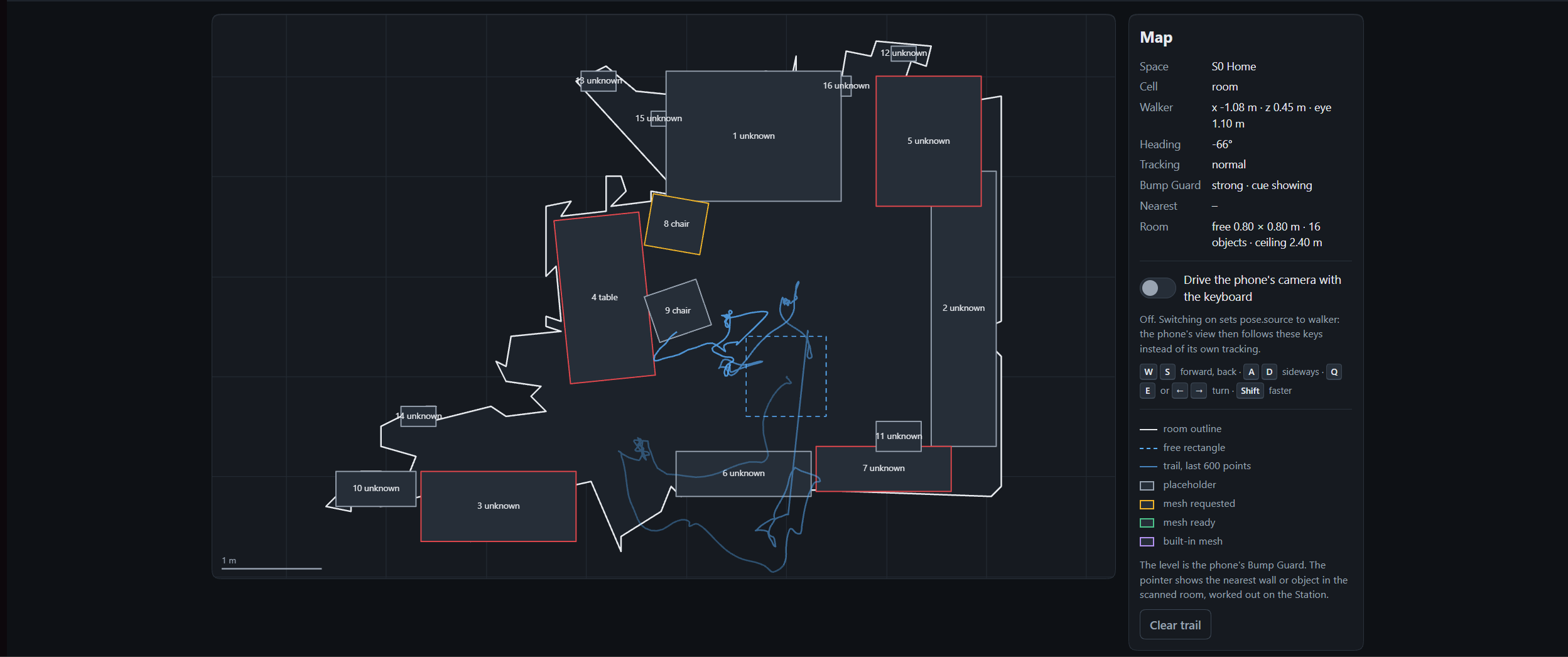
Sweep the room with the phone. Using LiDAR, ATLAS measures the free floor, finds the walls and furniture, and rebuilds the room around you 1:1. No markers, no external trackers.
2. Your furniture, regenerated by a diffusion model
During the scan the phone photographs each object. A PC beside you runs TripoSG, an open source research framework for diffusion-based 3D generation from VAST, The Chinese University of Hong Kong, UT Austin and Shanghai AI Laboratory, and sends back a real-looking mesh of your chair, couch or bed, sized and turned to match the scan. Until it arrives, the phone shows a simple first shape, so the room is never empty.
3. Walk through non-Euclidean spaces
How many copies of your room meet at each corner? Three gives a small planet, four is ordinary flat space, and five gives hyperbolic space with endless rooms. ATLAS fits the curvature to your floor, so the lap that fits your room is the lap that shows the effect.
- Home: your scanned room, rebuilt 1:1. Every journey starts and ends here.
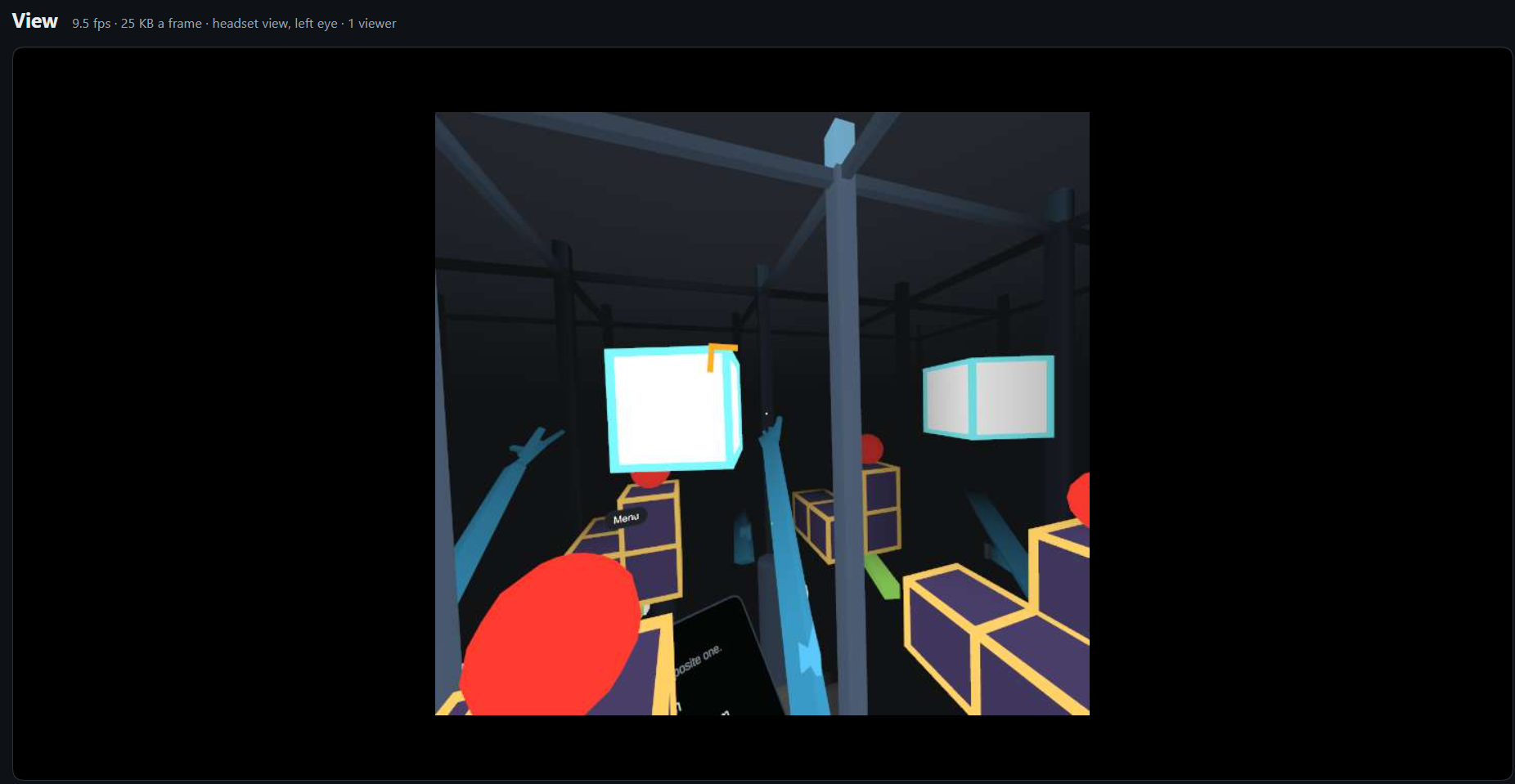
- Glued: a torus, a Klein bottle and a 3-torus. Look ahead and see your own back; in the Klein bottle your copy waves the other hand.
- Curved Walk: smooth hyperbolic space. Walk a square, turn left four times, and you are in the next room. Five laps bring the first room back.
- Aligned Cells: the same hyperbolic world built from flat cells. Walk once round a corner post and you are in a fifth room.
- Small Planet: spherical space. Three right-angle turns make a closed triangle, and the world is finite.
- Impossible Rooms: flat rooms joined by portals. A one-metre booth holds a hall, and the building is bigger than the room.
- 4D Slicer: a tesseract and other 4D solids inside your room, shown as the 3D slice you are standing in. Walk, and the slice changes shape.
4. Network Atlas
A network generated in hyperbolic space, shown on a Poincaré disc on the PC and as a floor map in the headset. A packet finds its way by always stepping to the neighbour closest to the target, with no routing table. In our generated network that delivers 100% of packets by hyperbolic distance, against about 72% by distance in the flat picture.
5. Your hands, in the headset
You cannot see your own hands in a generated view, so ATLAS tracks them and draws them where you feel them. A pinch opens the menu and your gaze picks the item. Gaze dwell, the headset lever and a gamepad always work too.
6. Bump Guard
In curved space the virtual walls are not where the real walls are, so safety cannot come from the picture. Bump Guard watches the real room through LiDAR, predicts your path, and warns you with a chevron, a sound and a haptic pulse before you walk into anything, including a person who walked in after the scan. It has no off switch.
7. Overheat protection
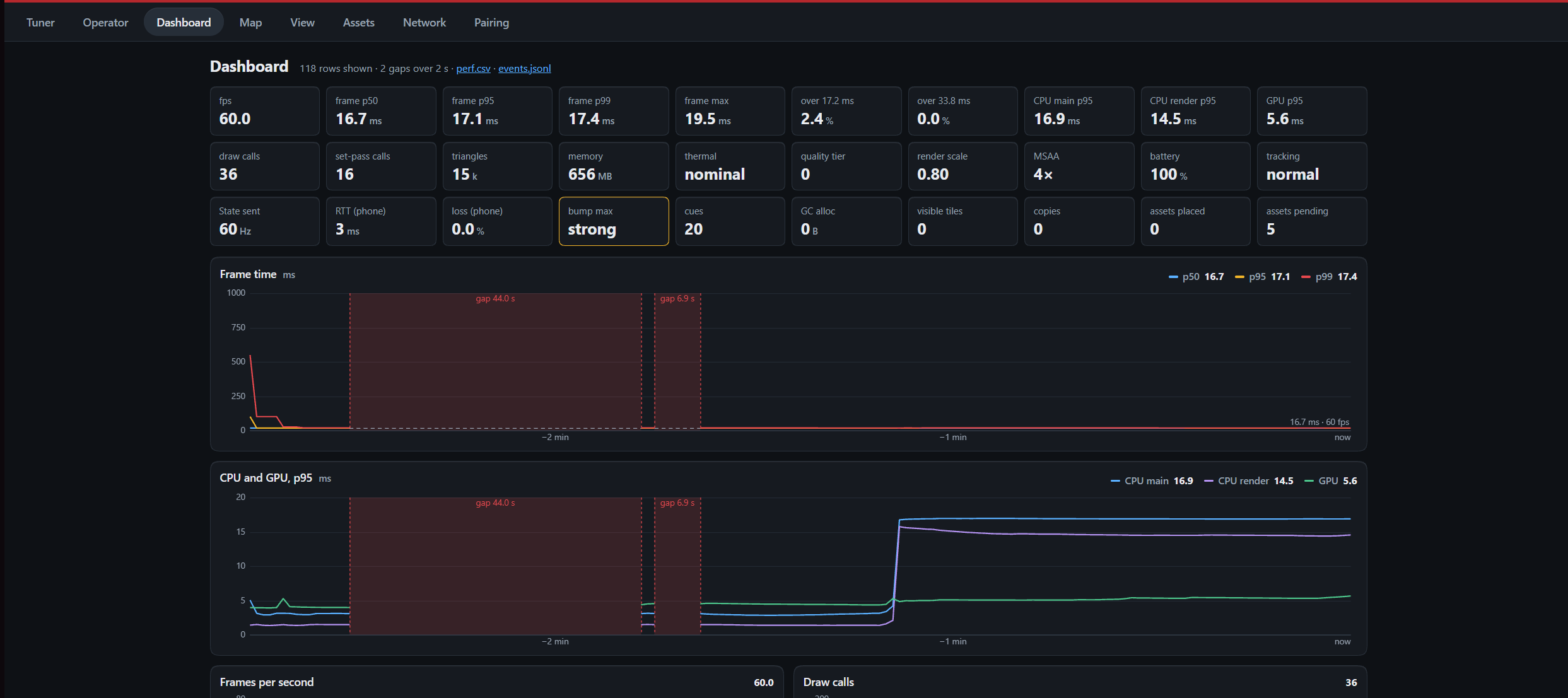
A phone sealed in a goggle, running LiDAR, tracking and two eye views, gets hot against your face. ATLAS watches the phone's temperature and sheds work in steps before the phone throttles itself: a softer picture first, then fewer distant rooms, and a lower frame rate only as the last resort. Bump Guard is never reduced.
8. The Station
A teammate's PC mirrors the walker's view live beside a flat map of where they are, and an operator Console tunes the experience, changes space and can stop the walk.
9. Every walk is recorded
Each session logs the head pose, space, exact tile and walker state 60 times a second, with an event log and a performance log beside it. Any session can be replayed through the real frame loop, on the PC, with no phone. So every walk is a path we can look at afterwards, and every recorded walk doubles as a test.
How we built it
What it stands on
- Curved space you walk, not watch. We work in H²×R and S²×R: only the floor is curved, height stays ordinary. Carrying a direction round a closed loop turns it by the loop's area over L² (Gauss-Bonnet), and that turn is what the walker feels as "the wrong room".
- Hyperbolic networks. The Network Atlas follows Krioukov et al., Hyperbolic Geometry of Complex Networks (2010): nodes scattered in a hyperbolic disc and linked by hyperbolic distance give the hubs-and-rim structure of real networks, and greedy routing works on them.
- Image-to-3D diffusion. The Forge uses TripoSG: High-Fidelity 3D Shape Synthesis using Large-Scale Rectified Flow Models (arXiv 2502.06608, 2025), by VAST, The Chinese University of Hong Kong, The University of Texas at Austin and Shanghai AI Laboratory. It is trained on 2 million curated objects, and its code and weights are MIT licensed.
What we measured
All of these were measured off the device, in tests and on recorded or synthetic walks. Measurements on the phone and with people are the next step.
- Path closure: a recorded five-corner lap in hyperbolic space closes to under 0.25 m when replayed through the real frame loop.
- Tile growth: rooms at 0, 1, 2, ... steps away number 1, 4, 12, 28, 64, 148, matching the known sequence for the {4,5} tiling: about 2.3 times more per ring, where a flat grid adds only four.
- Greedy routing: on 1,000 random pairs in our generated 200-node network, routing by hyperbolic distance delivered 100% and 99.7% (two seeds); routing by distance in the flat picture delivered about 72%.
- Safety lead time: on ten simulated wall approaches at 0.5 to 1.0 m/s, Bump Guard warned 0.85 to 0.93 seconds before contact.
- Diffusion model: about 87 seconds per object on an RTX 4060 laptop GPU at 50 steps.
- Correctness: about 2,000 automated tests, none failing, including holonomy against angle defect and 4D slice areas against known values.
The hardware
- Headset: an iPhone 15 Pro Max or 14 Pro Max in a lens goggle. No XR plug-in and no headset SDK: we wrote the stereo rig and the lens distortion pass ourselves, and the lens numbers can be tuned live from the PC.
- LiDAR: the room mesh and surface classes during the scan, then the live depth image every frame for Bump Guard and the hands.
- Camera and IMU: ARKit world tracking at 60 Hz for the head pose, object photos for the diffusion model, and hand detection on the same camera frames.
- Haptics and audio: the phone's haptic engine and speaker carry the safety cue.
- Thermal ladder: a phone sealed in a goggle gets hot. The app reads the phone's thermal state and GPU time and steps down render scale, anti-aliasing and draw radius before it ever drops frame rate.
- The Station: a PC with an NVIDIA RTX GPU on its own router, with no internet needed. The phone pairs by scanning a QR code and talks to it over UDP.
- The app is complete without the Station. If Wi-Fi drops, the walker notices nothing.
Heat safety
- Four tiers: nominal, fair, serious and critical, following the phone's own thermal state and the measured GPU time.
- Quality goes before frame rate: each tier lowers render scale, then anti-aliasing, then how far the curved world is drawn, how many copies the Glued spaces show, and how detailed the furniture is. Only the last tier drops from 60 to 30 frames a second, and it never goes below that.
- No flapping: it moves one tier at a time, at most once every 20 seconds.
- Sensors are rationed: the LiDAR room mesh runs only during the scan. Hand tracking runs at 30 Hz, halves when the phone is warm, stops when it is hot, and idles at 5 Hz when no hand is in view.
- Heavy work stays off the phone: the diffusion model runs on the Station, and the phone sends 202 bytes of state instead of video.
- Safety is exempt: Bump Guard runs first in every frame at every tier.
- The operator can also see the tier on the Console and set it by hand.
Phone application
- Unity 6 (URP) with AR Foundation and ARKit, in C# with small Swift plugins.
- Two eye cameras 64 mm apart, each rendered to its own texture, then one full-screen pass that bends both pictures for the lenses.
- One shader for every surface: a flat, diagram-like look with no lights or shadows, because lighting cannot follow warped geometry and a line drawing of a curved world reads better than a lit one.
Scanning
- The LiDAR mesh is dropped onto a 5 cm floor grid, and a distance field gives the distance from every cell to the nearest wall or obstacle.
- The largest free rectangle of floor sets the lap square, and the lap square sets the curvature.
- Furniture comes from RoomPlan's boxes merged with the obstacles on the grid.
- Everything is stored relative to an ARKit anchor, so when tracking corrects its drift the room moves with it.
Geometry kernel
- We never map the room onto curved space. We map each step you take. Every frame, your movement on the real floor becomes a movement in curved space, and the curved world is laid flat around your head at its true distance and direction.
- One walker kernel provides flat, spherical and hyperbolic space. A point lives on the hyperboloid, and each step is a 3x3 Lorentz boost, the same matrix as in special relativity.
- Tiles have exact integer ids (arithmetic in ℤ[φ] on the {4,5} tiling), so walking in circles never drifts and every room is the same when you come back.
- A warp vertex shader bends the scanned room and its furniture into curved space. Curvature eases in over four seconds, and only while you are standing still.
- Distance fog comes for free from the true geodesic distance, and tiles share their edges exactly, so there are no seams.
- Glued draws a lattice of copies of the room, with a copy of the walker and their hands in each.
- Impossible Rooms pick which room you see per pixel with a stencil mask. Nobody is teleported, and the real floor stays under your feet.
- 4D Slicer cuts real 4D tetrahedra with a hyperplane every frame in a Burst job.
- We checked the maths with unit tests: holonomy equals angle defect, tile counts match the known growth sequence, and 4D slices match known areas.
The diffusion pipeline (the Forge)
- A Python FastAPI service on the Station's GPU.
- Capture: the phone keeps up to three views of each object, cropped to its scanned box.
- Matte: the background is removed and the object is set on white.
- Generate: TripoSG, a 1.5-billion-parameter rectified-flow transformer, turns the photo into a 3D shape in 50 denoising steps. The photo steers it through DINOv2 image features, the shape is a signed distance field, and the mesh is its zero surface. It ran in about 87 seconds per object on an RTX 4060 laptop GPU.
- Clean-up: the mesh is turned and scaled to fit the LiDAR scan, regridded so the warp can bend it, and coloured from the photos.
- Self-check: each result is scored against the object's LiDAR profile. A poor fit tries the next photo, and if nothing passes, the first shape stays.
- Deliver: a GLB of at most 2 MB, checked by hash on the phone and faded in.
Tracked hands
- Apple Vision finds 21 joints per hand on the camera frame ARKit already has.
- LiDAR depth places the palm, and bone lengths along each joint's camera ray place the fingers, so 2D joints become a 3D hand in the room.
- The hands are masked out of Bump Guard's live depth, so raising a hand does not trip the warning.
Bump Guard
- Runs first in every frame and reads only the real world: the real head pose, the scan and the live LiDAR depth.
- It looks 0.4 and 0.8 seconds along your path and has two levels of warning.
- If tracking is lost, it falls back to live depth alone and tells you to stand still.
- It is kept independent of the network by a test, so a Wi-Fi drop cannot touch it.
The Station
- Hub: a .NET 8 service that terminates the phone's UDP link, relays state and serves the web Console.
- Console: live state, a slider for every tunable parameter, and the operator commands.
- Spectator: a Unity view that redraws the walker's world with the same kernel and warp. No video is sent: the phone sends a 202-byte state message 60 times a second.
- Forge: the diffusion pipeline above.
- ReplayPhone: a small program that plays a recorded or synthetic walk into the Hub, so the Station can be built and tested with no phone.
- The Hub keeps a clock offset per client, reports link latency, and hands a reconnecting phone its settings back.
Art
- Hero pieces are modelled in Blender and exported through our own GLB pipeline.
Team process
- Four lanes worked in parallel: platform and look; curved-world kernel; scan, room and safety; link and Station.
- Only one Mac could build to the phones, so we wrote a headless verification harness that compiles every assembly against the real Unity assemblies for the phone, the Station and the Editor, and runs about 2,000 tests without opening Unity.
- Recorded walks are replayed through the real frame loop, so a five-corner lap is a test.
Challenges we ran into
Curving a room you can actually walk in
Real rooms are small and irregular. We had to fit the curvature to each scanned floor, and keep the curved world registered to the real walls so people don't walk into them.
Rooms that wouldn't stay put
After a few laps of hyperbolic space, the rooms started sliding out of place. It turned out tiny rounding errors were piling up every time you crossed into a new tile. We had to rip that out and track every tile with exact whole numbers instead, which took a lot longer than we expected.
A phone is not a headset
There was no headset SDK to lean on. We built the stereo view and lens correction ourselves, worked out 3D hands from a 2D detector and a depth sensor, and had to plan for the heat of a phone running LiDAR, tracking and stereo rendering inside a closed goggle.
A diffusion model on hackathon hardware
TripoSG gives a shape with no colour and no real-world size, and it does not fit on a phone. We had to run it on a laptop GPU, fit its output back to the LiDAR scan, and make sure the room still works when a mesh is late or wrong.
Putting it all together
The four of us each built our own piece at the same time: the curved-space maths, the app itself, the room scanner, and the link to the PC. Each part worked fine alone. Getting them to work together at the end was a mess of conflicts, and we spent a lot of late hours just getting everything to compile in one place.
Accomplishments that we're proud of
Every kind of weird space, in one app
Hyperbolic, spherical, 4D and impossible rooms all run on the same engine, and your own room shows up in every one of them.
Nothing drifts, no matter how long you walk
Early on, rooms would slowly slide out of place after a few laps of hyperbolic space. We switched to keeping track of every tile with exact numbers instead of decimals, and now you can walk in circles all day and come back to exactly the same room.
A headset made from a phone
Scan, tracking, stereo, hands and safety all come from the sensors already in an iPhone. The only extra hardware is a pair of lenses.
Your own furniture comes with you
A diffusion model rebuilds your real chair and couch from a photo, and they bend into curved space along with the room.
It's not just a trick
Real networks like the internet or social networks actually have a hidden hyperbolic shape, and that's why messages can find their way across them so easily. The Network Atlas lets you see that, which made hyperbolic space feel useful to us and not just strange.
What we learned
- Walking it beats looking at it. We'd all seen pictures of hyperbolic space before, but none of us really got it until we walked a square, turned left four times, and weren't back where we started.
- Keep people oriented. We learned to keep each space simple, always give people a map, and warn them before they bump into anything.
- Safety has to ignore the picture. Once the virtual walls stop matching the real ones, the only safe system is one that reads the real world and nothing else.
- Measure before you claim. Writing down what is proven in tests and what is proven on a phone kept us honest about which results are real.
- Test without the device. With one build machine between four people, the headless harness was what let us all keep moving.
What's next for ATLAS - NVP
Walkers who have never heard of it
This is the question the project was built to answer. We want to put the headset on people who've never heard of hyperbolic space and measure, not guess: can they find their way back to the first room, do they learn the five-corner rule on their own, do they feel sick, and does walking teach it better than a picture or a video of the same space? The session logs already record every step, so each walk gives us a path to analyse.
Numbers from the device
Everything we measured so far was off the phone. Next come frame rate, heat, scan accuracy against a tape measure, and Bump Guard's lead time on real approaches with a spotter.
FieldFit
A teaching demo of visual-field loss: your room seen through a narrow tunnel, then through a lens that squeezes the lost field back into view.
Joined homes
Two people's scanned homes joined into a single surface through a door frame, so you can walk from your living room into a friend's.


Log in or sign up for Devpost to join the conversation.