Inspiration
I'm a designer. I started agentic coding this February and quickly understood the benefits of the CLI. So I spent several weeks learning it — trust me, I really tried :D. I know Ctrl+U clears a line, along with all the other tricks. But it still felt unintuitive, and it was missing too much of what I needed: a good reading experience, a modern way to write prompts, pasting images, previews, session management etc...
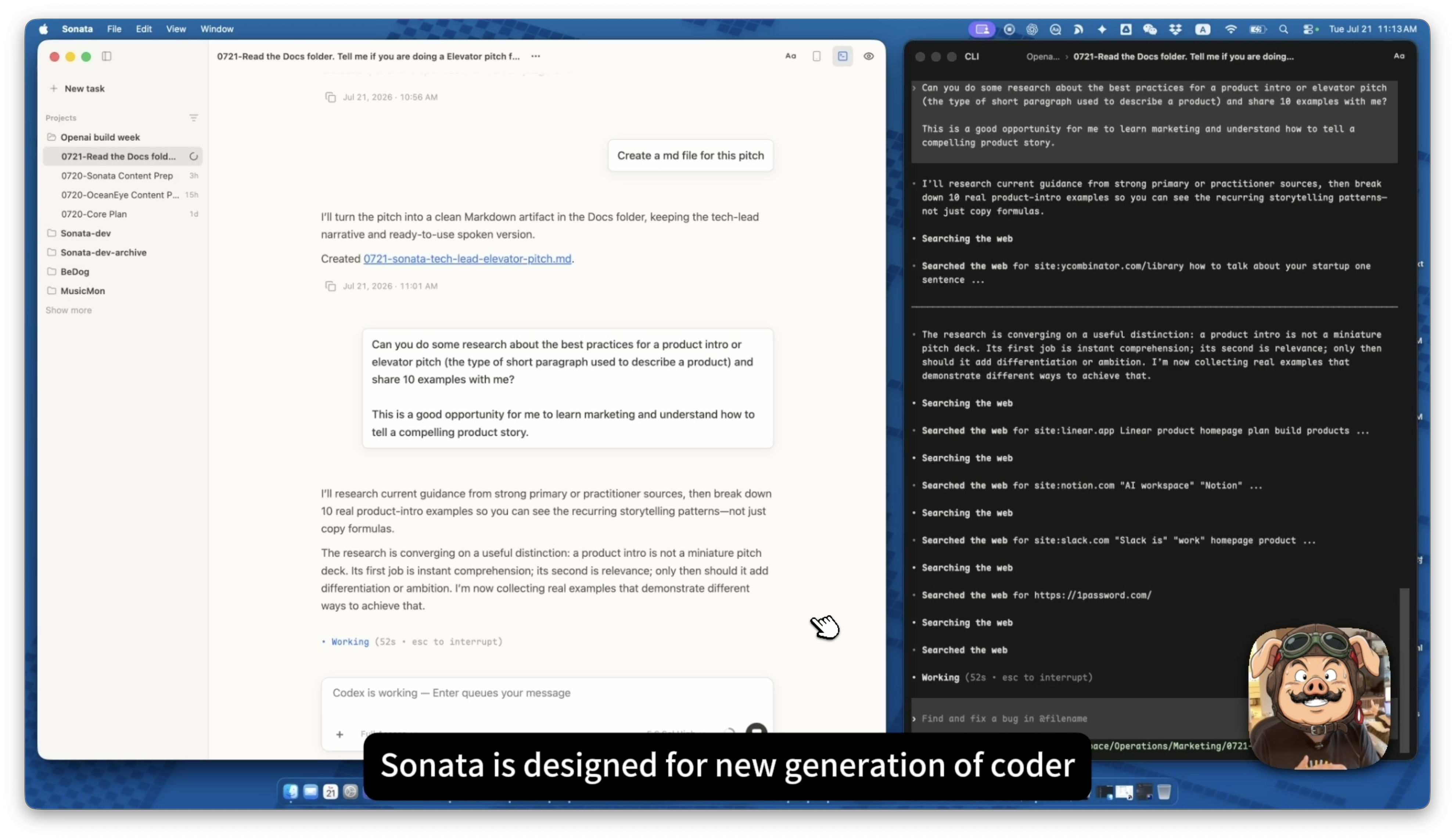
The terminal is the best workspace for AI coding agents like Claude Code and Codex. Sonata is the workspace designed for humans.
Sonata is for a new generation of coders, builders, and design engineers — people whose workflow no longer centers on editing code, but still wanna get benefit of CLIs with good reading, writing and session XP.
What it does
Sonata is a free, open-source macOS app that runs your Codex & Claude CLIs — native behavior, native capabilities, your existing subscription — and pairs them with a workspace for the human side of the work:
- Read. Sessions become clean turn cards — markdown, folded tool calls, plan blocks — with tuned typography and reading themes. Built from hooks and transcripts, not re-rendered terminal output.
- Write. A composer for expressing intent: natural typing, images, files, and semantic slash commands.
- Manage. Name, tag, and filter sessions across projects.
- Preview. Markdown, HTML, images, and changed files open in floating windows — no editor needed.
Sonata is deliberately not a terminal skin, not an IDE, not a new agent runtime, not another subscription, not a cloud layer.
How I built it
Electron + TypeScript, with one strict split: a UI-agnostic runtime owns PTY orchestration, the hooks-driven signal layer, and transcript normalization; the renderer is a replaceable shell on top.
Sonata is built by the agents it hosts, running inside itself. My daily toolchain is Codex and Claude Code, in Sonata, building Sonata.
The newest feature set — the session tag system — was built end to end by Codex with GPT-5.6, in four slices over a single day: the persisted tag store, sixteen built-in tag definitions, filtering, and a sidebar hovercard with real tooltip timing. I wrote intent, read the plans and diffs, and made the judgment calls; Codex owned the code.
Challenges we ran into
- Signal gaps. Hooks and transcripts occasionally don't deliver a complete signal. Instead of papering over it, the terminal stays co-present — it's the fallback and the diagnostic surface.
- One PTY, two writers. You can type into the terminal at any time, and so can Sonata. An in-flight automation write buffers your keystrokes, and delivery pauses while you're typing.
- Two providers, one surface. Claude and Codex speak different session formats. Normalizing both into neutral turn cards — without flattening what's distinctive — is ongoing work.
Accomplishments that we're proud of
Sonata is my daily driver. Real work runs through it every day — including building Sonata itself.
What we learned
I was originally trying to hid the terminal and make it work only in the background so the user never sees it. But eventually, I found there are tons of edge cases or scenarios that it's so hard to walk that path if the CLI doesn't provide proper hooks, data, or transcripts.
So, right now they are running side by side. Starting with this pivot is actually a good thing for me, because I can always see the side AI working through every detail, while focusing on the left with my reading and response.
What's next for Sonata
- Auto-update. The artifacts are already updater-compatible
- Onboarding XP Expecially for people have limited knowledge around CLI, Node, Homebrew.
- Keep refining the reading system — typography, folding, navigation inside long sessions.
- Stay sync with the CLIs updates
- Sonata for E-Ink.
Built With
- claude-code
- codex
- electron
- gpt-5.6
- macos
- node-pty
- node.js
- playwright
- typescript
- vite
- xterm.js

Log in or sign up for Devpost to join the conversation.