-
-
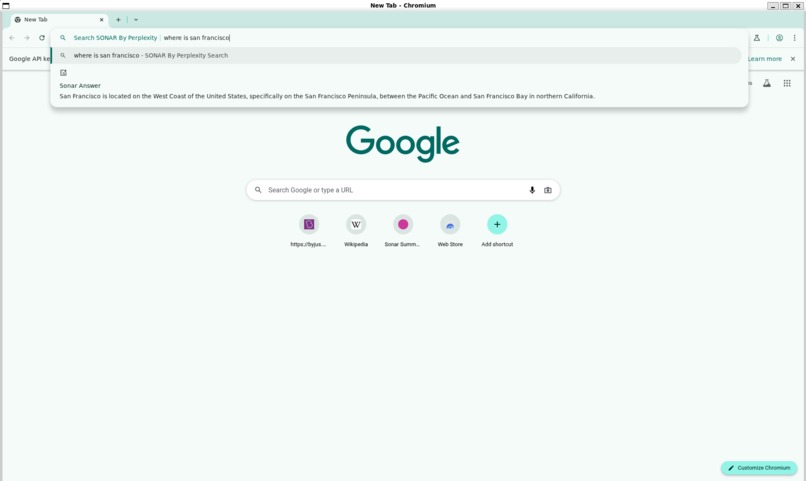
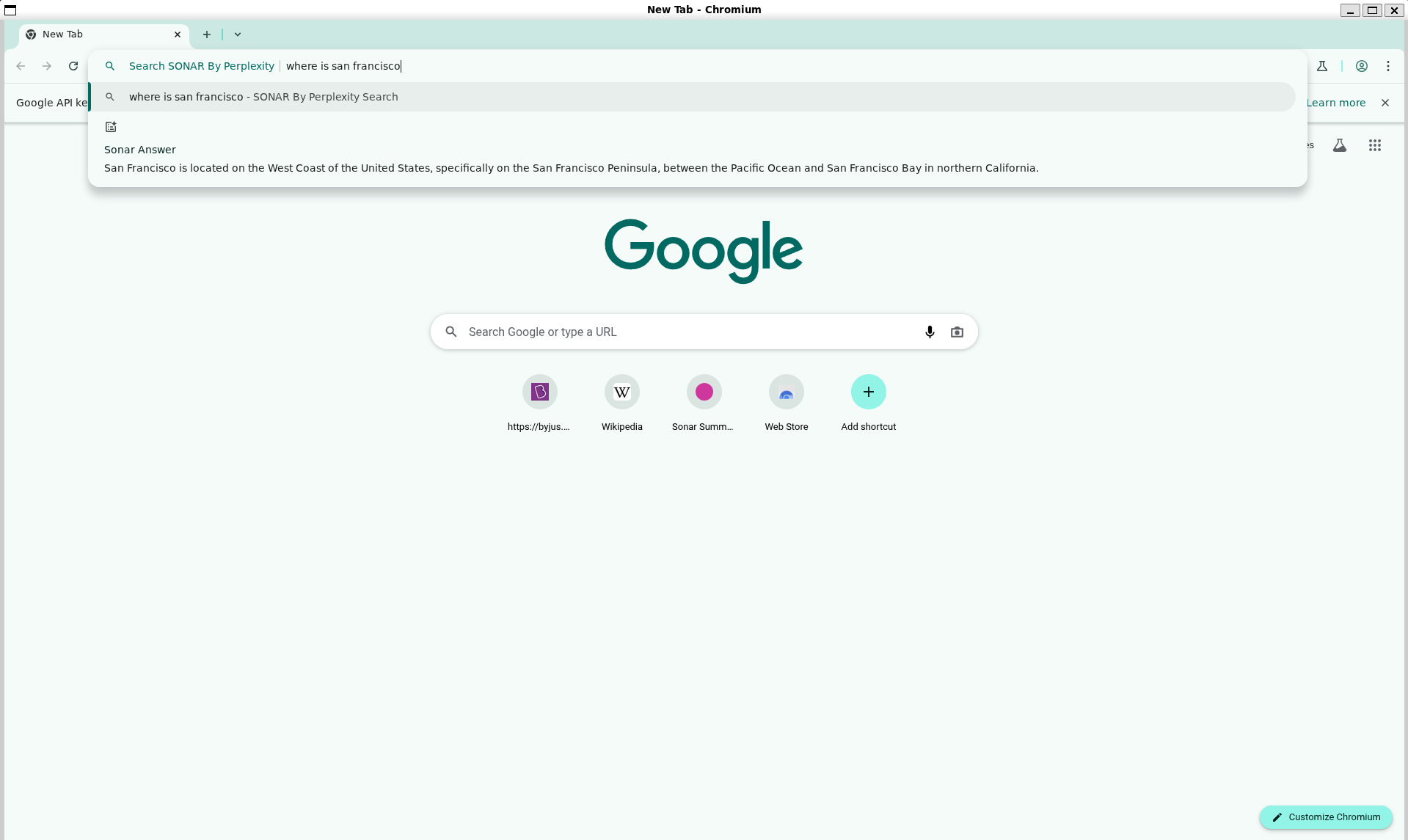
SONAR AI powered omnibox (address bar) answers
-
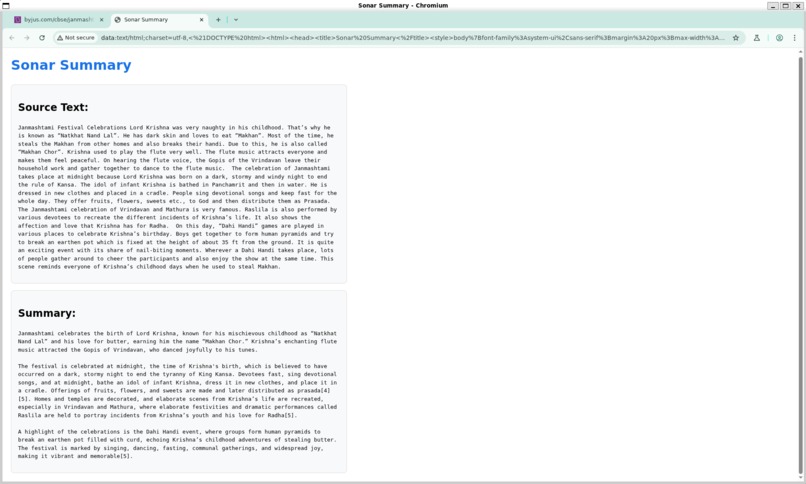
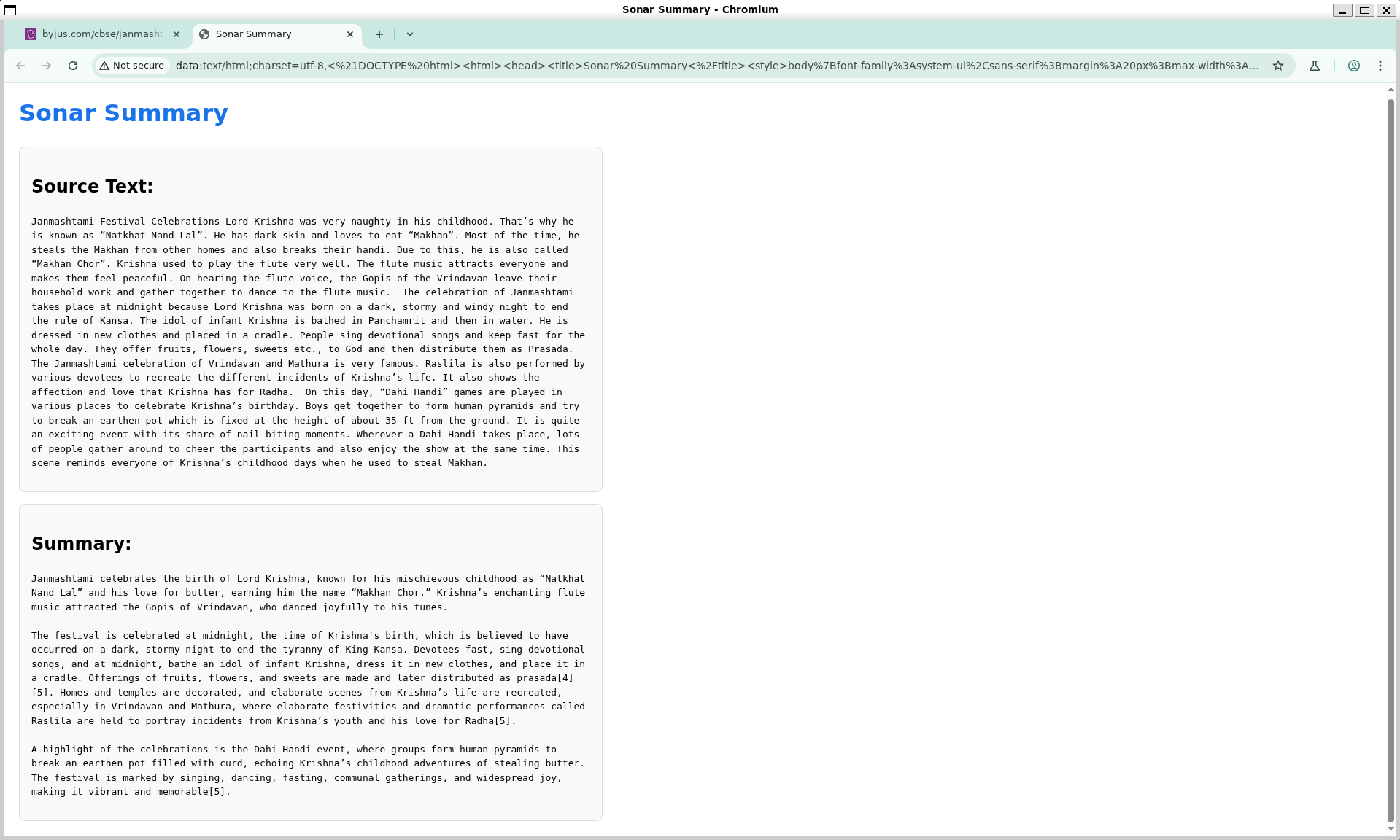
Summarize with Sonar feature
Inspiration
The way we interact with information online is constantly evolving. I've always been fascinated by the potential of AI to make browsing more intuitive and efficient. Seeing tools that bring AI assistance directly into workflows inspired me, but I noticed a gap: truly native AI integration within the browser's core, rather than just as an extension. With Perplexity's rumored browser development and the power of the Sonar API, this hackathon felt like the perfect opportunity to explore what it would be like to weave AI directly into the fabric of Chromium. I wanted to build something that felt like a natural extension of the browser itself, offering instant intelligence without the usual overhead.
What it does
"Sonar Chromium" brings two powerful Perplexity Sonar API features directly into a custom Chromium build:
- Sonar-Powered Omnibox Answers: Users can type a query prefixed with the keyword
sonar(e.g.,sonar what is the capital of France?) directly into the omnibox (address bar). Instead of just getting search links, the browser makes a live call to the Sonar API and displays a concise, direct answer as an autocomplete suggestion. This offers immediate knowledge for quick questions without needing to open a new page. - Context Menu: \"Summarize with Sonar\": When browsing any webpage, users can select a block of text (a few lines, a paragraph, or more), right-click, and choose "Summarize with Sonar." The selected text is sent to the Sonar API, and a new browser tab opens displaying both the original source text and a concise summary generated by Sonar. This allows for quick understanding of lengthy content.
How I built it
This project involved diving deep into the Chromium source code, a massive and complex C++ codebase.
- Setting up the Environment: The first step was getting a Chromium development environment up and running, which is a significant undertaking in itself, involving tools like
depot_toolsandgclient. - Omnibox Integration (C++):
- I created a new
SonarAutocompleteProviderclass, inheriting from Chromium'sAutocompleteProvider. - This provider's
Start()method was implemented to detect thesonarkeyword and the subsequent query. - To prevent spamming the API, a debounce timer (
base::OneShotTimer) was added, so the API call inExecuteQuery()only fires after the user pauses typing. - The
ExecuteQuery()method uses Chromium'snetwork::SimpleURLLoaderto make an asynchronous POST request to the Perplexity Sonar API (https://api.perplexity.ai/chat/completions) with the user's query and thesonar-promodel. - In the
OnApiReply()callback, the JSON response is parsed usingbase::JSONReader, and the answer text is extracted, cleaned (removing markdown, sanitizing), and then formatted into anAutocompleteMatchobject. - This new provider was then registered within Chromium's
AutocompleteControllerto make it active.
- I created a new
- Context Menu Summarization (C++):
- The core logic for this feature resides in
chrome/browser/renderer_context_menu/render_view_context_menu.cc. - A new command ID,
IDC_CONTENT_CONTEXT_SUMMARIZE_WITH_SONAR, was defined inchrome/app/chrome_command_ids.h. - The
InitMenu()method was modified to add the "Summarize with Sonar" menu item, making it visible only when text is selected. - The
ExecuteCommand()method was updated to handle this new command ID. When triggered, it calls a dedicatedSummarizeWithSonar()method. - The
SummarizeWithSonar()method (withinRenderViewContextMenufor this implementation) retrieves the selected text. It then performs an asynchronous call to the Sonar API (similar to the Omnibox feature, usingSimpleURLLoader). - In its API callback (
OnSonarApiResponseForSummarization), it parses the summary from the Sonar API's JSON response. - Finally, it dynamically constructs an HTML page as a
data:URL, embedding both the original selected text and the AI-generated summary. Thisdata:URL is then opened in a new browser tab.
- The core logic for this feature resides in
- Build System: Numerous
BUILD.gnfiles were modified to include the new C++ files and ensure correct dependencies (e.g., networking services, JSON parsing). String resources and UMA logging entries were also conceptually considered.
Challenges I ran into
- Chromium's Scale and Complexity: Navigating and understanding the massive Chromium codebase was the biggest initial hurdle. Finding the right insertion points and understanding the lifecycle of components like the Omnibox and Context Menus took significant effort and debugging.
- Asynchronous Operations: Both features rely on asynchronous API calls. Managing callbacks, object lifetimes (using
base::WeakPtrFactory), and ensuring the UI updates correctly without jank or race conditions within Chromium's multi-process architecture was challenging. - Build Times: Chromium's build times are substantial, making the iteration cycle for debugging and testing quite long.
- API Integration Nuances: Ensuring the Sonar API requests were correctly formatted (JSON body, headers, authentication) and that the responses were parsed reliably required careful attention to detail and the API documentation.
-
data:URL for Summaries: While functional for the hackathon, displaying the summary in adata:URL tab for the context menu feature has limitations (e.g., no persistent state, less polished UI). A native side panel (which I later explored can be developed with WebUI files) would be a more robust solution but added significant complexity for the hackathon timeframe for this specific display part. Initially, getting the side panel and thedata:URL concepts mixed up in my implementation plan caused some hurdle.
Accomplishments that I am proud of
- Successfully integrating two distinct Sonar API-powered features natively into the Chromium codebase.
- Implementing a keyword-triggered, debounced, asynchronous Omnibox provider that delivers real-time AI answers.
- Creating a functional context menu option for on-demand text summarization using the Sonar API.
- Gaining a much deeper understanding of core Chromium components like the Omnibox, context menus, and its networking stack.
- Navigating the Chromium build system and successfully compiling a custom version of the browser with new native features.
What I learned
- The power of native integration: Building features directly into the browser offers a level of seamlessness and performance that extensions can't always match.
- Chromium Architecture: Learnt in depth the modularity and complexity of world's most popular browser's architecture. Specifics around
AutocompleteProvider,RenderViewContextMenu,SimpleURLLoader, and the build system (gn) were key takeaways. - Asynchronous C++ in a Large System: Best practices for handling callbacks, object ownership, and avoiding common pitfalls with asynchronous operations.
- Practical API Usage: How to construct requests, handle authentication, parse JSON responses, and manage potential errors when interacting with a real-world AI API.
- Iterative Development: The importance of breaking down complex tasks, testing incrementally, and using logging/debugging effectively in a large codebase.
What's next for Sonar Chromium: AI in Your Browser
This hackathon project lays a strong foundation. Potential next steps could include:
- Side Panel for Summaries: Refactor the context menu summarization to display results in a polished, native Chromium side panel (using WebUI, as some initial files in my commit structure suggest), rather than a
data:URL tab. This would offer a better user experience. - More Sophisticated Omnibox Triggering: Explore natural language detection for questions in the Omnibox to trigger Sonar automatically, rather than relying solely on a keyword.
- Streaming Responses: For longer answers or summaries, investigate streaming the response from the Sonar API for a more responsive UI.
- Error Handling & UI Polish: Improve the user interface for loading states and provide more informative error messages.
- Explore Other Sonar Endpoints: Integrate other Sonar API functionalities, like "change tone" or "ask follow-up questions," into the native browser experience.
Built With
- api
- c++
- css
- gn
- html
- javascript
- ninja
- perplexity
- sonar

Log in or sign up for Devpost to join the conversation.