-
-
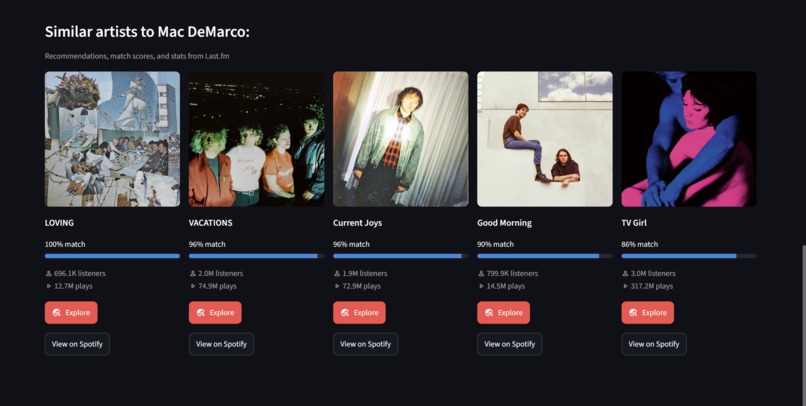
Recommended artists based on Mac DeMarco search, with each having a match % bar and an explore and view in Spotify button respectively
-
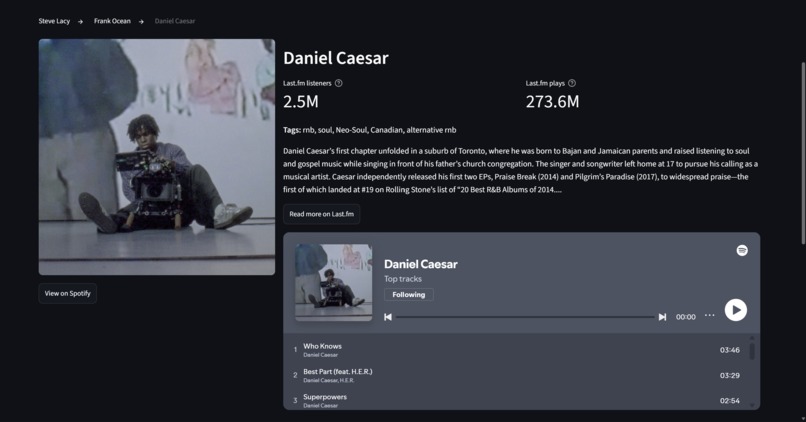
Main page for search result, with artist name, image, listeners, plays, short bio, and Spotify window to hear their music
Inspiration
I struggle with finding new music, so I wanted to make an app that could assist people in doing so. I also decided to make it able to accept either a song or an artist to have a bigger range of possible uses.
What it does
- Search by artist or song: Sonar finds it on Spotify and shows a profile with the photo or album cover, genre tags, a short bio, and Last.fm listener and play counts.
- Get recommendations: five similar artists or songs, each with a match bar showing how closely it relates to your search.
- Go down the rabbit hole: click Explore on any recommendation to make it your new search. A clickable trail (Frank Ocean → Steve Lacy → The Internet) tracks your path, so you can jump back to any step.
- Listen right away: embedded Spotify players let you preview an artist's top tracks or a single song without leaving the app.
How I built it
Sonar is written in Python with Streamlit for the interface, and it combines two APIs:
- Spotify Web API (through Spotipy) to find the artist or song you typed, plus images, album info, links, and embedded players.
- Last.fm API for the recommendations, match scores, listener and play counts, tags, and bios.
Streamlit reruns the whole script on every click, so I used
st.session_stateto remember the current search and the exploration trail between reruns. I also cached every API call withst.cache_data, so repeat searches load almost instantly and use fewer API calls. The app is deployed on Streamlit Community Cloud, with the API keys stored as secrets.
Challenges I ran into
- Two APIs name songs differently. Last.fm would suggest "Ghost Town (feat. PARTYNEXTDOOR)", but on Spotify it's just "Ghost Town", so the lookup found nothing and the card had no image. I added a fallback that retries without the "(feat. ...)" part, but only when that actually changes the title, so other searches don't make extra calls.
- Results disappearing. Because Streamlit reruns everything on each click, adding Explore buttons at first made the results vanish. Learning
session_statefixed it. - Scroll position. After clicking Explore at the bottom of the page, the new artist's profile loaded off-screen above. I added a small script that scrolls back to the top after each Explore.
- Deployment. My first deploy crashed because the API keys are in a local
.envfile that isn't on GitHub. I had to add them as secrets in Streamlit Cloud. I also found myrequirements.txthad been saved in the wrong text encoding by PowerShell and had to re-save it as UTF-8.
Accomplishments that I'm proud of
- Building a complete, deployed app that anyone can try at sonar-music.streamlit.app
- The Explore rabbit hole with its trail, which turns one search into a chain of discoveries
- Combining two different APIs into one smooth experience, with fallbacks for missing images, empty bios, and mismatched song names
What I learned
- How to work with REST APIs, API keys, and error responses
- How Streamlit apps work: reruns,
session_state, caching, layouts, and callbacks - How to deploy a Python app and manage secrets safely
What's next for Sonar
- "Why you'll like this": AI-written explanations of what connects each recommendation to your search, using the tags and bios Sonar already fetches
- Vibe search: describe what you want in plain English ("chill songs for a late-night drive") and get matching music
- Clickable genre tags to explore top artists for a genre like "neo-soul"
- Journey summary: turn your exploration trail into a playlist idea

Log in or sign up for Devpost to join the conversation.