-
-
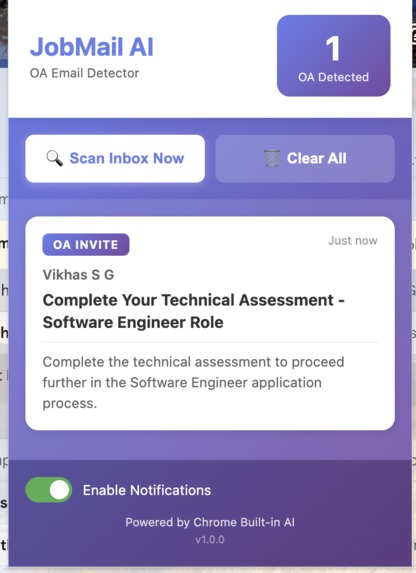
JobMail AI extension
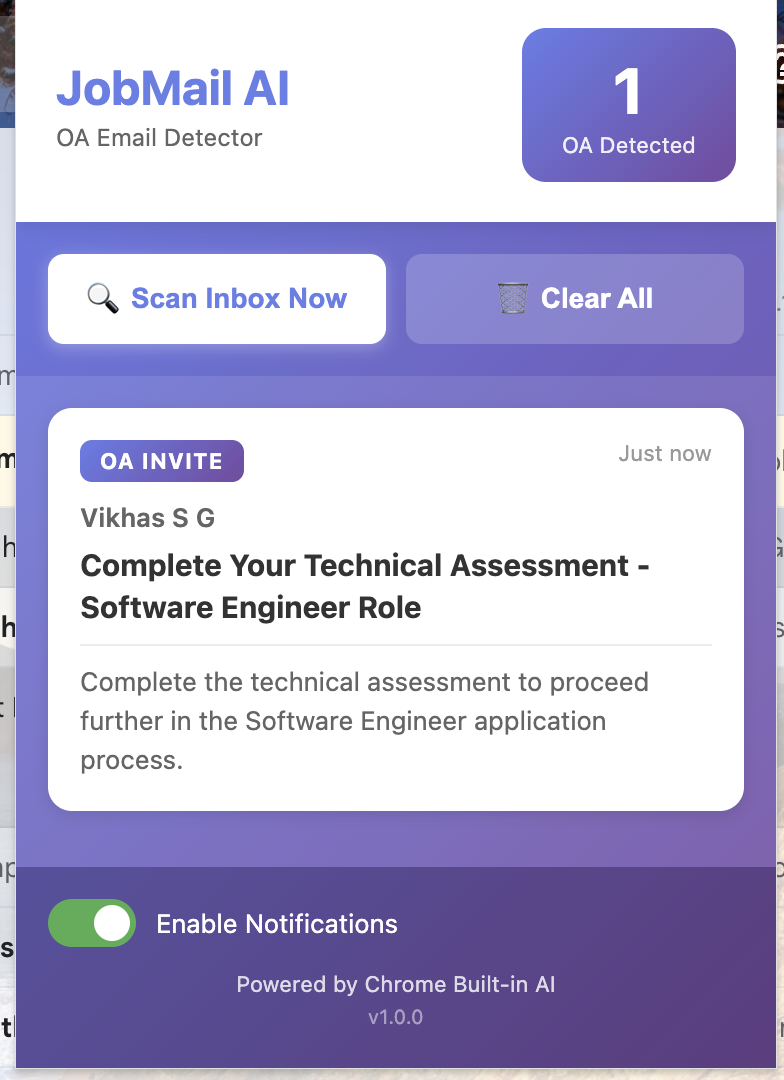
JobMail AI
🧠 Smart Gmail Assistant for Job Seekers — Powered by On-Device Chrome AI
💡 Inspiration
The inspiration for JobMail AI came from personal experience—and a fair bit of stress. As a student applying for internships and jobs, my inbox was a chaotic mix of application confirmations, newsletters, and status updates… with time-sensitive Online Assessment (OA) invitations buried deep inside.
I once missed a coding test invitation because it was lost among 30 other emails. Gmail’s keyword filters just weren’t smart enough to differentiate between “Thank you for applying” and “Your coding challenge is ready.”
So, I decided to build something fast, intelligent, and private—a sentinel for your inbox that ensures you’ll never miss a critical opportunity again.
🚀 What It Does
JobMail AI is a Manifest V3 Chrome Extension that supercharges Gmail for the job hunt. It runs 100% on-device using Chrome’s built-in Gemini Nano AI model to:
- 🧩 Detect & Classify — Scans emails in real time and classifies them as
OA_INVITE,REJECTION,STATUS_UPDATE, orOTHER. - 🎯 Visually Highlight — Adds a bold purple “OA” badge beside detected assessment invitations.
- 📝 Summarize — Generates a 20-word AI summary for quick understanding.
- 🔔 Notify — Sends a browser notification when a new OA is found and updates the extension badge count.
- 📋 Consolidate — Maintains a clean dashboard in the popup, showing all detected OAs for easy tracking.
✨ Privacy-first — All detection and summarization happen locally on your device. No servers. No data leaks. No latency. Works even offline.
🏗️ How I Built It
This project is a Manifest V3 Chrome Extension built with JavaScript, HTML, and CSS, powered by Chrome’s new AI APIs.
Architecture Overview:
content.js→ Injected into Gmail. Watches for new emails using aMutationObserver. Extracts sender, subject, and snippet.ai-bridge.js→ The bridge between the content script and Chrome AI. SinceLanguageModel.create()only works in the main world, this bridge securely communicates usingwindow.postMessage.- Gemini Nano (Chrome AI) →
- Prompt API: Trained via system prompts to categorize emails.
- Summarizer API: Condenses emails to 20 words or less.
background.js→ A service worker that handles notifications and updates the extension badge.popup.js→ Displays a dashboard of all detected OAs and allows manual rescanning of the inbox.
Key Communication Flow:
content.js ⟷ ai-bridge.js ⟷ background.js ⟷ popup.js
→ Securely connected using Chrome’s messaging APIs and event listeners.
🧩 Challenges I Ran Into
Chrome Extension Context Isolation The Chrome AI APIs don’t work in isolated content scripts. ✅ Solution: Built an injected bridge (
ai-bridge.js) that runs in the page’s main world and communicates viapostMessage.Gmail’s Ever-Changing DOM Gmail obfuscates its HTML class names frequently. ✅ Solution: Used
MutationObserverand stable attribute selectors instead of scraping on intervals.Fallback Compatibility What if users have older Chrome versions without AI? ✅ Solution: Implemented a keyword-based fallback with 17+ OA-related phrases for ~85% detection accuracy.
🏆 Accomplishments I’m Proud Of
- 🔒 100% Privacy-First AI App — All intelligence runs locally. No external servers, no API keys.
- ⚡ Zero-Latency Classification — On-device inference means instant results.
- 🧠 Resilient Fallback System — Ensures functionality even without Chrome AI.
- 💼 Real-World Utility — Solves a genuine pain point for students and job seekers.
📚 What I Learned
This project was a deep dive into the future of AI-powered web apps. I learned:
- How to use Chrome’s new on-device AI APIs (
LanguageModel.create, system prompts). - The nuances of Manifest V3 architecture — service workers, context isolation, and secure cross-script communication.
- Building resilient, dynamic DOM-based automation in complex apps like Gmail.
- The potential of on-device AI to deliver smart, privacy-friendly experiences.
🔮 What’s Next for JobMail AI
- 📅 Deadline Tracking — Automatically extract and add OA deadlines to Google Calendar.
- 🌍 Multilingual Support — Extend detection for languages like Spanish, French, Chinese, and Hindi.
- ✉️ AI-Powered Proofreading — Help users craft polished, recruiter-ready emails.
- 💻 Cross-Platform Support — Expand compatibility to Outlook Web and other mail clients.
⚙️ Tech Stack
Languages & Frameworks: JavaScript, HTML5, CSS3
APIs & Platforms:
- Chrome AI (Gemini Nano via
LanguageModel.create) - Chrome Extensions API (Manifest V3)
Storage & Communication:
chrome.storagewindow.postMessageMutationObserver- Service Workers
Tools & Environment: VS Code, Chrome DevTools
Built With
- chrome
- css3
- gemini
- html5
- javascript
- prompt
- summarizer
- v3

Log in or sign up for Devpost to join the conversation.