-
-
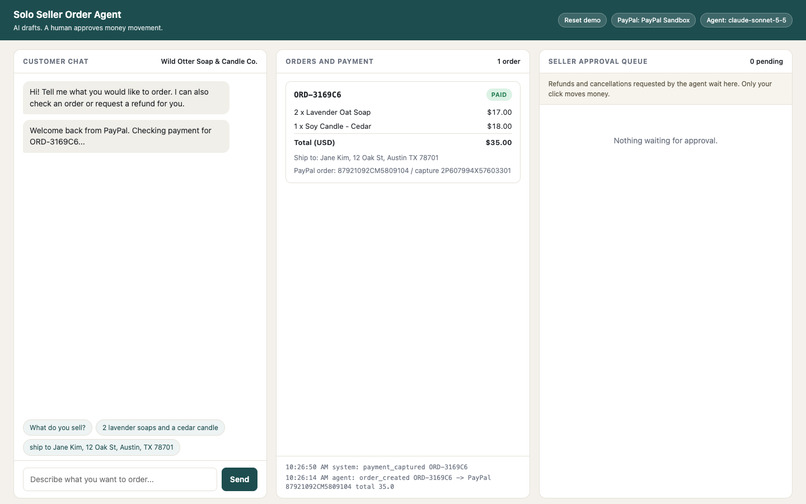
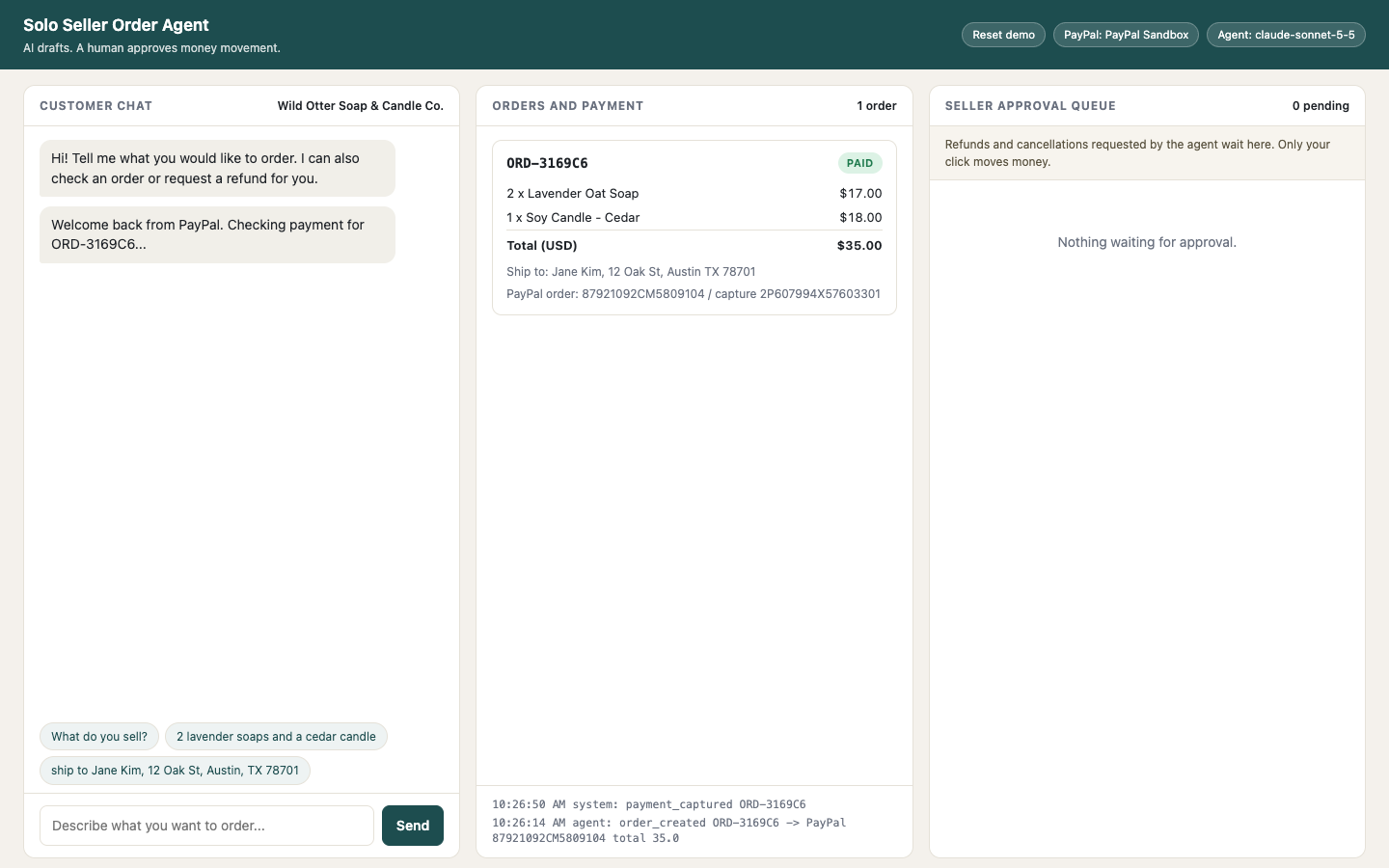
Back from PayPal Checkout: payment captured, order PAID
-
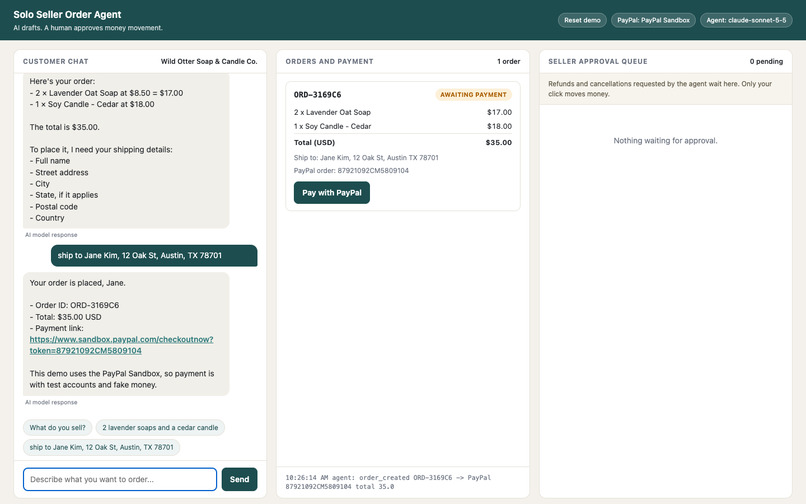
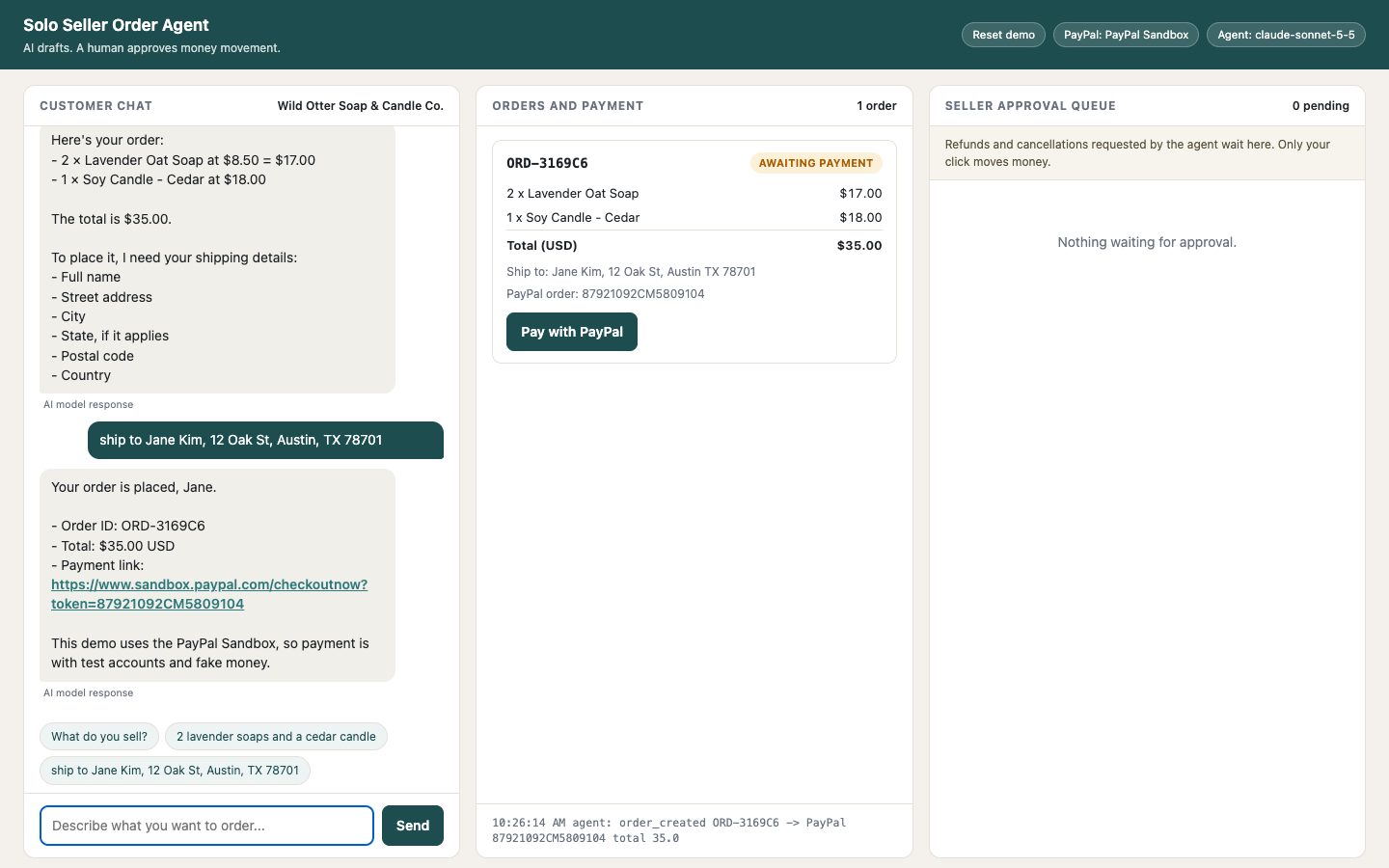
Chat order turned into a PayPal Sandbox order with a checkout link
-
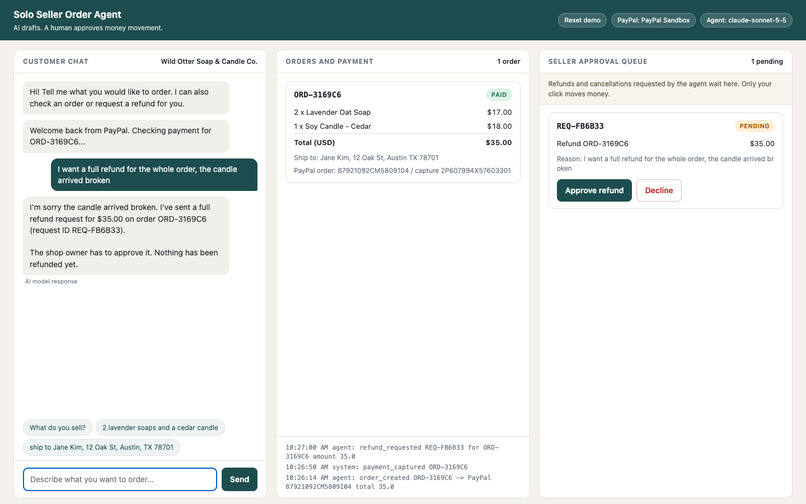
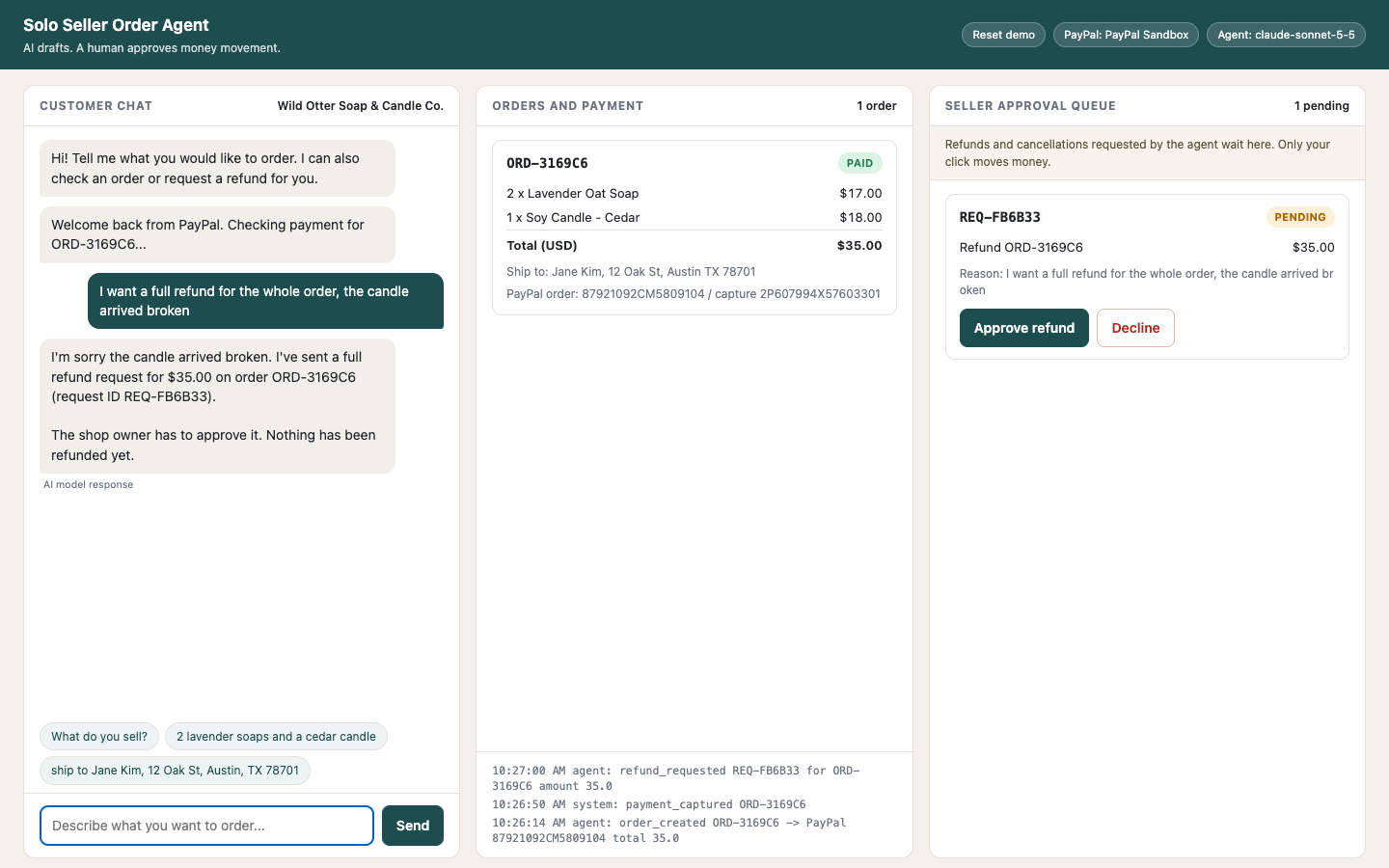
Refund request waits in the seller approval queue (order still PAID)
-
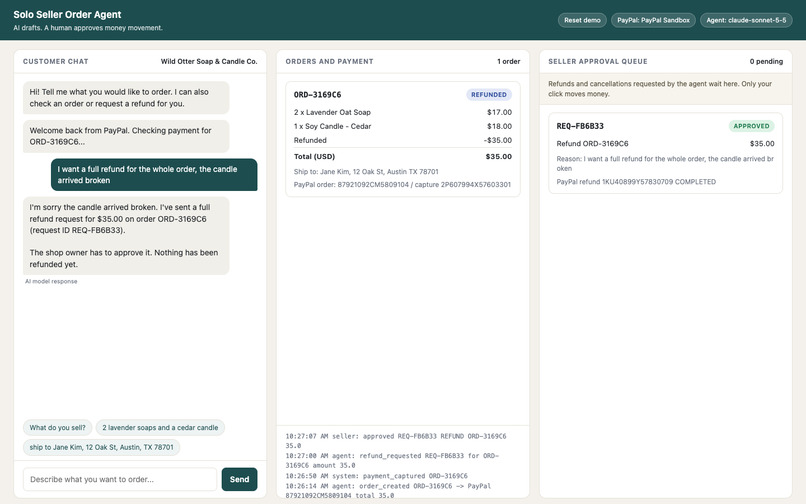
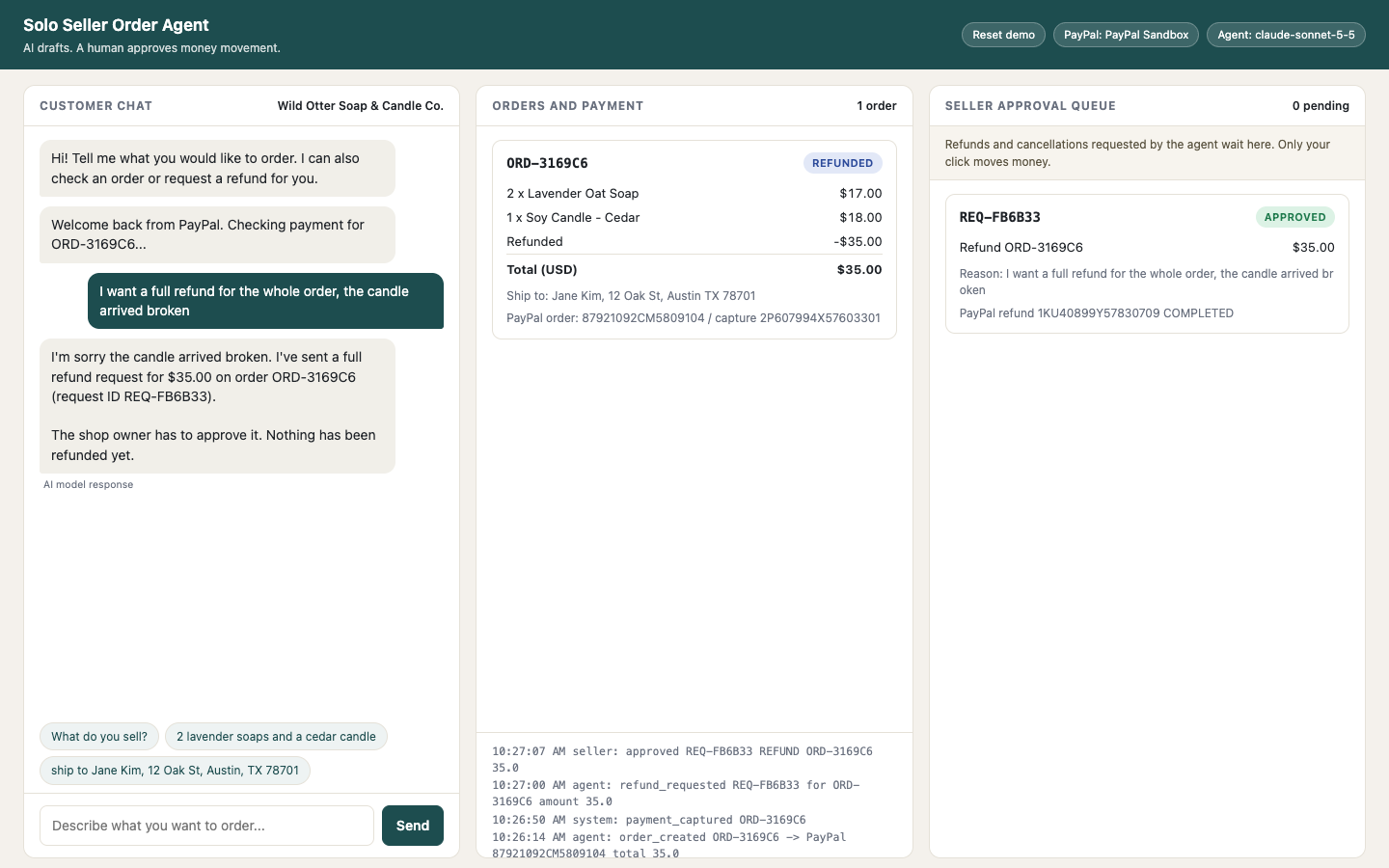
Seller approved: PayPal refund COMPLETED, order REFUNDED
Inspiration
A solo seller (soap maker, candle shop, print-on-demand artist) takes orders over DMs and email. Every order means retyping items and prices, building a payment link by hand, checking whether it was paid, and answering refund requests at odd hours. An AI agent could take that work over, but nobody wants a language model that can move money on its own. We wanted to see how far an agent can go with PayPal while the money-moving step stays behind a human click.
What it does
- A customer chats in plain language ("2 lavender soaps and a cedar candle", then a shipping address).
- The agent turns the chat into an order draft. Prices always come from the shop catalog, never from the customer or the model.
- The agent creates a PayPal order in the Sandbox and replies with a checkout link.
- After the buyer approves in PayPal, the app captures the payment and the order turns PAID. The agent can also report payment status on request.
- When the customer asks for a refund or cancellation, the agent can only file a request. It lands in a seller approval queue with reason and amount. Nothing runs until the seller clicks Approve.
- On approval the app calls the PayPal refund API. Every action is written to an audit log shown in the UI.
How we built it
- FastAPI backend, a single-page UI (three columns: customer chat, orders and payment, seller approval queue), JSON file storage.
- Agent: LLM function calling through any OpenAI-compatible endpoint (Claude
claude-sonnet-5-5in the recorded demo and the real sandbox run), plus a deterministic rule-based fallback that handles the same flow when no key is set, the call fails, or a usage limit is hit. Each chat reply in the UI is tagged "AI model response" or "Rule-based response". - The agent receives an
AgentToolsobject with five tools:list_products,create_order,get_order_status,request_refund,request_cancel. It has no approve, refund-execution or gateway method. A test (test_agent_has_no_money_moving_surface) pins this. - The refund call exists only behind
POST /api/approvals/{id}/approve, which is triggered by the seller's click. - Guardrails in code: only paid orders can be refunded, the amount is capped at what remains of the captured amount, one open request per order, an approved request cannot run twice.
- Public-demo hardening: every visitor gets an isolated session (orders, requests, audit log and chat are scoped to a random session id, and another visitor cannot approve your request), a Reset demo button, a 500-character message cap, a per-IP hourly limit, a daily cap on LLM calls (over the limit the app falls back to the rule-based agent), 10 orders per session, and relative URLs so it can run behind a reverse proxy at a sub-path.
PayPal integration
| Step | PayPal piece |
|---|---|
| Create order and checkout link | Official PayPal Agent Toolkit (paypal-agent-toolkit), tool create_order (Orders v2, intent CAPTURE, payment_source.paypal with return and cancel URLs) |
| Read order and payment status | Agent Toolkit tool get_order_details |
| Capture after buyer approval | Orders v2 POST /v2/checkout/orders/{id}/capture, sent through the toolkit's authenticated sandbox client |
| Refund after seller approval | Payments v2 POST /v2/payments/captures/{capture_id}/refund, same client |
The Agent Toolkit has no capture or refund tool, so those two calls are plain REST v2 calls that reuse the toolkit's client (same auth, same sandbox base URL). Everything in the demo runs against the real PayPal Sandbox with the LLM agent: a sandbox buyer approved the payment on PayPal Checkout, the capture succeeded, and the refund came back COMPLETED. Screenshots of that run are in docs/e2e/ and scripts/e2e_sandbox.py reproduces it.
Challenges
- The toolkit covers order creation and lookup but not capture or refund, so we had to decide where the REST calls live. We kept them out of the agent's tool list on purpose, which also turned into the human-in-the-loop design.
- Making "the agent cannot refund" verifiable rather than a prompt instruction. The agent's tool surface is a separate object, and a test checks it.
- Getting a deterministic fallback good enough that the full flow works without an LLM key, so judges can run it with only PayPal sandbox keys. It also keeps the demo alive when the LLM call fails or a usage limit is reached.
- Keeping the LLM from being the weak point: it never sets prices, it cannot call anything that moves money, and a per-session / per-IP / daily budget stops one visitor from running up the bill.
- Recording the buyer login without exposing sandbox credentials (they are covered in the video).
Accomplishments
- A real sandbox end-to-end run with a real LLM agent: chat order, PayPal Checkout approval by a sandbox buyer, capture, refund request, seller approval, refund COMPLETED.
- A structural guarantee, not a prompt, that the agent cannot execute a refund.
- Runs with only sandbox keys; mock mode exists for offline development.
- 21 automated tests (mock gateway, no network, LLM client stubbed) for the order, approval, guardrail, session-isolation and usage-limit flow.
What we learned
- Splitting "what the agent can ask for" from "what a human can execute" is simple to build and easy to explain to a seller.
- The toolkit's tools are a good fit for read and create steps; for money movement after human sign-off, plain REST v2 through the same client is straightforward.
- Sandbox checkout pages follow the test account's locale, so the buyer screen may not be in English.
What's next
- Partial refunds from the chat (the tool already accepts an amount; the UI flow is only demoed with full refunds).
- Webhooks for payment and refund events instead of relying on the buyer redirect.
- Cancellation of unpaid orders is implemented through the same queue but not part of the demo; polish and test it with real sandbox orders.
- Notify the seller (email or chat) when a request is waiting.
Testing instructions
No account with us and no payment is needed; everything uses the PayPal Sandbox.
- Clone the repo:
git clone https://github.com/Dazzlar199/solo-seller-order-agent && cd solo-seller-order-agent - Python 3.11+:
uv venv --python 3.12 && source .venv/bin/activate && uv pip install -r requirements.txt && uv pip install --no-deps paypal-agent-toolkit(plainpipworks the same way). cp .env.example .envand setPAYPAL_CLIENT_ID,PAYPAL_CLIENT_SECRET(a Sandbox app from https://developer.paypal.com/dashboard/applications/sandbox) andMOCK_PAYPAL=0.LLM_API_KEY(withLLM_BASE_URLandLLM_MODEL) is optional; without it the rule-based agent is used../run.sh, then open http://localhost:8000. The header badge should read "PayPal: PayPal Sandbox".- In the chat send
2 lavender soaps and a cedar candle, thenship to Jane Kim, 12 Oak St, Austin, TX 78701. - Click Pay with PayPal and sign in with a sandbox personal (buyer) account from https://developer.paypal.com/dashboard/accounts. Approve; you return to the app and the order is PAID.
- In the chat send
I want a full refund for the whole order, the candle arrived broken. The request shows as PENDING in the right column while the order is still PAID. - Click Approve refund. The order turns REFUNDED; you can verify the refund in the sandbox business account's activity.
- Tests without network:
pytest -q(21 tests).
