Inspiration
What it does
How we built it## Inspiration
I looked through the WebMCP demos that already exist — hotel booking, sports storefronts, restaurant reservations, movie tickets — and noticed they mostly share the same shape:
The agent searches, filters, fills, and submits.
It does what a person could already do, only faster.
I wanted to build the other thing: a web app where the agent has a capability the interface fundamentally cannot offer.
Sizing a home solar system turned out to be the perfect problem.
A solar system is a three-way trade-off between panels, battery, and inverter. The best configuration depends on how all three interact, along with electricity usage and tariffs.
There are thousands of sensible combinations.
A person moving sliders can explore one configuration at a time. An agent can search the entire design space.
That difference is the project.
What Solaris Does
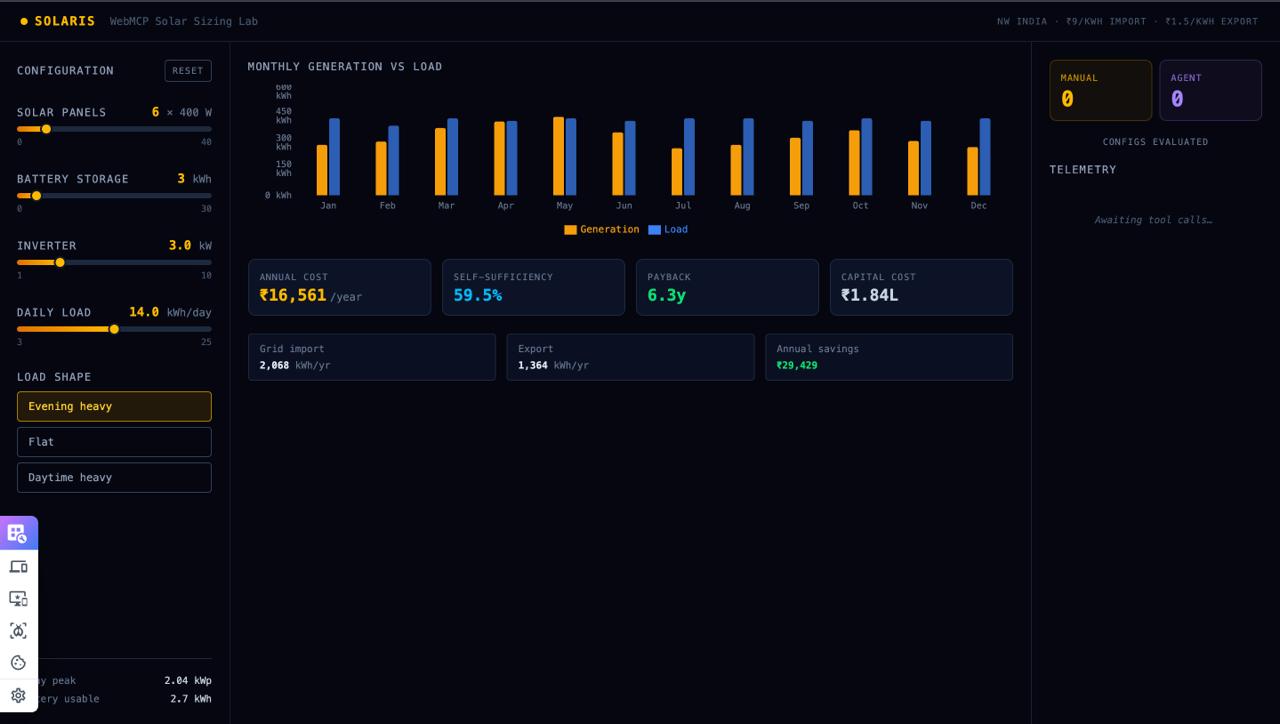
Solaris is a browser-based solar and battery simulator that lets humans explore systems manually — while giving AI agents the ability to search the design space computationally.
You can use Solaris normally:
- Adjust solar panels
- Adjust battery capacity
- Adjust inverter size
- Change daily energy consumption
- Run simulations
- See annual generation, grid dependence, cost, and payback
But you can also ask for an outcome instead of a configuration:
"I use about 14 kWh a day, mostly evenings. Find me the cheapest setup over ten years that keeps me at least 80% off the grid."
The agent can call grid_search.
Instead of moving sliders one by one, it evaluates roughly 2,000 possible configurations in about 40 milliseconds, ranks them against the requested objective and constraints, and returns the best trade-offs.
Solaris then visualizes the search:
- Every configuration the agent evaluated
- The trade-off frontier
- The best options at different budgets
- The selected configuration
The agent can then apply the winning configuration, and the sliders visibly move on screen.
Why This Is WebMCP
The most important part of Solaris is that grid_search has no meaningful UI equivalent.
A slider can represent one value.
A button can trigger one operation.
But grid_search takes:
- Parameter ranges
- An optimization objective
- Constraints
- A requested result size
…and evaluates thousands of possible combinations.
There is no sensible "Search 2,000 configurations" button for a human to use interactively.
The agent isn't simply operating the existing interface. It has gained a new computational capability through the web page.
That is what I wanted to explore with WebMCP.
The browser is the computational environment
Solaris runs entirely in the browser.
There is no backend, no external simulation service, and no separate MCP server holding the model state.
The simulator and the WebMCP tools operate on the same client-side state.
So if a human changes the battery slider halfway through an agent conversation, the agent can call get_state and immediately see the new configuration.
The browser supplies the model and compute.
The agent supplies the search strategy.
WebMCP connects the two.
What Humans and Agents Can Do Together
Solaris enables interactions that are difficult to express through a traditional UI.
1. Ask for outcomes instead of settings
Instead of figuring out which slider values to use, a person can describe the result they want.
"Keep me at least 80% off-grid while minimizing my 10-year cost."
The agent searches the design space and shows the resulting trade-offs.
2. Explore the agent's reasoning space
Solaris doesn't only return the winner.
It visualizes the configurations the agent explored, allowing the human to see the shape of the optimization problem and the alternatives that were rejected.
The result becomes something the human can inspect rather than a black-box recommendation.
3. Human changes become agent context
A user can manually change the system after an agent recommendation and ask:
"Was that a good idea?"
The agent reads the current browser state and can compare it against the previous configuration.
4. Expensive computation requires human approval
Searches over more than 200 configurations trigger an approval dialog that tells the user how much computation will be performed.
The user can approve or decline the operation.
A refusal is returned to the agent as structured tool output, allowing it to respond intelligently rather than treating the action as an error.
How I Built It
Solaris is a self-contained HTML application with no backend, build step, or external dependencies.
The simulation model is deterministic JavaScript.
It models:
- Hourly solar generation across 8,760 hours
- A daylight generation profile
- Monthly peak-sun-hour scaling
- Inverter clipping
- Battery charging and round-trip efficiency
- Battery discharge
- Grid imports
- Energy exports
- Annual costs and payback
There are two simulation fidelities.
simulateFull runs all 8,760 hours and powers the detailed UI.
simulateFast uses twelve representative days scaled to a year and powers parameter sweeps.
The two agree within 0.1% on annual generation.
WebMCP Tools
Solaris exposes nine tools through document.modelContext:
get_model_specget_stateset_paramsrunsweepgrid_searchpin_runcompare_runsexplain_state
The most important is grid_search.
document.modelContext.registerTool({
  name: "grid_search",
  description: "Search several parameters together and return the best configurations found.",
  inputSchema: {
    type: "object",
    properties: {
      ranges: { type: "object" },
      objective: {
        type: "string",
        enum: [
          "min_annual_cost",
          "min_payback",
          "min_total_cost_10yr",
          "max_self_sufficiency"
        ]
      },
      constraints: { type: "object" },
      topN: { type: "integer" }
    },
    required: ["ranges"]
  },
  execute: async (input) => {
    // Build grid → request approval when necessary
    // → evaluate → rank → return compact results
  }
});
Every tool call is wrapped with telemetry before registration, allowing the interface to display the tool name, arguments, duration, and number of simulations performed.
Large searches run in chunks with a progress indicator so the browser remains responsive.
Results are also returned compactly — top configurations plus aggregates rather than thousands of raw rows.
Challenges
Getting the economics right
My first cost assumptions made the optimization landscape almost useless.
The default configuration already achieved roughly 99% self-sufficiency, meaning grid_search could evaluate thousands of configurations only to discover that the starting point was already nearly optimal.
I brute-forced the search space, found the optimum sitting on a slider boundary, and retuned the tariffs and component costs.
The optimum moved into the interior of the search space.
That made the optimization meaningful.
Teaching the agent when to use each tool
My first tool descriptions simply explained what each function did.
That produced timid behavior.
The agent would sometimes use a one-parameter sweep when the user's question required a joint search.
The solution wasn't more code.
It was better tool descriptions.
I explicitly described when each tool should be preferred, and made it clear that grid_search exists specifically for questions that cannot be answered efficiently by manipulating individual controls.
That changed the agent's behavior dramatically.
Approval without approval fatigue
Putting a confirmation dialog in front of every operation would train users to blindly click through it.
Instead, Solaris only requires approval once a search exceeds 200 configurations.
The dialog shows the number of configurations and the estimated computation rather than presenting a vague "Are you sure?"
What I Learned
The most interesting discovery came from the agent itself.
The cheapest configuration deliberately undersized the inverter, producing a DC:AC ratio of around 1.6.
It accepted some midday clipping because the clipped energy would only export at ₹1.50, while additional inverter capacity cost ₹7,000 per kW.
I didn't explicitly encode that conclusion.
It emerged from the search.
That was the moment the idea clicked for me:
The interesting result wasn't sitting in the UI waiting to be clicked.
And it wasn't something I had manually programmed the agent to say.
It emerged from giving the agent the ability to explore a space that would be impractical for a human to explore manually.
What's Next
Solaris is one example of a broader pattern.
Many useful problems aren't about finding a single value.
They're about exploring a frontier.
The same architecture could apply to:
- Financial scenario planning
- Staffing and queue optimization
- Logistics
- Engineering tolerances
- Resource allocation
- Energy systems
- Capacity planning
Wherever a browser can hold a model, WebMCP can potentially give an agent the ability to describe the space, search it, compare the results, and work with a human to make the final decision.
Solaris is an experiment in what that future web looks like.
Challenges we ran into
Accomplishments that we're proud of
What we learned
What's next for Solaris — agent-native solar sizing lab
Built With
- chatgpt
- chrome
- codex
- css3
- document.modelcontext
- grid-search
- html5
- javascript
- openai
- optimization
- simulation
- solar
- svg
- vercel
- webmcp

Log in or sign up for Devpost to join the conversation.