-
-
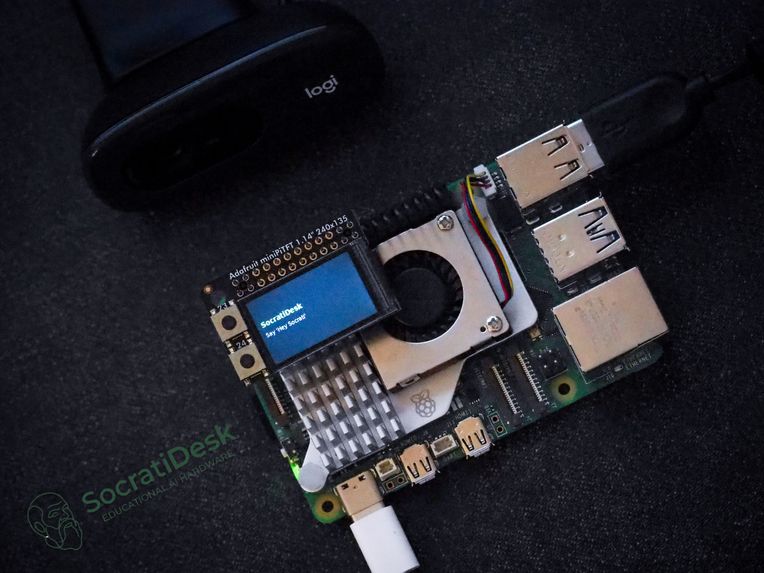
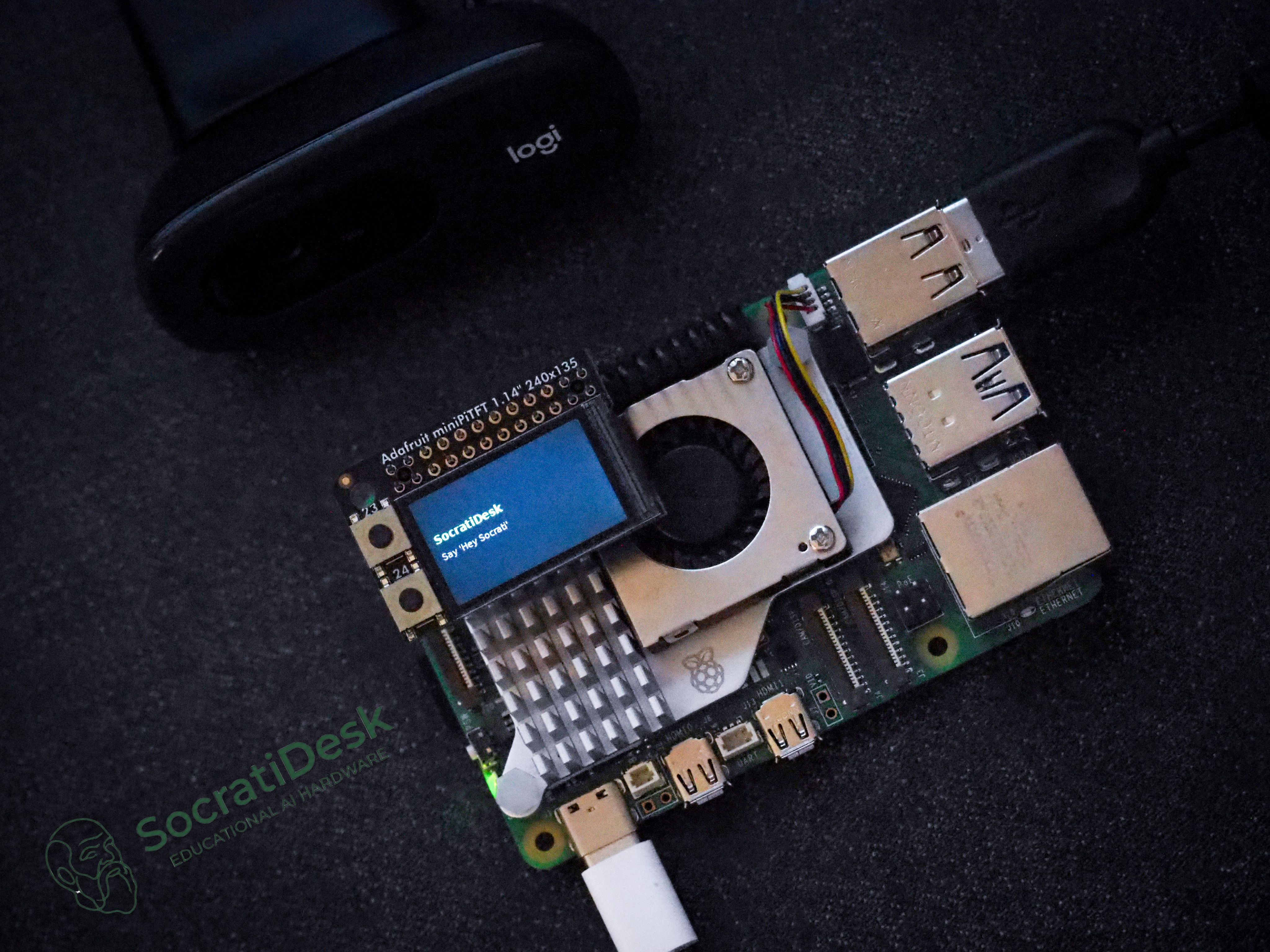
SocratiDesk prototype device running a real-time Gemini Live voice tutoring agent
-
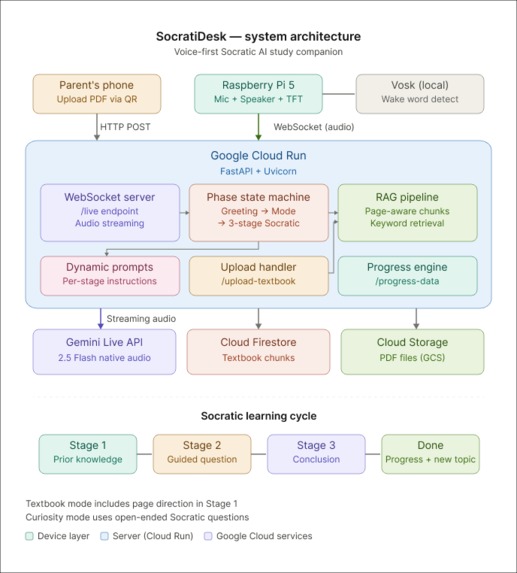
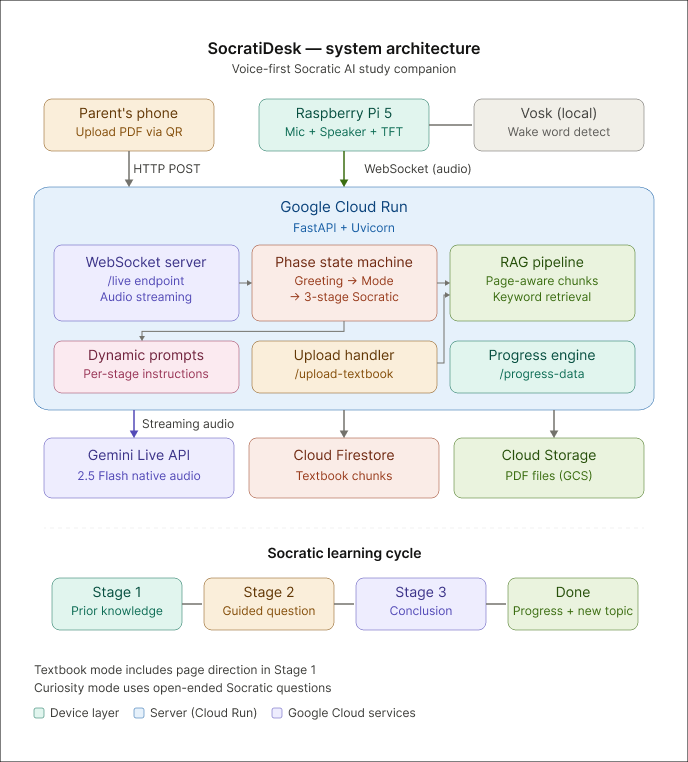
System architecture connecting the SocratiDesk device, cloud server, and Gemini Live AI agent
Inspiration
Every parent has seen it: their child snaps a photo or screenshots a homework question, sends it to ChatGPT, and copies the answer in seconds. Learning never happens. A 2024 Stanford study found that 60% of K-12 students use AI to get answers rather than to understand concepts. Meanwhile, decades of education research confirm that Socratic questioning — guiding students to discover answers themselves — produces 2x better retention than direct instruction.
We asked ourselves: What if AI could teach kids to think instead of giving them answers?
We grew up in classrooms where the best teachers never told us the answer — they pointed us to the right page, asked the right question, and let us figure it out. SocratiDesk is our attempt to bring that experience to every child's desk, powered by Gemini's native audio capabilities.
What it does
SocratiDesk is a voice-first AI study companion built on a Raspberry Pi 5.
It sits on a student’s desk like a smart speaker and uses Gemini Live API’s native audio to hold real-time spoken conversations — creating a focused, distraction-free learning space.
Instead of giving answers instantly like most AI tools, SocratiDesk guides students through Socratic questioning, helping them think through problems step by step.
SocratiDesk supports two learning modes.
Textbook Mode
A parent or teacher uploads a PDF textbook via QR code.
When a student asks a question such as “What is pH?”, SocratiDesk does not give the answer directly. Instead, it guides the student back to the book.
Stage 1 — Find the Knowledge
“Open your book to page 42. Look at the middle section — you’ll see a diagram of the pH scale. Read it and tell me what you found.”
Stage 2 — Guided Understanding
After the student reports back, SocratiDesk gives feedback, explains the concept simply, and asks a quick comprehension question.
“Good observation. pH measures how acidic or basic a solution is. If 7 is neutral, what do you think a pH of 3 means?”
Stage 3 — Reinforcement
SocratiDesk evaluates the answer, summarizes the key concept with page citations, and encourages the next related topic.
Curiosity Mode
For everyday science questions, even without a textbook.
If a student asks: “Why do volcanoes erupt?”
Stage 1 — Activate Prior Knowledge
SocratiDesk begins with a Socratic prompt:
“What do you already know about volcanoes? Why do you think they erupt?”
Stage 2 — Guided Exploration
After the student responds, SocratiDesk gives encouraging feedback and asks a guiding follow-up question to deepen reasoning.
“Good thinking. Volcanoes are related to magma under the Earth’s surface. What do you think happens when pressure builds up underground?”
Stage 3 — Concept Clarification
SocratiDesk summarizes the concept in simple language and connects the reasoning steps.
“Volcanoes erupt because pressure from magma and gas builds beneath the Earth’s crust. When the pressure becomes too strong, it forces magma out through openings.”
After each topic, a mobile progress dashboard — accessible via a QR code on the device’s display — shows:
- AI-generated learning summaries (highlighted key concepts)
- subject tags (Biology, Chemistry, Physics, etc.)
- full conversation history
How we built it
Architecture: Raspberry Pi 5 ↔ WebSocket ↔ FastAPI on Google Cloud Run ↔ Gemini Live API
Hardware (Pi device):
- ReSpeaker USB microphone for voice input
- Speaker for Gemini's native audio output
- 1.8" TFT display showing status, QR codes, and progress links
- Vosk offline wake-word detection ("Hey Socrati") — no cloud needed to start listening
Server (Cloud Run):
- Gemini Live API with
gemini-2.5-flash-native-audio-previewfor real-time speech-to-speech conversation - Custom phase state machine managing the full dialogue flow:
idle → greeting → mode selection → textbook/curiosity → 3-stage Socratic cycle - RAG pipeline for textbook mode: PDFs are chunked with page awareness, stored in memory, and retrieved with keyword matching to provide Gemini with the exact textbook content for each topic
- Dynamic system instructions that change per-stage, ensuring Gemini follows the Socratic method (never giving answers in Stage 1, always asking questions in Stage 2)
- Session store tracking topics, turns, and duration for the progress dashboard
- Gemini-powered summarization generating structured learning feedback with
<strong>highlighted key terms
Audio pipeline:
- Raw 16-bit PCM at 16kHz, streamed in real-time over WebSocket
- Software gain normalization (target RMS ~1200) for consistent Gemini input
- Speech detection with dual thresholds (silence < 1500 RMS, speech > 2500 RMS)
- Manual VAD with explicit
ActivityStart/ActivityEndsignals to Gemini (automatic activity detection disabled for precise turn control)
Mobile companion:
- Phone-optimized upload page for textbook PDFs
- Real-time progress dashboard with Summary, Knowledge, and History tabs
- Auto-refreshes via WebSocket when new topics complete
Challenges we ran into
Gemini Live API's VAD behavior: With automatic_activity_detection disabled, we had to manually send ActivityStart before the first audio chunk and ActivityEnd after the user stops speaking. Missing either caused Gemini to silently ignore all audio — with no error message. This took days to debug.
Silence detection vs. gain boost conflict: We boost audio gain 4x for Gemini to hear clearly, but our silence detector was using the boosted signal — so even silence registered as "speech." Fix: detect silence on raw audio, send boosted audio to Gemini.
Infinite greeting loops: In "speak-first" phases (where Gemini speaks before the user), Gemini would keep repeating its greeting because every turn looked like a fresh start. We added per-phase flags (_textbook_intro_done, _curiosity_intro_done) to ensure the introduction only happens once.
Transcript fragments without spaces: Gemini Live's input_transcription returns word fragments without separators. "Uh" + "I" + "want" became "UhIwant", making topic inference fail. We had to accumulate fragments with spaces and strip filler words before extracting the topic.
Session lifecycle on Cloud Run: Each Gemini session is a WebSocket connection that must be opened, used for one turn, then closed. On Cloud Run's stateless containers with 3600s timeout, managing session lifecycle, reconnection, and state persistence required careful async orchestration.
Accomplishments that we're proud of
- A working voice-first AI tutor on a $60 Raspberry Pi that genuinely follows the Socratic method — it asks questions instead of giving answers
- The 3-stage dialogue system that mirrors how great teachers actually work: direct to the source → discuss and check understanding → summarize and encourage
- End-to-end native audio — student speaks, Gemini processes and responds in audio, no text-to-speech needed. The conversation feels natural, not robotic
- The textbook RAG pipeline that grounds every response in the student's actual textbook, with specific page references — not hallucinated facts
- 14 bugs found and fixed in the audio pipeline alone, each requiring deep understanding of Gemini Live API's underdocumented behavior
- A complete mobile companion that transforms raw conversation data into structured learning summaries with AI-generated feedback, subject detection, and highlighted key concepts
What we learned
- Gemini Live API is incredibly powerful but demands precision: Unlike REST APIs, real-time audio streaming has zero tolerance for protocol mistakes. A missing
ActivityStartsignal silently drops all audio. We learned to treat the WebSocket protocol as carefully as hardware protocols. - The Socratic method is hard to enforce with LLMs: Without explicit, stage-specific system instructions, Gemini naturally wants to be helpful and give answers. We learned that the system prompt must be rewritten for every single stage, with clear constraints like "DO NOT explain the answer."
- Voice-first UX is fundamentally different: Without a screen, you can't show a loading spinner. Every state transition needs an audio cue or spoken feedback. We redesigned the interaction 3 times before the flow felt natural.
- Building on real hardware reveals real problems: Microphone floor noise, speaker feedback, gain calibration — none of these exist in a browser demo. Testing required a physical setup and an actual child's reading level.
Cost efficiency & business viability
SocratiDesk is designed to be radically affordable — both in hardware and AI costs.
Hardware: $60 per device
| Component | Cost |
|---|---|
| Raspberry Pi 5 (4GB) | ~$40 |
| ReSpeaker USB Mic | ~$8 |
| 1.8" TFT Display | ~$5 |
| Speaker + wiring | ~$7 |
| Total | ~$60 |
Compare this to a $300+ tablet that comes with YouTube, games, and every possible distraction. SocratiDesk has zero distractions by design.
AI cost: ~$0.02 per learning session
Our architecture is optimized for minimal token usage:
- We use Gemini 2.5 Flash (native audio preview), the most cost-effective model with native audio at $0.30/M input tokens and $1.00/M audio input tokens
- Each topic is a 3-turn conversation (not an open-ended chat), so sessions are short and structured — typically under 2 minutes of audio
- Dynamic system instructions are rewritten per-stage (not a massive static prompt), keeping context windows small
- RAG retrieval sends only the relevant textbook chunks (not the entire PDF) to Gemini, reducing input tokens by 90%+ vs. sending the whole document
- Each session closes after the topic completes — no idle connections burning tokens
Estimated cost per student per month: | Usage | Tokens | Cost | |---|---|---| | 5 topics/day × 3 turns × 30 days | ~450 turns | | | Audio input (~15s per turn avg) | ~1.8M audio tokens | ~$1.80 | | System instructions + RAG context | ~0.9M text tokens | ~$0.27 | | Audio output (~20s per turn avg) | ~2.4M tokens | ~$6.00 | | Monthly total per student | | ~$8.07 |
At scale with Gemini's free tier (15 RPM, 1M TPM), a single API key can support 5–10 students studying simultaneously at zero cost — ideal for a classroom pilot.
Business model:
- version 1 (Now): Open-source hardware kit + free Gemini API tier → schools build their own for $60
- version 2: Pre-assembled device sold at $99 with 1 year of cloud service included
- version 3: School district licensing at $5/student/month — cheaper than a single textbook, with AI-powered progress tracking for teachers
What's next for SocratiDesk
- Multi-language support — Gemini Live API already supports multiple languages; we want to help students study science in their native language
- Visual input with Pi Camera — Students could point the camera at a textbook page or a homework problem, and Gemini would see and discuss it using multimodal input
- Open-source hardware kit — We want to publish a complete BOM and assembly guide so any school can build a SocratiDesk for under $80
Built With
- adafruit-minipitft
- fastapi
- firestore
- gemini-2.5-flash
- gemini-live-api
- google-cloud
- google-cloud-run
- google-genai-sdk
- pdfplumber
- python
- raspberry-pi
- vosk
- websockets


Log in or sign up for Devpost to join the conversation.