Inspiration
Homework is where you're supposed to actually learn the material. You sit there stuck on a problem for forty minutes and somewhere in that mess it finally makes sense. That's the whole point of a problem set. Nobody does it that way anymore, us included. You get stuck, you screenshot the problem, you paste it into ChatGPT or Claude, and thirty seconds later there's a full solution. You read it. You nod. You copy it onto your page. It really does feel like you learned something. Then you sit down for the midterm and you can't start the first question.
We talked about this a lot before writing any code, and what bugged us is that the AI is good. It explains things well. The trouble is where it lives. It's in another tab. It has never seen your attempt, so it has no idea which line you messed up. All it can do is hand you its own solution from the top. And getting to it is annoying enough (screenshot, switch apps, paste, type out what you're confused about, switch back) that you only bother once, so you ask for the entire answer. Compare that to the times something really stuck. For us it was a TA glancing at the page and going "check your sign there." Or watching a graph move and suddenly getting what a derivative is. Somebody looked at our work and gave us one small push, and we did the rest.
So that's what we tried to build. An AI that's already on the page while you're writing, sees your work, and helps the way a good TA would. Most of the time that means a question, which is why we named it after Socrates.
What it does
Socra is a notebook for the iPad. You write your homework in it with an Apple Pencil, the same way you would on paper, and there's a tutor reading along the whole time. You never screenshot anything or leave the page.
Here's what that looks like:
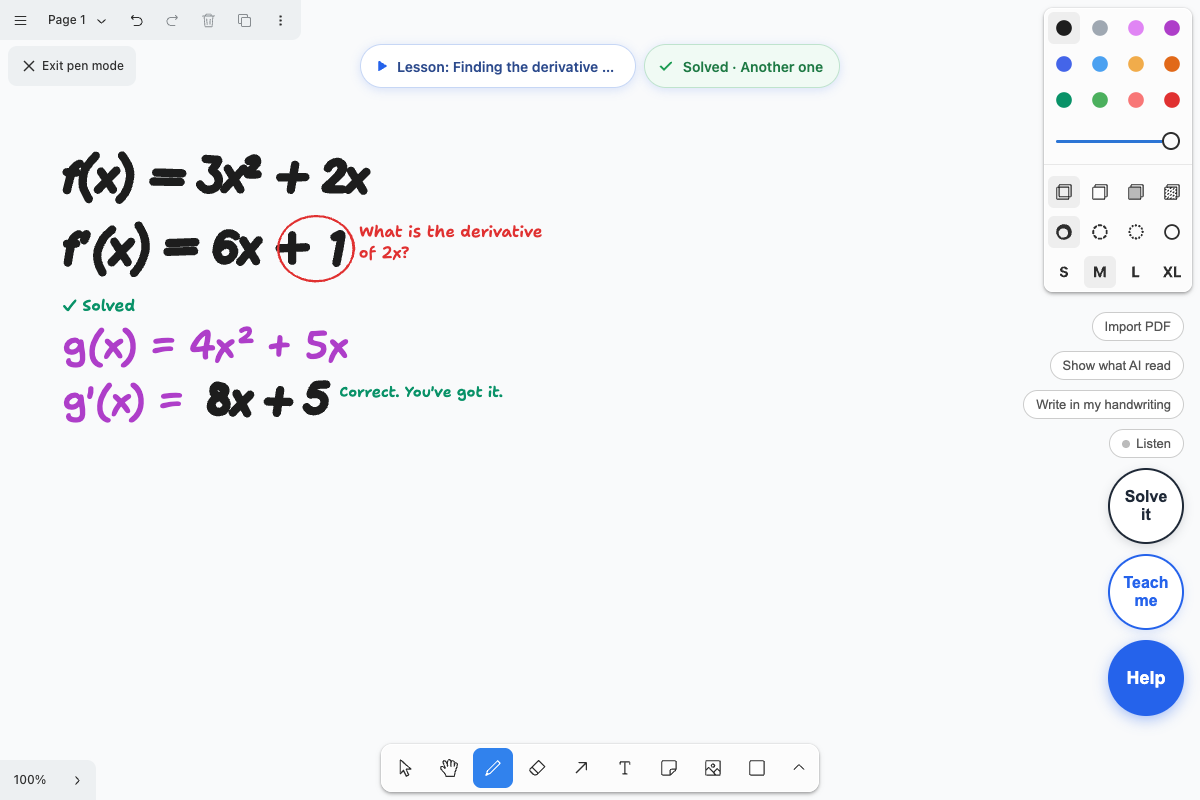
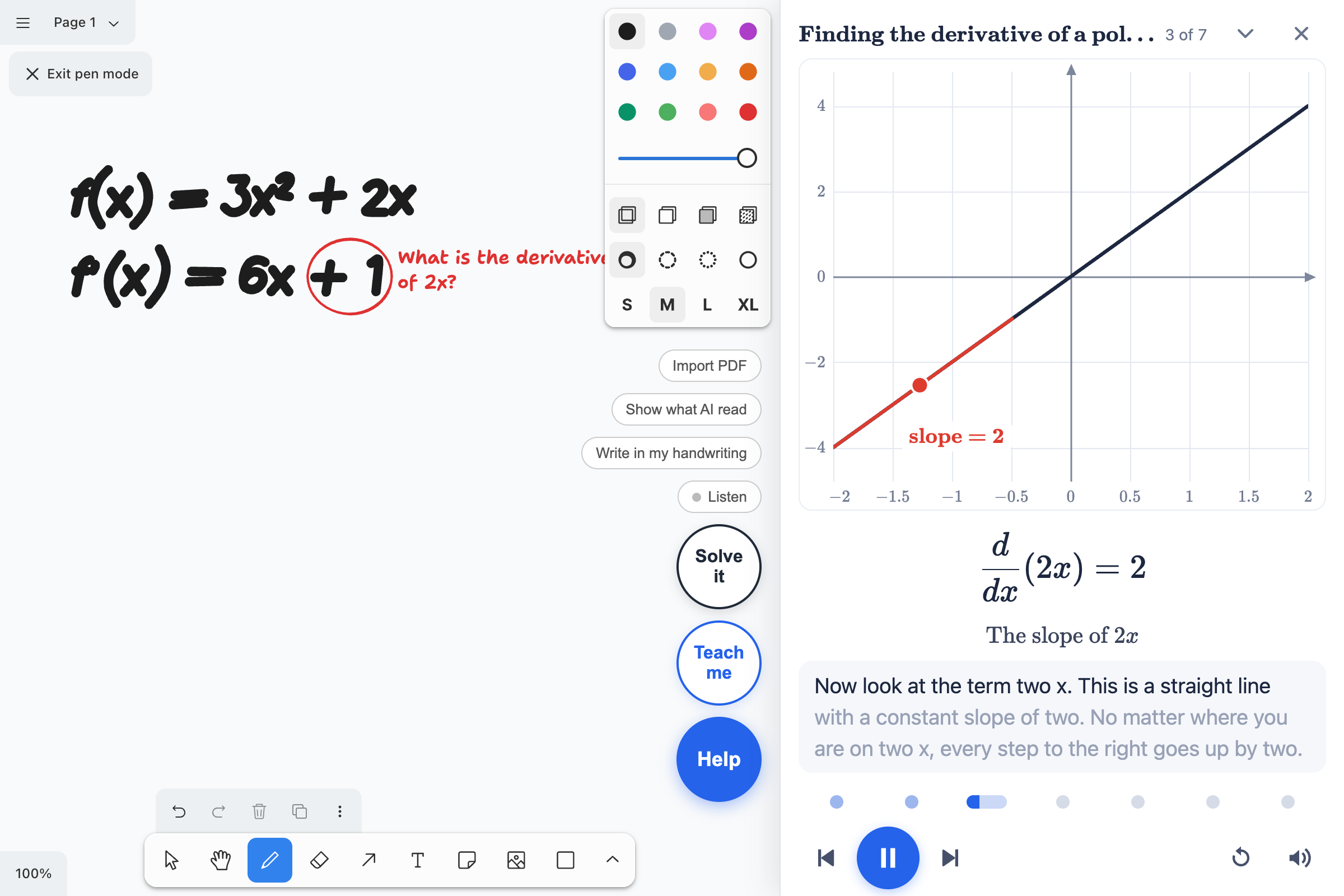
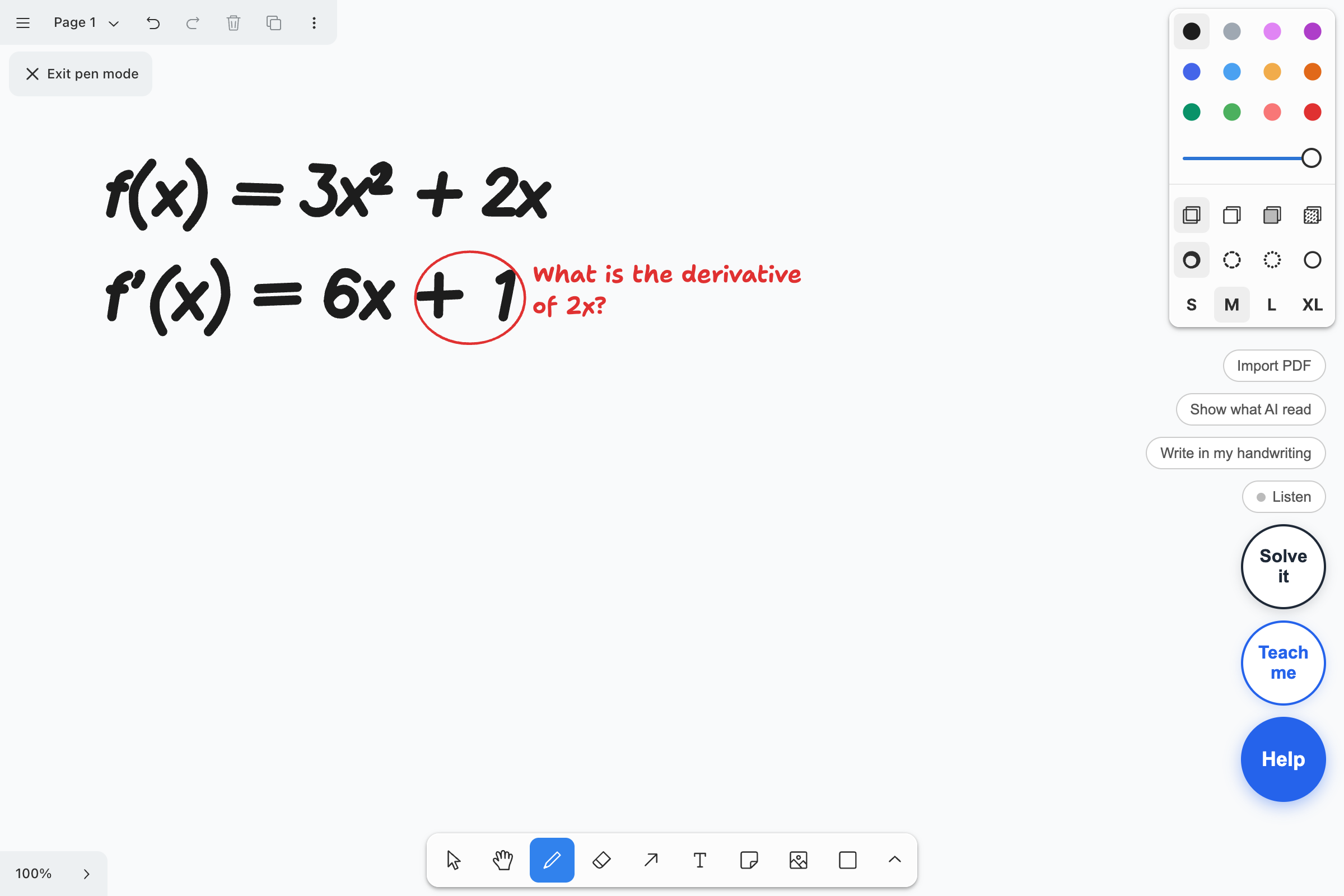
It catches the step where you went wrong. Say you write \(f(x) = 3x^2 + 2x\) and then \(f'(x) = 6x + 1\). A few seconds after you stop writing, Socra circles the \(+1\) in red and asks, "What is the derivative of \(2x\)?" It doesn't tell you the answer. Fix the line and the circle goes away.
Help, when you ask for it. Tap Help and you get a hint about the idea. If you're still stuck, the next one is more specific, and the one after that works a step with you.
Teach me. This is the one we're proudest of. Tap it and you get a short lesson about the exact thing you got wrong, with a voice explaining it and a graph that moves while it talks. When it's done it gives you a new problem to try, and tells you when you've got it.
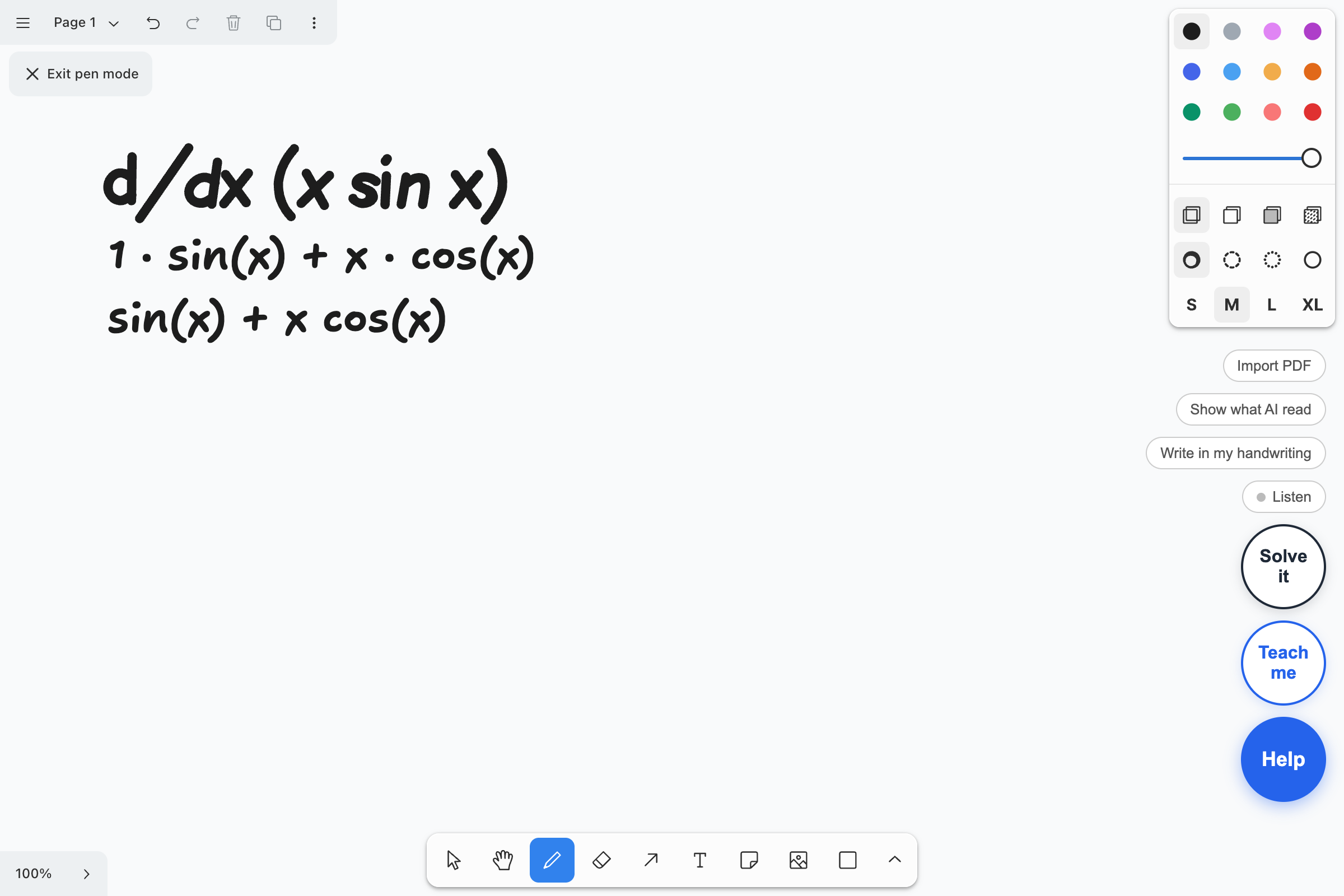
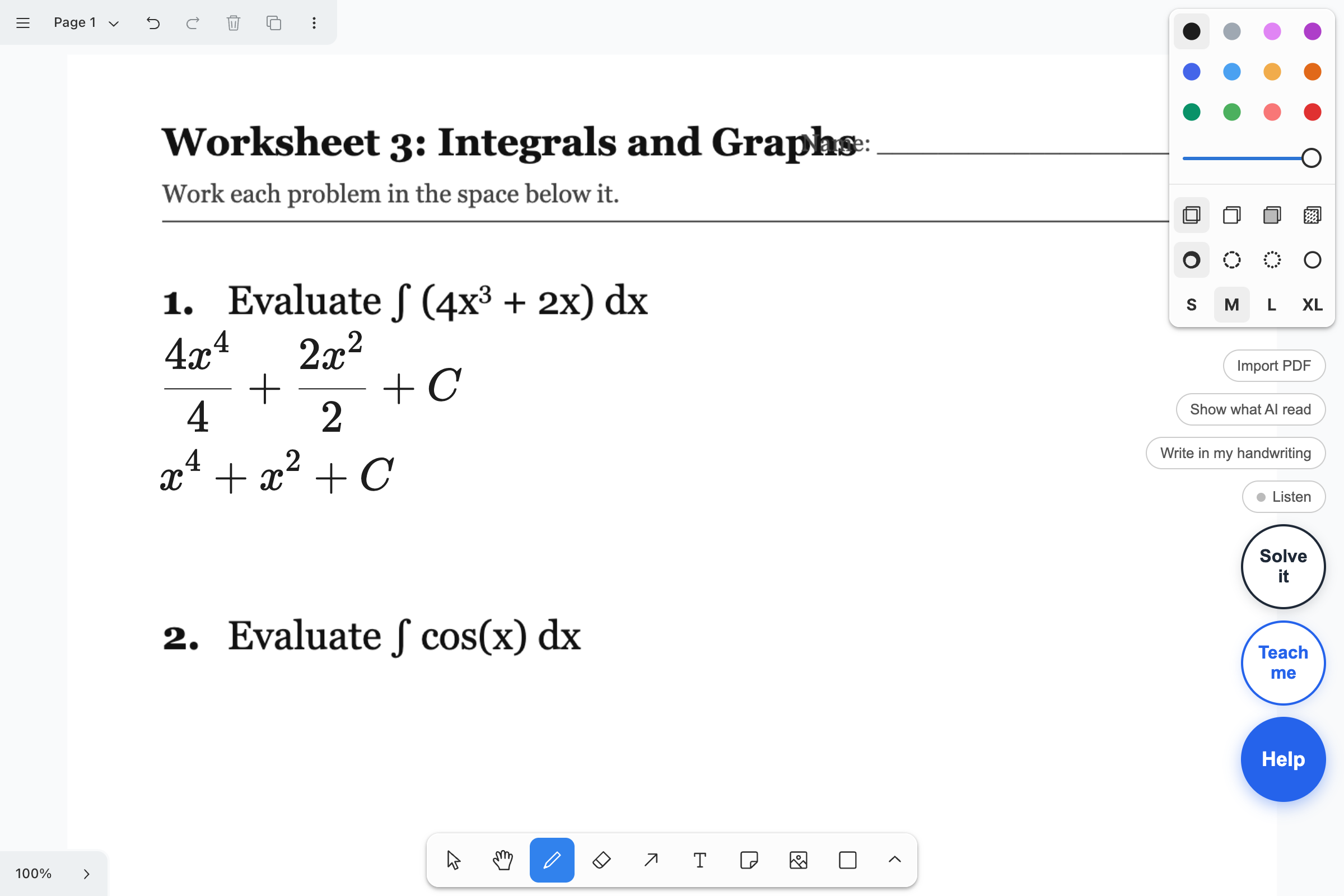
Solve it. Sometimes you just need to see the whole thing. This writes out every step under your own line, in real math notation with proper fractions.
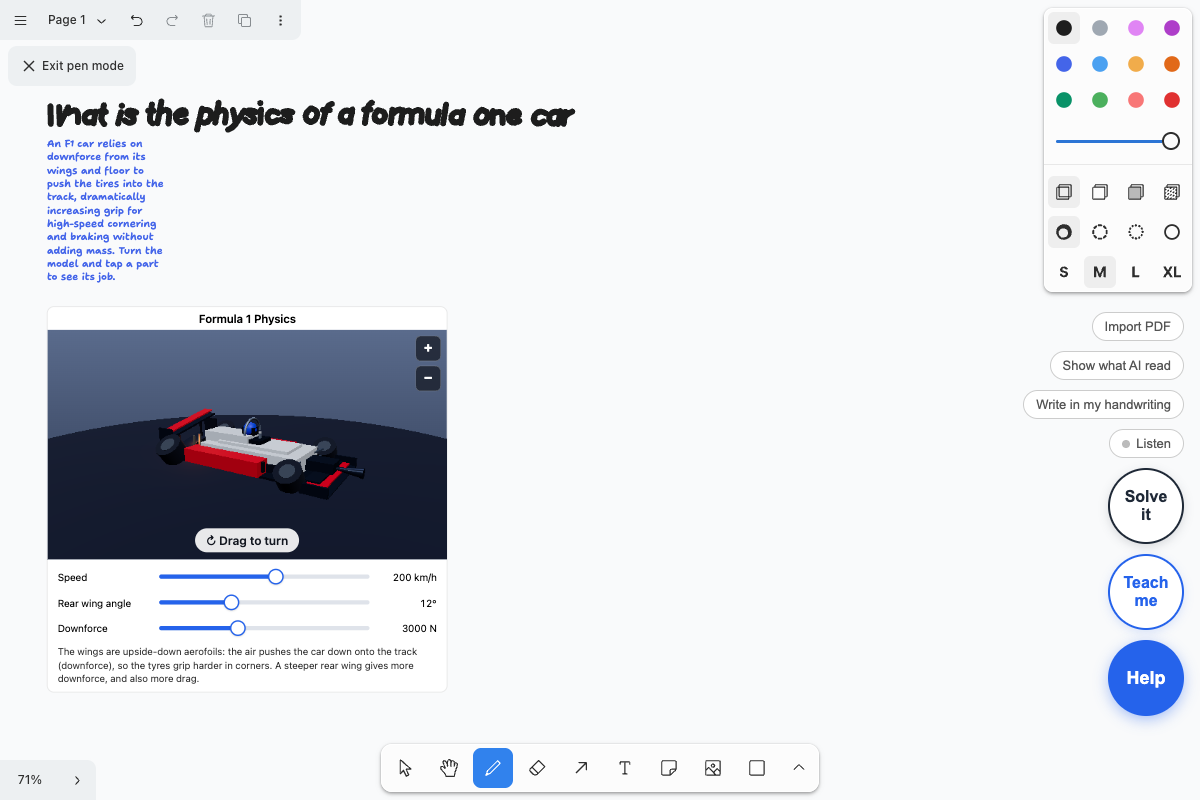
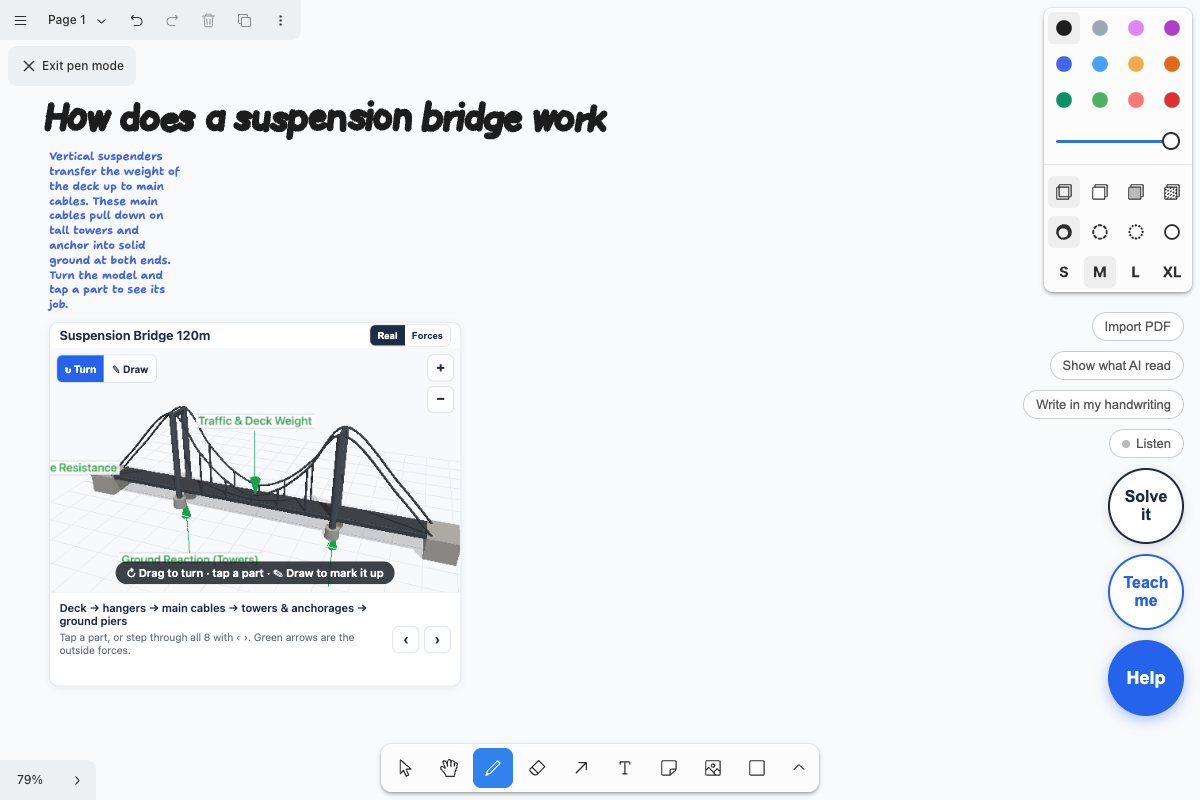
Talk to it. Hold Help and ask out loud. We tried "make me a problem about Formula One and walk me through it," then "give me a 3D model for this," and it kept up, because it remembers what you were just talking about.
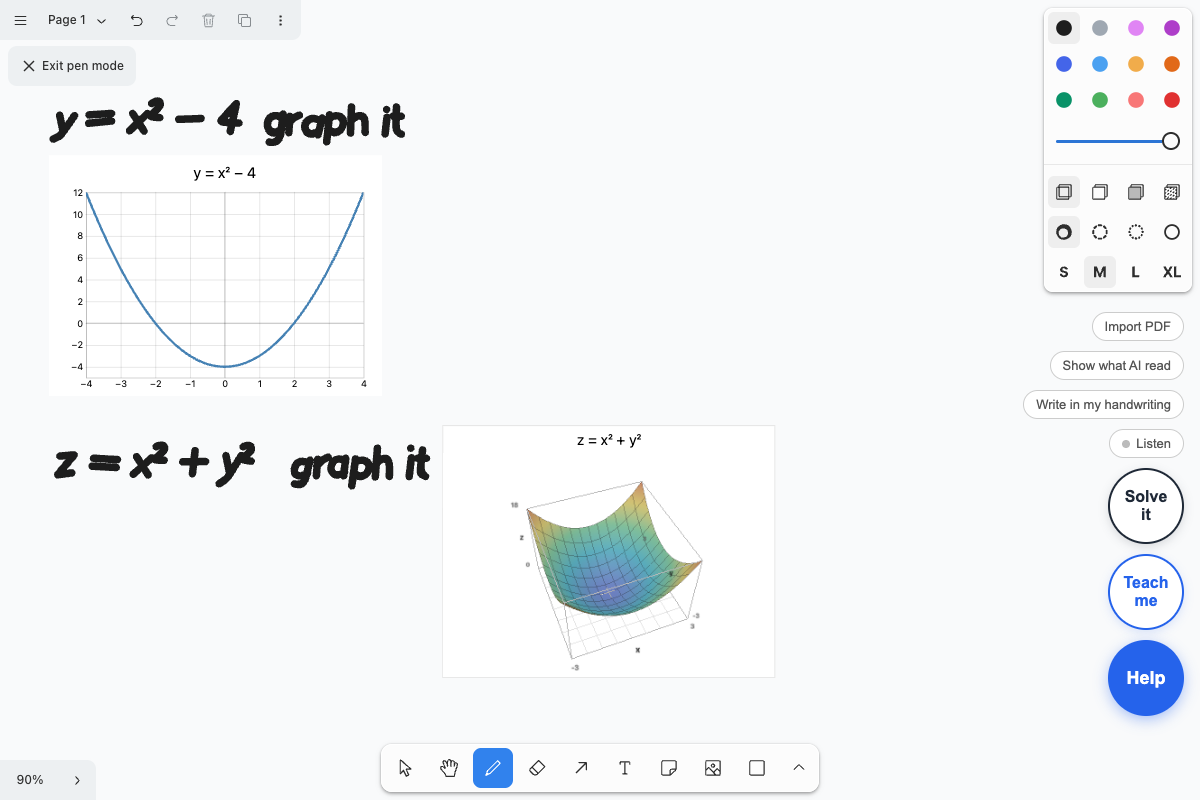
Graphs and 3D. Write "graph it" next to an equation and you get the graph. Write \(z = x^2 + y^2\) and you get a surface you can spin with your finger.
Your real homework. Import the PDF your professor posted, circle a problem, and ask for help on that one.
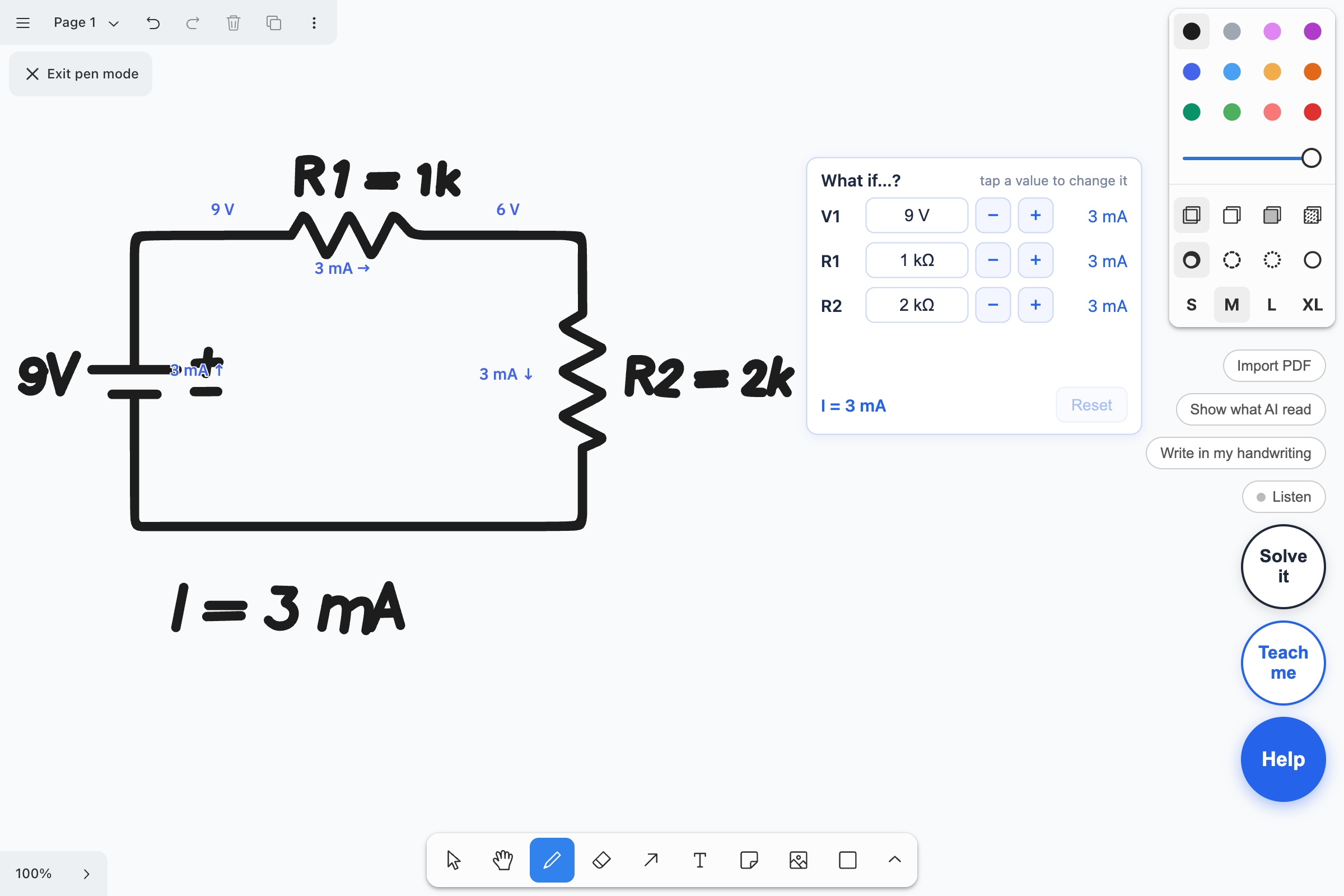
Engineering too. Draw a circuit by hand and write your answer. Socra solves the circuit to check you, then labels the voltages and currents right on your drawing. There's a little card where you can change a resistor and watch every number update. It also checks units, checks free-body diagrams, and can pull up 3D models of things like an F1 car or a wind turbine that you can turn around.
How we built it
Every time you lift your pen, three things happen in a few seconds. A vision model reads your handwriting and maps every line to its place on the page. A reasoning agent works through your steps and has to prove a mistake with a symbolic math engine before it can circle anything. A speech model gives the tutor a voice.
The pipeline
1. Capture. The page doesn't send the whole notebook. It works out which strokes are new, grows a window around them to include the lines they belong to, and sends only that crop. If nothing has changed since the last check, nothing is sent at all.
2. Read (Gemini 3.5 Flash, vision + structured output). Gemini turns the image into structured lines. Each line comes back with the math in calculator syntax, its bounding box on the page, whether it's handwriting or printed text from a worksheet, and how it relates to the line above (a derivative of it, a simplification of it, the next step in solving it). Circuits and free-body diagrams come back as data too: a netlist of components, or a list of forces with angles.
3. Reason (Gemini 3.5 Flash, function calling). A second call gets those lines and a set of tools. It runs in a loop of up to five rounds, and it is forced to answer through function calls, never free text.
4. Guard. Before anything reaches the page, server code goes over what the model wants to draw and throws out anything that wasn't backed by a check.
5. Draw. The page places each mark where there's free space, measuring your ink and the printed text so it never writes on top of either.
How we know the math is right
We don't trust the model with math. It reads, it explains, and it decides what to check. The checking is done by deterministic code:
- A symbolic engine (SymPy). To verify a step, we parse both lines and test them symbolically: differentiate one and compare, differentiate an antiderivative and check it gives back the integrand, or solve both equations and compare the solution sets. If the symbolic test can't decide, it falls back to evaluating both sides at random points.
- A circuit solver. Circuits are solved by nodal analysis in code, from the netlist that was read off your drawing. The voltages and currents labelled on your sketch come from that solver, never from the model.
- A unit checker built on SymPy's unit system, and a force-balance checker that sums components and finds the direction of whatever force is missing.
Then the rules that make it stick:
- A red mark is only drawn if a checker returned "incorrect" for that step. If the model tries to mark something the checker didn't confirm, the server drops it.
- Worked solutions are checked a second time by the server, step against step. If one step doesn't follow, the solution is cut there and Socra says it couldn't verify the rest.
- Graphs are plotted in the browser from the formula, so a graph can't be "hallucinated." The model only names the expression.
- If the checker can't read a line, the answer is "unknown," and unknown never becomes a red mark.
The one place this doesn't reach is a problem Socra invents itself, like "make me a Formula One problem." There's nothing on the page to check against, so those steps lean on the model plus the calculations it runs through the solver.
The models
- Gemini 3.5 Flash for reading handwriting and diagrams, for the tutoring agent, for writing lessons, and for describing 3D models as structured JSON. Thinking is set to minimal to keep answers fast.
- Gemini text-to-speech for the voice, with four models chained (3.8 Flash Lite TTS, 3.8 Flash TTS, 3.1 Flash TTS, 2.5 Flash TTS). When one hits its daily request limit, the server skips it until it resets and uses the next.
Keeping it fast and cheap
- Prompt caching. The tutor's instructions are long and identical on every call, so Gemini bills the repeated part at its cached rate. In one full test run, about 28% of all input tokens were cached.
- Voice cache. Every spoken sentence is cached on the server, so replaying a lesson costs nothing. Lessons request audio two steps ahead of where you are, so a lesson you close early never pays for its second half.
- Hint prefetch. While you read a hint, the next one is already being fetched. If you're still stuck 18 seconds later, it appears with no wait.
- Models built once. A generated 3D model is built one time and stored in the notebook page.
- No model at all where code will do. Changing a resistor on the what-if card re-solves the circuit in about 0.4 seconds with no AI call. Graphs, 3D surfaces and the hand-built 3D models never touch the model either.
- Token accounting. The server records tokens per call and per check, which is how we know a check costs about 21,000 input tokens.
The stack
React and TypeScript on the front end, with tldraw for the canvas, KaTeX for typeset math, Three.js and React Three Fiber for 3D, and pdf.js for worksheets. Python and FastAPI on the server, deployed on Google Cloud Run. Firebase Hosting serves the app and Firestore saves each notebook.
We test with an automated student: a harness that opens the app in a browser, writes problems with real pen strokes, and checks what the tutor does against the live server across 17 scenarios, on top of 401 server tests and 525 front-end tests.
Challenges we ran into
Our own checker was wrong. Around midnight we asked it to solve \(\int (4x^3 + 2x)\,dx\). Gemini got it right. Then our math checker looked at the simplified line, decided it was supposed to be the integral of the line above it, and threw the whole solution out. All the student saw was "I could not check a full solution for this one." It took a while to figure out the AI was fine and the bug was ours.
We ran out of money. Three times. First we hit a spending cap in the middle of testing and everything went dead. We got that raised, and a couple of hours later the prepaid credit ran out. Then we found out the voice model only allows 100 requests a day, and one lesson was using eight. After that we added token counting so we could see where it was all going, made lessons load their audio a couple of steps ahead rather than all at once, and set up the voice to fall back to other models.
A full page of homework is too much. The first time one of us imported a real problem set and tapped Help, it sat there for 44 seconds and timed out. It was trying to read the entire page. Now it only sends the part you circled, and the same request comes back in under 3 seconds.
Safari kept killing the tab. With a worksheet, a lesson and a 3D graph open together, the iPad would crash the page. Then it would reload, restore the 3D graph, and crash again, forever. We cut how much memory the 3D views use, limited it to two running at once, and made restored ones wait for a tap.
Figuring out where to write. We did not expect this one. When the tutor has a note, a graph or five lines of working to put on the page, it has to find a spot that isn't on top of your handwriting or the printed problem. On a crowded worksheet that's really hard, and we rewrote it more than once.
Accomplishments that we're proud of
It works on real homework. One of us imported an actual controls problem set this morning, circled a Bode plot question, and got a real explanation and a graph back. That was the moment it stopped feeling like a demo.
You never leave the page. The thing we set out to kill was the screenshot, switch apps, paste, explain, switch back routine. In Socra, getting help is just pausing your pen, or tapping one button.
It reads messy handwriting. We wrote fast and sloppy on purpose, and it kept up, including exponents, fractions and integral signs.
A red mark means something. When Socra circles a step, a math engine has checked that step and found it wrong. We didn't want a tutor that sounds confident and is sometimes just guessing.
The lesson is about your mistake. Teach me doesn't play a generic video on derivatives. It builds a lesson around the line you got wrong, then hands you a new problem and tells you when you've nailed it.
The what-if card. Draw a circuit, get it right, then change a resistor and watch every voltage and current update in under half a second. No AI call happens for that part, which is why it's instant.
Machine Learning + Writing in your own handwriting created a whole machine learning model that accurately deciphers samples of handwriting and through series of pattern recognition and stroke modulation our model can replicate the users handwriting. Gemini locates every character in what you've written, and Socra lifts the actual pen strokes for each one into a personal letter bank. When it finishes a line for you, it replays your own strokes, scaled and spaced to match the line.
What we learned
Where the AI sits matters more than how smart it is. We used the same kind of model everyone already has in a chat tab. Putting it on the page, looking at your actual work, made it feel like a completely different thing.
Don't let the model grade. Early on we let Gemini decide whether a step was right. It was right most of the time, and that's the problem: a tutor that's wrong one time in twenty teaches you to stop trusting it. Once we made it call a real math checker before marking anything, the wrong marks went away.
Getting structured data back is what makes it drawable. A paragraph of explanation is easy to get. A circle on the exact term, a graph with the right window, or a lesson with a dot that moves along a curve all needed Gemini to answer in a format our code could draw from.
Test on the real thing. We had an automated test that wrote problems with fake pen strokes and it passed almost everything. Then one of us picked up the iPad and found five bugs in ten minutes. Real handwriting, a zoomed-out page, a finger on the wrong button: none of that shows up in a script.
Know what it costs before you run out. We had no idea one check was using about 21,000 tokens, most of it our own instructions being sent over and over, until the credit was gone. We should have been counting from the first hour.
Hints are harder than answers. Getting an AI to solve a problem is easy now. Getting it to hold back, say just enough, and leave the next step to you took most of our prompt work.
What's next for Socra
Fully hands-free. Right now you hold a button to talk. We've started on a mode where it just listens, so you can say "I'm stuck" mid-problem and it answers out loud. It needs more work on the iPad before we'd call it done.
It should know you. If you drop a negative sign every third problem, Socra should notice and build your practice around that. Today it only remembers the page you're on.
More subjects. The checking works for calculus, algebra, circuits, units and force diagrams. Chemistry, statics and proofs are next, and each one needs its own checker.
Faster. A check takes a few seconds, mostly because we send a lot of instructions every time. There's a lot of room to cut that down.
Better 3D. The models are simple right now. We want them to look like the real thing and react to the numbers in your problem.
Classrooms. A professor uploads the problem set once, and every student gets a tutor that already knows it. The professor sees where the whole class got stuck, without seeing anyone's answers handed to them.
Built With
- docker
- fastapi
- firebase
- firebase-hosting
- firestore
- function-plot
- gemini
- gemini-api
- google-cloud
- google-cloud-run
- html5
- katex
- math.js
- pdf.js
- python
- react
- react-three-fiber
- sympy
- three.js
- tldraw
- typescript
- vite

