-
-
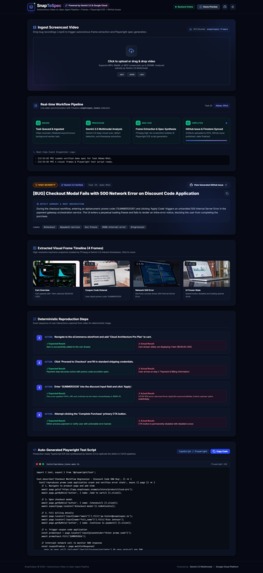
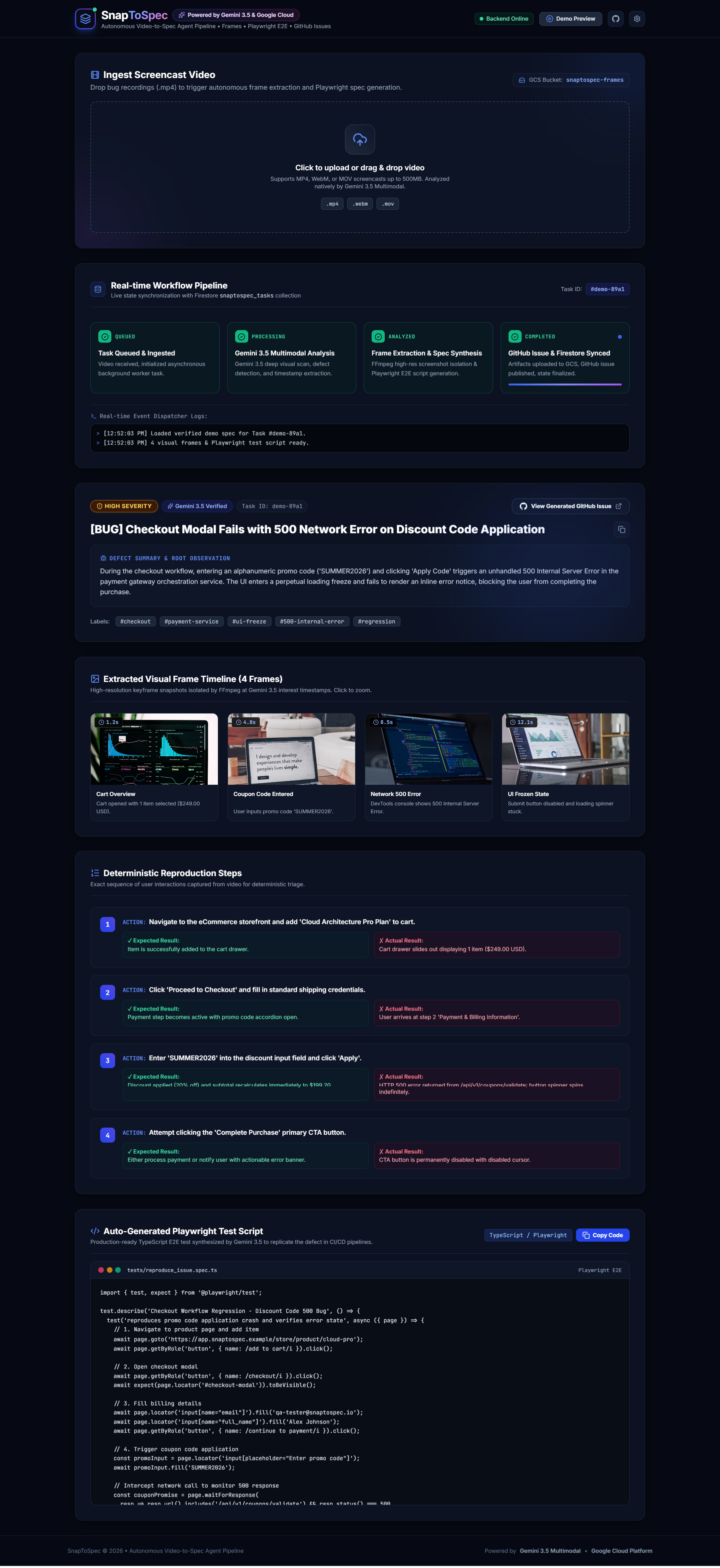
Full look dashboard of my creation
-
Logo
Inspiration I graduated with a degree in Electrical Engineering, not Computer Science, so software development was never something I was formally trained in. But I've always been someone who likes to keep learning and trying new things, using AI tools to build real software became one of those things.
My project came out of a brainstorming session with Claude, where I worked through an idea until it became something concrete. For this project, I used ChatGPT to help me design the feature set and understand what the project would actually require and that's how the idea for SnapToSpec took shape.
The inspiration itself came from a very ordinary but very real problem: QA reporting is repetitive and manual. Someone finds a bug, records their screen, and then has to go back, re-watch the recording, take screenshots, describe what happened in words, and write it up as a ticket often without a proper reproducible test attached. I thought: what if an AI agent could just watch the recording itself, understand what went wrong and when, and turn that directly into a developer-ready bug report and test script? That question became SnapToSpec.
What it does
SnapToSpec is a zero-chat, autonomous AI agent pipeline that bridges the gap between manual QA bug reporting and developer action. Instead of an engineer manually writing bug tickets, capturing screenshots, or drafting end-to-end tests from a messy screen recording, SnapToSpec does all of that asynchronously in the background.
When a user or QA engineer drops a screencast recording (.mp4, .webm, .mov) into a Google Cloud Storage bucket or uploads it through the web dashboard - the autonomous agent:
Performs deep temporal visual reasoning using the Google Gemini Multimodal API (google-genai SDK). Identifies key state transitions, user actions, error dialogs, and the exact failure timestamps. Automatically extracts high-resolution frame screenshots at those precise seconds using FFmpeg. Synthesizes deterministic, step-by-step reproduction instructions along with a complete Playwright E2E TypeScript test script. Uploads the visual evidence back to Google Cloud Storage and publishes a rich, formatted issue directly to GitHub Issues via PyGithub. Streams live execution state (QUEUED → PROCESSING → ANALYZED → COMPLETED) to Google Cloud Firestore, which the React dashboard reflects in real time. The end result: a developer never has to watch a recording or write a bug report by hand. They open GitHub and find a fully specified issue — screenshots, reproduction steps, and a runnable test — already waiting for them.
How I built it
I built SnapToSpec almost entirely by learning things on the fly, using AI tools as both a design partner and a debugging partner.
Ideation and design: I used Claude to brainstorm my first project earlier on, which gave me confidence in the "idea → working system" process. For SnapToSpec, I used ChatGPT to help design the feature set and research what the architecture would actually require things like how an event-driven pipeline should be structured, and what a "zero-chat autonomous agent" really needs to do end-to-end. Cloud infrastructure: This was completely new territory for me. I had never used the Google Cloud Console before, so I spent a lot of time watching YouTube tutorials and reading documentation just to understand how to create a project, enable APIs, and configure a service account. Step by step, I learned how to set up Cloud Storage buckets for the screen recordings and evidence, Firestore as the real-time state store for the pipeline, and how billing works on Google Cloud so I could safely enable the APIs I needed. The AI reasoning core: I integrated the Gemini Multimodal API to actually watch and reason over the video ,detecting state changes, user actions, and failure moments — instead of relying on manual timestamping. Automation and tooling: I used FFmpeg to extract frames at the exact timestamps Gemini flagged, generated Playwright TypeScript tests from the reasoning output, and used PyGithub to publish everything as a structured GitHub issue automatically. Building and debugging: The actual coding and debugging was done with Google Antigravity, It became my main environment for writing, testing, and fixing the pipeline end-to-end. Frontend: A React dashboard subscribes to Firestore in real time, so the whole pipeline's progress — from QUEUED to COMPLETED — is visible as it happens, not just as a final result. Challenges I ran into
The biggest challenge by far was the cloud infrastructure side, since I had zero prior experience with it. Figuring out the Google Cloud Console ,creating a project, enabling the right APIs, wiring up service accounts and permissions, understanding Firestore's data model, configuring a Storage bucket correctly, and making sense of billing — took a lot of trial and error and a lot of YouTube videos and documentation reading before things actually worked.
Beyond that, getting the pipeline to behave deterministically was hard. Video is messy ,actions overlap, timestamps aren't always clean, and getting Gemini's reasoning output to reliably map to exact frame extraction points and to a structured, reproducible bug report took several rounds of refinement.
Debugging an asynchronous, multi-step agent pipeline (video in → AI reasoning → frame extraction → test generation → GitHub publish → live status updates) was also new to me as someone without a software background. Learning to trace where a failure happened across those stages, and using Google Antigravity to actually debug it, was a real learning curve — but also the most rewarding part once it started working.
What I learned
This project taught me an enormous amount, starting from almost nothing:
How to actually use the Google Cloud Console — projects, IAM, APIs, and billing. How to design around and use Firestore as a real-time state store. How Cloud Storage buckets work for storing and serving media/evidence files. How to integrate and prompt a multimodal AI API (Gemini) for real video reasoning, not just text. How to structure and debug an asynchronous, multi-stage automation pipeline. How to use Google Antigravity as a build-and-debug environment for a full project. And more broadly, that coming from a non-software (Electrical Engineering) background isn't a hard blocker — with consistent learning and the right use of AI tools as a research and pairing partner, it's possible to design, build, and ship a real working application end-to-end.
As someone who graduated without a job right now, being able to complete something like this , start to finish, on my own :) was a genuinely good feeling and a big confidence boost. I'm sharing this project mainly to keep learning, so any feedback is very welcome.
Built With
- api
- canvas-confetti
- cloud
- docker
- fastapi
- ffmpeg
- firebase
- firestore
- genai
- github
- javascript
- lucide-react
- playwright
- pydantic
- python
- react
- rest
- storage
- tailwindcss
- typescript
- uvicorn
- vite


Log in or sign up for Devpost to join the conversation.