-
-
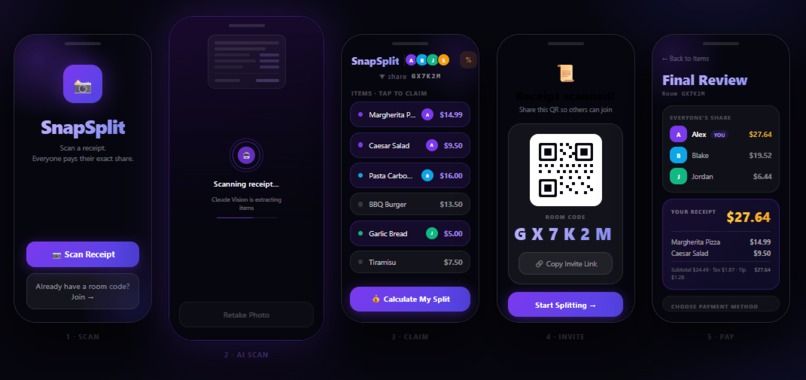
SnapSplit Wireframe

Inspiration
Splitting bills with a group always feels way more hassle than it needs to be. I remember this one time watching my roommate try to handle receipts on a trip with friends and family. She was jotting down every single thing people ordered, then figuring out who owed what, and later running around to collect the money. That whole process just dragged on, and it seemed full of mistakes, plus it stressed everyone out.
There are a few apps out there for splitting bills already, but a lot of them do not really work well for different situations. They miss things like letting people add stuff in real time together or making it simple to scan receipts instead of typing everything. It seems like they could be better.
We figured it was worth trying to build something ourselves that speeds things up and makes more sense. Kind of removes all that back and forth in group payments. I am not totally sure how easy that will be, but it feels like the right direction.
What it does
SnapSplit is a mobile-first PWA that makes splitting restaurant bills effortless and real-time.
Scan receipts: Snap a photo, and AI extracts items and prices instantly. Join a room: Use a 6-character code or QR code to start a shared session. Claim items: Tap what you ordered; everyone sees updates live. Automatic totals: Tax and tip are calculated fairly and proportionally. Quick payments: Generate one-tap Venmo, Cash App, or PayPal links with exact amounts.
No more manual math, spreadsheets, or awkward follow-ups
How we built it
The frontend of the system is designed to be a mobile-first PWA using React, Vue, and HTML/CSS. The frontend will interact with the backend using REST APIs and WebSocket's to provide a real-time experience. The backend of the system will be designed using Python 3.12 and Fast API. The Gemini API will also be utilized to provide an AI-driven receipt processing experience. This design will enable SnapSplit to behave like a shared, real-time ledger, ensuring that all users have a shared and consistent view of the bill and can settle it easily.
Challenges we ran into
- We ran into an issue with the Gemini API integration: Our public was pushed to GitHub, so we located the code where it was present and implemented a .env file and added to our .gitignore file so credentials stay safe.
- We ran into issues with the UI since Claude Code coded average UI but we wanted to keep it clean and simple, so we prompt Claude simplify each section of each page, using bigger button and eliminating options, so the app's easy to use.
- Difference between Android, IOS and PC Our UI was rendering differently on different platforms for we tested all pages on all platforms and coded such that pages rendered the same everywhere
- Integrating EC2 Instance with HTTP/S on multiple platforms. EC2 instance was not a secure protocol so we found a way to purchase a domain name for free and get our SSL certificate that way.
Accomplishments that we're proud of
It took us 3 hours to come up with an idea for hackathon, but once we identified the idea, we created a prototype quickly. Our website works on the platform It was initially planned as a mobile app, but we turn it into a progressive web-app to ensure easy platform compatibility
What we learned
Agentic AI development, Secure API keys, Gemini API usage, Creating system prompt for consistent AI output, User-experience design,
Built With
- amazon-web-services
- ec2
- fastapi
- gemini
- python
- react
- tailwindcss
- vite
- vue
- websocket