Inspiration
We realized screenshots are the digital equivalent of sticky notes. We capture them for a reason, but later they become impossible to find because every file is named Screenshot (431).png. Searching becomes memory-based instead of searchable. We wanted screenshots to behave like documents: readable, meaningful, and self-organized.
What it does
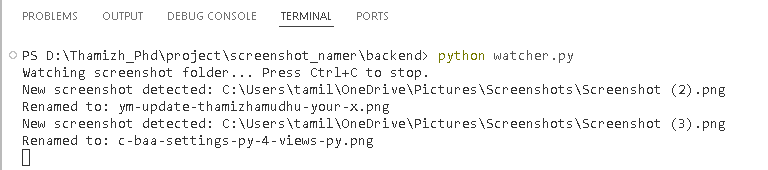
SnapSense automatically understands and renames screenshots the moment they are created.
Instead of timestamps, filenames describe intent:
Screenshot (124).png → python_missing_import_error.png Screenshot (125).png → upi_payment_success.png Screenshot (126).png → hackathon_rules_deadline.png
It reads image content, detects context, and assigns a meaningful filename instantly. No upload. No manual sorting. The folder organizes itself in real time.
How we built it
Backend Intelligence
Django REST API processes screenshots
Tesseract OCR extracts text from images
Heuristic NLP scoring determines the most meaningful phrase
Context detection identifies screen types (documents, code, file explorer, etc.)
Automation Layer
Python Watchdog monitors the screenshots folder
New files are automatically sent to the backend
The system renames the file locally in seconds
Pipeline
Screenshot taken → detected → text extracted → context inferred → renamed instantly
Challenges we ran into
OCR returns noisy text, especially from file explorer tables
Many screenshots contain multiple lines with equal importance
Needed to distinguish UI data from meaningful content
Handling partially saved files during real-time detection
Designing logic that works without heavy AI models
We solved this by building a scoring algorithm that filters numeric noise and ranks meaningful human language.
Accomplishments that we're proud of
Real-time automatic renaming without user interaction
Context-aware naming instead of plain OCR dumping
Works entirely locally after setup
Turns screenshots into searchable knowledge instead of clutter
Reliable detection within ~2 seconds of capture
What we learned
Automation UX matters more than UI for productivity tools
Simple heuristics + good logic can outperform heavy AI for specific tasks
OCR alone is not intelligence; interpretation is the real challenge
Small daily frustrations are powerful innovation opportunities
What's next for SnapSense
Auto-sorting into folders (coding, payments, documents, etc.)
Search interface for screenshot history
Multilingual recognition
Mobile companion version
Learning user naming preferences over time

Log in or sign up for Devpost to join the conversation.