Inspiration
Every student has been here: you sit through a 2-hour lecture filling pages with notes, sketch a system architecture on a whiteboard, brainstorm on a napkin — and then that knowledge just sits there. Unstructured. Unsearchable. Disconnected from everything else you've learned.
Existing tools don't solve this. OCR apps give you raw garbled text. Note-taking apps require you to type everything from scratch. AI assistants need you to manually copy-paste content.
We wanted something different. An app that doesn't just digitize handwriting — it understands it. One that looks at your messy class notes and thinks: "These are study notes — let me generate flashcards and a quiz." One that sees a hand-drawn flowchart and redraws it professionally. One that connects your Monday scan to your Thursday scan and tells you something you didn't realize.
That's why we built SnapLearn — an intelligent content engine that transforms any handwritten content into structured, enriched, interactive documents.
What it does
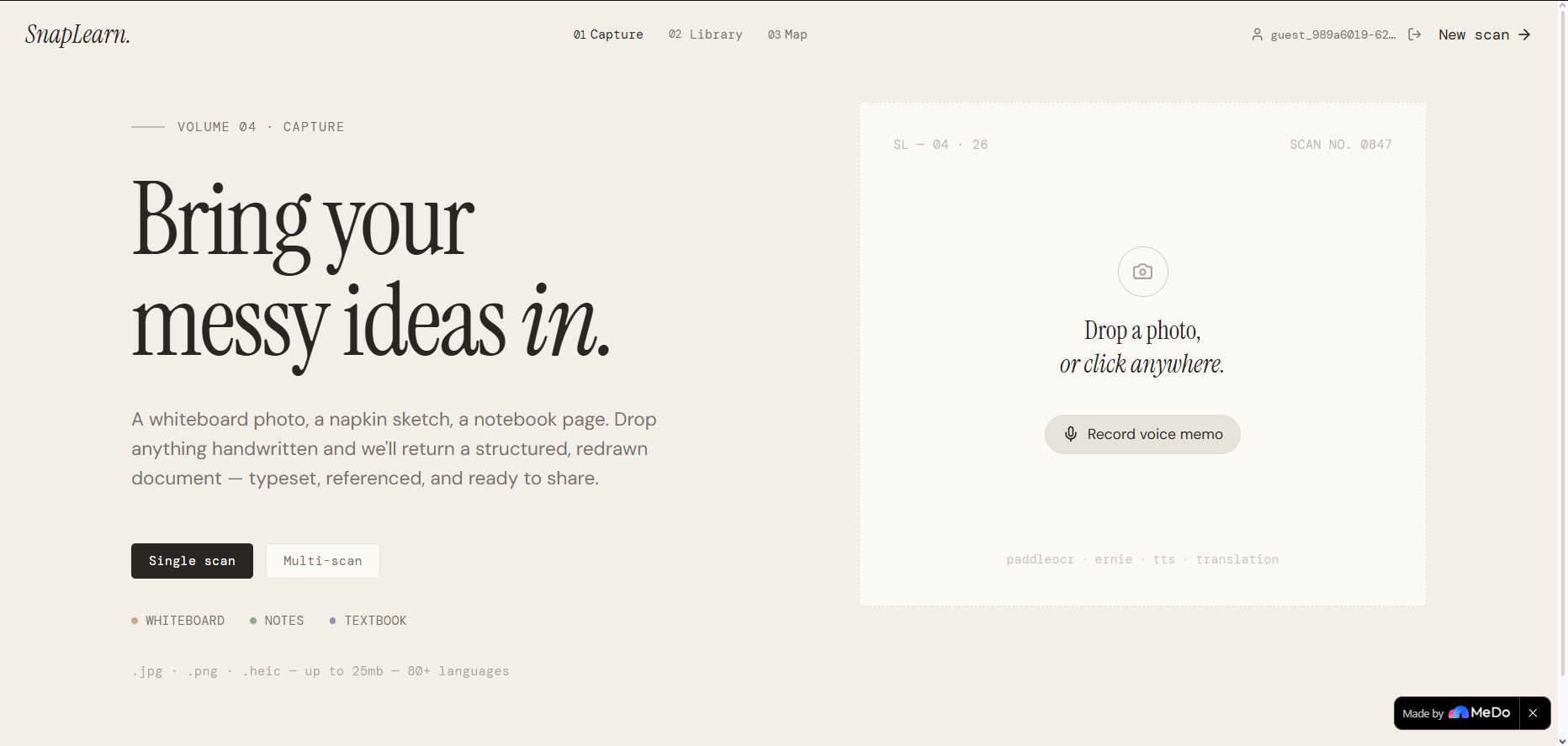
SnapLearn takes a photo of anything handwritten — class notes, whiteboards, code, diagrams, to-do lists, brainstorms, math, recipes — and transforms it through a multi-stage AI pipeline.
Smart Content Detection
The AI automatically classifies your scan into one of 13 content types and adapts the entire output:
| Content Type | What SnapLearn Generates |
|---|---|
| Class Notes | Flashcards with 3D flip animations + interactive quiz with scoring |
| Code | Syntax-highlighted code blocks preserving actual code |
| Meeting Notes | Extracted action items with owners and deadlines + email draft |
| Brainstorm | Mind map visualization + impact vs effort priority matrix |
| To-Do List | AI-prioritized interactive checklist with time estimates |
| Math/Science | Clean formula typesetting + step-by-step solutions + practice problems |
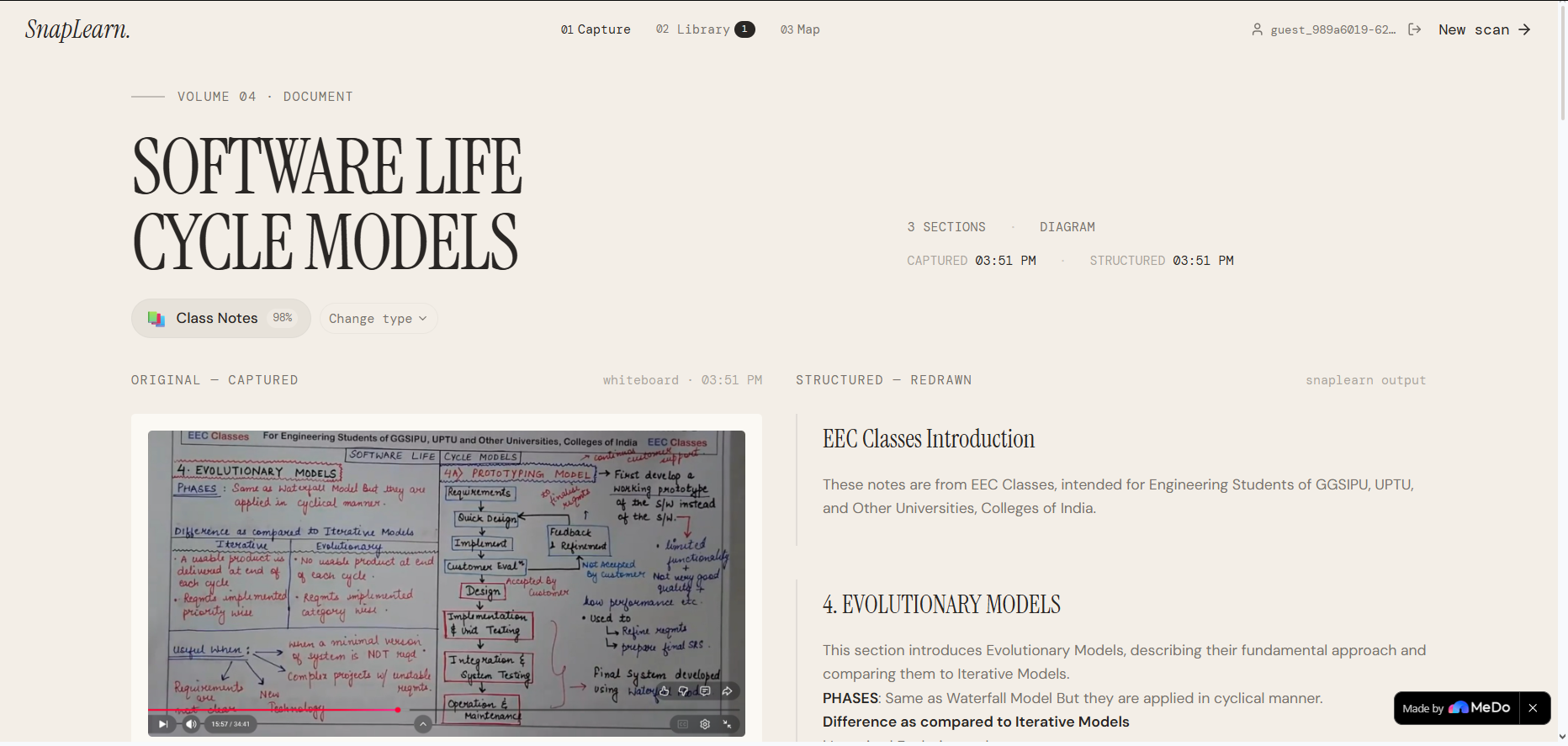
| Diagram | AI-redrawn flowchart (structured HTML + artistic AI image) |
Diagram Redraw
Hand-drawn flowcharts, mind maps, and architecture diagrams are detected and redrawn in two views:
- Structured view — clean HTML/CSS diagram with perfect, readable text labels
- Artistic view — AI-generated visual interpretation via Kling Image Generation (text-free to avoid garbling)
The before/after transformation — messy whiteboard sketch to professional diagram — is the core "wow" moment.
Multi-Scan Stitch
Upload 2-5 photos from the same meeting or study session. SnapLearn OCRs each one, then merges them into a single unified document with:
- Deduplication (same point on two boards → included once)
- Cross-references between boards
- Conflict detection ("Board 1 says launch in Q3, Board 4 says Q4")
- Consolidated action items with source tracking
Web Enrichment
Click "Enrich with web" and SnapLearn:
- Extracts key topics from your document
- Searches the web for each topic
- Scrapes full article content from the top results
- Merges definitions, examples, statistics, and expert context into your document
- Adds a glossary and further reading section
All web additions are marked with 🌐 so you can distinguish original vs enriched content. Download the enriched version as a Word document.
Remix Engine
Transform any scan into a different format with one click:
Blog post · Tweet thread · Email draft · Slack message · Simple summary · Study guide · Practice exam · Documentation · README.md
Each format has its own LLM prompt — tweets come out under 280 characters, emails have subject lines, blog posts have engaging intros.
One-Click Export
- PowerPoint — AI-optimized slides with titles, bullet keywords, generated visuals per slide, and speaker notes (via @PPT Generator, free)
- Word — formatted .docx with headings, code blocks, and cover page (via @Word, free)
- PDF — clean print-optimized export (via @PDF, free)
Interactive Flashcards
A dedicated study experience:
- 3D card flip animation (0.6s rotateY)
- Difficulty rating per card (Easy / Okay / Hard)
- Segmented progress bar with color coding
- Shuffle mode and "Hard cards only" filter
- Completion screen with confetti animation and mastery percentage
Interactive Quiz
- Multiple choice + true/false questions
- Green particle burst on correct answers, shake animation on wrong
- Explanation card slides up after each answer
- Animated circular score reveal counting from 0 to final score
- Detailed breakdown by difficulty level
- "Share score" for social proof
Knowledge Map
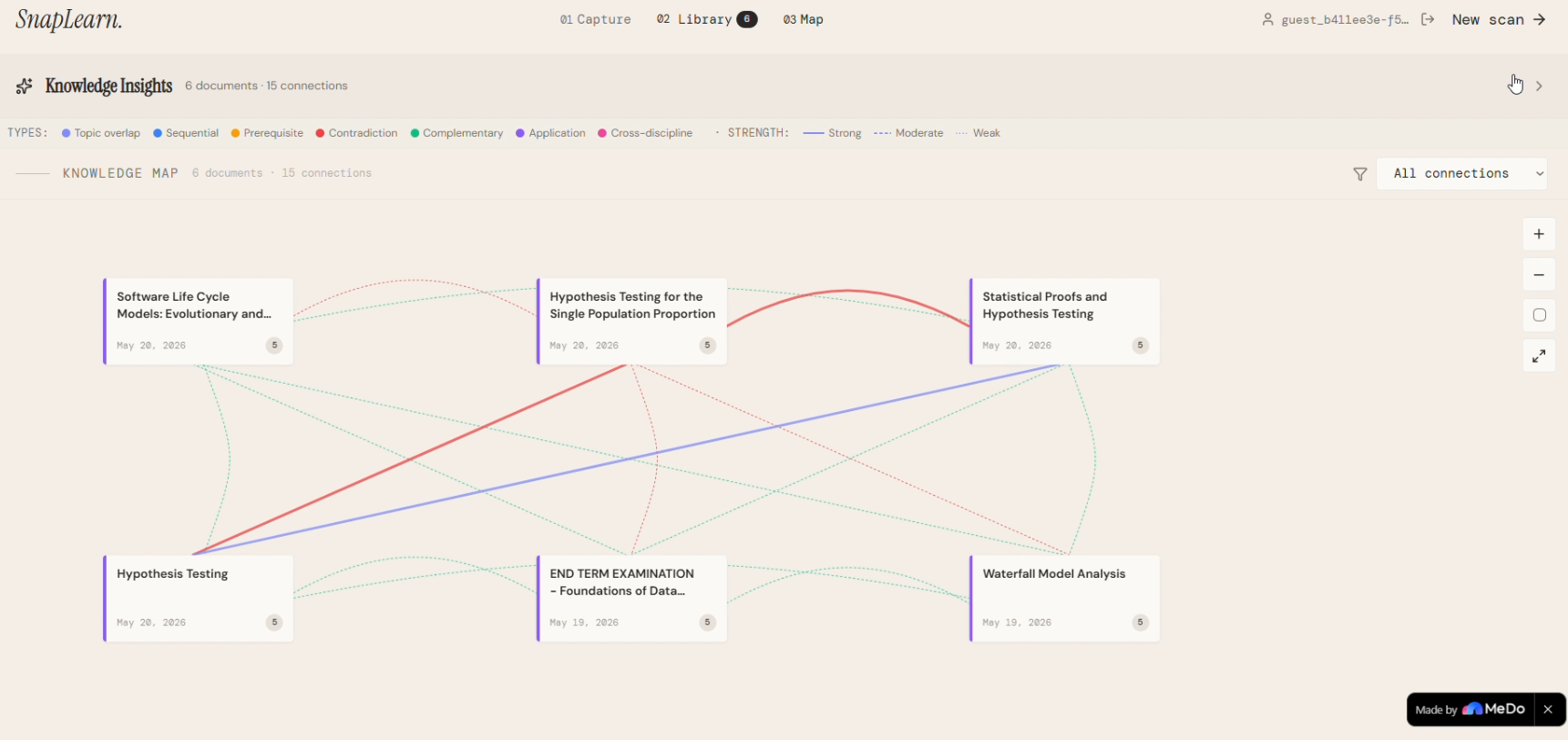
Every scan is saved to your personal library. The AI automatically finds 7 types of connections between your documents:
- Topic overlap — shared subjects
- Sequential — one continues from another
- Prerequisite — understanding one requires the other
- Contradiction — one updates or corrects another
- Complementary — together they give a fuller picture
- Application — theory in one, practice in another
- Cross-discipline — connections across different fields
Each connection includes an AI-generated insight — a new understanding that emerges from seeing both documents together, something neither document says alone.
The visual knowledge map displays documents as colored nodes in a grid layout with curved bezier connection lines. Global insights analyze your entire knowledge base: top areas, strongest clusters, knowledge gaps, and a suggested learning path.
User Authentication
Login system via @Login plugin — each user gets their own private library, knowledge map, and document history that persists across sessions.
How we built it
Design-First Approach
We started by designing the complete UI in Claude as an interactive React prototype — a warm editorial aesthetic with Instrument Serif headings, DM Sans body text, DM Mono for code, and a cream/paper color palette (#F4EFE7 backgrounds, #FBF8F2 cards).
We then screenshotted each state (upload, processing, result, chat) and fed them to MeDo alongside functional prompts. MeDo's screenshot-based editing matched our design while wiring up the plugin backend.
Multimodal AI Pipeline
Our breakthrough was skipping traditional OCR entirely. Instead of OCR → text cleanup → analysis, we send the uploaded image directly to ERNIE's multimodal LLM. It reads text, understands visual layout, detects diagrams, classifies content type, and structures the output — all in one step. This produces dramatically better results than OCR because the LLM understands context, not just characters.
12 MeDo Plugins in One Pipeline
Image Upload
    → Large Language Model (multimodal analysis + structuring)
    → Image Generation (diagram redraw + PPT visuals)
    → Text-to-Speech (read aloud)
    → Google Text Translation (multi-language)
    → Web Search + Webpage Content Extract (enrichment)
    → PPT Generator + Word + PDF (exports)
    → Login (authentication)
    → OCR (fallback)
    → Speech-to-Text (voice input)
Iterative MeDo Development
The app went through 47+ versions in MeDo. Each feature was added through multi-turn conversations — describe the feature, review the output, refine with follow-up prompts. The visual editor handled small styling fixes without burning credits.
Backend
Supabase Edge Functions orchestrate the AI pipeline — multimodal analysis, diagram detection, chat routing, connection analysis, and web enrichment. The database stores documents, flashcards, quiz results, chat history, connection graphs, and user data.
Challenges we ran into
The Diagram Problem
This was the hardest challenge. Our first approach used Mermaid.js — but the LLM kept generating invalid syntax, causing render failures. Our second approach used AI image generation — but Kling garbled all the text labels ("Research" became "Pritorint").
The solution: A hybrid approach. HTML/CSS diagrams for the structured view (styled divs are bulletproof — no parsing, no library, no syntax errors), plus text-free AI-generated images for the artistic view. Two complementary approaches that cover each other's weaknesses.
OCR Quality
Our initial OCR pipeline produced garbled text — English mixed with random Cyrillic characters, broken words, missing spaces. The breakthrough was switching to multimodal LLM analysis (sending images directly to ERNIE), which understands context instead of just recognizing individual characters.
The Paraphrasing Problem
The LLM kept converting everything into generic prose paragraphs. Handwritten SQL code became "Create a table named VIPs with seven specified attributes" instead of actual CREATE TABLE syntax. It took extensive prompt engineering to get the rule: "Output the cleaned version of what was written — not a book report about it." Code stays as code. Lists stay as lists. Diagrams become diagrams.
Knowledge Map Layout
Early versions had a spaghetti problem — connection lines crossing everywhere, labels overlapping, visual chaos. The fix was switching from force-directed to structured grid layout with curved bezier connections and labels shown only on hover.
Credit Management
With limited MeDo credits, every generation mattered. We learned to use the visual editor for small CSS fixes and save prompt-based regeneration for functional changes.
Accomplishments that we're proud of
🏆 12 MeDo plugins working together in one coherent pipeline — we believe this is the deepest plugin integration in the hackathon
🏆 Multimodal AI pipeline that skips traditional OCR — sending images directly to the LLM was a breakthrough that dramatically improved output quality
🏆 Smart content detection that adapts the entire UI — the app feels different for class notes vs code vs meeting notes, without the user configuring anything
🏆 The before/after diagram transformation — messy hand-drawn whiteboard sketch to clean professional flowchart in seconds. This single feature makes people stop and say "wait, it does THAT?"
🏆 Interactive flashcards and quiz with real animations — 3D card flips, confetti on completion, animated score reveals. It doesn't feel like a hackathon prototype — it feels like a shipped product
🏆 Multi-scan stitch with conflict detection — upload 4 messy board photos, get one merged document that catches contradictions between boards. Nobody else in the competition does this.
🏆 Knowledge map with AI-generated insights — the AI doesn't just find connections, it tells you something new: "Your SQL exercises could build the actual tables for this project — the column types already match."
🏆 47+ iterations from concept to deployed product, entirely through MeDo's conversational development
What we learned
Multimodal AI > traditional OCR for handwritten content. The LLM's contextual understanding produces dramatically better results than character-by-character recognition. This will be the standard approach within a year.
Prompt engineering is the real development in no-code AI apps. The same LLM call produces wildly different quality depending on how you instruct it. The difference between "analyze this text" and a 200-word system prompt with examples, rules, and output format is the difference between a demo and a product.
Adaptive output is what makes AI feel intelligent. When the app detects "these are class notes" and automatically shows flashcards — without the user asking — that's the moment it stops feeling like a tool and starts feeling like it understands you.
Screenshot-based design in MeDo is powerful. Designing the UI in one tool and building the functionality in another gave us the best of both worlds — Claude's design quality with MeDo's plugin integration.
Plugin orchestration is MeDo's superpower. Chaining 12 plugins into a coherent pipeline — where OCR feeds into LLM feeds into Image Generation feeds into PPT Generator — was smoother than expected. Each plugin does one thing well; the magic is in the orchestration.
What's next for SnapLearn
- Real-time camera scanning — live preview that updates as you move the camera across a whiteboard, no need to take a photo
- Collaborative scanning — multiple people in the same meeting room scan different boards simultaneously, AI merges everything in real-time
- Video explainer generation — scan notes, get a short animated explainer video of the concept using Kling Video Generation
- Spaced repetition system — long-term flashcard scheduling based on forgetting curves, turning SnapLearn into a complete study tool
- Integration with Google Classroom, Notion, and Slack — automatic export of scanned documents to the tools students and teams already use
- Handwriting style learning — the more you use SnapLearn, the better it understands YOUR specific handwriting
Built With
- baidu-ai
- ernie
- google-text-translation
- image-generation
- kling-ai
- large-language-model
- medo
- mermaid.js
- multimodal-ai
- no-code
- paddleocr
- ppt-generator
- react
- speech-to-text
- supabase
- tailwind-css
- text-to-speech
- typescript
- web-search


Log in or sign up for Devpost to join the conversation.