-
-
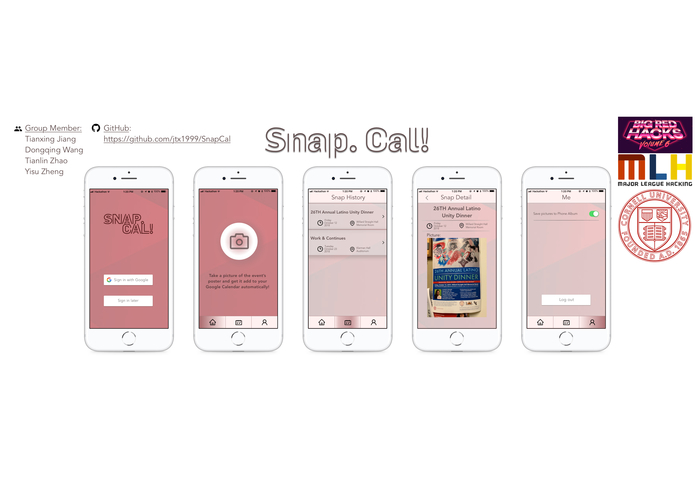
iPhone Mock up of SnapCal
Inspiration
Our inspiration came from our daily experience that when we are trying to record the events we saw from the posters, we need to type them manually into Google Calendar. And that’s a lot of work! We need to choose the date, choose the location, and choose the time. Imagine when you see ten interesting events’ poster on the same wall, that’s gonna take you about 15 minutes to record all the events. In order to save more time for busy^100000 college students, we decided to develop SnapCal, an app which helps you add events to Google Calendar with a simple snap!
What it does
With a simple snap, you can have the poster event saved to your calendar. As you take a picture of the event poster, SnapCal automatically detects the texts, identify the event title, dates and times. The correct event and location will be added to your Google calendar. You don’t need to input anything, and SnapCal will handle everything for you.
How we built it
We utilized the Google Cloud Vision API to extract texts from images. After that, we identify the title based on the position and size of texts. The date and time are matched out using patterns. The texts are also compared with a building list, and then sorted by the Google Maps API.
Challenges we ran into
Filtering the date and time is a challenging task, since there are so many formats.
Accomplishments that we're proud of
For now the application successfully detects location in Cornell University at an accuracy of approximately 80%. For each picture of poster that we test against the application, date and time for corresponding events despite the fact that texts and images vary in form, shape and color for each poster test. We also successfully create corresponding event in user’s Google Calendar with efficiency. The operations required is easily-understood and within click.
What we learned
- Applying Google API, IBM API, etc.
- Basic text matching algorithm
- Data extraction from free-form text
- UI interface design knowledge
What's next for SnapCal
- Improve information detecting accuracy, especially location matching to enlarge the scope of usage for the app from Cornell Campus to any valid location.
- Implement actual app interface for SnapCal in order to provide valid using channel for user.
iOS app mock-up

This is the log-in page where users can log-in to their Google account, or can try this app straight with "Log in later". But if they want to create an event on Google Calendar, they have to log in.

This is the Home page where users can starting taking picture of the poster with a single click of the camera icon.

On the Snap History page, users can check the history of the events they recorded in a list.


On the Snap Detail page, users can see the details of the event and can access the event's poster photo they've taken.

On the Me page, users can log out or set up the photo saving preference.
Built With
- google-cloud-vision
- google-maps
- kivy
- python


Log in or sign up for Devpost to join the conversation.