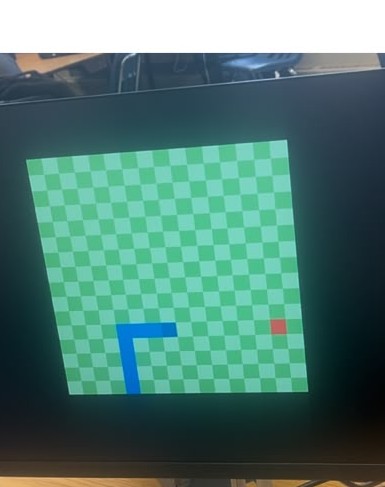
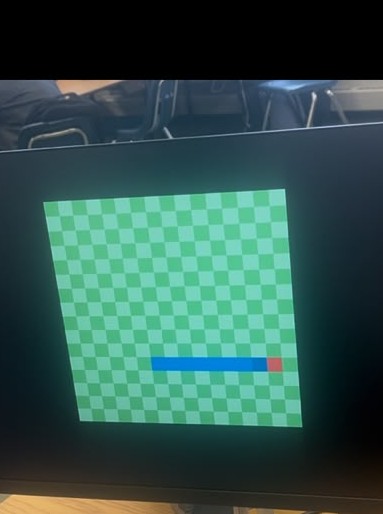
Snake Game on DE-10 Board with VGA Display
Introduction
The snake game consists of an ever growing snake on the game board such that it doesn't bite itself and doesn't cross the boundaries of the game board. The apple is a randomly placed object upon the gameboard, which increments the length of the snake by 1 square upon being eaten by the snake along with increasing the user's score.
The team thought it would be best to use a 16 × 16 game board for simulating 'snake' over the VGA monitor. The code utilizes a series of multiple combinational and sequential logic constructs to create the snake's body (by storing the previous positions), updating score, producing random apples, etc. which will be discussed in Part 3 of this document.
The game can be played with the four push buttons on the DE-10 board which all associate to four directions: left, up, right, and down. One switch turns on the VGA and another starts the game.
Implementation Logic and Code
The DE-10 board's clock runs at 50 MHz, which was implemented to make a slow clock that provides a pulse at a frequency of 5 Hz (once every 0.2 seconds).
This game contains a multidimensional vector reg[3:0] matrix [0:15][0:15] that consists of the gameboard's pixels on which the snake's body and apple will be simulated. Each pixel in the square will store a colour state which will be associated with an RGB value.
The program also contains reg [10:0] snake[0:50] and reg [10:0] oldsnake[0:50] that keeps a record of which pixel stores the snake's body (its x and y coordinates in [10:7] and [6:3]) in the matrix, direction in [2:1] and death state in [0]th bit.
Snake Death Logic
In the Verilog code (lines 306–362), when the snake dies:
The HDL specifies the corners on the board (in its coordinates) to detect whether the snake went across the board's boundary or the reset switch has been pressed. In either case, the subsequent cycle of slowedclk will run a for loop over the snake's body to clear its RGB colours and reset the score to 0.
Snake Update Logic
In the Verilog code (lines 364–407):
This code gets executed in cases where the snake is alive and requires an update after every 0.2 seconds. Firstly, snake stores its current data (position, colour, and deadState), which will be transferred to oldsnake, followed by the shifting of the snake's bits towards the right (as a shift register, with the loss of the last pixel depicting the snake's tail). Then the snake acquires its [0]th bit according to the user's specified direction, which becomes the snake's head.
Random Apple Generation
In order for random apple generation to be truly random from the game itself is a challenging task to be implemented. It was achieved in our code by using the 50 MHz clock on the DE-10 board and the randomness of user input. The counter of the clock produces a rapidly changing value. The value of the counter at that specific time that the user interacts with the inputs is used to create X and Y coordinates for the apple. This value is then altered (by selecting 8 bits) to make it so that the apple only appears in the board part of the VGA display.
The discussed code above is linked in Appendix A.
User Interactions and Key Features
Snake is a game played on a 16×16 board. The player controls the snake using the 4 push buttons to make it move up, down, left, and right to eat apples that spawn at random locations. Each apple the snake eats increases its length by one block and increases the score by 1. The player wins by reaching 50 points and loses if the snake runs into a wall or any part of its own body.
Module Overview
The Snake Game code has the main module Project and the submodule snake_game_functionality. Below is an overview of inputs and outputs for both modules.
Project Inputs
clk— Internal clock with a 50 MHz frequency from the boardup, down, left, right— Player inputs that control the snake. From left to right, the 4 push buttons represent left, up, right, down.reseter— Game reset switch, resets the score and snake length. SW3 is the reset switch.
Project Outputs
SSD0, SSD1, SSD3— Each outputs to a seven-segment LED display for the scoreboard. The 3 rightmost 7-segment LED displays make up the scoreboard.
snake_game_functionality Inputs
direction— 2-bit input that represents the current direction of the snake (00 = up, 01 = down, 10 = left, 11 = right)slowedclk— Slowed clock that determines how fast the snake movesreseter— Same asreseterin the project module. Resets the score to zero and resets the snake back to its initial size and position.
snake_game_functionality Outputs
score— Current game score, 1 point for every apple eaten.
The exact pin assignments to the DE-10 board are linked in the appendix.
Future Developments
Although the Snake Game runs quite well using a VGA and the DE-10 board, a few improvements could still be made for better player experience:
- Displaying the score on the VGA: This could be achieved by creating a simulation on the empty areas of the VGA output by determining other coordinate values.
- Adding a "Game Over" screen: Displaying
GAME OVERwhen a player loses andYOU WINwhen a player hits 50 points. - Increasing difficulty: Making the game more challenging by increasing the speed of the snake as it grows. Tracking the player's past record to determine the speed of the snake such that it automatically increases with a rise in player capabilities.
- Better apple placement: Sometimes the apple generates on top of the snake.
- Better memory management: In a traditional snake game, the player only wins when the snake gets large enough to cover the whole board. Due to issues with Verilog's memory, having the snake length go up to 256 blocks produces too many registers for Quartus to handle. Another way will be to change the relevant position upon each clock cycle or using enhanced sequential logic by creating finite states that restricts the use of more memory.
- Better quality: Having more pixels can make the snake and apple look realistic instead of witnessing discrete movements.
Major Challenges
Some major challenges we faced were the hardware limitations of the DE-10 Board and the limitations of using a hardware description language. For our snake, we can only have a maximum length of 50 because of the DE-10's memory.
To implement the game visually on the VGA, we needed a way to display differing priorities of layers, since the snake and apple are the top layer, and the background is the bottom layer. To achieve this, a matrix had to be used since one can only assign a value of a register in a single always block. By using a matrix we were able to store the information for the display without setting it directly. Since Verilog does not let you pass matrices between modules, the entirety of the snake logic and VGA logic had to be in a single module.
Built With
- fpga
- verilog


Log in or sign up for Devpost to join the conversation.