Snagline Tenants report repairs the way people text: several problems in one message, no room named, half in Hindi, with the dangerous part halfway down. Snagline turns that message into separate, validated maintenance work orders a technician can act on. It also writes a reply asking the tenant for whatever is still missing.
It is a plain HTML/CSS/JS web app built on the Firebase AI Logic web SDK (firebase/ai) with hybrid inference. It uses Gemini Nano on the device in Chrome when available, and Gemini in the cloud otherwise. It also runs fully offline in demo mode with no account, key or network.
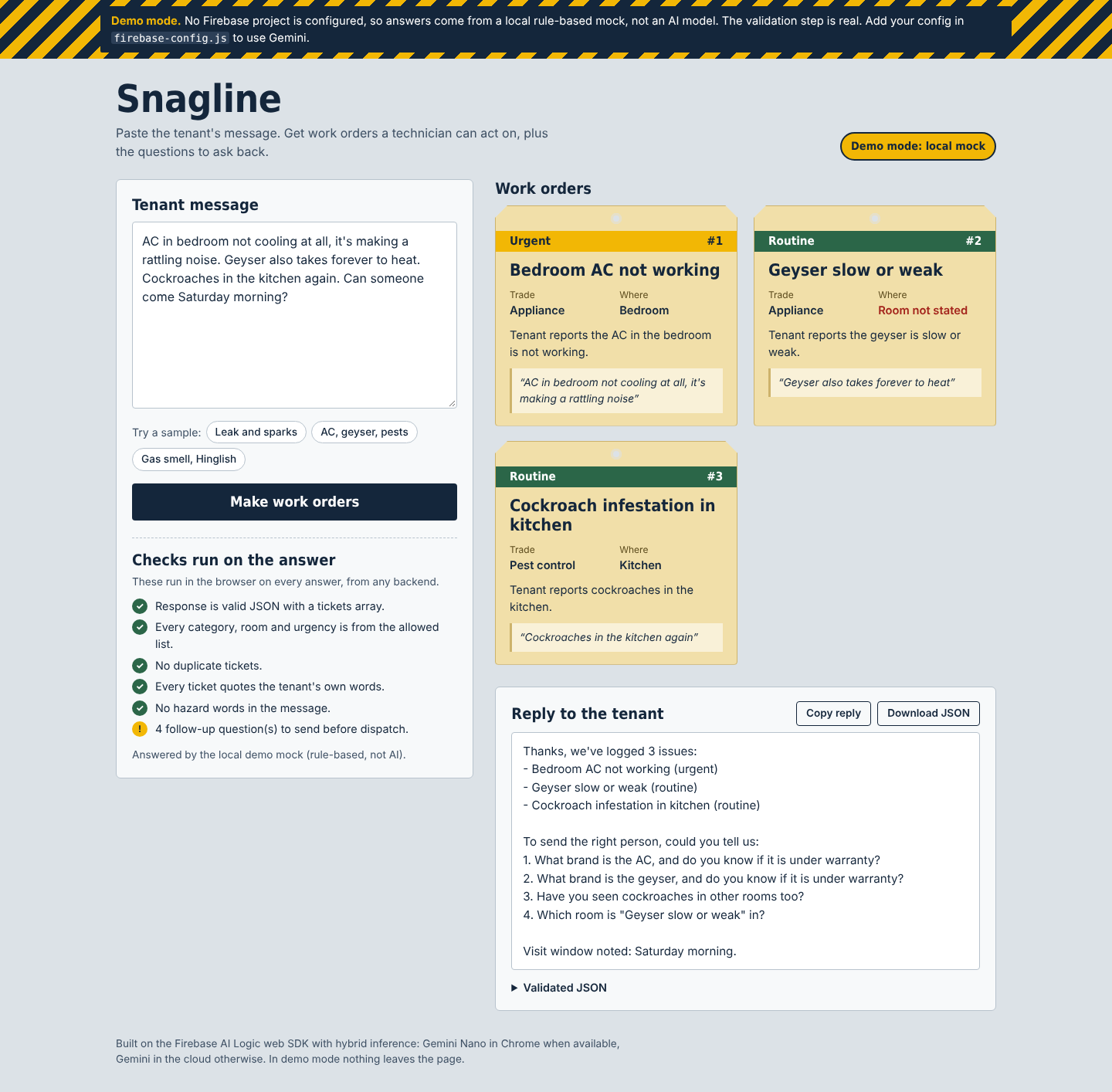
Snagline in offline demo mode
What it does You paste a tenant's message, or pick one of the three samples. The model returns JSON that has to match a response schema (src/schema.js). It contains one ticket per problem with a title, trade, room, urgency, description, an exact quote from the message, and safety flags. It also returns the visit window and follow-up questions. A deterministic validator (src/validate.js) runs in the browser on every answer, whichever backend produced it: JSON and enum check. It rejects non-JSON and normalises any trade, room or urgency that is not on the allowed list. Grounding check. Every ticket's evidence_quote must appear in the tenant's message. If it does not, the ticket is flagged for review, which catches invented issues. Safety escalation. Gas smell, sparks or shocks, smoke or a burning smell, and flooding force the ticket to emergency and attach "do this now" advice, even if the model rated it lower. De-duplication. Tickets with the same trade and room are merged, keeping the higher urgency. Completeness. If a room or the visit window is missing, a follow-up question is added. The UI shows the tickets as work-order tags ordered by urgency, the checks that ran, which backend answered, a copy-ready reply to the tenant, and the validated JSON (which you can download). Real vs simulated: read this first Part Status Firebase AI Logic integration (src/ai-client.js): getAI + GoogleAIBackend, getGenerativeModel with mode: prefer_on_device, inCloudParams.generationConfig (responseMimeType: "application/json", responseSchema), onDeviceParams.promptOptions.responseConstraint, initializeDeviceModel, generateContent, response.inferenceSource, App Check Real code, not yet run against a live project. It was checked against the type definitions of [email protected]. In a browser with a dummy config it loaded the SDK from gstatic and sent a real generateContent request to firebasevertexai.googleapis.com, which rejected the dummy key with 400 API key not valid, as expected. No successful Gemini response has been observed, because this repo ships without a Firebase project. Offline demo mode (src/mock-model.js) Simulated. This is a keyword-rule mock with the same generateContent() → response.text() shape. It is not AI. It handles the samples and similar wording well and misses unusual phrasing. The UI labels it with a hazard-tape banner, a "Demo mode: local mock" badge and "Answered by the local demo mock (rule-based, not AI)". Validator, safety escalation, grounding check, reply draft (src/validate.js) Real. The same code runs in both modes and is covered by tests. On-device Gemini Nano Real code path, not exercised here. It needs desktop Chrome with the Prompt API and the model downloaded. In headless Chromium the availability check never returned, so the app has a timeout fallback. After onDeviceTimeoutMs (15 s) it retries the same prompt with an only_in_cloud model. That fallback was observed working in a browser. Sample messages Written for this demo. No real people, addresses or data. Statistics and benchmarks None. The app makes no accuracy claims. Run it offline (no keys, no install) You need Node.js 20 or newer. ES modules do not load from file://, so serve the folder over HTTP:
npm start # zero-dependency static server: http://localhost:8080
or, without Node:
python3 -m http.server 8080 Open http://localhost:8080. The yellow-and-navy hazard-tape banner and the "Demo mode: local mock" badge confirm you are in offline demo mode.
Shortcut: http://localhost:8080/?sample=0 (or 1, 2) fills in a sample and runs it straight away. This only happens in demo mode, because in Firebase mode the model must be created after a user click.
Tests npm test # 18 tests, no install needed (1 is skipped until the SDK is installed) npm install # optional: installs firebase@^13 as a devDependency npm test # now also checks the params against the real firebase/ai SDK The tests cover the validator rules, determinism and shape of the mock, demo-mode routing with the shipped config, the Firebase call shape (using a recording fake of the SDK), the stalled-on-device → cloud fallback, and, once the SDK is installed, that the real getGenerativeModel accepts the params.
Switch to real Firebase AI Logic Everything is in firebase-config.js. While its values are placeholders the app stays in demo mode. Once they are real, it uses Firebase AI Logic.
Create a project. Go to the Firebase console and click Create a project. Google Analytics is not needed. Enable AI Logic. In the console, open AI Services → AI Logic and click Get started. Pick the Gemini Developer API provider, which does not need billing to start. The console enables the APIs and creates a Gemini API key on the server side. Do not put that Gemini key in this repo. Register a web app. Go to Project settings → Your apps → Add app → Web. Copy the firebaseConfig values into firebase-config.js. The web apiKey identifies the project and is meant to ship to browsers. Set up App Check. Firebase AI Logic requires App Check enforcement: In Google Cloud console → reCAPTCHA (Fraud Defense), create a Web key and list your Hosting domains (PROJECT_ID.web.app, PROJECT_ID.firebaseapp.com). Do not add localhost. In Firebase console → Security → App Check → Apps, register the web app with reCAPTCHA Enterprise using that key. Put the site key in appCheckSiteKey. For local development, set appCheckDebugToken: true, reload, and copy the debug token printed in the browser console. Register it under App Check → your app → ⋮ → Manage debug tokens. Set appCheckDebugToken back to false before deploying, and never commit a token string. Optional settings: inferenceMode: one of prefer_on_device (the default), only_on_device, prefer_in_cloud or only_in_cloud. cloudModel: gemini-3.5-flash-lite is the default hybrid cloud model in [email protected]. Check the models list for current names. Reload. The badge turns green and reads "Firebase AI Logic: prefer_on_device". After each run, the left panel says whether the answer came on this device or from the cloud (response.inferenceSource). On-device (Gemini Nano): this needs desktop Chrome with the built-in Prompt API. To try it locally, follow the "Set up Chrome and the Prompt API" steps in the hybrid inference guide. The model download can take several minutes, and the button shows the progress. If the on-device model is unavailable, prefer_on_device falls back to the cloud. Check that guide for whether end users currently need an origin-trial token.
Deploy to Firebase Hosting npm install -g firebase-tools firebase login cp .firebaserc.example .firebaserc # then put your project ID in it
(or: firebase use --add)
firebase deploy --only hosting firebase.json serves the repo root as static files, leaving out tests, scripts, docs and Markdown. The site is published at https://PROJECT_ID.web.app. If you deploy with the placeholder config, the live site runs in demo mode, which is still a working URL for judges but not AI.
Project layout
index.html UI shell
styles.css styles (no external fonts or assets; nothing loads from the network in demo mode)
firebase-config.js the one switch: placeholders = demo mode, real values = Firebase AI Logic
src/app.js UI wiring
src/ai-client.js backend choice + Firebase AI Logic hybrid model setup + cloud retry
src/schema.js response schema (built with firebase/ai Schema)
src/prompt.js prompt shared by every backend
src/mock-model.js OFFLINE DEMO MODE mock (rule-based, not AI)
src/validate.js deterministic validator + tenant reply draft
src/lexicon.js hazard / trade / room keyword lists (English + common Hinglish)
src/samples.js three sample messages
tests/ node:test suites
scripts/serve.mjs zero-dependency static server
firebase.json Hosting config
Privacy
In demo mode, nothing leaves the browser. In Firebase mode, the message is processed on the device when Gemini Nano is available, and sent to Gemini through Firebase AI Logic otherwise. The app has no analytics, cookies or tracking, and it does not store messages.
License Apache-2.0. See LICENSE.
Built With
- firebase
- firebase-ai-logic
- gemini-nano
