-
-
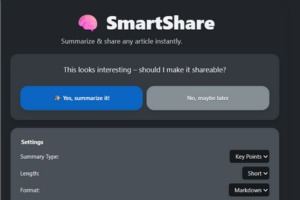
SmartShare UI
Inspiration
The idea for SmartShare began as a shared challenge during our internships. We both realized how vital social media platforms, particularly LinkedIn, are for building professional visibility and credibility. However, balancing demanding workloads and long commutes left us with little time to consistently create or share meaningful content.
At the same time, much of what we saw online felt repetitive and lacked authenticity. We wanted a way to share genuine insights without the tedious process of copying, summarizing, and rewriting content across platforms. SmartShare was inspired by this need, to make it easier for busy professionals to share real, thoughtful information seamlessly, while improving both productivity and personal branding.
What it does
SmartShare is a lightweight Chrome extension that summarizes online articles and transforms them into concise, social-media-ready posts. With one click, users get a short summary, key insights, and a direct link to share, making it easier to turn information into genuine conversation.
How we built it
We built SmartShare as a Chrome extension powered by the Chrome Side Panel API, Summarizer API, and JavaScript modules. The UI was crafted using HTML, CSS (with Open Props), and minimal, responsive styling for smooth user experience.
Our architecture is designed around a simple but smart workflow:
- The background script monitors webpage changes and injects lightweight scripts.
- When the user opens the extension, it fetches the current page’s content, cleans it up, and uses the browser’s on-device AI Summarizer to generate concise summaries.
- The side panel interface displays the summary, allows one-click LinkedIn sharing, and maintains a local history log of past summaries.
- The extension works entirely client-side, no external servers, ensuring privacy and speed.
Challenges we ran into
- Getting the Summarizer API to behave consistently across browsers and permissions.
- Handling edge cases where webpages block content scripts (like paywalled or ad-heavy sites).
- Avoiding “auto-summarization loops”, ensuring SmartShare only summarizes when the user explicitly interacts, not on every page load.
- Designing a clean, side-panel chat-like UI that feels intuitive and friendly within Chrome’s restricted layout environment.
Accomplishments that we're proud of
- Creating a seamless, human-like experience that feels conversational instead of mechanical.
- Building a tool that turns passive reading into active sharing, with zero friction.
- Achieving a full offline, privacy-first summarization flow using only browser-native capabilities.
- Making a polished UX that looks and feels like a professional productivity tool, despite being lightweight and built in just a few days.
What we learned
- How to leverage Chrome’s new Side Panel API effectively for modern extensions.
- The importance of managing state and session data to avoid unintended automation.
- How to blend AI capabilities into micro-interactions, making tech feel more personal and assistive.
- Collaboration taught us the value of iterating quickly, testing often, and balancing usability with functionality.
What's next for SmartShare
- Conversational AI mode , where SmartShare can generate captions, hashtags, or post tones (e.g., “make this sound more inspiring”).
- Multi-language summarization and translation support.
- Cloud sync for history, so users can access summaries across devices.
- Mobile integration , letting users summarize and share directly from their phones.
- AI-enhanced sharing suggestions like “Post this as a question” or “Turn this into a thought leadership post.”


Log in or sign up for Devpost to join the conversation.