SmartSchedule AI
Your plans change. Your schedule adapts.
Inspiration
Students often know what they need to get done but struggle to find time for it. Assignments, classes, club activities, and personal commitments all compete for space. When one thing changes, the rest of the week can quickly become hard to manage.
A to do list tracks the work. A calendar tracks the commitments. We wanted to build something that could turn both into a workable plan and adjust it when plans change.
What it does
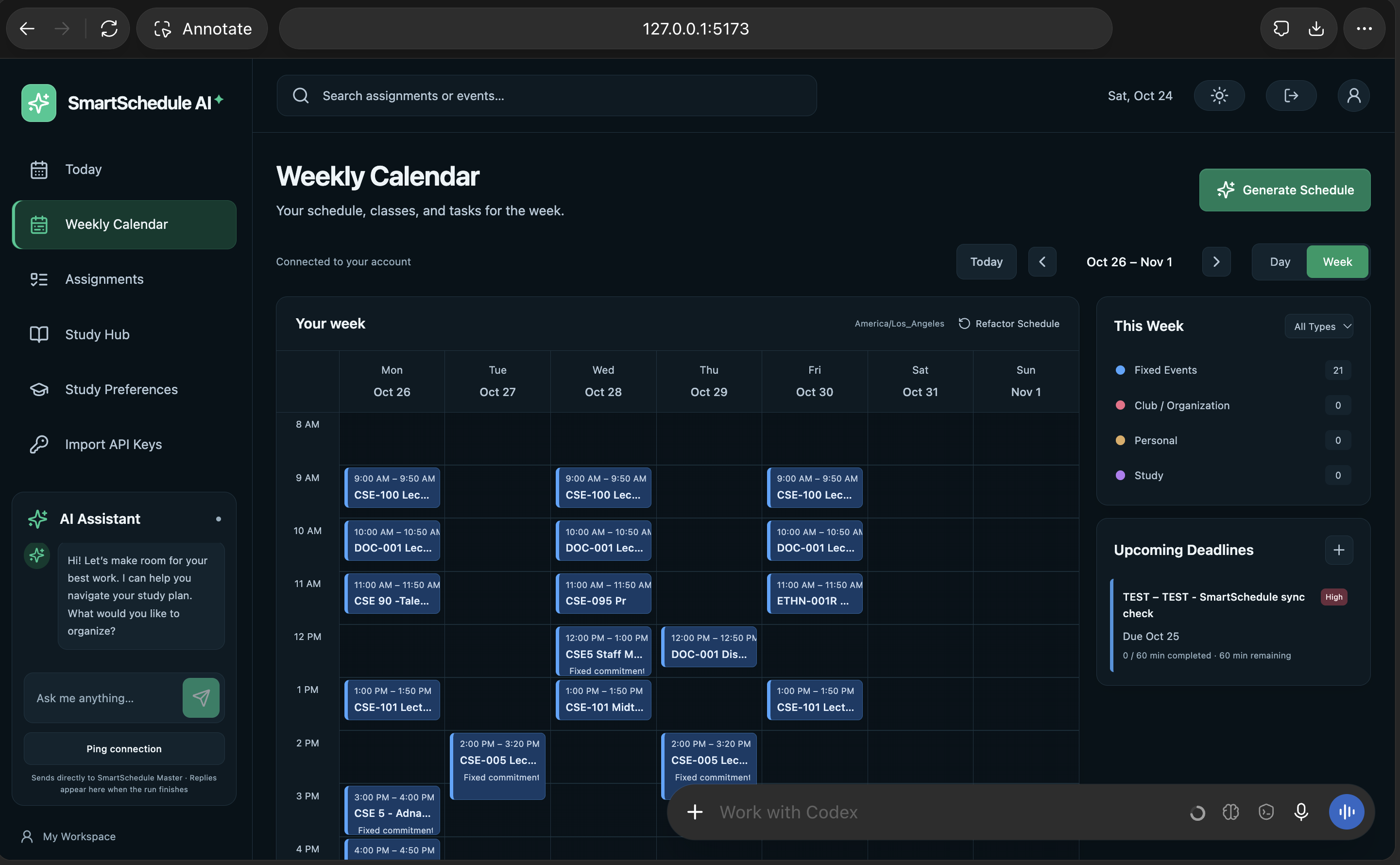
SmartSchedule AI turns assignments and existing commitments into a daily or weekly study plan. Users add a deadline, priority, and estimated work time. The scheduler places manageable work sessions in available time while respecting fixed events, breaks, preferred hours, and deadlines.
Users can mark sessions as completed, missed, or partly completed. The app uses the time they actually spent to calculate how much work remains. They can also move or lock sessions, and the scheduler will preserve those choices when it updates the plan.
The app includes daily and weekly calendar views, user accounts, and a Grok assistant connection. Users can send a planning request from the interface, see whether it was accepted, and receive the assistant’s reply in the app. The backend also supports authenticated schedule imports.
How we built it
We built the app with React, TypeScript, and Vite on the frontend, and Node.js with Hono on the backend. SQLite stores accounts, assignments, sessions, and progress.
The scheduling engine uses clear rules to place work around deadlines, available time, existing events, breaks, and user preferences. It also accounts for time zones and daylight saving changes. When the plan changes, it keeps completed work and sessions the user has locked.
Grok connects through a server side webhook. The backend checks that the signed in user is the site owner, validates each request, and keeps the webhook credentials out of the browser. It sends one request with a timeout. If delivery fails, the app saves the request in an outbox for someone to retry manually. Grok can send an authenticated reply back to the app, where the interface checks for it.
Challenges we ran into
The scheduling rules had to handle more than open calendar slots. The app needs to know which sessions can move, which must stay put, and how much work is left after a user finishes only part of a session.
We also had to keep planned time separate from completed work. A two hour calendar block should not count as two hours of progress unless the user actually did the work.
Connecting Grok raised a different set of problems. The webhook only confirms that a run started; the answer arrives later through a callback. We had to connect those steps while protecting the callback and webhook keys and keeping failed requests available for manual retry.
Accomplishments that we're proud of
We built a working planner with daily and weekly views, accounts, persistent storage, and a scheduling engine that respects real commitments. Users can track partial progress and keep control over sessions they move or lock.
We also connected the app to Grok through the server side webhook flow, added a ping to check the connection, and set up authenticated callbacks so replies can appear in the interface. The project has automated tests for scheduling, progress, account boundaries, and the assistant connection.
What we learned
A useful schedule has to reflect what happened, not just what was planned. Missed sessions and partial progress change the amount of work left, so the scheduler needs to account for them when it updates the week.
We also learned to let AI handle the conversation while keeping scheduling rules in the application. Grok can receive a request and return a reply, while the scheduler remains responsible for checking time, deadlines, and fixed commitments.
What's Next for SmartSchedule AI?
Our next goal is to make SmartSchedule AI a fully automated personal planning assistant.
We plan to integrate Google Calendar, Canvas, and Gradescope so users can automatically import their classes, assignments, deadlines, and personal commitments without manually entering everything.
We also want to expand our GrokBot integration, allowing users to manage their schedules entirely through natural language. For example, someone could say, "I didn't finish my homework today, and I'm busy tomorrow morning," and SmartSchedule would automatically reorganize their remaining work.
Future improvements include personalized scheduling based on productivity habits, recurring tasks, smarter workload predictions, and a mobile-friendly experience.
Ultimately, we want SmartSchedule to become a planner that doesn't just organize your time—it actively adapts to your life.
Built With
- codex
- grokbot
- python
- react-native
- webhooks

Log in or sign up for Devpost to join the conversation.