-
-
Operations of the system
-
Arduino Schematic
Inspiration
One day, a friend of our teammates asked him whether he can borrow him a book . Our teammate pleasantly answered him yes, and tried to find the book in his house. He definitely knows that he possesses the book, but unfortunately, he couldn't find it because he has a large bookshelf. He spent one hour finding the book. The idea started from this simple situation. He thought if he can search the location of the book by using smartphone, he won't have to spend time finding a book one by one. So he suggested his idea to us and we decided to make . Moreover, by making database of one's book list, we thought we can make a small peer-to-peer local library. We expect that this system will one day explore a new sharing economy market.
What it does
has two main processes, 1. register 2. search.
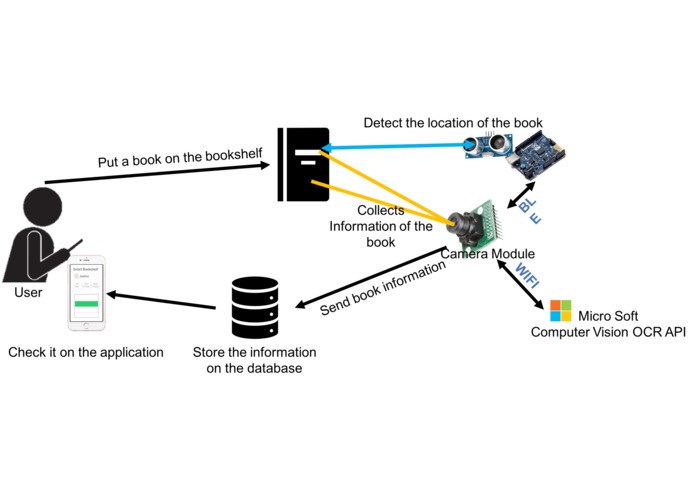
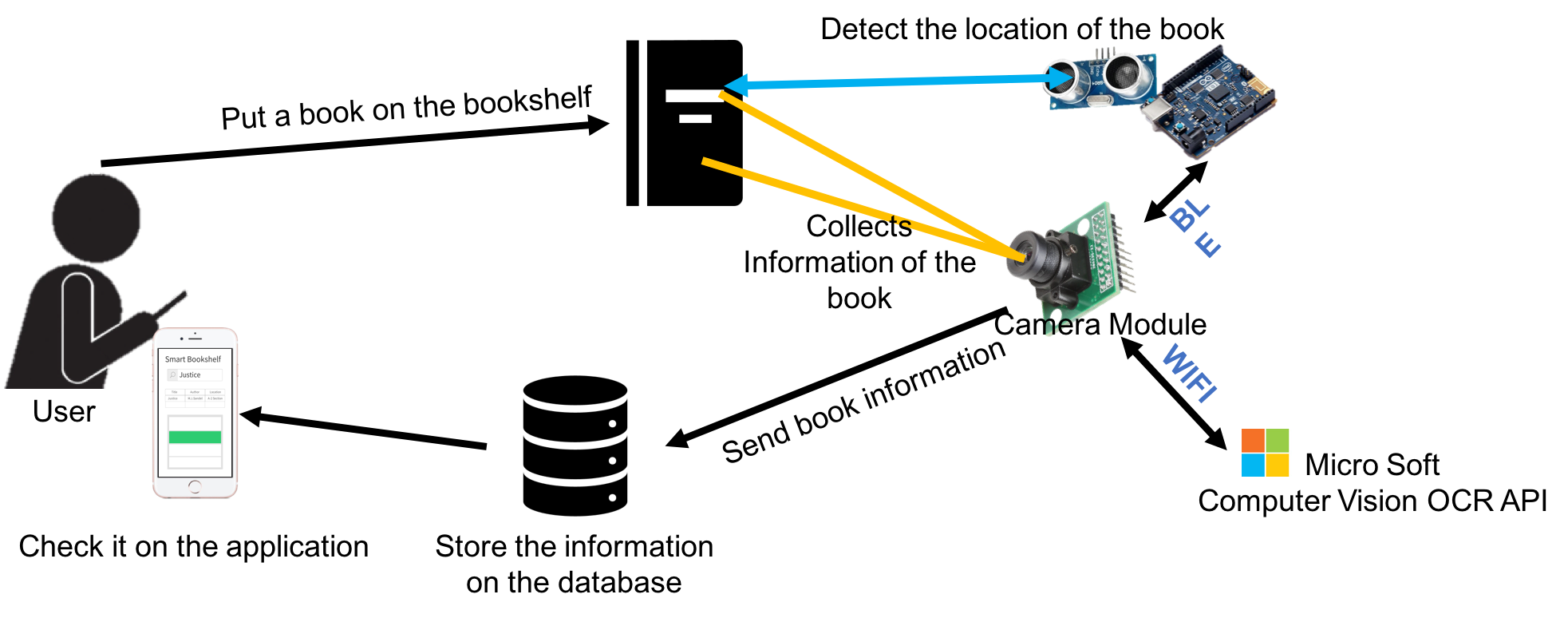
Register When the user put a book into our smart bookshelf, the system automatically perceives the information of the book, such as title, author and the location of the book, and save them in the database. The location is monitored by sonar sensor. The title and the author are recognized by camera.
Search When the user wants to find the location of the book, the system provides 'search' function. The only thing user has to do is type the words on the application. Then the system automatically finds the book and indicates the user by LED on the bookshelf.
How we built it
- OCR: To save information of the book by an image, we need OCR system. For OCR, we used Microsoft Computer Vision API.
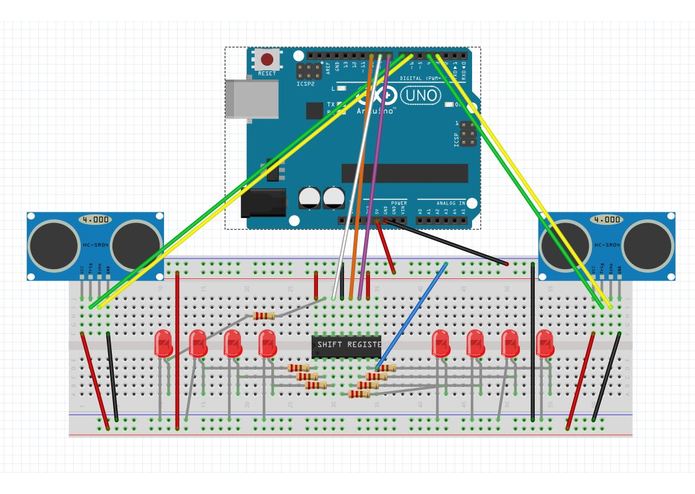
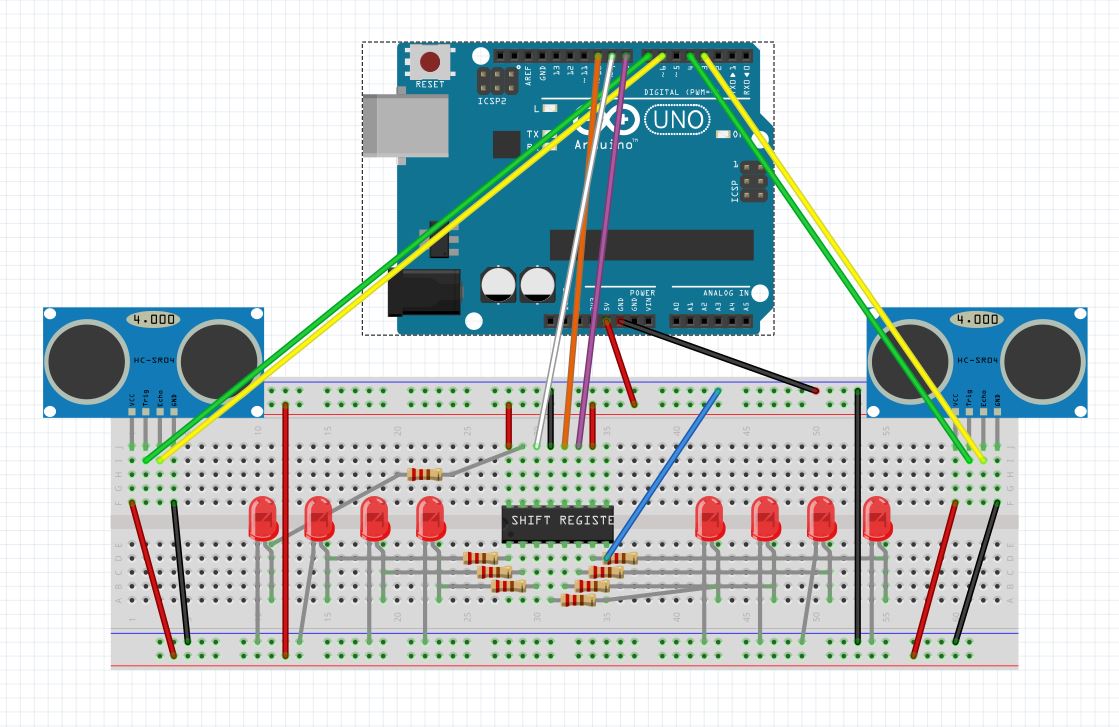
- Sonar Sensor: By using two sonar sensors, the system can distinguish whether the book is getting out of the bookshelf or not. For example, let's assume there are two sonar sensors named A and B. If A->B is detected sequentially, it means "Book is Out of the bookshelf". If B->A is detected, it means "Book is Put on the bookshelf". Also, sonar sensor catches the distance to the book. All the processes by sonar sensor are handled by Arduino 101.
- Application: Application has a list of the book that the user has. Also, if the user wants to find a book, the application helps finding it and notifies the user.
- Camera: We used camera module on the smart phone. When the user tries to move the book on the bookshelf, the camera catches the cover of the book and analyze the information of the book.
- Bluetooth: Camera module and Arduino 101 communicates through bluetooth.
- LED: LED is for indicating the position of the book. When the user searches a book, Smart Bookshelf blinks the LED near the book. It is controlled by Arduino 101.
Challenges we ran into
At first, we wanted to use Arduino camera module, but it was too expensive that we cannot afford to it. Instead, we used camera that is on the smart phone and communicates with Arduino through bluetooth.
Accomplishments that we're proud of
We've made a totally new system. There are so many smart devices in the world, but smart bookshelf is unique one. No one has made this idea before. Also by broaden our system into "peer-to-peer local library", we can exploit a new sharing economy market.
What we learned
Arduino 101 is very easy to use even for the beginners. For handling diverse of sensors, nothing is more simple than the Arduino. However, it cannot work as a complex brain of the system. It needs another processor to have a complex intelligence.
What's next for SmartBookshelf
Our first Smart Bookshelf is only for home. Next thing we want to do is broaden the system into public libraries. The books of the public libraries have a small chip in it, so if we utilize this we can get more precise information about the books.

Log in or sign up for Devpost to join the conversation.