Inspiration
Have you ever signed up for a free trial, promising yourself you would cancel before it ended, only to realise you had been charged before you remembered?
I have. More than once.
Sometimes, I subscribe to several online services and lose track of what I have signed up for. Other times, I genuinely want to try a product for free, but I miss the cancellation deadline and end up paying for something I never intended to purchase.
The frustrating part is that my finances are already budgeted. An unexpected subscription charge, no matter how small, can disrupt that budget. And when multiple subscriptions accumulate, those forgotten payments can become a significant expense.
I started thinking: What if there were a simple way to keep track of every subscription, know exactly when a payment was coming, and get reminded early enough to do something about it?
This question inspired Smart.
I wanted to build something that would help people enjoy free trials without the anxiety of forgetting to cancel, keep track of recurring expenses, and take control before another unwanted charge appears.
What it does
Smart turns a screenshot of a trial confirmation, receipt, or billing page into a subscription you can track.
- Snap, don't type. Upload a screenshot and AI extracts the service, plan, price, trial status, and billing or expiry date. Review the results before saving.
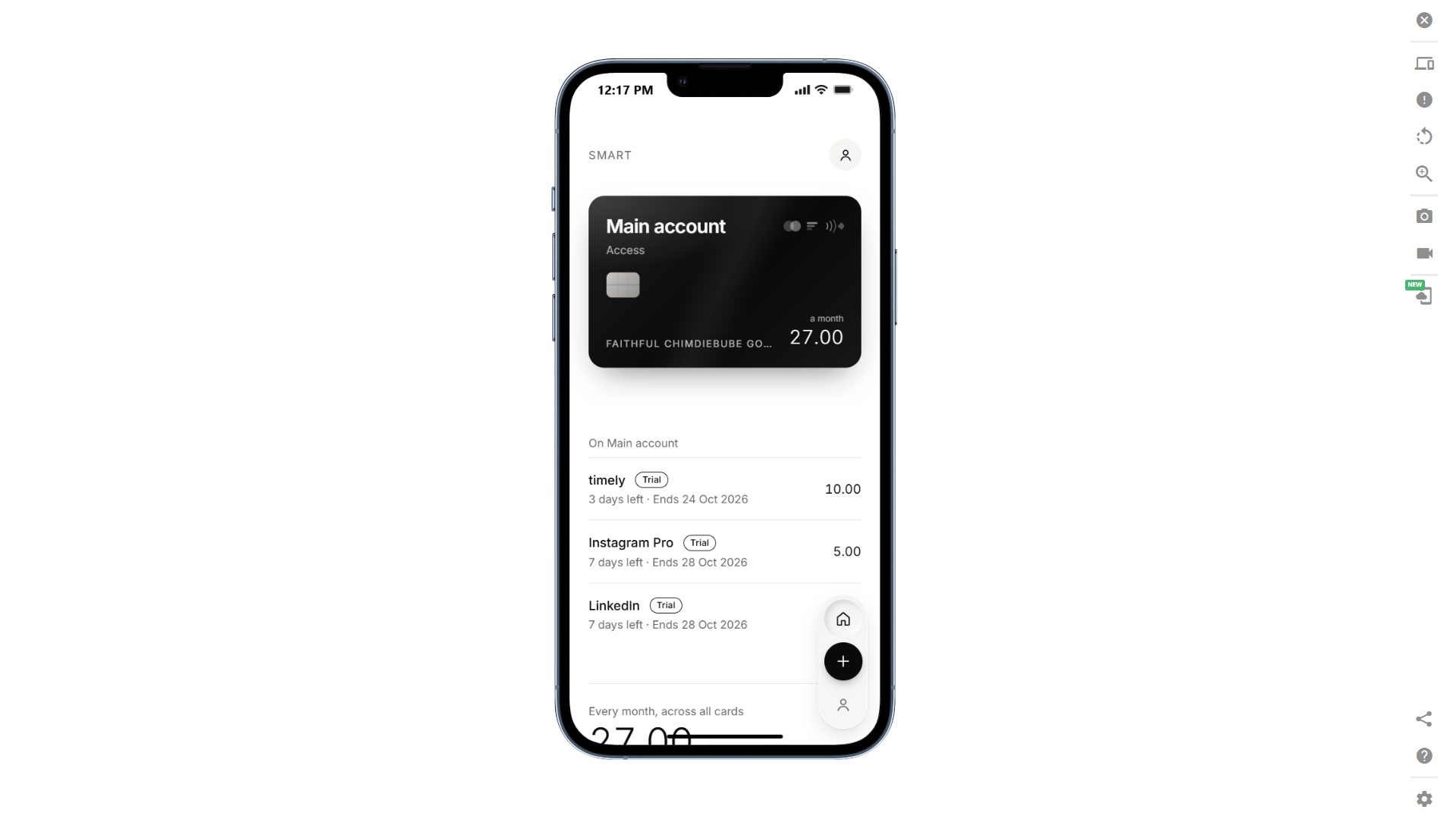
- Know which card is exposed. Group subscriptions by payment-card nickname, see each card's monthly commitment, and view your overall total. No real card numbers or bank logins required.
- Get actionable reminders. Receive in-app and email reminders two days before, one day before, and on the deadline when applicable, at your chosen time and time zone.
- Know where to cancel. Smart checks cancellation links, finds official cancellation pages when possible, and directs App Store or Google Play purchases to the appropriate subscription settings.
- Stay in control. When a deadline passes, tell Smart whether you cancelled or the subscription renewed. Your totals and future reminders update accordingly.
How we built it
Rather than jumping straight into coding, I used the Devpost Learn Skill Pack with Claude Code to work through the planning and implementation process. This helped me turn a personal frustration into a more clearly defined product, establish the scope, document the requirements, and plan the technical implementation before building.
Smart is built with:
- Frontend: HTML, CSS, JavaScript, and Tailwind CSS.
- Backend: Python and Flask.
- Database: SQLite.
- AI: Screenshot interpretation that extracts subscription details, converts recurring prices to monthly equivalents, and validates results before presenting them.
- Reminders: A background deadline watcher that checks due reminders and avoids sending duplicates. Email: Gmail SMTP for real reminder delivery. Deployment: Render, configured with persistent storage and a single application worker for the background watcher.
The repository also includes the planning documents generated during the build process: the scope, product requirements document, technical specification, and implementation checklist.
Challenges we ran into
The hardest part was making the experience trustworthy, not simply getting AI to fill in a form.
AI can misread prices, confuse dates, or suggest an unreliable cancellation page. I addressed this by validating extracted information, showing users what was found, flagging missing details, and requiring confirmation before saving.
I also had to account for time zones, deadlines that fall on the current day, duplicate reminders, and servers that may restart. The public demo needed to be easy to explore without allowing unlimited AI requests or email sending.
Accomplishments that we're proud of
- Turning a screenshot into a reviewable, mostly completed subscription form.
- Making the AI extraction process visible as it happens.
- Building a card-first dashboard that reveals which payment card carries each commitment.
- Connecting real subscription records to in-app and email reminders.
- Creating a guided, no-sign-up demo with both instant and step-by-step options.
Most importantly, Smart brings the entire experience together: capture, review, track, get reminded, and find where to cancel.
What we learned
I learned that building with AI works best when you make the important decisions before generating code.
The Devpost Learn Skill Pack helped me turn an initial idea into a defined scope, product requirements, technical specification, and implementation checklist. Those documents made it easier to build in small steps, test real browser behaviour, and record revisions when feedback exposed a better approach.
I also learned that AI-powered features need verification, and that a product isn't finished just because its main screen looks good. Dates, email delivery, privacy, failure cases, and the first-time experience matter just as much.
What's next for Smart
- Add accounts so subscriptions can follow users across devices.
- Allow users to forward trial confirmation emails instead of uploading screenshots.
- Build clearer step-by-step cancellation guides for popular services.
- Explore bank-statement imports to help users discover forgotten subscriptions.
- Add voice-based subscription entry.
Ultimately, I want Smart to become more than a place to list subscriptions. I want it to help people make intentional decisions about recurring payments and avoid spending money simply because they forgot a deadline.
Built With
- devpostby.
- flask
- html
- javascript
- python
- tailwind

