-
-
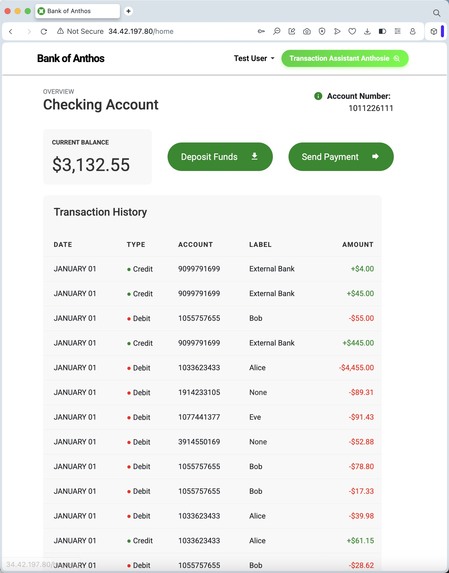
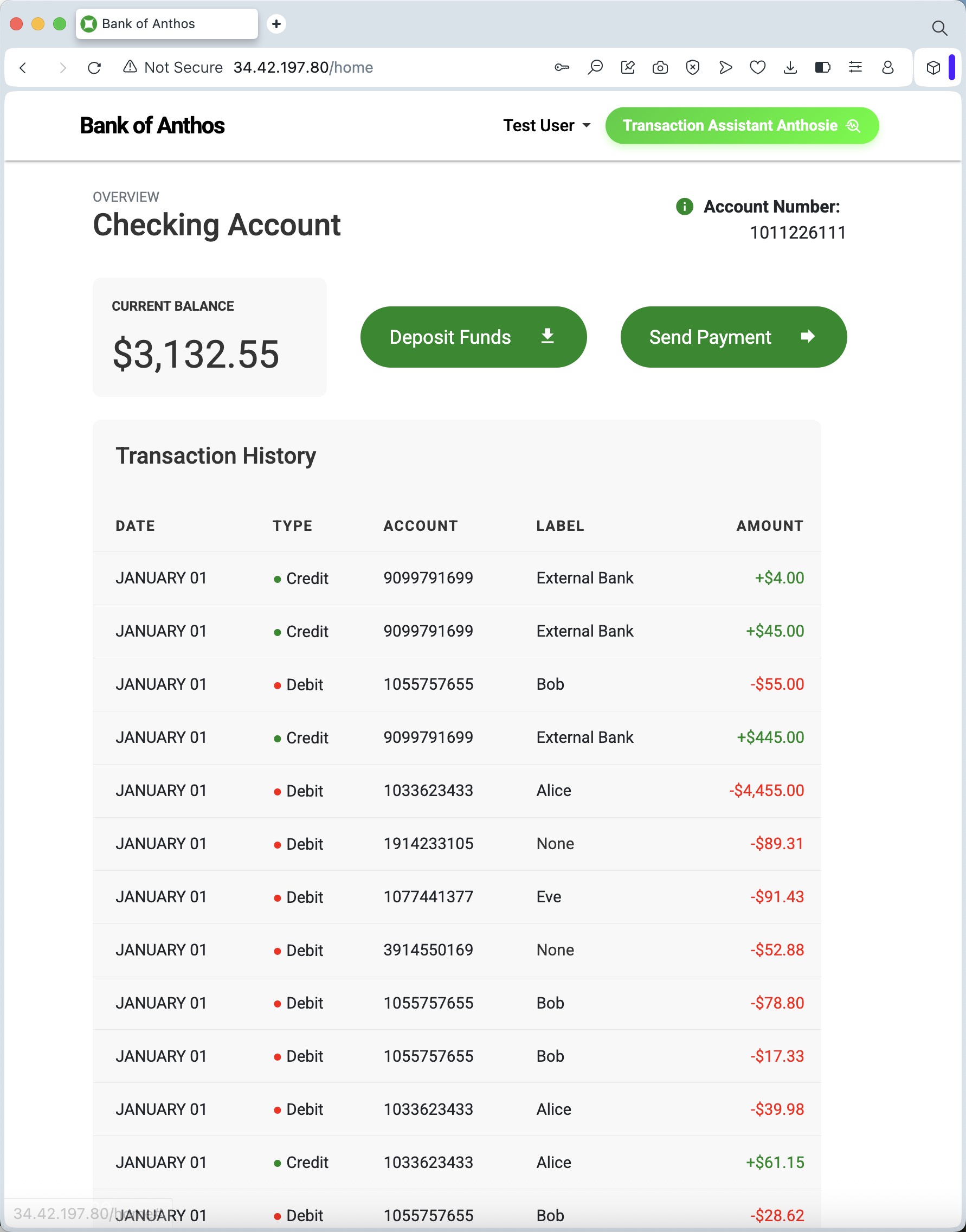
Seamless Integration
-
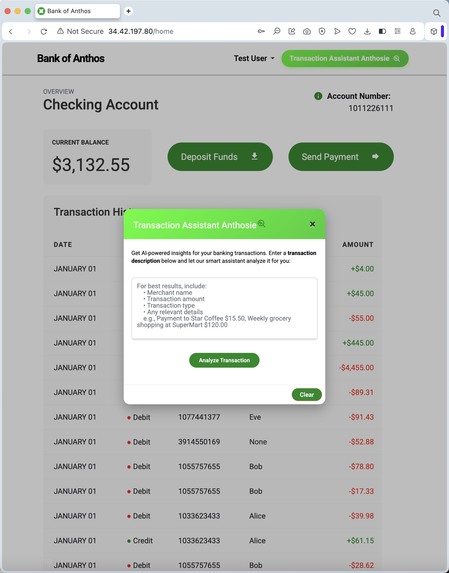
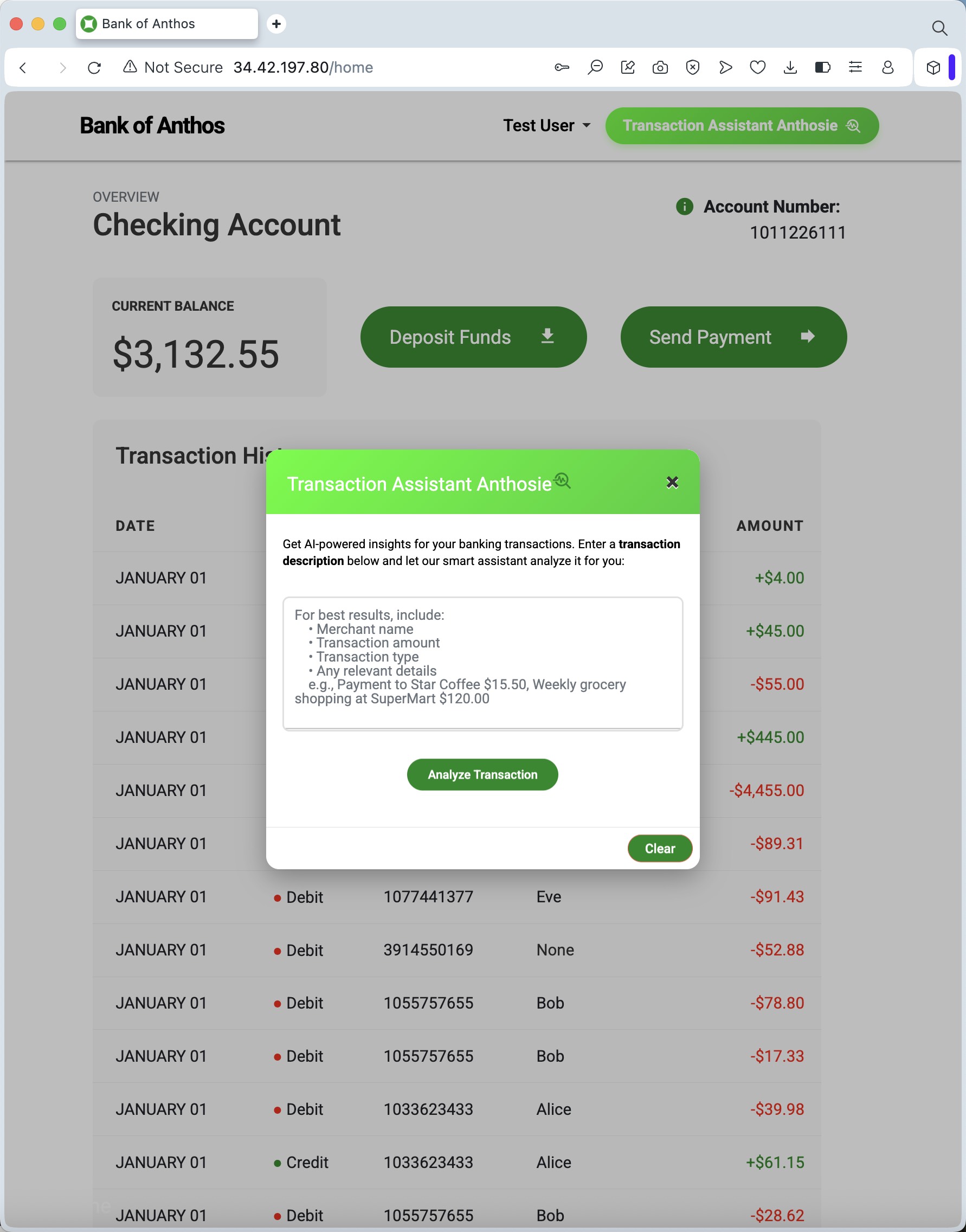
Anthosie AI Entry
-
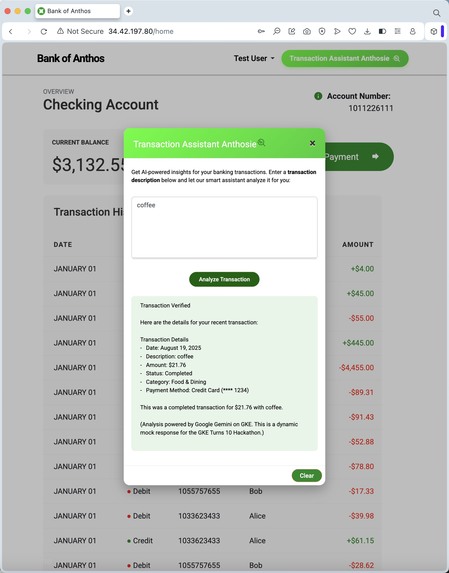
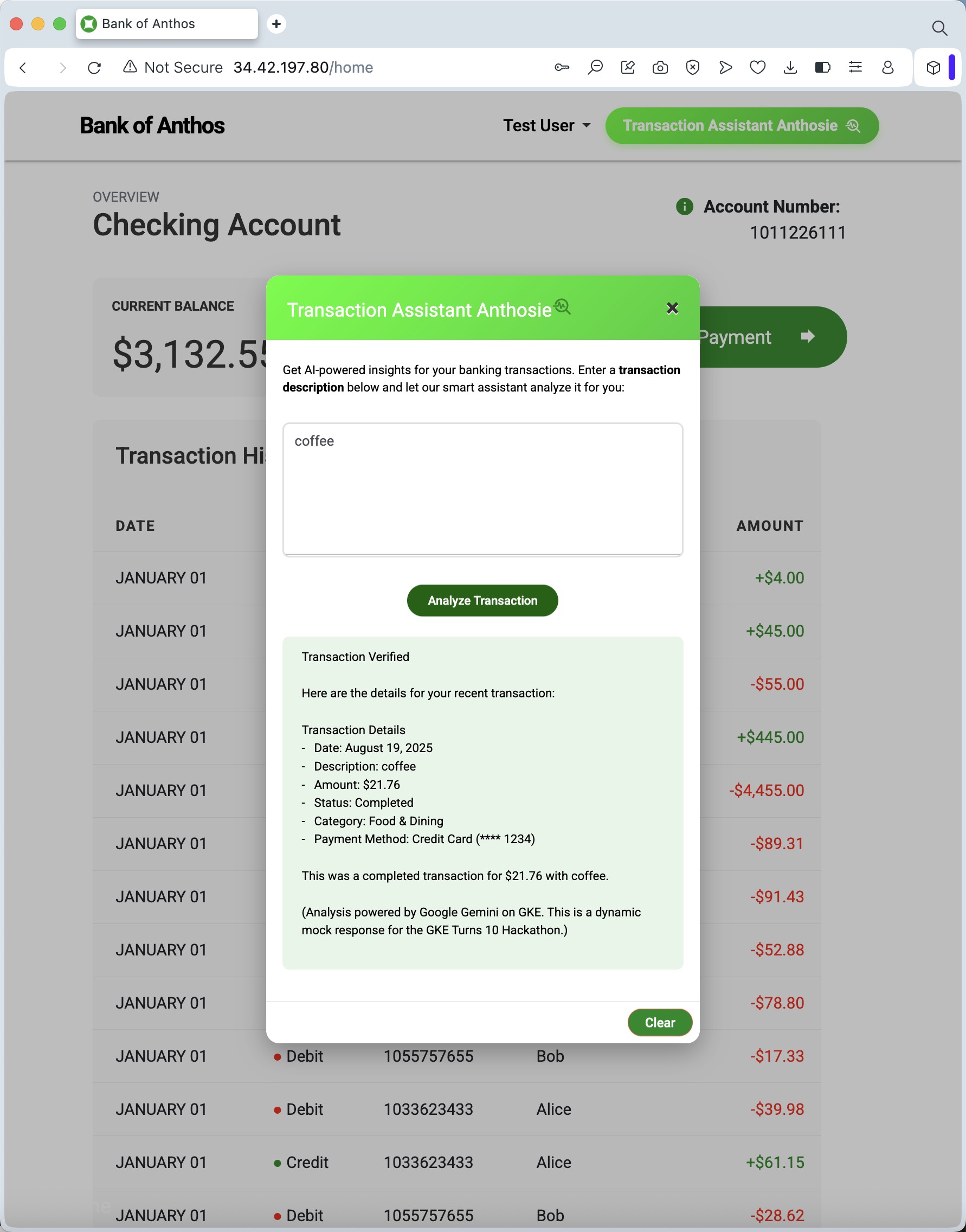
Anthosie AI Result
-
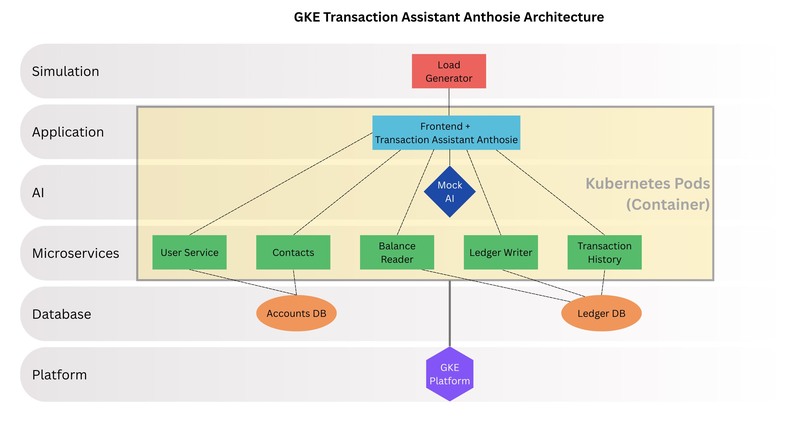
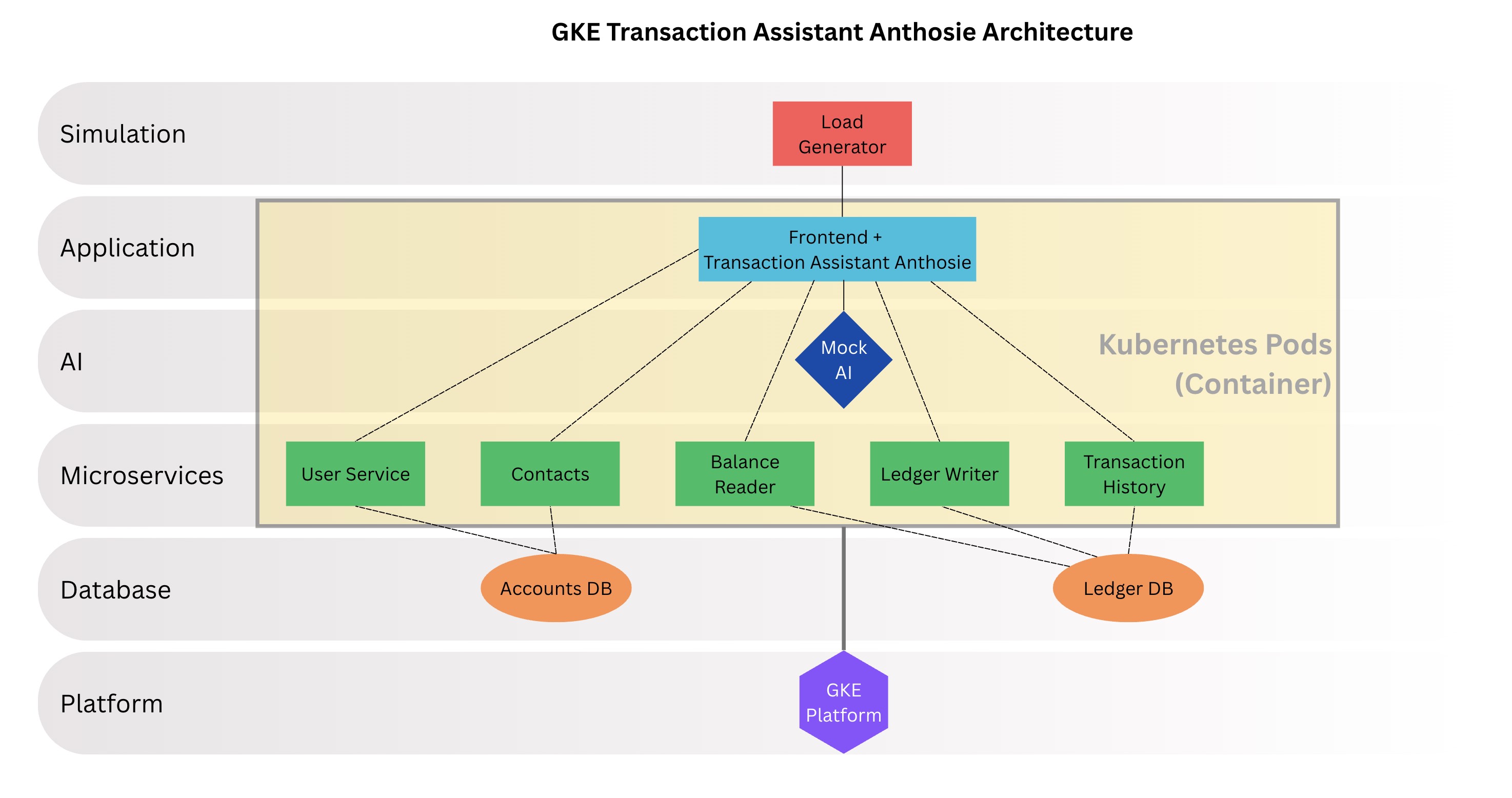
Architecture Diagram
Smart Transaction Assistant Anthosie
Project Overview
This project extends the original Bank of Anthos (BoA) sample application by integrating the Smart Transaction Assistant, Anthosie. This feature provides customers with intelligent, clear, and dynamic analysis of their transaction history using a mock integration with Google's Gemini AI. This enhancement transforms the standard transaction list into an interactive, user-friendly experience, demonstrating the power of integrating AI into modern, cloud-native banking applications running on Google Kubernetes Engine (GKE).
Key Features
The Transaction Assistant introduces several new capabilities:
- Natural Language Analysis: Users can get a clear and human-readable summary of any transaction.
- Dynamic Mock AI: A robust mock AI response system built into the frontend provides a reliable and impressive demo experience for simulating the power of a real AI model.
- Seamless UI Integration: The assistant is accessed via a "Transaction Assistant Anthosie" button directly within the transaction history, providing a smooth user experience.
- Client-Friendly Summaries: The analysis includes key details like transaction status, category and a concise summary making it easy for users to understand their spendings.
- Built on GKE: The entire application leverages the power, scalability and reliability of GKE.
Architecture
The application follows a microservices architecture deployed on GKE. The Transaction Assistant feature is integrated directly into the frontend service.
- Frontend Service (
frontend.py): Modified to include the/analyze-transactionAPI endpoint. This endpoint contains the logic for the mock AI analysis. - User Interface (
index.html): Updated to include the "Transaction Assistant Anthosie" button and the JavaScript required to call the analysis endpoint and display the results in a modal popup. - Kubernetes (
k8s/): The existing Kubernetes manifests are used to deploy the enhanced frontend service.
Architecture Layers
- Simulation Layer: Load generator simulating traffic
- Application Layer: Enhanced Frontend Service with the Transaction Assistant feature
- AI Layer: Mock Google Gemini AI integration for transaction analysis
- Microservices Layer: All BoA microservices (User Service, Transaction History, Balance Reader, etc.)
- Database Layer: PostgreSQL databases for accounts and ledger data
- Container Layer: Docker containers orchestrated by Kubernetes
- Platform Layer: GKE providing the infrastructure
Technologies Used
This project leverages modern cloud-native technology stack to deliver a robust and scalable application.
- Cloud Platform:
- GKE: The core platform for deploying, managing, and scaling our containerized microservices.
- Containerization & Orchestration:
- Docker: Used to containerize each microservice for consistent deployment.
- Kubernetes: For orchestrating the containerized services, managing networking, and ensuring high availability.
- Backend Microservices:
- Python (Flask): Powers the
frontend,userservice, andcontactsmicroservices, providing a lightweight and flexible backend. - Java: Used for the core financial transaction services (
ledgerwriter,balancereader,transactionhistory) to ensure performance and reliability. - gRPC: The primary protocol for high-performance communication between the internal microservices.
- Python (Flask): Powers the
- Database:
- PostgreSQL: The relational database used for both the
accounts-dbandledger-db, providing a reliable and ACID-compliant data store.
- PostgreSQL: The relational database used for both the
- Artificial Intelligence (Mock):
- Google Gemini (Simulated): The logic for the Smart Transaction Assistant is designed to simulate the capabilities of a powerful Large Language Model like Google Gemini for natural language processing and analysis.
- Frontend:
- HTML, CSS, JavaScript: Standard web technologies for building the user interface.
- jQuery/AJAX: Used for making asynchronous API calls to the
frontendservice to power the Smart Assistant feature.
- Development & Operations:
- Git & GitHub: For version control and source code management.
- Cloud Shell: The primary development environment for interacting with the GKE cluster.
Data Sources
This project utilizes 2 primary types of data, both of which are self-contained within the application for demonstration purposes.
- Pre-populated Demo Data: The
accounts-dbandledger-dbPostgreSQL databases are populated with a set of demo users, accounts, and transaction histories upon deployment. This allows for immediate testing and interaction with the application's core banking features. - Mock AI Transaction Analysis Data: The "Smart Transaction Assistant" does not connect to any external live data sources. Instead, it uses a sophisticated mock data generation function built into the
frontendservice. When a user provides a transaction description, the backend logic simulates an AI analysis by returning a pre-structured, dynamic JSON response. This approach ensures a reliable, fast, and impressive demo experience without incurring API costs or relying on external network connectivity.
How to Use
- Navigate to the BoA homepage.
- Log in and view your transaction history.
- Click the "Transaction Assistant Anthosie" button next to any transaction.
- Enter a transaction description (e.g., "Coffee") into the prompt.
- View the AI-powered analysis in the popup window.
Deployment
This project is deployed on GKE using the original BoA deployment scripts and manifests, with the frontend container image updated to gcr.io/gke-hackathon/frontend:v-ultimate1.
Key Takeaways
Building this project was an amazing deep-dive into the world of cloud-native development. Here are a few things that really stood out to me:
- Microservices in Practice: Seeing how BoA splits everything into small, focused services made it click. It was so much easier to work on one piece (like the frontend) without worrying about breaking the entire system.
- Power of GKE: It is thrilling to realize how much work GKE handles behind the scenes. From networking all the services together to making sure they stay running, it let me focus on building features instead of managing the infrastructure.
- UX Challenge of AI: My favorite part was building the Smart Assistant. I learned that adding an “AI” feature is less about the algorithm and more about the user experience. Making the button feel right, ensuring the pop-up was smooth, and crafting a mock response that felt real and helpful was the most rewarding part of the challenge.
A Note on the Live Demo
- Mock AI Engine: To ensure a reliable, fast, and cost-effective demonstration for this hackathon, the Transaction Assistant Anthosie uses a mock AI engine built directly into the frontend service. This simulates the functionality of a powerful LLM like Google Gemini without incurring API costs or network latency.
- Live Demo URL: The application is fully deployable on GKE. However, to manage hosting costs for this hackathon project, the GKE cluster is not currently active. If you would like to review a live interactive version, please let me know, and I would be happy to deploy it for you.

Log in or sign up for Devpost to join the conversation.