SMART SCRIBES
The lecture ends. The learning doesn't.
A recording has a timeline. Understanding doesn't always follow it.
SMART SCRIBES is our attempt to make the space around a lecture feel connected: the spoken explanation, the slide on screen, the page in a textbook, the question that comes up afterward. Instead of treating these as separate things to revisit, we built toward one place where they can become a study experience.
Inspiration
Learning from a lecture can turn into a small scavenger hunt. Rewind the video to find one definition. Open the slides to locate the diagram. Search the textbook for the proof. Write down a question and hope you remember where it came from.
We were inspired by a simple possibility: what if the lecture could be revisited as more than a video? What if a student could move from a timestamp to an explanation, from an explanation to a worked example, and from there to a relevant visual or book reference?
That question became SMART SCRIBES. The idea isn't to replace the professor or flatten a course into a chatbot. It's to make the knowledge already present in course materials easier to find, connect, and return to.
What it does
SMART SCRIBES brings lecture media and course materials into a shared learning workspace. Its multimodal pipeline works with video, audio, and PDFs; the web app gives professors tools to manage course content and gives students ways to explore it.
The experience is built around context, not just generated text. A topic can sit alongside its timestamp, notes, images, animation, worked examples, student questions, and book references. Students can move through lecture content in sequence, or use study and Q&A tools to focus on what they need next.
For a lesson on QuickSort, that might mean seeing a partition step, following an array through a worked trace, and then meeting the complexity analysis where it belongs: next to the algorithm. Its average-case runtime is $O(n \log n)$; the notation matters, but so does the example that makes it mean something.
The core idea: turn lecture materials into connected paths through a subject, rather than another pile of files.
How we built it
We built the student and professor experience as a Next.js application using TypeScript and Tailwind CSS. Next.js API routes connect the interface to application services. Supabase supports authentication and structured application data; Google Cloud Storage holds lecture assets and generated media.
Behind the interface, Python processing handles the different shapes of lecture material. Audio and video are analyzed separately; frames and PDFs contribute visual and textual signals. OCR and image captioning help interpret visuals, embeddings help represent content, language models help structure learning materials, and Manim is used for educational animations.
Project Architecture
The system connects the upload experience to processing and back to the student workspace. Raw lecture materials live in cloud storage; the Python pipeline turns them into aligned study content and generated media; the application brings those results back into course and lecture context.
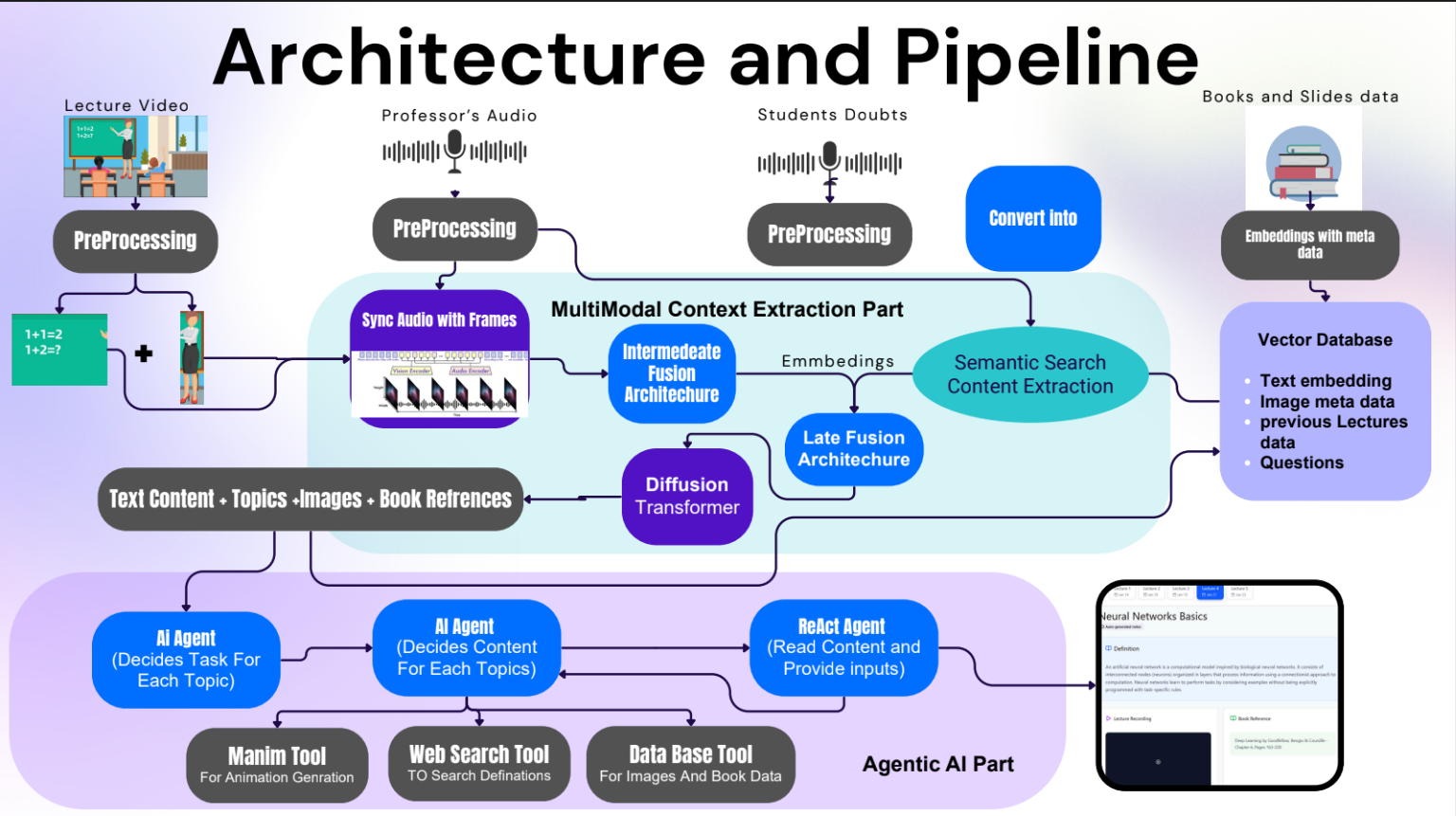
The central engineering challenge is keeping every result attached to the right course, lecture, and moment. A video, a PDF, a database record, and an animation are different kinds of assets; the application and pipeline must agree on how each is identified, stored, processed, and presented.
Challenges we ran into
Multimodal doesn't mean magically unified. Video, audio, and reference material each arrive with different structure and useful signals. Connecting them meant coordinating processing steps, metadata, storage paths, permissions, and the app's understanding of a course and lecture.
The local environment had a vote. On Windows, Unicode progress output hit a terminal encoding error under the default console encoding. Running Python with UTF-8 settings resolved that particular issue. Missing dependencies and model setup added more friction, and GPU acceleration depended on aligning PyTorch with a compatible CUDA build. A pipeline that can use a GPU in principle still needs the right environment to do it in practice.
Those problems changed how we thought about the project: infrastructure and setup aren't chores after the AI work. They are part of whether the learning experience works at all.
Accomplishments that we're proud of
We brought multiple parts of the learning loop into one project: course and lecture management for professors, an interactive workspace for students, multimodal processing, Q&A, planning tools, and visual explanations.
We are especially proud of the way lecture content can carry its context with it. In the QuickSort example, the lecture is organized as a chronological path through intuition, partitioning, a worked trace, correctness, and complexity. Professor notes, animations, images, and textbook references can live beside the relevant section instead of being stranded at the end of the lesson.
That is the difference we were aiming for: not simply more content, but a clearer route back into the content that matters.
What we learned
We learned that a useful learning assistant needs more than a model that can produce a plausible answer. It needs source material that has been processed reliably, answers that remain connected to where they came from, and an interface that lets a student inspect and navigate those connections.
We also learned to treat the whole system as the product. Model behavior, cloud permissions, dependency versions, processing time, data flow, and interface design all affect whether the result is useful. A clever answer is only the beginning; the student needs to know what it relates to and where to go next.
What's next for SMART SCRIBES
The next chapter is about trust and usefulness at real-course scale:
- Make processing jobs more observable, with clearer progress and failure states.
- Improve runtime through a consistently configured GPU environment.
- Evaluate summaries and generated questions against source lectures, not just whether they sound convincing.
- Gather feedback from students and professors to improve navigation, retrieval, and visual explanations.
- Expand supported course materials while keeping study content traceable to its lecture and reference sources.
SMART SCRIBES began with the thought that a lecture shouldn't become harder to learn from the moment it ends. We want it to become a map: one students can open again, follow in their own order, and use to find their next question.
Built With
- deeplearning
- google-cloud
- langchain
- manim
- multimodel
- next.js
- node.js
- postgresql
- python
- tailwind
- typescript

